Project 1 - Parsing NASA thermodynamic data
NASA Thermodynamic data file parsing
AIM:
1.To Write a function that extracts the 14 co-efficients and calculates the enthalpy, entropy and specific heats for all the species in the data file.
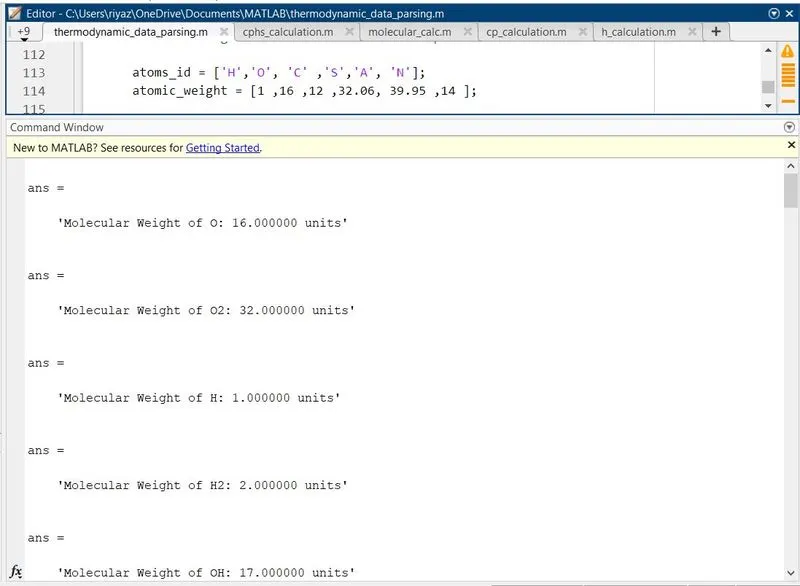
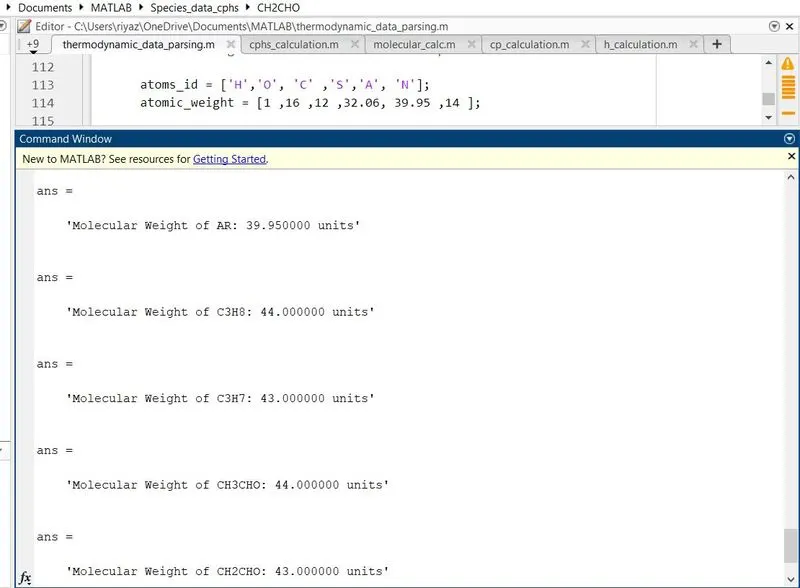
2. Calculate the molecular weight of each species and display it in the command window.
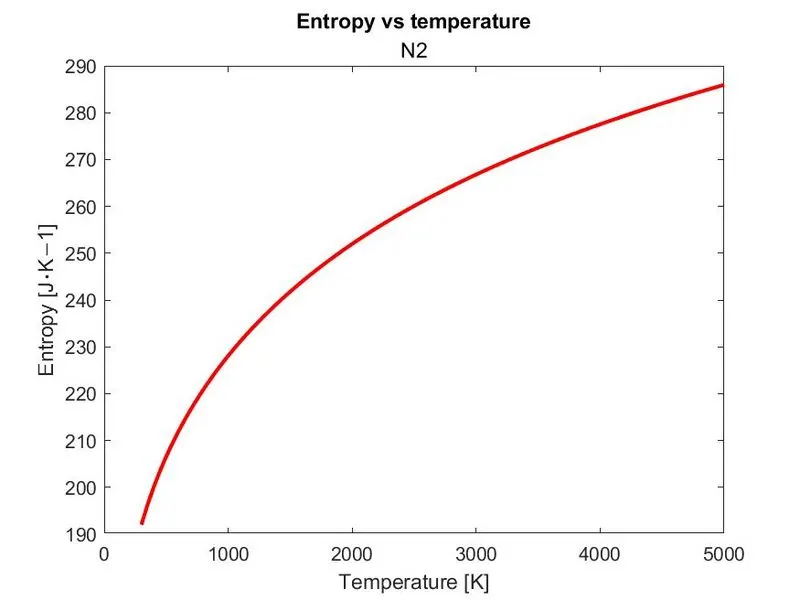
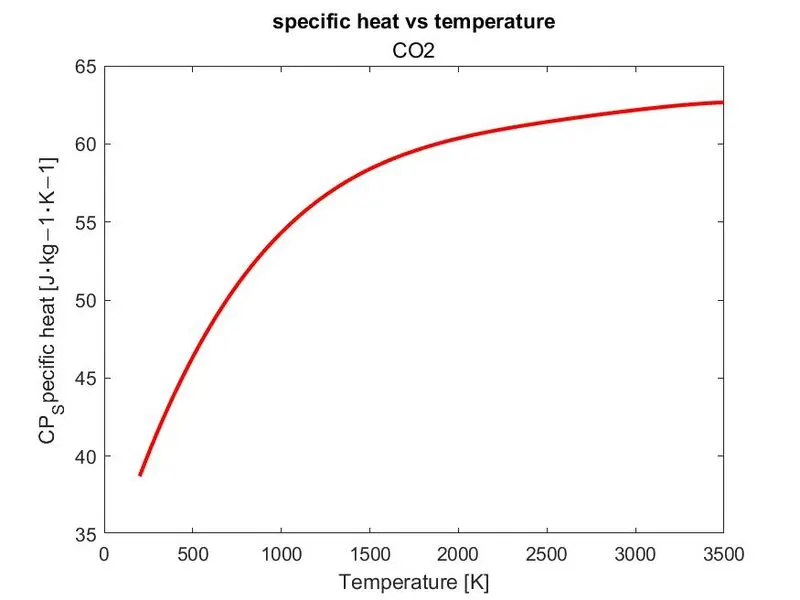
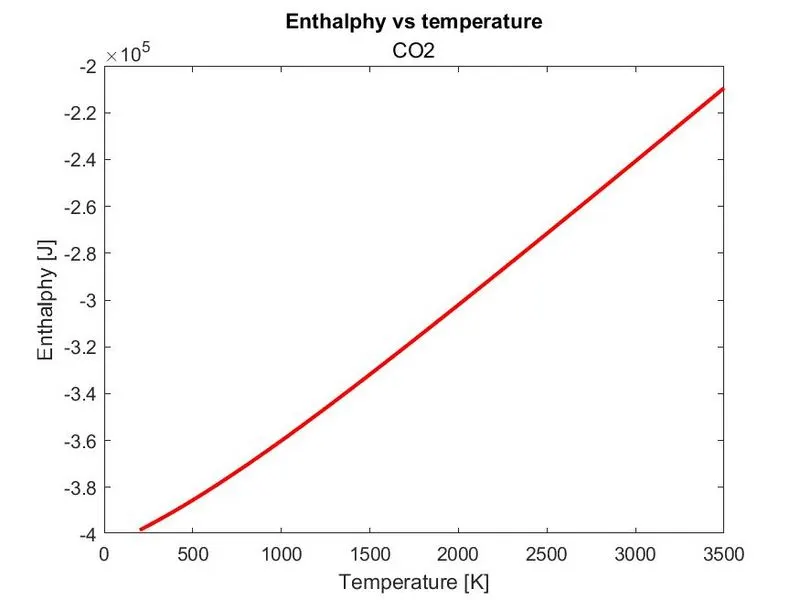
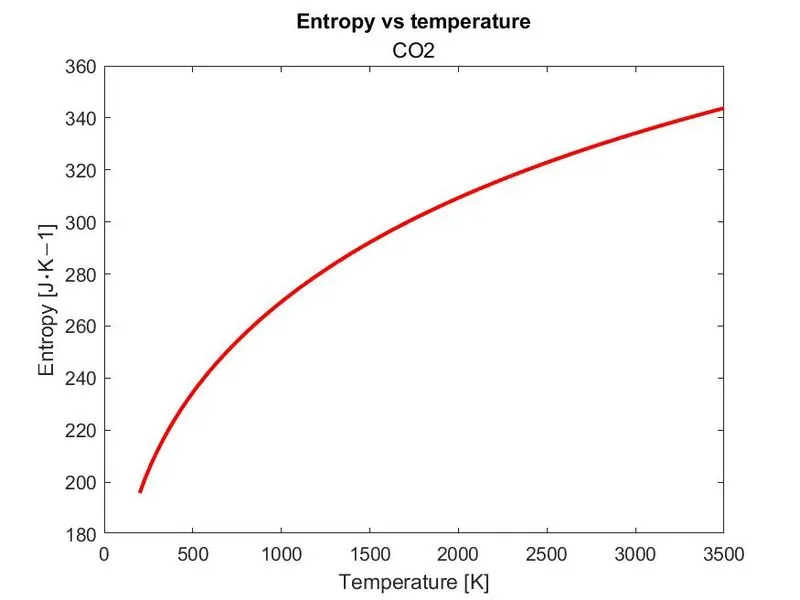
3. Plot the Cp, Enthalpy and Entropy for the local temperature range (low temperature : high temperature) specific for each species.
4. Save the plots as images with appropriate names and dump them in separate folders for each species with suitable name. All these should be generated automatically.
5. The main program that you will submit will just take the "THERMO.dat" file as an input and generate Cp, H and S plots.
6. Please write a detailed report to describe your logic.
DESCRIPTION:
To extract the coefficients and calculate the entropy,enthalpy and specific heat,first we need formula for entropy,enthalpy and specific heat and make the function containing these formulas,formulas are given below.

Function for cp,h and s calculation:
1.Function for specific heat calculation:
function [cp]= cp_calculation(a1,a2,a3,a4,a5,a6,a7,a8,a9,a10,a11,a12,a13,a14,R,T,local_mid_temp)

if T<=local_mid_temp


    cp = R*(a8 + a9*T + a10*T.^2 + a11*T.^3 + a12*T.^4) ;

else
    cp = R*(a1 + a2*T + a3*T.^2 + a4*T.^3 + a5*T.^4) ;

end
end
2. Function for enthalpy calculation:
function [h]= h_calculation(a1,a2,a3,a4,a5,a6,a7,a8,a9,a10,a11,a12,a13,a14,R,T,local_mid_temp)

if T<=local_mid_temp

   h = R*T.*(a8 + ((a9*T)/2) + ((a10*T.^2)/3) + ((a11*T.^3)/4) + ((a12*T.^4)/5)+ (a13./T) );

else

   h = R*T.*(a1 + ((a2*T)/2) + ((a3*T.^2)/3) + ((a4*T.^3)/4) + ((a5*T.^4)/5) + (a6./T) );
end
end
3.Function for Entropy calculation:
function [s]= s_calculation(a1,a2,a3,a4,a5,a6,a7,a8,a9,a10,a11,a12,a13,a14,R,T,local_mid_temp)

if T<=local_mid_temp

    s = R*(a8*log(T) + a9*T + ((a10*T.^2)/2) + ((a11*T.^3)/3) + ((a12*T.^4)/4) + a14 );
else
    s = R*(a1*log(T) + a2*T + ((a3*T.^2)/2) + ((a4*T.^3)/3) + ((a5*T.^4)/4) + a7);

end
end
Explanation of function programs for cp,h,s:
Since there are lower and higher temperature coefficients,we have use two formulas
if T<=local_mid_temp we have to use the lower temperature coefficients (a8 to a14)
and if T>=local_mid_temp we have to use higher temperature coefficients(a1 to a7).
Define the function cp,h and s by giving inputs R,T,local_mid_temoo and all the coefficients
use if and else command for switching between lower and higher coefficients.
Main program:
main program for reading THERMO.DAT file and calculating the cp,h,s and ploting the values and also calculation of molecular weight are attached below.
clear all
close all
clc

f1 = fopen('THERMO.dat','r');

tline =( '300.000 1000.000 5000.000');
A = strsplit(tline,' ');
global_low_temp = str2num(A{1});
global_mid_temp = str2num(A{2});
global_high_temp = str2num(A{3});

for i = 1:5
   fgetl(f1);
end

%Gas constant
R = 8.314;

%loop for all the species cp,h,s and molecular weight calculation
for k = 1:53

%1st species monoatomic oxygen
Line_of_species = fgetl(f1);
LS = strsplit(Line_of_species,' ');
species_name = (LS{1});

local_low_temp = str2num(LS{length(LS)-3});
local_mid_temp = str2num(LS{length(LS)-1});
local_high_temp = str2num(LS{length(LS)-2});

local_tem_range = linspace(local_low_temp,local_high_temp,100);

T = linspace(local_low_temp,local_high_temp,100);
%line 1 L1
L1=fgetl(f1);
a = findstr(L1,'E');

% getting coefficients from line 1
 a1string = L1(1:a(1)+3);
 a1 = str2num(a1string);
 a2string = L1(a(1)+4:a(2)+3);
 a2 = str2num(a2string);
  a3string = L1(a(2)+4:a(3)+3);
 a3 = str2num(a3string);
  a4string = L1(a(3)+4:a(4)+3);
 a4 = str2num(a4string);
 a5string = L1(a(4)+4:a(5)+3);
 a5 = str2num(a5string);

%line2 L2 % getting coefficients from line 2
 L2=fgetl(f1);
 b = findstr(L2,'E');

 a6string = L2(1:b(1)+3);
 a6 = str2num(a6string);
 a7string = L2(b(1)+4:b(2)+3);
 a7 = str2num(a7string);
  a8string = L2(b(2)+4:b(3)+3);
 a8 = str2num(a8string);
  a9string = L2(b(3)+4:b(4)+3);
 a9 = str2num(a9string);
 a10string = L2(b(4)+4:b(5)+3);
 a10 = str2num(a10string);
%line3 L3 % getting coefficients from line 3
 L3=fgetl(f1);
 c = findstr(L3,'E');

 a11string = L3(1:c(1)+3);
 a11 = str2num(a11string);
 a12string = L3(c(1)+4:c(2)+3);
 a12 = str2num(a12string);
  a13string = L3(c(2)+4:c(3)+3);
 a13 = str2num(a13string);
  a14string = L3(c(3)+4:c(4)+3);
 a14 = str2num(a14string);

%calling the function
[cp]= cp_calculation(a1,a2,a3,a4,a5,a6,a7,a8,a9,a10,a11,a12,a13,a14,R,T,local_mid_temp);
[h]= h_calculation(a1,a2,a3,a4,a5,a6,a7,a8,a9,a10,a11,a12,a13,a14,R,T,local_mid_temp);
[s]= s_calculation(a1,a2,a3,a4,a5,a6,a7,a8,a9,a10,a11,a12,a13,a14,R,T,local_mid_temp);


mkdir(['C:\Users\riyaz\OneDrive\Documents\MATLAB\Species_data_cphs\',species_name]);

%plotting the values of cp,h,s for each species
 figure(1)
 plot(T,cp,'LineWidth',2,'Color','r');
 xlabel('Temperature [K]');
 ylabel('CP_Specific heat [J⋅kg−1⋅K−1]')
 title('specific heat vs temperature');

 figure(2)
 plot(T,s,'LineWidth',2,'Color','r');
 xlabel('Temperature [K]');
 ylabel('Entropy [J⋅K−1]')
 title('Entropy vs temperature');

 figure(3)
 plot(T,h,'LineWidth',2,'Color','r');
 xlabel('Temperature [K]');
 ylabel('Enthalphy [J]')
 title('Enthalphy vs temperature');

 cd(['C:\Users\riyaz\OneDrive\Documents\MATLAB\Species_data_cphs\',species_name]);

  saveas(figure(1),'cp_vs_t','jpg');
  saveas(figure(2),'s_vs_t','jpg');
  saveas(figure(3),'hp_vs_t','jpg');

  %molecular weight calculation for all the species

    atoms_id = ['H','O', 'C' ,'S','A', 'N'];
    atomic_weight = [1 ,16 ,12 ,32.06, 39.95 ,14 ];

molecular_weight = 0;

for i=1:length(species_name)
    for j = 1:length(atoms_id)
    if strcmpi(species_name(i),atoms_id(j))

      molecular_weight = molecular_weight + atomic_weight(j);
      position = j;
    end
    end
  find_num = str2double(species_name(i));
if find_num>1
    molecular_weight = molecular_weight + atomic_weight(position)*(find_num-1);

end
end
sprintf('Molecular Weight of %s: %f units',species_name,molecular_weight)

end
fclose(f1)
Explanation of main program:
- open the THERMO.DAT file using fopen command for reading and use f1 as pointer for the file Thermo.dat
- get the global temperatures by assigning the values in tline and using splitline command and convert into num using str2num command.
- get the comments line and read it by using fgetl command for the first 5 lines.
- assign gas constan R = 8.314
- since there are 53 species create the for loop k = 53 to calculate the cp,h,s and molecular weight for all the species.
- get the species name from the species line using fgetl command from the line O L 1/90O 1 G 200.000 3500.000 1000.000 1 using species_name = (LS{1});
- get the local temp using the logic below for getting the last 3 strings from the line
local_low_temp = str2num(LS{length(LS)-3});
local_mid_temp = str2num(LS{length(LS)-1});
local_high_temp = str2num(LS{length(LS)-2}); - Create variable T for the array of local low temp to local high temperature values.
- the upcoming lines contains the 14 coefficients to extract the coefficents we are using the logic 2.56942078E+00-8.59741137E-05 4.19484589E-08-1.00177799E-11 1.22833691E-15 2
2.92175791E+04 4.78433864E+00 3.16826710E+00-3.27931884E-03 6.64306396E-06 3
-6.12806624E-09 2.11265971E-12 2.91222592E+04 2.05193346E+00 4 - find the string E in the line using findstr command and adding the strings before and after E to get the coefficients and convert it into num for calculation and repeat for the next 2 lines to get the 14 coefficients.
%line 1 L1
L1=fgetl(f1);
a = findstr(L1,'E');% getting coefficients from line 1
a1string = L1(1:a(1)+3);
a1 = str2num(a1string); - calling the function
- function of specific heat,enthalpy and entropy are separately coded with formulas and called in main program.function calculations are explained above[cp]= cp_calculation(a1,a2,a3,a4,a5,a6,a7,a8,a9,a10,a11,a12,a13,a14,R,T,local_mid_temp);
[h]= h_calculation(a1,a2,a3,a4,a5,a6,a7,a8,a9,a10,a11,a12,a13,a14,R,T,local_mid_temp);
[s]= s_calculation(a1,a2,a3,a4,a5,a6,a7,a8,a9,a10,a11,a12,a13,a14,R,T,local_mid_temp); - make the directory to store the plots of each species
- mkdir(['C:\Users\riyaz\OneDrive\Documents\MATLAB\Species_file\',species_name]);
- plot three figures for cp,h,s separately in figure 1,figure 2, figure 3 with plot command by assigning title,xlabel and ylabel.
- using the cd command change the current folder for each loop to save the images in separate folder and images are saved using saveas command.
- calculate the molecular weight (explained below)
- close the file using fclose command.
Calculation of molecular weight:
Molecular weight is calculated by the below logic and coding
%molecular weight calculation for all the species

    atoms_id = ['H','O', 'C' ,'S','A', 'N'];
    atomic_weight = [1 ,16 ,12 ,32.06, 39.95 ,14 ];

molecular_weight = 0;

for i=1:length(species_name)
    for j = 1:length(atoms_id)
    if strcmpi(species_name(i),atoms_id(j))

      molecular_weight = molecular_weight + atomic_weight(j);
      position = j;
    end
    end
  find_num = str2double(species_name(i));
if find_num>1
    molecular_weight = molecular_weight + atomic_weight(position)*(find_num-1);

end
end
sprintf('Molecular Weight of %s: %f units',species_name,molecular_weight)
Explanation of molecular weight calculation:
- Species atoms are given as atoms_id and stored it in array
- respective atomic weights are also stored in atomic_weight array
- initially molecular weight is assigned as 0
- open the for loop (i) for length of the species and (j) for length atoms_id
- using strcmpi command for comparing the string characters of species name and atoms id string,if it is same it will goes to the formula
- molecular_weight = molecular_weight + atomic_weight(j);
position = j; - position j is stored for using the position of atomic weight value to add for calculation
- end the if and j for loop
- assign find_num = str2double(species_name(i)); to check the species name string is string or number if it is number it will execute the if conditions
- if find_num>1
molecular_weight = molecular_weight + atomic_weight(position)*(find_num-1);
end - atomic weight of previous atom is added n-1 time to get the molecular weight if no of atoms more than one.
- end the if and i loop end of program.
calculated molecular weight and screenshots of command window:
Plotting of plots as images and saved in separate folders:
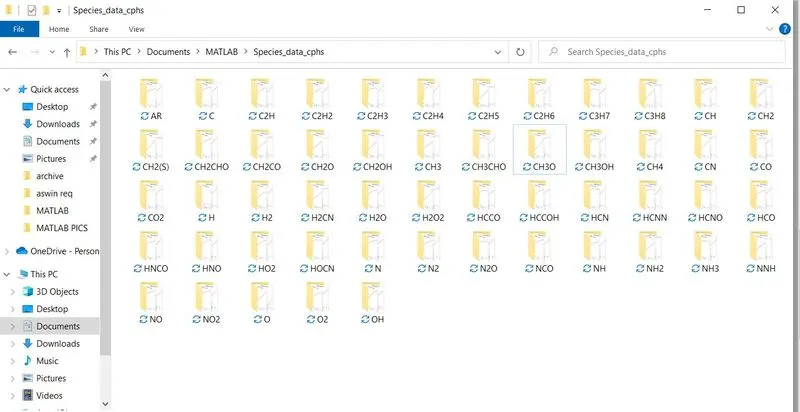
Save the plots as images with appropriate names and dump them in separate folders for each species with suitable name. All these should be generated automatically.
The plots are saved in separate folders using the mkdir and cd command
mkdir(['C:\Users\riyaz\OneDrive\Documents\MATLAB\Species_data_cphs\',species_name]);
and
cd(['C:\Users\riyaz\OneDrive\Documents\MATLAB\Species_data_cphs\',species_name]);
mkdir make the new directory of each species name and cd commands change the current folder to save the each species.
Screenshot is attahced below:
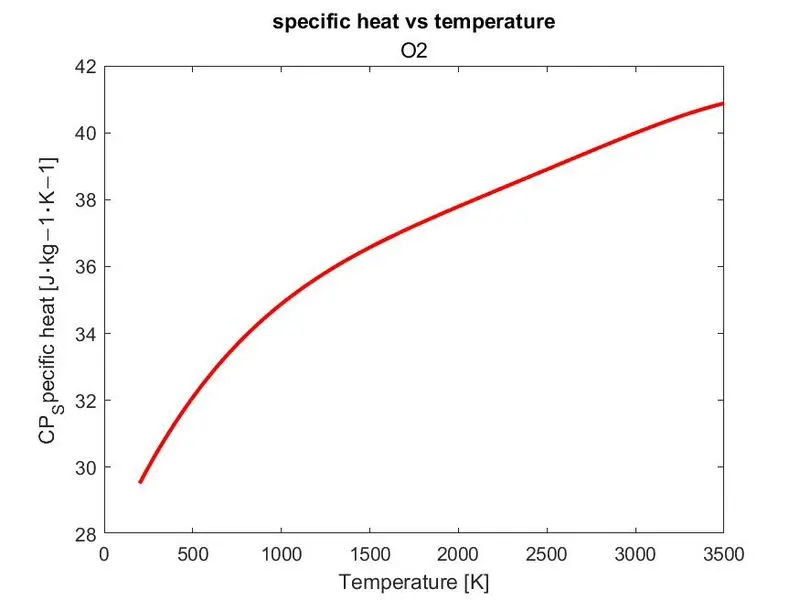
PLOTS FOR O2,N2 AND CO2:
PLOTS FOR O2:
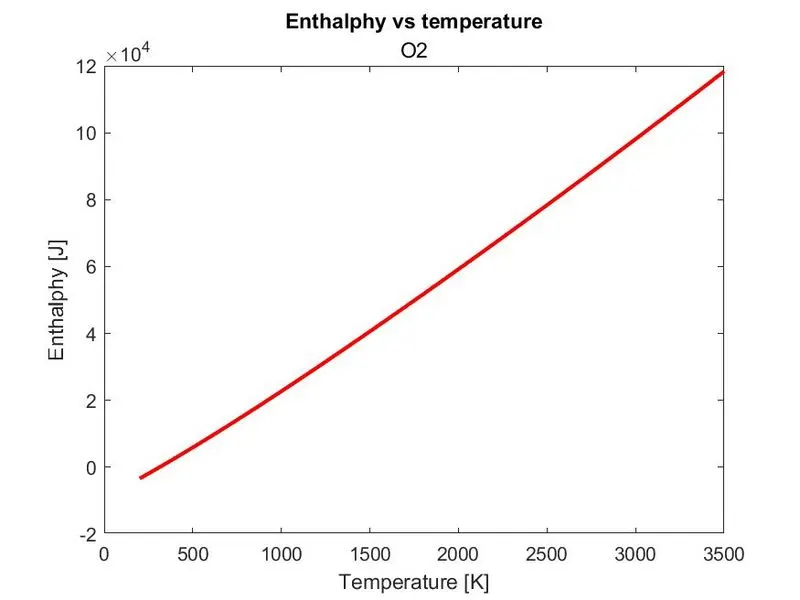
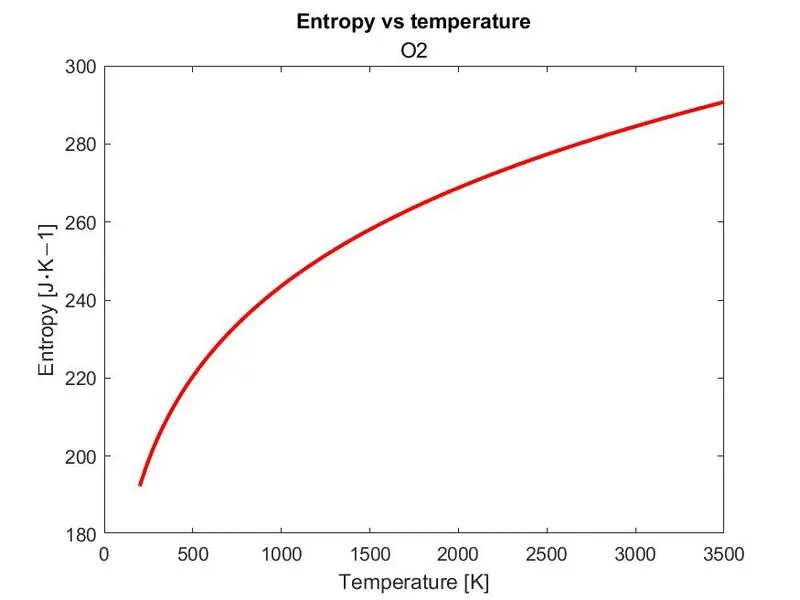
PLOTS FOR N2:
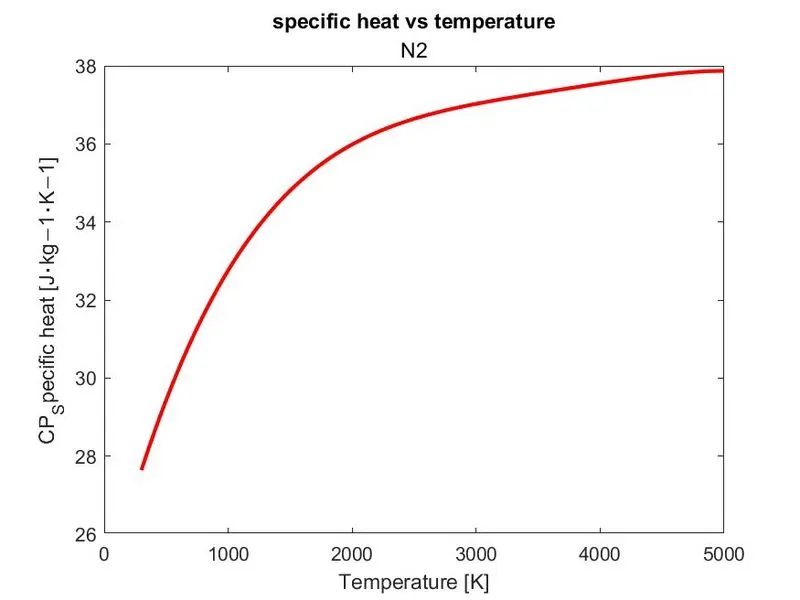
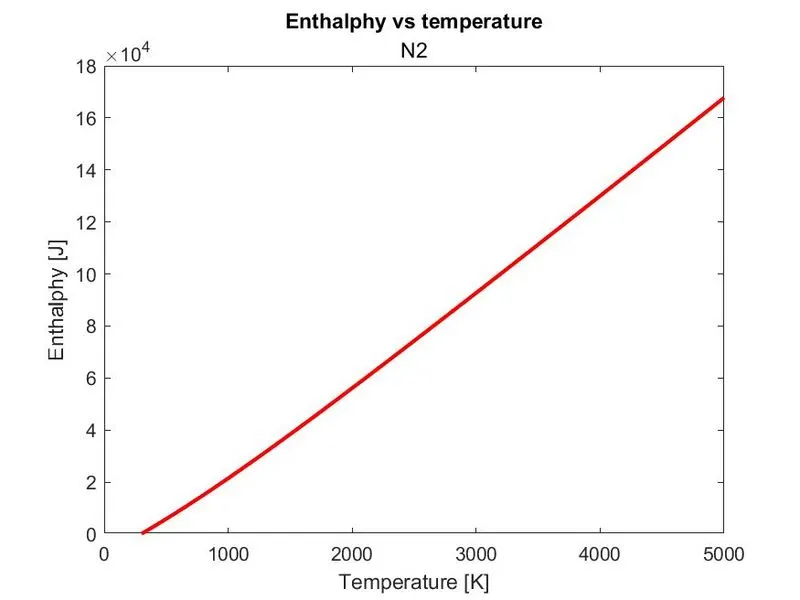
PLOTS FOR CO2:
Errors during writing program:
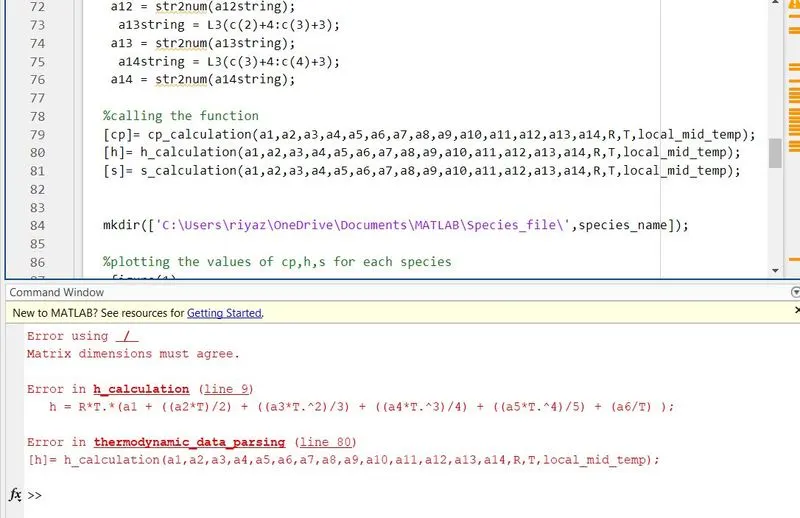
Error was caused due to not adding of element wise operator for dividing T.
dot operator was added to debug that code.
h = R*T.*(a1 + ((a2*T)/2) + ((a3*T.^2)/3) + ((a4*T.^3)/4) + ((a5*T.^4)/5) + (a6./T) );
Conclusion:
The code is written for reading the NASA thermodynamic data file to calculate the specific heat,entropy,enthalpy of different species and plots are plotted and saved in separate folders and molecular weight of the species are calculated using the logic and plots of 02,N2, and C02 are attached.