Week -2
Aim:
- Make a Simulink model of Doorbell using solenoid block.
- Use a thermistor to sense the temperature of a heater & turn on or turn off the fan.
Introduction:
Simulink:
Simulink is a MATLAB-based graphical programming environment for modeling, simulating and analyzing multidomain dynamical systems. Its primary interface is a graphical block diagramming tool and a customizable set of block libraries. It offers tight integration with the rest of the MATLAB environment and can either drive MATLAB or be scripted from it. Simulink is widely used in automatic control and digital signal processing for multi-domain simulation and model-based design.
1. Doorbell model using Simulink:
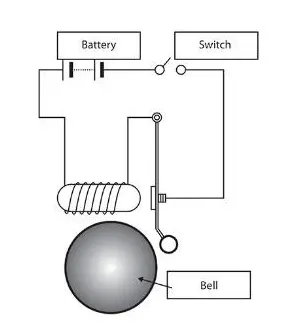
In a doorbell, When the button is pressed, the circuit closes and the electromagnet moves a contact arm. When the contact arm moves, it interrupts the circuit and the electromagnet stops. When it stops, the contact arms falls back into position, completing the circuit and starting the process over again. This cycle repeats quickly over and over again as long as the button of the doorbell is held down.
Solenoid:
A solenoid is a device comprised of a coil of wire, the housing and a moveable plunger. When an electrical current is introduced, a magnetic field forms around the coil which draws the plunger in. More simply, a solenoid converts electrical energy into mechanical work.
Simulink Model:
Procedure:
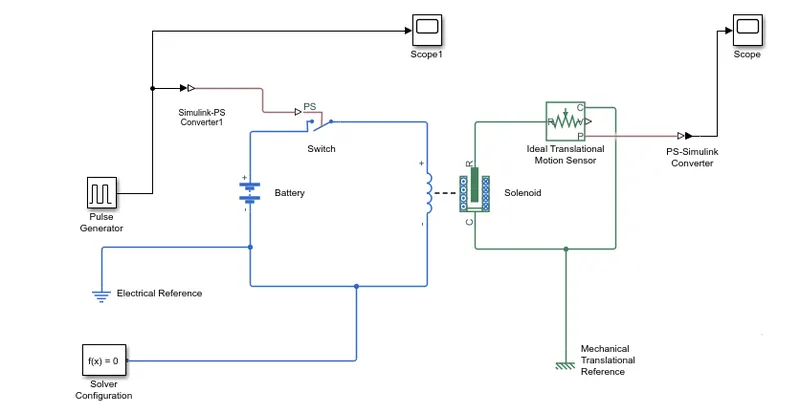
- A pulse generator which is used to generate square wave pulses at regular intervals is connected to a Simulink-PS converter, a scope is used in the model to check the output pulses.
- Simulink-PS converter is connected to a switch block, which is connected to a battery terminal and solenoid. Other battery terminal is connected to electrical reference before connecting the solenoid.
- The ElectricalReference block represents an electrical ground and solver configuration is connected to the reference which specifies the solver parameters that model needs before simulation begins.
- Solenoid is connected with ideal translation motion sensor and a mechanical translation reference.
- A PS-Simulink converter is connected with motion sensor and a scope to get the output pulse.
Output:
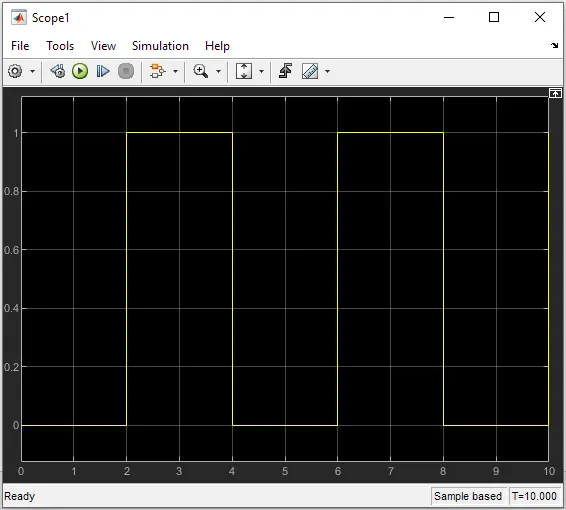
Here, the switch is closed for 2 seconds and after that switch is released.
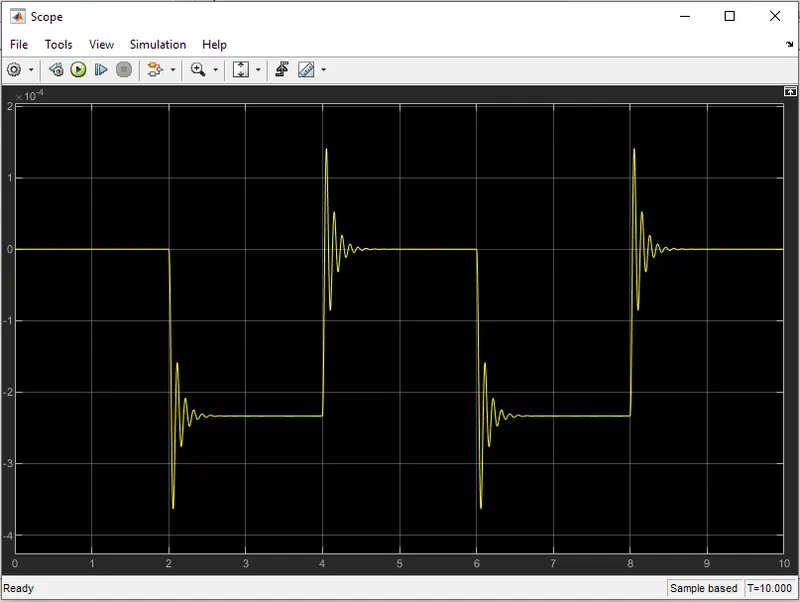
The plunger motion is simulated here. In this scope, 0 represents the switch is closed. So, we can see the plunger strikes after every 2 seconds.
2. Fan controlled by thermistor:
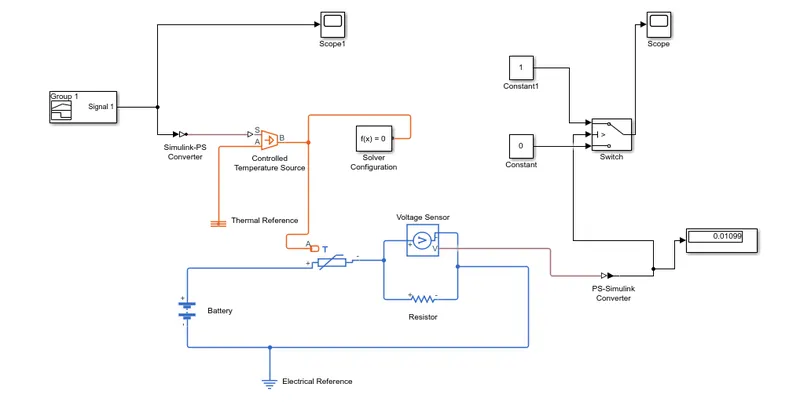
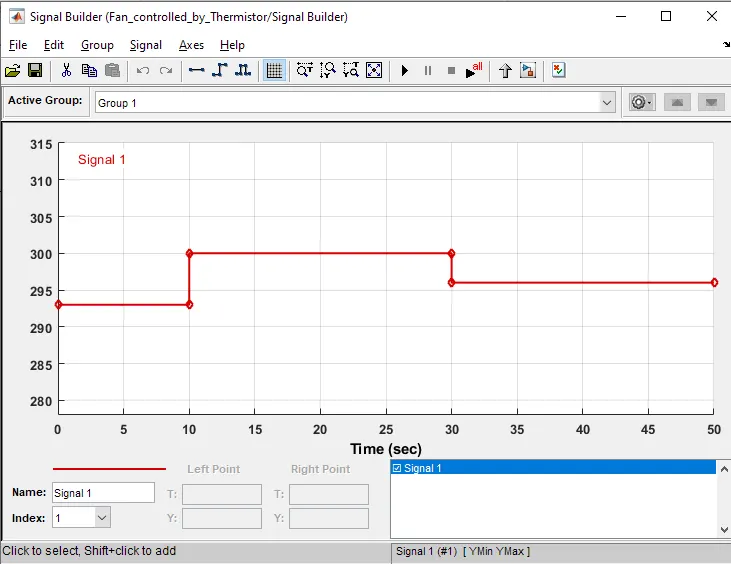
In this model, a thermistor is used to sense the temperature of a heater & turn on or turn off the fan as per the given conditions, which is 20 °C from 0 to 10 seconds, 27 °C from 10 to 30 seconds, 23 °C from 30 to 50 seconds and fan turn on if the temperature goes above 25 °C.
Thermistor
Thermistors are thermally sensitive resistors whose prime function is to exhibit a large, predictable and precise change in electrical resistance when subjected to a corresponding change in body temperature.
Simulink Model:
Signal builder parameters:
Procedure:
- A signal builder is set with required signals and connected to Simulink-PS converter. Then the converter is connected to controlled temperature source which represents ideal source of thermal energy.
- The temperature source block is connected to thermal reference and solver configuration and the parameters are set.
- A thermistor is connected to the temperature source and its terminals are connected battery and voltage sensor.
- The voltage sensor is connected to the resistor and PS-Simulink converter and electrical reference is connected to this loop.
- Converter is connected with the display and switch.
- The constant values 0 and 1 are added to the switch and it is connected to scope as shown in the model.
Output:
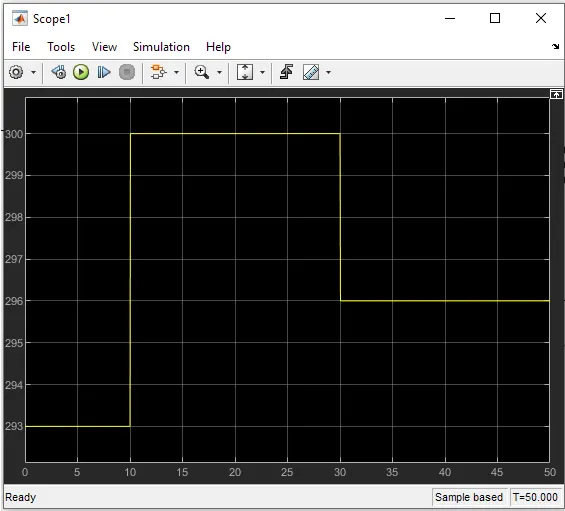
In this scope which is connected to signal builder, we can see that signal is settled as 293K (20°C) for 0-10 seconds, 300K (27°C) for 10-30 seconds, 296K (23°C) for 30-50 seconds.
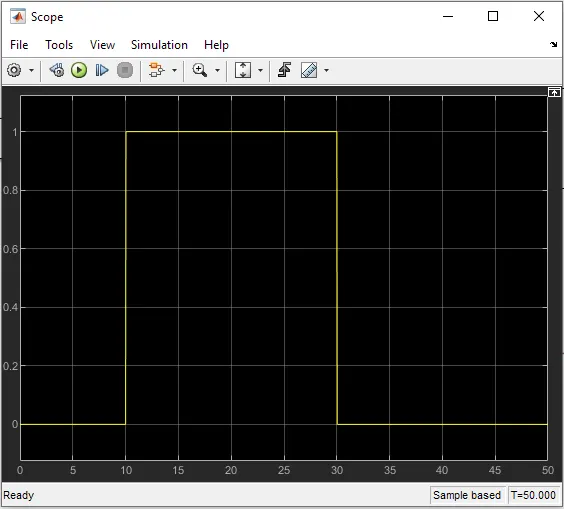
In this scope which is connected to switch, here 0 represents “off” and 1 represents “on”.
we can see the output as the temperature is in 0-10 seconds, switch is off, after 10-30 seconds, switch is on and again switch is off when the temperature goes below 25°C for 30-50 seconds.
Conclusion:
Thus, the Simulink model is created for doorbell using solenoid and Simulink model created using thermistor for controlling ON and OFF conditions of a fan.