Week -2
A).
1. Title :-
Make a Simulink model of Doorbell using solenoid block.
2. Introduction :-
Simulation of door bell using solenoid block with following condition :- The switch is closed for 2 seconds and then released. Observe the physical movement of the plunger.
While simulating this model following blocks are used :-
- DC source
- Switch
- Solenoid
- Ideal translational motion sensor
- pulse generator
- PS-Simulink converter/Simulink-PS converter
- Electrical refrence
- Mechanical translational refrence
- Scope
- Solver configuration
3. Workdone :-
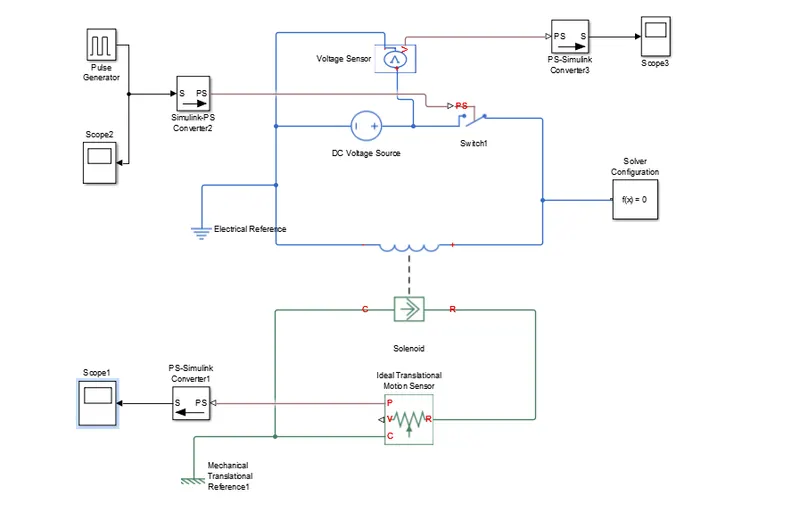
- In this simulation switch is controlled by external signal that is pulse generator.
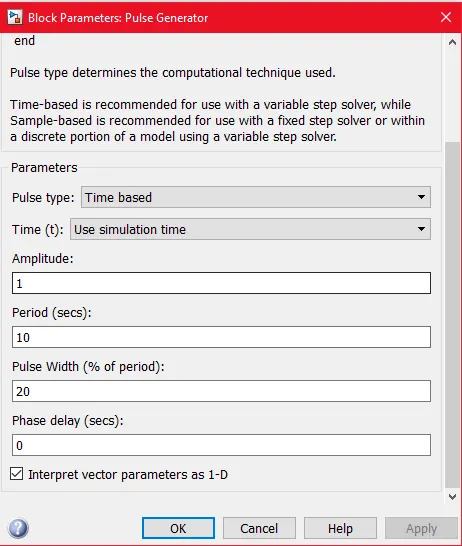
- As per given condition in the problem that switch is closed for 2 seconds and then open so,accordingly pulse generator block is modified .
- DC source is used with amplitude of 12 V.
- To sense the physical movement of plunger an ideal translational motion sensor is used.It has two outlet one for position and other for velocity.
- Used position outlet to sense the physical movement of plunger.
- To, see the results in scope use ps - simulink converter as motion sensor is from simscape library and scope is from simulink library.
- For mechanical block we use mechanical refrence and for electrical block we use electrical refrence.
4. Result :-
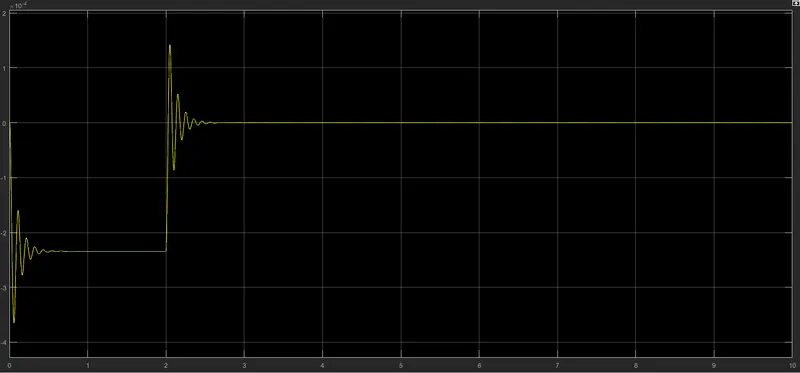
- As we see from the above graph , intially plunger is at rest that is at 0 value.
- As switch is closed for 2 second the elctromagnet get charged and it attracts the plunger to hit the bell.So, for 0 to 2 second the plunger position
- changed as shown in graph.
- After 2 second as switch is open plunger goes to its intial position that is zero value.
5. Conclusion :-
Comprehensive simulation of above model is carried out in MATLAB/SIMULINK software and analysis is done thoroughly.
B).
1. Title :-
Use a thermistor to sense the temperature of a heater & turn on or turn off the fan.
2. Introduction :-
Simulation is done by considering the following condition :-
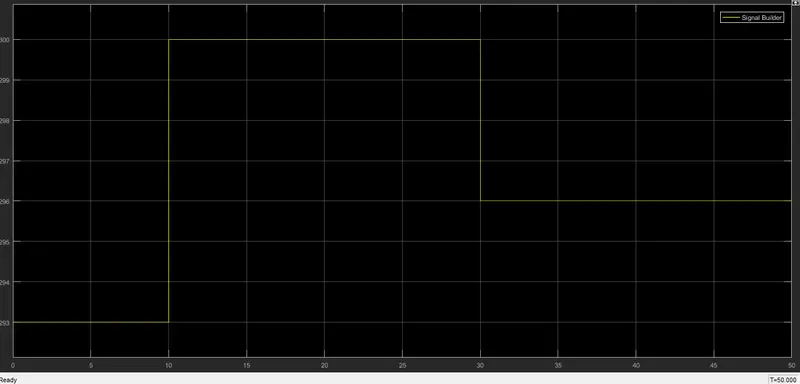
Temperature source: 20 °C from 0 to 10 seconds, 27 °C from 10 to 30 seconds, 23 °C from 30 to 50 seconds. Fan conditions: ON if the temperature above 25 °C, OFF otherwise.
While simulating this model following blocks are used :-
- Signal builder .
- Ideal temperature source.
- Thermistor..
- DC voltage source.
- Resistor.
- Solver configuration.
- Thermal and electrical refrence.
- Scope,Display.
- goto,from.
- Switch ,PS - simulink ,constant.
- voltage sensor and pulse generator.
3. Workdone :-
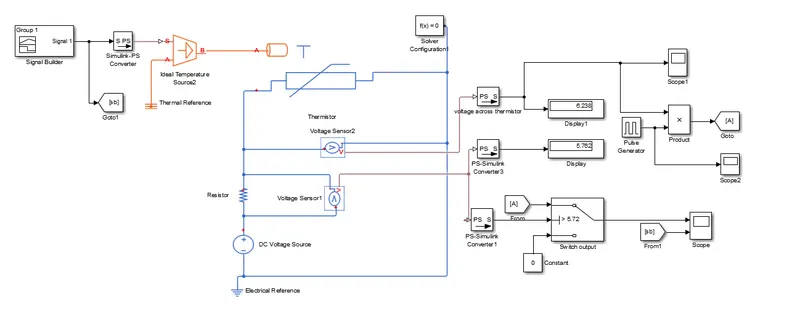
- Signal builder block is used to generate the input signal as per given condition .
- This input is converted into physical signal using simulink -PS converter,and given to ideal temperature source.
- output of ideal temperature source is then given to thermistor.
- Thermistor is the sensor which sense the temperature as input and gives output in terms of resistance with respect to different temperature change.
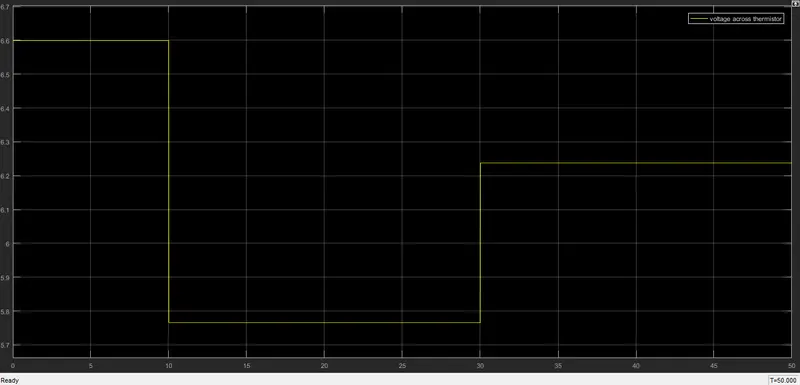
- A voltage sensor is used to sense the voltage across thermistor for different temperature .
- As per operating condition of fan 298k is the threshold value, above which fan operate and below it is off.
- So, by considering this condition a resistor of value 1005.9 ohm is connected in series with DC voltage source.Calculation of resistor is done by this formula :-
- R(T) = R0*exp(B*(1/T-1/T0)
- B= 3500k ,T0 =298.15k ,R0 = 1000 ohm, T =298k.
- The voltage across this resistor is acts as thershold for switch and its value is 5.72V.
- Switch has three port . port 1 and port 2 acts as data port .port 2 is control signal port , threshold value is given to port 2.
4. Result:-
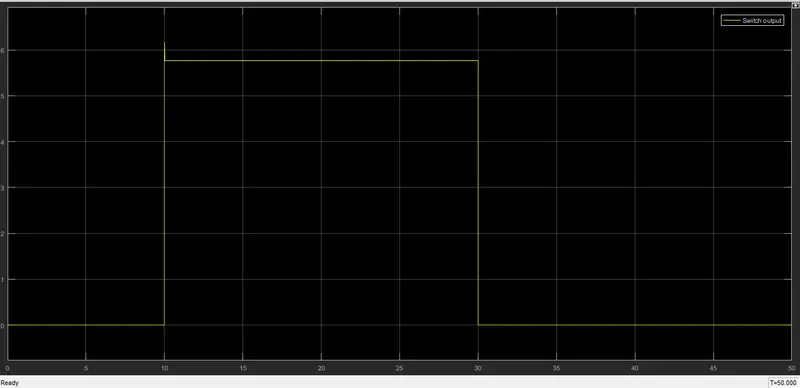
a) output of switch :-
b) Voltage across thermistor :-
c) Signal builder:-
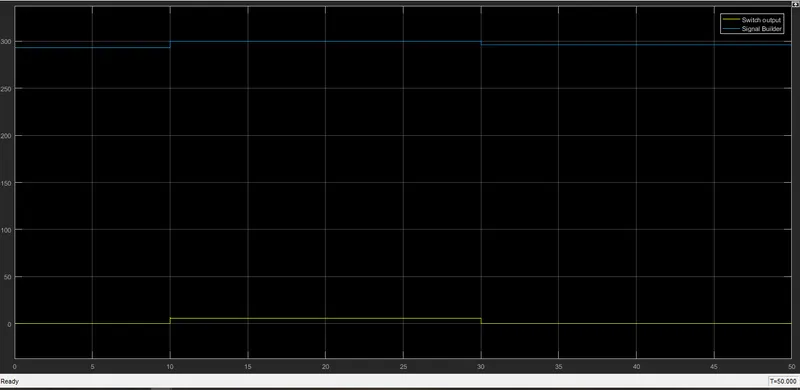
d) Combine plot of signal builder input and switch output :-
5. Conclusion :-
Comprehensive simulation of above model is carried out in MATLAB/SIMULINK software and analysis is done thoroughly.