Week 11 - Simulation of Flow through a pipe in OpenFoam
Objective:-
In this project, we are using the wedge boundary condition to simulate an axisymmetric flow. where there is smooth flow through a pipe with a constant cross-section and an inlet Reynolds number of 2100. And check the results with Hagen-equations Poiseuille's to make sure the flow is fully developed.
Description:-
In this project, the Hegen-Poiseuille flow through a circular pipe is simulated.
The flow is axisymmetric, which means that the flow is the same on both sides of the pipe's centre.
So, to make things easier, only simulate a small part of the pipe, like a wedge, from which the flow will be simulated.
MATLAB scripting is used to make a computational mesh automatically with a wedge angle of 5 deg.
The MATLAB programme creates the blockMeshDict file and then replaces it with the file that should be in the run folder.
The folder is copied from the foam folder to the fun folder, where the solver is chosen. In this case, the solver is icoFoam, which is in the incompressible folder.
As it is used to simulate the flow through a pipe by solving the incompressible laminar Navier-stroke equation.
Once the wedge has been simulated in the run folder, use paraFoam to get the results and look at the flow velocity profile at the hydrodynamic entrance length of the pipe and at fully developed flow.
The Hegen-Poiseuille Equations were used to get the data from the CFD simulations to make sure the results were accurate.
HYDRODYNAMIC ENTRANCE & FULLY DEVELOPED FLOW REGIONS:-
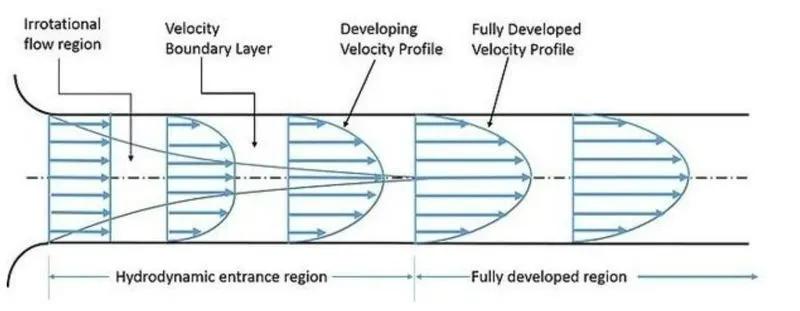
The picture above shows two regions: the hydrodynamic entrance region and the fully developed region. The entrance length is the distance a flow goes after entering the pipe.
This length refers to the length of the entry region, which is the area after the pipe entrance where effects from the pipe's inner wall spread into the flow as an expanding boundary layer.
When the boundary layer grows big enough to fill the whole pipe, the developing flow turns into a fully developed flow, where the flow characteristics don't change as you move farther along the pipe.
The hydrodynamic entrance region is the part of a pipe where viscous forces from the inside wall of the pipe cause fluid to move into the pipe to develop a speed profile.
The part of the flow where the effects of viscosity and speed change quickly is called the boundary layer.
The flow in a pipe is split into two parts by the boundary surface: the irrotational flow area and the boundary layer area.
In the boundary layer region, the effects of viscosity have a big effect on how fast the speed changes. In the irrotational region, the effects of friction are small, and the speed stays mostly in the radial direction.
As the flow goes on, the thickness of the boundary gradually grows, and when it gets to the middle, the speed profile becomes more clear.
The hydrodynamic entrance region is the length from the point where the flow changes to a fully developed region to the point where it starts to flow again.
This flow is called "hydrodynamically developed flow" because this is where the speed profile develops and keeps changing.
The flow in the area is fully developed and stays the same across the pipe, making a parabolic velocity profile as shown in the figure above.
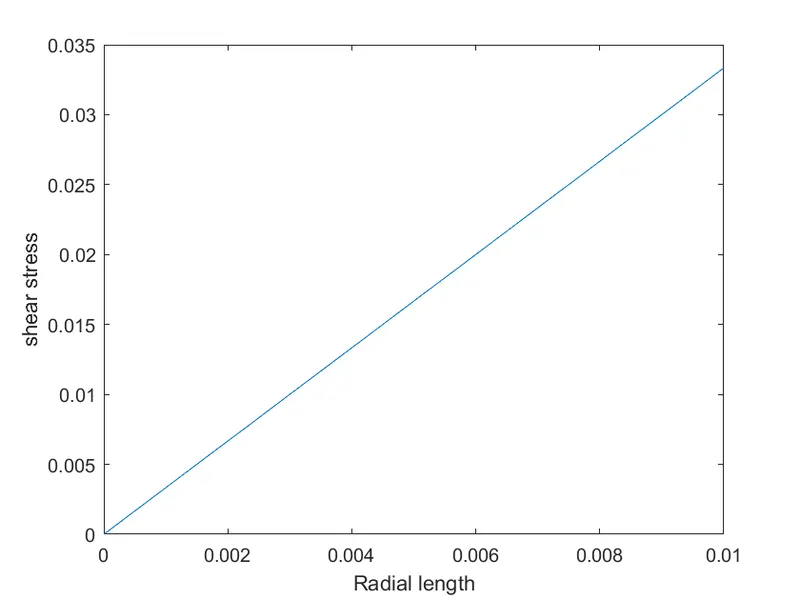
The shear stress is directly related to the difference in speed. This means that the shear stress is highest at the wall and lowest in the middle.
HAGEN-POISEUILLE EQUATION:
In non-fluid dynamics, the Hagen-poiseuille equation is a physical law that tells us how much the pressure drops when an incompressible Newtonian fluid flows laminarly through a long cylinder pipe with a constant cross-section.
Here's how the equations describe pressure drop:
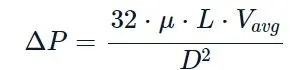
Here are some things you might think,
Fluids can't be squashed and should flow according to Newton's law of viscosity.
Flow is smooth through a pipe with a circular cross-section that stays the same and is much longer than its diameter.
There is no relative movement between the particles of a fluid and the boundaries of a solid, which means that the fluid does not slip at the solid boundary.
In the pipe, there is no buildup of fluid.
Steps for Solving the Procedure:
First, open " Terminal " in Linux OS.
When you type "cd $FOAM TUTORIALS/," the software will take you to the built-in tutorial files. Now, type "ls" to see the list of tutorials.
When we open the list, we can see several directories. To choose, type "cd incompressible/" in the box. As above, type "ls" to go to its list. Then it sends you to the specific directory.
Based on the information we have, we need to use the icoFOAM solver to solve the flow. Then type "cd icoFOAM/." Go to the list and choose "cd cavity/," for example.
Once we go to the cavity folder, we can see several files. One of them is called "cavity," and we need to copy and paste it to the "run" folder. To do this, we use the command "cp -r cavity $FOAM RUN /(folder name without "/")" to copy and paste the file.
Putting together a.txt file for blockMeshDict
At first, it's important to understand the idea behind Hagen-equation, Poiseuilles's because it makes a number of assumptions and uses the right formulas.
Asa said, the right assumptions are made so that the programme can be run better and without any mistakes.
From Hagen Poiseuilles's equation, figure out the equations so that we can check the solutions and write down all the formulas that are needed for the calculation so that the programme runs smoothly.
When we start the programme, we need to say what all the assumptions are. Include all the equations that need to be solved and are shown in the programme.
Write a small piece of code to figure out the shear stress based on the pipe's radius.
Now, to make a blockMeshDict file, we use a technique called file parsing to read and write files. These files are then used as input data in our calculations or simulations.
Follow the above steps to make a header file by hand, or we can import the header part from an existing file and set the line numbers so that it shows up in the right order.
Use "" f1 = fopen("blockMeshDict.txt", "w") to make a text file ". This command is used to put the files in the folder that was given.
Follow the same order that is used in the tutorial files and make sure to put the spaces in the right places, as shown above. The programme goes over all of the steps.
When you're done entering all the data needed to calculate a blockMeshDict file, just type "" fclose(f1) ". This is a way to help close the text file.
So, this makes a ".txt file," which is shown below. This file should be replaced with the file that is already there. To do this, remove the.txt from the end of the file name, so that the file name only says "blockMeshDict."
Getting in charge
Dict, transportProperties, and u and p files
Open the existing controlDict file and change the start time, end time, deltaT, etc. values. Save the file.
In the same way, go to transport Properties and change the value of the fluid's kinematic viscosity as shown below, then save the file.
In the same way, make the needed changes to the u and p files based on the inputs and considerations and save them.
Go to the terminal and tell it where the files are saved. Then type "blockMesh" in run to go to the cavity directory. By giving this command, the mesh is set up and calculations are done on the inside to make sure the meshing is perfect. After theblockMesh is done running, use the checkMesh command to look for mistakes in the mesh.
So, if we check the mesh and find no mistakes, we can say that it is stable.
Now, use the "icoFoam" command to finish running the simulation. We used icoFoam as the solver for this problem. Wait until the timer gets to the last step. Check to see if it has run for all of the time steps so that the simulation can run smoothly. Check to see if the courant number is less than 1.
After the simulation is done, type "paraFoam." By showing the geometry, the paraFoam command goes straight to the paraview software.
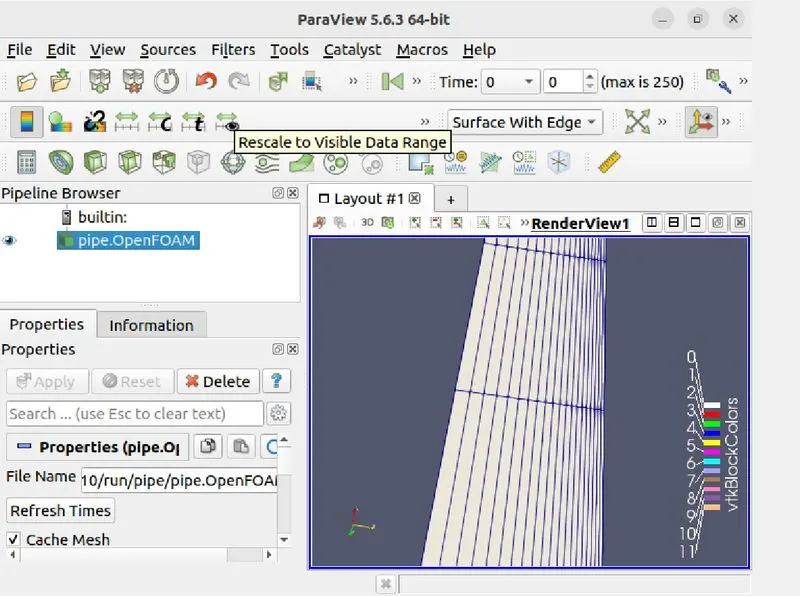
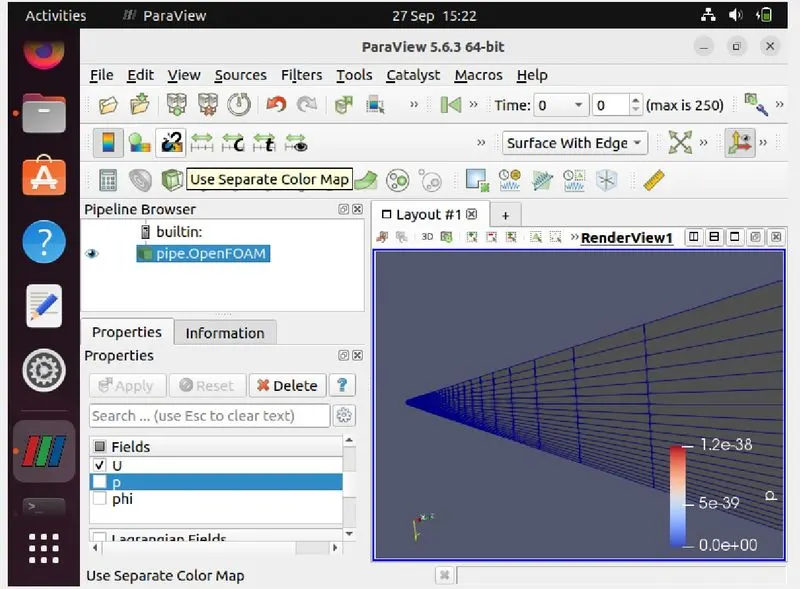
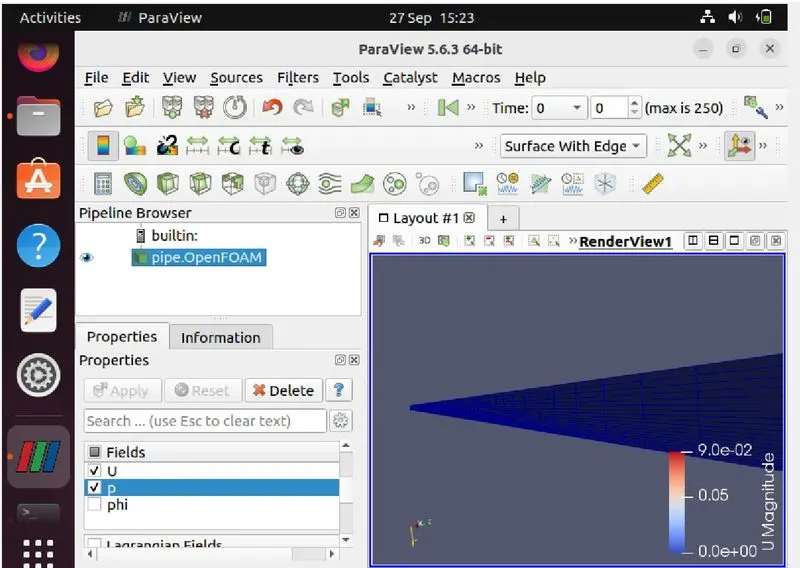
With the paraview software, both geometry and mesh can be seen and graphs can be made, as shown below.
MATLAB CODE:
clear all
close all
clc

D=0.02;
Re=2100;
rho=1000;
theta=4;
nu=8.91e-7;

%dynamic vis
mu=rho*nu;
v_avg= mu*Re/(rho*D);
v_max=2*v_avg;

L_w=0.3;
L_entrance= 0.06* Re*D;
L=L_entrance+L_w;


%pressure drop in flow
delta_p= 32*mu*v_avg*L_w/D^2;


r=D/2;
R=linspace(0,r,500);1;

for i=1:length(R)

    tau(i)=2*mu*v_max*(abs(R(i)))/r^2;

end

for j=1: length(R)

    vel_p(j)=2*v_avg*(1-(abs(R(j))^2/r^2));
end
figure(1)
plot(R,tau)
ylabel('shear stress')
xlabel('Radial length')

figure (2)
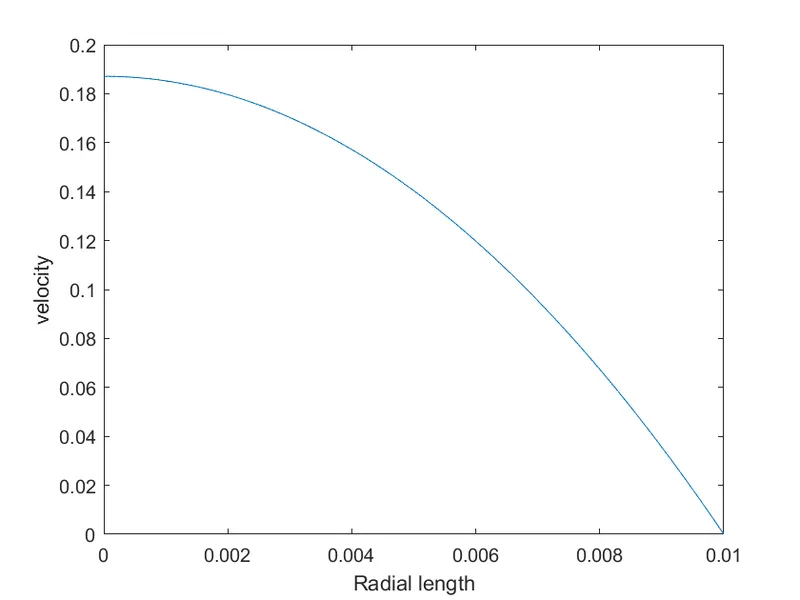
plot(R,vel_p)
ylabel('velocity')
xlabel('Radial length')
%blockmeshdict file

v0=[0 0 0];
v1=[0 r*cosd(theta/2) -r*sind(theta/2)];
v2=[0 r*cosd(theta/2) r*sind(theta/2)];
v3=[L 0 0];
v4=[L r*cosd(theta/2) -r*sind(theta/2)];
v5=[L r*cosd(theta/2) r*sind(theta/2)];

f1=fopen('blockMeshDict','w');

fprintf(f1,'\t FoamFile \n');
fprintf(f1,'\t { \n');
fprintf(f1,'\t \t format      ascii;\n');
fprintf(f1,'\t\t class       dictionary;\n');
fprintf(f1,'\t\t object      blockMeshDict;\n');
fprintf(f1,'\t } \n');
%vertices
fprintf(f1,'%s \n','convertToMeters 1 ;');
fprintf(f1,'\n %s \n','vertices');
fprintf(f1,'%s \n','(');
fprintf(f1,'\t(%d %d %d)\n',v0(1), v0(2), v0(3));
fprintf(f1,'\t(%d %d %d)\n',v1(1), v1(2), v1(3));
fprintf(f1,'\t(%d %d %d)\n',v2(1), v2(2), v2(3));
fprintf(f1,'\t(%d %d %d)\n',v3(1), v3(2), v3(3));
fprintf(f1,'\t(%d %d %d)\n',v4(1), v4(2), v4(3));
fprintf(f1,'\t(%d %d %d)\n',v5(1), v5(2), v5(3));
fprintf(f1,'%s \n',');');

%blocks
fprintf(f1,'%s \n','blocks');
fprintf(f1,'%s \n','(');
fprintf(f1,'\t hex(0 3 4 1 0 3 5 2) (%d %d %d) simpleGrading (%d %d %d)\n', 200,20,1,1,0.1,1);
fprintf(f1,'%s \n',');');

%edges
fprintf(f1,'\n %s \n','edges');
fprintf(f1,'%s \n','(');
fprintf(f1,'\t arc 1 2 (%d %d %d) \n',0,r,0);
fprintf(f1,'\t arc 1 2 (%d %d %d) \n',L,r,0);
fprintf(f1,'\n %s',');');

%boundary
fprintf(f1,'\n %s \n','boundary');
fprintf(f1,'%s \n','(');
fprintf(f1,'\n %s \n','axis');
fprintf(f1,'{ \n \t type empty; \n');
fprintf(f1,'\t faces \n( \n');
fprintf(f1,'\t (%d %d %d %d) \n',0,3,3,0);
fprintf(f1,'\t ) ; \n }\n');

%wall
fprintf(f1,'\n %s \n','wall');
fprintf(f1,'%s \n','{');
fprintf(f1,'\t type wall; \n');
fprintf(f1,'\t faces \n ( \n');
fprintf(f1,'\t (%d %d %d %d) \n',1,4,5,2);
fprintf(f1,'\t ) ; \n }\n');

%inlet
fprintf(f1,'\n %s \n','inlet');
fprintf(f1,'%s \n','{');

fprintf(f1,'\t type patch; \n');
fprintf(f1,'\t faces \n ( \n');
fprintf(f1,'\t (%d %d %d %d) \n',0,1,2,0);
fprintf(f1,'\t ) ; \n }\n');

%outlet
fprintf(f1,'\n %s \n','outlet');
fprintf(f1,'%s \n','{');
fprintf(f1,'\t type patch; \n');
fprintf(f1,'\t faces \n ( \n');
fprintf(f1,'\t (%d %d %d %d) \n',3,5,4,3);
fprintf(f1,'\t ); \n }\n');

%front
fprintf(f1,'\n\t front \n { \n');
fprintf(f1,'\t type wedge ; \n');
fprintf(f1,'\t faces \n ( \n');
fprintf(f1,'\t (%d %d %d %d) \n',0,3,4,1);
fprintf(f1,'\t ) ; \n \t }\n');

%back
fprintf(f1,'\n\t back \n { \n');
fprintf(f1,'\t type wedge ; \n');
fprintf(f1,'\t faces \n ( \n');
fprintf(f1,'\t (%d %d %d %d) \n',0,2,5,3);
fprintf(f1,'\t ) ; \n \t }\n');
fprintf(f1,');');
OpenFoam Code:-
BlockMeshDict File:-
/*--------------------------------*- C++ -*----------------------------------*
=========                 |
\      /  F ield         | OpenFOAM: The Open Source CFD Toolbox
\    /   O peration     | Website:  https://openfoam.org
\  /    A nd           | Version:  8
\/     M anipulation  |
*---------------------------------------------------------------------------*/
FoamFile
{
version     2.0;
format      ascii;
class       dictionary;
object      blockMeshDict;
}
// * * * * * * * * * * * * * * * * * * * * * * * * * * * * * * * * * * * * * //
convertToMeters 1;
vertices
(
(0.000000 0.000000 0.000000)//point0
(0.000000 0.009990 0.000436)//point1
(0.000000 0.009990 -0.000436)//point2
(3.000000 0.000000 0.000000)//point3
(3.000000 0.009990 0.000436)//point4
(3.000000 0.009990 -0.000436)//point5
);
blocks
(
 hex (0 3 5 2 0 3 4 1) (200 20 1 ) simpleGrading (1.000000 0.200000 1.000000));
edges
(
 arc 1 2 (0.000000 0.010000 0.000000)
 arc 4 5 (3.000000 0.010000 0.000000)
);
boundary
(
    inlet
    {
	type patch;
	faces
	(
 	(0 1 2 0)
 	);
    }
    outlet
    {
	type patch;
	faces
	(
	(3 5 4 3)
	);
    }
    topwall
    {
	type wall;
	faces
 	(
	(1 4 5 2)
	);
    }
    front
    {
	type wedge;
	faces
	(
	(0 3 4 1)
	);
    }
    back
    {
 	type wedge;
	faces
 	(
 	(0 2 5 3)
	);
    }
    axis
    {
	type empty;
	faces
	(
	(0 3 3 0)
	);
    }
);
mergePatchPairs
(
);
// ************************************************************************* //
ControlDict File:-
/*--------------------------------*- C++ -*----------------------------------*\
  =========                 |
  \\      /  F ield         | OpenFOAM: The Open Source CFD Toolbox
   \\    /   O peration     | Website:  https://openfoam.org
    \\  /    A nd           | Version:  10
     \\/     M anipulation  |
\*---------------------------------------------------------------------------*/
FoamFile
{
    format      ascii;
    class       dictionary;
    location    "system";
    object      controlDict;
}
// * * * * * * * * * * * * * * * * * * * * * * * * * * * * * * * * * * * * * //

application     icoFoam;

startFrom       startTime;

startTime       0;

stopAt          endTime;

endTime         50;

deltaT          0.01;

writeControl    timeStep;

writeInterval   20;

purgeWrite      0;

writeFormat     ascii;

writePrecision  6;

writeCompression off;

timeFormat      general;

timePrecision   6;

runTimeModifiable true;


// ************************************************************************* //
Pressure:-
/*--------------------------------*- C++ -*----------------------------------*\
  =========                 |
  \\      /  F ield         | OpenFOAM: The Open Source CFD Toolbox
   \\    /   O peration     | Website:  https://openfoam.org
    \\  /    A nd           | Version:  10
     \\/     M anipulation  |
\*---------------------------------------------------------------------------*/
FoamFile
{
    format      ascii;
    class       volScalarField;
    object      p;
}
// * * * * * * * * * * * * * * * * * * * * * * * * * * * * * * * * * * * * * //

dimensions      [0 2 -2 0 0 0 0];

internalField   uniform 0;

boundaryField
{
    topwall
    {
        type            zeroGradient;
    }

    inlet
    {
        type            zeroGradient;
    }
    outlet
    {
        type            fixedValue;
        value           uniform 0;
    }

    front
    {
        type            wedge;
    }
    back
    {
        type            wedge;
    }
    axis
    {
        type            empty;
    }
}

// ************************************************************************* //
Velocity:-
/*--------------------------------*- C++ -*----------------------------------*\
  =========                 |
  \\      /  F ield         | OpenFOAM: The Open Source CFD Toolbox
   \\    /   O peration     | Website:  https://openfoam.org
    \\  /    A nd           | Version:  10
     \\/     M anipulation  |
\*---------------------------------------------------------------------------*/
FoamFile
{
    format      ascii;
    class       volVectorField;
    object      U;
}
// * * * * * * * * * * * * * * * * * * * * * * * * * * * * * * * * * * * * * //

dimensions      [0 1 -1 0 0 0 0];

internalField   uniform (0 0 0);

boundaryField
{
    topwall
    {
        type            noSlip;
    }

    inlet
    {
        type            fixedValue;
        value           uniform (0.09 0 0);
    }
    outlet
    {
        type            zeroGradient;

    }

    front
    {
        type            wedge;
    }
    back
    {
        type            wedge;
    }
    axis
    {
        type            empty;
    }
}

// ************************************************************************* //
Physical Properties:-
/*--------------------------------*- C++ -*----------------------------------*\
  =========                 |
  \\      /  F ield         | OpenFOAM: The Open Source CFD Toolbox
   \\    /   O peration     | Website:  https://openfoam.org
    \\  /    A nd           | Version:  10
     \\/     M anipulation  |
\*---------------------------------------------------------------------------*/
FoamFile
{
    format      ascii;
    class       dictionary;
    location    "constant";
    object      physicalProperties;
}
// * * * * * * * * * * * * * * * * * * * * * * * * * * * * * * * * * * * * * //

nu              [0 2 -1 0 0 0 0] 0.892e-6;


// ************************************************************************* //
RESULTS:-