Week 11 - Simulation of Flow through a pipe in OpenFoam
Objective of the project: 1.The main objective of this project is to simulate the laminar flow through pipe. The wedge portion is taken as the whole circular section (cylinder) may take time to simulate or it may be costly if your computer do not have much resources.
2. The other objectives is to write the Matlab code for blockMeshDict file for different wedge angle , length and radius.
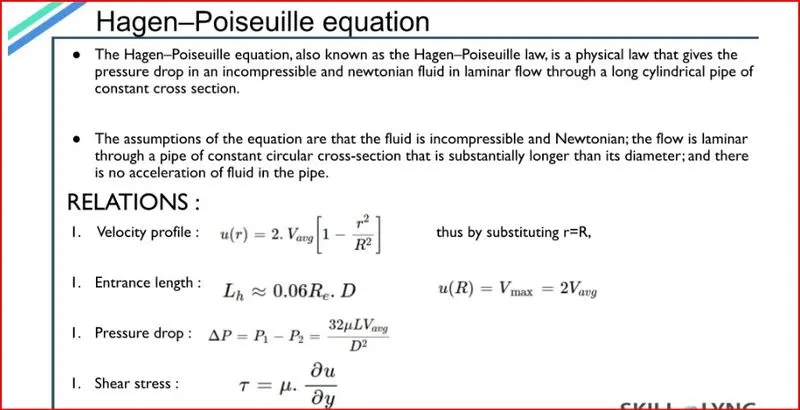
3. The final objective is to post process the results of velocity at different length of the pipe and shear stress at the fully developed portion and to compare it with the analytical solution i.e by hagen poiseuille equation
Assumptions made :
- Steady flow , incompressible and laminar flow
- Flow is two dimenional ( Flow WRT theta is ignored )
- Constant fluid properties (Viscosity , Density etc)
Introduction to the laminar flow through pipe:
In this project we aim to simulate a section of pipe (Wedge shaped geometry) to understand various aspects of flow through a pipe. The fluid chosen is water and the flow is laminar and incompressible. Also we choose to neglect any changes in cross section. The specified Reynolds Number Re is specified as 2100.
Internal flow occurs when the fluid is filled entirely in a conduit and is driven primarily by a pressure difference.
Fluid velocity in a pipe changes from zero at the surface because of the no-slip boundary condition to a maximum at the pipe center. The average velocity remains constant in an incompressible flow when the cross section of the pipe is constant.
The following file is an automatic generated file for wedge angle 3 which is derived from the above MATLAB code .This file is used in place of the existing blockMeshDict file which is in the incompressible solver file from openFoam software .Note that the solver used here is icoFoam .The same technique is used for wedge angle 4 as well. The only difference is specifying the angle as 4 degrees in matlab code instead of 3 degrees.
BlockMeshDict file :
/*--------------------------------*- C++ -*----------------------------------*\\
| =========                 |                                                 |
| \\\\      /  F ield         | OpenFOAM: The Open Source CFD Toolbox           |
|  \\\\    /   O peration     | Version:  4.1                                   |
|   \\\\  /    A nd           | Web:      www.OpenFOAM.org                      |
|    \\\\/     M anipulation  |                                                 |
\\*---------------------------------------------------------------------------*/

FoamFile
 {
         version       2.0;
          format       ascii;
           class       dictionary;
          object       blockMeshDict;
 }
// * * * * * * * * * * * * * * * * * * * * * * * * * * * * * * * * * * * * * //

converToMeters 1;

vertices
 (
	(0 0 0)
	(0 9.996573e-03 -2.617695e-04)
	(0 9.996573e-03 2.617695e-04)
	(2.820000e+00 0 0)
	(2.820000e+00 9.996573e-03 -2.617695e-04)
	(2.820000e+00 9.996573e-03 2.617695e-04)
 );

blocks
 (
 	 hex (0 1 2 0 3 4 5 3) (50 1 200) simpleGrading (2.000000e-01 1 1)
 );

edges
 (
	 arc 1 2 (0 1.000000e-02 0)
	 arc 4 5 (2.820000e+00 1.000000e-02 0)
 );

boundary
 (
 	  axis
 	     {
	          type empty;
	          faces
                  (
	 	       (0 3 3 0)
                  );

              }

 	  wall
 	     {
	          type wall;
	          faces
                  (
	 	       (2 5 4 1)
                  );

              }

 	 inlet
 	     {
	          type patch;
	          faces
                  (
	 	       (0 0 2 1)
                  );

              }

 	 outlet
 	     {
	          type patch;
	          faces
                  (
	 	       (3 4 5 3)
                  );

              }

 	 wedgeFront
 	     {
	          type wedge;
	          faces
                  (
	 	       (0 3 5 2)
                  );

              }

 	 wedgeBack
 	     {
	          type wedge;
	          faces
                  (
	 	       (0 1 4 3)
                  );

              }

 );

mergePatchPairs
 (
 );
// * * * * * * * * * * * * * * * * * * * * * * * * * * * * * * * * * * * * * //
Initial conditions - Kinematic pressure drop
/*--------------------------------*- C++ -*----------------------------------*
  =========                 |
  \\      /  F ield         | OpenFOAM: The Open Source CFD Toolbox
   \\    /   O peration     | Website:  https://openfoam.org
    \\  /    A nd           | Version:  6
     \\/     M anipulation  |
*---------------------------------------------------------------------------*/
FoamFile
{
    version     2.0;
    format      ascii;
    class       volScalarField;
    object      p;
}
// * * * * * * * * * * * * * * * * * * * * * * * * * * * * * * * * * * * * * //

dimensions      [0 2 -2 0 0 0 0];

internalField   uniform 0;

boundaryField
{
    axis
    {
        type            empty;
    }

    inlet
    {
        type            zeroGradient;
    }

    outlet
    {
        type            fixedValue;
	value		uniform 0.018;
    }

    wall
    {
        type            zeroGradient;
    }

    wedgeFront
    {
        type            wedge;
    }

    wedgeBack
    {
        type            wedge;
    }
}

// ************************************************************************* //
Initial conditions -Inlet Average velocity
/*--------------------------------*- C++ -*----------------------------------*
  =========                 |
  \\      /  F ield         | OpenFOAM: The Open Source CFD Toolbox
   \\    /   O peration     | Website:  https://openfoam.org
    \\  /    A nd           | Version:  6
     \\/     M anipulation  |
*---------------------------------------------------------------------------*/
FoamFile
{
    version     2.0;
    format      ascii;
    class       volVectorField;
    object      U;
}
// * * * * * * * * * * * * * * * * * * * * * * * * * * * * * * * * * * * * * //

dimensions      [0 1 -1 0 0 0 0];

internalField   uniform (0.0937312 0 0);

boundaryField
{
    axis
    {
        type            empty;
    }

    inlet
    {
        type            fixedValue;
        value           uniform (0.0937312 0 0);
    }

    outlet
    {
        type            zeroGradient;
    }

    wall
    {
        type            fixedValue;
        value           uniform (0 0 0);
    }

    wedgeFront
    {
 	type		wedge;
    }

    wedgeBack
    {
 	type		wedge;
    }
}

// ************************************************************************* //
Transport Properties- Kinematic viscosity:
/*--------------------------------*- C++ -*----------------------------------*\\
| =========                 |                                                 |
| \\\\      /  F ield         | OpenFOAM: The Open Source CFD Toolbox           |
|  \\\\    /   O peration     | Version:  4.1                                   |
|   \\\\  /    A nd           | Web:      www.OpenFOAM.org                      |
|    \\\\/     M anipulation  |                                                 |
\\*---------------------------------------------------------------------------*/
FoamFile
{
    version     2.0;
    format      ascii;
    class       dictionary;
    location    \"constant\";
    object      transportProperties;
}
// * * * * * * * * * * * * * * * * * * * * * * * * * * * * * * * * * * * * * //

nu              [0 2 -1 0 0 0 0] 1e-06;


// ************************************************************************* //
ControlDict:
/*--------------------------------*- C++ -*----------------------------------*\\
  =========                 |
  \\\\      /  F ield         | OpenFOAM: The Open Source CFD Toolbox
   \\\\    /   O peration     | Website:  https://openfoam.org
    \\\\  /    A nd           | Version:  6
     \\\\/     M anipulation  |
\\*---------------------------------------------------------------------------*/
FoamFile
{
    version     2.0;
    format      ascii;
    class       dictionary;
    location    \"system\";
    object      controlDict;
}
// * * * * * * * * * * * * * * * * * * * * * * * * * * * * * * * * * * * * * //

application     icoFoam;

startFrom       startTime;

startTime       0;

stopAt          endTime;

endTime         50;

deltaT          0.01;

writeControl    timeStep;

writeInterval   200;

purgeWrite      0;

writeFormat     ascii;

writePrecision  6;

writeCompression off;

timeFormat      general;

timePrecision   6;

runTimeModifiable true;


// ************************************************************************
Post Processing
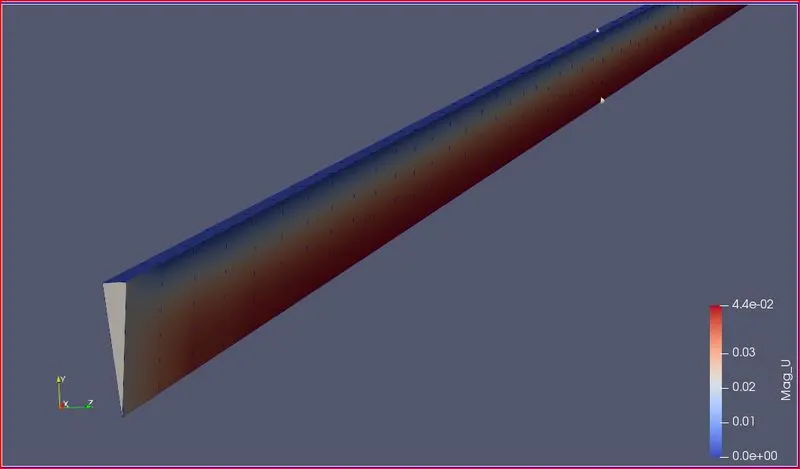
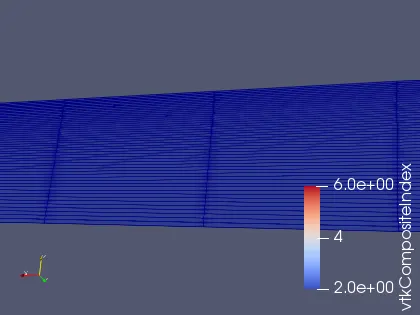
- After opening paraview click on generate to see the geometry. View the geometry from different sides across X,Y and Z axes.
- Press on the play button to post process to end time.
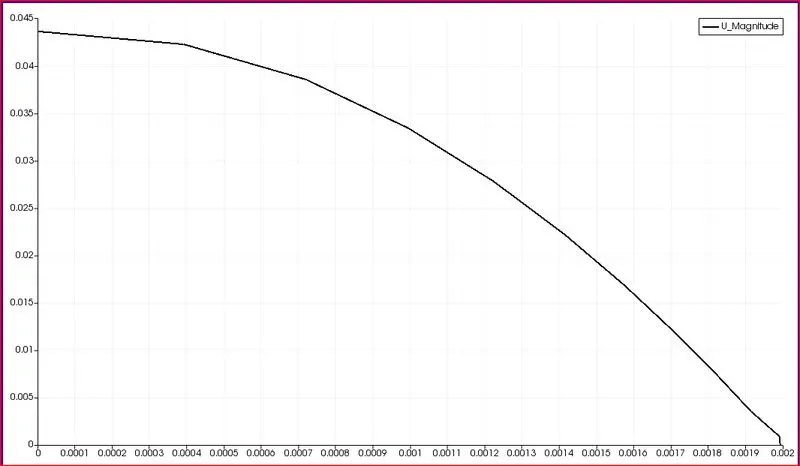
- Click on filters and select plot over line and plot velocity magnitude and pressure with respect to radial distance.
- Export the velocity data in .csv format.
- For calculating the shear stress import the .csv file into MATLAB/Octave.
- Select the suitable column to plot shear stress.
- Write a MATLAB/Octave code to calculate shear stress.
- The shear stress should be maximum at walls.
- Plot the result for shear stress.
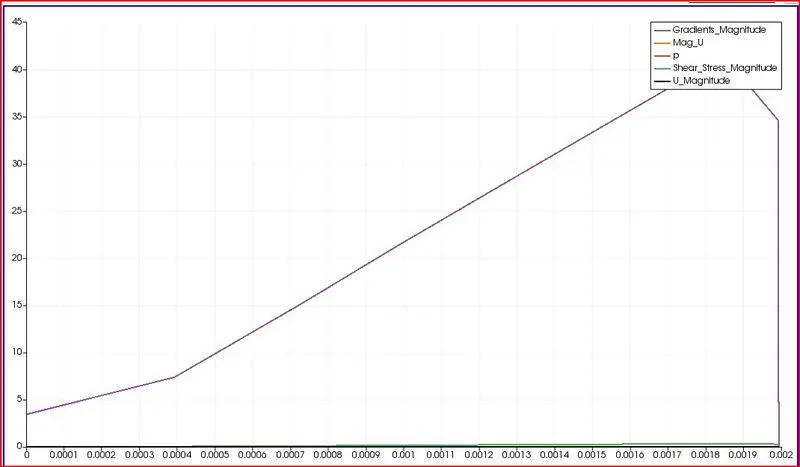
Shear stress :
1. When the fluid is in motion, shear stresses are developed due to the particles in the fluid moving relative to one another.
2. For a fluid flowing in a pipe Fluid velocity will be zero at the pipe wall. Velocity will increase while moving towards the center of the pipe. Shear Force is normally present because the adjacent layer of the fluid move with different velocities compared to each other.
3. Fluids Obeying Newton\'s law where the values of “mu” are constant are known as Newtonian fluids. If ‘mu’ is constant, the shear stress is linearly dependent on the velocity gradient.
By considering the velocity of this relative motion, the Shear rate can be calculated shear rate is defined as a measurement of the extent or rate of relative motion between the adjacent layer of the moving fluid. The shear rate for fluid flowing between two parallel plates one moving at a constant speed and one is stationary.
shear stress is propotional to the shear rate where viscosity is the propotionality cofficient.
this is known as Newtons\'s law of viscocity
tau = mu((du)/(dy))`
- The above expression is valid only for the low range of Reynolds numbers like laminar flows.
- coming to the turbulent flows it doesn’t work because are any well-defined layers. Instead, unsteady vortices appear of many sizes that interact with each other in a rather chaotic manner
- A separate code has to write to calculate the shear stress numerically.
- Before that, we need to extract the velocity values from the OpenFOAM.
- Using a “CSV” file, we can extract all the velocity (U_magnitude, U_x, U_y, U_z) and pressure values. The “.CSV” is more like an Excel sheet, directly we can upload it to Matlab.
- After uploading it into Matlab, Select only “u” (U_magnitude) values and upload it to the workspace.