Week-11 Challenge: Braking
AIM: Braking.
OBJECTIVE:
1. For a defined driving cycle, calculate the energy required for braking.
Driving Cycle:
A driving cycle is a series of data points representing the speed of a vehicle versus time.Driving cycles are produced by different countries and organizations to assess the performance of vehicles in various ways, as for instance fuel consumption, electric vehicle autonomy and polluting emissions. They are used in propulsion system simulations to predict performance of internal combustion engines, transmissions, electric drive systems, batteries, fuel cell systems, and similar components.The duty cycle selected for our challenge is NEDC(New European Drive Cycle) which came into existence in 1970. This drive cycle is designed to assess the emission levels of car engines and fuel economy in passenger cars.It consists of four repeated urban driving cycles (UDC) and one Extra-Urban driving cycle (EUDC). Here is the plot for vehicle speed(km/hr) vs Time(s).
Braking:
A brake is a mechanical device that inhibits motion by absorbing energy from a moving system. It is used for slowing or stopping a moving vehicle, wheel, axle, or to prevent its motion, most often accomplished by means of friction.
When the vehicle is in motion, braking happens when the any object is infront of the vehicle.It is different to various situtations based on the model of the vehicle.
Under the condition of braking, some amount of energy is required to do the same as that of energy required for accelerating the vehicle. Hence to calculate energy, we use the acceleration energy equarion,
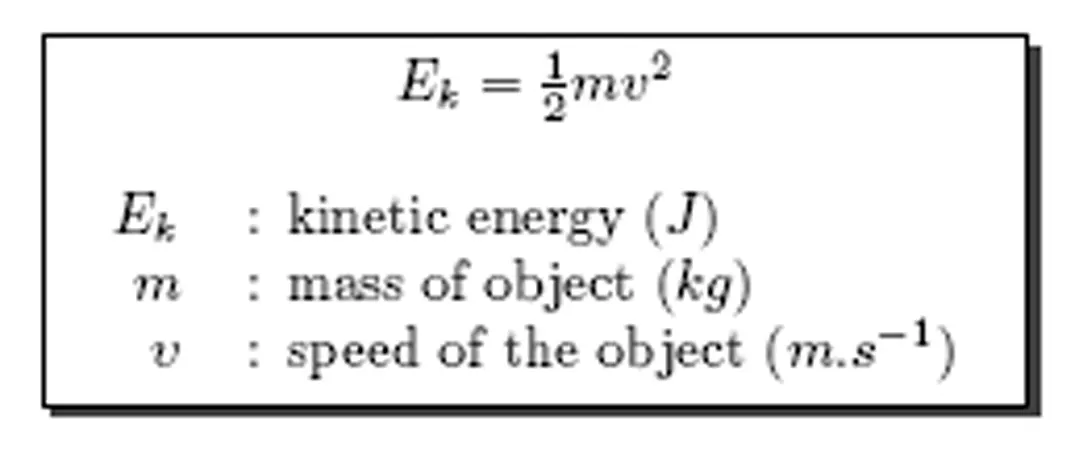
Formula:
E=0.5*m*v^2
where m is the total mass of the vehicle(kerb weight + payload)
V is the velocity of the vehicle given by (Vf−Vi)
Vf is the final velocity.
Vi is the initial velocity.
Calculation of the Energy required for Braking:
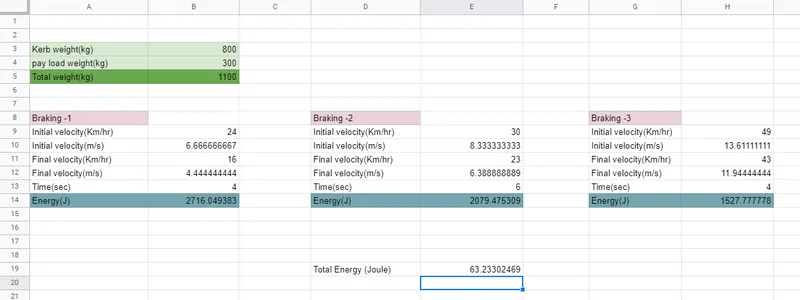
The Total energy required for braking is 63.233 Joules.
Link for the calculation of the energy required for Braking.
https://docs.google.com/spreadsheets/d/1r4ONceg8XZHJ-oArNbrafDpHto0TkJTP-lBePvcSoFY/edit?usp=sharing
2. Why electric motor can’t develop braking torque at high speed similar to starting? How electric and mechanical brakes are coordinated?
The braking torque in an electric motor is not as high as that of the acceleration torque at higher speeds. This can be attributed to many different reasons.The rate of discharge of the battery is higher than the charging rate. It can be said that the discharge rate can be twice as that of the charging rate.There are other limitations to the motors in the form of power converters too. This power converter is customised 3-phase inverters which are bidirectional as it needs to convert regenerative braking energy back to DC current for the battery and this reduces the efficiency of the power converter.At low speeds, regenerative braking is very high and as speed increases, the regenerative braking reduces as the effectiveness of inverter plays an important role and the overall efficiency reduces resulting in reduced braking torque.Hence, for effective braking at high speeds, we use a combination of Hydraulic(mechanical) brake and the regenerative(electric) brake.
Considering an EV vehicle running 100 kmph and reaches to 0 kmph in 10 sec, the quadrant 1(Q1) is the mirror of quadrant(Q2) when the vehicle reaches 100kmph in 100 sec, the peak acceleration is not equal to peak decelration. At low speed, acceleration is higher and at higher speed deceleration is not higher it takes time for braking. The motor which will be producing 7Nm in the acceleration will not be decleration at -7Nm. The braking torque in EV vehicle is not higher than acceleration.
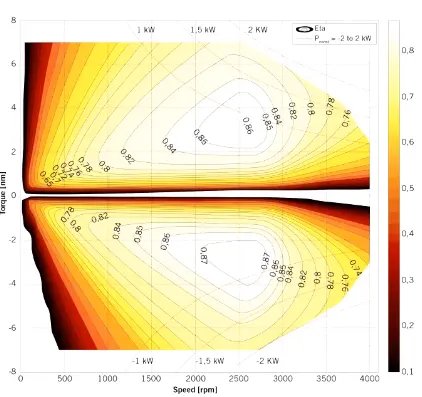
There are different ways of coordinating between the hydraulic brakes and regenerative brakes. One of the brake control strategies involves series connection where both brakes are connected together(one after another) which implies that in this scenario both brakes are used together and the next one in the parallel connection where either of the two brakes is operated individually without relying on one another depending on the braking requirements.
Limitations of Regenerative Braking:
- Regenerating braking cannot happen fastly that mean cahrging to battery.
- It is based on battery. During acceleration, the bateery can discharge at double rate 2C. The charge rate is (1C).
- Power Converter: A bi-directional Power converter in the reverse direction of ower flow.
Electric and mechanical brakes are coordinated by:
(i) Series:
In series, brakes are applied one after other. Either one brake strategy at a time either regenerative braking or mechanical braking at a time.
(ii) Parallel:
In parallel braking, Both the brakes are applied simultaneously ar a time.
Electric Driven Intelligent brake:
In Nissan leaf, the Technology Electric Driven Intelligent Brake(EDIB) which is the combination of hydraulic brake and mechanical brake along with regenerative braking are connected in parallel. At higher vehicle speed, the regenerative braking and friction brake occurs. When the speed of the vehicle reduces, the vehicle can attain higher torque At lower speed, the higher braking attains.
At lower speed - Regenerative braking is higher.
At higher speed - combining both the Regenerative speed and Friction speed is higher.
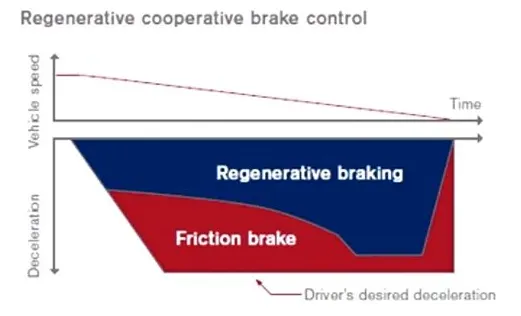
3. Make a MATLAB program which plots contour of given motor speed, torque and efficiency values. Attach the code as a .m file attach a screenshot of all the plots.
Matlab Code:
%plotting the efficiency of motor using matlab contour plot

clear all
close all
clc

%defining the set of values for speed and the torque
Speed = linspace(1,1000);
Torque = linspace(1,500);

%defining the motor loss constants

Kc = 0.2; %copper loss constant
Ki = 0.008; %irron loss constant
Kw = 0.00001; %windage loss constant
Const = 20; %constant loses

[Speed,Torque] = meshgrid(Speed,Torque);
Op = (Speed.*Torque); %output power from the motor
C = (Torque.^2)*Kc; %copper losses
I = Speed*Ki; %Iron losses
W = (Speed.^2)*Kw; %Windage losses

Ip = Op+C+I+W+Const; %Total power input to the motor

Eff = Op./Ip; %Efficiency of motor
Veff = linspace(0.6,0.98,10); %Efficiency values
contour(Speed,Torque,Eff,Veff);
hold on
xlabel('speed(rad/sec)')
ylabel('Torque(Nm)')
Explanation:
- Here ''Speed" is defined as the speed and we use 'linspace' command to specify from 1 to1000 values for the speed parameter.
- Here ''Torque" is defined as the torque and we use the 'linspace' command to specify from 1 to 500 values for this parameter.
- All the motor constants are defined
- Kc is the copper losses which has a value of 0.2
- ki is the iron losses which has a value of 0.08
- Kw is the winding loss which has a value of 0.00001.
- The Const is constant motor loss which is 20.
- Then we use the meshgrid command to make an array of and y coordinates to plot the 3D graph in the form of Speed and Torque.
- The output power is given by the value of speed multiplied by torque.
- The copper loss is calculated with a square term of Torque multiplied by the copper loss constant.
- The iron loss has an Speed term multiplied by loss constant.
- The winding loss has an cubic term of Speed gained by the loss constant.
- Input power is calculated by the formula = Op + C + I + W + const
- 'Eff' is the efficiency of the motor can be calculated output power/input power.
- And the 'Veff' is a variable used to define the efficiencies to plot the contour curve.
- plot3 command is used to get a real time plot of the values of the graph.
- Contour creates a contour plot containing the isolines of matrix z, where z contains height values on the x-y plane.
- MATLAB automatically selects the contour lines to display.The column and row indices of z are the x and y coordinates in the plane.
Output Plot:
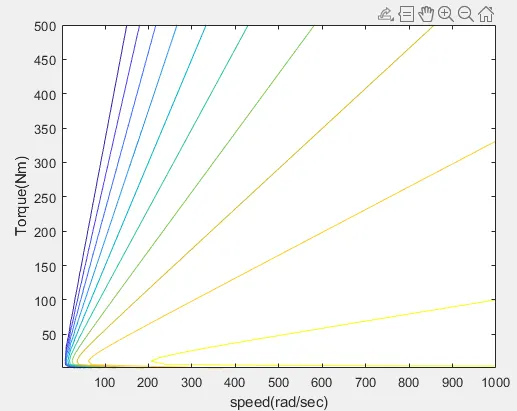
- We can understand from the result that speed is inversely proportional to torque.
- When speed increases the torque goes on decreasing and vice-versa.
Conclusion:
1. Calculated the energy required for braking for a driving cycle.
2. Explained how electric and mechanical brakes are coordinated.
3. Matlab code is explained