Week 10 - Challenge 3 - Door Trim Lower with Engineering Features
THE CREATION AND DRAFT ANALYSIS OF DOOR TRIM LOWER WITH ENGINEERING FEATURES (LOCATORS & HEAT STAKES):
TOOLING AXIS:
- The direction of open and close operations in Molding Machines, basically the Direction of the Mold pulls apart.
- The Mold is built in two seperate pieces. so, you have a Cavity and Core sides.The Core pulls apart from the Cavity is the Tooling direction.
THE CREATION OF TOOLING AXIS:
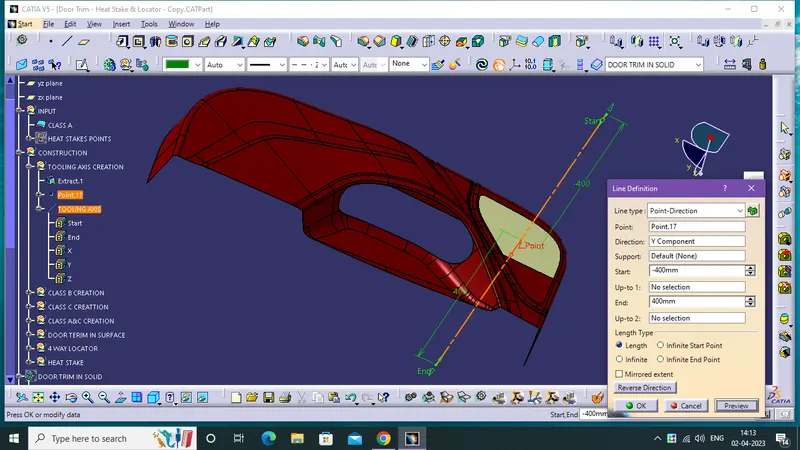
- First Find out the possible directionn of Drafting, in this component select a complete flat surface, The axis is created from that surface (reference).
- Extract the selected surface.
- Create a point in the middle of the Extracted surface .
- Finally create A line with the help of point.
THE DRAFT ANALYSIS TECHNIQUE:
- The draft analysis technique is used to analyse whether our part model created in CAD is manufacturable based on the draft condition applied. Here the part should get easily removed from the panel dies (in case of Sheet metal part) or Mold (in case of plastic).
- No parts can be ejected from the tool if it is having a straight 90-degree profile from its base surface. A small draft angle is provided to each and every area of the component in order to get easy removal of the component from the tool.
- Here we are providing a direction in which components should eject in order to get easy removal of components from the tool. In other words, it also lets us know whether the model is having a draft angle and how much is the draft angle from the tool direction.
DRAFT ANALYSIS OF PLASTIC COMPONENTS:
- The ideal draft angle for the plastic components is 3 deg. This may vary according to the functional requirement. Apart from the draft angle consideration, the remaining procedures for the draft analysis are similar to the above-mentioned steps. The draft angle provided for the plastic features is 0.5 deg. This may also get varied accordingly.
THE DRAFT ANALYSIS OF THE CLASS-A SURFACE:
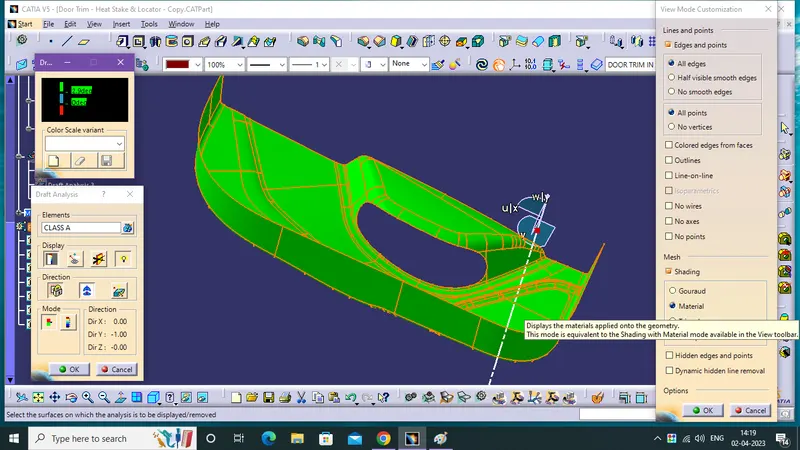
(* draft value 2.9 deg)
- First Enable The Class A Surface for Draft Analysis. then, select the Material Mode on View Mode Customization.
- Insert a Draft Analysis then, click a Compass and drag into the main tooling axis then fix it in the axis with using lock.
- enable the draft angle colour code dialog box for class A surface
THE DRAFT ANALYSIS OF THE FINAL PLASTIC COMPONENT:
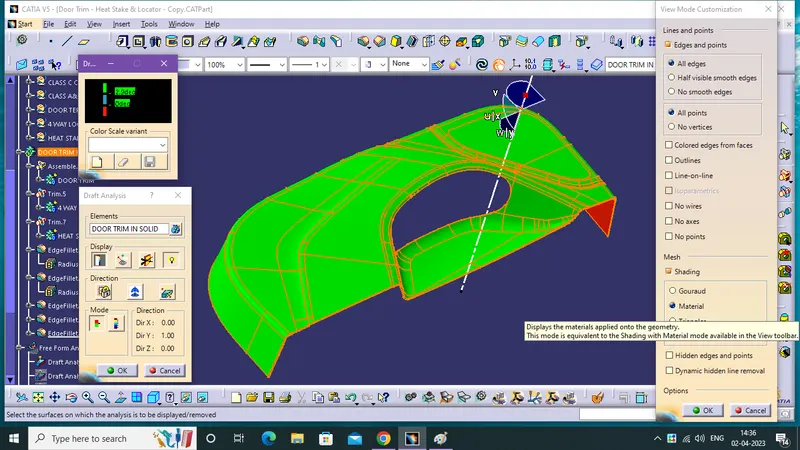
(* draft value 2.9 deg)
- First Enable The Final SoliD Door Trim for Draft Analysis. then, select the Material Mode on View Mode Customization.
- Insert a Draft Analysis then, click a Compass and drag into the main tooling axis then fix it in the axis using lock.
- enable the draft angle colour code dialog box for Door Trim.
some small amount of class C surface is 0deg, while in the 2.9 deg draft.
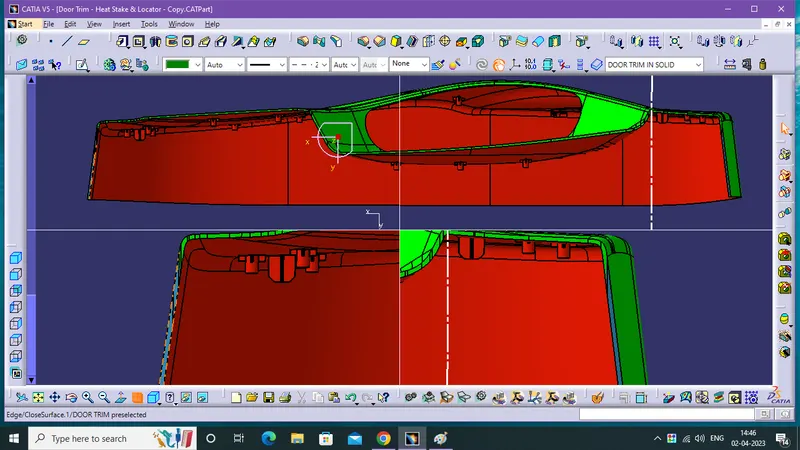
(* draft value 2.9 deg)
now it is clear the draft analysis with the draft value of 2.7 deg.
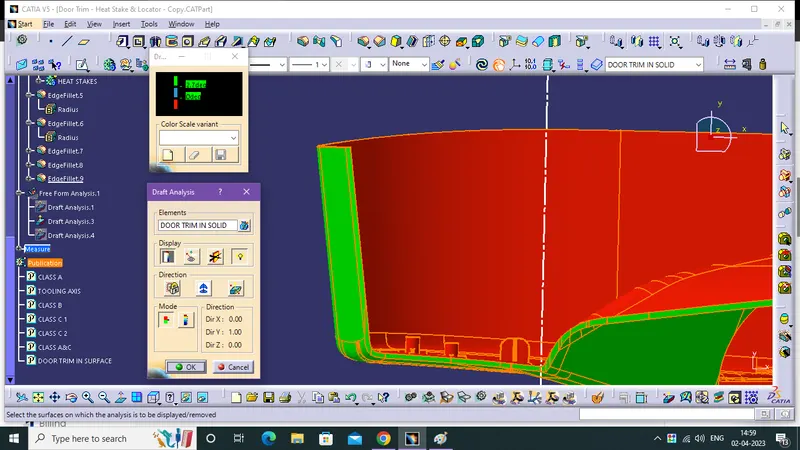
(* draft value 2.7 deg)
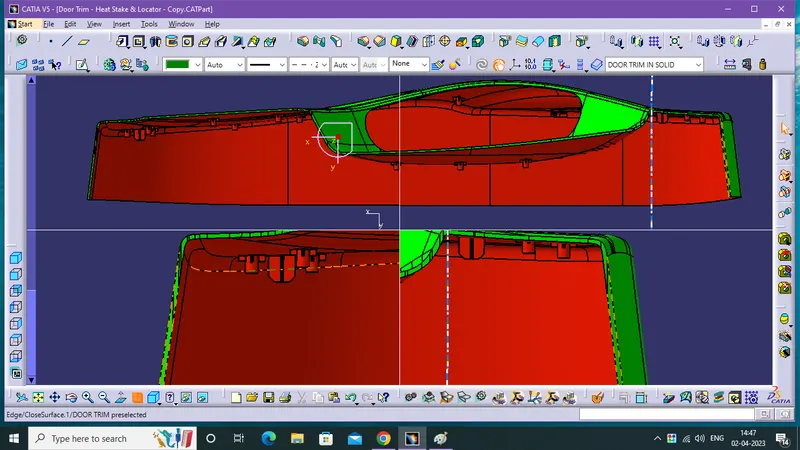
(* draft value 2.7 deg)
THE SOLID MODEL WITH THE PROPER COLOR CODE DRAFT ANGLE IN VARIOUS ORIENTAION (FRONT, TOP, SIDE AND ISOMETRIC VIEWS):
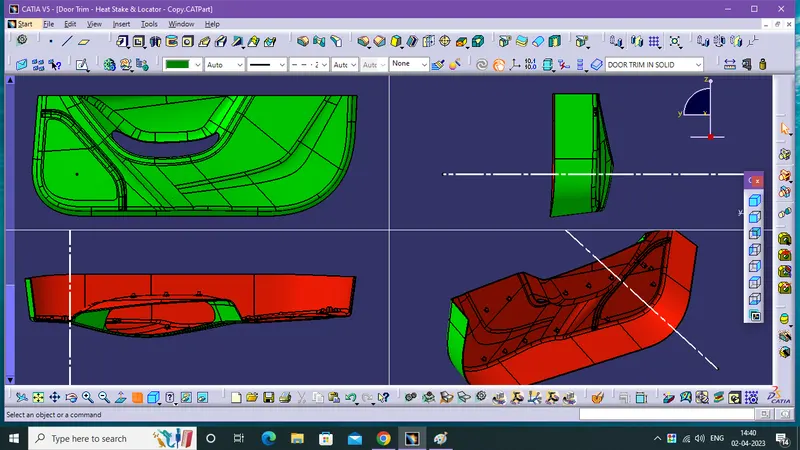
(* draft value 2.9 deg)
THE CREATTION OF 4 WAY LOCATOR AND HEAT STAKES:
- For the Heat Stakes and the Locators, I took the design rules mentioned in the video for the door applique.
For HEAT STAKE,
- Inner Dia 5mm,Outer Dia 7mm, Height from B surface approx. 10mm.
- ribs thicknes 1.3 mm, H from B urface approx 4mm.
- Fillets 0.3 mm, Draft 0.5deg.
For 4 WAY LOCATOR,
- Thickness 1.3mm ,Height from Bsurface approx. 15mm.
- Fillets 0.3mm, Draft 0.5deg.
- Champfer for top 3x45, Fillet for chamfer 3mm.
DRAFT ANALYSYS OF ENGINEERING FEATURES:
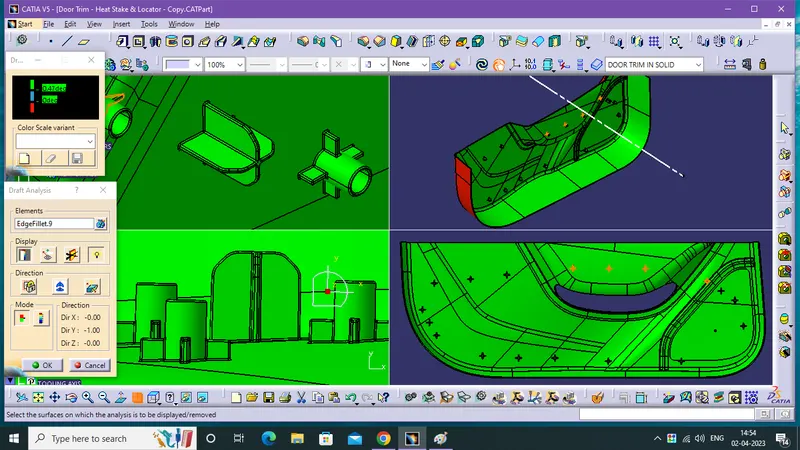
(* draft value 0.47 deg)
- First Enable The Final SoliD Door Trim for Draft Analysis. then, select the Material Mode on View Mode Customization.
- Insert a Draft Analysis then, click a Compass and drag into the main tooling axis then fix it in the axis using lock.
- enable the draft angle colour code dialog box for Door Trim.
CONCLUSION:
- Therefore,Creation and Draft analysis of Door trim with Engineering Features is done from given Input class A surface.