Exercise on M-script (Part-2)
Que. 1
AIM: To create a MATLAB Program that executes addition, subtraction, multiplication, left & right division matrix operations.
OBJECTIVES :
- To perform addition, subtraction, multiplication, left & right division.
PROGRAM :
% MATLAB Program to perform Arithmetic Operations

clear all
close all
clc

% Step I : Input Matrix
a = [11,3,15; 12,4,6; 7,18,9]
b = [8,16,4; 9,17,5; 3,1,12]

% Step 2 : Arithmetic Operations
c = a + b       % Addition of Matrix
d = a - b       % Subtraction of Matrix
e = a * b       % Multiplication of Matrix
f = a / b       % Division of Matrix
g = a \ b       % Back Division of Matrix
RESULTS :
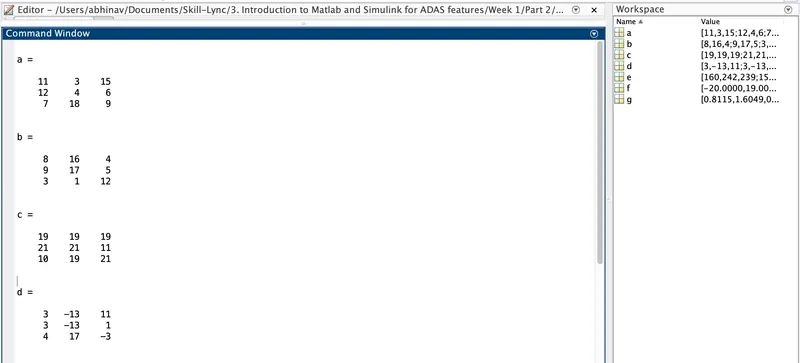
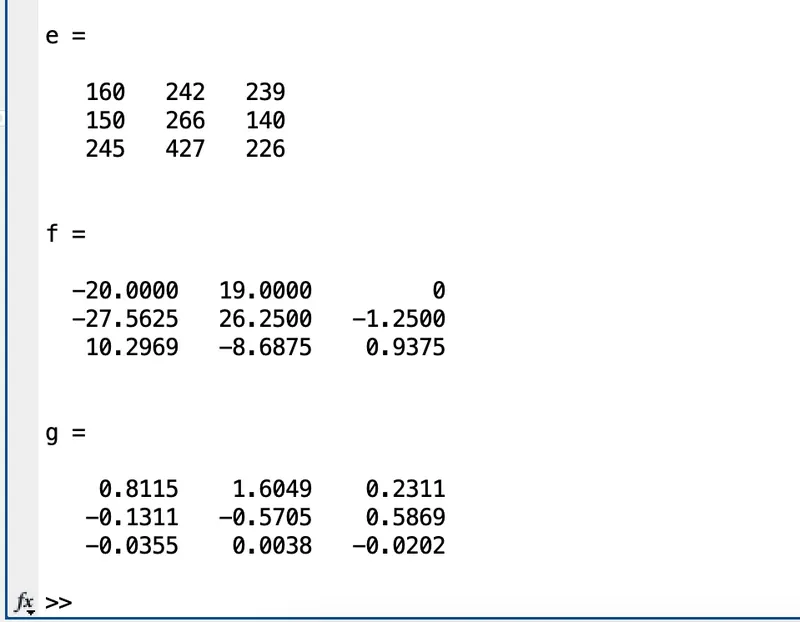
CONCLUSION :
We created a MATLAB script to execute arithmetic operations such as addition, subtraction, multiplication and left and right division based on the given data.
Que. 2
AIM: To create a MATLAB Program that executes concatenation, transpose and inverse matrix operations.
OBJECTIVES :
- To perform horizontal concatenation, vertical concatenation, transpose & inverse of matrices.
PROGRAM :
% MATLAB Program to perform Matrix Operations

clear all
close all
clc

% Step I : Input Matrix
a = [11,3,15; 12,4,6; 7,18,9]
b = [8,16,4; 9,17,5; 3,1,12]

% Step 2 : Concatenation Operation
c = horzcat(a,b)        % Horizontal Concatenation
d = vertcat(a,b)        % Vertical Concatenation

% Step 3 : Transpose Operation
e = a'
f = b'

% Step 4 : Inverse Operation
g = inv(a)
h = inv(b)
COMMANDS USED :
RESULTS :
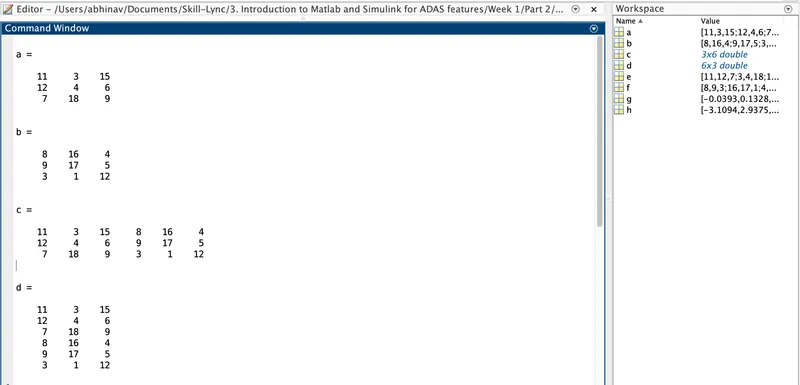
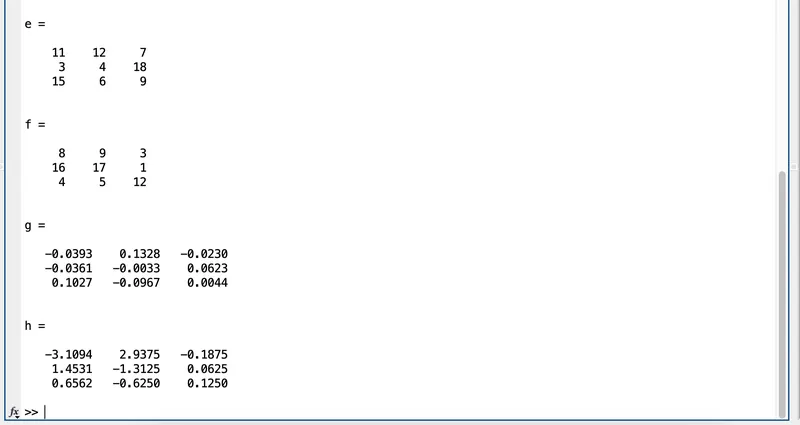
CONCLUSION :
We created a MATLAB script to execute arithmetic operations such as horizontal concatenation, vertical concatenation, transpose & inverse of matrices based on the given data.
Que. 3
AIM: To create a MATLAB Program that executes bitand, bitor, bitxor & bitshift.
OBJECTIVES :
- To perform bitand, bitor, bitxor & bitshift.
PROGRAM :
% MATLAB program to perform Bit-wise And, OR, XOR & Shift Operations

clear all
close all
clc

% Step I : Bit data
a = 60
b = 13

% Step 2 : Bit-wise And Operation
c = bitand(a,b)

% Step 3 : Bit-wise OR Operation
d = bitor(a,b)

% Step 4 : Bit-wise XOR Operation
e = bitxor(a, b)

% Step 5 : Bit-wise Shift Operation
f = bitshift(a,2)
g = bitshift(a,-2)
COMMANDS USED :
RESULTS :
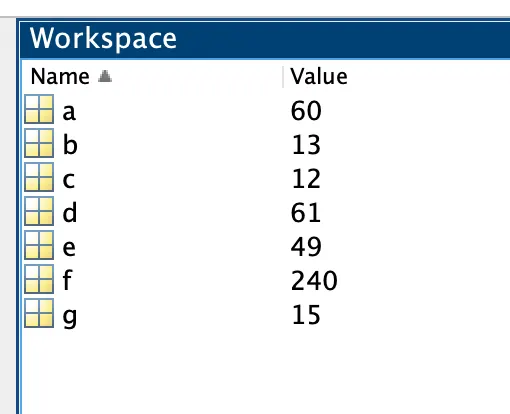
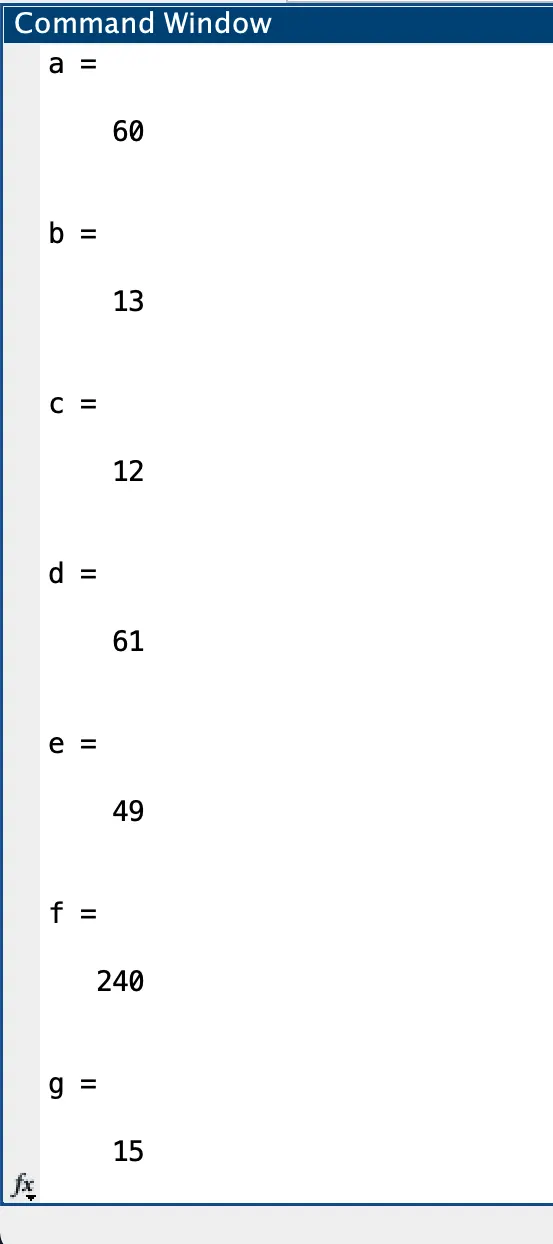
CONCLUSION :
We created a MATLAB script to execute operations such as bitand, bitor, bitxor & bitshift based on the given data.
Que. 4
AIM: To create a MATLAB Program that helps to sort the values in row-wise & then column-wise.
OBJECTIVES :
- To create a vector 'a'.
- To arrange them as numerically increasing values.
- To create a two-dimensional array ‘b’.
- To sort them along row-wise & then column-wise.
PROGRAM :
% MATLAB program to perform sorting of values

clear all
close all
clc

% Step I : Input Vector
a = [21,15,31,17,23,11,19,13,27]

% Step 2 : Sorting in Increasing Order
x = sort(a)

% Step 3 : Two Dimensional Array
b = [1,9,5; 2,8,4; 3,7,6]

% Step 4 : Sorting b along the row
c = sort(b,1)

% Step 5 : Sorting b along the column
d = sort(b,2)
COMMANDS USED :
RESULTS :
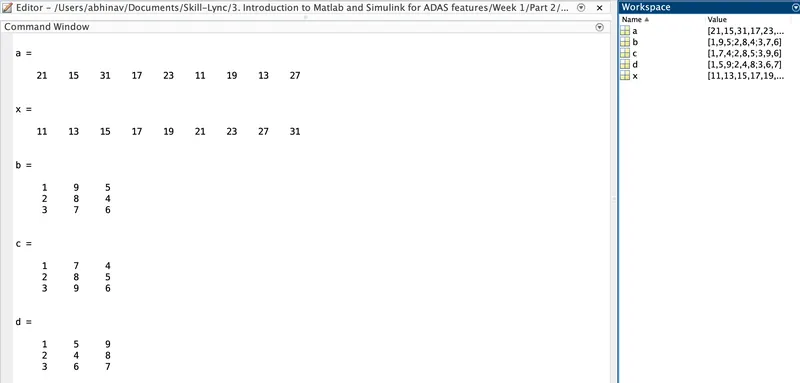
CONCLUSION :
We created a MATLAB script to execute operations such as arranging the vector in numerically increasing order and sorting them along row-wise and then column-wise.
Que. 5
AIM: To create a MATLAB program using string replace operation.
OBJECTIVES :
- To a string input of the following 11 players from the Indian Cricket Team.
- Using String Replace operation, replace Pant in place of Saha.
- To display the team name finally again.
PROGRAM :
% MATLAB program for Finding and Replacing Strings
clear all
close all
clc

% Step 1 : Input String
Team = ('Mayank Agarwal, Rohit Sharma, Cheteshwar Pujara, Virat Kohli, Ajinkya Rahane, Rishabh Pant, Ravichandran Ashwin, Ravindra Jadeja, Jasprit Bumrah, Mohammad Shami, Umesh Yadav')

% Step 2 : Find & Replace
Final_Team = strrep(Team, 'Rishabh Pant', 'Wriddhiman Saha')
COMMANDS USED :
RESULTS :

CONCLUSION :
We created a MATLAB script to execute operations for Finding and Replacing the player's name from the Indian Cricket Team using the Strings Replace operation.
Que. 6
AIM: To create a MATLAB program using joining string.
OBJECTIVES :
- To create a cell array of string input of above 11 players from the Indian Cricket Team.
- To join the multiple strings in an array into a single string using the [,] comma operator.
- To display the output with their names.
PROGRAM :
% MATLAB program for Joining Strings

clear all
close all
clc

% Step 1 : Input String
C = {'Mayank Agarwal', 'Rohit Sharma', 'Cheteshwar Pujara', 'Virat Kohli', 'Ajinkya Rahane', 'Rishabh Pant', 'Ravichandran Ashwin', 'Ravindra Jadeja', 'Jasprit Bumrah', 'Mohammad Shami', 'Umesh Yadav'}

% Step 2 : Joining into a single string
str = strjoin(C)


% Step 3 : Using Comma Operator
str = strjoin(C,', ')
COMMANDS USED :
RESULTS :
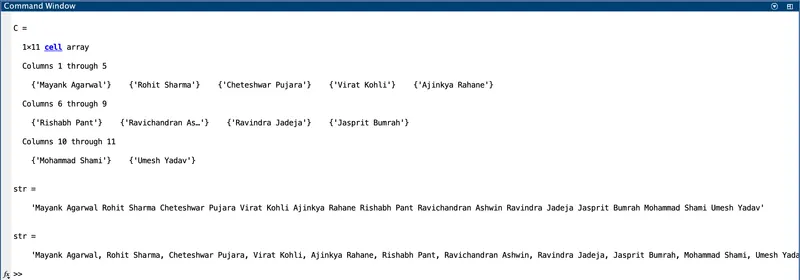
CONCLUSION :
We created a MATLAB script that performs a cell array of string inputs of the above list of 11 players from the Indian Cricket Team and joined the multiple strings into a single string using the comma operator which gives us the output in the form of names.