Week 1 - Exercise on M-script (Part - 1)
Que. 1
AIM: To write a Matlab program that calculates the square root of a given number.
OBJECTIVES :
- To calculate the square root of a given number.
PROGRAM :
% MATLAB Program to calculate the Square Root
clear all
close all
clc

% Step 1
fprintf('To calculate the square root of a desired value \n \n')

% Step 2 : Variables
x = input('Enter the Value = ');
y = sqrt(x);

% Step 3 : Results
fprintf('Square Root = %f \n \n',y);
fprintf('The square root of %.2f is %.2f \n \n',x,y);
COMMANDS USED :
RESULTS :

CONCLUSION :
Hence we have created a MATLAB program that helps to calculate the square root of any desired number.
Que. 2
AIM: To write a Matlab program to calculate the total wage amount of a single employee.
OBJECTIVES :
- To calculate the total wage amount of a single employee.
PROGRAM :
% MATLAB program to calculate the total wage amount of an employee

clear all
close all
clc

% Step 1 : Program
fprintf('To calculate the Total Wage Amount of an Employee\n\n');

% Step 2 : Inputs
a = input('Enter the Daily Wage Amount = ');
b = input('Enter Number of Days of Work in a Year = ');

% Step 3 : Calculations
% Total Wage Amount
t = a*b;

% Step 4 : Results
fprintf('Total Wage Amount of an Employee is ₹%.2f \n \n', t);
COMMANDS USED :
RESULTS :

CONCLUSION :
As a result, we developed a MATLAB program that helps to calculate the total wage amount of a single employee annually.
Que. 3
AIM: To write a Matlab program to get temperature input as kelvin & convert it to both Celsius & Fahrenheit.
OBJECTIVES :
- To provide any input temperature as Kelvin.
- To convert Kelvin temperature into Celsius & Fahrenheit.
FORMULA :
Kelvin to Celsius
°C=K−273°C=K-273
Kelvin to Fahrenheit
°F=(95)(K−273)+32°F=(95)(K-273)+32
| where, | |
| K | Kelvin |
| °C | Celsius |
| °F | Fahrenheit |
PROGRAM :
% MATLAB program to convert temperature from Kelvin to Celsius and Fahrenheit
clear all
close all
clc

% Step 1 :
fprintf('To convert temperature from Kelvin to Celsius and Fahrenheit \n \n')

% Step 2 : Input
K = input('Enter the Temperature in Kelvin = ');

% Step 3 : Formulae
C = K - 273;
F = (9./5).*(K - 273) + 32;

% Step 4 : Results
fprintf('\n \nTemperature in Celsius = %.2f °C\n', C)
fprintf('Temperature in Fahrenheit = %.2f °F\n \n', F)
COMMANDS USED :
RESULTS :

CONCLUSION :
As a result, we developed a MATLAB program that can be used to convert the temperature from Kelvin to Celsius and Fahrenheit.
Que. 4
AIM: To write a MATLAB program to determine whether the specified year is a leap year or not.
OBJECTIVES :
- To determine whether the specified year is a leap year or not.
THEORY :
A regular year in the Gregorian calendar has 365 days. Because a sidereal year (the time it takes for the Earth to cycle once around the Sun) is 365.2425 days, a "leap year" of 366 days is used once every four years to correct for the inaccuracy caused by three regular (but short) years. A leap year is any year that is equally divisible by four: for example, 1988, 1992, and 1996.
However, there is one minor flaw that needs to be addressed. To avoid this problem, the Gregorian calendar requires that a year that is equally divisible by 100 (for example, 1900) is also evenly divisible by 400 to be considered a leap year.
As a result, the following years will not be leap years: 1700, 1800, 1900, 2100, 2200, 2300, 2500, 2600, 2100, 2200, 2300, 2500, 2600. In this case, they are evenly divisible by 100 but not by 400.
The years 1600, 2000, and 2400 are leap years. This is because they are evenly divisible by 100 and 400.
PROGRAM :
% MATLAB Program to find the specified year is a Leap Year or Not

clear all
close all
clc

% Step 1 :
fprintf('To determine whether the specified year is a Leap Year or not \n \n')

% Step 2 : Input
year = input('Enter the year to check if it is a leap year = ');

% Step 3 : IF Statement
if ((rem(year,4)==0) && ((rem(year,100)~=0) || (rem(year,400)==0)));
    disp('1')
    disp('It is a Leap Year')
else
    disp('0')
    disp('It is not a Leap Year')
end
COMMANDS USED :
RESULTS :
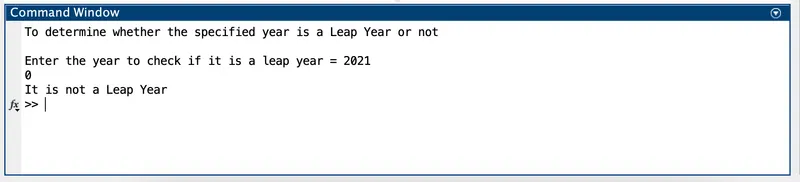
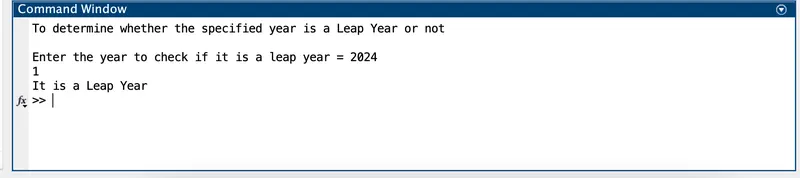
CONCLUSION :
As a result, we developed a MATLAB program that helps to determine whether the specified year is a leap year or not.
Que. 5
AIM: To write a Matlab program that helps to perform the multiplication of two input vectors.
OBJECTIVES :
- To provide 'a' as a row vector and 'b' as a column vector.
- To multiply the given equation c = a*b.
PROGRAM :
% MATLAB Program to perform Multiplication of two Input Vectors

clear all
close all
clc

% Step 1 : Input Variables
% Row Vector
a = [2, 4, 6, 8, 10]

% Column Vector
b = [1; 3; 5; 7; 9]

% Step 2 : Multipliaction
c = a*b
RESULTS :
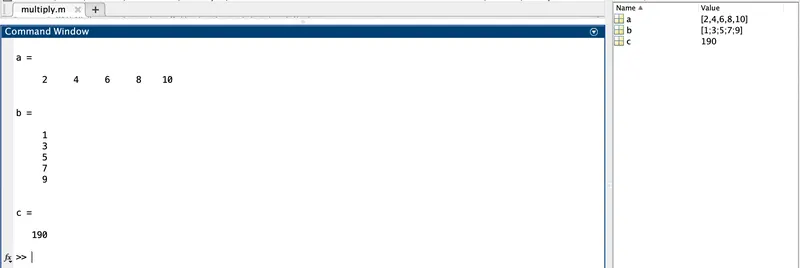
CONCLUSION :
From the two input vectors a & b, we have calculated its product value with the help of the equation c = a*b.
Que. 6
AIM: To write a MATLAB program that helps to perform basic arithmetic operations.
OBJECTIVES :
- To perform basic arithmetic operations on values of 'a' & 'b'.
- Take input 'b' as a scalar value.
THEORY :
When you add, subtract, multiply or divide a matrix by a number, that operation is called a scalar operation. It produces a new matrix with the same number of rows and columns with each element of the original matrix added to, subtracted from, multiplied by or divided by the number.
PROGRAM :
% MATLAB Program to perform basic Arithmetic Operations

clear all
close all
clc

% Step 1 : Input Variables
a = [9,1,8; 2,7,3; 4,6,5];  % 3x3 Matrix
b = [3];                    % Scalar Value

% Step 2 : Arithmetic Operations & Results
c = a+b
d = a-b
e = a*b
f = a/b
RESULTS :
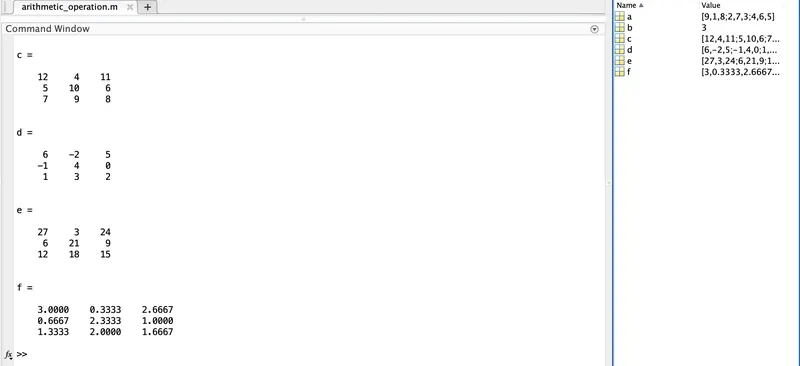
CONCLUSION :
From the above vectors a & b, we have created a MATLAB program that helps to calculate various arithmetic operations such as c = a+b, d = a-b, e = a*b and f = a/b.