Week 1 Challenge
1. 1. Write the steps involved to upload a .std file through web mail?
- Open STAADPro software anf from introduction page there is a option to share.
- Choose share throught mail and the file is upload as .std file.
2. Name the different materials that can be designed using STAAD Pro.
- Concrete
- Steel
- Aluminium
- Strainless steel
3. Is it possible to capture images in STAAD Pro? If yes how?
Yes, by choosing utilities and under utilities choose take picture.
4. Name the three ways by which you can create a model.
The way of creating model are,
- Analytical
- Physical
- Building
5. Write the steps followed to assign properties in a model.
- After completition of geomentry go to property tab
- Define section i.e rectangular or circular
- Then specify its properties and specify the material.
2. 1. Name any six design parameter involved in RCC design.
Parameter involved in RCC design are,
- Depth
- Width
- Yield strength
- Compressive strength
- Maximum main reinforcement
- Maximum secondary reinforcement
2. What are the different cursor types available in STAAD Pro?
- Node cursor
- Beam cursor
- Plate cursor
- Solid cursor
3. How will you generate different views for a model? State the steps involved.
- Go to view tab
- Under view tab there is different view and choose it.
4. Explain the procedure to define a “Simply Supported” condition in STAAD Pro
- Go to support and create the support
- Choose the support that want to load
- Assing the same support on both the side.
5. Name any five topics that you will include while creating DBR.
- Name of the project
- Location of tghe project
- Structural layout
- Load and combination
- Analysis and methodology
6. Describe the term “Multi material design” of STAAD Pro.
Multi material design is defned as the structural element that is designed more than one structural material.
3. 1. Name the structure systems in STAAD Pro? Explain each system?
The structural ststem are,
- Space
- Plane
- Frame
- Truss
2. Explain the coordinate system adopted in STAAD Pro software.
The coordinate system adopted are:
- Global X
- Global Y
- Global z
- Local X
- Local Y
- Local Z
3. Elaborate DBR and its uses.
DRB-Design Basis Report.
- It is used to specify and complete the data required for analysis and design of structural element
- It clearly de[icts the assumptions and specification that are being used to develop
4. Explain the different types of analysis options in STAAD pro.
The different type of analysis options are,
- Perform analysis
- PDelta analysis
- Perform cable analysis
- Perform imperfection analysis
- Perform direct analysis
- Non linear analysis
- Generate floor spectrum
5. Explain the difference between Fixed and Fixed But condition.
Fixed:
In this type of condition,both the moment and forrces are restrained.
Fixed but:
In this type of condition ,we can releases the force and moment which is not required.
Practical
Aim:
To create a STAAD.PRO model.
Procedure:
- Open STAAD.PRO and choose new and choose the file name and the place to save it.
- And choose type as analytical and choose metric.
- And give create.
- Choose grid from toolbar abd choose the distance.
- Then choose add beam to join the two nodes.
- And choose properties.
- Then move to support and add the support .
- Add fixed and then add roller suport.
- Use the cursor to assign the support.
- To add load go to loading and add a dead load and add the point load.
- Now go to analysis and run analysis.
Result:
Thus the STAAD.PRO model has been completed.
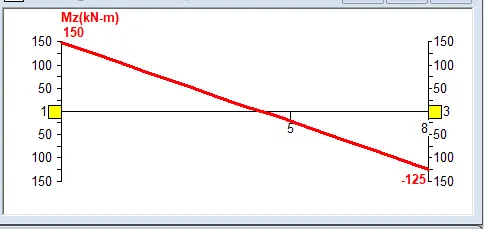
SFD
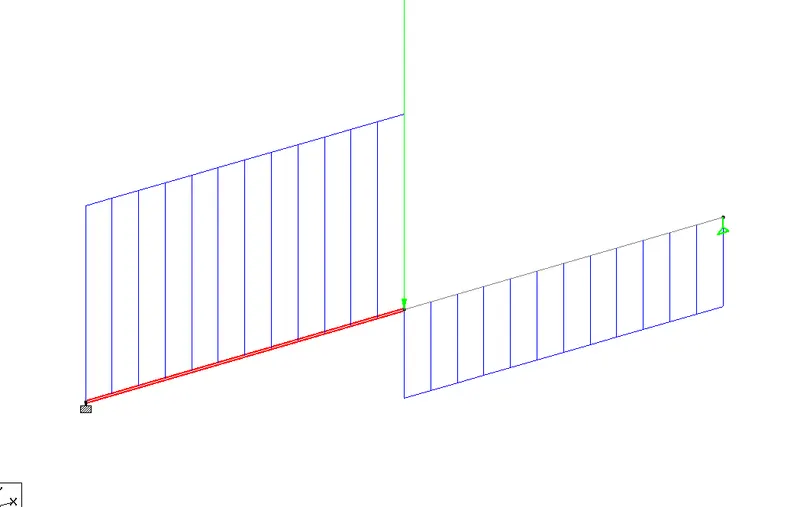
BMD