Week 1 Challenge
(1)
ANS1
--------------------------------------------------------------------------------------------------------------------------------------------------------------Ways
ANS 2 : Different material that can be designed using STAADPRO are:
Aluminium, Concrete, Stainless Steel, Steel
---------------------------------------------------------------------------------------------------------------------------------------------------------------
Ans 3: Yes, it is possible to capture the images in stadd pro using icons available in task bar as marked in the below mentioned screenshots.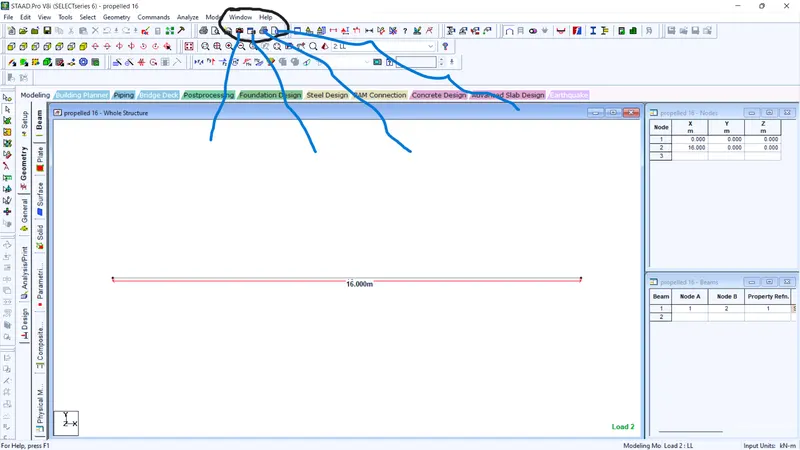
Starting from left to right,
first line shows camera option
Second line shows EXPORT VIEW save an image in various formats such as bitmap, jpeg, tiff, pcx, targa.
Third line shows print current view.
Fourth line PRINT PREVIOUS CURRENT VIEW.
------------------------------------------------------------------------------------------------------------------------------------------------------------------
Ans 4: There are two ways of creating a model in the staad pro as mentioned in class lectures:
- By Coordinates System
- By using RUN structural wizard(Select GEOMETRY option in the task bar, select prototypes from the drop down list with various options such as TRUSS, FRAME, SURFACE/PLATE, SOLID, COMPOSITE, IMPORT CAD, VBA MACRO)
- By using Structural wizard option enclosed with user defined option.
------------------------------------------------------------------------------------------------------------------------------------------------------------------
ANS 5:
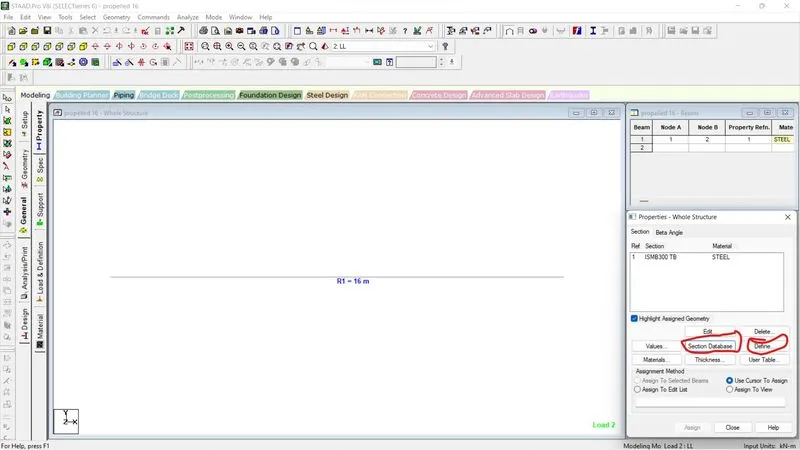
Steps to be followed to assign properties in a model:
Properties option is enclosed within GENERAL tab while preprocessing has been done.
Properties can be assigned through two ways:
1. By selecting SECTION DATABASE in the right hand side of the screen adopting rolled/built-up section.
2. By defining the section properties manually.
------------------------------------------------------------------------------------------------------------------------------------------------------------------
(2)
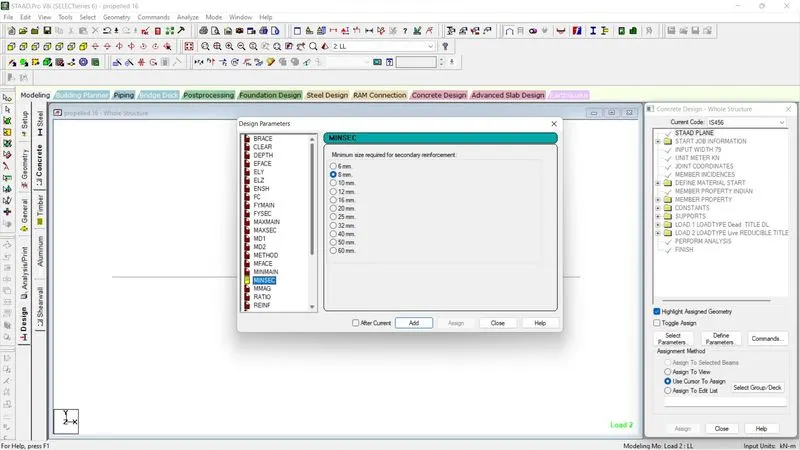
ANS 1: Six Design Parameters included in RCC Design:
Clear cover, Yield strength(kn/mm2), Ultimate strength, Torsion, Bracing, Effective length factor along x.z direction, unsupported length ,
Spacing between main bars, Max/Minimum size of main/ secondary reinforcement.
---------------------------------------------------------------------------------------------------------------------------------------------------------------
ANS 2:
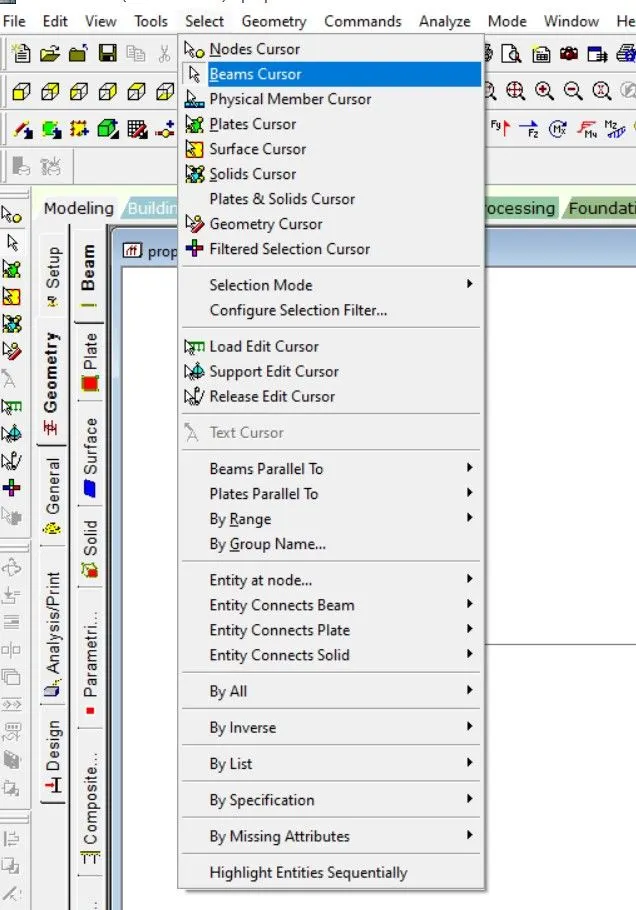
There are 12 types of cursor in staad pro software which are as follows:
- Node cursor
- Beam Cursor
- Physical Member cursor
- Plate Cursor
- Surface Cursor
- Solids Cursor
- PLates & Solids cursor
- Geometry Cursor
- Filtered Selection
- Load Edit Cursor
- Support Edit cursor
- Release Edit Cursor
-------------------------------------------------------------------------------------------------------------------------------------------------------------------
ANS3: Ways to generate different views for a model:
1. Select VIEW option in the taskbar, drop list would open up and then select VIEW MANAGEMENT from the drop down list.
2. Select the required option from the list of four items.
3. Save the view .
-----------------------------------------------------------------------------------------------------------------------------------------------------------------
ANS 4: create a simple support at the ends :
1. IN pre-processing mode, Select GENERAL tab from the toolbar and then, select SUPPORT option .
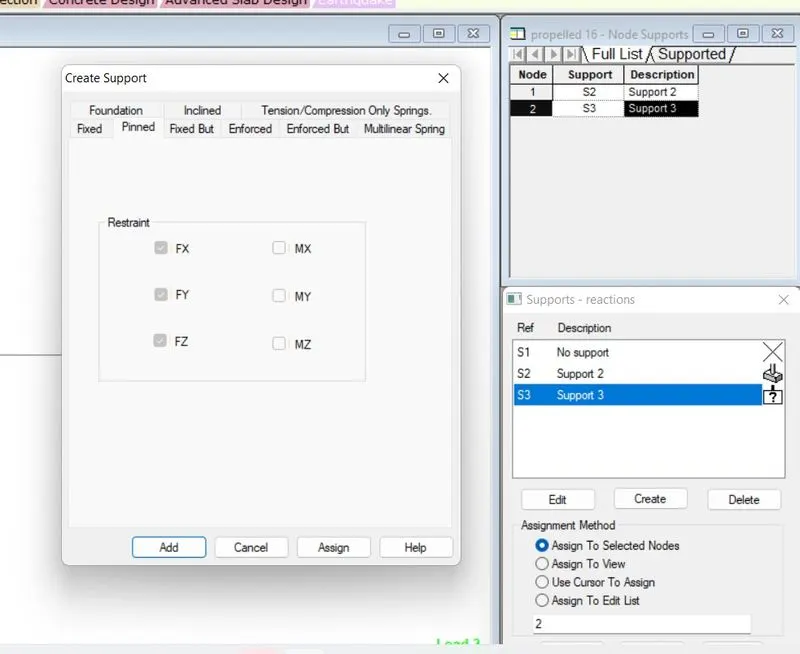
2. Choose CREATE option to create a support and then, choose pinned support from the various options available as described in the screenshot below.
3. Simple support means release of moment from all the axes and providing restraint support translationally either in two axes or in three axes based on planar or space model respecvtively.
--------------------------------------------------------------------------------------------------------------------------------------------------------------------
ANS 5:
Topics to be included while creating DBR (Design Basis Report):
1. Various assumptions to be included in the design data.
2. Introduction of the project, Client, contractor and Monitoring agency info, Location and place of the project.
3. Structure consist of sub-structure and super-structure, their description/ specification is clearly mentioned.
4. Material used in the construction process and its load analysis
5. Soil data shall be provided along with geological report of the site.
6. Design Parameters to be adopted in the preeliminary study.
----------------------------------------------------------------------------------------------------------------------------------------------------------------
ANS:6 MULTI MATERIAL DESIGN of STAADPRO means various materials used in the building based on its properties to bear the structural loads coming over the structure.
In STADD, we are using four types of materials: Stainless Steel, Steel, Aluminium, wood.
If due to structural complexity or architectural shape, homogeneous construction can not be done using singular material then we may provide different material with various structural form like Space truss, Gable frame or any other component depending on the requirement at the site.
-------------------------------------------------------------------------------------------------------------------------------------------------------------------
(3)
ANS: 1 Structural systems in STAAD PRO are:
1. Truss Frame (HOWE truss/roof, PRATT, LATTICE, WARREN, NORTH LIGHT).
2. Frame Models (BAY frame, GRID frame, continuous beam, circular beam, Cylindrical Frame, Reverse Cylindrical Frame).
3. PLATE/ SURFACE model(polygonal plate with holes, Circular plate with hole, cylindrical surface, spherical surface, Hyperbolic-Paraboloid shell, Cooling towers).
4. Solid Model
5. VBA MACROS model (stadium roof, simple roof)
6. COMPOSITE model (BUNKER/SILO)
------------------------------------------------------------------------------------------------------------------------------------------------------------------
ANS 2: Coordinate system adopted in staad pro software:
1. Modeling of the structure is oftenly done through coordinate system.
2. Using Coordinates, we can draw the user defined models as per the structural niche.
3. Use Absolute coordinates system to assign nodes to a particular model.
4. After defining the coordinates, these nodes would be connected through various cursor based on the nature of element.
5. Incase of repetition along any of the axis, Translational repeat may be used with different span/height dimensions.
6. Link Steps if necessary during 5th step only.
7. Various Miscellanous tools might be required for assigning/locating the coordinates such as mirror, select intersect beams, copy & paste option based on drawing and draftman understanding.
-------------------------------------------------------------------------------------------------------------------------------------------------------------------
ANS 3: Design Basis Report(DBR) and it's uses:
Design Basis Report has been made during the preliminary survey of the site or before the commencement of work.
It contain various facts about the site like Location and place of site i.e. (introduction), Structural components (Soil survey, Geological survey, Hydrological data, Substructure & superstructure), Loading (Different materials used in the construction and its various property), Design data (Anticipated Data, Assumption while designing the elements, Various empirical equations or theory used in the design process, various codes referred etc.)
1.Such documents are prepared to understand newly engaged/employee executive about the project i.e. it provides perception towards aim.
2. Specific Criteria and drawing/codal specification can be monitored at site using DBR.
3. Such document help in estimating the anticipated cost the project.
4. help in preparing bill of quantity of various items.
5. Help in managing the resourses department to contact or quote tenders for different vendors at site.
6. Elaborate the material quantity and quality requirement at the site.
7. Various Site Conditions are mentioned in such documents which purge the execution mistakes upto maximum limit.
8. along with Execution, It is a key module for planning and designing as prepared during preeliminary survey.
------------------------------------------------------------------------------------------------------------------------------------------------------------------
ANS 4 Analysis option used in STAADPRO are:
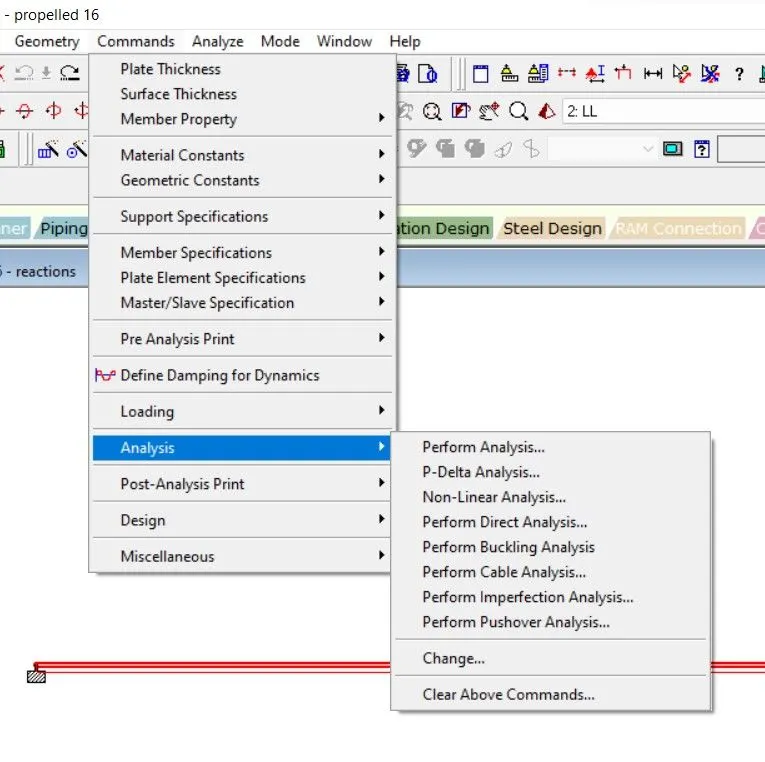
There are eight type of analysis which are shown in the above screenshot :
1. PERFORM ANALYSIS: it is an elastic model analysis, where stress generated in the member is within Elastic Limit.
2. P-DELTA ANALYSIS: It is an iterative process of two degree where two unknown are present (Axial load and its corresponding buckling deflection).
3. NonLinear Analysis:
------------------------------------------------------------------------------------------------------------------------------------------------------------------
ANS 5:
D/b FIXED & FIXED BUT CONDITION:
| FIXED SUPPORT | FIXED BUT CONDITION |
| All reactions are restraint along all the axes. |
Some reaction may be restraint fully or may be released . |
| it is predefined support | it is USER Defined support |
| can not be edited. | can be edited |