Week 1 Challenge
Theory
1.
a) The Steps involved in uploading a .stad file using a web mail are as following:
- Open the staad pro window.
- On the left hand corner we can find soo many options like, open, new, archieve, share and help.
- From these option select Share option
- Now we can upload the .stad file and can mail it.
b) Different types of materials that can be designed using STAAD Pro are, Concrete, Steel, Aluminium and Timber.
c) It is possible to capture image in STAAD Pro by selecting th Utility menu. From the utility menu, there is an option Take a picture, by using that, we can take a snapshot of the current structure view and adds itto the photo album so that it can be used in the creation of a user report in STAAD Pro.
d) The three ways by which you can create a model are Analytical, Physical and Building. The Physical option lets you use the STAAD.Pro Physical Modeler (SPPM) which allows modeling members and surfaces as physical entities as opposed to analytical elements. The Building mode is to access the Building Planner that lets you easily model concrete building floors and is primarily used for design of concrete buildings as per Indian codes
e) The steps followed to assign properties in a model are:-
- Select the members which all have the same section.
- Now select the Section tool in the Assign properties group on the Member ribbon tab.
- And select the profile to use and click OK.
2.
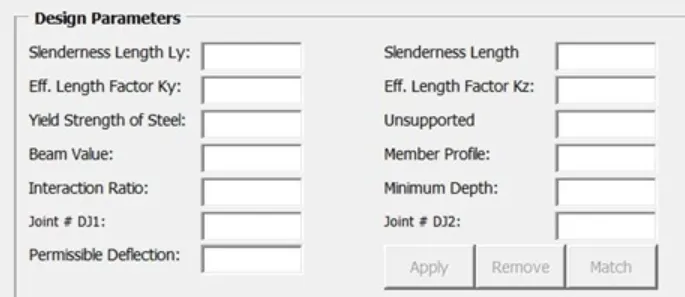
a) The design parameter involved in RCC design are:-
- Slenderness Length
- Effective Length factor
- Yield Strength of steel
- Beam Value
- Interaction Ratio
- Minimum depth
- Permissible deflection
b) The different cursor types available in STAAD Pro are as following :-
- Nodes Cursor : This cursor is used to select the nodes
- Beam cursor : This cursor is used to select the beams
- Plate cursor : This cursor is used to select the plates
- Solid cursor : This cursor is used to select the solid elements
- Geometry cursor : This is used to select nodes, members and elements of the structure.
- Members cursor : This cursor is used in Steel Design or Concrete Design to select all those beams defined as a same member.
- Plates and solids cursor : This is used to select the plates and solid elements
- Select text cursor : This is used to add comments and titles to pictures result diagrams and plot it.
- Previous cursor : This cursor selects the last objects selected , if the selection set has changed or deselected.
- Load cursor : This cursor is used to modify any load already applied on the model by double clicking it, the mouse pointer changes to the Load Edit Cursor.
c) The view window contains a unique control device called the Rotation Gizmo which allows us to select set view orientations or to orient the model in the view about the global axes.
We can generate different views for a model by the following steps:-
- Firstly click the Rotation Gizmo to display preset views.
- Now click the Invert icon to display the reverse of these views.
- Now click and drag on the Rotation Gizmo axes to rotate the view about that global axis.
- By clicking on the zoom controls to zoom in or out of parts of the model. Click-and-drag the scroll wheel to pan the view.
- And by clicking on the Perspective control, we can display the perspective switch and slider.
d)