Creation of geometries by Coordinate system methods using AutoCad
Aim: To create the geometries from P1 to P2 using all the coordinates system methods using the line and circle tools.
Introduction: AutoCAD offers three co-ordinate systems in which we make sketches. They are;
- Absolute co-ordinate system: Use of cartesian co-ordinate system where all the co-ordinates are with respect to the origin(0,0)
- Relative rectangular co-ordinate system: Co-ordinate system in which the co-ordinates are with respect to the previous co-ordinate.
- Relative polar co-ordinate system: In Polar co-ordinate system, the co-ordinates whose length and angles are specifies
- Direct distance entry
Software used: AutoCAD 2022
Initial procedure: The following set-up should be done before sketching
- Open AutoCAD
- Type QNEW command in the command box
- Set the decimal units
- Set the unit
- Set the decimal (precision to 0.0)
- Set the angle, decimal degree, angle measure, the direction
- Set the area as
P1.
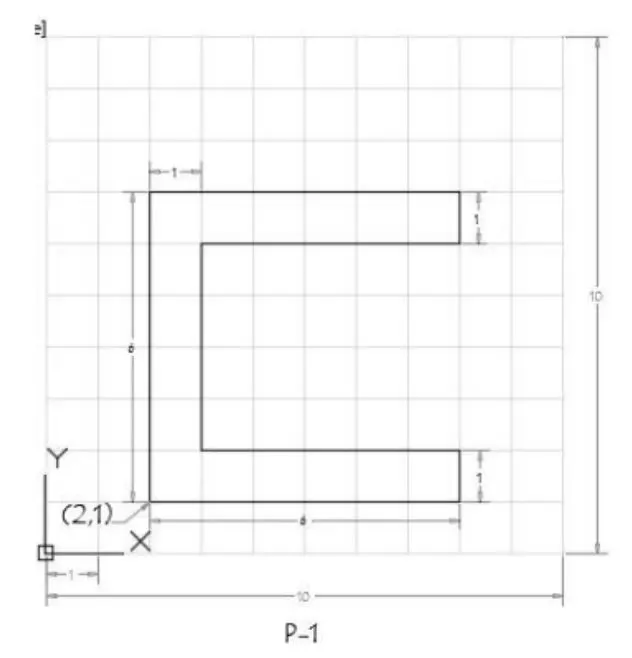
Procedure:
ABSOLUTUE CO-ORDINATE SYSTEM:
- Type Line command in the command box
- Specify the first point (2,1) as the start point
- Specify the next point (8,1)
- Specify the next point (8,2)
- Specify the next point (3,2)
- Specify the next point (3,6)
- Specify the next point (8,6)
- Specify the next point (8,7)
- Specify the next point (2,7)
- Now click Esc or close.
Result:
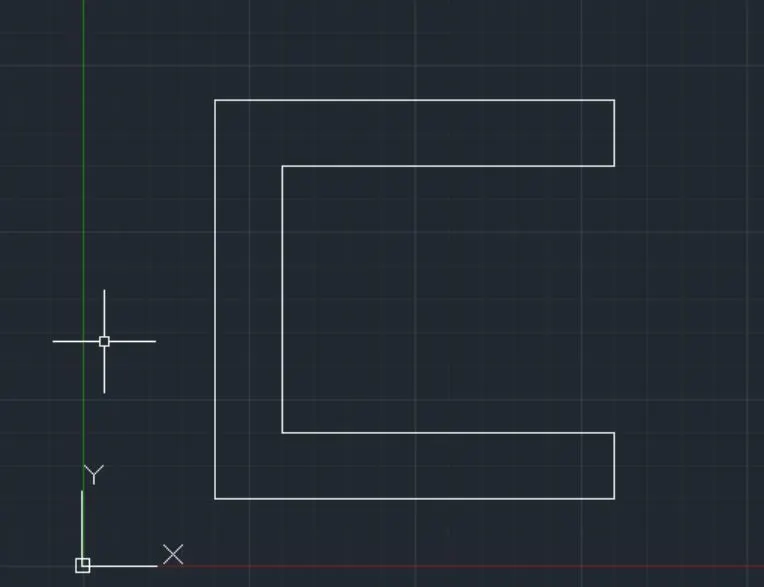
RELATIVE RECTANGULAR CO-ORDINATES SYSTEM:
- Type Line command in the command box
- Specify the start point (2,1)
- Now specify the next point as @6,0 (where, dx= 6 units, dy=0 units)
- Specify the next point as @0,1 (where, dx= 0 units, dy=1 units)
- Specify the next point as @-5,0 (where, dx= 5 units, dy=0 units)
- Specify the next point as @0,4 (where, dx= 0 units, dy=4 units)
- Specify the next point as @5,0 (where, dx= 5 units, dy=0 units)
- Specify the next point as @0,1 (where, dx= 0 units, dy=1 units)
- Specify the next point as @-6,0 (where, dx= 6 units, dy=0 units)
- Now close
Result:
RELATIVE POLAR CO-ORDINATES SYSTEM:
- Type Line command in the command box
- Specify the start point (2,1)
- Now specify the next point as @6<0
- Specify the next point as @1<90
- Specify the next point as @5<180
- Specify the next point as @4<90
- Specify the next point as @5<0
- Specify the next point as @1<90
- Specify the next point as @6<180
- Specify the next point as @6<270
- Now close
Result:
P2.
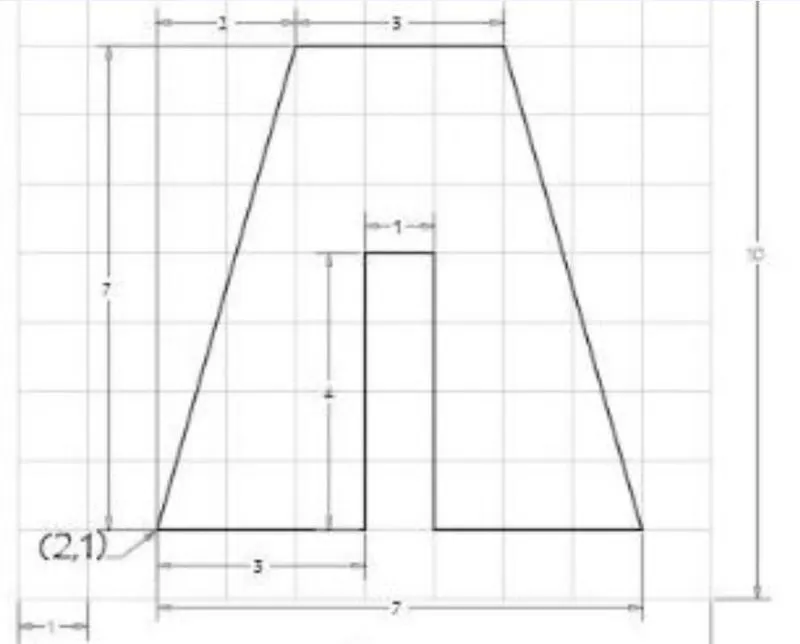
Procedure:
ABSOLUTUE CO-ORDINATE SYSTEM:
- Type Line command in the command box
- Specify the first point (2,1) as the start point
- Specify the next point (5,1)
- Specify the next point (5,5)
- Specify the next point (6,5)
- Specify the next point (6,1)
- Specify the next point (9,1)
- Specify the next point (7,8)
- Specify the next point (4,8)
- Now click Esc or close.
Result:
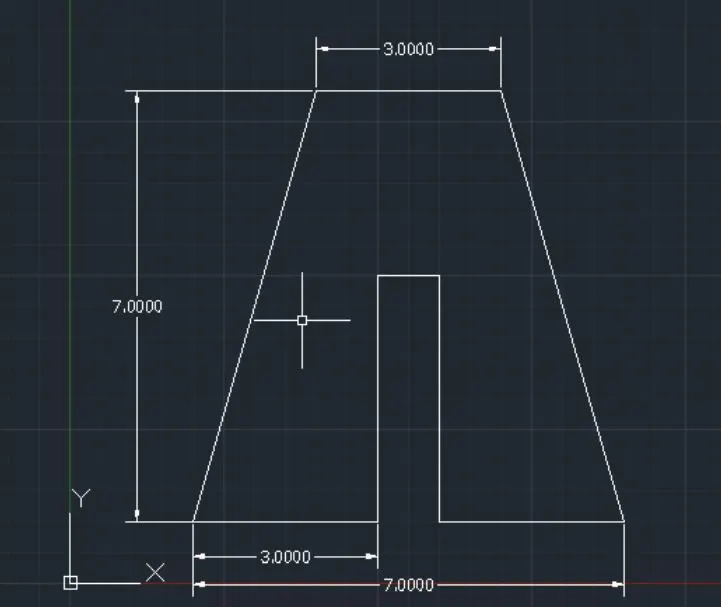
RELATIVE RECTANGULAR CO-ORDINATES SYSTEM:
- Type Line command in the command box
- Specify the start point (2,1)
- Now specify the next point as @3,0 (where, dx= 3 units, dy=0 units)
- Specify the next point as @0,4 (where, dx= 0 units, dy=4 units)
- Specify the next point as @1,0 (where, dx= 1 units, dy=0 units)
- Specify the next point as @0,-4 (where, dx= 0 units, dy=4 units)
- Specify the next point as @3,0 (where, dx= 3 units, dy=0 units)
- Specify the next point as @-2,7 (where, dx= 2 units, dy=7 units)
- Specify the next point as @-3,0 (where, dx= 3 units, dy=0 units)
- Now close
Result:
RELATIVE POLAR CO-ORDINATES SYSTEM:
- Type Line command in the command box
- Specify the start point (2,1)
- Now specify the next point as @3<0
- Specify the next point as @4<90
- Specify the next point as @1<90
- Specify the next point as @4<270
- Specify the next point as @3<0
- Specify the next point as @7<90
- Specify the next point as @2<180
- Join the starting point and end point, and delete the excess lines
- Now close
Result:
P4.
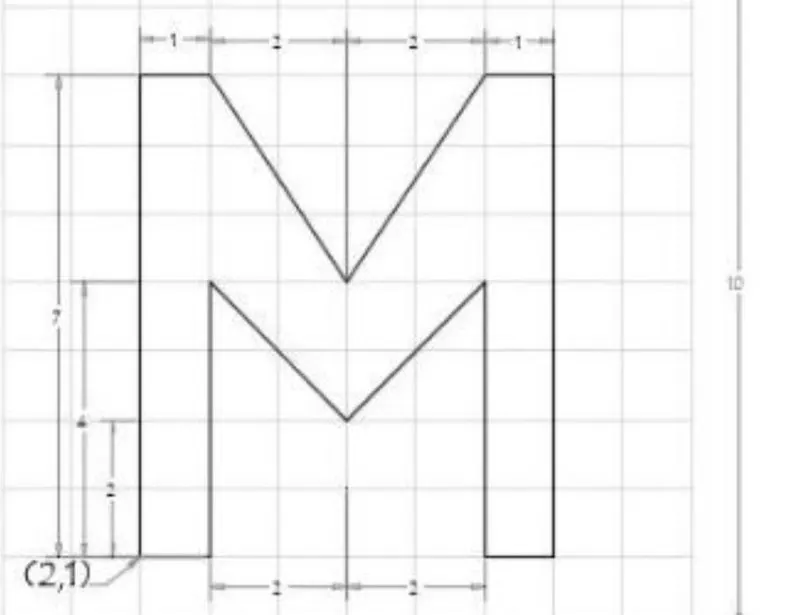
Procedure:
ABSOLUTUE CO-ORDINATE SYSTEM:
- Type Line command in the command box
- Specify the first point (2,1) as the start point
- Specify the next point (3,1)
- Specify the next point (3,5)
- Specify the next point (5,3)
- Specify the next point (7,5)
- Specify the next point (7,1)
- Specify the next point (8,1)
- Specify the next point (8,8)
- Specify the next point (7,8)
- Specify the next point (5,5)
- Specify the next point (3,8)
- Specify the next point (2,8)
- Now click Esc or close.
Result:
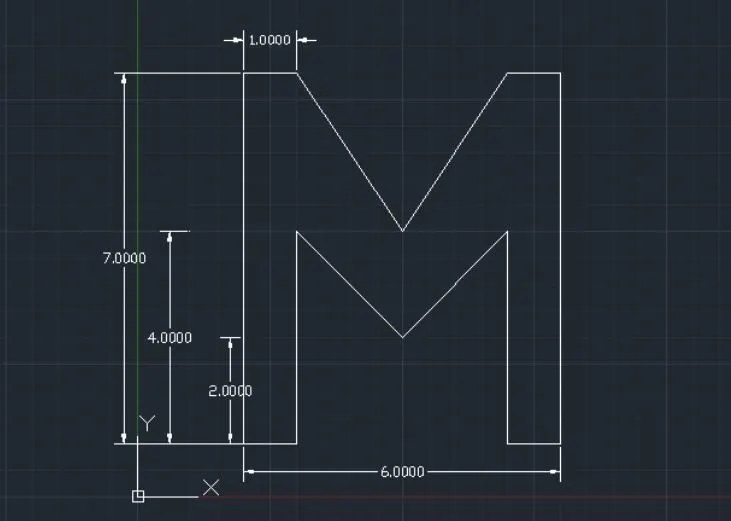
RELATIVE RECTANGULAR CO-ORDINATES SYSTEM:
- Type Line command in the command box
- Specify the start point (2,1)
- Now specify the next point as @1,0 (where, dx= 1 units, dy=0 units)
- Specify the next point as @0,4 (where, dx= 0 units, dy=4 units)
- Specify the next point as @2,-2 (where, dx= 2 units, dy=2 units)
- Specify the next point as @2,2(where, dx= 2 units, dy=2 units)
- Specify the next point as @0,-4 (where, dx= 0 units, dy=4 units)
- Specify the next point as @1,0 (where, dx= 1 units, dy=0 units)
- Specify the next point as @0,7 (where, dx= 0 units, dy=7 units)
- Specify the next point as @-1,0 (where, dx= 1 units, dy=0 units)
- Specify the next point as @-2,-3 (where, dx= 2 units, dy=3 units)
- Specify the next point as @-2,3 (where, dx= 2 units, dy=3 units)
- Specify the next point as @-1,0 (where, dx= 1 units, dy=0 units)
- Now close
Result:
RELATIVE POLAR CO-ORDINATES SYSTEM:
- Type Line command in the command box
- Specify the start point (2,1)
- Now specify the next point as @6<0
- Specify the next point as @1<90
- Specify the next point as @5<180
- Specify the next point as @4<90
- Specify the next point as @5<0
- Specify the next point as @1<90
- Specify the next point as @6<180
- Specify the next point as @6<270
- Now close
Result:
P5.
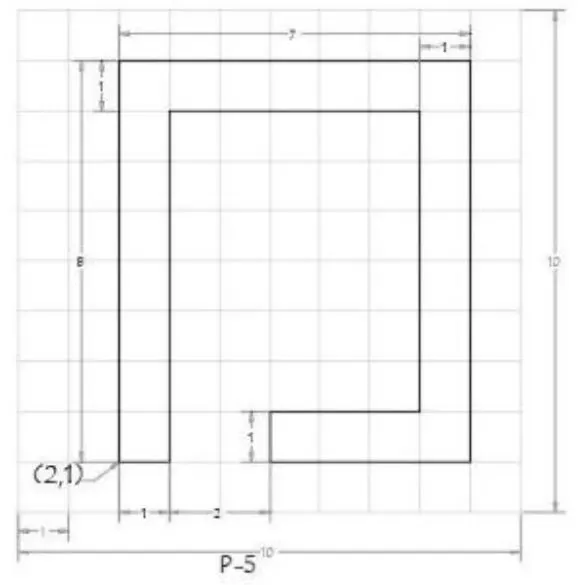
Procedure:
ABSOLUTUE CO-ORDINATE SYSTEM:
- Type Line command in the command box
- Specify the first point (2,1) as the start point
- Specify the next point (3,1)
- Specify the next point (3,8)
- Specify the next point (8,8)
- Specify the next point (5,2)
- Specify the next point (5,1)
- Specify the next point (9,1)
- Specify the next point (9,9)
- Specify the next point (2,9)
- Now click Esc or close.
Result:
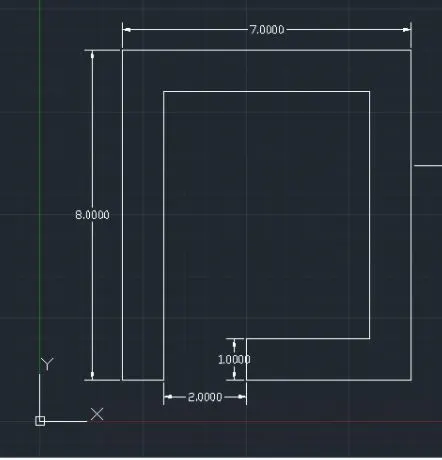
RELATIVE RECTANGULAR CO-ORDINATES SYSTEM:
- Type Line command in the command box
- Specify the start point (2,1)
- Now specify the next point as @1,0 (where, dx= 1 units, dy=0 units)
- Specify the next point as @0,7 (where, dx= 0 units, dy=7 units)
- Specify the next point as @5,0 (where, dx= 5 units, dy=0 units)
- Specify the next point as @0,-6 (where, dx= 0 units, dy=6 units)
- Specify the next point as @-3,0 (where, dx= 3 units, dy=0 units)
- Specify the next point as @0,-1 (where, dx= 0 units, dy=1 units)
- Specify the next point as @4,0 (where, dx= 4 units, dy=0 units)
- Specify the next point as @0,8 (where, dx= 0 units, dy=8 units)
- Specify the next point as @-7,0 (where, dx= 7 units, dy=0 units)
- Now close
Result:
RELATIVE POLAR CO-ORDINATES SYSTEM:
- Type Line command in the command box
- Specify the start point (2,1)
- Now specify the next point as @1<0
- Specify the next point as @7<90
- Specify the next point as @5<0
- Specify the next point as @6<270
- Specify the next point as @3<180
- Specify the next point as @1<270
- Specify the next point as @4<0
- Specify the next point as @8<90
- Specify the next point as @7<180
- Now close
Result:
P7.
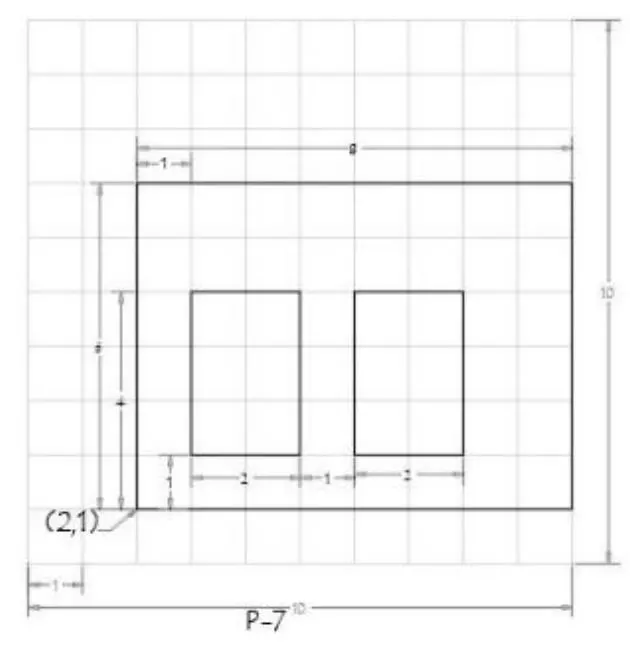
Procedure:
ABSOLUTUE CO-ORDINATE SYSTEM:
- Type Line command in the command box
- Specify the first point (2,1) as the start point
- Specify the next point (10,1)
- Specify the next point (10,7)
- Specify the next point (2,7)
- Now Close
- Specify the next point (3,2)
- Specify the next point (5,2)
- Specify the next point (5,5)
- Specify the next point (3,5)
- Now close
- Specify the next point (6,2)
- Specify the next point (8,2)
- Specify the next point (8,5)
- Specify the next point (6,5)
- Now click Esc or close.
Result:
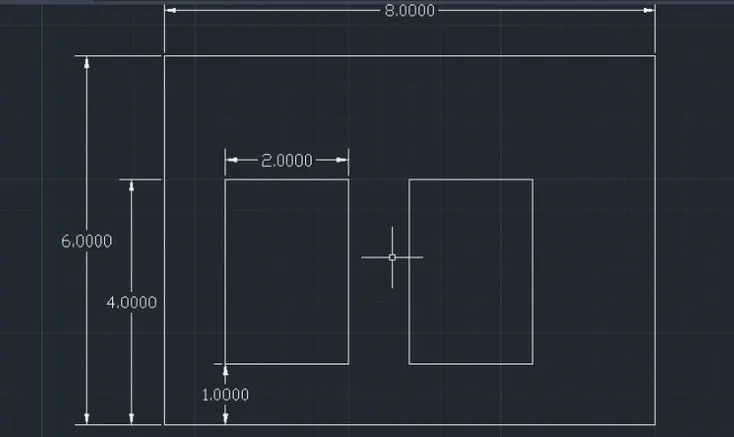
RELATIVE RECTANGULAR CO-ORDINATES SYSTEM:
- Type Line command in the command box
- Specify the start point (2,1)
- Now specify the next point as @8,0 (where, dx= 18 units, dy=0 units)
- Specify the next point as @0, 6(where, dx= 0 units, dy=6 units)
- Specify the next point as @-8,0 (where, dx= 8 units, dy=0 units)
- Now close
- Specify the start point (3,2)
- Specify the next point as @2,0 (where, dx= 2 units, dy=0 units)
- Specify the next point as @0,3 (where, dx= 0 units, dy=3 units)
- Specify the next point as @-2,0 (where, dx= 2 units, dy=0 units)
- Now close
- Specify the start point (6,2)
- Specify the next point as @2,0 (where, dx= 2 units, dy=0 units)
- Specify the next point as @0,3 (where, dx= 0 units, dy=3 units)
- Specify the next point as @-2,0 (where, dx= 2 units, dy=0 units)
- Now close
Result:
RELATIVE POLAR CO-ORDINATES SYSTEM:
- Type Line command in the command box
- Specify the start point (2,1)
- Now specify the next point as @8<0
- Specify the next point as @6<90
- Specify the next point as @8<180
- Specify the next point as @6<270
- Specify the start point (3,2)
- Specify the next point as @2<0
- Specify the next point as @3<90
- Specify the next point as @2<180
- Specify the next point as @3<270
- Specify the start point (6,2)
- Specify the next point as @2<0
- Specify the next point as @3<90
- Specify the next point as @2<180
- Specify the next point as @3<270
- Now close
Result:
P8.
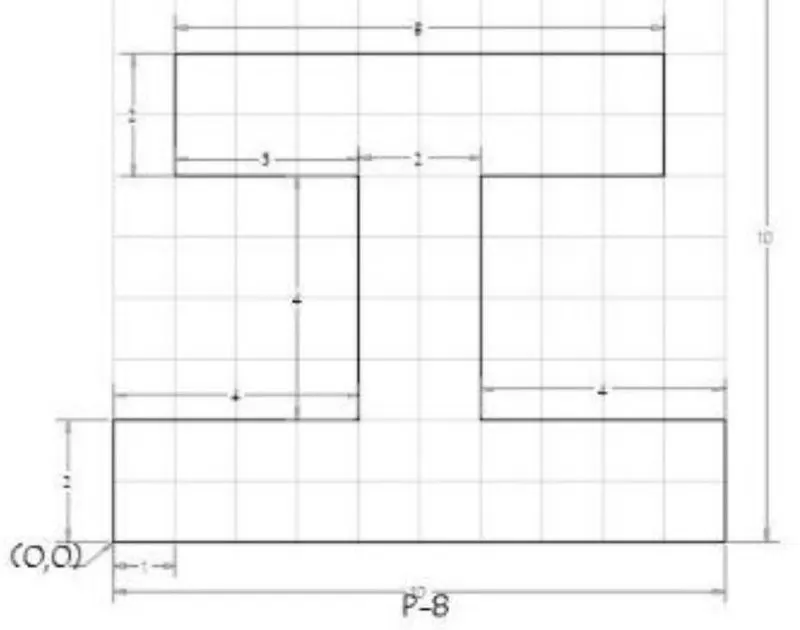
Procedure:
ABSOLUTUE CO-ORDINATE SYSTEM:
- Type Line command in the command box
- Specify the first point (0,0) as the start point
- Specify the next point (10,0)
- Specify the next point (10,2)
- Specify the next point (6,2)
- Specify the next point (6,6)
- Specify the next point (9,6)
- Specify the next point (9,8)
- Specify the next point (1,8)
- Specify the next point (1,6)
- Specify the next point (4,6)
- Specify the next point (4,2)
- Specify the next point (0,2)
- Now click Esc or close.
Result:
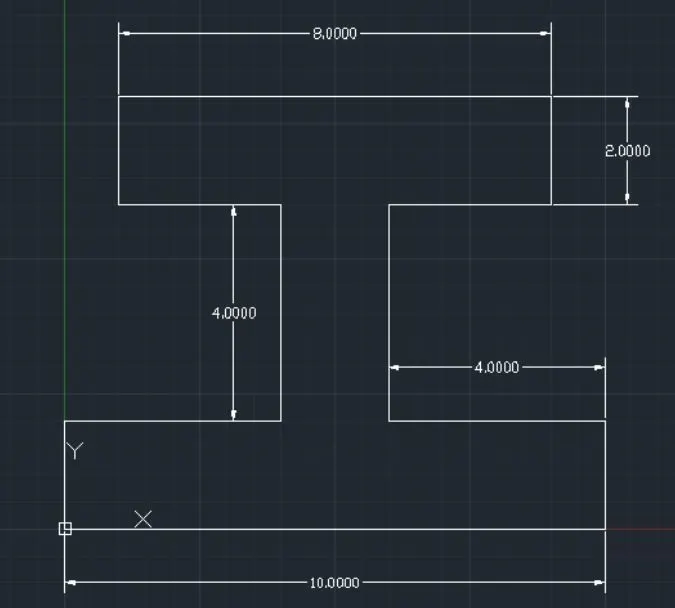
RELATIVE RECTANGULAR CO-ORDINATES SYSTEM:
- Type Line command in the command box
- Specify the start point (0,0)
- Now specify the next point as @10,0 (where, dx= 10 units, dy=0 units)
- Specify the next point as @0,2 (where, dx= 0 units, dy=2 units)
- Specify the next point as @-4,0 (where, dx= 4 units, dy=0 units)
- Specify the next point as @0,4 (where, dx= 0 units, dy=4 units)
- Specify the next point as @3,0 (where, dx= 3 units, dy=0 units)
- Specify the next point as @0,2 (where, dx= 0 units, dy=2 units)
- Specify the next point as @-8,0 (where, dx= 8 units, dy=0 units)
- Specify the next point as @0,-2 (where, dx= 0 units, dy=2 units)
- Specify the next point as @3,0 (where, dx= 3 units, dy=0 units)
- Specify the next point as @0,-4 (where, dx= 0 units, dy=4 units)
- Specify the next point as @-4,0 (where, dx= 4 units, dy=0 units)
- Now close
Result:
RELATIVE POLAR CO-ORDINATES SYSTEM:
- Type Line command in the command box
- Specify the start point (0,0)
- Now specify the next point as @10<0
- Specify the next point as @2<90
- Specify the next point as @4<180
- Specify the next point as @4<90
- Specify the next point as @3<0
- Specify the next point as @2<90
- Specify the next point as @8<180
- Specify the next point as @2<270
- Specify the next point as @3<0
- Specify the next point as @4<270
- Specify the next point as @4<180
- Now close
Result:
P9.
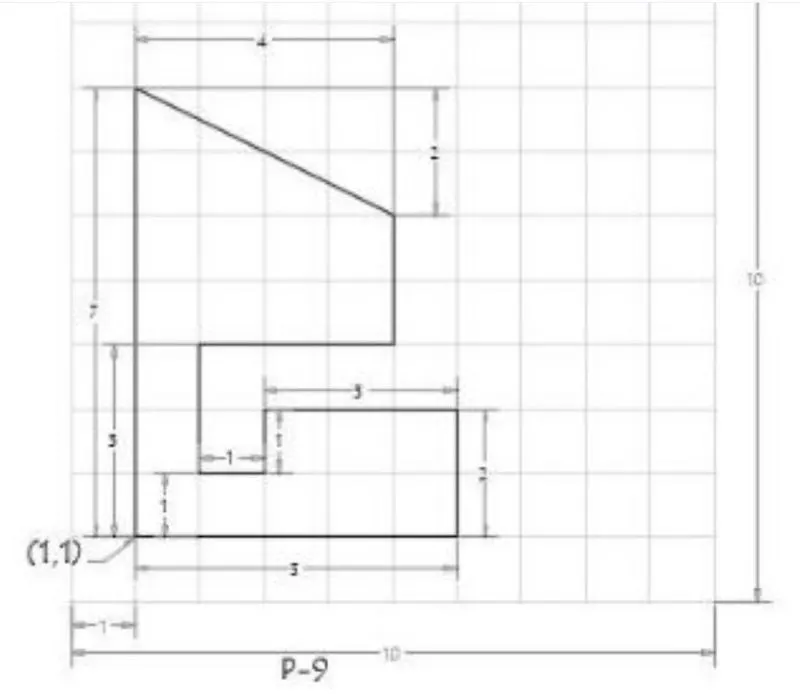
Procedure:
ABSOLUTUE CO-ORDINATE SYSTEM:
- Type Line command in the command box
- Specify the first point (1,1) as the start point
- Specify the next point (6,1)
- Specify the next point (6,3)
- Specify the next point (3,3)
- Specify the next point (3,2)
- Specify the next point (2,2)
- Specify the next point (2,4)
- Specify the next point (5,4)
- Specify the next point (5,6)
- Specify the next point (1,8)
- Now click Esc or close.
Result:
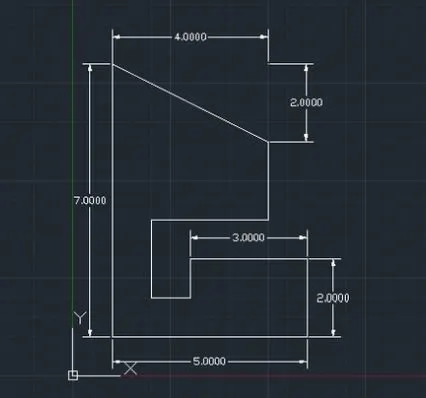
RELATIVE RECTANGULAR CO-ORDINATES SYSTEM:
- Type Line command in the command box
- Specify the start point (1,1)
- Now specify the next point as @5,0 (where, dx= 5 units, dy=0 units)
- Specify the next point as @0,2 (where, dx= 0 units, dy=2 units)
- Specify the next point as @-3,0 (where, dx= 3 units, dy=0 units)
- Specify the next point as @0,-1 (where, dx= 0 units, dy=1 units)
- Specify the next point as @-1,0 (where, dx= 1 units, dy=0 units)
- Specify the next point as @0,2 (where, dx= 0 units, dy=2 units)
- Specify the next point as @3,0 (where, dx= 3 units, dy=0 units)
- Specify the next point as @0,2 (where, dx= 0 units, dy=2 units)
- Specify the next point as @-4,2 (where, dx= 4 units, dy=2 units)
- Now close
Result:
RELATIVE POLAR CO-ORDINATES SYSTEM:
- Type Line command in the command box
- Specify the start point (1,1)
- Now specify the next point as @1<0
- Specify the next point as @7<90
- Specify the next point as @5<0
- Specify the next point as @6<270
- Specify the next point as @3<180
- Specify the next point as @1<270
- Specify the next point as @4<0
- Specify the next point as @8<90
- Specify the next point as @7<180
- Now close
Result:
P10.
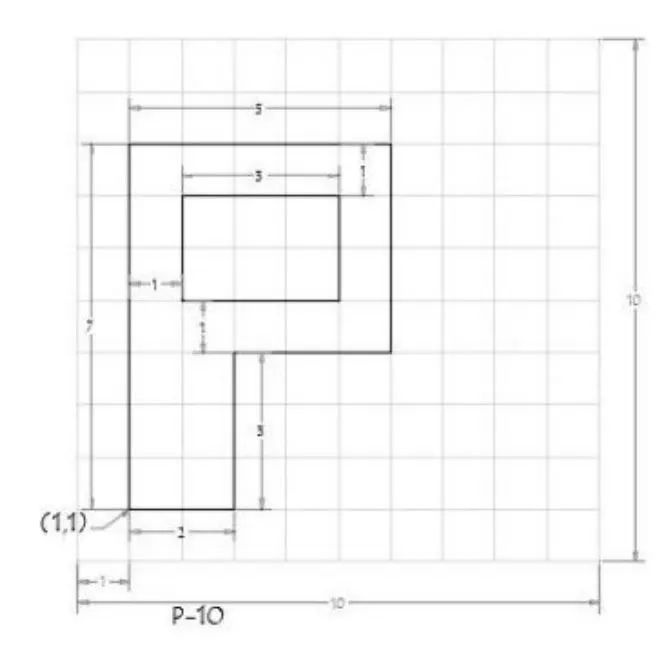
Procedure:
ABSOLUTUE CO-ORDINATE SYSTEM:
- Type Line command in the command box
- Specify the first point (1,1) as the start point
- Specify the next point (3,1)
- Specify the next point (3,4)
- Specify the next point (6,4)
- Specify the next point (6,8)
- Specify the next point (1,8)
- Now close
- Specify the next point (2,5)
- Specify the next point (5,5)
- Specify the next point (5,7)
- Specify the next point (2,7)
- Now click Esc or close.
Result:
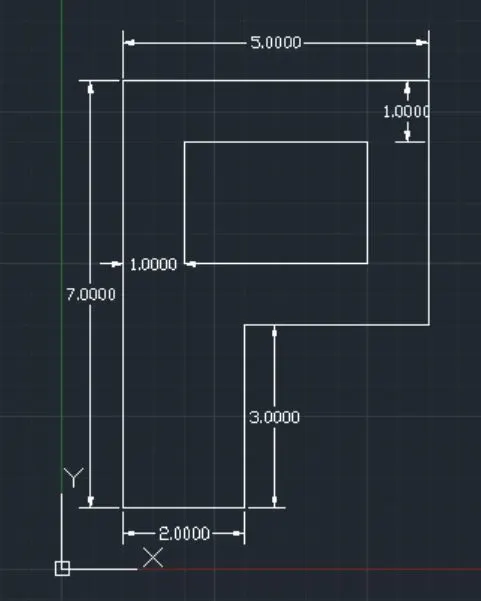
RELATIVE RECTANGULAR CO-ORDINATES SYSTEM:
- Type Line command in the command box
- Specify the start point (1,1)
- Now specify the next point as @2,0 (where, dx= 2 units, dy=0 units)
- Specify the next point as @0,3 (where, dx= 0 units, dy=3 units)
- Specify the next point as @3,0 (where, dx= 3 units, dy=0 units)
- Specify the next point as @0,4 (where, dx= 0 units, dy=4 units)
- Specify the next point as @-5,0 (where, dx= 5 units, dy=0 units)
- Now close
- Specify the next point as @2,5 (where, dx= 2 units, dy=5 units)
- Specify the next point as @3,0 (where, dx= 3 units, dy=0 units)
- Specify the next point as @0,2 (where, dx= 0 units, dy=2 units)
- Specify the next point as @-3,0 (where, dx= 3 units, dy=0 units)
- Now close
Result:
RELATIVE POLAR CO-ORDINATES SYSTEM:
- Type Line command in the command box
- Specify the start point (1,1)
- Now specify the next point as @2<0
- Specify the next point as @3<90
- Specify the next point as @3<0
- Specify the next point as @4<90
- Specify the next point as @5<180
- Now close
- Specify the next point as @2,5
- Specify the next point as @3<0
- Specify the next point as @2<90
- Specify the next point as @3<180
- Specify the next point as @2<270
- Now close
Result:
CIVIL-RELATED DRAWINGS
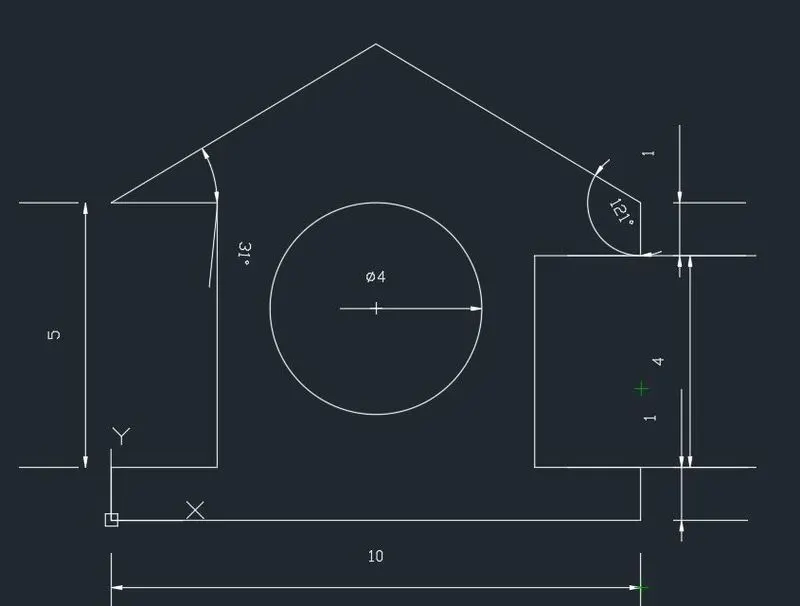
Profile Wood
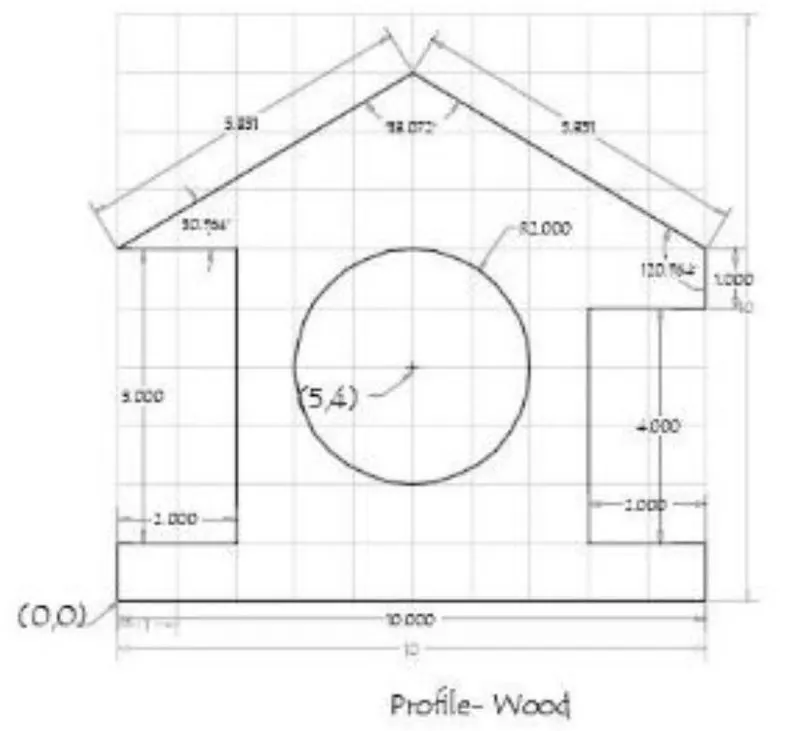
Procedure:
Method used: ABSOLUTUE CO-ORDINATE SYSTEM
- Type Line command in the command box
- Specify the first point (0,0) as the start point
- Specify the next point (10,0)
- Specify the next point (10,1)
- Specify the next point (8,1)
- Specify the next point (8,5)
- Specify the next point (10,5)
- Specify the next point (10,6)
- Specify the next point (5,9)
- Specify the next point (0,6)
- Specify the next point (2,6)
- Specify the next point (2,1)
- Specify the next point (0,1)
- Type circle at centre: (5,4)
- Now click Esc or close.
Result:
Queen Post truss
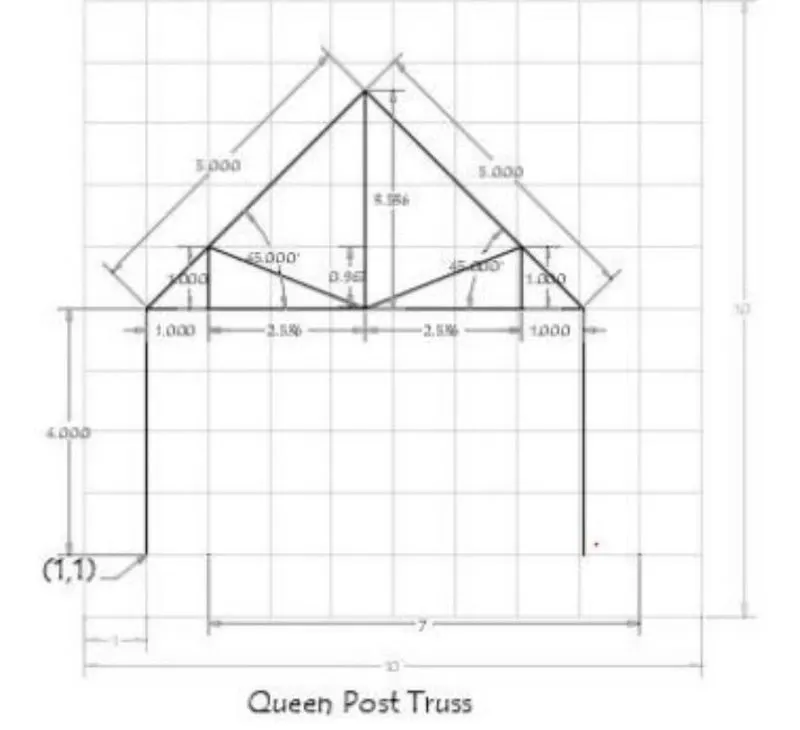
Method used: ABSOLUTUE CO-ORDINATE SYSTEM
- Type Line command in the command box
- Specify the first point (1,1) as the start point
- Specify the next point (1,5)
- Specify the next point (8,5)
- Specify the next point (8,1)
- Specify the next point (1,5)
- Specify the next point (4.5,8.5)
- Specify the next point (8,5)
- Specify the next point (2,5)
- Specify the next point (2,6)
- Specify the next point (4.5,5)
- Specify the next point (7,6)
- Specify the next point (7,5)
- Using line command join the co-ordinates (4.5,5) and (4.5,8.5)
- Now click Esc or close.
- Erase the unwanted lines.
Result:
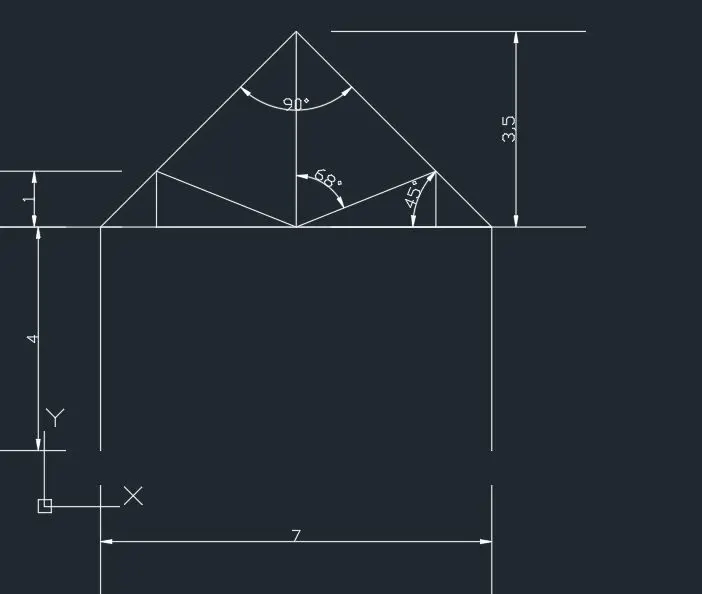
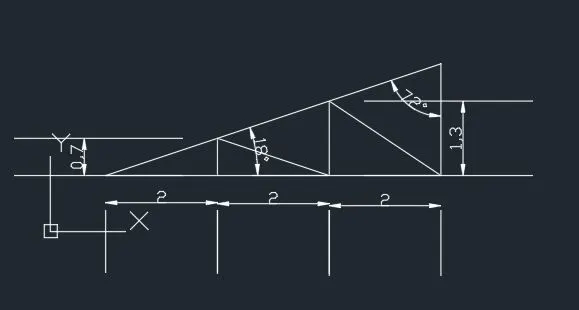
Mono Pitch
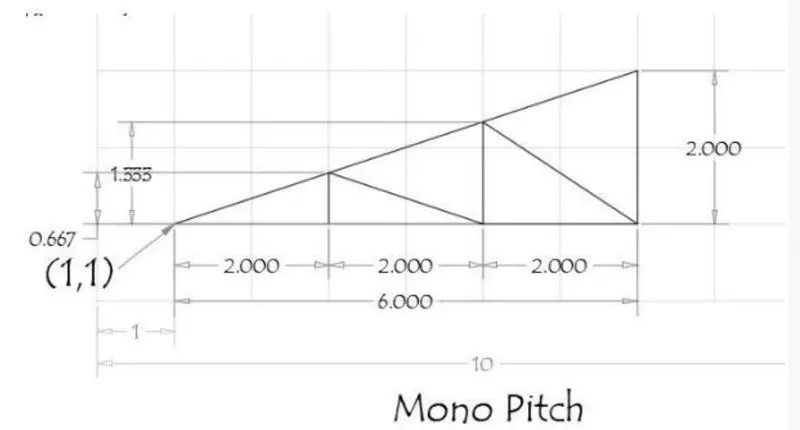
Method used: ABSOLUTUE CO-ORDINATE SYSTEM
- Type Line command in the command box
- Specify the first point (1,1) as the start point
- Specify the next point (3,1)
- Specify the next point (5,1)
- Specify the next point (7,1)
- Specify the next point (7,3)
- Now close
- Specify the next point (3,1)
- Specify the next point (3,1.667)
- Specify the next point (5,1)
- Specify the next point (5,2.333)
- Specify the next point (7,1)
- Now click Esc or close.
Result: