Usage of Collaborate tool in REVIT
AIM-1Open an architectural template. Using the Manage tab set project base point and project shared coordinates for the project:
INTRADUCTION: Revit Structure is Autodesk's BIM software solution for structural engineering companies and structural engineers, that provides a feature rich tool set helping to drive efficient design processes in a BIM (Building Information Modelling) environment, or when working with other construction disciplines using Autodesk
PROCEDURE:
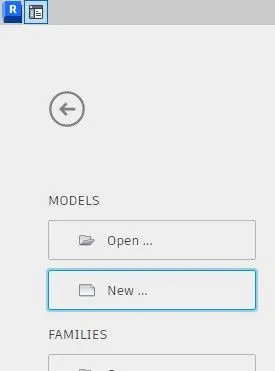
- open revit application we get welcome page appeared select the new template in that
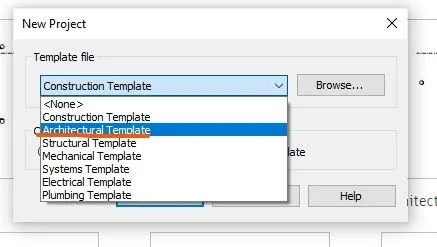
- after we get another dailog box appered for selection whitch type of template we select architectural in that new project.
- working space of revit appeared with selected template architectural
STEP-2
- Now select the grids in architecture tab place in wirking screen vertical and horizontal

- select co-ordinate in mange tab

- in coordinate rolling titles select specify co-ordinate on the point
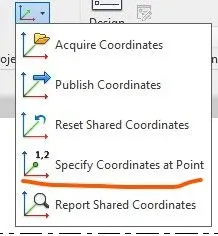
- now select the grid lines seperately correct their coordinates point into zero(0).
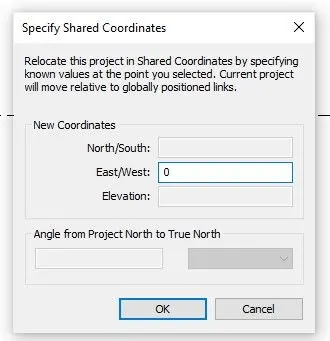
- after that showcase project base point type VG(VISUAL GRAPHICS) appear dailogbox related VISUAL GRAPHICS
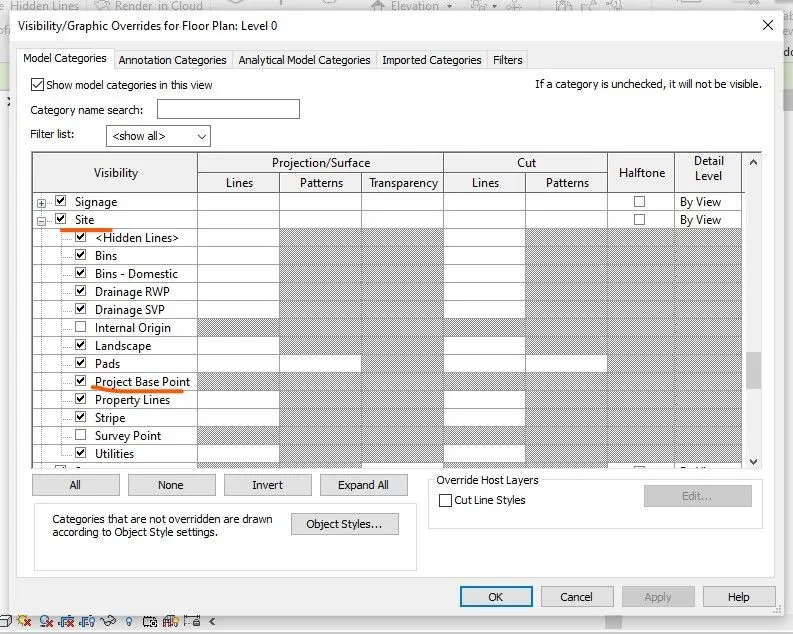
- Appear the project base point middile of the working screen them change the directions of base to zero it comes into joint of grids.
RESULTS:
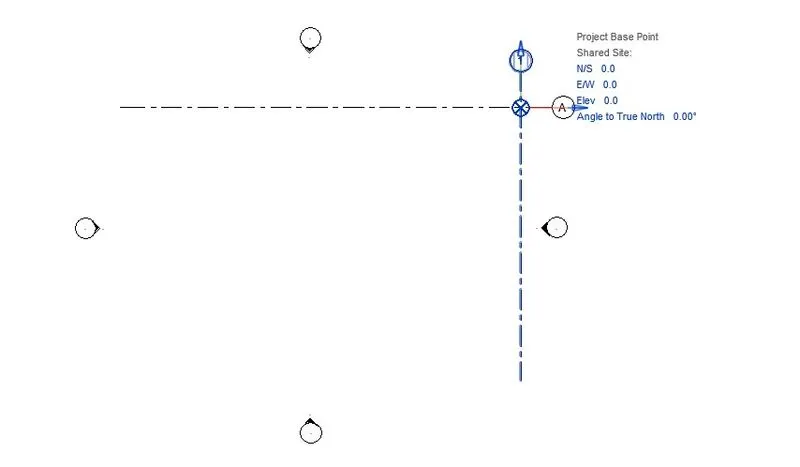
after that save the file using file tab in ribbion with a name of architectural.
AIM-2: Open another new file but with a structural template. Using the manage tab set project parameters the same as the architectural model. Copy the parameters from the architectural model to the structural template or enter the parameters manually into the structural model
INTRADUCTION: Revit Structure is Autodesk's BIM software solution for structural engineering companies and structural engineers, that provides a feature rich tool set helping to drive efficient design processes in a BIM (Building Information Modelling) environment, or when working with other construction disciplines using Autodesk
PROCEDURE:
STEP-1
- open revit application we get welcome page appeared select the new template in that
-
- after we get another dailog box appered for selection whitch type of template we select stractural in that new project.
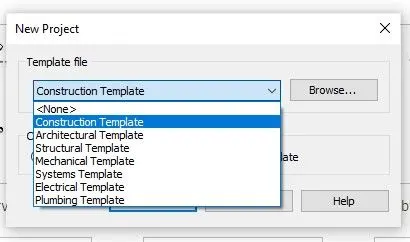
- working space of revit appeared with selected template architectural
STEP-2
- Now select the grids in stractural tab place in wirking screen vertical and horizontal
- select co-ordinate in mange tab
- in coordinate rolling titles select specify co-ordinate on the point
- now select the grid lines seperately correct their coordinates point into zero(0).
- after that showcase project base point type VG(VISUAL GRAPHICS) appear dailogbox related VISUAL GRAPHICS
- Appear the project base point middile of the working screen them change the directions of base to zero it comes into joint of grids.
RESULTS:
after that save the file using file tab in ribbion with a name of stractural.
AIM-3: Re-open the architectural model. Using the tools under the Collaborate tab make the architectural model a central model (enabling simultaneous working on the model)
INTRADUCTION: Revit Structure is Autodesk's BIM software solution for structural engineering companies and structural engineers, that provides a feature rich tool set helping to drive efficient design processes in a BIM (Building Information Modelling) environment, or when working with other construction disciplines using Autodesk
PROCEDURE:
STEP-1
- open revit application we get welcome page appeared select the new template in that
-
- Now open the previous file wha we created in by the name as architectural
- then go to collabarate tab

- select collabarate in collabarate tab the we get a dailog box
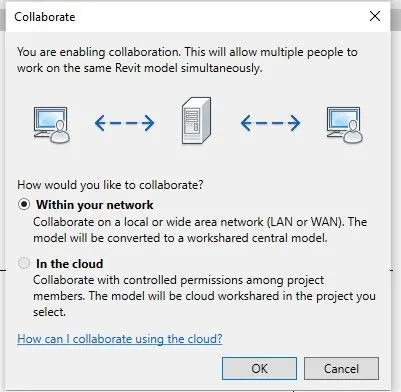
- click ok then that file is become as a central file. then save that file then we get appeare a warning window.
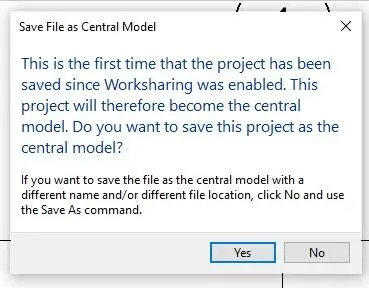
RESULTS:
NOW CLICK OK TO IT BECOME A CENTRAL WINDOW.
AIM-4: Create the Grids Longitudinal and Transverse pattern for the project similar to the task done in Week 2
INTRADUCTION: Revit Structure is Autodesk's BIM software solution for structural engineering companies and structural engineers, that provides a feature rich tool set helping to drive efficient design processes in a BIM (Building Information Modelling) environment, or when working with other construction disciplines using Autodesk
PROCEDURE:
- Now open the file archiectural select grid in architectural tab
- after we get editing tools appeared regarding grid markings

- select the pic-line option to then enter the offset distance in upper of working screen page then place curser in above the previous grid
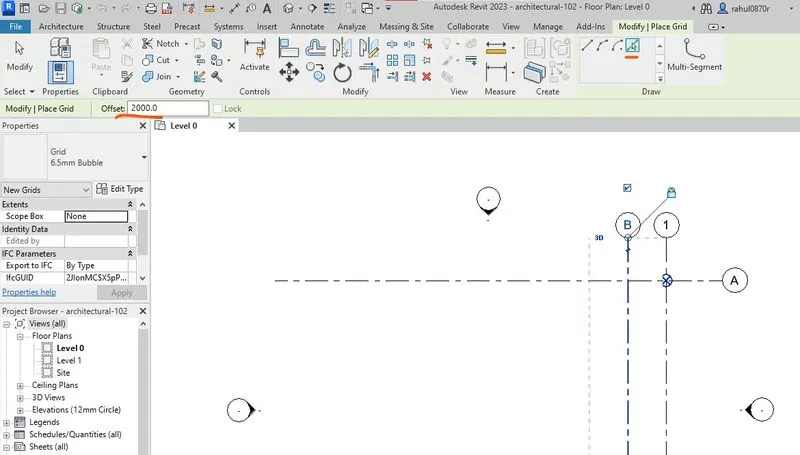
- in these process grid lines are placed Longitudinal and Transverse pattern
RESULTS:
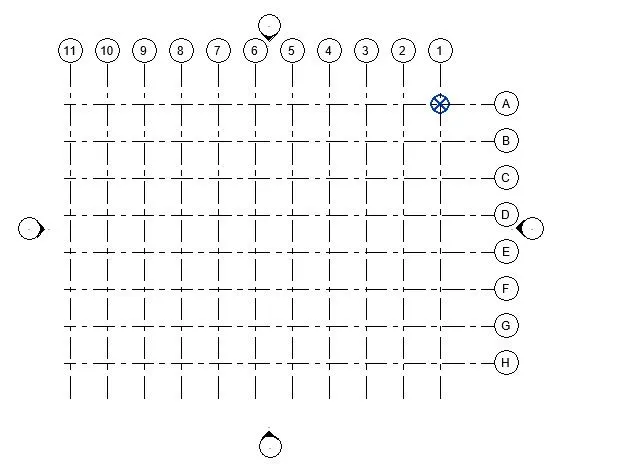
AIM-5: Synchronize the changes from the local copy to the central file of the architectural model.
INTRADUCTION: Revit Structure is Autodesk's BIM software solution for structural engineering companies and structural engineers, that provides a feature rich tool set helping to drive efficient design processes in a BIM (Building Information Modelling) environment, or when working with other construction disciplines using Autodesk
PROCEDURE:
- Now go to the collabarate tab and select the synchronize with central icon to we get twice options select synchronize now it syncronize instant.

- if we select the synchronize and modify we appear another dailoge box about custion details about syncronize
-
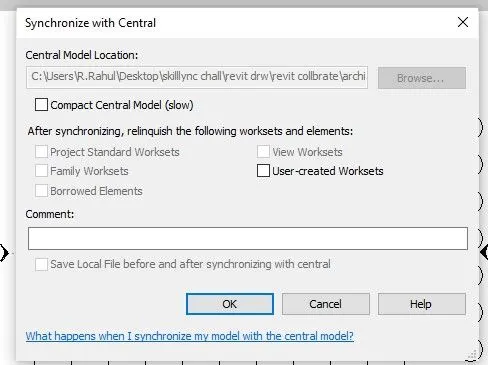
- in this window we get the check box to click compact central model make changes of path of the drawing save
- click ok it save in central model
- we have another shortcut key is avilabile top of a screen to insant syncronize
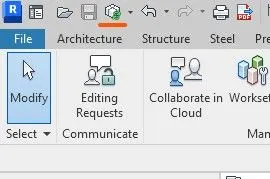
RESULTS:
IN TIS PROCESS FILE SYNCRONIZE THE FILE TO CENTRAL MODEL.
AIM-6: Open the structural model and use the collaborate tools to save the model as a central file.
INTRADUCTION: Revit Structure is Autodesk's BIM software solution for structural engineering companies and structural engineers, that provides a feature rich tool set helping to drive efficient design processes in a BIM (Building Information Modelling) environment, or when working with other construction disciplines using Autodesk
PROCEDURE:
- open revit application we get welcome page appeared select the new template in that
-
- Now open the previous file wha we created in by the name as STRACTURAL
- then go to collabarate tab
- select collabarate in collabarate tab the we get a dailog box
- click ok then that file is become as a central file. then save that file then we get appeare a warning window.
-
RESULTS:
IN THIS WAY NORMAL CONVERTED IN TO CENTRAL MODEL FILE.
AIM-7: Under the Collaborate tab, select the grids and levels from the architectural model, and using Copy Monitor try to copy the grids to the structural model. See what happens when the copy monitored grid is moved around in the structural model
INTRADUCTION: Revit Structure is Autodesk's BIM software solution for structural engineering companies and structural engineers, that provides a feature rich tool set helping to drive efficient design processes in a BIM (Building Information Modelling) environment, or when working with other construction disciplines using Autodesk
PROCEDURE:
- Now oprn the starctural before question
- go to the insert tab in ribbion selct revit link in that
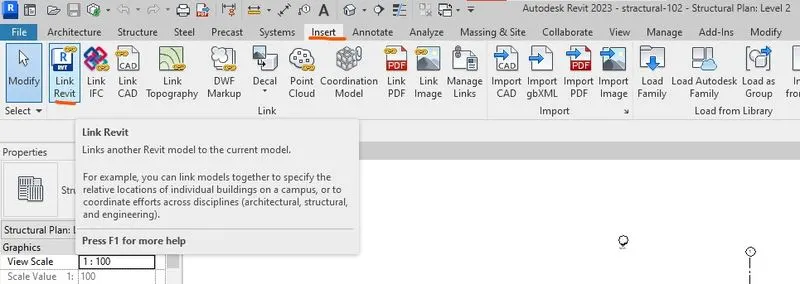
- after selection another po-up window appear to select the link in region of we saved
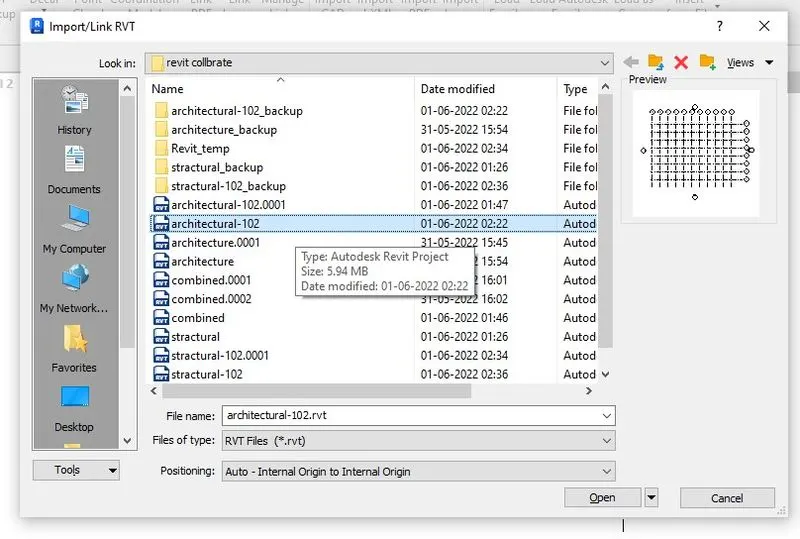
- then we select the architectural model click open
- then it appeared in the working screen then got colabarate tab in the ribion
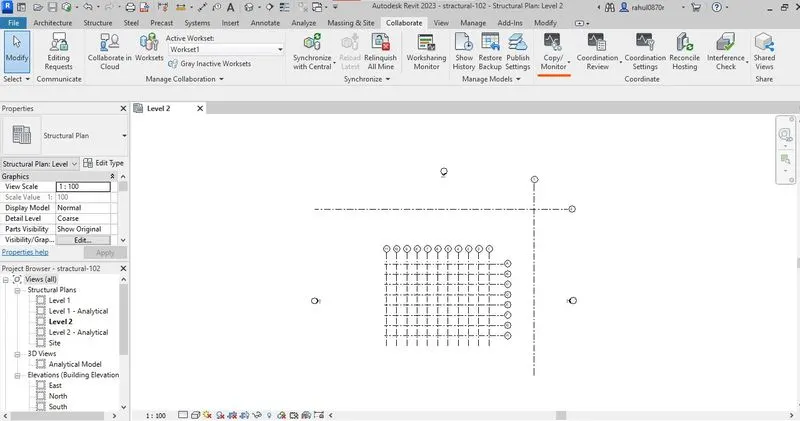
- then we select the copy moniter icon in colabarate tab we get another rollig options contain then we select the select link
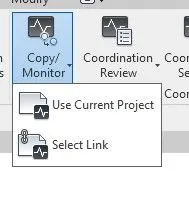
- then we select the linked object to select we get another editing tool ribbion tool is open
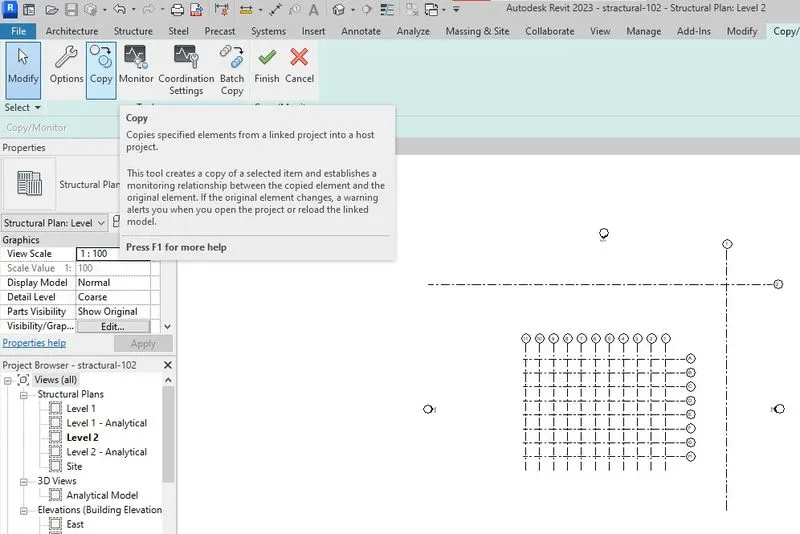
- click on the copy option in the ribbion click check box of in bottiom of the ribbion related multiple then select the linked file copy element to copy
- click finish buttion bottom of the ribbion editing tools.
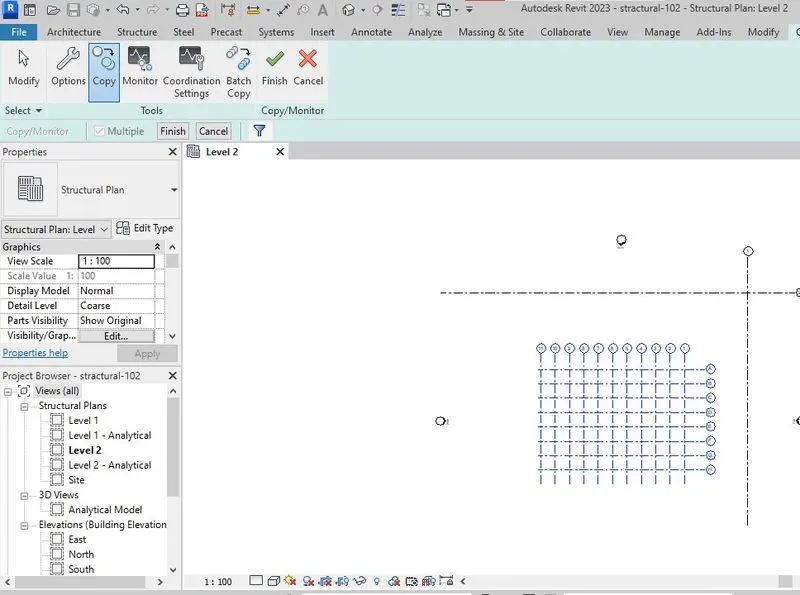
- after that click finish in green bar mark then it copied in to the project
RESULTS:
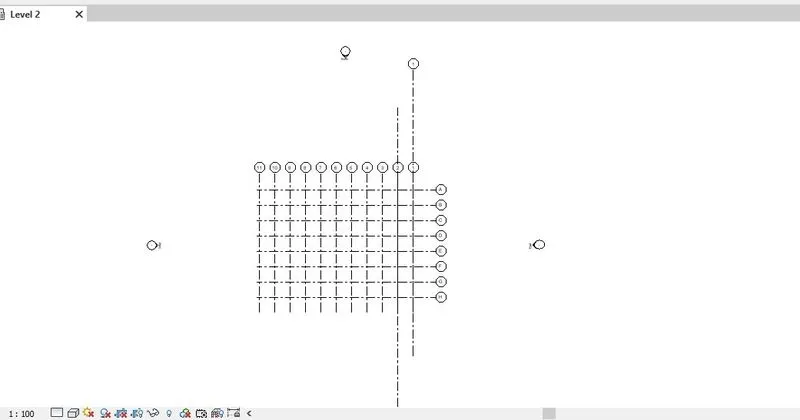
IF WE WANT CHECK IT IS CONNECTE DOR NOT CONNECTED THEN GO TO VISIUVAL GRAPHICKS SETTINGS GO TO REVIT LINKS DISABILE THE CHECK BOX CLIK OK THEN AFTER THAT LINKED OBJECT IS DISAPPEARED THEN IT IS NOT COPIED IF ITS APPEARED IT IS COPIED.
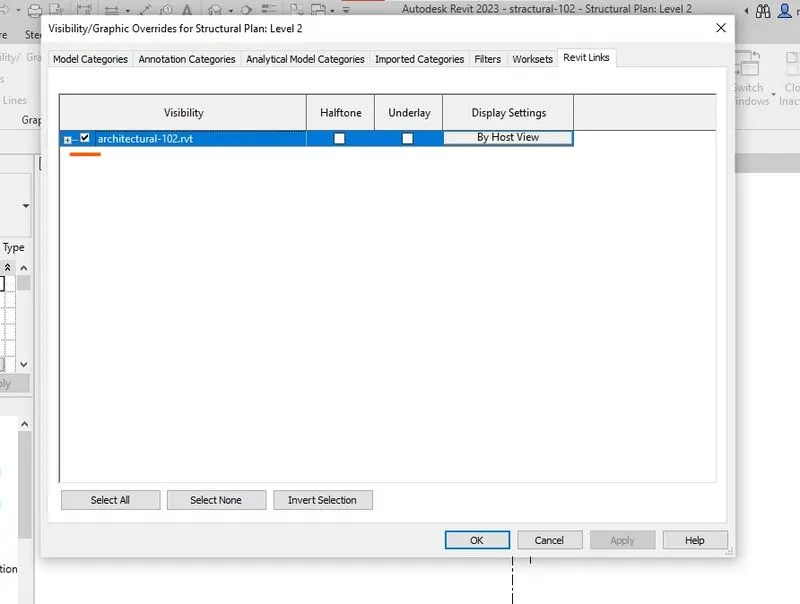
AIM-8: Create another new file with a construction template. Save the new file as a central model. This file will include both architectural and structural model. Under the manage tab, Click manage links to link both architectural and structural files. Save the file and close all the files.
INTRADUCTION: Revit Structure is Autodesk's BIM software solution for structural engineering companies and structural engineers, that provides a feature rich tool set helping to drive efficient design processes in a BIM (Building Information Modelling) environment, or when working with other construction disciplines using Autodesk
PROCEDURE:
- open revit application we get welcome page appeared select the new template in that
-
- after we get another dailog box appered for selection whitch type of template we select CONSTRACTION in that new project.
- working space of revit appeared with selected template constraction.
- then go to collabarate tab
- select collabarate in collabarate tab the we get a dailog box
- click ok then that file is become as a central file. then save that file then we get appeare a warning window.
-
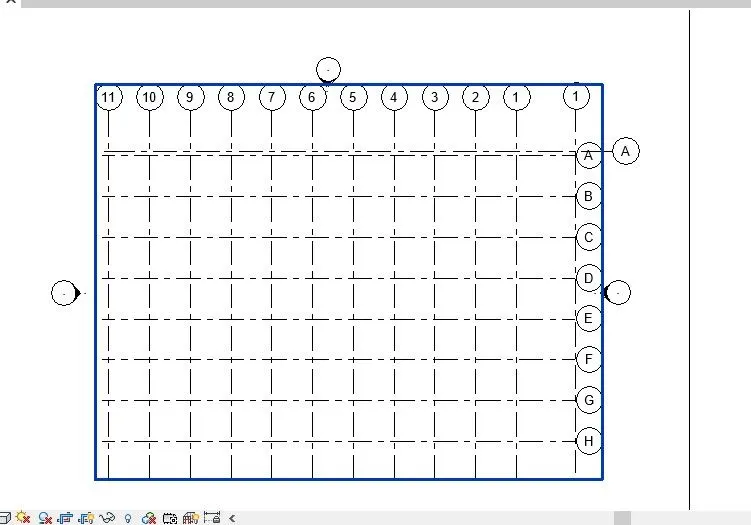
- then go to the insert tab in ribbion selct revit link in that
- after selection another pop-up window appeared to select the link in region of we saved
- now select the previous created stractural and architectural to insert through revit link icon in insert tab.
RESULTS:
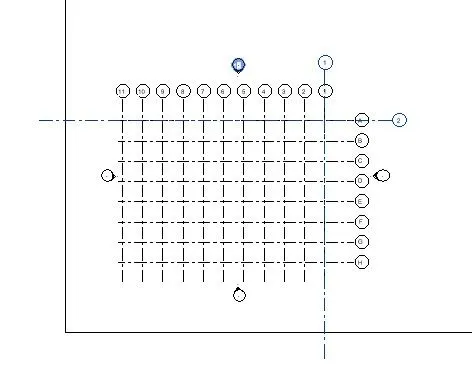
AIM-9:Are the grids from structural and architectural model matching in the construction template created? If yes the model is set up for project 2. If not work on the shared parameters and linking options under Manage links
( Hint: origin to origin, by shared coordinates or by project base point to base point ) to link the models in an appropriate manner
RESULTS: ITIS COINSIDED
AIM-10: List a flow chart of a project tree set up in terms of Construction model, Architecture & Structure model, in this exercise and understand how many people can work on the same project using Revit simultaneously
INTRADUCTION: Revit Structure is Autodesk's BIM software solution for structural engineering companies and structural engineers, that provides a feature rich tool set helping to drive efficient design processes in a BIM (Building Information Modelling) environment, or when working with other construction disciplines using Autodesk
PROCEDURE:
FLOW CHART OF CONSTRACTION MODEL.
- site preparation
- check the matrial and work related facilities avilabile or not
- then import the material storage
- start lining the exacavation related foundation
- then star execution of the work with help of drawings stractural members
- after that go through the architectural
PEOPLE INVOLVING IN DESIGNING IN REVIT:
- Plumbing designers
- mechnical
- electrical
- architectural
- stractural.