To calculate wind load for industrial steel structures and to apply it by using TSD
- Generate module wind loading in the design report based IS code as per following input
- Basic wind speed
- Terrain category 2
- AIM : To calculate wind load as per IS CODE 875 part -III
- INTRODUCTION : Wind load is calculated according to IS code 875 -III For industrial Building
Terrain Category is given as 2
Vb = Basic wind speed which is given as 39 m/s
Normally basic wind speed is selected from appendix A of code IS 875 III which is given based on wind speed in variois cities
Design Wind speed Vz = Vb*K1*K2*K3*K4
Where Wind speeed (Vz) depends on risk level terrain roughness height size of structure local topography
K1 = Probability Factor
K2 = Terrain height ,Structure factor which is taken from tabble 2 = 1.05
K3 = Topography factor which is taken as 1
K4 = Importance factor for cycloninc region K4 is taken as 1.15
- PROCEDURE :
- Wind Speed = 39m/s
- Life speed = 50 yrs
- Terrain Category = 2
- Design Wind speed (Vz)= Vb*K1*K2*K3*K4= 39*1*1.05*1*1.15 = 47m/s
- Design Wind Pressure = Pz =0.6 XVz^2 = 1330 N/m^2=1.33 Kn/M^2
- Length = 18m , Width = 18m ,Height = 0.937
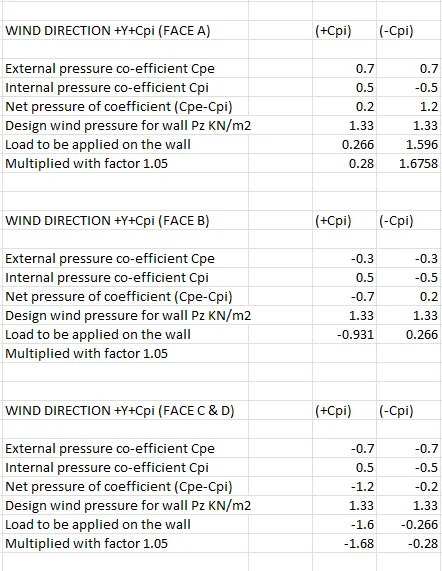
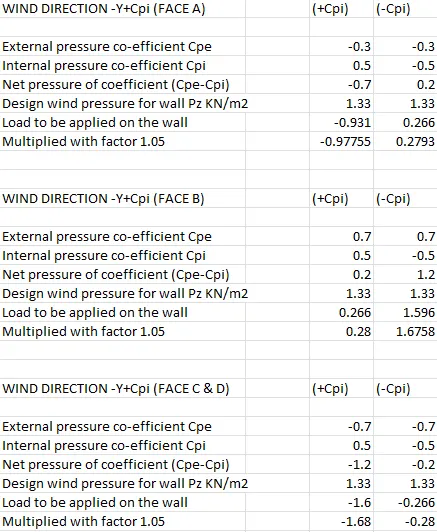
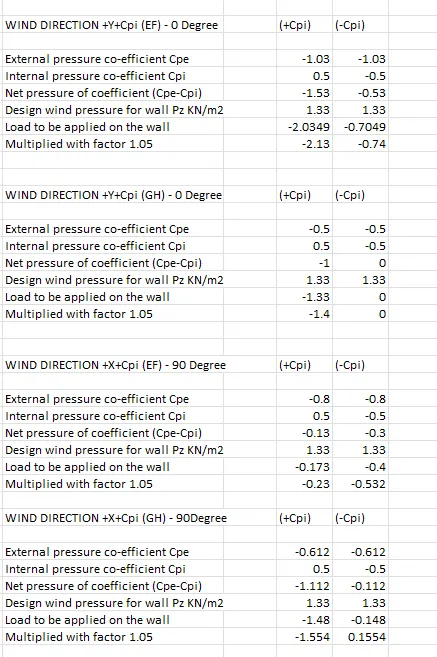
- External PRessure coefficent for wall is taken from tale 5 (H/W = 0.937)
- Based On the above calculation apply the loading on the m model
- AIM: To apply calculated wind load on the industrial structure
- INTRODUCTION :
- These are the combination applied on the structure
- Y + Cpi
- Y-Cpi
- -Y+Cpi
- -Y-Cpi
- Roof (EF,GH)
- Y+Cpi
- Y-Cpi
- -Y+CPi
- -Y-Cpi
- X+Cpi
- X-Cpi
- -X+CPi
- -X-Cpi
- PROCEDURE :
- OPen model in tekla software
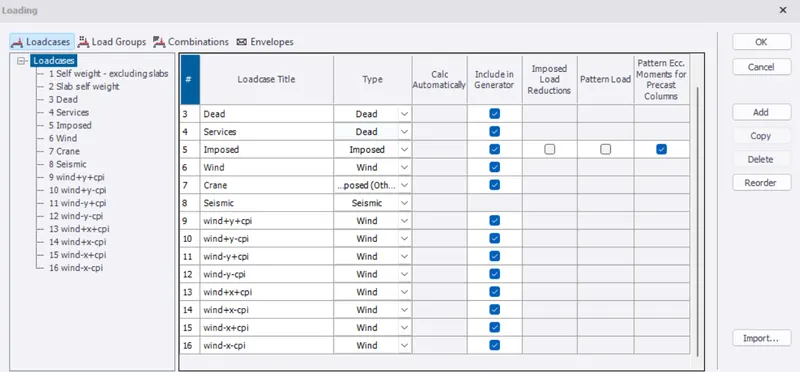
- OPen load tab and select load cases
- Add following load cases
- Wind Load
- Wind +Y-Cpi
- Wind +x+Cpi
- Wind +x-CPi
- Wind - Y+Cpi
- Wind -Y -Cpi
- Wind -X+CPi
- Wind -X -CPi
- Select the frames to bbe applied
- Go to load select area load
- At bottom select the combination load and apply ot on walls roofs
- RESULTS
- Wind Direction+y+CPi(face A)
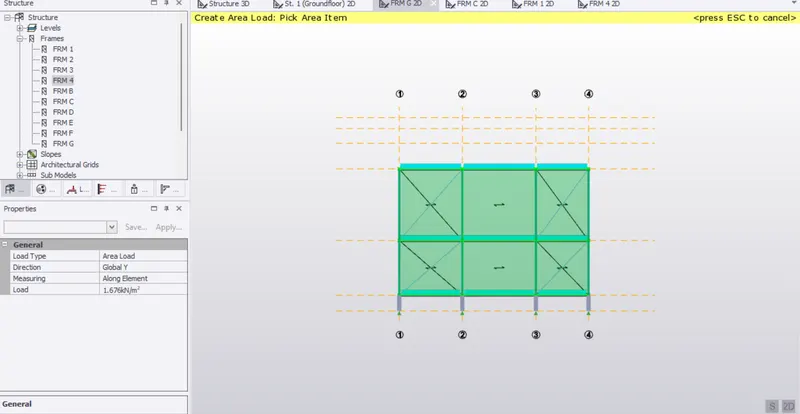
- Wind Direction +Y-Cpi(FACE B)
- Wind Direction +Y + Cpi (FACE B)
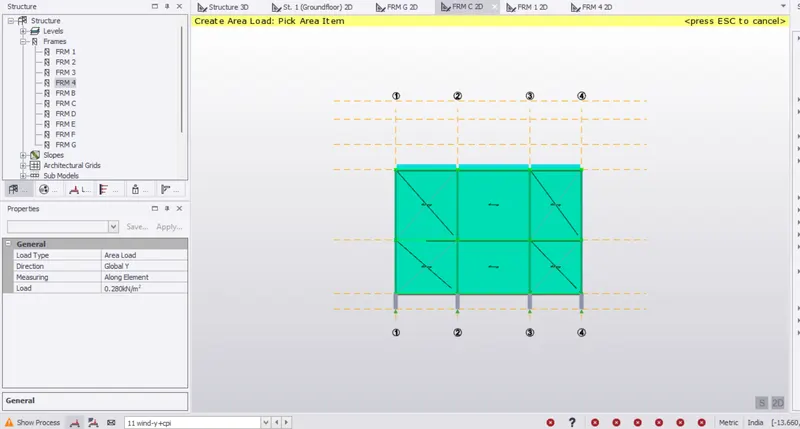
- Wind Direction +Y-Cpi(FACE C)
- WIND DIRECTION +Y+Cpi (FACE D)
- WIND DIRECTION +Y-Cpi (FACE D)
- Wind Direction -Y+Cpi (FACE A)
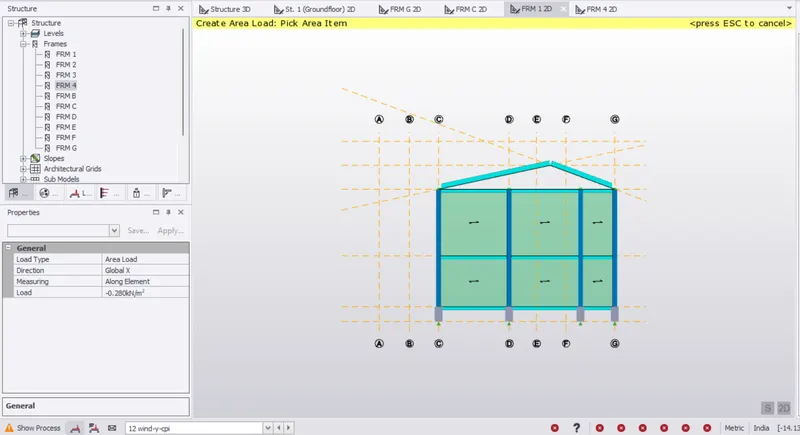
- Wind Direction -Y-Cpi (FACE A)
- Wind Direction -Y+Cpi (FACE B)
- Wind Direction -Y-Cpi (FACE B)
- Wind Directon -Y+Cpi (FACE C)
- Wind Direction -Y-Cpi (FACE C)
- Wind Direection -Y+Cpi (FACE D)
- WIND DIRECTION -Y-CPi (FACE D)
- ROOF LOADS
- WIND DIRECTION +Y+Cpi (EF)
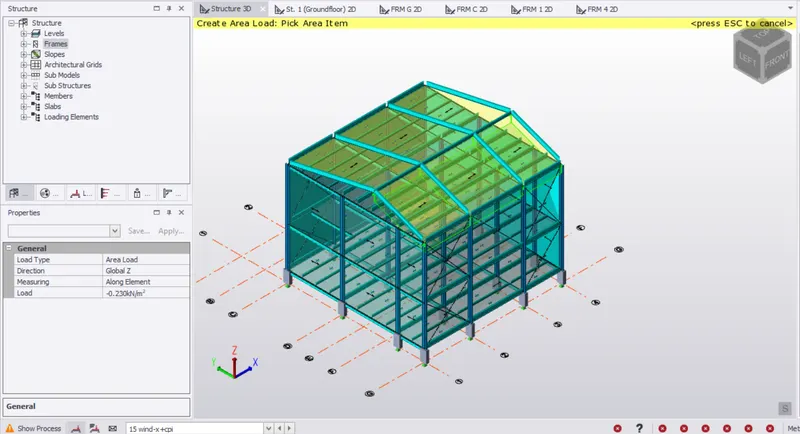
- WIND DIRECTION +Y+CPi (GH)
- WIND DIRECTION +Y-Cpi (GH)
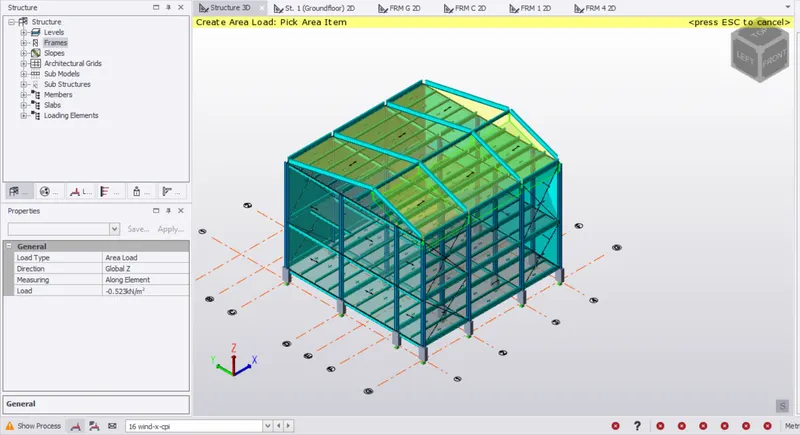
- WIND DIRECTION +X+Cpi
WIND DIRECTION +x-CPI (EF)
- WIND DIRECTION +X-Cpi (EF)
- WIND DIRECTION +X+Cpi(GH)
- WIND DIRECTION +X -Cpi (GH)
- WIND DIRECCTION -Y+Cpi(GH)
- WIND DIRECTION -Y-Cpi (GH)
- WIND DIRECTION -Y+Cpi (EF)
- WIND DIRECTION -X+Cpi (GH)
- WIND DIRECTION -X-Cpi (GH)
- WIND DIRECTION -X+Cpi (GH)
- WIND DIRECTION -X-Cpi (EF)
- On a separate model generate wind loading using wind wizard
- AIM : To generate wind loading using wind wizard
INTRODUCTION :
Wind wizard is used to calculate wind loading on structure for enclosed structure this requires at least one wall panel or roof panel to exist before it becomes available for open structure it requires at least one element set to apply open structure wind load to exist before oit becomes available
PROCEDURE:
- Delete Previous wind loads
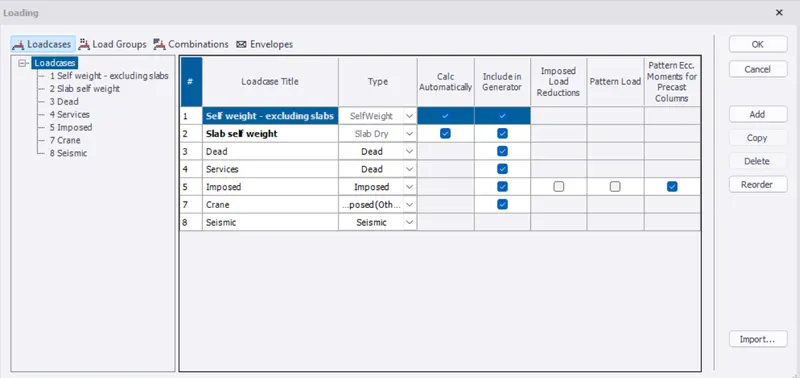
- Now click wind wizard in load tab
- Click on worst case data and click next
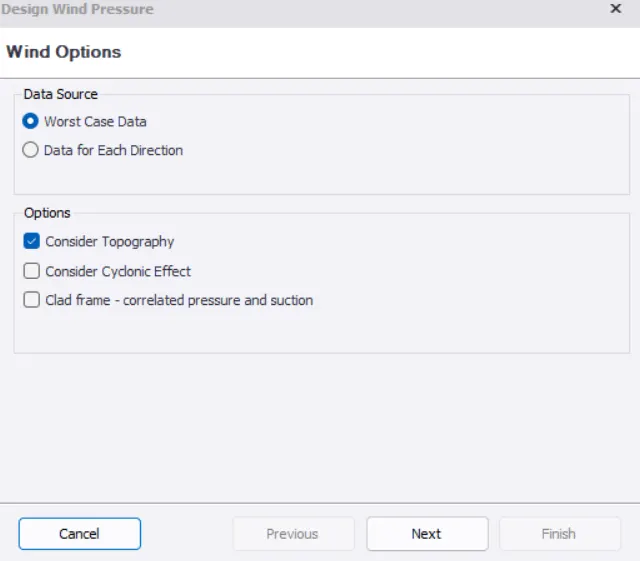
- Set height as 16.88 m ,Type industrial and wind speed 39 m/s and click next
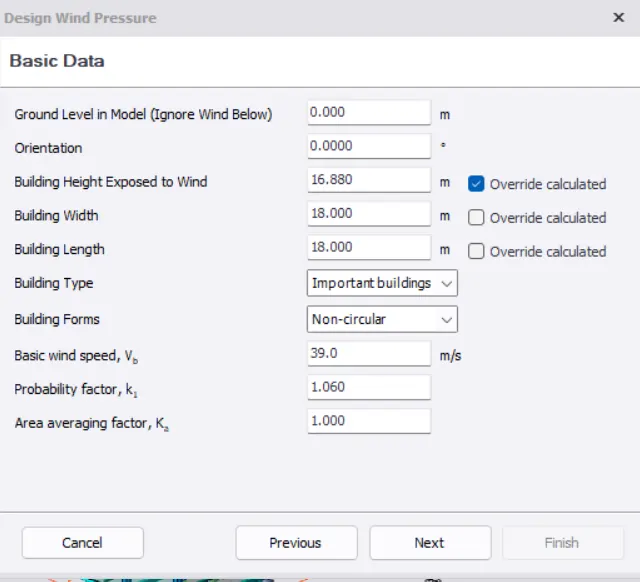
- Set height as 16.88m ,Type industrial and wind speed 39 m/s and click next
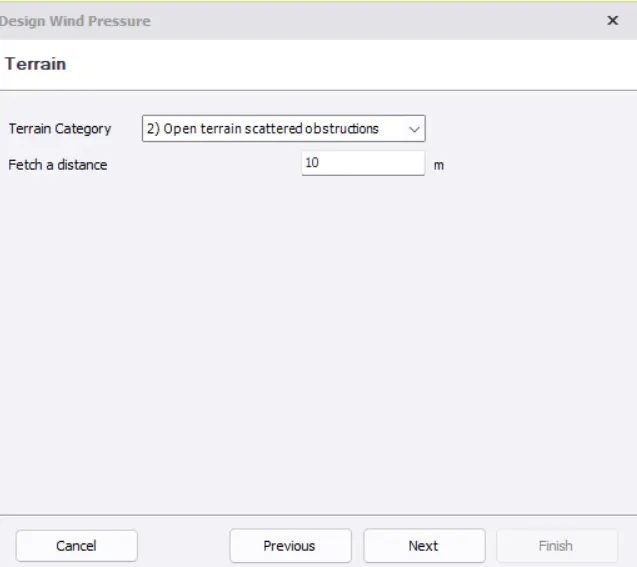
- Set Terrain as open terrain scattered obstruction,Fetch a distancce as 10m and click next
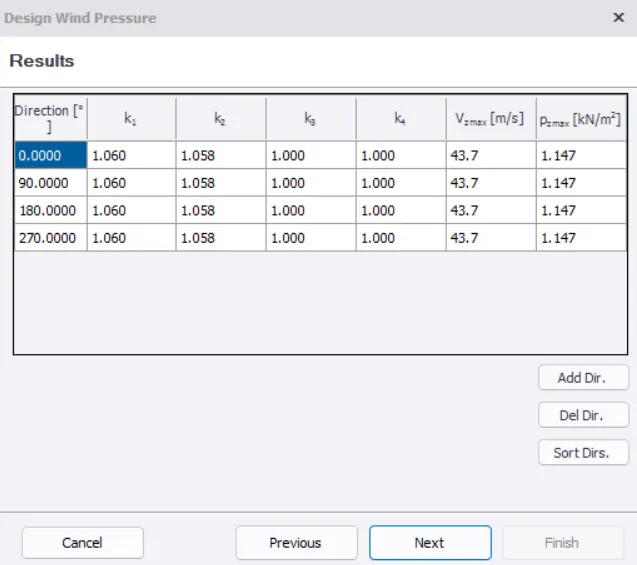
- Click next for results and direction
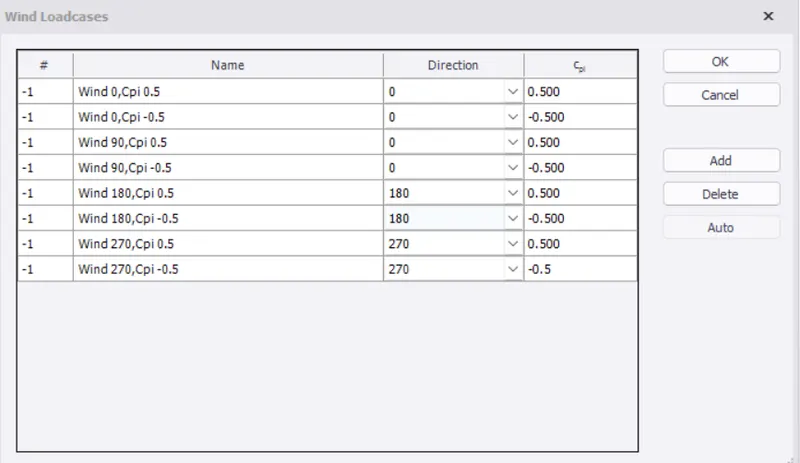
- Click on load cases and add wind loads as shown below
- RESULTS :
Wind loads are generated through wind wizard