Structural analysis of a buidling using Robot Structural Analysis
1) What are HVAC systems? Why are they essential in the modeling of buildings.
HVAC stands for Heating Ventilation and Air Conditioning. HVAC is the use of various technologies to control the temperature, humidity and purity of air in the enclosed space. Its goal to provide thermal comfort and acceptable indoor air quality.
HVAC is an important part of residential structures such as single family homes, apartment buildings, hotels, and senior living facilities; medium to large industrial and office buildings such as skyscrapers and hospitals, where safe and healthy building conditions are regulated with respect to temperature and humidity, using fresh air from outdoors.
Essential in building modeling:
HVAC controlls the overall climate of the building. during hot days the System provides the cool air to the inner atmosphere of the building and in winter season the System maintain the inner atmosphere warmer by turning on the boilers.
It enhances the productivity. Having a comfortable office climate increase the level of productivity.
It improves the air quality. a typical HVAC system will reduce the amount of humidity in the air so the occupants enjoys pleasant atmosphere in the building.
Achieving the energy efficiency. HVAC systems today are automated, proper adjustments will be made right when they are needed. This makes your energy consumption more efficient as it gets rid of energy wasted.
2) From week 7 assignment, based on the building designed use the same Revit file to design a HVAC system for each floor to cover the topics included in the class.
a. Typical HVAC unit includes Distribution center
b. Collector
c. Ducts
d. Blower
Based on the layout choose appropriate ducts and elevation using property browser and assign the components to appropriate groups to complete modeling of the HVAC unit.
Aim:
To design a HVAC system for each floor for the building designed in the week 7.
a. Tyoical HVAC unit includes Distribution center
b. Collector
c. Ducts
d. Blower
Introduction:
HVAC is the use of various technologies to control the temperature, humidity and purity of air in the enclosed space. Its goal to provide thermal comfort and acceptable indoor air quality.
Procedure:
- Open the new project in revit by using system template.
- Set the basics of the project like references.
- Create grids in longitudiunal and transverse direction.
- Specify coordinates to the grids.
- Set the project base point as the intersection of the grids.
- Make the project as a central model by clicking collaborate tab.
- Insert the week 7 revit file into the system template.
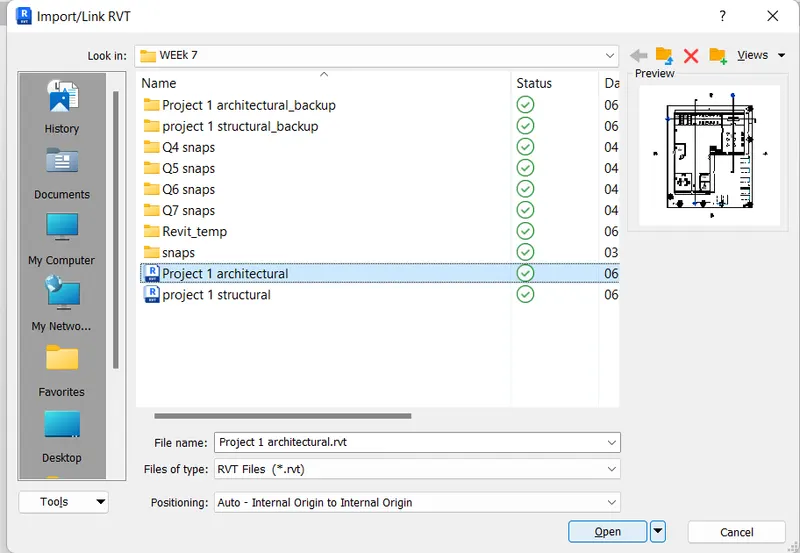
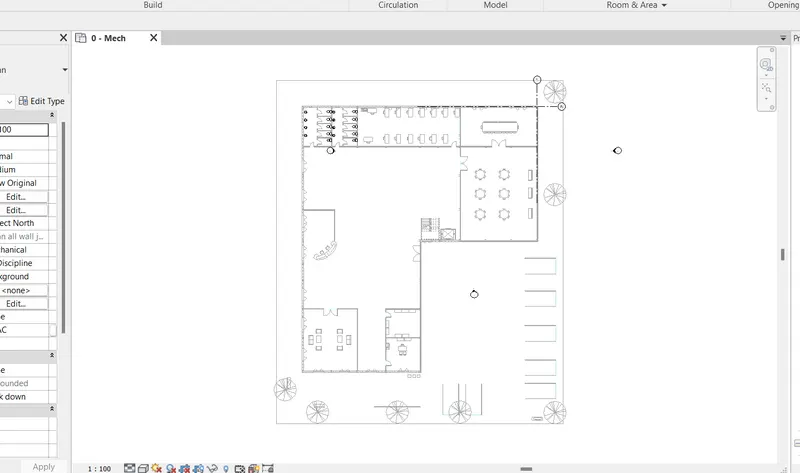
- Design a HVAC system.
- CHoose 'Air terminals' in the 'system tab'
- Select the type by using the properties browser.
- Select 'Supply diffuser'
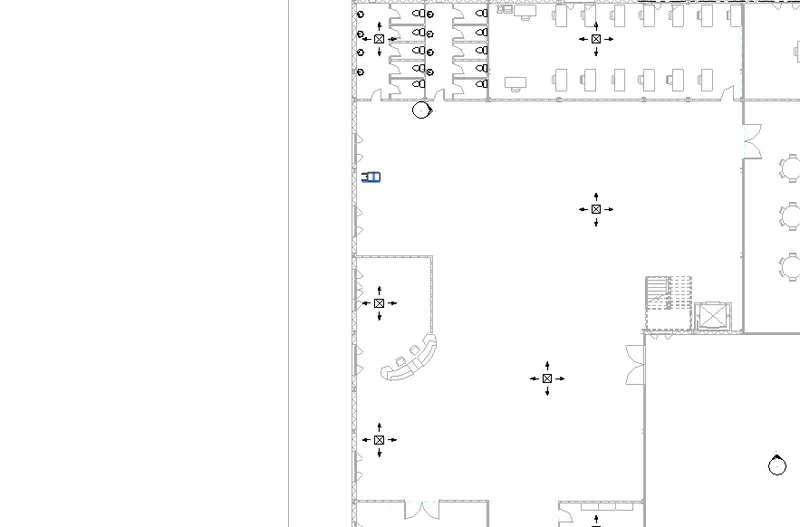
- Palce it into the model whenever is required.
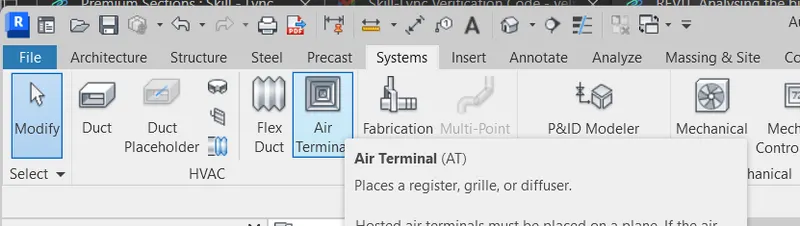
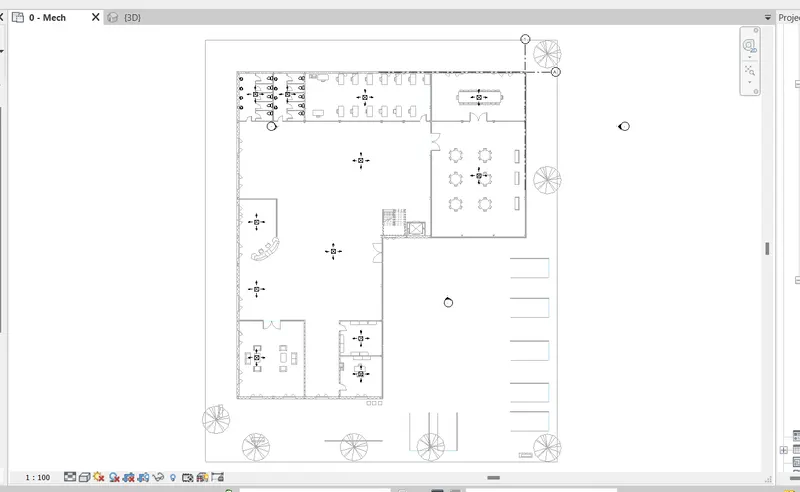
- Select 'mechanical equipments' under the 'system tab'
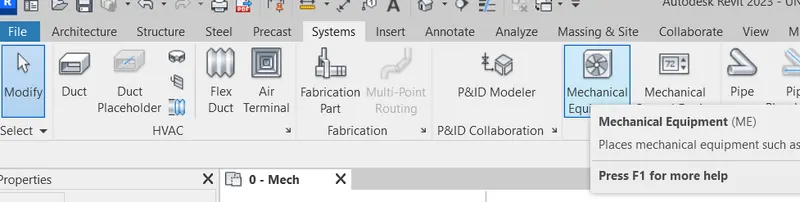
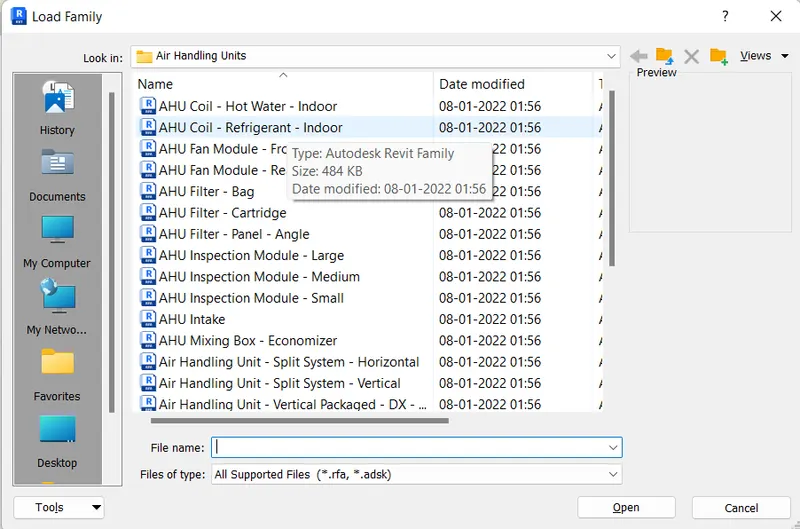
- Ckick 'load family'
- Slecect mechanical category, Air handling units family and AHU coil-Refrigerant- indoor element.
- Place it to the model in the required location.
- Creating duct.
- Select all the elements placed in the model.
- Select 'duct' option in the 'Create system' pannel.
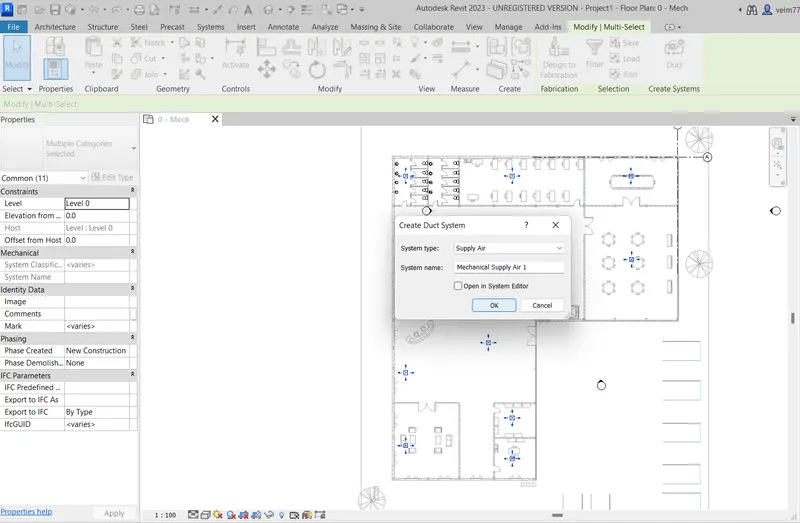
- Click generate layout in the system tools pannel.
- The layout is created for the duct.
- There are 5 layout options available select the appropriate one and click finish.

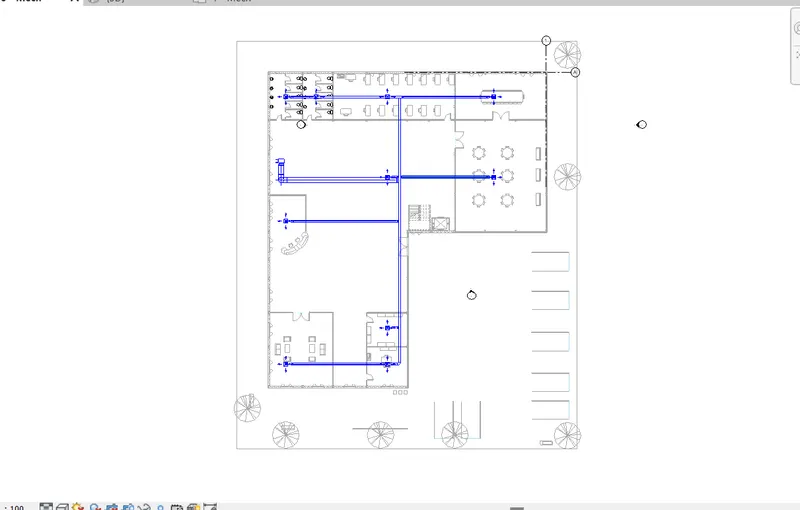
- Similarly create the HVAC systems for another 3 floors.
Result:
a HVAC system for each floor for the building is designed that includes distribution center, collector, ducts and blower.
3) Use the add-ins tab to load plug-ins for robot structural analysis to your Revit software.
- Go to analyze tab in revit and check if the robot structural analysis is available.
- If it is not available. Select the shoping cart in the top of the ribbon tab.
- It will redirects to the autodesk website.
- Click the search bar and type structural analysis toolkit.
- The robot structural analysis is shown,
- Download it and install it.
- Now check the analyze toolbar in revit the robot structural analysis is available.
4) Why do we need to assess buildings/analyze while modeling elements? Does design affect modeling in anyways?
Structural analysis is essential in modeling. It helps in calculating the effects of loads and internal forces on a structure, building or any object. It is particularly important for structural engineers to ensure that the complete understanding load paths and impacts the loads have on the engineering design. It also allows engineers or designers to endure thet the pece of equipment or structure is safe for the use under the estimated loads and it is expect to withstand.
Strctural analysis is either can be perform during design, testing or post construction and will generally accounts for the material used, geometry of the structure and applied loads. Structural analysis is usually looks up at an individual structural elements and forces they undergo. Then structural engineers will lookat structural analysis results for all the structural components such as beams, slabs, cables and walls. All of these elements have forces and apply to them sush as wind load, live load, dead load for all the load which will be faced on the building.
So, it is important for an engineer to review how each elements bahave under these loads. so this is core focus of the structural analysis.
The structural design will affect the modeling. It will helps to design better models and cover the issues with an existing model and allows to incorporate the alternatives.
5) From the structural model developed in week 6 and 7, export the complete analytical model to robot structural analysis.
a. List your assumptions on what boundary conditions will be realistic for the analysis approach
b. Use the design standards to decide what loads must be applied to floorings based on the type of structure decided
c. List the load combinations and include them in the analysis model
d. Analyze the building and report the following results
i. Maximum Moment in each floor for all Load Combinations
ii. Maximum Displacement in each floor for all Load combinations
iii. Lateral Displacement in building for all Lateral Load combinations
e. After analysis, do you think you have a better approach or idea in modeling structural members?
Aim:
To export the complete analytical model to robot structural analysis and perfor analysis.
a. List your assumptions on what boundary conditions will be realistic for the analysis approach.
A boundary condition is a place on a structure where either the external force or the displacement are known at the start of the analysis. In this way, boundary conditions are where the structure interacts with the environment either through the application of an external force or through some restraint that is imposing a displacement. For a structural analysis problem to be solvable, every location on the boundary of our structure must have a known boundary condition, either a known force or a known displacement. The known force or displacement may have some magnitude or it may be zero.
Boundary conditions are typically expressed in terms of applicable degrees of freedom. A degree of freedom is simply a single direction that a point on a structure can move freely. In two dimensions, each free point on a structure has three different possible DOFs: one horizontal, one vertical, and one rotational. This means that a point can move in the x-direction and y-direction, or can rotate about the out-of-plane z-axis
b. Use the design standards to decide what loads must be applied to floorings based on the type of structure decided.
- Dead load
- Live load
- Wind load
- Seismic load
c. List the load combinations and include them in the analysis model.
- 1.5DL+1.5LL
- 1.5DL+-1.5ELx
- 1.5DL+-1.5ELy
- 1.2DL+1.2LL+-1.2ELx
- 1.2DL+1.2LL+-1.2ELy
d. Analyze the building and report the following results
i. Maximum Moment in each floor for all Load Combinations
ii. Maximum Displacement in each floor for all Load combinations
iii. Lateral Displacement in building for all Lateral Load combinations
Procedure:
- Open the revit Structural project that was created in week 7.
- Go to analyze tab
- Select load and select area load
- Apply to all level floors
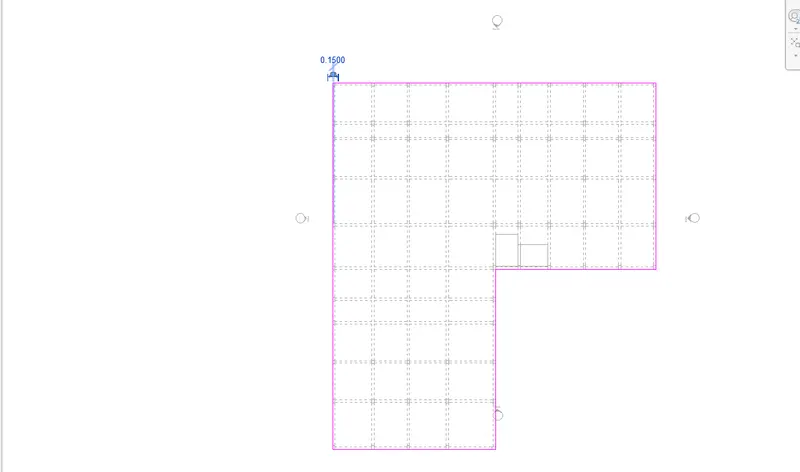
- Define load cases.
- Under the analyze tab select load cases.
- Add dead load, live load, wind load, seismic load.
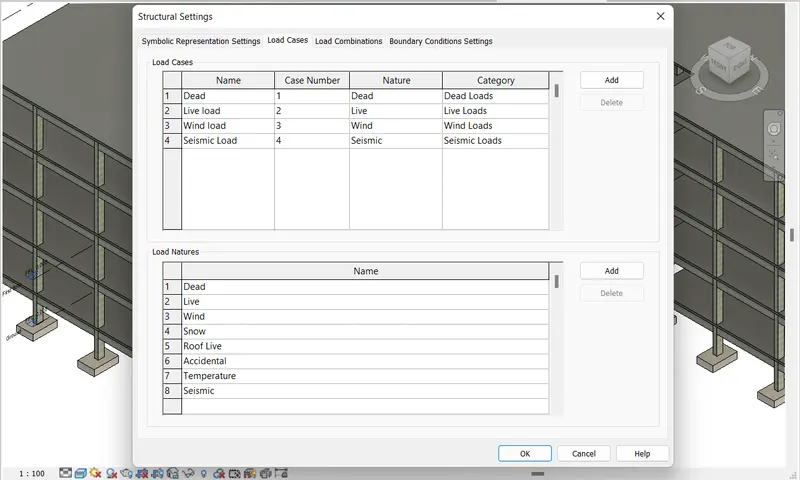
- Define load combinations.
- Under the analyze tab selsct load combinations.
- Click add, add the load combinations.
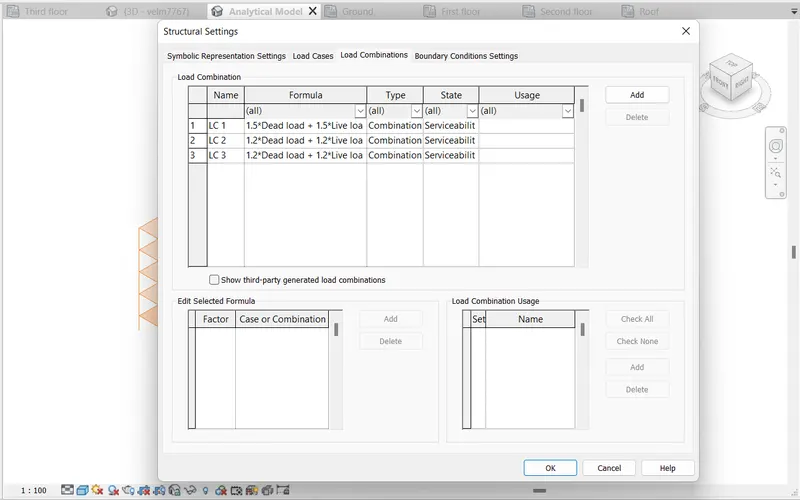
- Open the analytical model.
- Add boundary conditions.
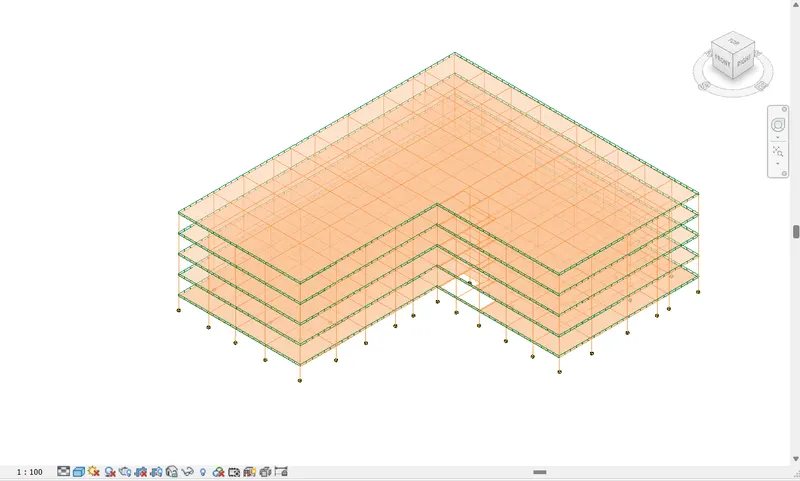
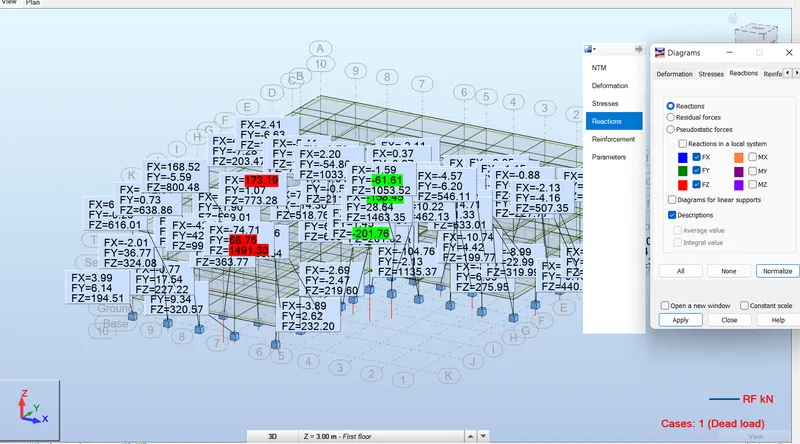
- Export the model to robot structural analysis.
- Select robot structural analysis under the analyze tab.
- Then select robot structural analysis link.
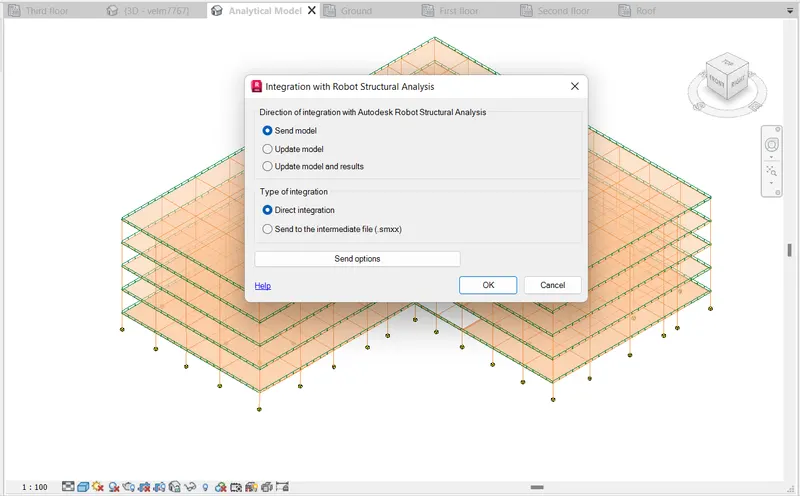
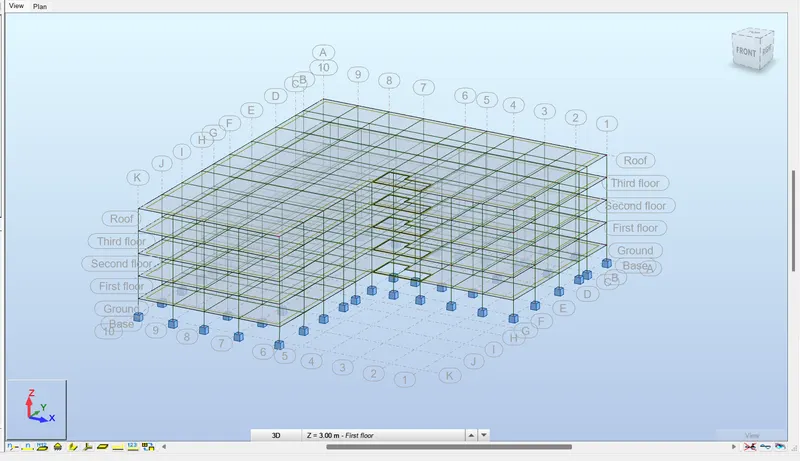
- Once the process is completed it opens the robot structural analysis.
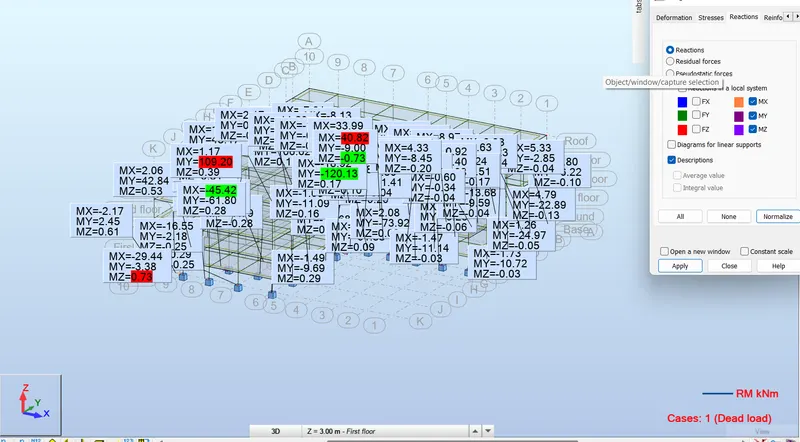
- Click analysis and calculate the analysis process is performed by the software.
- Click results and diagrams for members.
- It will helps to show the results. We can see maximum bending moment value, maximum displacement, lateral displacement vaues.
Result:
The analytical model is exported to robot structural analysis and the analysis is performed.
6) What is energy analysis and why do we need to consider it while modeling in Revit? How does the factor of sustainability improve the quality of your design?
Energy analysis is the traditional method of analyzing energy used in an operation involving in the physical and chemical processing of materials.
Energy analysis can give mojor four principles,
- Calculation of heat gain and loss to the building space and the heating and cooling loads imposed upon the building system.
- Calculation of energy addition and extraction to meet the possibility varying temperature, point and humidity criteria.
- Determination of fuel requirements of primary equipments in the attempt to supply the energy needs of HVAC system.
- It evaluates the cost of equipments, fuels, electricity, labours and retrofit components against the alternative of investing money in other ways.
Energy simulation can help in analyzing the movement of energy in, out and throughout the rooms and volume in building models. This information can help to designers make better information, cost effective desitions that improves the performance and reduce the environmental impacts of the building.
The sustainable design is intend to completely eliminates the environmental impacts throughout the design process. This conceps can be applied across all fields of design such as designing buildings. A sustainable design regardless of application will see to incorporate environmentally preferable out comes such as,
- Lower energy and water consumption throughout the entire life cycle.
- It minimize the impact on climate change by reducing green house gas emission throughout through carbon neutralizing activities.
- Limit resource consumption throughout waste free manufacturing.
- It looks for waste to incorporate biomimicry principles whenever possible.
- It gives preference to non toxic materials.
- It emphasize the quality and durability over the price.