Section Modulus calculation and optimization
Aim:
The aim of this challenge is to calculate the section modulus of the hood design and alter the design to get a higher inertia value
Section Modulus:
Section modulus is a geometric property for a given cross-section used in the design. Section modulus and other geometric properties are affected by the geometry of the design. There are two types of section moduli, the elastic section modulus, and the plastic section modulus.
S = I/y
Where,
S = Section Modulus
I = Moment of Inertia
y = distance between the neutral axis and the extreme end of the object
Steps involved in creating a profile to find the inertia
- Create a plane in the center of the hood and make an intersection.
- Join the outer and inner panel sketch by deleting the bottom part of the outer panel and deleting the upper part of the inner panel.
- Join the inner panel with each other and the outer panel by drawing lines and creating intersections.
- Now using the ‘fill’ command the closed sketch is filled.
- Using the inertia feature the inertia of the sketch is found
Only the minimum value of inertia is taken because at a minimum value the part starts to bend while at maximum the parts will break.
In Case 1,
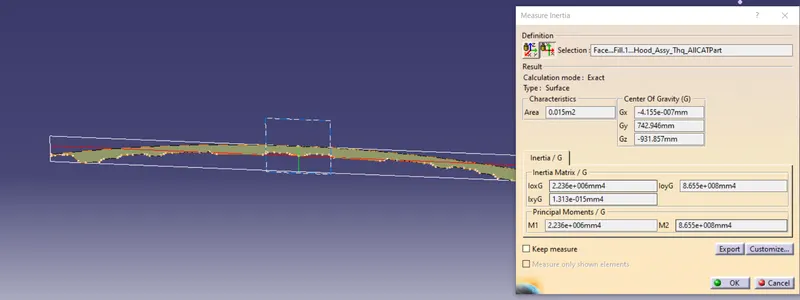
I = 2.236*10^6 mm^4
Y = 440.533mm
S= 2.236*10^6/440.533
= 5075.669mm^3
Case 2:
In this case in order to increase the section modulus and inertia the design is altered. First, the top portion of the Outer panel sketch is offset 0.5mm, and then a specific part of the emboss is made bigger.
Increasing the size of the design reduces the headroom side and uses up more material.
In this case,
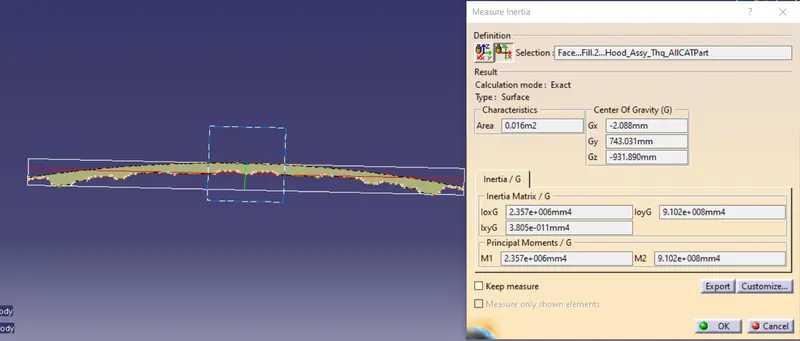
I = 2.357*10^6 mm4
Y = 440.552 mm
S= 2.357*10^6/440.552
= 5350.106 mm^3
By varying the design the section modulus of an object can be altered and ideal values and design can be obtained
Result:
By changing the sketch of the hood, an increase in section modulus has been achieved. The new design formed is later used to create a new part.