QR code generator
import qrcode
from tkinter import *
from tkinter import messagebox
#Creating the window
wn = Tk()
wn.title('DataFlair QR Code Generator')
wn.geometry('700x700')
wn.config(bg='black')
#Function to generate the QR code and save it
def generateCode():
#Creating a QRCode object of the size specified by the user
qr = qrcode.QRCode(version = size.get(),
box_size = 10,
border = 5)
qr.add_data(text.get()) #Adding the data to be encoded to the QRCode object
qr.make(fit = True) #Making the entire QR Code space utilized
img = qr.make_image() #Generating the QR Code
fileDirec=loc.get()+''+name.get() #Getting the directory where the file has to be save
img.save(f'{fileDirec}.png') #Saving the QR Code
#Showing the pop up message on saving the file
messagebox.showinfo("DataFlair QR Code Generator","QR Code is saved successfully!")
#Label for the window
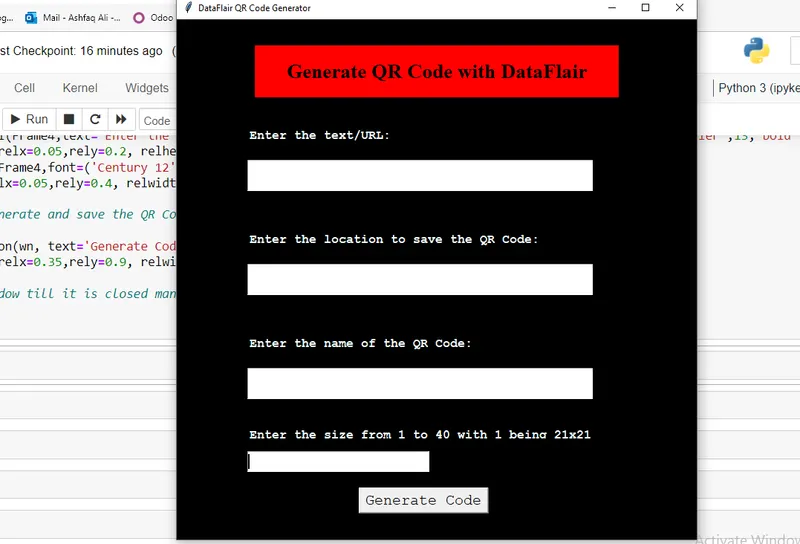
headingFrame = Frame(wn,bg="red",bd=5)
headingFrame.place(relx=0.15,rely=0.05,relwidth=0.7,relheight=0.1)
headingLabel = Label(headingFrame, text="Generate QR Code with DataFlair", bg='red', font=('Times',20,'bold'))
headingLabel.place(relx=0,rely=0, relwidth=1, relheight=1)
#Taking the input of the text or URL to get QR code
Frame1 = Frame(wn,bg="black")
Frame1.place(relx=0.1,rely=0.15,relwidth=0.7,relheight=0.3)
label1 = Label(Frame1,text="Enter the text/URL: ",bg="black",fg='azure',font=('Courier',13,'bold'))
label1.place(relx=0.05,rely=0.2, relheight=0.08)
text = Entry(Frame1,font=('Century 12'))
text.place(relx=0.05,rely=0.4, relwidth=1, relheight=0.2)
#Getting input of the location to save QR Code
Frame2 = Frame(wn,bg="black")
Frame2.place(relx=0.1,rely=0.35,relwidth=0.7,relheight=0.3)
label2 = Label(Frame2,text="Enter the location to save the QR Code: ",bg="black",fg='azure',font=('Courier',13,'bold'))
label2.place(relx=0.05,rely=0.2, relheight=0.08)
loc = Entry(Frame2,font=('Century 12'))
loc.place(relx=0.05,rely=0.4, relwidth=1, relheight=0.2)
#Getting input of the QR Code image name
Frame3 = Frame(wn,bg="black")
Frame3.place(relx=0.1,rely=0.55,relwidth=0.7,relheight=0.3)
label3 = Label(Frame3,text="Enter the name of the QR Code: ",bg="black",fg='azure',font=('Courier',13,'bold'))
label3.place(relx=0.05,rely=0.2, relheight=0.08)
name = Entry(Frame3,font=('Century 12'))
name.place(relx=0.05,rely=0.4, relwidth=1, relheight=0.2)
#Getting the input of the size of the QR Code
Frame4 = Frame(wn,bg="black")
Frame4.place(relx=0.1,rely=0.75,relwidth=0.7,relheight=0.2)
label4 = Label(Frame4,text="Enter the size from 1 to 40 with 1 being 21x21: ",bg="black",fg='azure',font=('Courier',13,'bold'))
label4.place(relx=0.05,rely=0.2, relheight=0.08)
size = Entry(Frame4,font=('Century 12'))
size.place(relx=0.05,rely=0.4, relwidth=0.5, relheight=0.2)
#Button to generate and save the QR Code
button = Button(wn, text='Generate Code',font=('Courier',15,'normal'),command=generateCode)
button.place(relx=0.35,rely=0.9, relwidth=0.25, relheight=0.05)
#Runs the window till it is closed manually
wn.mainloop()