PV Diagram of Otto Cycle using MATLAB
Aim : To plot the PV diagram for a Otto cycle using the engine kinematics and to calculate the thermal efficiency of the Otto cycle using MATLAB.
Code :
% Engine kinematics
function [V] = engine_kinematics(bore,stroke,con_rod,cr,start_crank,end_crank)
a = stroke/2
R = con_rod/a
v_s = (pi/4)*bore^2*stroke;
v_c = v_s/(cr-1);
theta = linspace(start_crank,end_crank,100);
term1 = 0.5*(cr-1);
term2 = R + 1 - cosd(theta);
term3 = (R^2 - sind(theta).^2).^0.5;
V = (1 + term1*(term2 - term3)).*v_c;
end
clear all
close all
clc
%Inputs
gamma = 1.4
t3 = 2300
% State variables
p1 = 101325
t1 = 500
% Engine geometric parameters
bore = 0.1;
stroke = 0.1;
con_rod = 0.15;
cr = 8
% Calculating the swept colume and clearance volume
v_swept = (pi/4)*bore^2*stroke;
v_clearance = v_swept/(cr-1);
v1 = v_swept + v_clearance
v2 = v_clearance
% State variables at state point 2
% p2v2^gamma = p1*cr^gamma
p2 = p1*cr^gamma;
% p1v1/t1 = p2*v2/t2 | t2 = p2*v2*t1/(p1*v1)
t2 = p2*v2*t1/(p1*v1)
constant_c = p1*v1^gamma;
V_compression = engine_kinematics(bore,stroke,con_rod,cr,180,0);
P_compression = constant_c./V_compression.^gamma;
% State variables at state point 3
v3 = v2
% p3v3/t3 = p2v2/t2 | p3 = p2*t3/t2
p3 = p2*t3/t2
constant_c = p3*v3^gamma;
V_expansion = engine_kinematics(bore,stroke,con_rod,cr,0,180);
P_expansion = constant_c./V_expansion.^gamma;
% State variables at state point 4
v4 = v1
% p3v3^gamma = p4v4^gamma | p4 = p3*(v3/v4)^gamma
p4 = p3*(v3/v4)^gamma
% Thermal efficiency
efficiency = 1-1/cr^(gamma-1)
hold on
plot(v1,p1,'*','color','b')
plot(V_compression,P_compression,'color','b')
plot(v2,p2,'*','color','b')
plot([v2 v3],[p2 p3],'color','b')
plot(v3,p3,'*','color','b')
plot(V_expansion,P_expansion,'color','b')
plot(v4,p4,'*','color','b')
plot([v4 v1],[p4 p1],'color','b')
xlabel('Volume')
ylabel('Pressure')Report :
Step-wise explanation of code :
The program for engine kinematics is created as a function, which can be called to the main program for solving the kinematic equation of the piston.
Initially in the main program, the inputs variables gamma and t3 are assumed and the state 1 variables p1 and t1 are also assumed.
The engine geometric paramters are also considered with the basic measurements of a standard piston.
Now the formulae to calculate the swept volume and clearance volume is computed with which we can find the values of v1 and v2.
During the compression phase of the engine, the value of t2 is calculated at state point 2 and the engine kinematics function is called now to compute the curve from state 1 to state 2.
During the ignition phase of the engine, the value of p3 is calculated at state point 3.
During the expansion phase of the engine, the engine kinematics function is called now to compute the curve from state 3 to state 4.
During the heat rejection phase of the engine, the value of p4 is calculate at state point 4.
And the thermal efficiency of the otto cycle is calculated finally using the values of compression ratio and gamma.
Now the points are plotted and the curve is computed in the PV diagram with the values calculated from state 1 to state 4.
Errors faced while programming :
Error 1 : While calling the function the value of function V is not a single value.
Error 2 : The plot between state 2 and state 3 and the plot between state 4 and state 1.
Steps taken to overcome these errors :
Step 1 : We must use the element wise operator to multiply the values of function V since it is an array.
Step 2 : The plots are computed using the values at the states as an array.
Screenshots showing errors :
Error 1 :

Error 2 :
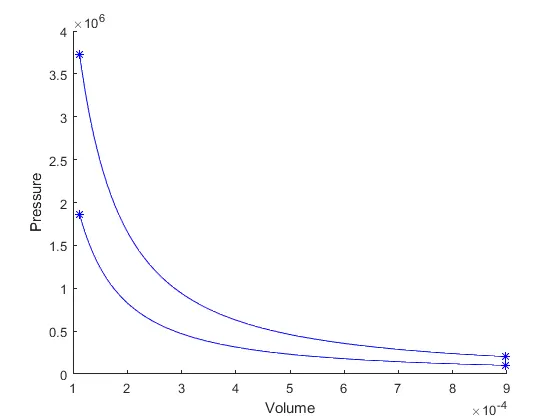
Output :
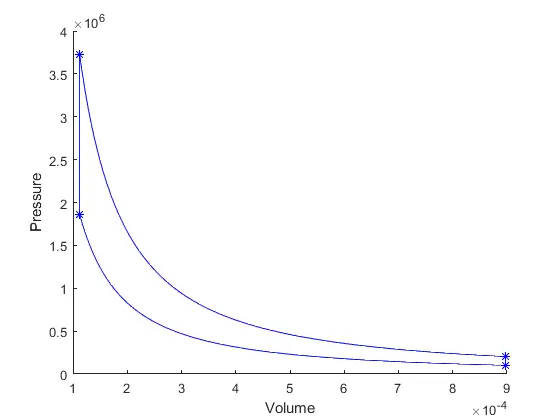
Thermal efficiency = 0.5647 or 56.47%
An otto cycle explains the function of a spark ignition engine, we are using the program to plot the curve of PV diagram which explains the pressure variation and volume variation taking place in the engine during different cycles of the engine. Specifically this program helps us to find out the PV diagram and the thermal efficiency of engine, when we just input the required input parameters.