Project - Design a Hospital Management system
Answer
What is Healthcare Management System
Healthcare management system is a system that is used in healthcare setting for better working coordination. A healthcare management is put into place for the different departments to have coordination without any problem. A hospital management system helps to clear the clutter of miscommunication in a healthcare structure. Let us take the example of hospital which is the most common healthcare structure. A hospital is a quite large building with several departments. Each of the department works in sync with the other department. Like the accounts department of the hospital is linked with the front desk, billing and customer billing department. All of these departments work in absolute sync with each other. The same way the front desk works in sync with the nursing department, which tells them which beds are available in the hospital rooms at the moment. The nursing department also works in coordination with all of the major departments in the hospital. Now, imagine if there was not a hospital system like back in the days. They used to use PA system to announce different things to various systems. This sometimes led to miscommunication as the hospital is always bustling, so sound can get dissolved or the speaker on the receiving end can be broken. This sometimes led to various complications if the nurse is one relaying the message, as the nurse can be needed immediately in the department and if she goes to relay information due the speaker being busted and no helping staff being there, it can be fatal for the patient. With the introduction of healthcare management system, such this have become easier. The nurse does not need to make trips to the infirmary to collect the meds, it can be done directly via the software. The bed availability can be also updated directly on the software and the real time status of the bed can be viewed directly from anywhere. With the little tweaks the organizations starts working more efficiently leading to better results.
Webpage Development
As we know that hospital management system is a server based service. This means it will operate using just the server and does not need too much space in the hard drive to begin. Therefore a web based application will suffice for the service to work. A web application necessarily does all of the work that an installed application will do but it works directly on a web browser which all of the systems have installed in them already. This makes the application work faster and directly. Now a web application is just a direct link of the website so not much of the coding is done to make it. Although an application which will do the same thing but in its own environment will need more coding. Since, web applications are used mostly, so the only thing that would need some coding is the website itself. There are several coding languages that are used to make the front-end and the back-end of the application. The languages used in back-end and front-end of the website requires different sets of languages. The front-end of the web site requires languages like HTML, CSS, AJAX and JavaScript. While the back-end of the website requires coding languages like PHP, Node.js, Python, Ruby, Java, JavaScript, Golang, C# and DBMS. Let us discuss all of the languages in the topic below.
Front-end Coding Languages
-
HTML: HTML stands for Hypertext Markup Language. It is used to design the front-end portion of web pages using a markup language. HTML is the combination of Hypertext and Markup language. Hypertext defines the link between the web pages. The markup language is used to define the text documentation within the tag which defines the structure of web pages.
-
CSS: Cascading Style Sheets fondly referred to as CSS is a simply designed language intended to simplify the process of making web pages presentable. CSS allows you to apply styles to web pages. More importantly, CSS enables you to do this independent of the HTML that makes up each web page.
-
AJAX: Ajax is an acronym for Asynchronous JavaScript and XML. It is used to communicate with the server without refreshing the web page and thus increasing the user experience and better performance.
-
JavaScript: JavaScript is a famous scripting language used to create magic on the sites to make the site interactive for the user. It is used to enhancing the functionality of a website to running cool games and web-based software.
Back-end Coding Languages
-
PHP: PHP is a server-side scripting language designed specifically for web development. Since PHP code executed on the server-side, so it is called a server-side scripting language.
-
Node.js: Node.js is an open-source and cross-platform runtime environment for executing JavaScript code outside a browser. You need to remember that NodeJS is not a framework, and it’s not a programming language. Most people are confused and understand it’s a framework or a programming language. We often use Node.js for building back-end services like APIs like Web App or Mobile App. It’s used in production by large companies such as Paypal, Uber, Netflix, Wallmart, and so on.
-
Python: Python is a programming language that lets you work quickly and integrate systems more efficiently.
-
Ruby: Ruby is a dynamic, reflective, object-oriented, general-purpose programming language. Ruby is a pure Object-Oriented language developed by Yukihiro Matsumoto. Everything in Ruby is an object except the blocks but there are replacements too for it i.e procs and lambda. The objective of Ruby’s development was to make it act as a sensible buffer between human programmers and the underlying computing machinery.
-
Java: Java is one of the most popular and widely used programming languages and platforms. It is highly scalable. Java components are easily available.
-
JavaScript: JavaScript can be used as both (front end and back end) programming.
-
Golang: Golang is a procedural and statically typed programming language having the syntax similar to C programming language. Sometimes it is termed as Go Programming Language.
-
C#: C# is a general-purpose, modern and object-oriented programming language pronounced as “C sharp”.
-
DBMS: The software which is used to manage database is called Database Management System (DBMS).
Front-end view of the website
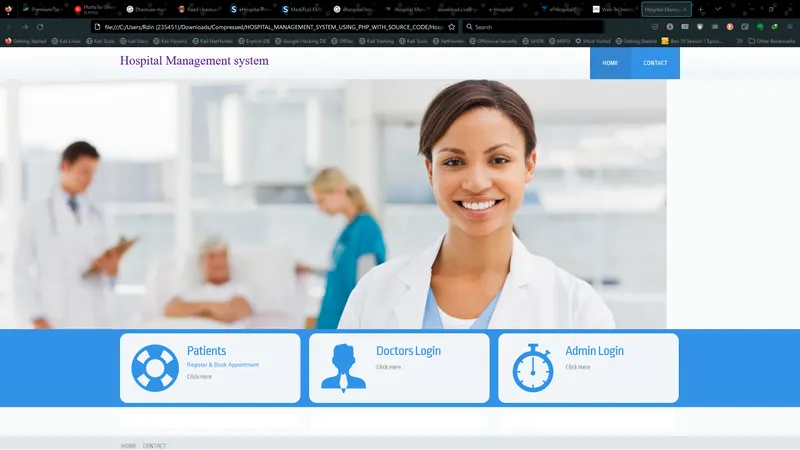
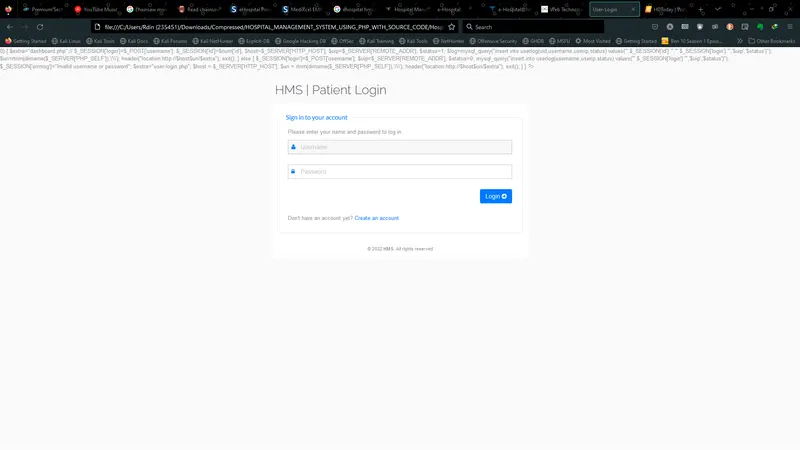
Now that we are done with the coding description of the page, the front-end view of the web page, what will have it? Let us discuss that. Once the web application is opened, the page will greet the user with a login page. Login page will have a bubble or a box in which the login details can be entered. The login will let you in once the server has confirmed that the user is verified. The login will be categorised at the back-end of the website. If the login credentials match with the stored credentials for the doctor then the doctor's portal will be opened. All of the portals are customized according to different doctors. Once the login is done, the user gets a page to walkthrough. For the first-time user, the website has a complimentary walk-through for the user. The website gives a tour of all the necessary functions that the user would require to surf through the portal. The website has a record of the beds, doctor's appointments, patient reports etc. The user can access all of these functions from the table/ drop-down table that is located either on the top of the page or on the side of the page, as the user has asked the provider to customize it. From the table, the user can select the options needed to operate the specific task the user needs to do. There can be large icons for each of the service under the heading recently used. The user can just click on the icon and go back to doing what they were about to do. Some of the services that are on the page are in-patient, out-patient, OT services, bed availability etc.
Code Snippets:
-- http://www.phpmyadmin.net
--
-- Host: 127.0.0.1
-- Generation Time: Jan 07, 2017 at 09:25 AM
-- Server version: 5.6.26
-- PHP Version: 5.5.28
SET SQL_MODE = "NO_AUTO_VALUE_ON_ZERO";
SET time_zone = "+00:00";
/*!40101 SET @OLD_CHARACTER_SET_CLIENT=@@CHARACTER_SET_CLIENT */;
/*!40101 SET @OLD_CHARACTER_SET_RESULTS=@@CHARACTER_SET_RESULTS */;
/*!40101 SET @OLD_COLLATION_CONNECTION=@@COLLATION_CONNECTION */;
/*!40101 SET NAMES utf8mb4 */;
--
-- Database: `hms`
--
-- --------------------------------------------------------
--
-- Table structure for table `admin`
--
CREATE TABLE IF NOT EXISTS `admin` (
`id` int(11) NOT NULL,
`username` varchar(255) NOT NULL,
`password` varchar(255) NOT NULL,
`updationDate` varchar(255) NOT NULL
) ENGINE=InnoDB AUTO_INCREMENT=2 DEFAULT CHARSET=latin1;
--
-- Dumping data for table `admin`
--
INSERT INTO `admin` (`id`, `username`, `password`, `updationDate`) VALUES
(1, 'admin', 'Test@12345', '28-12-2016 11:42:05 AM');
-- --------------------------------------------------------
--
-- Table structure for table `appointment`
--
CREATE TABLE IF NOT EXISTS `appointment` (
`id` int(11) NOT NULL,
`doctorSpecialization` varchar(255) NOT NULL,
`doctorId` int(11) NOT NULL,
`userId` int(11) NOT NULL,
`consultancyFees` int(11) NOT NULL,
`appointmentDate` varchar(255) NOT NULL,
`appointmentTime` varchar(255) NOT NULL,
`postingDate` timestamp NOT NULL DEFAULT CURRENT_TIMESTAMP,
`userStatus` int(11) NOT NULL,
`doctorStatus` int(11) NOT NULL,
`updationDate` varchar(255) NOT NULL
) ENGINE=InnoDB AUTO_INCREMENT=3 DEFAULT CHARSET=latin1;
--
-- Dumping data for table `appointment`
--
INSERT INTO `appointment` (`id`, `doctorSpecialization`, `doctorId`, `userId`, `consultancyFees`, `appointmentDate`, `appointmentTime`, `postingDate`, `userStatus`, `doctorStatus`, `updationDate`) VALUES
(1, 'Dentist', 1, 1, 500, '2016-12-31', '09:25', '2017-01-01 00:29:02', 1, 0, ''),
(2, 'Homeopath', 4, 5, 700, '2017-01-11', '14:10', '2017-01-07 08:02:58', 0, 1, '');
-- --------------------------------------------------------
--
-- Table structure for table `doctors`
--
CREATE TABLE IF NOT EXISTS `doctors` (
`id` int(11) NOT NULL,
`specilization` varchar(255) NOT NULL,
`doctorName` varchar(255) NOT NULL,
`address` longtext NOT NULL,
`docFees` varchar(255) NOT NULL,
`contactno` bigint(11) NOT NULL,
`docEmail` varchar(255) NOT NULL,
`password` varchar(255) NOT NULL,
`creationDate` timestamp NOT NULL DEFAULT CURRENT_TIMESTAMP,
`updationDate` varchar(255) NOT NULL
) ENGINE=InnoDB AUTO_INCREMENT=8 DEFAULT CHARSET=latin1;
--
-- Dumping data for table `doctors`
--
INSERT INTO `doctors` (`id`, `specilization`, `doctorName`, `address`, `docFees`, `contactno`, `docEmail`, `password`, `creationDate`, `updationDate`) VALUES
(1, 'Dentist', 'Anuj', 'New Delhi', '500', 8285703354, '[email protected]', '5c428d8875d2948607f3e3fe134d71b4', '2016-12-29 06:25:37', '04-01-2017 01:27:51 PM'),
(2, 'Homeopath', 'Code Projects', 'Varanasi', '600', 2147483647, '[email protected]', 'f925916e2754e5e03f75dd58a5733251', '2016-12-29 06:51:51', ''),
(3, 'General Physician', 'Nitesh Kumar', 'Ghaziabad', '1200', 8523699999, '[email protected]', 'f925916e2754e5e03f75dd58a5733251', '2017-01-07 07:43:35', ''),
(4, 'Homeopath', 'Vijay Verma', 'New Delhi', '700', 25668888, '[email protected]', 'f925916e2754e5e03f75dd58a5733251', '2017-01-07 07:45:09', ''),
(5, 'Ayurveda', 'Sanjeev', 'Gurugram', '8050', 442166644646, '[email protected]', 'f925916e2754e5e03f75dd58a5733251', '2017-01-07 07:47:07', ''),
(6, 'General Physician', 'Amrita', 'New Delhi India', '2500', 45497964, '[email protected]', 'f925916e2754e5e03f75dd58a5733251', '2017-01-07 07:52:50', ''),
(7, 'Demo test', 'abc ', 'xyz', '200', 852888888, '[email protected]', 'f925916e2754e5e03f75dd58a5733251', '2017-01-07 08:08:58', '');
-- --------------------------------------------------------
--
-- Table structure for table `doctorslog`
--
CREATE TABLE IF NOT EXISTS `doctorslog` (
`id` int(11) NOT NULL,
`uid` int(11) NOT NULL,
`username` varchar(255) NOT NULL,
`userip` binary(16) NOT NULL,
`loginTime` timestamp NOT NULL DEFAULT CURRENT_TIMESTAMP,
`logout` varchar(255) NOT NULL,
`status` int(11) NOT NULL
) ENGINE=InnoDB AUTO_INCREMENT=10 DEFAULT CHARSET=latin1;
--
-- Dumping data for table `doctorslog`
--
INSERT INTO `doctorslog` (`id`, `uid`, `username`, `userip`, `loginTime`, `logout`, `status`) VALUES
(1, 2, '[email protected]', 0x30000000000000000000000000000000, '2017-01-06 05:53:31', '', 1),
(2, 0, 'admin', 0x3a3a3100000000000000000000000000, '2017-01-06 06:36:07', '', 0),
(3, 2, '[email protected]', 0x3a3a3100000000000000000000000000, '2017-01-06 06:36:37', '06/01/2017 07:36:45', 1),
(4, 2, '[email protected]', 0x3a3a3100000000000000000000000000, '2017-01-06 06:41:33', '12:11:46', 1),
(5, 2, '[email protected]', 0x3a3a3100000000000000000000000000, '2017-01-06 06:55:16', '06-01-2017 12:27:47 PM', 1),
(6, 0, 'admin', 0x3a3a3100000000000000000000000000, '2017-01-06 07:07:12', '', 0),
(7, 0, '[email protected]', 0x3a3a3100000000000000000000000000, '2017-01-07 08:04:42', '', 0),
(8, 0, '[email protected]', 0x3a3a3100000000000000000000000000, '2017-01-07 08:04:55', '', 0),
(9, 2, '[email protected]', 0x3a3a3100000000000000000000000000, '2017-01-07 08:05:54', '07-01-2017 01:36:28 PM', 1);
-- --------------------------------------------------------
--
-- Table structure for table `doctorspecilization`
--
CREATE TABLE IF NOT EXISTS `doctorspecilization` (
`id` int(11) NOT NULL,
`specilization` varchar(255) NOT NULL,
`creationDate` timestamp NOT NULL DEFAULT CURRENT_TIMESTAMP,
`updationDate` varchar(255) NOT NULL
) ENGINE=InnoDB AUTO_INCREMENT=11 DEFAULT CHARSET=latin1;
--
-- Dumping data for table `doctorspecilization`
--
INSERT INTO `doctorspecilization` (`id`, `specilization`, `creationDate`, `updationDate`) VALUES
(1, 'Gynecologist/Obstetrician', '2016-12-28 06:37:25', ''),
(2, 'General Physician', '2016-12-28 06:38:12', ''),
(3, 'Dermatologist', '2016-12-28 06:38:48', ''),
(4, 'Homeopath', '2016-12-28 06:39:26', ''),
(5, 'Ayurveda', '2016-12-28 06:39:51', ''),
(6, 'Dentist', '2016-12-28 06:40:08', ''),
(7, 'Ear-Nose-Throat (Ent) Specialist', '2016-12-28 06:41:18', ''),
(9, 'Demo test', '2016-12-28 07:37:39', '28-12-2016 01:28:42 PM'),
(10, 'Bones Specialist demo', '2017-01-07 08:07:53', '07-01-2017 01:38:04 PM');
-- --------------------------------------------------------
--
-- Table structure for table `userlog`
--
CREATE TABLE IF NOT EXISTS `userlog` (
`id` int(11) NOT NULL,
`uid` int(11) NOT NULL,
`username` varchar(255) NOT NULL,
`userip` binary(16) NOT NULL,
`loginTime` timestamp NOT NULL DEFAULT CURRENT_TIMESTAMP,
`logout` varchar(255) NOT NULL,
`status` int(11) NOT NULL
) ENGINE=InnoDB AUTO_INCREMENT=15 DEFAULT CHARSET=latin1;
--
-- Dumping data for table `userlog`
--
INSERT INTO `userlog` (`id`, `uid`, `username`, `userip`, `loginTime`, `logout`, `status`) VALUES
(6, 1, '', 0x3a3a3100000000000000000000000000, '2017-01-06 07:02:28', '', 1),
(7, 1, '[email protected]', 0x3a3a3100000000000000000000000000, '2017-01-06 07:04:28', '', 1),
(8, 0, 'admin', 0x3a3a3100000000000000000000000000, '2017-01-06 07:07:41', '06-01-2017 12:38:09 PM', 0),
(9, 1, '[email protected]', 0x3a3a3100000000000000000000000000, '2017-01-06 07:08:01', '', 1),
(10, 1, '[email protected]', 0x3a3a3100000000000000000000000000, '2017-01-06 07:10:09', '06-01-2017 12:41:43 PM', 1),
(11, 2, '[email protected]', 0x3a3a3100000000000000000000000000, '2017-01-07 07:57:18', '07-01-2017 01:27:34 PM', 1),
(12, 0, 'asdad', 0x3a3a3100000000000000000000000000, '2017-01-07 07:57:44', '', 0),
(13, 0, '[email protected]', 0x3a3a3100000000000000000000000000, '2017-01-07 07:59:43', '', 0),
(14, 5, '[email protected]', 0x3a3a3100000000000000000000000000, '2017-01-07 08:00:44', '07-01-2017 01:34:19 PM', 1);
-- --------------------------------------------------------
--
-- Table structure for table `users`
--
CREATE TABLE IF NOT EXISTS `users` (
`id` int(11) NOT NULL,
`fullName` varchar(255) NOT NULL,
`address` longtext NOT NULL,
`city` varchar(255) NOT NULL,
`gender` varchar(255) NOT NULL,
`email` varchar(255) NOT NULL,
`password` varchar(255) NOT NULL,
`regDate` timestamp NOT NULL DEFAULT CURRENT_TIMESTAMP,
`updationDate` varchar(255) NOT NULL
) ENGINE=InnoDB AUTO_INCREMENT=6 DEFAULT CHARSET=latin1;
--
-- Dumping data for table `users`
--
INSERT INTO `users` (`id`, `fullName`, `address`, `city`, `gender`, `email`, `password`, `regDate`, `updationDate`) VALUES
(1, 'Anuj kumar', 'Test address', 'Aligarh', 'Males', '[email protected]', 'f925916e2754e5e03f75dd58a5733251', '2016-12-26 07:03:09', '30-12-2016 11:27:47 AM'),
(2, 'Code Projects', 'New Delhi India', 'Delhi', 'female', '[email protected]', 'f925916e2754e5e03f75dd58a5733251', '2016-12-30 05:34:39', ''),
(3, 'Amit', 'New Delhi', 'New delhi', 'male', '[email protected]', 'f925916e2754e5e03f75dd58a5733251', '2017-01-07 06:36:53', ''),
(4, 'Rahul Singh', 'New Delhi', 'New delhi', 'male', '[email protected]', 'f925916e2754e5e03f75dd58a5733251', '2017-01-07 07:41:14', ''),
(5, 'Amit kumar', 'New Delhi India', 'Delhi', 'male', '[email protected]', 'f925916e2754e5e03f75dd58a5733251', '2017-01-07 08:00:26', '07-01-2017 01:32:12 PM');
--
-- Indexes for dumped tables
--
--
-- Indexes for table `admin`
--
ALTER TABLE `admin`
ADD PRIMARY KEY (`id`);
--
-- Indexes for table `appointment`
--
ALTER TABLE `appointment`
ADD PRIMARY KEY (`id`);
--
-- Indexes for table `doctors`
--
ALTER TABLE `doctors`
ADD PRIMARY KEY (`id`);
--
-- Indexes for table `doctorslog`
--
ALTER TABLE `doctorslog`
ADD PRIMARY KEY (`id`);
--
-- Indexes for table `doctorspecilization`
--
ALTER TABLE `doctorspecilization`
ADD PRIMARY KEY (`id`);
--
-- Indexes for table `userlog`
--
ALTER TABLE `userlog`
ADD PRIMARY KEY (`id`);
--
-- Indexes for table `users`
--
ALTER TABLE `users`
ADD PRIMARY KEY (`id`);
--
-- AUTO_INCREMENT for dumped tables
--
--
-- AUTO_INCREMENT for table `admin`
--
ALTER TABLE `admin`
MODIFY `id` int(11) NOT NULL AUTO_INCREMENT,AUTO_INCREMENT=2;
--
-- AUTO_INCREMENT for table `appointment`
--
ALTER TABLE `appointment`
MODIFY `id` int(11) NOT NULL AUTO_INCREMENT,AUTO_INCREMENT=3;
--
-- AUTO_INCREMENT for table `doctors`
--
ALTER TABLE `doctors`
MODIFY `id` int(11) NOT NULL AUTO_INCREMENT,AUTO_INCREMENT=8;
--
-- AUTO_INCREMENT for table `doctorslog`
--
ALTER TABLE `doctorslog`
MODIFY `id` int(11) NOT NULL AUTO_INCREMENT,AUTO_INCREMENT=10;
--
-- AUTO_INCREMENT for table `doctorspecilization`
--
ALTER TABLE `doctorspecilization`
MODIFY `id` int(11) NOT NULL AUTO_INCREMENT,AUTO_INCREMENT=11;
--
-- AUTO_INCREMENT for table `userlog`
--
ALTER TABLE `userlog`
MODIFY `id` int(11) NOT NULL AUTO_INCREMENT,AUTO_INCREMENT=15;
--
-- AUTO_INCREMENT for table `users`
--
ALTER TABLE `users`
MODIFY `id` int(11) NOT NULL AUTO_INCREMENT,AUTO_INCREMENT=6;
/*!40101 SET CHARACTER_SET_CLIENT=@OLD_CHARACTER_SET_CLIENT */;
/*!40101 SET CHARACTER_SET_RESULTS=@OLD_CHARACTER_SET_RESULTS */;
/*!40101 SET COLLATION_CONNECTION=@OLD_COLLATION_CONNECTION */;
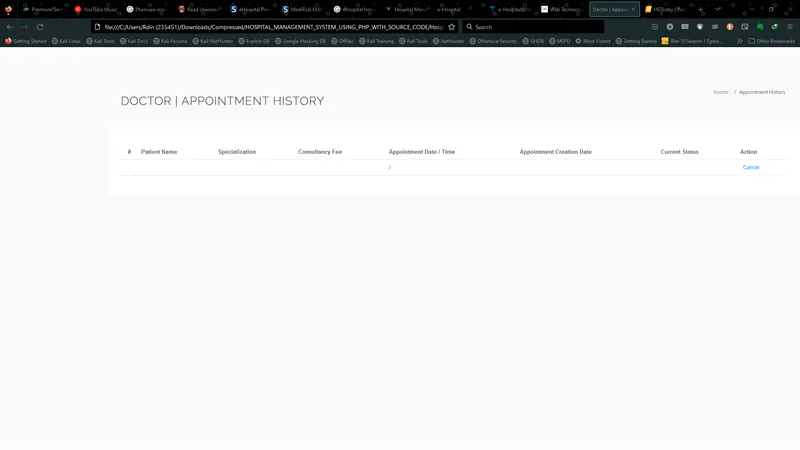
Healthcare Management System Snippet
What can be improved in the current Healthcare Management System
There are several things that can be improved in the current healthcare management system that is in circulation is report alert. Report alert will alert the users that the report has been printed in the hospital and they can go and collect the report from the hospital. Also if there is a facility to get medicines delivered at home it would be of great help. Sometimes a doctor issues some medicines that are available abroad and not in our home country. So, if there is a facility of medicine delivery, such medicines can be ordered right from the hospital without any problems. Also if there is a facility for pick up and drop that would be of a great help as sometimes due to app surge, the patient is not able to get a cab in time to prevent further complications. This can be avoided with the help of pick n drop facility.