Project - Design a Hospital Management system
Hospital Management System (HMS):
Hospital management system was introduced with the cause for helping hospitals speed up their processes.
Hospital management system is a computer system that helps manage the information related to health care and aids in the job completion of health care providers effectively. They manage the data related to all departments of healthcare such as,
- Clinical
- Financial
- Laboratory
- Inpatient
- Outpatient
- Operation theater
- Materials
- Nursing
- Pharmaceutical
- Radiology
- Pathology etc.
HMS came into the picture of hospital management as early as 1960 and have ever since been evolving and synchronizing with the technologies while modernizing healthcare facilities. In today’s world, the management of healthcare starts from the hands of the patients through their mobile phones and facilitates the needs of the patient.
Why is HMS important for a hospital?
HMS was introduced to solve the complications coming from managing all the paper works of every patient associated with the various departments of hospitalization with confidentiality. HMS provides the ability to manage all the paperwork in one place, reducing the work of staff in arranging and analyzing the paperwork of the patients. HMS does many works like:
- Maintain the medical records of the patient
- Maintain the contact details of the patient
- Keep track of the appointment dates
- Save the insurance information for later reference
- Tracking the bill payments.
The advantages of HMS can be pinpointed to the following:
- Time-saving Technology
- Improved Efficiency by avoiding human errors
- Reduces scope for Error
- Data security and correct data retrieval made possible
- Cost effective and easily manageable
- Easy access to patient data with correct patient history
- Improved patient care made possible
- Easy monitoring of supplies in inventory
- Reduces the work of documentation
- Better Audit controls and policy compliance.
Features of Hospital Management System:
Appointment Management
For hospitals having their own site, appointment widgets will be integrated onto the site. Patients visiting the hospital’s website can book online appointments with ease.
Billing Management
Integrated Billing with treatments, Lab and Radiology. Alerts will be sent on Discount Authorisation. Automatic due capture, Option to bill before and after consultation.
Prescription Management
Manage commonly and recently used medicines. Option to show medicines available in the pharmacy. SMS prescriptions to Patients.
Discharge Summary
Template based Discharge Summary. ICD10 integration. Option to prevent discharge summary till IP bill is closed.
Operation Theatre Management
Automatic notification can be sent to customers on test results. Lab notifications like email, SMS of the test reports sent from the Automated Lab notification module.
Pharmacy Management
Comprehensive Pharmacy Management handles stock, Prescription Integration, Ward Request, Stock Management, Stock Moment and intelligent reports.
Lab Management
Comprehensive Lab Management handles complete order management, Custom Reports, Smart Notifications, Credit Settlement, detailed MIS Reports, Analytics and App for Phlebotomist.
Master Information Systems
Lets you access entire MIS data from your palm.
Manage Multiple Locations
Any number of branches can be added and managed using a single account.
Benefits of Hospital Management System:
We have so far clarified on the importance of HMS, it is your responsibility to pick out the right kind of HMS for your needs and purposes. Here we give more information on the benefits of various HMS and the impact it creates on hospital systems.
Easy Patient data retrieval:
HMS makes it possible to access all the data related to a patient via a system by the means of a few simple clicks. Information like patient history, current illness, doctors involved, tests reports taken, billing information and many more can be made visible to the user. These data will help to connect the dots about the patient, like specific diagnosis, related treatment, and medication
The Electronic Medical Record (EMR) or Electronic Health Record (EHR):
This electronic-based medical record system can be viewed as a patient’s health chart. It retrieves information based on the patient’s name or medical record number or the physician’s record number.
Increased Data security:
The patient data can be kept a hundred percent safe by using HMS in your hospital. It can be made accessible by only a limited amount of authorized personnel. With HMS, all the data is stored on a server or cloud and kept safe by just securing the login information safe.
Improve Visibility and Transparency:
Hospital Management System (HMS) improves the visibility and transparency in the complete management process and in all records.
Streamline Accurate Reporting:
It helps in streamlining the accurate reporting with the help of updated and accurate records.
Improved Quality Control:
Hospital Management System improves the quality control on the products and services of the hospital.
Improved Management Visibility:
It also improves the management visibility of hospital, all information, and data regarding the patient, doctor and medicine could be seen by any department easily.
Ease to Access System Facilities:
Hospital Management System makes it easy to get access to the management system facilities for the authorized users and keep it safe from unauthorized users.
Cost Effective:
HMS not only saves time in the hospital but also is cost-effective in decreasing the number of people working on the system of manual entry of data and paperwork. The implementation of His will decrease the human intervention into the system thereby avoiding human-caused errors.
Every hospital has different needs, analyze what is best for the users requirement and install the apt HMS system.
HMS Workflow :-
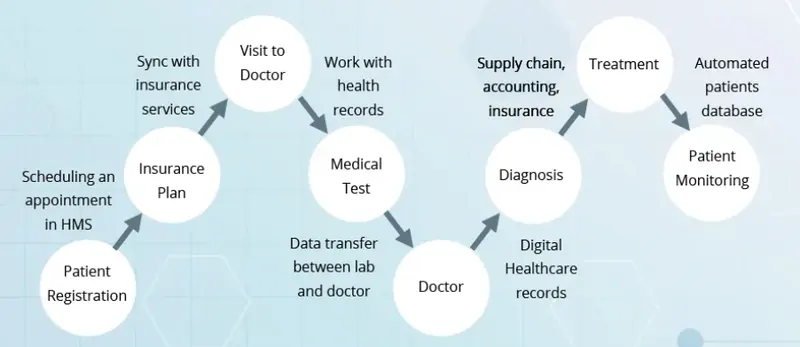
When the patient wants to have an appointment, he might choose among a few options. Firstly, you can find the data about visiting hours on the medical specialists’ profiles and book a convenient time. Secondly, you simply dial the receptionist who will check the doctors’ schedule for you and set your appointment. In both cases, the doctor gets the information about the next visit whereas the patient will get a reminder via SMS, email or even receive the automated calls.
As for the medical specialists, the healthcare record management system that contains the patient information in one place enables more efficient work of the staff. Automation speeds up the process of patient registration and filling out all the necessary records. The doctors have the ability to check the disease history, test results, as well as add new data to the patient file. The job of the doctor that previously involved too much paperwork can be completely computerized. Doctors spend more time on patients’ treatment rather than documentation. If something is requested in a written form, they are able to print it.
Finally, the clinic authorities receive the automated control of all the interactions in their facility. The hospital system software can generate the analysis of staff work, financial expenses, revenue, set the general priorities of the institution, outline future directions.
❖ User Interfaces
▪ This section provides a detailed description of all inputs into and outputs from the system. It also gives a description of the hardware, software and communication interfaces and provides basic prototypes of the user interface.
▪ The protocol used shall be HTTP.
▪ The Port number used will be 80.
▪ There shall be logical address of the system in IPv4 format.
❖ Hardware Interfaces
▪ Laptop/Desktop PC-Purpose of this is to give information when Patients ask information about doctors, medicine available lab tests etc. To perform such Action it need very efficient computer otherwise due to that reason patients have to wait for a long time to get what they ask for.
▪ Laser Printer (B/W) - This device is for printing patients’ info etc.
▪ Wi-Fi router - Wi-Fi router is used to for internetwork operations inside of a hospital and simply data transmission from pc’s to sever.
❖ Software Interfaces
▪ JDK 1.8 - Java is fast, secure, and reliable. From laptops to data centers, game consoles to scientific supercomputers, cell phones to the Internet,
▪ Mysql server - Database connectivity and management
▪ OS Windows 7/8/8.1- Very user friendly and common OS
▪ JRE 1.8 - JAVA Runtime Environment for run Java Application and System
❖ Hardware Requirement
- Core i5 processor
- 2GB Ram.
- 20GB of hard disk space in terminal machines
- 1TB hard disk space in Server Machine
- Windows 7 or above operating system
- JRE 1.8
- Mysql server
- NIC (Network Interface Card) – It is a computer hardware component that allows a computer to connect to a network. NICs may be used for both wired and wireless connections.
- CAT 5 network cable- for high signal integrity
- TCP/IP protocol- Internet service provider to access and share information over the Internet
- Ethernet Communications Interface- Ethernet is a frame-based computer network technology for local area networks (LANs)
- Ubiquitous, easy to set up and easy to use. Low cost and high data transmission rate.
{
Generate a Receipt and send confirmation message;
}
else if(mode == 2)
{
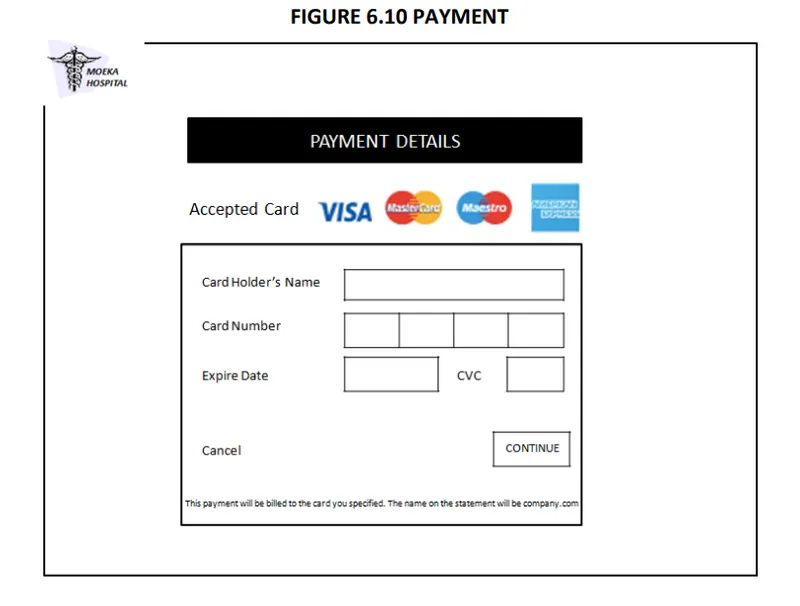
Enter Card Details
Make Payment
Send confirmation message
}
else
{
Enter Account Details
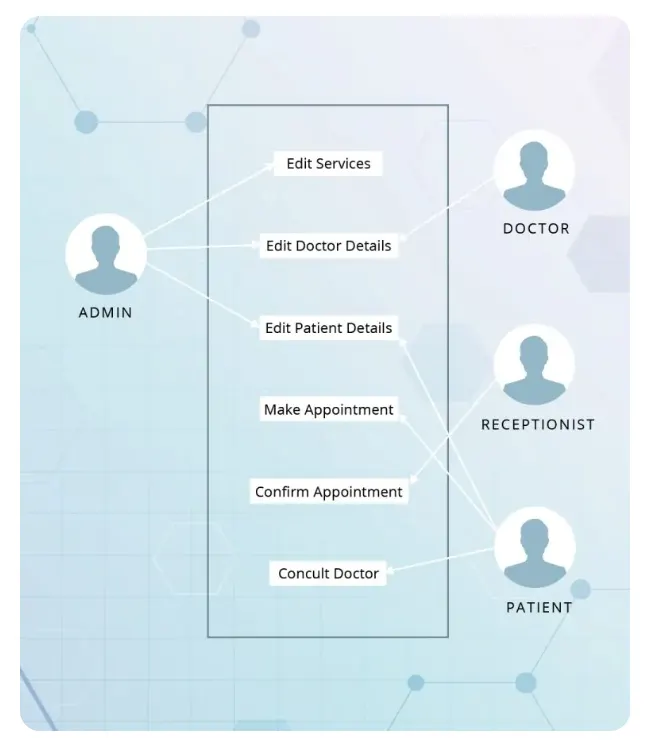
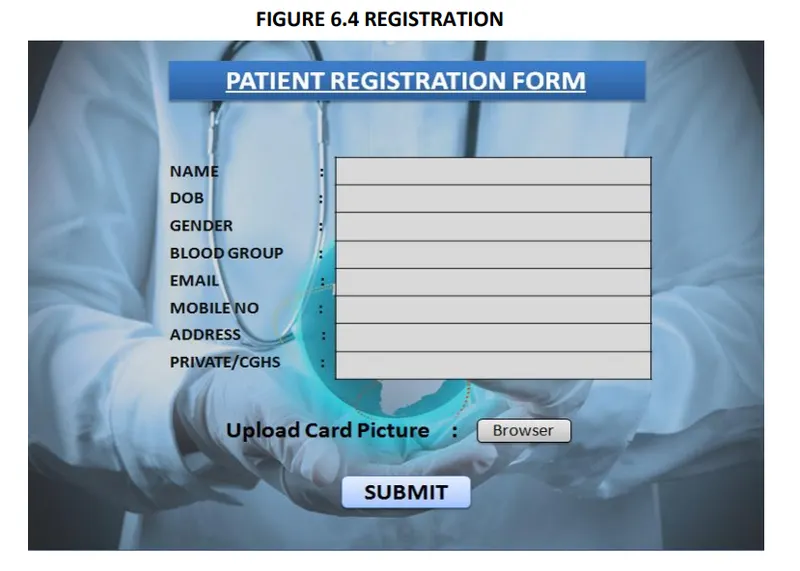
* REGISTRATION
DESCRIPTION - The new patient can register themselves and add their details like name, age , gender, blood group etc. The patient entry will be made in the hms database.
1. Patient selects sign up in login module.
2. A registration form get displayed
3. Patient fills the required details.
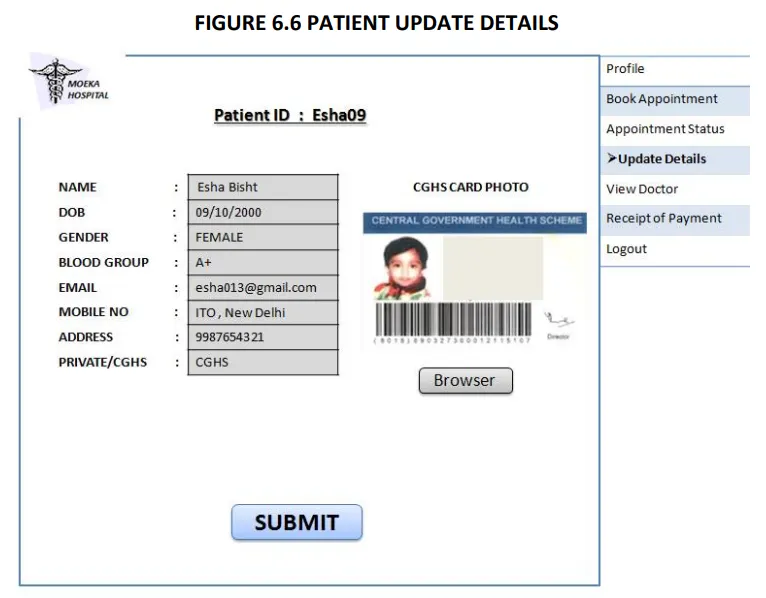
DESCRIPTION-The patient should be enabled to update his/her details and the changes should reflect in hms database.
2. Patient view his record
3. Patient selects update details.
4. Now patient may change the necessary fields.
5. Pop of update details.
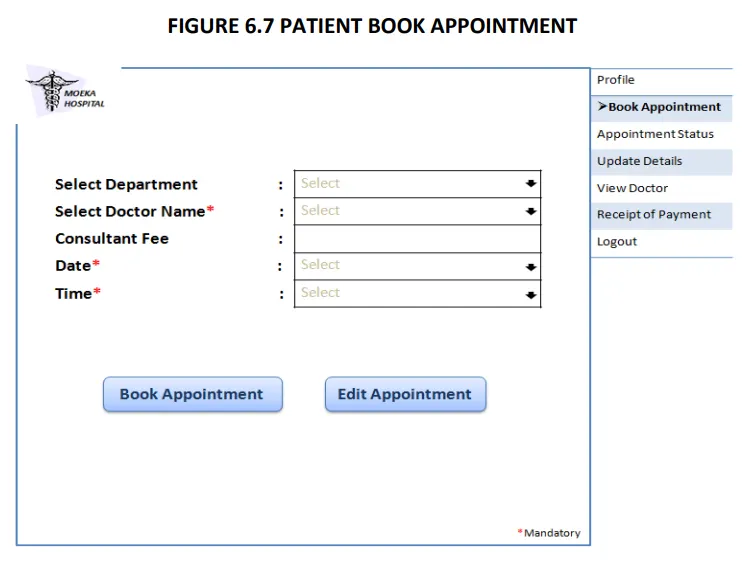
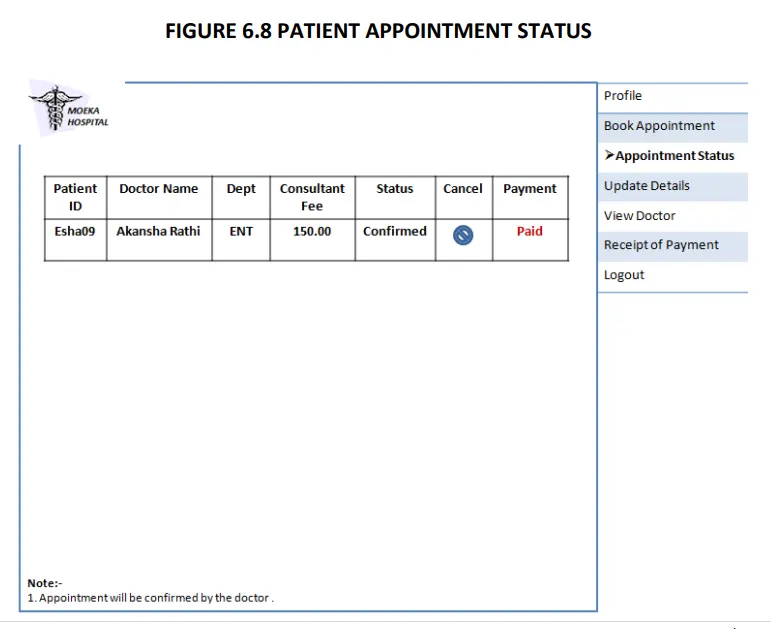
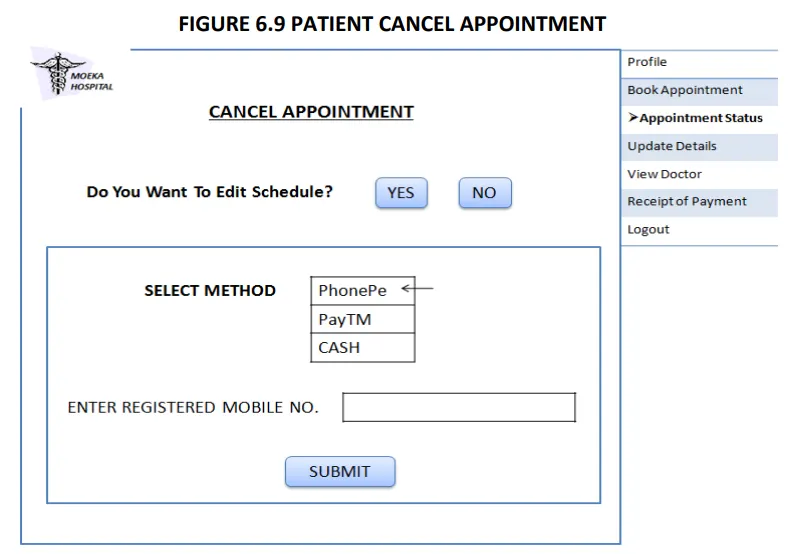
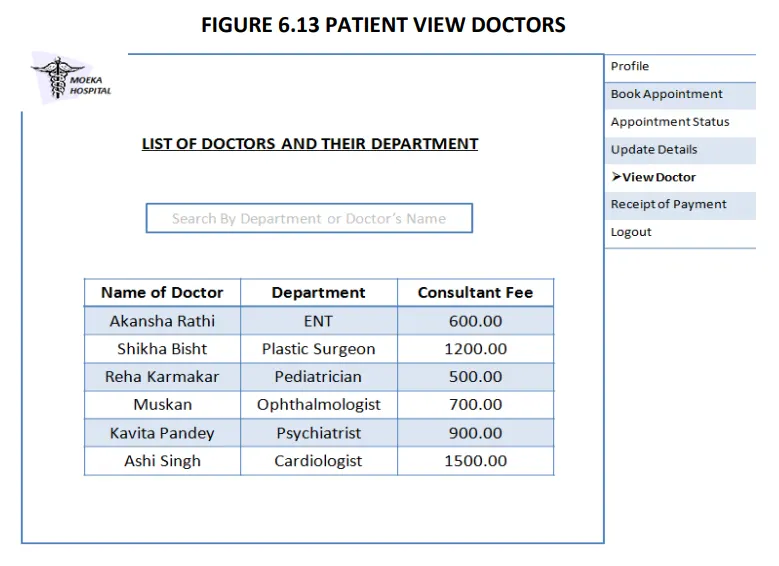
DESCRIPTION - It shows users a list of available doctors, timings, dates and enables patients to select the most suitable appointment date and doctor. The patient may also the cancel the appointment.
2. View his/her record.
3. Create a new appointment or cancel the appointment..
DESCRIPTION – It enables user to pay the consultant fee of Doctor online.
2. View his/her record.
3. Appointment confirmed by the Doctor then go for Payment.
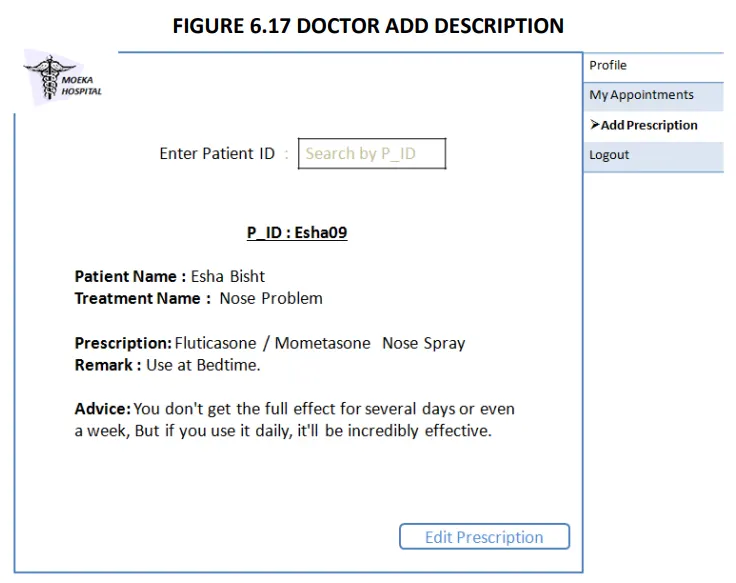
DESCRIPTION- The doctor view patient record/ update his details and add description of the treatment given to patient.
PRE-CONDITION – The doctor must be a registered doctor, System does not allow the doctor to modify the qualification, hospital managed details.
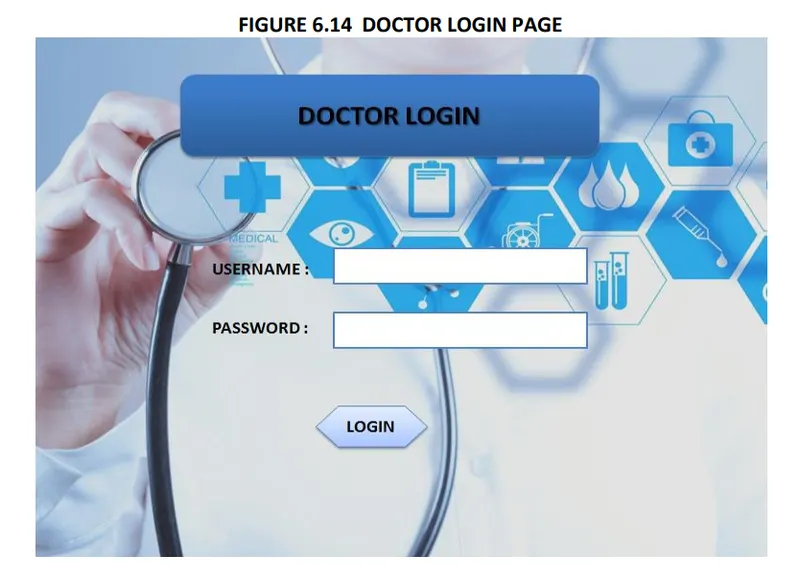
1.Doctor logs in to the system.
2. Doctor may select view patient.
2.1 Patient record is displayed with treatment history.
3. Doctor add description of patient treatment.
4. Doctor may select appointment details
4.1 Appointment Requests is displayed with schedule.
5. Doctor confirm or cancel appointment.
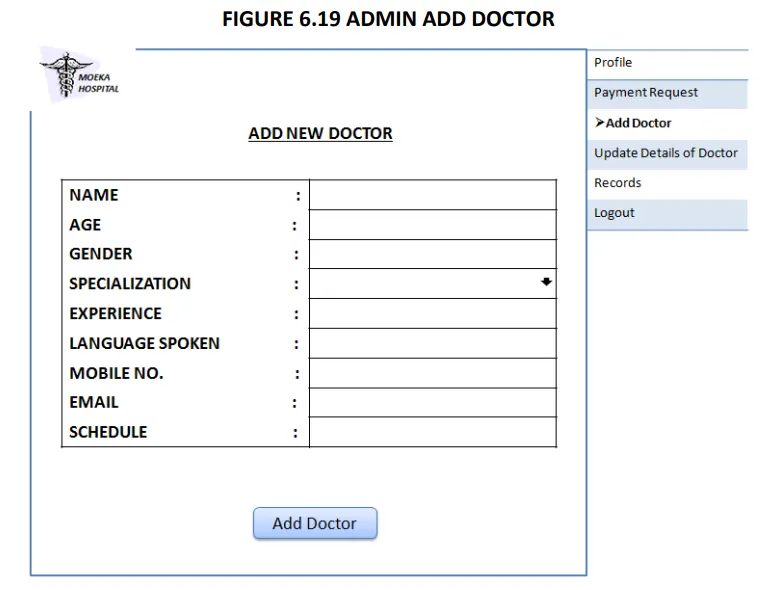
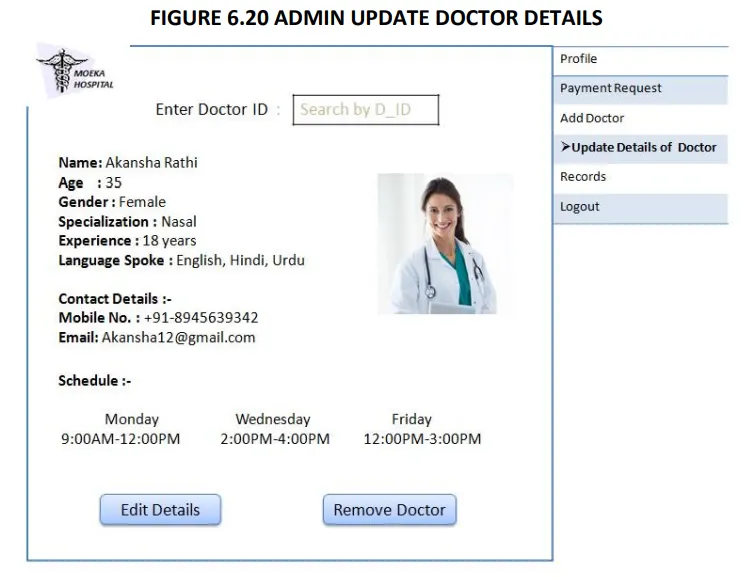
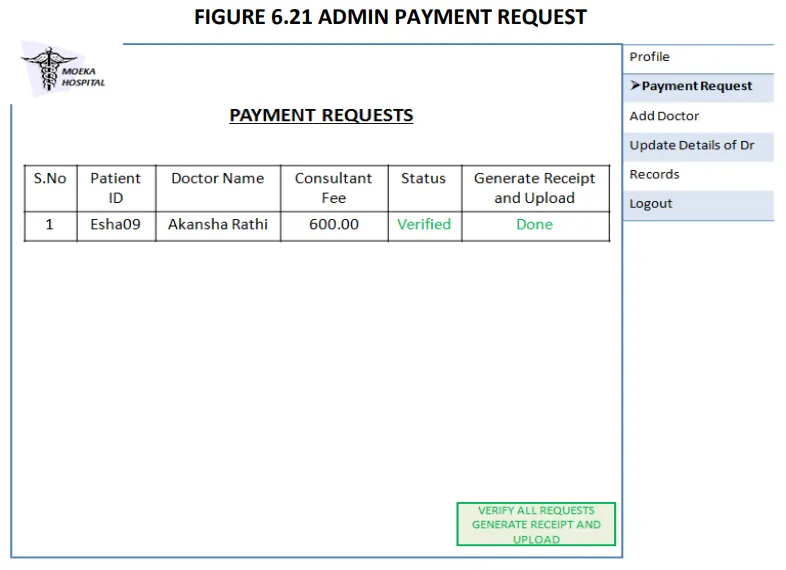
DESCRIPTION - The admin add doctor, update docotr details and verify payment and generate Bill/Reciept for the same.
2. Admin may add doctor new doctor.
2.1 admin fills the doctor’s details.
3. Admin view Doctor record.
3.1 Admin enters the doctor id in the system.
3.2 Doctor details are displayed, Admin can update details.
4. Admin Verify the payment submited by the Patient.
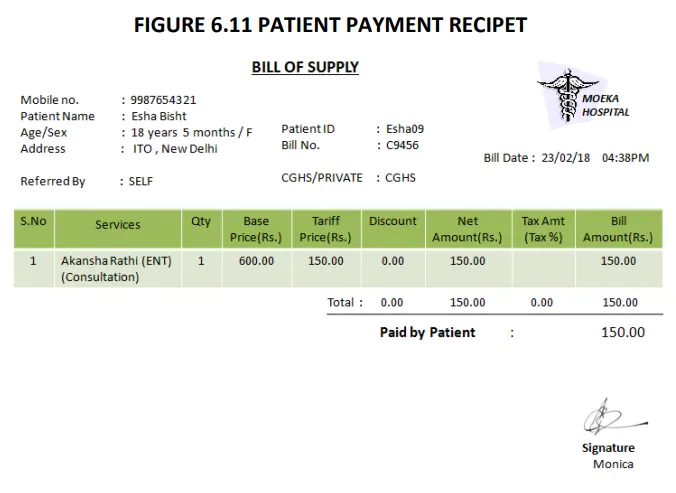
4.1 Generate Bill/Reciept and confirmation message for the same.
•Access patient record, doctor Record.
•Add new doctor entry in system database.
• Confirm Payment and Generate Bill.
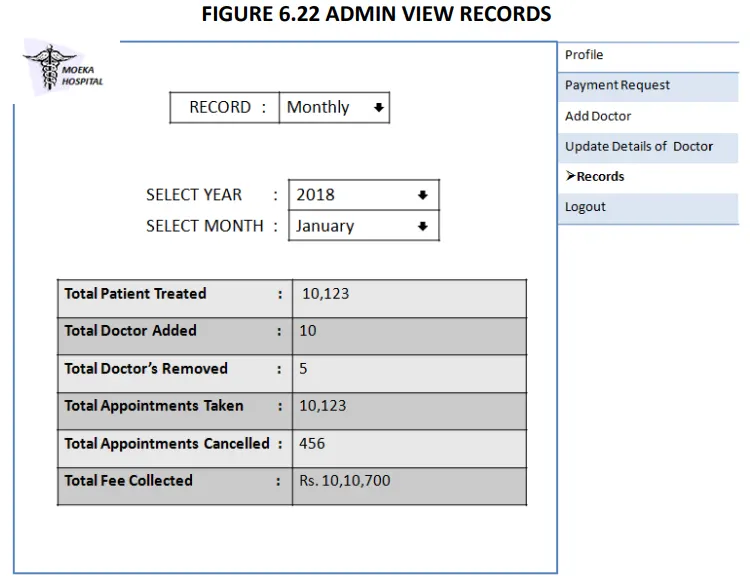
• View Records.(Total no of patients treated, doctor added/remove, consultant fee).
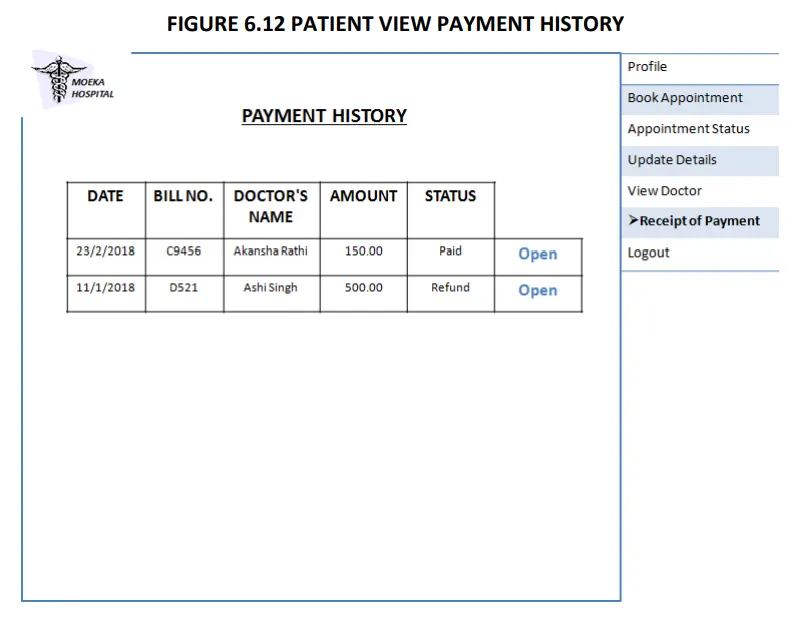
Patients can choose the best preferred appointments from the options provided and can also change the appointment schedule or cancel it. After appt. is confirmed by the respective doctor they can pay their consultant fee online. Patients have access to only their records.
• Cancel appointment.
• Update Details.
• Payment.
•View Payment History.
DOCTOR
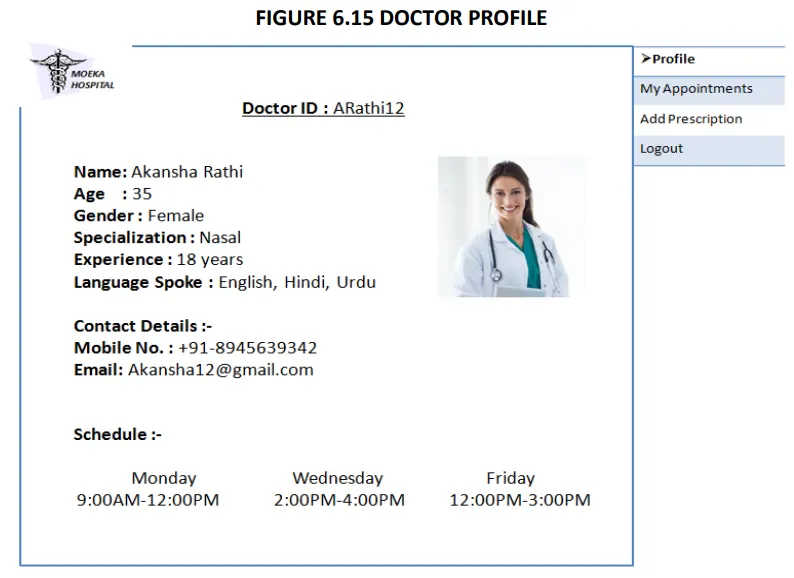
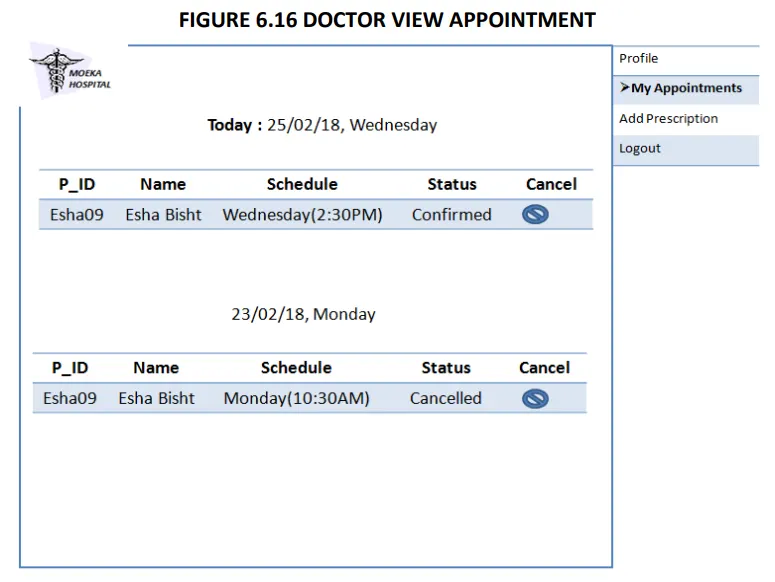
Doctors can view the patient appointment list and provide the confirmation or make changes in the appointment list if required. Doctors have access to only records of those patients whom they are treating.
• Confirmation of appointment.
• Cancellation of appointment.
• Modification of appointment list.
• Add Prescription.
• System is wirelessly networked with an encryption.
• System is only accessible within the hospital’s website only.
• Database is password protected.
• Should use less RAM and processing power.
• Each user should have individual ID and password.
• Only administrator can access the whole system.
1. Home Page.
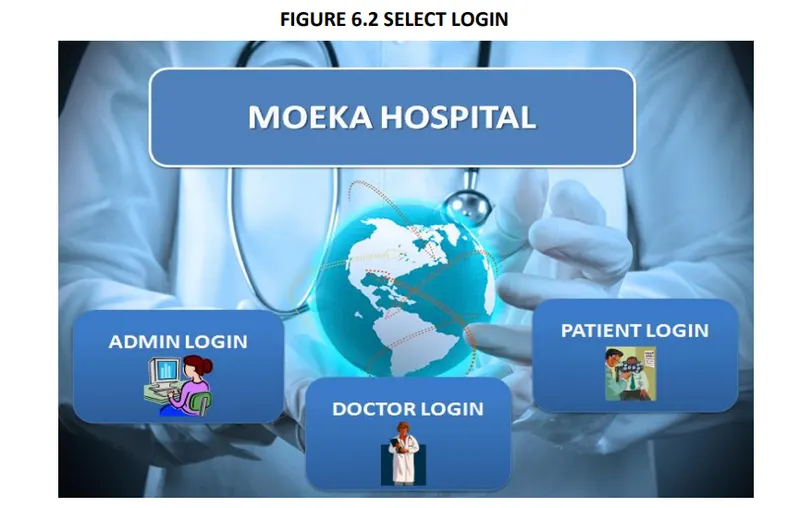
2. Select Login.
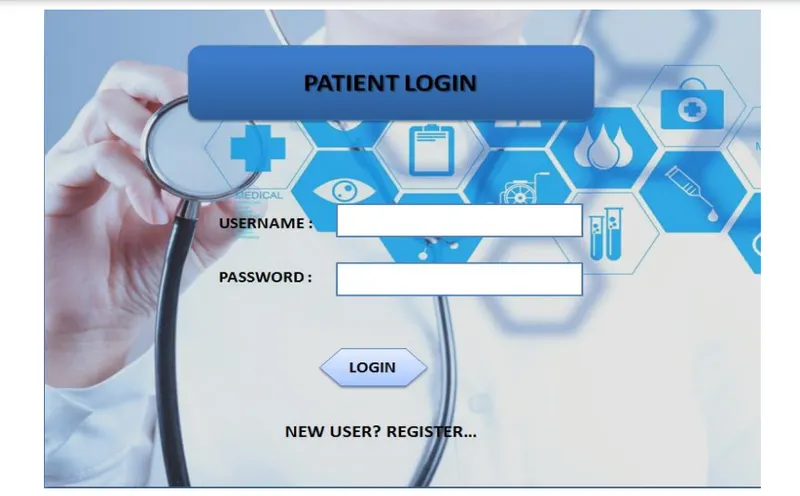
3. Login Page For Patient .
4. Registration For Patient.
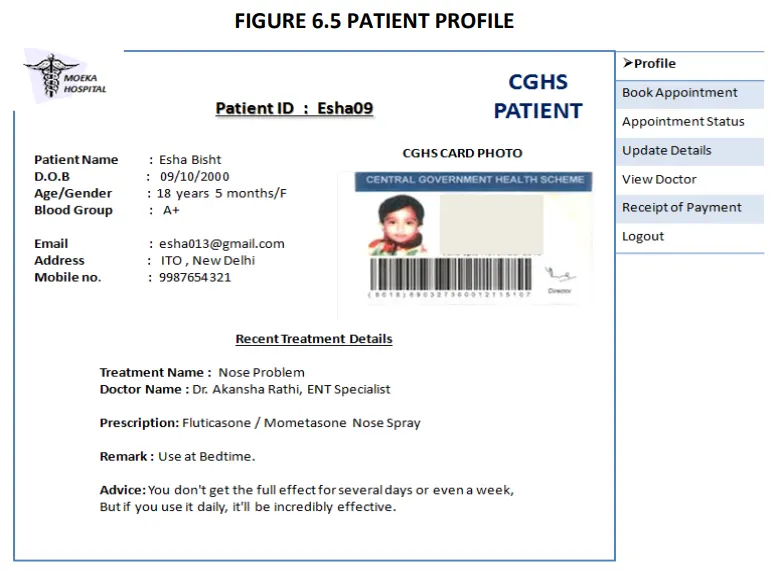
5. Patient Profile.
6. Patient Update Details.
7. Book Appointment .
8. View Appointment Status .
9. Cancel Appointment.
10. Payment By Patient.
11. Receipt Of Payment .
13. Doctor Profile.
14. Appointment Details.
15. View Patient by Doctor.
16. Add Prescription.
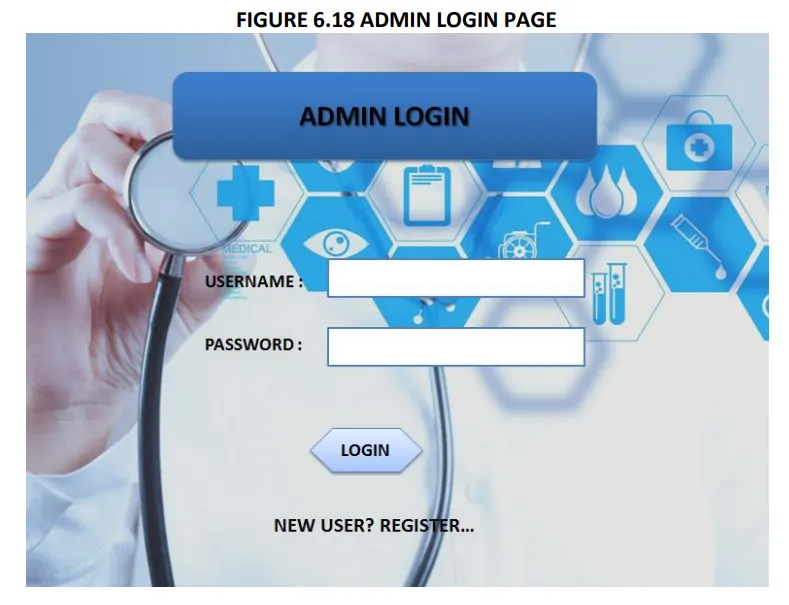
17. Login Page For Admin.
18. Generate Bill.
19. Update Doctor Details.
20. Add Doctor.
21. View doctor By Admin.
22. View Records.
2. Total Patients Treated.
3. Total Appointments Taken.
4. Total Appointments Cancelled.
5. Total Doctors on Leave.
6. Total Doctors Added.
7. Total Doctors Removed.
8. Total Consultant Fee Collected .

• Getting the current status of patient.
• Including a different module for pharmacy, LAB, Bed Allotment and many more.
• Including a Frequently Asked Questions Section.