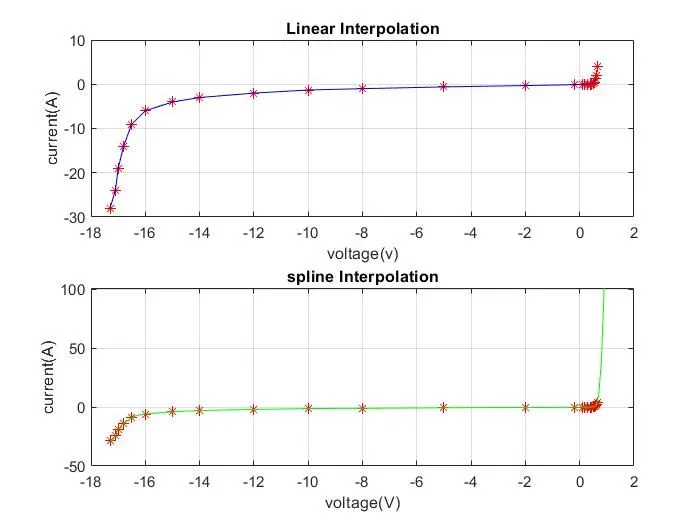
Project - Data Handling and Interpolation
Aim: Handling and Interpolating the Data
Objective :
- read the laboratory experimented data from the excel file.
- extract the data and store it in variables.
- Then interpolate them.
- Compute the current from the given voltage data.
- Store this computed data in the text file.
Matlab code :
% Data Interpolation of volage and current
Data=xlsread('VI.xlsx'); % first read the data from xlsx file
V=Data(:,1); % Define voltage data
A=Data(:,2); % define current data
xq=[-17.3:0.1:0.9]; % Range of interpolation
% here we start the linear interpolation of data
xq1=interp1(V,A,xq);
subplot(211)
plot(V,A,'r*',xq,xq1,'b-');
grid; % linear interpolation
title('Linear Interpolation');
xlabel('voltage(v)');
ylabel('current(A)');
% here we start spline interpolation of data
xq2=interp1(V,A,xq,'spline');
subplot(212)
plot(V,A,'r*',xq,xq2,'g-');
grid; % spline interpolation
title('spline Interpolation');
xlabel('voltage(V)');
ylabel('current(A)');
fileID=fopen('Interpolation_Data.txt','w'); % open interpolation.txt file
fprintf('%d\n',V,A); % save the values of V and A in file
fclose(fileID); % close the file
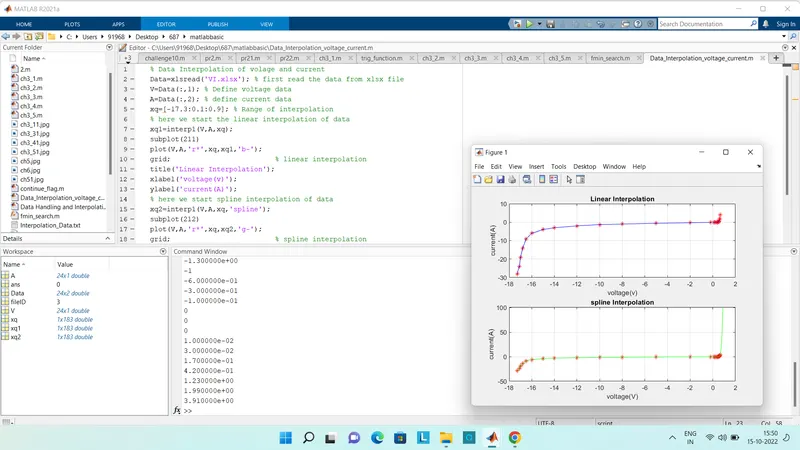
VI data :
| -17.2 |
| -13 |
| -11 |
| -9 |
| -6 |
| -1 |
| 0.11 |
| 0.25 |
| 0.5 |
| 0.61 |
| 0.66 |
Result:
- Using the xlsread function read the data and store it in the variable called FileId.
- from that extracted the first column which is voltage data and stored as variable V
- also extracted the second column which is current data stored as variable C.
- Then we interpolated the curve by adding some range of data in function interp1 Iq.
- smooth the data by spline interpolation method Iq2.
- computing the current Iq3 for given VV data by adding that data interp function.
- then plotted V Vs I data, second V Vs I data with Linear interpolated curve, Third V Vs I data and spline interpolated curve.
- for storing the computing data, we first open the file in write mode using fopen function pointer called f.
- using the for loop we printed the data in the VoltageCurrentData.txt file.
- and closed file.