Project 2 - Measuring the distance of an object using ultrasonic sensor and also smoothen the sensor data using moving average filter
Project 1:
Measuring the distance of an object using ultrasonic sensor and also smoothen the sensor data using moving average filter.
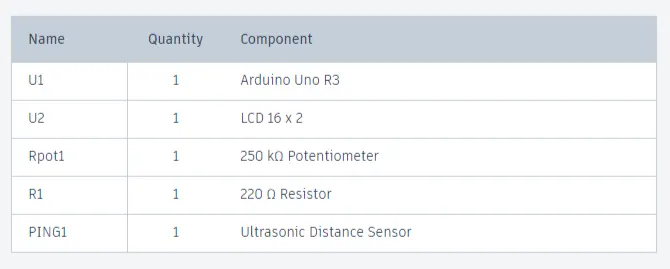
Components used:
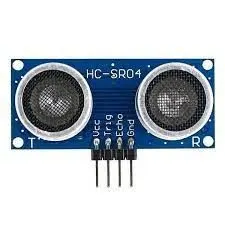
Ultrasonic sensor Module:
There are many types of Arduino distance sensors, but in this project we have used the HC-SR04 to measure distance in range of 2cm-400cm with an accuracy of 3mm. The sensor module consists of an ultrasonic transmitter, receiver and control circuit. The working principle of ultrasonic sensor is as follows:
- High level signal is sent for 10us using Trigger.
- The module sends eight 40 KHz signals automatically, and then detects whether pulse is received or not.If the signal is received, then it is through high level.
- The time of high duration is the time gap between sending and receiving the signal.
Distance= (Time x Speed of Sound in Air (340 m/s))/2
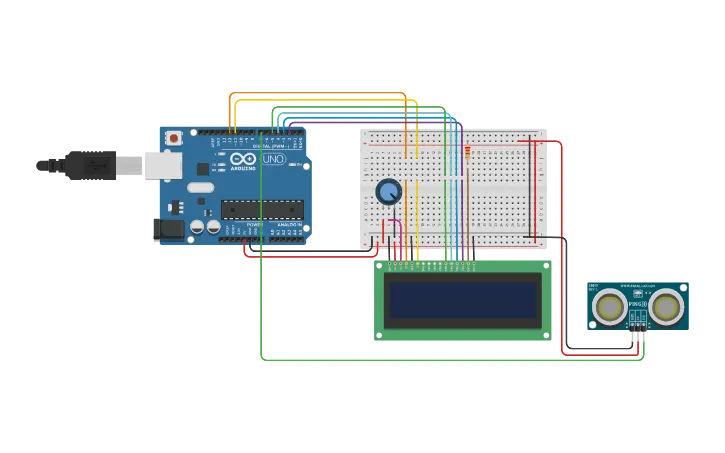
Pin Connections:
-
Ultrasonic Sensor:
- VCC (5V) --> Arduino 5V
- GND --> Arduino GND
- TRIG --> Arduino Digital Pin 7
- ECHO --> Arduino Digital Pin 7
-
LCD Display:
- VSS (GND) --> Arduino GND
- VDD (5V) --> Arduino 5V
- V0 (Contrast) --> Middle pin of the potentiometer
- RS --> Arduino Digital Pin 12
- RW (GND) --> Arduino GND
- E (Enable) --> Arduino Digital Pin 11
- D4 --> Arduino Digital Pin 5
- D5 --> Arduino Digital Pin 4
- D6 --> Arduino Digital Pin 3
- D7 --> Arduino Digital Pin 2
- A (Anode) and K (Cathode) for backlight --> Connect to 5V and GND, respectively
LCD Configuration: Connect the potentiometer to V0 (contrast) pin of the LCD. Adjust the potentiometer until you can see the characters clearly on the LCD.
Program:
#include <LiquidCrystal.h>

const int numReadings = 10;  // Number of readings to average
int readings[numReadings];  // Array to store sensor readings
int index = 0;  // Index for the current reading
int total = 0;  // Total sum of readings

int inches = 0;  // Distance in inches
int cm = 0;  // Distance in centimeters

LiquidCrystal lcd(12, 11, 5, 4, 3, 2);  // LCD display object

void setup() {
  lcd.begin(16, 2);  // Initialize LCD display with 16 columns and 2 rows
  lcd.print("New String !!!");  // Display a string on the LCD
  Serial.begin(9600);  // Initialize serial communication at 9600 baud rate
  pinMode(7, INPUT);  // Set pin 7 as input
}

void loop() {
  lcd.clear();  // Clear the LCD display

  cm = 0.01723 * readUltrasonicDistance(7);  // Read distance from the ultrasonic sensor in centimeters

  // Update the array with the latest reading
  total = total - readings[index];  // Subtract the oldest reading from the total sum
  readings[index] = cm;  // Store the new reading in the array
  total = total + readings[index];  // Add the new reading to the total sum
  index = (index + 1) % numReadings;  // Move to the next index or wrap around to 0 if the end is reached

  // Calculate the average distance
  cm = total / numReadings;  // Calculate the average in centimeters
  inches = cm / 2.54;  // Convert centimeters to inches

  Serial.print("cm: ");  // Print label to the serial monitor
  Serial.print(cm);  // Print the distance in centimeters

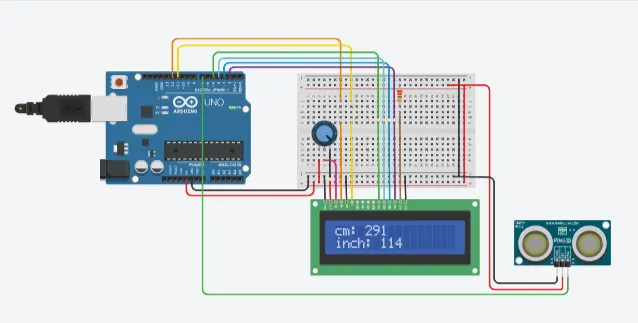
  lcd.setCursor(0, 0);  // Set the LCD cursor to the first column of the first row
  lcd.print("cm: ");  // Display label on the LCD
  lcd.setCursor(4, 0);  // Set the LCD cursor to the fifth column of the first row
  lcd.print(cm);  // Display the distance in centimeters on the LCD

  Serial.print("inch: ");  // Print label to the serial monitor
  Serial.println(inches);  // Print the distance in inches

  lcd.setCursor(0, 1);  // Set the LCD cursor to the first column of the second row
  lcd.print("inch: ");  // Display label on the LCD
  lcd.setCursor(6, 1);  // Set the LCD cursor to the seventh column of the second row
  lcd.print(inches);  // Display the distance in inches on the LCD

  delay(250);  // Delay
}

long readUltrasonicDistance(int pin) {
  pinMode(pin, OUTPUT);  // Set the pin as output
  digitalWrite(pin, LOW);  // Set the pin to low
  delayMicroseconds(2);  // Delay for 2 microseconds
  digitalWrite(pin, HIGH);  // Set the pin to high
  delayMicroseconds(10);  // Delay for 10 microseconds
  digitalWrite(pin, LOW);  // Set the pin to low
  pinMode(pin, INPUT);  // Set the pin as input
  return pulseIn(pin, HIGH);  // Measure the pulse duration and return the result
}
Explanation & Pin Configuration:
-
Library Inclusion: The code starts with including the
LiquidCrystallibrary, which is used to control the LCD display. -
Variable and Array Declarations: Several variables and arrays are declared to store the sensor readings, calculate the moving average, and store the distance values.
const int numReadings: Defines the number of readings to be averaged for the moving average filter.int readings[numReadings]: An array to store the sensor readings.int index: An index variable to keep track of the current reading's position in the array.int total: A variable to store the sum of the readings, used for calculating the moving average.int inchesandint cm: Variables to store the distance in inches and centimeters, respectively.
-
LCD Object Initialization: An
LiquidCrystalobject is created to control the LCD display. The constructor parameters12, 11, 5, 4, 3, 2represent the connections to the LCD's RS, E, D4, D5, D6, and D7 pins, respectively. -
setup() Function: This function is called once during the Arduino's startup phase.
lcd.begin(16, 2): Initializes the LCD display with 16 columns and 2 rows.lcd.print("New String !!!"): Displays the string "New String !!!" on the LCD display.Serial.begin(9600): Initializes the serial communication with a baud rate of 9600.pinMode(7, INPUT): Sets pin 7 as an input, presumably for connecting the ultrasonic sensor's echo pin.
-
loop() Function: The
loop()function is the main part of the code that runs repeatedly.-
lcd.clear(): Clears the LCD display before updating with new data. -
cm = 0.01723 * readUltrasonicDistance(7): Reads the distance from the ultrasonic sensor in centimeters by calling thereadUltrasonicDistance()function. -
Moving Average Calculation:
- The code calculates a moving average of the sensor readings to smoothen the data and reduce noise.
- The array
readings[]is updated with the latest distance reading. - The oldest reading is subtracted from the total sum, and the new reading is added to the total sum to calculate the average.
indexis incremented and wraps around if it reaches thenumReadingsvalue to update the array cyclically.
-
Distance Conversion:
- The average distance in centimeters is calculated by dividing the total sum by
numReadings. - The value in centimeters is converted to inches by dividing it by 2.54 (since 1 inch = 2.54 cm).
- The average distance in centimeters is calculated by dividing the total sum by
-
Serial and LCD Output:
- The distance in centimeters is printed to the Serial Monitor.
- The distance in centimeters and inches is displayed on the LCD in the first and second rows, respectively.
-
delay(250): A short delay of 250 milliseconds is added to slow down the loop's execution for better readability.
-
-
readUltrasonicDistance() Function: This function measures the pulse duration from the ultrasonic sensor's echo pin and returns the result. It's called within the
loop()function to obtain the distance reading.- The function first sets the pin as output and sends a short low-high-low pulse to trigger the ultrasonic sensor.
- Then, the pin is set as an input, and the function waits for the pulse duration using the
pulseIn()function. - The measured pulse duration is proportional to the distance, which is then returned.
Circuit Connection:
Output:
Conclusion:
The basic implementation to measure distances using an ultrasonic sensor, apply a moving average filter to smoothen the data, and display the results on both the Serial Monitor and an LCD display.