Project 2 - Measuring the distance of an object using ultrasonic sensor and also smoothen the sensor data using moving average filter
Note : For better understanding the word file is attached below.
File Name : Project 2 - Ultrasonic Distance Sensor with Moving Average Filter.docx
Project 2 - Measuring the distance of an object using ultrasonic sensor and also smoothen the sensor data using moving average filter
Solution :
Distance Measurement using Arduino Ultrasonic Sensor is a very easy project to measure shorter distance precisely. Before getting started you must know about Ultrasonic Sensor HC SR-04, which is a low-cost sensor. The ultrasonic sensor is consists of Transmitter and Receiver modules. Transmitter part ejects the pulse out and the receiver part receives the pulse. If an obstacle is placed before the sensor, the transmitted pulse ejected strike the obstacle and reflected back. The reflected pulse is received by the receiver part. The time between transmission and reception is calculated. This data is processed to calculate distance.
In this project, we are going to interface Ultrasonic sensor HC-SR04 with Arduino and LCD Display. The ultrasonic sensor is used to measure the distance. It acts as a Sonar. It sends an ultrasonic wave of a certain frequency that comes back after hitting the object and calculates the time traveled by it. So let’s learn about Distance Measurement Using Arduino & HC-SR04 Ultrasonic Sensor.
Components Used :
- Arduino Uno or Pro Mini
- Ultrasonic sensor Module
- 16x2 LCD
- Scale
- Bread board
- 9 volt battery
- Connecting wires
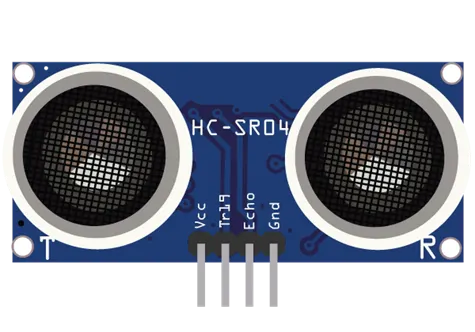
Ultrasonic Sensor Module
There are many types of Arduino distance sensors, but in this project we have used the HC-SR04 to measure distance in range of 2cm-400cm with an accuracy of 3mm. The sensor module consists of an ultrasonic transmitter, receiver and control circuit. The working principle of ultrasonic sensor is as follows:
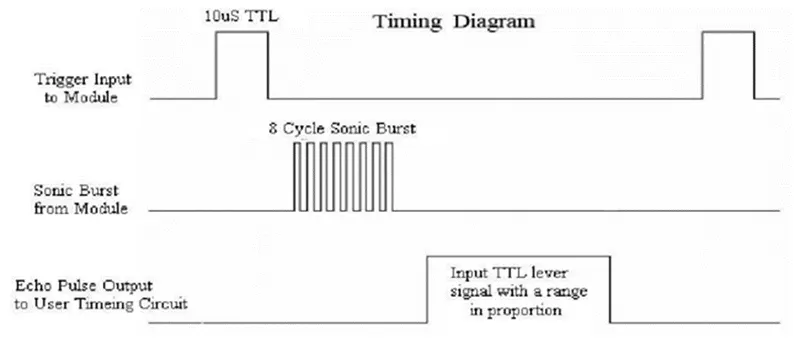
- High level signal is sent for 10us using Trigger.
- The module sends eight 40 KHz signals automatically, and then detects whether pulse is received or not.
- If the signal is received, then it is through high level. The time of high duration is the time gap between sending and receiving the signal.
Distance= (Time x Speed of Sound in Air (340 m/s))/2
Timing Diagram
The module works on the natural phenomenon of ECHO of sound. A pulse is sent for about 10us to trigger the module. After which the module automatically sends 8 cycles of 40 KHz ultrasound signal and checks its echo. The signal after striking with an obstacle returns back and is captured by the receiver. Thus the distance of the obstacle from the sensor is simply calculated by the formula given as
Distance= (time x speed)/2.
Here we have divided the product of speed and time by 2 because the time is the total time it took to reach the obstacle and return back. Thus the time to reach obstacle is just half the total time taken.
Ultrasonic Sensor Arduino Circuit Diagram and Explanation :
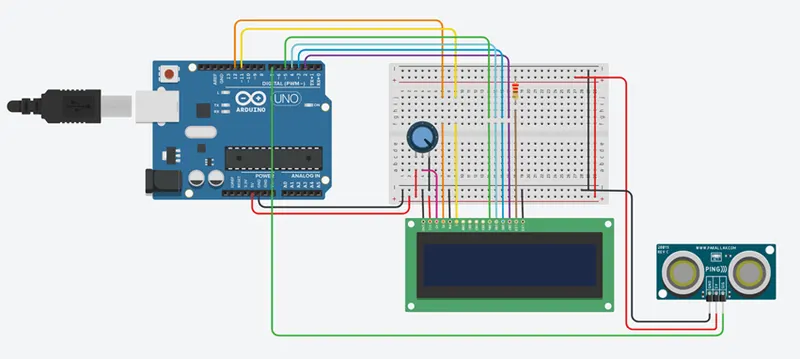
The circuit diagram for arduino and ultrasonic sensor is shown above to measure the distance. In circuit connections Ultrasonic sensor module’s “trigger” and “echo” pins are directly connected to pin 18(A4) and 19(A5) of arduino. A 16x2 LCD is connected with arduino in 4-bit mode. Control pin RS, RW and En are directly connected to arduino pin 2, GND and 3. And data pin D4-D7 is connected to 4, 5, 6 and 7 of arduino.
First of all we need to trigger the ultrasonic sensor module to transmit signal by using arduino and then wait for receive ECHO. Arduino reads the time between triggering and Received ECHO. We know that speed of sound is around 340m/s. so we can calculate distance by using given formula:
Distance= (travel time/2) * speed of sound
Where speed of sound around 340m per second.
A 16x2 LCD is used for displaying distance.
Find more about the working of distance measurement project in this tutorial: Distance measurement using ultrasonic sensor and AVR Microcontroller.
Arduino Ultrasonic Sensor Code for Distance Measurement :
#include <LiquidCrystal.h>
const int numReadings = 10; // Number of readings to average
int readings[numReadings]; // Array to store sensor readings
int index = 0; // Index for the current reading
int total = 0; // Total sum of readings
int inches = 0; // Distance in inches
int cm = 0; // Distance in centimeters
LiquidCrystal lcd(12, 11, 5, 4, 3, 2); // LCD display object
void setup() {
lcd.begin(16, 2); // Initialize LCD display with 16 columns and 2 rows
lcd.print("New String !!!"); // Display a string on the LCD
Serial.begin(9600); // Initialize serial communication at 9600 baud rate
pinMode(7, INPUT); // Set pin 7 as input
}
void loop() {
lcd.clear(); // Clear the LCD display
cm = 0.01723 * readUltrasonicDistance(7); // Read distance from the ultrasonic sensor in centimeters
// Update the array with the latest reading
total = total - readings[index]; // Subtract the oldest reading from the total sum
readings[index] = cm; // Store the new reading in the array
total = total + readings[index]; // Add the new reading to the total sum
index = (index + 1) % numReadings; // Move to the next index or wrap around to 0 if the end is reached
// Calculate the average distance
cm = total / numReadings; // Calculate the average in centimeters
inches = cm / 2.54; // Convert centimeters to inches
Serial.print("cm: "); // Print label to the serial monitor
Serial.print(cm); // Print the distance in centimeters
lcd.setCursor(0, 0); // Set the LCD cursor to the first column of the first row
lcd.print("cm: "); // Display label on the LCD
lcd.setCursor(4, 0); // Set the LCD cursor to the fifth column of the first row
lcd.print(cm); // Display the distance in centimeters on the LCD
Serial.print("inch: "); // Print label to the serial monitor
Serial.println(inches); // Print the distance in inches
lcd.setCursor(0, 1); // Set the LCD cursor to the first column of the second row
lcd.print("inch: "); // Display label on the LCD
lcd.setCursor(6, 1); // Set the LCD cursor to the seventh column of the second row
lcd.print(inches); // Display the distance in inches on the LCD
delay(250); // Delay
}
long readUltrasonicDistance(int pin) {
pinMode(pin, OUTPUT); // Set the pin as output
digitalWrite(pin, LOW); // Set the pin to low
delayMicroseconds(2); // Delay for 2 microseconds
digitalWrite(pin, HIGH); // Set the pin to high
delayMicroseconds(10); // Delay for 10 microseconds
digitalWrite(pin, LOW); // Set the pin to low
pinMode(pin, INPUT); // Set the pin as input
return pulseIn(pin, HIGH); // Measure the pulse duration and return the result
}
Output :
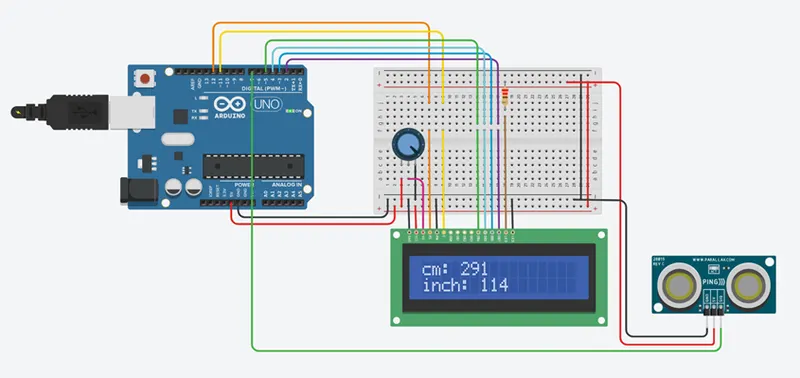
Cm : 291
Inch : 114