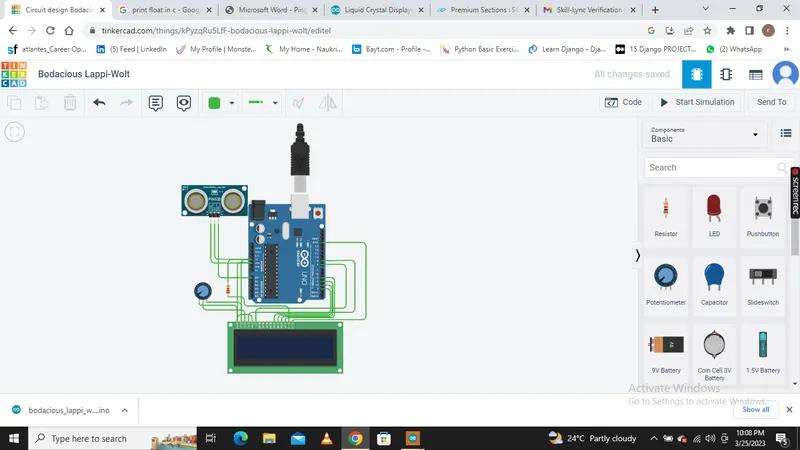
Project 2 - Measuring the distance of an object using ultrasonic sensor and also smoothen the sensor data using moving average filter
Overview of the Project:
In this project the implementation of code for “Measuring distance of an object using ultrasonic distance sensor (28015 Ping) and also smoothen the sensor data using moving average filter”.
Goals:
- Measuring the distance in terms of inches of an object using Ultrasonic Distance Sensor (28015 Ping).
- The sensor data is smoothened by using Moving average filter technique to eliminate the high frequency variations from the sensor data.
Key Highlights of the Project:
- Measuring the distance travelled by the wave to the object and gets bounced back from the object to sensor.
- Smoothening the sensor data by moving average filter technique, the filter has a window of certain size. That window determines that how many data the filter can take.
Deliverables of this project:
- The distance travelled by a wave to the object for which we want to measure the distance using Ultrasonic Distance Sensor (28015 Ping).
- Eliminate the high frequency jitters from the sensor data by Moving Average filter to smoothen the sensor data.
Expected Outcomes:
The students will get the Knowledge on Ultrasonic sensor (28015 Ping) to measure the distance travelled by wave to the object, the hardware connection of 2 Arduino’s connected to the sensor and smoothening the sensor data by removing high frequency variations using Moving Average Filter Technique.
ABOUT THIS PROJECT
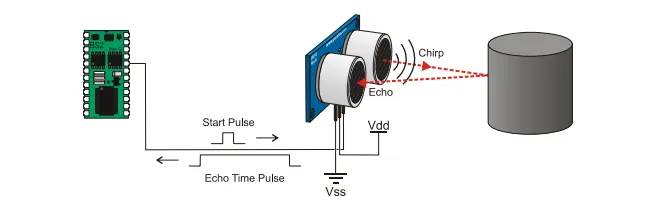
Distance Measurement using Arduino Ultrasonic Sensor is a very easy project to measure shorter distance precisely. Before getting started you must know about Ultrasonic Sensor 28015 Ping, which is a low-cost sensor. The ultrasonic sensor is consists of Transmitter and Receiver modules. Transmitter part ejects the pulse out and the receiver part receives the pulse. If an obstacle is placed before the sensor, the transmitted pulse ejected strike the obstacle and reflected back. The reflected pulse is received by the receiver part. The time between transmission and reception is calculated. This data is processed to calculate distance.
In this project, we are going to interface Ultrasonic sensor 28015 Ping with Arduino and LCD Display. The ultrasonic sensor is used to measure the distance. It acts as a Sonar. It sends an ultrasonic wave of a certain frequency that comes back after hitting the object and calculates the time traveled by it. So let’s learn about Distance Measurement Using Arduino & 28015 Ping Ultrasonic Sensor.
Components Used
- Arduino Uno
- U28015 Ping
- 16x2 LCD
Ultrasonic Sensor Module
The U28015 Ping ultrasonic distance sensor provides precise, non-contact distance measurements from about 2 cm (0.8 inches) to 3 meters (3.3 yards).
Key Specifications
- Range: 2 cm to 3 meters (~.75" to 10’)
- Supply Voltage: 5V +/-10% (Absolute: Minimum 4.5V, Maximum 6V)
- Supply Current: 30 mA typical, 35 mA maximum
- 3-pin interface (power, ground, signal)
- 20 mA power consumption
- Narrow acceptance angle
- Simple pulse in / pulse out communication
- Indicator LED shows measurement in progress
- Input Trigger: positive TTL pulse, 2 µs minimum, 5 µs typical
- Echo Pulse: positive TTL pulse, 115 µs to 18.5 ms
- Echo Hold-off: 750 µs from fall of trigger pulse
- Burst Frequency: 40 kHz for 200 µs
Moving Average Filter
Moving Average Filter is a Finite Impulse Response (FIR) Filter smoothing filter used for smoothing the signal from short term overshoots or noisy fluctuations and helps in retaining the true signal representation or retaining sharp step response
Timing Diagram
The module works on the natural phenomenon of ECHO of sound. A pulse is sent for about 10us to trigger the module. After which the module automatically sends 8 cycles of 40 KHz ultrasound signal and checks its echo. The signal after striking with an obstacle returns back and is captured by the receiver. Thus the distance of the obstacle from the sensor is simply calculated by the formula given as
Distance= (time x speed)/2.
Here we have divided the product of speed and time by 2 because the time is the total time it took to reach the obstacle and return back. Thus the time to reach obstacle is just half the total time taken.
program code
#define PING_PIN A0 //define the pin number of the sensor's output:
#include<LiquidCrystal.h>
const int rs = 9, en = 8, d4 = 2, d5 = 3, d6 = 4, d7 =5;
LiquidCrystal lcd(rs, en, d4, d5, d6, d7);
const int numReadings = 5;
int readings[numReadings]; // the readings from the analog input
int readIndex = 0; // the index of the current reading
int total = 0; // the running total
int average = 0; // the average
float inches; // establish variables for the distance result in inches
void setup() {
lcd.begin(16,2); // initialize the LCD :
Serial.begin(9600); // initialize serial communication:
for (int thisReading = 0; thisReading < numReadings; thisReading++) {
readings[thisReading] = 0.0f;// initialize all the readings to 0.0:
}
}
void loop() {
long microseconds; // establish variables for duration of the ping
// subtract the last reading:
total = total - readings[readIndex];
// read data from ping:
readings[readIndex] = distance_sensor();
// add the reading to the total:
total = total + readings[readIndex];
// advance to the next position in the array:
readIndex = readIndex + 1;
// if we're at the end of the array...
if (readIndex >= numReadings) {
// wrap around to the beginning:
readIndex = 0;
}
// calculate the average:
average = total / numReadings;
delay(1); // delay in between reads for stability
microseconds = average;// store smoothen the sensor data into variable microseconds
microsecondsToInches(microseconds); // calling function for convert the time into distance in inches
delay(25);
}
long distance_sensor()
{
long duration;
// The PING))) is triggered by a HIGH pulse of 2 or more microseconds.
// Give a short LOW pulse beforehand to ensure a clean HIGH pulse:
pinMode(PING_PIN, OUTPUT);
digitalWrite(PING_PIN, LOW);
delayMicroseconds(2);
digitalWrite(PING_PIN, HIGH);
delayMicroseconds(5);
digitalWrite(PING_PIN, LOW);
// The same pin is used to read the signal from the PING))): a HIGH pulse
// whose duration is the time (in microseconds) from the sending of the ping
// to the reception of its echo off of an object.
pinMode(PING_PIN, INPUT);
duration = pulseIn(PING_PIN, HIGH);
return duration;
}
void microsecondsToInches(long microseconds) {
// convert the time into a distance(inches)
inches = microseconds / 73.746/2 ;
//printing the result on LCD
lcd.setCursor(0,0);
lcd.print("Distance : ");
lcd.setCursor(3,1);
lcd.print(inches);
lcd.setCursor(9,1);
lcd.print("Inch");
}