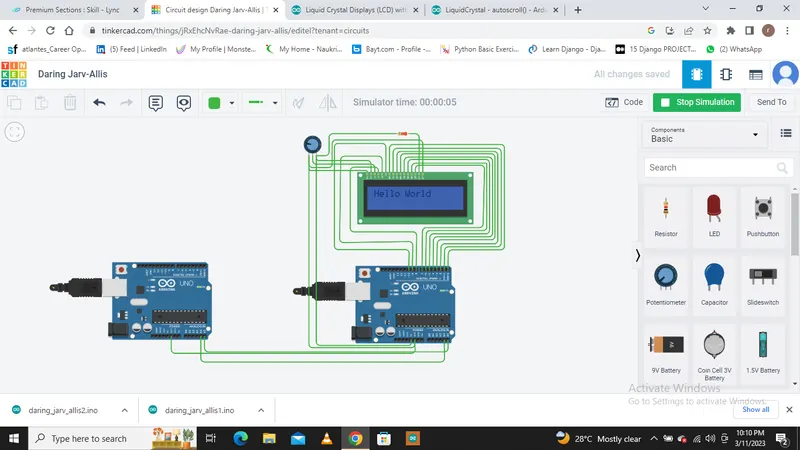
Project 1 - Interfacing a 16*2 LCD with Arduino using I2C protocol
Aim:
Overview of the Project:
In this project implementing the Code for “Interfacing a 16*2 LCD with two Arduino’s (one for Master and one for Slave) using Inter-Integrated Circuit (I2C) communication protocol” by sending the message to LCD using I2C communication protocol and display the message on LCD screen.
Goals:
- Communication between Arduino and 16*2 LCD using I2C protocol.
- Displaying the message sent by Master and received by slave i.e. LCD display.
Key Highlights of the Project:
- Using the inter-integrated circuit communication protocol, transferring the data i.e. the message we want to display is sent to the LCD.
- Two Arduino’s connected to the LCD display and the communication is executed using I2C protocol between Arduino and the LDC display.
Deliverables of this project:
- Communication between the Arduino’s and LCD using I2C.
- The message passed from master to slave and displayed on the 16*2 LCD.
Expected Outcomes:
- Students will get the Knowledge of I2C communication Protocol and the Arduino.
- The Hardware connection of all components used in this project.
- Displaying the message sent by master (Arduino) and received by the slave (16*2 LCD display).
Solutions:
MASTER code:
// C++ code
//
#include
void setup()
{
Wire.begin(); // start i2c bus
}
void loop()
{
Wire.beginTransmission(4); // transmit to device #4
Wire.write("Hello World "); // sends "hello World" to slave
Wire.endTransmission(); // stop transmitting
delay(500);
}
SLAVE code:
// C++ code
//
#include //including header file for ic2 protocol
#include //LCD header file
// defining LCD contol pins and data pins
#define RS 8
#define RW 9
#define ENABLE 10
#define DB0 0
#define DB1 1
#define DB2 2
#define DB3 3
#define DB4 4
#define DB5 5
#define DB6 6
#define DB7 7
LiquidCrystal lcd(RS,RW,ENABLE,DB0,DB1,DB2,DB3,DB4,DB5,DB6,DB7);
void setup()
{
Wire.begin(4);
Wire.onReceive(receiveEvent); //calling function receiveEvent
lcd.begin(16,2); // set up the LCD's number of columns and rows
lcd.clear(); // Clear the LCD screen
}
void loop()
{
delay(100);
}
void receiveEvent(int howMany)
{
while(1 < Wire.available()) // loop through all but the last
{
char c = Wire.read();// receive byte as a characte
lcd.print(c); // Print data on display
}
}