Project 2 - Measuring the distance of an object using ultrasonic sensor and also smoothen the sensor data using moving average filter
Overview of the Project:
In this project the implementation of code for “Measuring distance of an object using ultrasonic distance sensor (28015 Ping) and also smoothen the sensor data using moving average filter”.
Goals:
- Measuring the distance in terms of inches of an object using Ultrasonic Distance Sensor (28015 Ping).
- The sensor data is smoothened by using Moving average filter technique to eliminate the high frequency variations from the sensor data.
Key Highlights of the Project:
- Measuring the distance travelled by the wave to the object and gets bounced back from the object to sensor.
- Smoothening the sensor data by moving average filter technique, the filter has a window of certain size. That window determines that how many data the filter can take.
Deliverables of this project:
- The distance travelled by a wave to the object for which we want to measure the distance using Ultrasonic Distance Sensor (28015 Ping).
- Eliminate the high frequency jitters from the sensor data by Moving Average filter to smoothen the sensor data.
Expected Outcomes:
The students will get the Knowledge on Ultrasonic sensor (28015 Ping) to measure the distance travelled by wave to the object, the hardware connection of 2 Arduino’s connected to the sensor and smoothening the sensor data by removing high frequency variations using Moving Average Filter Technique
Component used:
Name Quantity Component
PING1 1 Ultrasonic Distance Sensor
U1
U2 2 Arduino Uno R3
U3 1 LCD 16 x 2
R1 1 1 kΩ Resistor
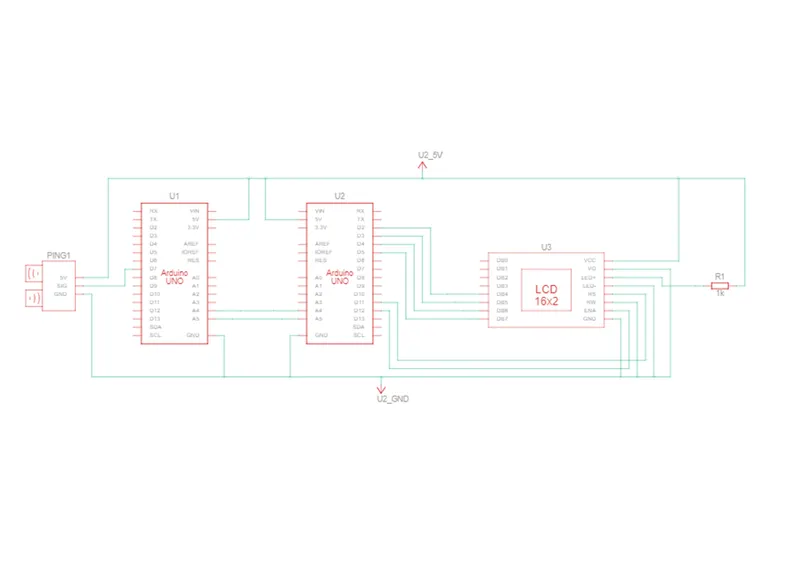
Schematic diagram:
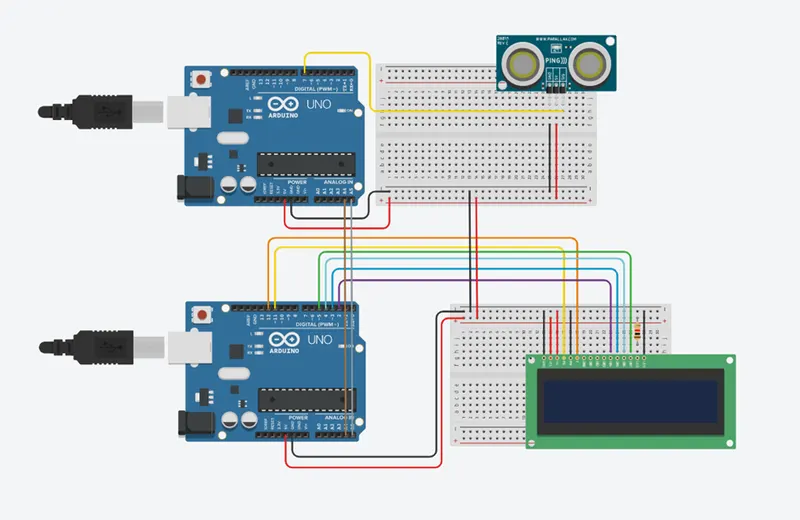
Block diagram:
Program:
// C++ code
//master
#include <Wire.h> // Header to use I2C communication
#include <LiquidCrystal.h> //Header to use LCD functions
LiquidCrystal lcd(11, 12, 2 ,3, 4, 5); //pins connected to LCD
void setup()
{
Wire.begin(); //To begin I2C communication
lcd.begin(16,2); //To begin LCD display
Serial.begin(9600);
}
void loop()
{
Wire.requestFrom(8,1); // 8 is address 1 byte
byte inches=Wire.read(); //To print character by character
lcd.setCursor(0, 0);
lcd.print(inches);//to print inches in LCD
lcd.print(" inches");
lcd.setCursor(0, 1);
}
//slave
#include <Wire.h> // Header to use I2C communication
// this constant won't change. It's the pin number of the sensor's output:
const int pingPin = 7;
long duration[5], inches,i; //Declaring as integer type
static int avg;
void setup() {
Wire.begin(8);
// initialize serial communication:
Serial.begin(9600);
Wire.onRequest(distance);//Goes to the "void distance" code and begin the request
}
void loop() {
delay(100);
}
void distance() //Called function
{
for(i=0;i<5;i++)
{
pinMode(pingPin, OUTPUT); //Declaring pin2 as output
digitalWrite(pingPin, LOW);//Sensor is triggered by pin2 with delay
delayMicroseconds(2);
digitalWrite(pingPin, HIGH);
delayMicroseconds(5);
digitalWrite(pingPin, LOW);
pinMode(pingPin, INPUT);//Declaring pin2 as input
duration[i] = pulseIn(pingPin, HIGH);//To read the pulse
}
//moving avarage filter
avg=(duration[0]+duration[1]+duration[2]+duration[3]+duration[4])/5;
inches = (avg/74)/2;// convert the time into a distance
Serial.print(inches);
Serial.print(" inches");
Serial.println();
//Inside the wire.write is the data to be sent to the master upon request
Wire.write(inches);
delay(1000);
}
Output:
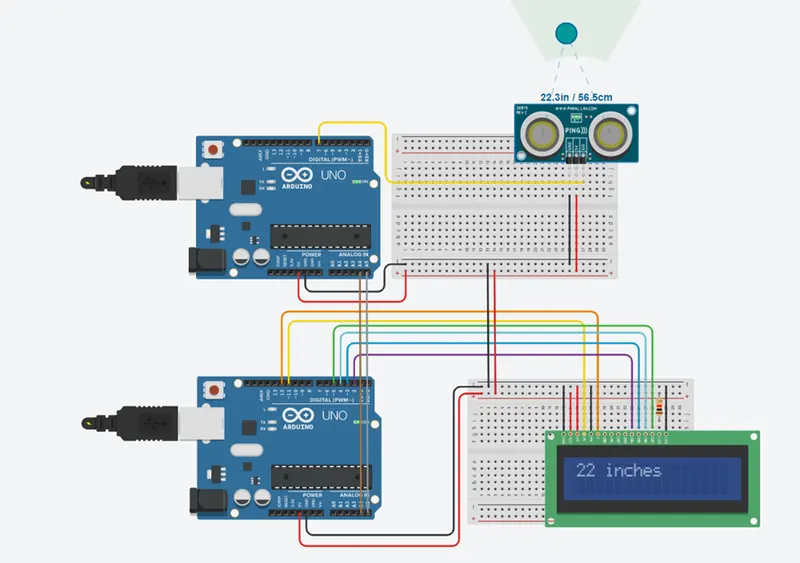
In this model we use moving average filter . this filter use to cancel unwanted noise. We make this filter using of 5 signal and its average value . the average value is to be our out put value.