Project 2 - Measuring the distance of an object using ultrasonic sensor and also smoothen the sensor data using moving average filter
Project:In this project the implementation of code for “Measuring distance of an object using ultrasonic distance sensor (28015 Ping) and also smoothen the sensor data using moving average filter”
Instrument: 1. Arduino UNO (main controller)
2.Ultrasonic sensor(28015).
3.Lcd_I2C display(PCF8574-based)
5.Simulation platform:tinkercad.
For calculating the distance by using arduino and distance sensor (28015 Ping) the below circuit constructiuon.
Here we use arduino UNO as a main controller and a I2C lcd display as display unit and a 28015 ultrasonic sensor for measuring the distance.
ultra sonic sensor has three pin connection one for 5 volt power one for ground and another for input/output bit.
Here we use 32 as display adress .
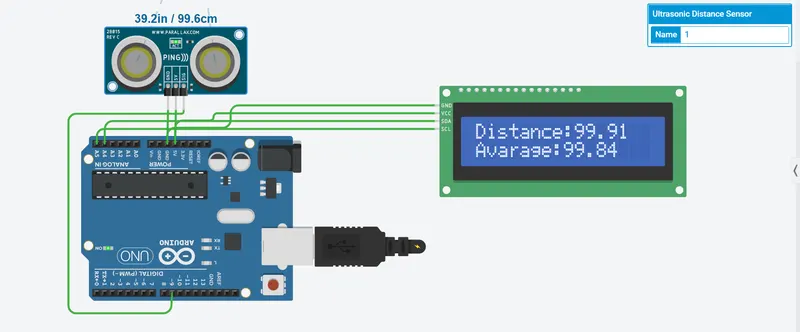
Here is the main programing for calculating the data topology.
For sensor analysis ,at first we use sensor pin as a output after alter the value we genarate a output pulse after 10 microw second we convert the pin as a input port and take the input data and put in the pulseIn function and convert the data to centimeter scale we give the distance data to the smoothing function and after reciving the data the smoothing function calculate sampling data to avarage data and send to loop function and we display the calculate avarage smooting data and display it on the I2C led display.
/*.............Header file section......................*/
#include<Wire.h>
#include <LiquidCrystal_I2C.h>

/*.............Initialigation..........................*/

int range=5,index=0;
float val[5];
float avarage,con=0;
float opPin=9;
float value=0,valueCm=0;
LiquidCrystal_I2C lcd(32,16,2);

/*................Setup function...........................*/

void setup()
{
  lcd.begin(16,2);
  lcd.init();
  lcd.backlight();
  Serial.begin(9600);
  lcd.setCursor(0,0);
}

/*................Main loop function.........................*/

void loop()
{
   distance();
   smothingData(valueCm);
   lcd.setCursor(0,0);
   lcd.print("Distance:");
   lcd.print(valueCm);
   lcd.setCursor(0,1);
   lcd.print("Avarage:");
   lcd.print(avarage);
}

/*................Distance measurement function..............*/

void distance()
{
   pinMode(opPin,OUTPUT);
   digitalWrite(opPin,LOW);
   delayMicroseconds(2);
   digitalWrite(opPin,HIGH);
   delayMicroseconds(10);
   digitalWrite(opPin,HIGH);

   pinMode(opPin,INPUT);
   value=pulseIn(opPin,HIGH);
   valueCm=value/29/2;
}

/*.................Data smothing function...................*/

void smothingData(float cValue)
{
  con=con-val[index];
  val[index]=cValue;
  con=con+val[index];
  index=index+1;
  if(index>=range)
  {
    index=0;
  }
 avarage=con/range;
}