Project 2 - Measuring distance of an object using ultrasonic sensor (HC-SR04)
PROJECT
Aim:
Implementation of code for Measuring distance of an object using ultrasonic distance sensor (HC-SR04)
Goals:
- Measuring the distance of an object using Ultrasonic Distance Sensor (HC-SR04)
- Usage of Input Capture Mode
Key Highlights of the Project:
- Measuring the distance travelled by the wave to the object and gets bounced back from the object to sensor.
- Measuring Pulse width using Input Capture Mode
Deliverables of this project:
- The distance travelled by a wave to the object for which we want to measure the distance using Ultrasonic Distance Sensor (HC-SR04).
- Measuring Pulse width using Input Capture Mode of Timer 1
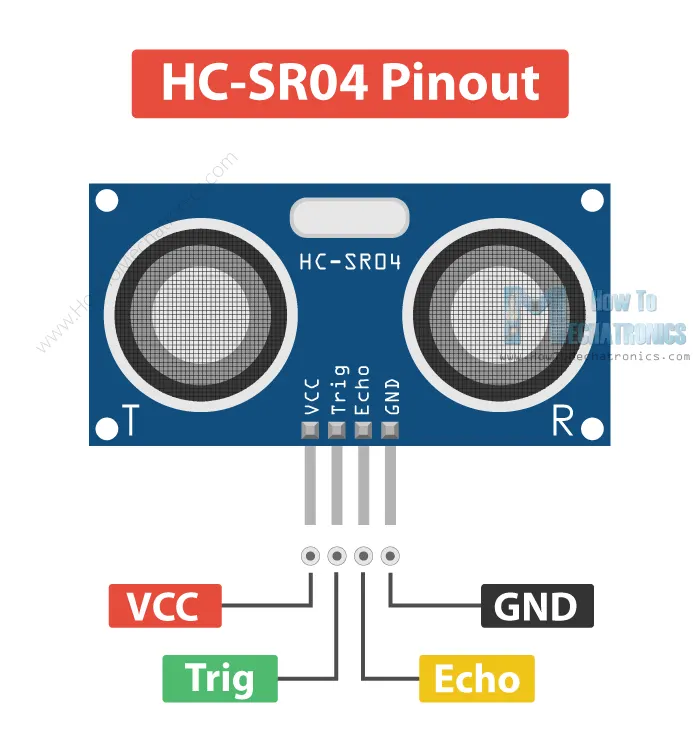
HC-SR04 Ultrasonic Sensor:
The HC-SR04 is an affordable and easy to use distance measuring sensor which has a range from 2cm to 450cm.
It emits an ultrasound at 40000 Hz which travels through the air and if there is an object or obstacle on its path It will bounce back to the module. Considering the travel time and the speed of the sound you can calculate the distance.
In order to generate the ultrasound we need to set the Trig pin on a High State for 15 µs. That will send out an 8 cycle ultrasonic burst which will travel at the speed of sound. The Echo pins goes high right away after that 8 cycle ultrasonic burst is sent, and it starts listening or waiting for that wave to be reflected from an object.
If we receive a reflected pulse, the Echo pin will go down. According to the amount of time the Echo pin was HIGH, we can determine the distance the sound wave traveled, thus the distance from the sensor to the object.
basic formula for calculating distance:
Distance = Speed x Time
We actually know both the speed and the time values. The time is the amount of time the Echo pin was HIGH, and the speed is the speed of sound which is 340m/s. There’s one additional step we need to do, and that’s divide the end result by 2. and that’s because we are measuring the duration the sound wave needs to travel to the object and bounce back.
Code:
#include <avr/io.h> //we are using the I/O registers of AVR
#define F_CPU 16000000L // define the CPU frequency
#include <util/delay.h> // delay function
#define rs_high PORTD |=(1<<0); //define bit for RS_high
#define rs_low PORTD &=~(1<<0); //define bit for RS_low
#define en_high PORTD |= (1<<2); //define bit for EN_High
#define en_low PORTD &=~(1<<2); //define bit for EN_Low
#define rw_high PORTD |= (1<<1);
#define rw_low PORTD &= ~(1<<1);
#define US_ERROR -1 // we are defining two more variables two know if the ultrasonic sensor is working or not
#define US_NO_OBSTACLE -2
#define US_PORT PORTC // we have connected the Ultrasonic sensor on port C to use the ultrasonic we need two pins of the ultrasonic to be connected on port C
#define US_PIN PINC // we need to initialize the pin resistor when we want to take input
#define US_DDR DDRC // we need data-direction-resistor (DDR) to set the direction of data flow input or output
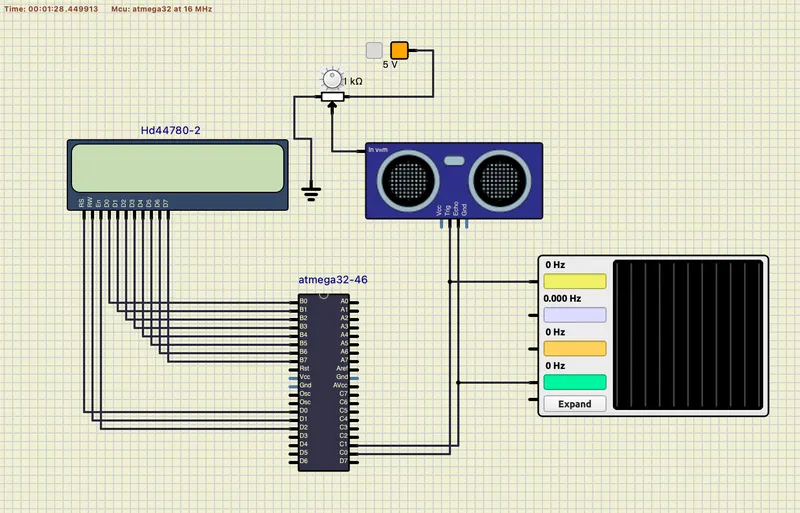
#define US_TRIG_POS PC0 // the trigger pin of ultrasonic sound sensor is connected to port C0
#define US_ECHO_POS PC1 // echo pin of ultrasonic sensor is connected to port C1
int distance, previous_distance;
void lcd_cmd(unsigned char cmd) //LCD_COMMAND FUNCTION
{
PORTB= cmd;
rs_low;
rw_high;
en_high;
_delay_ms(1);
en_low;
}
void lcd_data(unsigned char data) //LCD DATA FUNCTION
{
PORTB= data;
rw_low;
rs_high;
en_high;
_delay_ms(1);
en_low;
}
void lcd_init()//LCD INITILIAZATION
{
rw_high;
rs_high;
en_high;
PORTB = 0xff; //make lcd data portB direction as output
lcd_cmd(0x38); //16x2 lcd 8 bit
_delay_ms(5);
lcd_cmd(0x02);
_delay_ms(5);
lcd_cmd(0x01);
_delay_ms(5);
lcd_cmd(0x0c);
_delay_ms(5);
lcd_cmd(0x06);
_delay_ms(5);
lcd_cmd(0x80);
_delay_ms(5);
}
void cursorpos(char x,char y) //CURSOR POSITION FUNCTION
{
if((x<1 || x>2)||(y<1 || y>16)) //condition will checks the 2 rows and 16 columns
{
x=1; //x=row
y=1; //y=coloumn
}
if (x==1)
{
lcd_cmd(0x7F+y); //{ 80-1 = 7F} for starting the 1st line hex decimal value (80) we are using 7f+y as need to start from that coloumn
}
else
{
lcd_cmd(0xBF+y); //{0C-1 = 0B} for starting the 2nd line, 2nd row
}
}
void lcd_out(char a, char b,char *str) //lcd out function here we are checking which position we want to print
{
cursorpos(a,b);
while(*str)
{
lcd_data(*str);
str++;
}
}
void lcd_clear()
{
lcd_cmd (0x01); // this line clears the LCD screen
_delay_ms(2); // waits for two milliseconds
lcd_cmd (0x80); // this line sets the cursor to the row 1 column 1
}
void HCSR04Init()
{
// we are setting the trigger pin as output as it will generate ultrasonic sound wave
US_DDR|=(1<<US_TRIG_POS);
}
void HCSR04Trigger()
{ // this function will generate ultrasonic sound wave for 15 microseconds
//Send a 10uS pulse on trigger line
US_PORT|=(1<<US_TRIG_POS); //high
_delay_us(15); //wait 15uS
US_PORT&=~(1<<US_TRIG_POS); //low
}
uint16_t GetPulseWidth()
{
// this function will be used to measure the pulse duration ,When the ultra sound echo back after hitting an object
// the microcontroller will read the pulse using the echo pin of the ultrasonic sensor connected to it
uint32_t i,result;
// it check the echo pin for a certain amount of time ,if there is no signal it means the sensor is not working or not connect properly
for(i=0;i<600000;i++)
{
if(!(US_PIN & (1<<US_ECHO_POS)))
continue; //Line is still low, so wait
else
break; //High edge detected, so break.
}
if(i==600000)
return US_ERROR; //Indicates time out
//Setup Timer1
TCCR1A=0X00;
TCCR1B=(1<<CS11); // This line sets the resolution of the timer Maximum of how much value it should count
TCNT1=0x00; // This line start the counter to start counting time
for(i=0;i<600000;i++) // the 600000 value is used randomly to denote a very small amount of time, almost 40 miliseconds
{
if(US_PIN & (1<<US_ECHO_POS))
{
if(TCNT1 > 60000) break; else continue; // if the TCNT1 value gets higher than 60000 it means there is not object in the range of the sensor
}
else
break;
}
if(i==600000)
return US_NO_OBSTACLE; //Indicates time out
//Falling edge found
result=TCNT1; /* microcontroller stores the the value of the counted pulse time in the TCNT1 register. So, we are returning this value to the
main function for utilizing it later*/
//Stop Timer
TCCR1B=0x00;
if(result > 60000)
return US_NO_OBSTACLE; //No obstacle
else
return (result>>1);
}
int main(void)
{
lcd_init(); // we are initializing the LCD
char numberString[4]; // we are defining an array of character it will be utilized later to store integer to be displayed on the LCD screen
while(1)
{
uint16_t r;
_delay_ms(100); //Let the LCD Module start
//Set io port direction of sensor
HCSR04Init();
while(1)
{
//Send a trigger pulse
HCSR04Trigger(); // calling the ultrasonic sound wave generator function
//Measure the width of pulse
r=GetPulseWidth(); // getting the duration of the ultrasound took to echo back after hitting the object
//Handle Errors
if(r==US_ERROR) // if microcontroller doesn't get any pulse then it will set the US_ERROR variable to -1
{
cursorpos(1, 1); //lcd_setCursor(column, row)
char j[10] = "Error!";
lcd_out(1,1,&j);
}
else
{
distance=(r*0.034/2.0); // This will give the distance in centimeters
char f[15]= "Distance = ";
lcd_out(1,0,&f);
itoa(distance, numberString, 10); // distance is an integer number, we can not display integer directly on the LCD ,this line converts integer into array of character
lcd_out(2,4,numberString);
char h[6] = " cm";
lcd_out(2,10,&h);
previous_distance= distance;
_delay_ms(30);
}
}
}
}
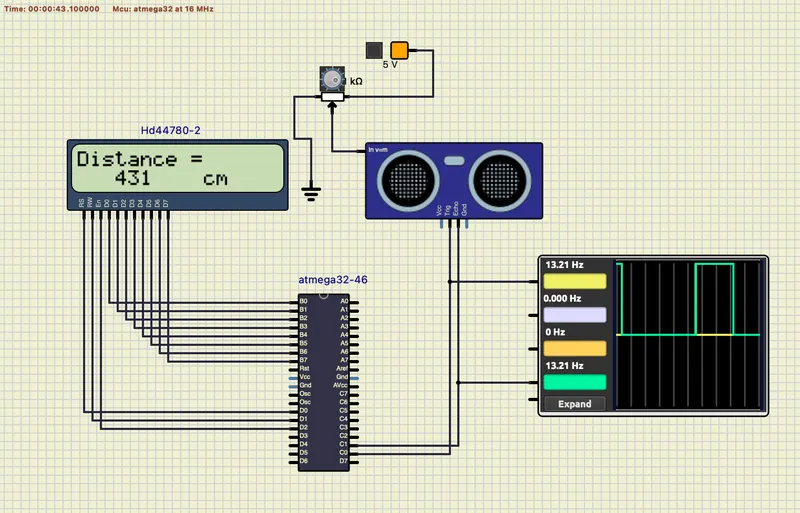
Circuit Module:
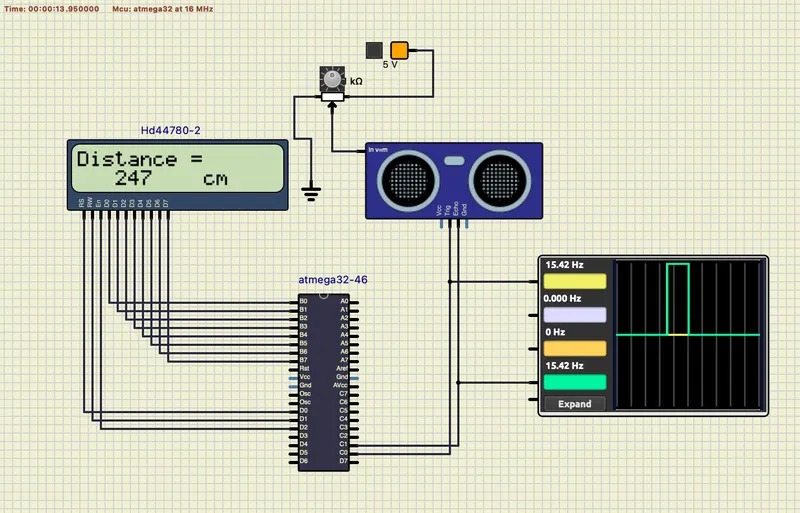
Output:
Ultrasonic distance is 247cm
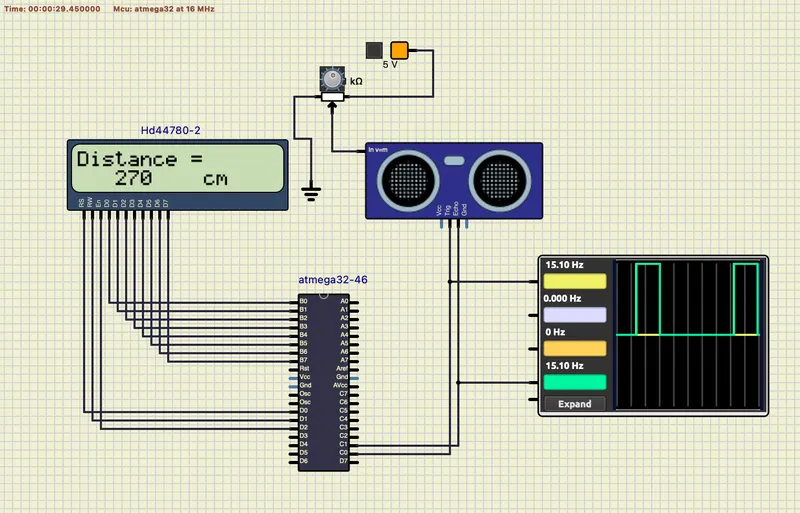
When we varries the potentiometer distance is increase
Expected Outcomes:
The students will get the Knowledge on Ultrasonic sensor (HC-SR04) to measure the distance travelled by wave to the object, the hardware connection of Atmega32 and HC-SR04 and how to use input capture mode of Timer1.
Conclusion:
So, we have successfully done this project and get the output, that we need to know about using the HC-SR04 Ultrasonic sensor with Atmega32. The ultrasonic sensor is a high pulse with the same duration as the time difference between transmitted ultrasonic bursts and the received echo signal.
Embedded - Batch 9 | LS