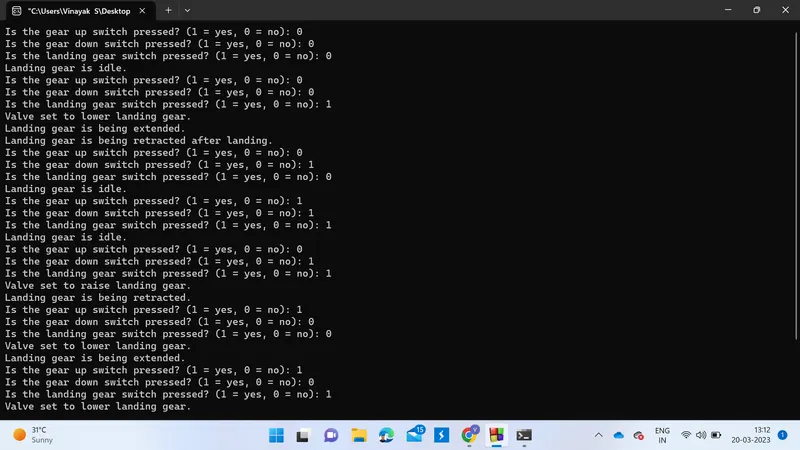
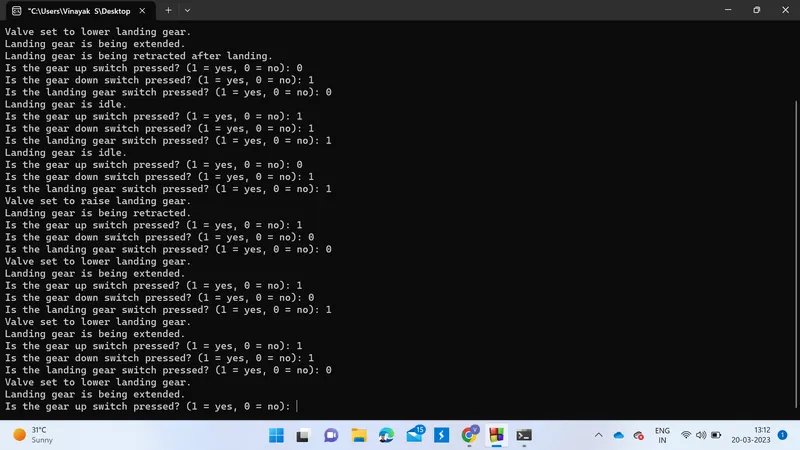
Implementing the Code for controlling the retraction and extension of Airplane’s landing gear
/*--------------------------Details of Finite state machine------------------
The finite state machine has four states: IDLE, GEAR_UP, and GEAR_DOWN,landing. The transitions between the states are
triggered by two events: GEAR_UP and GEAR_DOWN. When the GEAR_UP event is triggered, the machine transitions from
IDLE to GEAR_UP and from GEAR_UP to GEAR_DOWN. When the GEAR_DOWN event is triggered, the machine transitions from
GEAR_DOWN to IDLE and remains in GEAR_DOWN if the event is triggered while in that state.
At each state, an action is taken. In the IDLE state, the "idle_action" function is executed, which prints a
message indicating that the landing gear is idle. In the GEAR_UP state, the "gear_up_action" function is executed,
which prints a message indicating that the landing gear is being retracted. In the GEAR_DOWN state, the "gear_down_action"
function is executed, which prints a message indicating that the landing gear is being extended. The "control_valve"
function controls the valve direction based on the current state, setting it to raise or lower the landing gear
accordingly.
*/
/*----------------------------Implementation Details-------------------------------
The below code is an implementation of a finite state machine (FSM) that controls the landing gear of an aircraft.
The FSM has three possible states: idle, gear up, and gear down, and two possible events: gear up and gear down.
The code defines enumerated types for the states and events, as well as functions to perform actions in each state
(printing a message indicating the current state of the landing gear). It also defines a transition table that maps
current states to new states based on events.
The main function contains a while loop that reads input from switches to determine the current event, updates the
state machine based on the current state and event, controls the valve that raises and lowers the landing gear, and
performs an action based on the new state.
The program uses placeholders for functions that would read input from physical switches and control the valve to
raise and lower the landing gear. The placeholders prompt the user to input whether the gear up or gear down switch
is pressed, and return the input value. The program also prints messages to the console indicating the current state
of the landing gear and the valve direction
The program defines the states of the finite state machine using an enumerated type and the events that trigger state
transitions using another enumerated type. It also defines actions to be taken in each state using separate functions. The program implements the state machine using a transition table that maps current states to new states based on events.
The program also includes functions for reading input from switches that determine the events, and for controlling
the valve that raises or lowers the landing gear. In the main function, there is a loop that reads input from the
switches, determines the event, updates the state machine using the fsm_update function, and performs the appropriate
action based on the new state.
The program defines a set of states, events, and actions, and uses a transition table to update the current state of
the system based on input events.
The program consists of several parts:
The definition of the FSM states, events, and actions.
The transition table, which maps current states and events to new states.
The FSM update function, which takes the current state and an event as input and returns the new state based on the transition table.
Functions to read input from the switches that control the landing gear.
A function to control the direction of the valve that controls the landing gear.
The main function, which contains a loop that reads input from the switches, updates the FSM state, and controls the valve direction based on the current state.
The program can be summarized as follows:
The FSM has four states: STATE_IDLE, STATE_GEAR_UP, STATE_GEAR_DOWN, and STATE_LANDING.
The FSM has three events: EVENT_GEAR_UP, EVENT_GEAR_DOWN, and EVENT_LANDING.
The program reads input from three switches that control the landing gear: the gear up switch, the gear down switch, and the landing gear switch.
The program uses a transition table to update the FSM state based on the input events.
The program controls the direction of the valve that controls the landing gear based on the current FSM state. When the FSM is in the STATE_GEAR_UP state, the valve is set to raise the landing gear. When the FSM is in the STATE_GEAR_DOWN or STATE_LANDING state, the valve is set to lower the landing gear.
Imagine you are the captain of an aircraft and you need to control the landing gear to take off and land safely.
To do this, you use a system called a finite state machine (FSM), which is like a computer program that helps you
control the landing gear.
The FSM has three possible states: idle, gear up, and gear down. When the aircraft is on the ground, the landing gear
is in the gear down state. When you want to take off, you need to raise the landing gear by switching to the gear up
state. And when you are ready to land, you need to lower the landing gear by switching back to the gear down state.
The FSM also has two possible events: gear up and gear down. These events are triggered by physical switches that you
press to control the landing gear. When you press the gear up switch, the FSM transitions from the gear down state to
the gear up state. And when you press the gear down switch, the FSM transitions back from the gear up state to the gear
down state.
To control the landing gear, the FSM uses a transition table that maps current states to new states based on events.
This means that when you press the gear up switch, the FSM knows to transition from the gear down state to the gear up
state, and when you press the gear down switch, the FSM knows to transition back to the gear down state.
The FSM also performs actions based on the current state. For example, when the landing gear is in the gear down state,
the FSM will prompt you to input whether the gear up or gear down switch is pressed, and it will print a message
indicating that the landing gear is down. And when the landing gear is in the gear up state, the FSM will prompt you
to input whether the gear up or gear down switch is pressed, and it will print a message indicating that the landing
gear is up.
Overall, the FSM helps you control the landing gear of your aircraft safely and efficiently by automatically transitioning
between different states based on physical switches that you press, and by performing actions based on the current state
of the landing gear.
*/
//---------------------------------------program---------------
#include //includes the standard input/output library header file.
// Define the states of the FSM
typedef enum
{ //defines an enumerated type state_t with three possible states: STATE_IDLE, STATE_GEAR_UP, and STATE_GEAR_DOWN
STATE_IDLE, // Define an enum for the idle state
STATE_GEAR_UP, // Define an enum for the gear up state
STATE_GEAR_DOWN, //// Define an enum for the gear up state
STATE_LANDING // Define an enum for landing state
} state_t;
// Define the events that trigger state transitions
typedef enum
{ //defines an enumerated type event_t with two possible events: EVENT_GEAR_UP and EVENT_GEAR_DOWN.
EVENT_GEAR_UP, // Define an enum for the gear up event
EVENT_GEAR_DOWN, // Define an enum for the gear down event
EVENT_LANDING // added event for landing gear
} event_t;
// Define the actions to be taken in each state
void idle_action()
{ //defines a function idle_action() that prints a message indicating that the landing gear is idle.
printf("Landing gear is idle.n");//print to console
}
void gear_up_action()
{ //defines a function gear_up_action() that prints a message indicating that the landing gear is being retracted.
printf("Landing gear is being retracted.n");//print to console
}
void gear_down_action()
{ //defines a function gear_down_action() that prints a message indicating that the landing gear is being extended.
printf("Landing gear is being extended.n");//print to console
}
void landing_action()
{ // added action for landing gear
printf("Landing gear is being prepared for landing.n");
}
// Define the state machine transition table
state_t transition_table[4][3] =
{ //defines a 2D array transition_table that maps current states to new states based on events. For example,
//if the current state is STATE_IDLE and the event is EVENT_GEAR_UP, the new state is STATE_GEAR_UP
// Current state: STATE_IDLE
{STATE_IDLE, STATE_GEAR_UP, STATE_GEAR_DOWN},
{STATE_GEAR_DOWN, STATE_GEAR_UP, STATE_IDLE},
{STATE_GEAR_DOWN, STATE_IDLE, STATE_LANDING},
{STATE_LANDING, STATE_LANDING, STATE_LANDING}
};
// Define the function to update the state machine based on an event
state_t fsm_update(state_t current_state, event_t event)
{ //defines a function fsm_update() that takes the current state and an event as input and returns the new state based on the transition_table.
return transition_table[current_state][event];
}
// Placeholder function for reading the gear up switch
int read_gear_up_switch()
{
//defines a function read_gear_up_switch() that prompts the user to input whether the gear up switch is pressed (1 for yes, 0 for no), reads the input, and returns the input value.
int switch_state;
printf("Is the gear up switch pressed? (1 = yes, 0 = no): ");
scanf("%d", &switch_state);
return switch_state;
}
// Placeholder function for reading the gear down switch
int read_gear_down_switch()
{ // defines a function read_gear_down_switch() that prompts the user to input whether the gear down switch is pressed (1 for yes, 0 for no), reads the input, and returns the input value.
int switch_state;
printf("Is the gear down switch pressed? (1 = yes, 0 = no): ");
scanf("%d", &switch_state);
return switch_state;
}
int read_landing_switch()
{ // added function to read landing switch
int switch_state;
printf("Is the landing gear switch pressed? (1 = yes, 0 = no): ");
scanf("%d", &switch_state);
return switch_state;
}
// Function to control the valve direction
void control_valve(state_t current_state)
{ //Function to control the valve direction
if (current_state == STATE_GEAR_UP)
{
// Set valve to raise landing gear
printf("Valve set to raise landing gear.n");//print
// Code to control valve to raise landing gear goes here
}
else if (current_state == STATE_GEAR_DOWN || current_state == STATE_LANDING)
{ // modified to include new state
printf("Valve set to lower landing gear.n");
}
}
void extend_landing_gear()
{ // added function to extend landing gear
printf("Landing gear is being extended for landing.n");
}
void retract_landing_gear()
{ // added function to retract landing gear
printf("Landing gear is being retracted after landing.n");
}
int main()
{
state_t current_state = STATE_IDLE;//initial sate
while (1)
{
// Read input from switches to determine event
int gear_up_switch = read_gear_up_switch(); // read the gear up switch
int gear_down_switch = read_gear_down_switch(); // read the gear down switch
int landing_switch = read_landing_switch();
event_t event;
if (gear_up_switch)
{
event = EVENT_GEAR_UP;
}
else if (gear_down_switch)
{
event = EVENT_GEAR_DOWN;
}
else if (landing_switch)
{ // added event for landing switch
event = EVENT_LANDING;
}
else
{
event = -1; // No event
}
// Update the state machine
current_state = fsm_update(current_state, event);
// Control the valve based on the current state
control_valve(current_state);
// Take action based on new state
switch (current_state)
{
case STATE_IDLE:
idle_action(); // perform the idle action
break;
case STATE_GEAR_UP:
gear_up_action(); // perform the gear up action
break;
case STATE_GEAR_DOWN:
gear_down_action(); // perform the gear down action
break;
case STATE_LANDING:
landing_action();
break;
}
if (current_state == STATE_LANDING)
{ // added condition for landing state
extend_landing_gear();
}
else if (event == EVENT_LANDING && current_state != STATE_LANDING)
{ // added condition for landing event
retract_landing_gear();
}
}
return 0;//return zero to the called function
}