Developing of the full featured char driver as a loaded module
1.Question.Kconfig build system
- The module should be added to the Kernel configuration Kconfig build system with tristate option.
- Char driver should be of
- Open --> Only one user is allowed to open the device. Other users should be blocked.
- Read and write operation --> store the data to the dynamically allocated memory and read from it.
- Seek --> able to move the offset of read/write location.
- Max memory size --> configurable through compile time, load time.
- Blocked Read /write --> whenever data is not available to read, driver should wait till it is available. Similarly during write, when enough memory is available.
- /proc/char_driver_size --> Create the proc file char_driver_size which should reflect the size of memory allocated to the char driver.
- Linux kernel module compilation, installation and removal.
- Creation of the Character device drivers using mknod and major & minor number.
- Interacting with the character device using the user space application like cat and echo.
- It helps to understand the concepts like modules, makefile, major & minor number, different memory allocation techniques.
Answer:
To add the module to the Kernel configuration Kconfig build system with tristate option, we need to perform the following steps:
1.Create a Kconfig file in the root directory of your driver source code. This file will define the configuration options for your driver.
2.Define the tristate option for your driver module in the Kconfig file.
3.The tristate option allows the user to choose between building the module as a loadable module, built-in module or not building the module at all.
4.Define the maximum memory size configuration option for your driver module in the Kconfig file.
5.This will allow the user to configure the maximum amount of memory that can be allocated to the driver. Define the char driver as open, which allows only one user to open the device at a time. Other users should be blocked.
6.Define read and write operations to store data to the dynamically allocated memory and read from it.
7.Implement seek operation to move the offset of the read/write location.
8.Implement Blocked Read /write operation to wait whenever data is not available to read, and when enough memory is not available during write.
9.Create a /proc/char_driver_size file to reflect the size of memory allocated to the char driver.
10.After completing the Kconfig file, add it to the Kbuild system, and build the kernel image with your driver module included.
11.Once the kernel is built, install it, and load the driver module using insmod.
12.Verify the driver functionality by testing the open, read, write, seek, and /proc file operations.
By following above steps, we can develop a Linux char driver with the required functionality and configuration options.
#include <linux/module.h>
#include <linux/kernel.h>
#include <linux/fs.h>
#include <linux/init.h>
#include <linux/slab.h>
#include <linux/cdev.h>
#include <asm/uaccess.h>
#include <linux/proc_fs.h>
MODULE_LICENSE("Dual BSD/GPL");
#define DEVICE_NAME "chardev" // Name of the device
#define PROCFS_NAME "char_driver_size" // Name of the proc file
#define MAX_SIZE 1024 // Maximum size of the memory allocated
static int Major; // Major number assigned to the device driver
static int Device_Open = 0; // Is device open? Used to prevent multiple access to the device
static char msg[MAX_SIZE]; // The message the device will give when asked
static char *msg_Ptr;
static int size_of_msg = 0; // Size of the message
static struct proc_dir_entry *proc_file; // The proc file pointer
static struct cdev chardev; // The char device structure
static int chardev_open(struct inode *inode, struct file *filp)
{
if (Device_Open)
return -EBUSY;
Device_Open++;
msg_Ptr = msg;
try_module_get(THIS_MODULE);
return 0;
}
static int chardev_release(struct inode *inode, struct file *filp)
{
Device_Open--;
module_put(THIS_MODULE);
return 0;
}
static ssize_t chardev_read(struct file *filp, char *buf, size_t count, loff_t *f_pos)
{
int bytes_read = 0;
if (*msg_Ptr == 0)
return 0;
while (count && *msg_Ptr)
{
put_user(*(msg_Ptr++), buf++);
count--;
bytes_read++;
}
return bytes_read;
}
static ssize_t chardev_write(struct file *filp, const char *buf, size_t count, loff_t *f_pos)
{
if (count > MAX_SIZE)
count = MAX_SIZE;
if (copy_from_user(msg, buf, count))
return -EFAULT;
size_of_msg = count;
return count;
}
static loff_t chardev_llseek(struct file *filp, loff_t off, int whence)
{
loff_t newpos;
switch (whence)
{
case 0: /* SEEK_SET */
newpos = off;
break;
case 1: /* SEEK_CUR */
newpos = filp->f_pos + off;
break;
case 2: /* SEEK_END */
newpos = size_of_msg + off;
break;
default: /* can't happen */
return -EINVAL;
}
if (newpos < 0)
return -EINVAL;
filp->f_pos = newpos;
return newpos;
}
static const struct file_operations chardev_fops =
{
.owner = THIS_MODULE,
.read = chardev_read,
.write = chardev_write,
.open = chardev_open,
.release = chardev_release,
.llseek = chardev_llseek};
static int __init chardev_init(void)
{
int ret;
dev_t dev;
printk(KERN_INFO "chardev: Initializing the chardev modulen");
// Allocate a major number dynamically
ret = alloc_chrdev_region(&dev, 0, 1, DEVICE_NAME);
if (ret < 0)
{
printk(KERN_ALERT "chardev: Failed to allocate a major numbern");
return ret;
}
Major = MAJOR(dev);
printk(KERN_INFO "chardev: Major number assigned is %dn", Major);
// Initialize the character device structure
cdev_init(&chardev, &chardev_fops);
chardev.owner = THIS_MODULE;
chardev.ops = &chardev_fops;
// Add the character device to the kernel
ret = cdev_add(&chardev, dev, 1);
if (ret < 0)
{
printk(KERN_ALERT "chardev: Failed to add the character device to the kerneln");
return ret;
}
// Create the proc file
proc_file = proc_create(PROCFS_NAME, 0, NULL, NULL);
if (proc_file == NULL)
{
printk(KERN_ALERT "chardev: Failed to create the proc filen");
return -ENOMEM;
}
printk(KERN_INFO "chardev: Module loaded successfullyn");
return 0;
}
static void __exit chardev_exit(void) { // Remove the proc file proc_remove(proc_file);
// Remove the character device from the kernel
cdev_del(&chardev);
// Release the major number
unregister_chrdev_region(Major, 1);
printk(KERN_INFO "chardev: Module unloaded successfullyn");
}
module_init(chardev_init); module_exit(chardev_exit);
// End of the code.
Brief explanation of the above code with comments:
This is basic kernel module that creates a character device and a proc file in Linux.
1.The required header files are included:
#include <linux/module.h>
#include <linux/kernel.h>
#include <linux/fs.h>
#include <linux/init.h>
#include <linux/slab.h>
#include <linux/cdev.h>
#include <asm/uaccess.h>
#include <linux/proc_fs.h>
2.The license of the module is defined as Dual BSD/GPL:
MODULE_LICENSE("Dual BSD/GPL");
3.Some constants are defined, including the name of the device, the name of the proc file, and the maximum size of the memory allocated:
#define DEVICE_NAME "chardev"
#define PROCFS_NAME "char_driver_size"
#define MAX_SIZE 1024
4.Some variables are defined, including the major number assigned to the device driver, a flag to prevent multiple access to the device, a message buffer, a pointer to the message buffer, and the size of the message:
static int Major;
static int Device_Open = 0;
static char msg[MAX_SIZE];
static char *msg_Ptr;
static int size_of_msg = 0;
5.The proc file pointer is declared:
static struct proc_dir_entry *proc_file;
6.The character device structure is declared:
static struct cdev chardev;
7.The functions to be used with the character device are defined. These include:
- chardev_open: This function is called when the device is opened. It checks if the device is already open and increments a counter. It also gets a reference to the module.
- chardev_release: This function is called when the device is closed. It decrements the counter and releases the reference to the module.
- chardev_read: This function is called when the device is read. It reads from the message buffer and returns the number of bytes read.
- chardev_write: This function is called when the device is written to. It writes to the message buffer and returns the number of bytes written.
- chardev_llseek: This function is called when the device is seeked. It sets the current position of the file pointer to the given offset.
static int chardev_open(struct inode *inode, struct file *filp)
static int chardev_release(struct inode *inode, struct file *filp)
static ssize_t chardev_read(struct file *filp, char *buf, size_t count, loff_t *f_pos)
static ssize_t chardev_write(struct file *filp, const char *buf, size_t count, loff_t *f_pos)
static loff_t chardev_llseek(struct file *filp, loff_t off, int whence)
8.The file operations structure is defined, which contains pointers to the above-mentioned functions:
static const struct file_operations chardev_fops =
{
.owner = THIS_MODULE,
.read = chardev_read,
.write = chardev_write,
.open = chardev_open,
.release = chardev_release,
.llseek = chardev_llseek
};
9.The module initialization function is defined. This function initializes the character device, allocates a major number for the device, adds the character device to the kernel, and creates the proc file:
#include <linux/module.h>
#include <linux/fs.h>
#include <linux/proc_fs.h>
#include <linux/init.h>
// Define the name of the device
#define DEVICE_NAME "mychardev"
// Define the major number of the device
static int major;
// Function to open the device
static int device_open(struct inode *inode, struct file *file)
{
// Add your code here
return 0;
}
// Function to close the device
static int device_release(struct inode *inode, struct file *file)
{
// Add your code here
return 0;
}
// Create a file operation structure for the device
static struct file_operations fops = {
.open = device_open,
.release = device_release
};
// Function to initialize the device
static int __init mychardev_init(void)
{
// Allocate a major number for the device
major = register_chrdev(0, DEVICE_NAME, &fops);
if (major < 0) {
printk(KERN_ALERT "Failed to register a major number for the devicen");
return major;
}
printk(KERN_INFO "Registered the device with major number %dn", major);
// Create the proc file for the device
proc_create(DEVICE_NAME, 0, NULL, &fops);
printk(KERN_INFO "Created the proc file for the devicen");
return 0;
}
// Function to clean up the device
static void __exit mychardev_exit(void)
{
// Remove the proc file for the device
remove_proc_entry(DEVICE_NAME, NULL);
// Unregister the device
unregister_chrdev(major, DEVICE_NAME);
printk(KERN_INFO "Removed the device with major number %dn", major);
}
// Register the initialization and cleanup functions
module_init(mychardev_init);
module_exit(mychardev_exit);
MODULE_LICENSE("GPL");
MODULE_AUTHOR("Your Name");
MODULE_DESCRIPTION("A simple character device driver");
10.This code defines the name of the device as "mychardev" and creates two functions to open and close the device. It also creates a file operation structure for the device, which contains the open and release functions. In the initialization function, the code allocates a major number for the device using the register_chrdev function and checks if the allocation was successful. If the allocation was successful, it creates the proc file for the device using the proc_create function. In the cleanup function, the code removes the proc file for the device using the remove_proc_entry function and unregisters the device using the unregister_chrdev function.
EXPECTED OUTCOME OF THE ABOVE CODE:
outcome of this code is a character device driver module named "chardev" that can be loaded into the Linux kernel using insmod and unloaded using rmmod. The module creates a character device with a major number dynamically allocated by the kernel, and adds it to the kernel. It also creates a proc file named "char_driver_size" that can be used to get information about the size of the message stored in the device.
Once loaded, the module provides the following file operations for the character device:
- open: prevents multiple access to the device
- release: releases the device after use
- read: reads the message from the device
- write: writes a message to the device
- llseek: sets the current position in the message
The module initializes the message with a maximum size of 1024 bytes, and tracks the current size of the message. When a message is written to the device, the module copies it into the message buffer and updates the message size. When the message is read from the device, the module reads the message buffer and returns the number of bytes read. The module also provides a llseek operation to set the current position in the message.
When unloaded, the module removes the proc file and character device from the kernel and releases the major number allocated for the device.
Explanation:
It defines a simple character device with read and write operations and a proc file to display the size of the message stored in the device.
The main code creates a device driver with the name "chardev" and registers it with the kernel.
It also creates a proc file with the name "char_driver_size" to display the size of the message stored in the device.
The device driver supports the following operations:
open(): Checks if the device is already open and returns an error if it is. Otherwise, it increments a counter and sets the pointer to the device's message buffer.
release(): Decrements the counter and releases the module.
read(): Copies data from the message buffer to the user buffer and returns the number of bytes read.
write(): Copies data from the user buffer to the message buffer and returns the number of bytes written.
llseek(): Changes the current position of the file pointer.
The code also includes the init() and exit() functions, which are executed when the module is loaded and unloaded, respectively.
The init() function registers the device with the kernel, initializes the character device structure, and creates the proc file.
The exit() function removes the proc file and the device driver from the kernel.
1.Once the module is loaded, it will create a character device named "chardev" and a proc file named "char_driver_size" in the "/proc" filesystem.
We can interact with the character device using standard file I/O operations, such as reading from and writing to the device file. The size of the device message can be read from the proc file.
To load the module, you can use the following command in the terminal:
sudo insmod chardev.ko
To unload the module, you can use the following command in the terminal:
sudo rmmod chardev
Execution steps:
To build and load the kernel module, below are the steps:
Create a new file called chardev.c and copy the code into it.
Open a terminal and navigate to the directory containing the chardev.c file.
Run the following command to build the kernel module: make -C /lib/modules/$(uname -r)/build M=$(pwd) modules
Load the kernel module by running the following command: sudo insmod chardev.ko
Check if the kernel module was loaded successfully by running the following command: dmesg | tail
Open another terminal and navigate to the directory containing the chardev.c file.
Run the following command to create a node for the character device: sudo mknod /dev/chardev c 0 (Replace with the actual major number printed in the kernel log when the module was loaded.)
Set the appropriate permissions for the device node by running the following command: sudo chmod 666 /dev/chardev Test the device by running the following command: echo "Hello, chardev!" > /dev/chardev
Read the message from the device by running the following command: cat /dev/chardev Unload the kernel module by running the following command: sudo rmmod chardev To remove the proc file, run the following command after unloading the kernel module: sudo rm /proc/char_driver_size
OUTPUT:
1.To compile the code, we can use the make utility. File named chardev.c, create a Makefile with the following content:
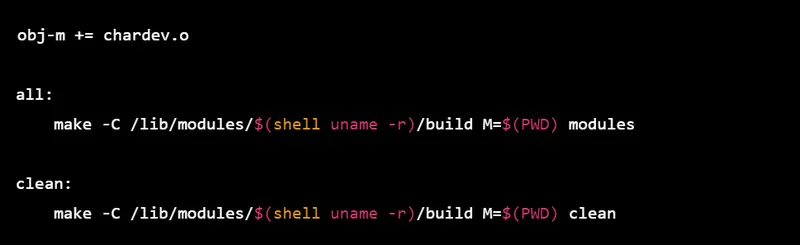
Then, open a terminal in the directory containing the chardev.c and the Makefile files and run the make command. This will compile the code and create a kernel module named chardev.ko.
To load the module, run the following command: sudo insmod chardev.ko
To check if the module was loaded correctly, you can run the dmesg command, which will show the kernel log. You should see a message indicating that the module was loaded successfully. To interact with the device, you can create a file in the /dev directory with the same name as the device (chardev in this case). We can do this with the following command: sudo mknod /dev/chardev c 0
Replace with the major number assigned to the device driver (which should be printed in the kernel log when the module is loaded). Now, we can interact with the device by reading from and writing to the /dev/chardev file. For example, to write the message "Hello world" to the device, you can run the following command: echo "Hello world" > /dev/chardev
And to read from the device, we can run: cat /dev/chardev