Project 2- Creating a custom IOObject in Visual Studio Code
Aim:
The aim of this project is to create a new input output object called Total pressure.
Objective:
The objectives of this project are as follows:-
1. Create an IOObject called total pressure.
2. Place this in the controlDict file.
3. Plot this variable against time.
Procedure:
The Ptotal we are trying to compute is nothing but the sum of static and dynamic
pressure. It is given by the following expression.
`P_(total) = P_(static) + P_(dynamic)`
`P_(Total) = P + (1/2) (U^2 )`
Since the value of p and u varies for each time step the value of total pressure needs to be calculated for each and every time step. We calculate this by using a cpp file and we compile this file using wmake. We will also be running this program on a test case which will be the pitzDaily case from the tutorials.
The algorithm is simple which is
1. read U
2. read p
3. Calculate `P_(Total)`
we create a new cpp file with the name ptotal.cpp and write the program in it which will be as follows
#include "fvCFD.H"
//simplifying the code using the namespace command
using namespace std;
int main(int argc,char *argv[])
1
{
Foam::argList::noBanner();
//removing the openfoam banner in the terminal
timeSelector::addOptions();
#include "addTimeOptions.H"
#include "setRootCase.H"
#include "createTime.H"
#include "createMesh.H"
instantList Times = timeSelector::select0(runTime,args);
forAll(Times,i)//for all the time steps
{
runTime.setTime(Times[i],i);
Info<<"Time: "<<runTime.timeName()<<endl;
//reading u
volVectorField U
(
IOobject
(
"U",
runTime.timeName(),
mesh,
IOobject::MUST_READ
),
mesh
);
//reading p
volScalarField p
(
IOobject
(
"p",
runTime.timeName(),
mesh,
IOobject::MUST_READ
2
),
mesh
);
//writing p_total
volScalarField p_total
(
IOobject
(
"p_total",
runTime.timeName(),
mesh,
IOobject::NO_READ,
IOobject::AUTO_WRITE
),
::mag(p+0.5*pow(mag(U),2))
);
p_total.write();
}
return 0;
}
Now we need to compile this. For this we create a make folder and create 2 files in it
with the names
1. files
2. options
The content in these will be as follows
files
ptotal.C
EXE = $(FOAM_USER_APPBIN)/ptotal
options
EXE_INC = \
-I$(LIB_SRC)/finiteVolume/lnInclude \
-I$(LIB_SRC)/meshTools/lnInclude
EXE_LIBS = \
-lfiniteVolume
In the make folder we create another folder with the name ”linux64GccDPInt32Opt”. Now in the main folder where we have the ptotal.cpp and Make. We open a new terminal and execute wmake and the ptotal program will be compiled. Now we copy the pitzdaily folder from incompressible in tutorials into the run folder. We navigate to this pitzdaily in the run and execute the following commands.
blockMesh
checkMesh
simpleFoam
ptotal
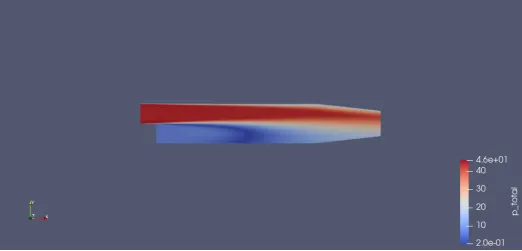
Results