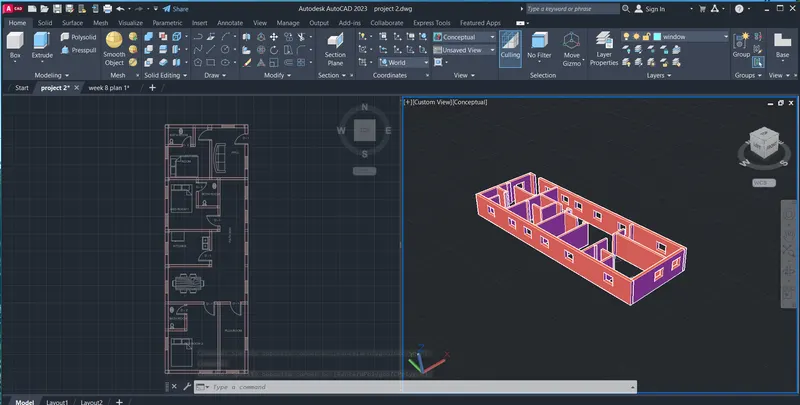
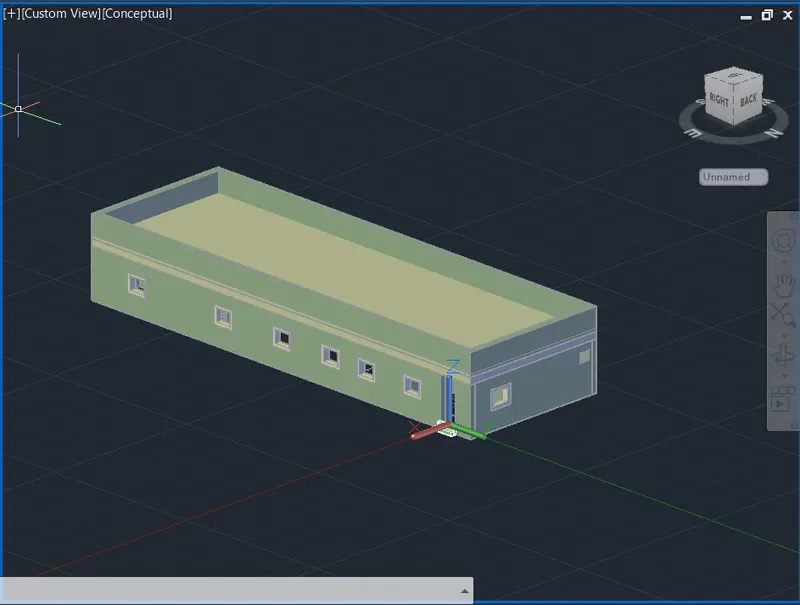
Project 2_Creating a 3D rendered model for a Residential Building in AutoCad
AIM:
To create a 3D rendered model for a Residential Building in AutoCAD
COMMANDS USED:
- line
- rectangle
- exture
- offset
- trim
- 3D modeling
- subtract
PROCEDURE:
Current layer: "parapet"
Enter an option [?/Make/Set/New/Rename/ON/OFF/Color/Ltype/LWeight/TRansparency/MATerial/Plot/Freeze/Thaw/LOck/Unlock/stAte/Description/rEconcile/Xref]: _LOCK
Enter name list of layer(s) to lock or <select objects>: =Defpoints
Enter an option [?/Make/Set/New/Rename/ON/OFF/Color/Ltype/LWeight/TRansparency/MATerial/Plot/Freeze/Thaw/LOck/Unlock/stAte/Description/rEconcile/Xref]:
Command:
Command: '_.-LAYER
Current layer: "parapet"
Enter an option [?/Make/Set/New/Rename/ON/OFF/Color/Ltype/LWeight/TRansparency/MATerial/Plot/Freeze/Thaw/LOck/Unlock/stAte/Description/rEconcile/Xref]: _LOCK
Enter name list of layer(s) to lock or <select objects>: =roof
Enter an option [?/Make/Set/New/Rename/ON/OFF/Color/Ltype/LWeight/TRansparency/MATerial/Plot/Freeze/Thaw/LOck/Unlock/stAte/Description/rEconcile/Xref]:
Command:
Command: '_.-LAYER
Current layer: "parapet"
Enter an option [?/Make/Set/New/Rename/ON/OFF/Color/Ltype/LWeight/TRansparency/MATerial/Plot/Freeze/Thaw/LOck/Unlock/stAte/Description/rEconcile/Xref]: _LOCK
Enter name list of layer(s) to lock or <select objects>: =window
Enter an option [?/Make/Set/New/Rename/ON/OFF/Color/Ltype/LWeight/TRansparency/MATerial/Plot/Freeze/Thaw/LOck/Unlock/stAte/Description/rEconcile/Xref]:
Command:
Command: '_.-LAYER
Current layer: "parapet"
Enter an option [?/Make/Set/New/Rename/ON/OFF/Color/Ltype/LWeight/TRansparency/MATerial/Plot/Freeze/Thaw/LOck/Unlock/stAte/Description/rEconcile/Xref]: _LOCK
Enter name list of layer(s) to lock or <select objects>: =0
Enter an option [?/Make/Set/New/Rename/ON/OFF/Color/Ltype/LWeight/TRansparency/MATerial/Plot/Freeze/Thaw/LOck/Unlock/stAte/Description/rEconcile/Xref]:
Command:
Command:
Command:
Command:
Command:
Command:
Command:
Command: '_.-LAYER
Current layer: "steps"
Enter an option [?/Make/Set/New/Rename/ON/OFF/Color/Ltype/LWeight/TRansparency/MATerial/Plot/Freeze/Thaw/LOck/Unlock/stAte/Description/rEconcile/Xref]: _UNLOCK
Enter name list of layer(s) to unlock or <select objects>: =steps
Enter an option [?/Make/Set/New/Rename/ON/OFF/Color/Ltype/LWeight/TRansparency/MATerial/Plot/Freeze/Thaw/LOck/Unlock/stAte/Description/rEconcile/Xref]:
Command: REC
RECTANG
Specify first corner point or [Chamfer/Elevation/Fillet/Thickness/Width]:
Specify other corner point or [Area/Dimensions/Rotation]:
Command:
Window Lasso Press Spacebar to cycle options
Command:
Command:
** STRETCH **
Specify stretch point or [Base point/Copy/Undo/eXit]:
Command: _.erase 1 found
Command:
.ERASE
Select objects: *Cancel*
Command: REC
RECTANG
Specify first corner point or [Chamfer/Elevation/Fillet/Thickness/Width]: *Cancel*
Command: rec
RECTANG
Specify first corner point or [Chamfer/Elevation/Fillet/Thickness/Width]:
Specify other corner point or [Area/Dimensions/Rotation]: 5
Crossing Lasso Press Spacebar to cycle options
Command: CP
COPY 1 found
Current settings: Copy mode = Multiple
Specify base point or [Displacement/mOde] <Displacement>:
Specify second point or [Array] <use first point as displacement>:
Specify second point or [Array/Exit/Undo] <Exit>:
Specify second point or [Array/Exit/Undo] <Exit>:
Specify second point or [Array/Exit/Undo] <Exit>: *Cancel*
Command:
Command:
Command:
Command:
Command:
Command:
Command: Specify opposite corner or [Fence/WPolygon/CPolygon]:
Command:
Command:
Command: '_.-LAYER
Current layer: "steps"
Enter an option [?/Make/Set/New/Rename/ON/OFF/Color/Ltype/LWeight/TRansparency/MATerial/Plot/Freeze/Thaw/LOck/Unlock/stAte/Description/rEconcile/Xref]: _COLOR
New color [Truecolor/COlorbook] : 7
Enter name list of layer(s) for color 7 (white) <steps>: =window
Enter an option [?/Make/Set/New/Rename/ON/OFF/Color/Ltype/LWeight/TRansparency/MATerial/Plot/Freeze/Thaw/LOck/Unlock/stAte/Description/rEconcile/Xref]:
Command: *Cancel*
Command:
Command: *Cancel*
Command:
Command:
Command:
Automatic save to C:\Users\Welcome\AppData\Local\Temp\project 2_1_4940_3ec30178.sv$ ...
Command:
Command:
Command: *Cancel*
Command:
Command:
Command:
Command:
Command:
Command: *Cancel*
Command:
Command:
** STRETCH **
Specify stretch point or [Base point/Copy/Undo/eXit]:*Cancel*
Command:
** STRETCH **
Specify stretch point:*Cancel*
Command:
** STRETCH **
Specify stretch point:
Command:
** STRETCH **
Specify stretch point:
Command:
** STRETCH **
Specify stretch point:
Command: *Cancel*
Crossing Lasso Press Spacebar to cycle options
Command: STRETCH
Stretching selected objects by last window...3 found
Specify base point or [Displacement] <Displacement>:
Specify second point or <use first point as displacement>:
Command:
Command:
** STRETCH **
Specify stretch point:
Command: *Cancel*
Command:
Command:
Command:
** STRETCH **
Specify stretch point or [Base point/Copy/Undo/eXit]:
Command: *Cancel*
Crossing Lasso Press Spacebar to cycle options
Command:
** STRETCH **
Specify stretch point:
Command: *Cancel*
Crossing Lasso Press Spacebar to cycle options
Command:
** STRETCH **
Specify stretch point:
Command: *Cancel*
Command: Specify opposite corner or [Fence/WPolygon/CPolygon]:
Command:
Command:
Command: _presspull
Select object or bounded area:
Specify extrusion height or [Multiple]:
Specify extrusion height or [Multiple]:
Resuming PRESSPULL command.
Specify extrusion height or [Multiple]:10
1 extrusion(s) created
The object is on a locked layer.
Select object or bounded area:
The object is on a locked layer.
Specify extrusion height or [Multiple]:
Specify extrusion height or [Multiple]:7.5
1 extrusion(s) created
Select object or bounded area:
1 loop extracted.
1 Region created.
Specify extrusion height or [Multiple]:
Specify extrusion height or [Multiple]:
1 extrusion(s) created
Select object or bounded area:
Command:
Command:
** STRETCH **
Specify stretch point or [Base point/Copy/Undo/eXit]: *Cancel*
Command: *Cancel*
Command:
Command: _.erase 1 found
Command:
Command: _.erase 1 found
Command:
Command:
Command:
Command: _presspull
The object is on a locked layer.
Select object or bounded area:
Specify extrusion height or [Multiple]:
Specify extrusion height or [Multiple]:
1 extrusion(s) created
The object is on a locked layer.
Select object or bounded area:
Click a face, curve, or inside a bounded area
Select object or bounded area:
Specify extrusion height or [Multiple]:
Specify extrusion height or [Multiple]:
1 extrusion(s) created
Select object or bounded area:
The object is on a locked layer.
Command:
Command:
Command:
Command:
Command:
Command:
Command:
Command:
Command:
Command:
Command:
Command:
Command:
Command:
Command:
Command:
Command: *Cancel*
Command:
Command:
Command:
** STRETCH **
Specify stretch point or [Base point/Copy/Undo/eXit]:
Command:
** STRETCH **
Specify stretch point or [Base point/Copy/Undo/eXit]:
Command: *Cancel*
Command:
Command:
Command:
Command:
Command: *Cancel*
Command:
Command: _.erase 1 found
Command:
Command:
Command: _presspull
The object is on a locked layer.
Select object or bounded area:
The object is on a locked layer.
The object is on a locked layer.
The object is on a locked layer.
The object is on a locked layer.
The object is on a locked layer.
The object is on a locked layer.
The object is on a locked layer.
The object is on a locked layer.
The object is on a locked layer.
The object is on a locked layer.
The object is on a locked layer.
The object is on a locked layer.
The object is on a locked layer.
The object is on a locked layer.
The object is on a locked layer.
The object is on a locked layer.
The object is on a locked layer.
The object is on a locked layer.
The object is on a locked layer.
Command: Specify opposite corner or [Fence/WPolygon/CPolygon]:
Command: *Cancel*
Command:
Command:
Command: _presspull
Select object or bounded area:
Specify extrusion height or [Multiple]:
Specify extrusion height or [Multiple]:5
1 extrusion(s) created
Select object or bounded area:
Specify extrusion height or [Multiple]:
Specify extrusion height or [Multiple]:1
1 extrusion(s) created
Select object or bounded area:
Command:
Command: _.erase 1 found
Crossing Lasso Press Spacebar to cycle options
Command: _.erase 2 found
Command:
Command:
Command:
Command: Specify opposite corner or [Fence/WPolygon/CPolygon]: *Cancel*
Command:
Command: *Cancel*
Command:
Command:
Command:
Command:
Command:
Command: Specify opposite corner or [Fence/WPolygon/CPolygon]:
Command: Specify opposite corner or [Fence/WPolygon/CPolygon]:
Command:
Command:
Command:
Command: *Cancel*
Command:
Command:
Automatic save to C:\Users\Welcome\AppData\Local\Temp\project 2_1_4940_3ec30178.sv$ ...
Command: