Project 2 Adaptive Cruise Control
Aim:- To create the Simulink Data Dictionary and to develop an algorithm for Adaptive Cruise Control and also Generate C Code of the same.
Objective:-
- Develop a Simulink Model which signifies Adaptive Cruise Control feature as per the Requirement Document using MATLAB and Simulink.
- Follow Up all the MBD realated processes, Requirement Tagging and Traceability, Creating Simulink Data Dictionary, Configuration Parameter Setting, Model Advisor Checks and Finally C- Code generation.
General Overview:-
Adaptive cruise control (ACC) is a system designed to help vehicles maintain a safe following distance and stay within the speed limit. This system adjusts a car's speed automatically so drivers don't have to.
Adaptive cruise control, or ACC, is a technology that has quickly become an essential feature for many drivers. ACC is an intelligent and adaptable version of the cruise control system. Unlike regular cruise control systems, which simply hold the vehicle’s speed at a constant level, adaptive systems regulate the speed of the vehicle to maintain a safe following distance while in traffic.
ACC systems use onboard computers and sophisticated sensors, such as radar or laser systems, to monitor the other vehicles on the road. Because of this, adaptive cruise control is also called radar cruise control or autonomous cruise control.
Once the driver locks his or her preferred speed into the ACC system, the vehicle will monitor its surroundings. The system runs a signal from its radar headway system through a digital signal processor to determine the distance to the nearest car, and it then uses a longitudinal controller to determine a safe following distance.
If the driver’s vehicle has too little following distance, the ACC system sends a signal to the engine or brakes, slowing the vehicle down. Once the path is clear, the ACC system will accelerate the vehicle back to the driver’s preferred speed. By restricting airflow to the engine when the vehicle is close to its speed setting and increasing airflow when the vehicle is below its speed setting, the cruise control system helps the car maintain a near-constant speed.
Standard Adaptive Cruise Control can be activated from speeds of around 30 km/h (20 mph) upwards and supports the driver, primarily on cross-country journeys or on freeways. The cruise control stop & go variant is also active at speeds below 30 km/h (20 mph). It can maintain the set distance to the preceding vehicle even at very low speeds and can decelerate to a complete standstill. When the vehicle remains stopped longer, the driver needs only to reactivate the system, for example by briefly stepping on the gas pedal to return to cruise control mode. In this way, cruise control stop & go supports the driver even in heavy traffic and traffic jams.
Since Adaptive Cruise Control is a comfort and convenience system, brake interventions and vehicle acceleration only take place within defined limits. Even with Adaptive Cruise Control switched on, it remains the driver’s responsibility to monitor the speed and distance from the vehicle in front.
Simulink Model:-
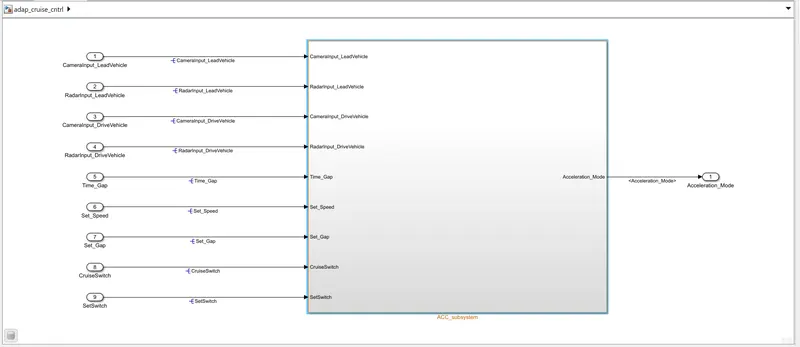
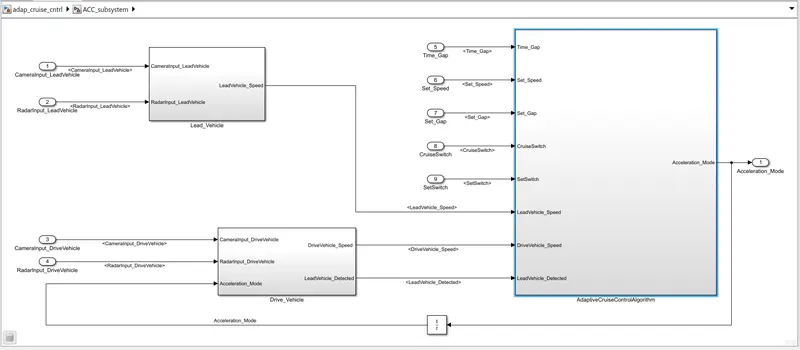
Requirement 1– Lead Vehicle:
- Lead Vehicle is a vehicle which is driving in the road ahead of our drive vehicle. Two input signals (Signal Name: CameraInput_LeadVehicle & RadarInput_LeadVehicle).
- Ideally sensor fusion techniques will be deployed to process & analyze data from camera & radar. For complexity reasons, let’s not adapt to any such algorithms.
- We can simply add both the radar & camera inputs & the corresponding output is read as Speed profile output (Signal Name: LeadVehicle_Speed).
- Speed data of the lead vehicle is critical in implementing the Adaptive Cruise Control algorithm.
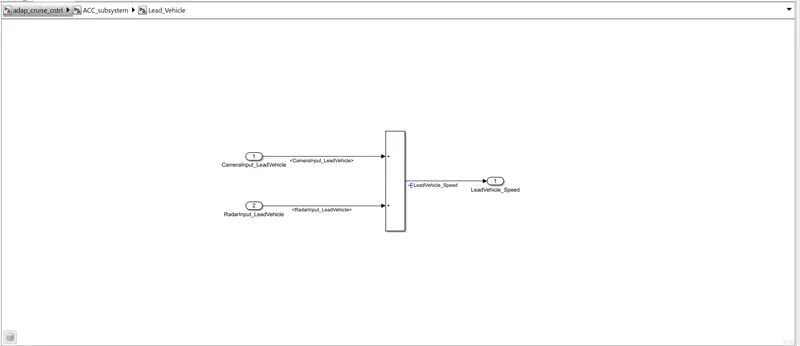
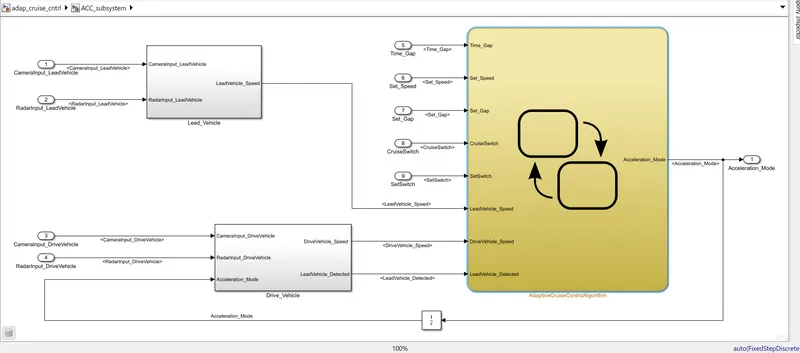
According to the given condition the Subsystem Lead_Vehicle is created and both the incoming signal is added as mentioned to generate the output signal as LeadVehicle_Speed.
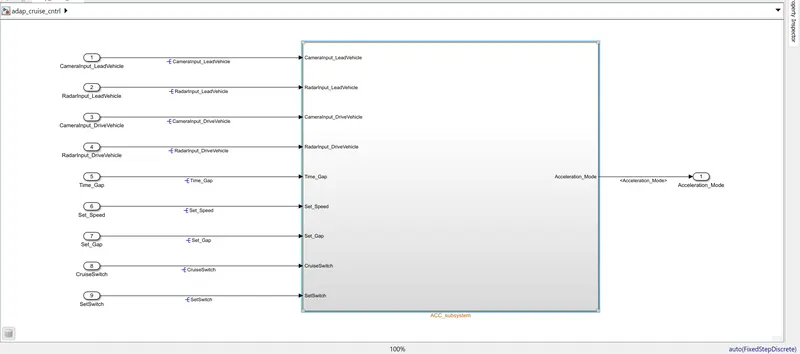
The input signal labels are propogated and the output signal is resolved to Simulink signal objects.
Requirement 2 – Drive Vehicle:
- Drive Vehicle is the vehicle driven by the user & this is the vehicle which has ACC algorithm in it.
- Like the Lead Vehicle, Drive Vehicle algorithm also has 2 input signals (Signal Name: CameraInput_DriveVehicle, RadarInput_DriveVehicle) & one signal coming as an Input to this subsystem (Signal Name: Acceleration_Mode) – three inputs into this requirement in total.
- Like the above requirement, sensor fusion techniques will also be deployed here, for complexity reasons we are ignoring them.
- Two output signals come from this subsystem (Signal Name: DriveVehicle_Speed & LeadVehicle_Detected).
- Signal DriveVehicle_Speed is summation of three input signals mentioned above & LeadVehicle_Detected is renamed from Input Signal RadarInput_DriveVehicle by mere use of Signal Conversion block.
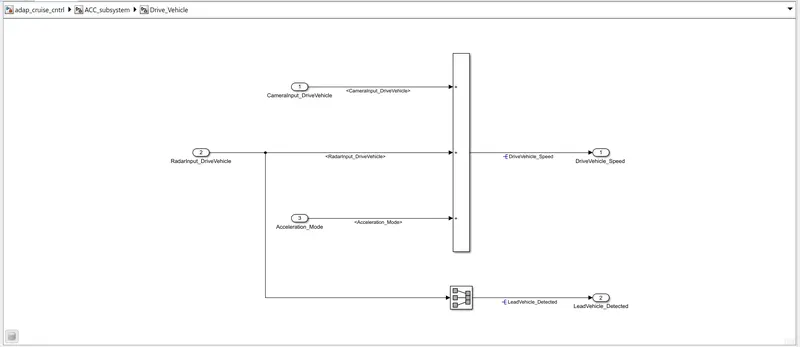
To regulate the Drive Vehicle Speed the Camera and Radar Input signal are added along with the Acceleration mode which is coming from a unit delay block after the application of Adaptive Cruise Control Alogrithm through state chart.
Requirement 3 – Adaptive Cruise Control Algorithm:
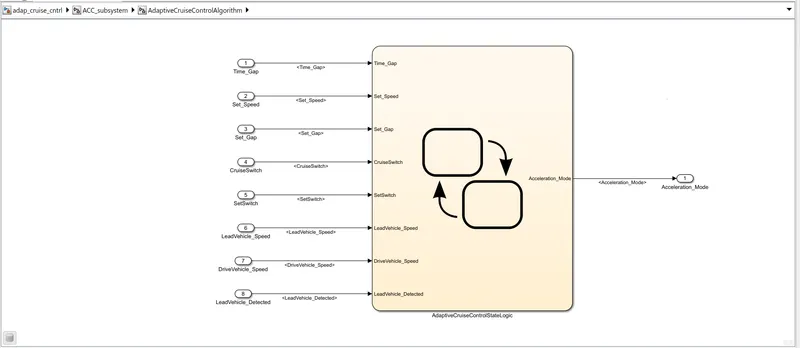
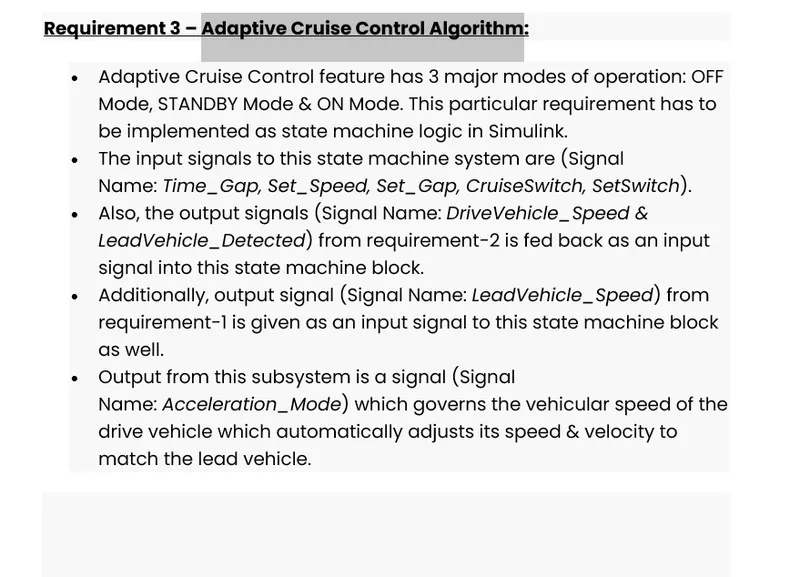
- Adaptive Cruise Control feature has 3 major modes of operation: OFF Mode, STANDBY Mode & ON Mode. This particular requirement has to be implemented as state machine logic in Simulink.
- The input signals to this state machine system are (Signal Name: Time_Gap, Set_Speed, Set_Gap, CruiseSwitch, SetSwitch).
- Also, the output signals (Signal Name: DriveVehicle_Speed & LeadVehicle_Detected) from requirement-2 is fed back as an input signal into this state machine block.
- Additionally, output signal (Signal Name: LeadVehicle_Speed) from requirement-1 is given as an input signal to this state machine block as well.
- Output from this subsystem is a signal (Signal Name: Acceleration_Mode) which governs the vehicular speed of the drive vehicle which automatically adjusts its speed & velocity to match the lead vehicle.
Requirement 3a – ACC OFF MODE state logic:
- This is the default state inside state machine logic. Output signal Acceleration_Mode is at value 0 in this state.
- This state is governed by input signal CruiseSwitch.
- If CruiseSwitch is equal to 1, state ACC STANDBY mode will get activated. If CruiseSwitch is equal to 0, state ACC OFF mode will get activated, from either ACC ON mode or ACC STANDBY mode
Requirement 3b – ACC STANDBY MODE state logic:
- This is the second activated state inside state machine logic. Output signal Acceleration_Mode is at value 1 in this state.
- This state is governed by both input signals CruiseSwitch & SetSwitch.
- If CruiseSwitch is equal to 1, state ACC STANDBY mode will get activated. If CruiseSwitch is equal to 0, state ACC OFF mode will get activated, from either ACC ON mode or ACC STANDBY mode
- If SetSwitch is equal to 1, state ACC ON mode will get activated. If SetSwitch is equal to 0, state ACC STANDBY mode will get activated.
Requirement 3c – ACC ON MODE state logic:
This state will be activated when input signal SetSwitch is equal to 1. There are 6 sub states to this state logic: They are:
- LeadVehicle_Detected_Follow (Default)
- LeadVehicle_Not_Detected
- LeadVehicle_Detected_Resume
- LeadVehicle_Not_Detected_Resume
- LeadVehicle_Speed_lessthan_Set_Speed
- LeadVehicle_Speed_equal_Set_Speed
Requirement 3c (i) – LeadVehicle_Detected_Follow (ACC ON MODE):
- This is the default sub state inside ACC ON MODE state. Output signal Acceleration_Mode is equal to 2.
- Condition to transit from LeadVehicle_Detected_Follow to LeadVehicle_Not_Detected; Input signal condition LeadVehicle_Detected == 0.
- Condition to transit from LeadVehicle_Detected_Follow to LeadVehicle_Speed_lessthan_Set_Speed; Input Signals condition (LeadVehicle_Detected == 1) && (LeadVehicle_Speed < Set_Speed) || (Time_Gap < Set_Gap).
Requirement 3c (ii) – LeadVehicle_Not_Detected (ACC ON MODE):
- Output signal Acceleration_Mode is equal to 1.
- Condition to transit from LeadVehicle_Not_Detected to LeadVehicle_Detected_Follow; Input signals condition [(LeadVehicle_Detected==1) && (DriveVehicle_Speed == Set_Speed) && (LeadVehicle_Speed >= Set_Speed) && (Time_Gap >= Set_Gap)]
- Condition to transit from LeadVehicle_Not_Detected to LeadVehicle_Speed_lessthan_Set_Speed; Input signals condition [(LeadVehicle_Detected == 1) && (LeadVehicle_Speed < Set_Speed) || (Time_Gap < Set_Gap)]
Requirement 3c (iii) – LeadVehicle_Detected_Resume (ACC ON MODE):
- Output signal Acceleration_Mode is equal to 3.
- Condition to transit from LeadVehicle_Detected_Resume to LeadVehicle_Detected_Follow; Input signals condition [(DriveVehicle_Speed == Set_Speed) && (LeadVehicle_Speed >= Set_Speed) && (Time_Gap >= Set_Gap)]
- Condition to transit from LeadVehicle_Detected_Resume to LeadVehicle_Not_Detected_Resume; Input signal condition LeadVehicle_Detected==0.
- Condition to transit from LeadVehicle_Detected_Resume to LeadVehicle_Speed_equal_Set_Speed; Input Signal condition [(DriveVehicle_Speed < Set_Speed) && (LeadVehicle_Speed > DriveVehicle_Speed) && (Time_Gap >= Set_Gap)]
Requirement 3c (iv) - LeadVehicle_Not_Detected_Resume (ACC ON MODE):
- Output signal Acceleration_Mode is equal to 1.
Requirement 3c (v) - LeadVehicle_Speed_lessthan_Set_Speed (ACC ON MODE):
- Output signal Acceleration_Mode is equal to 4.
- Condition to transit from LeadVehicle_Speed_lessthan_Set_Speed to LeadVehicle_Not_Detected; Input signal condition [(LeadVehicle_Detected == 0) && (DriveVehicle_Speed == Set_Speed)]
- Condition to transit from LeadVehicle_Speed_lessthan_Set_Speed to LeadVehicle_Speed_equal_Set_Speed; Input signals condition [((LeadVehicle_Speed*1.25>=DriveVehicle_Speed) && (LeadVehicle_Speed * 0.75<=DriveVehicle_Speed)) && (DriveVehicle_Speed < Set_Speed) && ((Time_Gap<=1.25*Set_Gap) && (Time_Gap >=0.75*Set_Gap))]
Requirement 3c (vi) - LeadVehicle_Speed_equal_Set_Speed (ACC ON MODE):
- Output signal Acceleration_Mode is equal to 5.
- Condition to transit from LeadVehicle_Speed_equal_Set_Speed to LeadVehicle_Not_Detected_Resume; Input signal conditions is [(LeadVehicle_Detected == 0) || (DriveVehicle_Speed <= Set_Speed)]
- Condition to transit from LeadVehicle_Speed_equal_Set_Speed to LeadVehicle_Detected_Resume; Input signal conditions [(DriveVehicle_Speed < Set_Speed) && (LeadVehicle_Speed > DriveVehicle_Speed) || (Time_Gap >= Set_Gap)]
- Condition to transit from LeadVehicle_Speed_equal_Set_Speed to LeadVehicle_Speed_lessthan_Set_Speed; Input signals conditions [(LeadVehicle_Speed<Set_Speed) && (LeadVehicle_Speed<DriveVehicle_Speed) || (Time_Gap == 0.75*Set_Gap)]
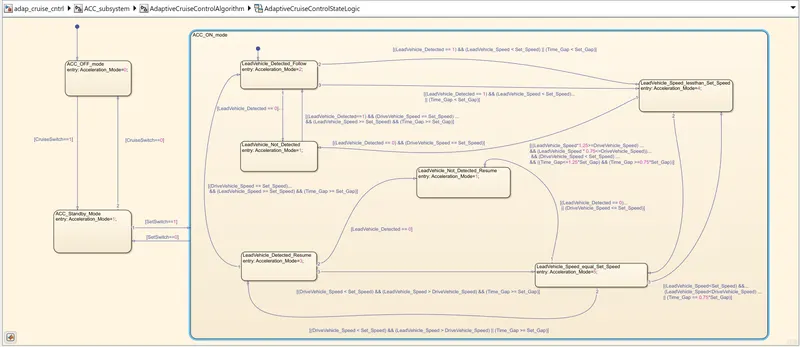
The following state variable along with the mentioned condition were updated in the Stateflow Chart and the Output of the Stateflow chart is the Acceleration Mode.
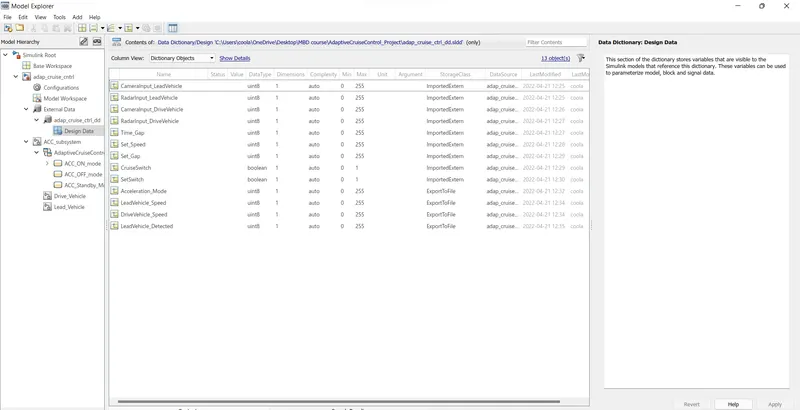
Simulink Data Dictionary:- The following signal and calibration data need to be created under Siimulink Data Dictionary
Signals & Calibration Data List:
|
Signal / Calibration Name |
Signal Type |
Data Type |
Dimension |
Min |
Max |
Initial Value |
Units |
|
CameraInput_LeadVehicle |
Input |
Uint8 |
1 |
0 |
255 |
- |
- |
|
RadarInput_LeadVehicle |
Input |
Uint8 |
1 |
0 |
255 |
- |
- |
|
CameraInput_DriveVehicle |
Input |
Uint8 |
1 |
0 |
255 |
- |
- |
|
RadarInput_DriveVehicle |
Input |
Uint8 |
1 |
0 |
255 |
- |
- |
|
Time_Gap |
Input |
Uint8 |
1 |
0 |
255 |
- |
- |
|
Set_Speed |
Input |
Uint8 |
1 |
0 |
255 |
- |
- |
|
Set_Gap |
Input |
Uint8 |
1 |
0 |
255 |
- |
- |
|
CruiseSwitch |
Input |
Boolean |
1 |
0 |
1 |
- |
- |
|
SetSwitch |
Input |
Boolean |
1 |
0 |
1 |
- |
- |
|
Acceleration_Mode |
Output |
Uint8 |
1 |
0 |
255 |
- |
- |
|
LeadVehicle_Speed |
Output |
Uint8 |
1 |
0 |
255 |
- |
- |
|
DriveVehicle_Speed |
Output |
Uint8 |
1 |
0 |
255 |
- |
- |
|
LeadVehicle_Detected |
Output |
Uint8 |
1 |
0 |
255 |
- |
- |
The Simulink data Dictionary is created with the name of adap_cruise_ctrl_dd and above mentioned signal were added as below:-
Requirement tagging and Signal Propogation:-
Requiremt tagging of Lead Vehicle, Drive Vehicle nd the Adaptive Cruise Control Algorithm is added to their respective subsystem and I have taken snap for the ACC Algorithm as below:-
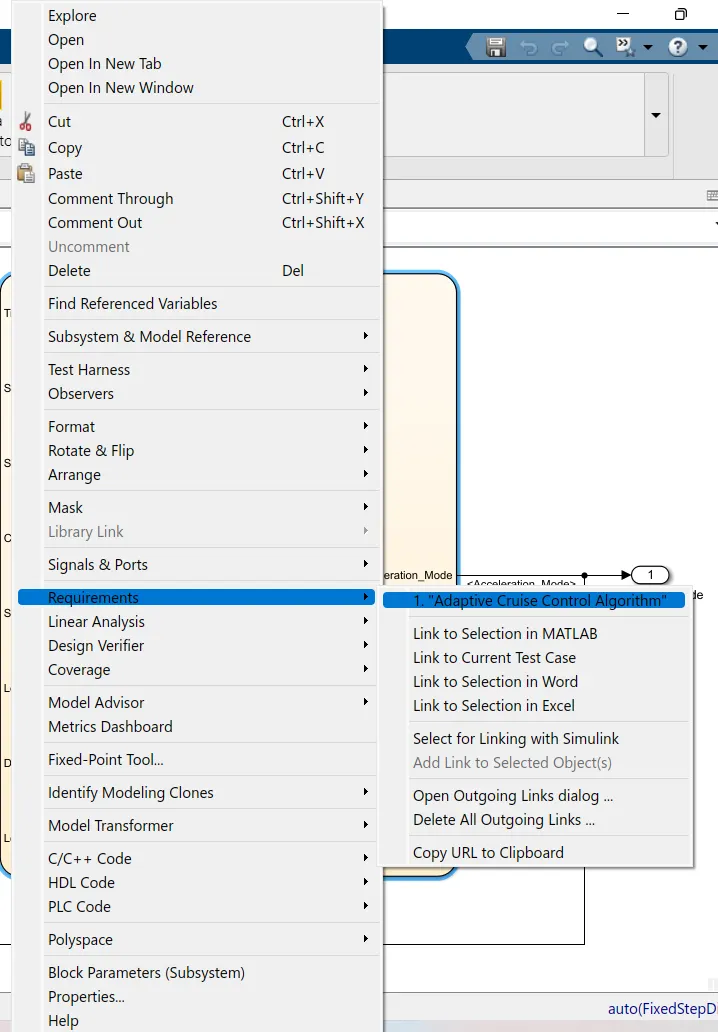
Requirement Sheet is opened showing the Requirement Document as below:-
Signal Resolving is done for Input signal at the root level of their start i.e. at the top level, while they are popogated inside the subsystem and for the Output signal they are resolved at the point they are generated or started and then the are propogated further.
Model Advisory Check:-
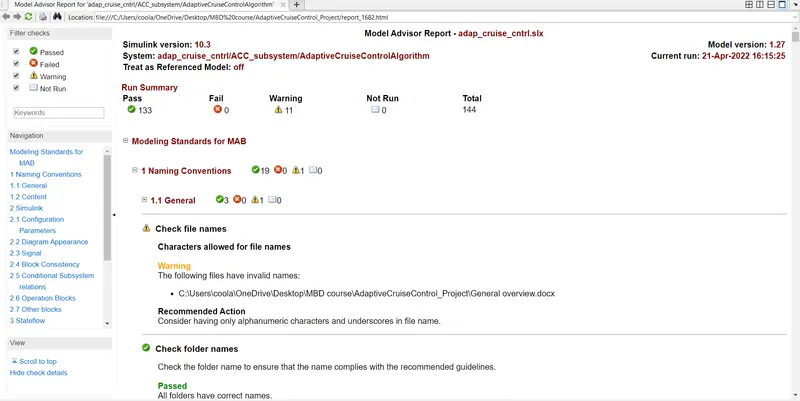
Developed Model is checked with the MAB guidelines to check whether the developed model is compliant to MAB Modelling standard or not.
The snap below show that the Model has zero error.
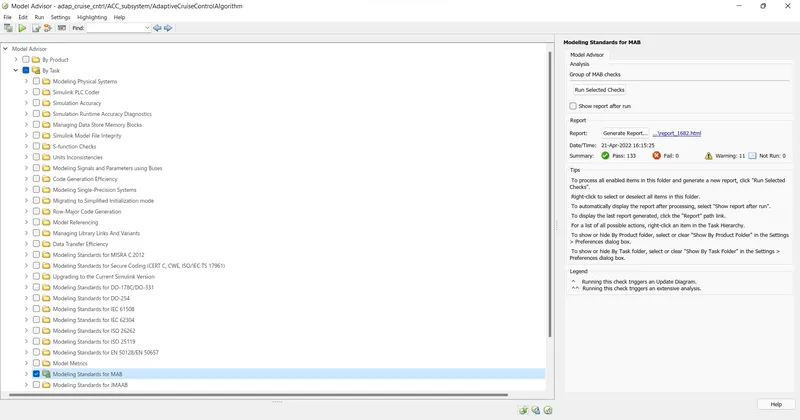
The Model Advisory Report is shown below:-
Code Generation:-
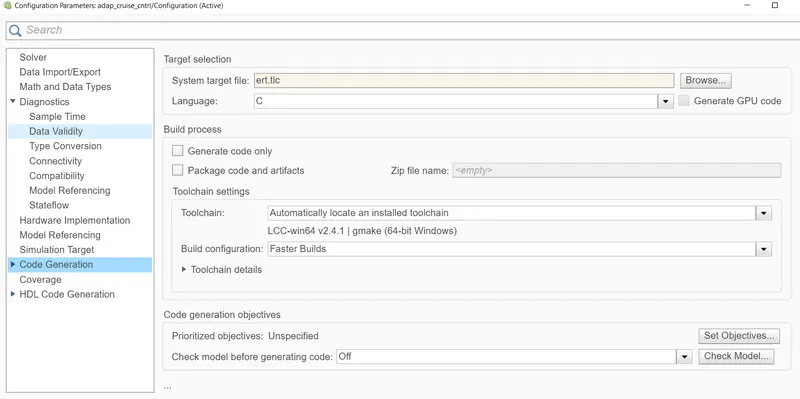
Under the Configuration parameter block for Code generation we have to select the ert.tlc file insted of grt.tlc as selected below:-
The C code genrtaed is as below:-
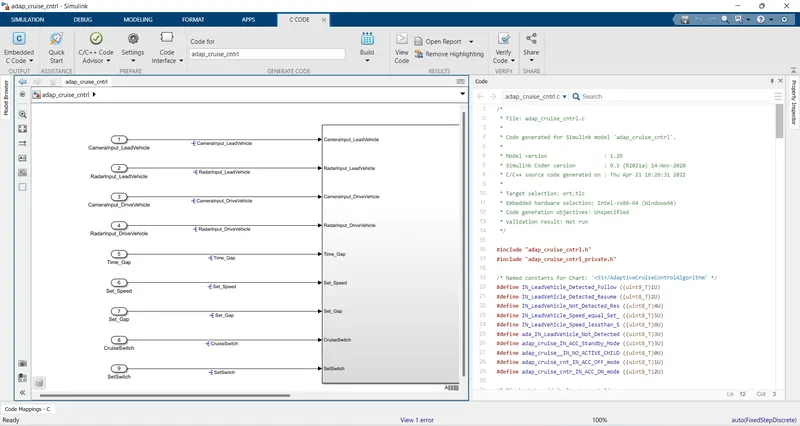
.C Code:-
/*
 * File: adap_cruise_cntrl.c
 *
 * Code generated for Simulink model 'adap_cruise_cntrl'.
 *
 * Model version                  : 1.29
 * Simulink Coder version         : 9.5 (R2021a) 14-Nov-2020
 * C/C++ source code generated on : Thu Apr 21 16:26:31 2022
 *
 * Target selection: ert.tlc
 * Embedded hardware selection: Intel->x86-64 (Windows64)
 * Code generation objectives: Unspecified
 * Validation result: Not run
 */

#include "adap_cruise_cntrl.h"
#include "adap_cruise_cntrl_private.h"

/* Named constants for Chart: '/AdaptiveCruiseControlAlgorithm' */
#define IN_LeadVehicle_Detected_Follow ((uint8_T)1U)
#define IN_LeadVehicle_Detected_Resume ((uint8_T)2U)
#define IN_LeadVehicle_Not_Detected_Res ((uint8_T)4U)
#define IN_LeadVehicle_Speed_equal_Set_ ((uint8_T)5U)
#define IN_LeadVehicle_Speed_lessthan_S ((uint8_T)6U)
#define ada_IN_LeadVehicle_Not_Detected ((uint8_T)3U)
#define adap_cruise_IN_ACC_Standby_Mode ((uint8_T)3U)
#define adap_cruise__IN_NO_ACTIVE_CHILD ((uint8_T)0U)
#define adap_cruise_cnt_IN_ACC_OFF_mode ((uint8_T)1U)
#define adap_cruise_cntr_IN_ACC_ON_mode ((uint8_T)2U)

/* Block states (default storage) */
DW_adap_cruise_cntrl_T adap_cruise_cntrl_DW;

/* Real-time model */
static RT_MODEL_adap_cruise_cntrl_T adap_cruise_cntrl_M_;
RT_MODEL_adap_cruise_cntrl_T *const adap_cruise_cntrl_M = &adap_cruise_cntrl_M_;
real_T rt_roundd_snf(real_T u)
{
  real_T y;
  if (fabs(u) < 4.503599627370496E+15) {
    if (u >= 0.5) {
      y = floor(u + 0.5);
    } else if (u > -0.5) {
      y = u * 0.0;
    } else {
      y = ceil(u - 0.5);
    }
  } else {
    y = u;
  }

  return y;
}

/* Model step function */
void adap_cruise_cntrl_step(void)
{
  int32_T tmp;
  int32_T tmp_0;
  uint8_T tmp_1;
  uint8_T tmp_2;

  /* Sum: '/Add' incorporates:
   *  Inport: '/CameraInput_LeadVehicle'
   *  Inport: '/RadarInput_LeadVehicle'
   */
  LeadVehicle_Speed = (uint8_T)((uint32_T)CameraInput_LeadVehicle +
    RadarInput_LeadVehicle);

  /* Sum: '/Add' incorporates:
   *  Inport: '/CameraInput_DriveVehicle'
   *  Inport: '/RadarInput_DriveVehicle'
   *  UnitDelay: '/Unit Delay'
   */
  DriveVehicle_Speed = (uint8_T)((uint32_T)(uint8_T)((uint32_T)
    CameraInput_DriveVehicle + RadarInput_DriveVehicle) + Acceleration_Mode);

  /* SignalConversion: '/Signal Conversion' incorporates:
   *  Inport: '/RadarInput_DriveVehicle'
   */
  LeadVehicle_Detected = RadarInput_DriveVehicle;

  /* Chart: '/AdaptiveCruiseControlAlgorithm' incorporates:
   *  Inport: '/CruiseSwitch'
   *  Inport: '/SetSwitch'
   *  Inport: '/Set_Gap'
   *  Inport: '/Set_Speed'
   *  Inport: '/Time_Gap'
   */
  if (adap_cruise_cntrl_DW.is_active_c3_adap_cruise_cntrl == 0U) {
    adap_cruise_cntrl_DW.is_active_c3_adap_cruise_cntrl = 1U;
    adap_cruise_cntrl_DW.is_c3_adap_cruise_cntrl =
      adap_cruise_cnt_IN_ACC_OFF_mode;
    Acceleration_Mode = 0U;
  } else {
    switch (adap_cruise_cntrl_DW.is_c3_adap_cruise_cntrl) {
     case adap_cruise_cnt_IN_ACC_OFF_mode:
      Acceleration_Mode = 0U;
      if (CruiseSwitch) {
        adap_cruise_cntrl_DW.is_c3_adap_cruise_cntrl =
          adap_cruise_IN_ACC_Standby_Mode;
        Acceleration_Mode = 1U;
      }
      break;

     case adap_cruise_cntr_IN_ACC_ON_mode:
      if (!SetSwitch) {
        adap_cruise_cntrl_DW.is_ACC_ON_mode = adap_cruise__IN_NO_ACTIVE_CHILD;
        adap_cruise_cntrl_DW.is_c3_adap_cruise_cntrl =
          adap_cruise_IN_ACC_Standby_Mode;
        Acceleration_Mode = 1U;
      } else {
        switch (adap_cruise_cntrl_DW.is_ACC_ON_mode) {
         case IN_LeadVehicle_Detected_Follow:
          Acceleration_Mode = 2U;
          if (LeadVehicle_Detected == 0) {
            adap_cruise_cntrl_DW.is_ACC_ON_mode =
              ada_IN_LeadVehicle_Not_Detected;
            Acceleration_Mode = 1U;
          } else if (((LeadVehicle_Detected == 1) && (LeadVehicle_Speed <
                       Set_Speed)) || (Time_Gap < Set_Gap) ||
                     (((LeadVehicle_Detected == 1) && (LeadVehicle_Speed <
                        Set_Speed)) || (Time_Gap < Set_Gap))) {
            adap_cruise_cntrl_DW.is_ACC_ON_mode =
              IN_LeadVehicle_Speed_lessthan_S;
            Acceleration_Mode = 4U;
          }
          break;

         case IN_LeadVehicle_Detected_Resume:
          Acceleration_Mode = 3U;
          if ((DriveVehicle_Speed == Set_Speed) && (LeadVehicle_Speed >=
               Set_Speed) && (Time_Gap >= Set_Gap)) {
            adap_cruise_cntrl_DW.is_ACC_ON_mode = IN_LeadVehicle_Detected_Follow;
            Acceleration_Mode = 2U;
          } else if (LeadVehicle_Detected == 0) {
            adap_cruise_cntrl_DW.is_ACC_ON_mode =