Construction Technology_Vaastu Shastra & Calculation of loads_Project 2
AIM OF THE PROJECT :- Draw a G+1 Residential building plan according to the Vastu Shastra and structural drawing required at site for the construction of the same and to calculate the self load of the different members acting on the building
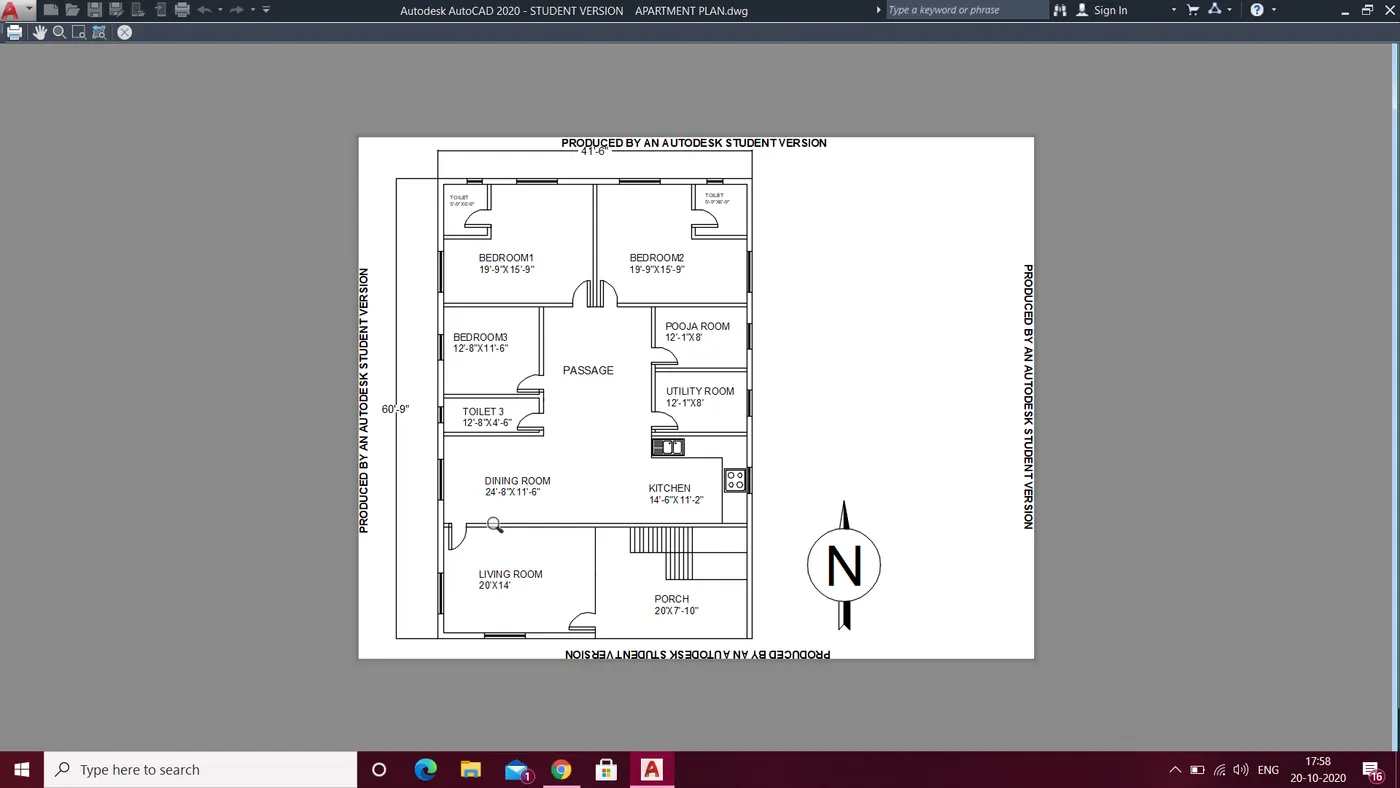
GROUND FLOOR PLAN
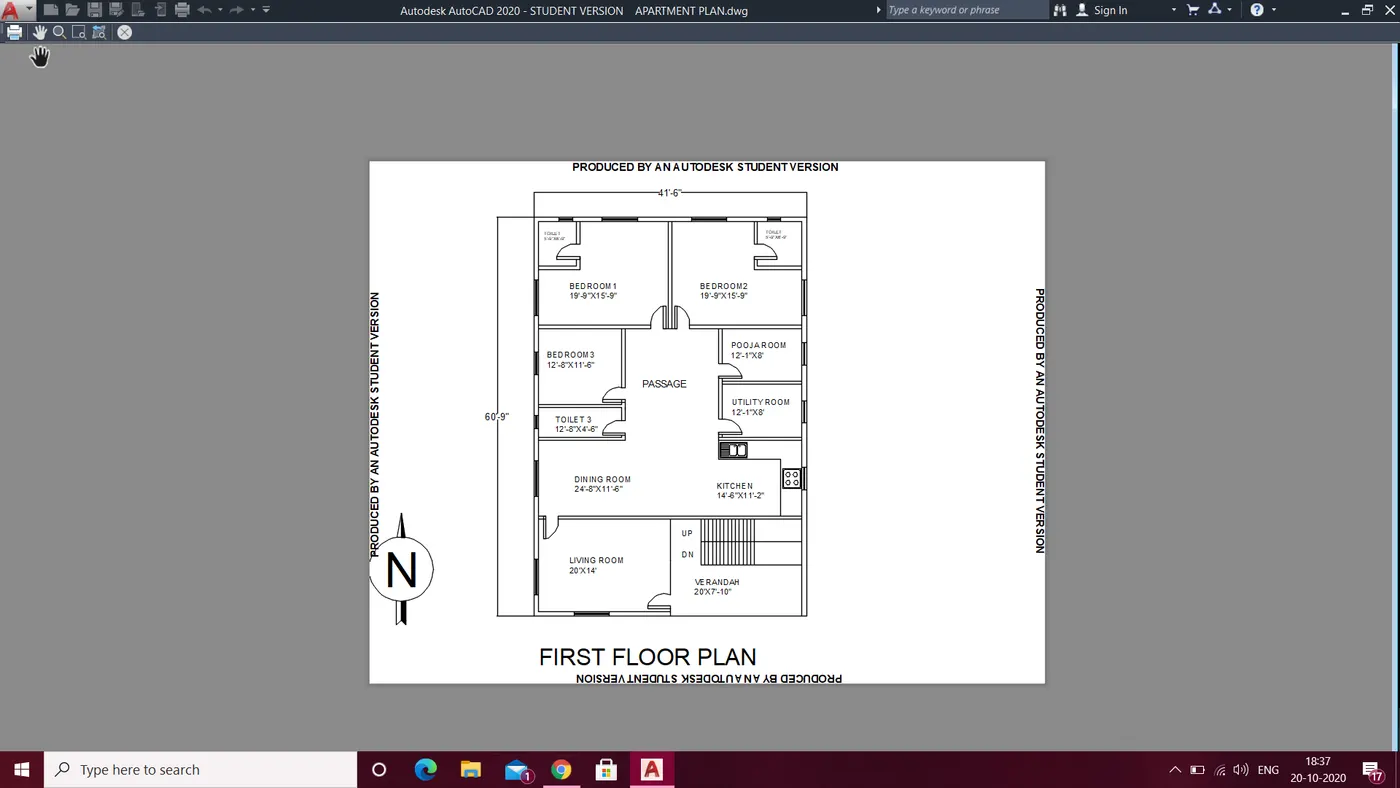
1. Open the autocad
2. Type UN in command prompt and select engineering and precision to 0'-0"
3. Type Limits in command prompt and specify the lower and upper points
4. z enter a enter now we are ready for drafting
5. Type L in command prompt and specify the first point
6. Type @40'<0
7. Type @60'<90
8. Type @40'<180
9. Type @60'<270
10. Type offset in command prompt and specify 15'-9" and do the offset (for bedroom1 and 2)
11. Type offset in command prompt and specify 19'-9" and do the offset (partition of bedroom 1and 2)
12. Type offset in command prompt and specify 11'-6" and do the offset (for bedroom3)
13. Type offset in command prompt and specify 4'-6" and do the offset (for toilet3)
14. Type offset in command prompt and specify 11'-6" and do the offset (for dining room)
15. Type offset in command prompt and specify 14' and do the offset (for living room)
16. Type offset in command prompt and specify 12'-8" and do the offset (for bedroom3 and toilet 3)
17. Type trim in command prompt and trim all the extra lines of the offset
18. Join all the lines wherever required
19. Type offset in command prompt and specify 8' and do the offset from bedroom2 (for pooja room and utility)
20. Type offset in command prompt and specify 6'-9" and do the offset (for bedroom1 and 2 toilet )
21. Type offset in command prompt and specify 5'-9" and do the offset (for bedroom1 and 2 toilet)
22. With the help of line command draw the staircase with offset of 11"
23. Trim the lines of the walls for door openings in the required place as shown in fig
24. Draw the door with the help of line and arc command
25. Type BL and select the object and select the base point and save it with the naam as Door
26. Insert the doors at all the places with the insert option in blocks and rotate the bl as required with rotate command
27. Select the text command and select the font and height of the text and do the detailing
28. Draw the window with the help of line command and convert it into blocks and save it as window(1 ,2, 3) as i have taken three size of windows in the drawing
29. Insert the window at all the places with the insert option in blocks and rotate the block as required with rotate command
30. In the layer option crete new layer as doors and select all the doors and put it in that layer
31. In the layer option crete new layer as window and select all the windows and put in that layer
32. In kitchen counter select the block of wash basin and stove from insert block command (i have downloaded some blocks) and with scale option scale the blocks with respect to the drawing)
33. Ground floor is done
34. opy all the object and paste it and rename it as first floor plan
35. nothing changes except the porch area gets converted to verendah as porch cant be at top floor
36. In the insert option i have north direction also insert that in the drawing and scale it as required
37. Hence the following drawing is obtained
Structural drawing required to start the construction work are
- centre line drawing
- Footing and column layout with reinforcement details
- column schedule with reinforcement details
- Plinth beam layout with reinforcement details
- First floor beam layout with reinforcement details
- First floor slab layout with reinforcement details
I am assuming the size of
- column = 230x460mm
- Beam = 230x230mm
- Slab =125mm thickness
- height of column = 4m
To calculate the self load of column
- volume of concrete= .23*.46*4=0.42m^3
- unit weight of concrete = 25KN/m^3
- Dead load of column = 0.42*25 = 10.5KN (per column)
To calculate the self load of beam
- volume of concrete = .23*.23*1= 0.0529m^3
- unit weight of concrete= 25KN/m^3
- Self load of beam = 25*0.0529=1.32KN(per meter)
To calculate self load of slab
- Volume of concrete= 1*1*.125=0.125m^3
- unit weight of concrete= 25KN/m^3
- Self load of slab= 25*0.125=3.125 (per square meter)