Project 1- Traffic Jam Assistant Feature
Aim :- Traffic Jam Assistant Feature;-
Objective :-
- This model must be developed in MATLAB Simulink as per MBD guidelines according to the requirements given.
- Tag the requirements to the Simulink model, Requirements 1 & Requirement 2 are tagged into their corresponding subsystems.
- Creation of Simulink Data Dictionary for the model & must be linked to the model.
- Tagging for Requirement 1 and Requirement2 subsystem.
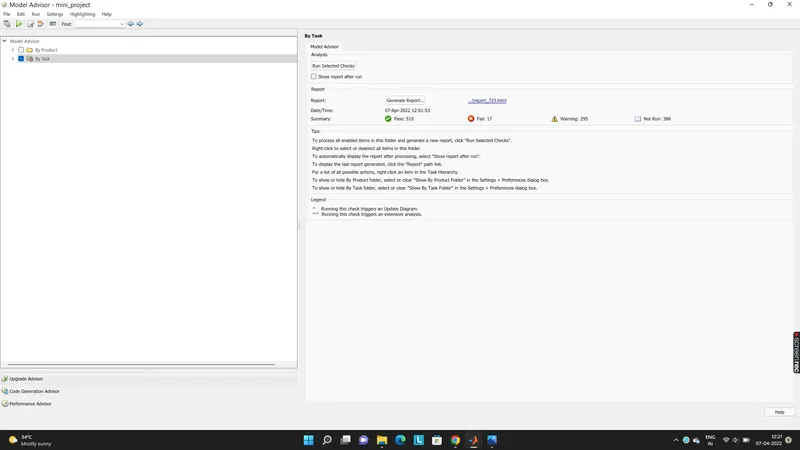
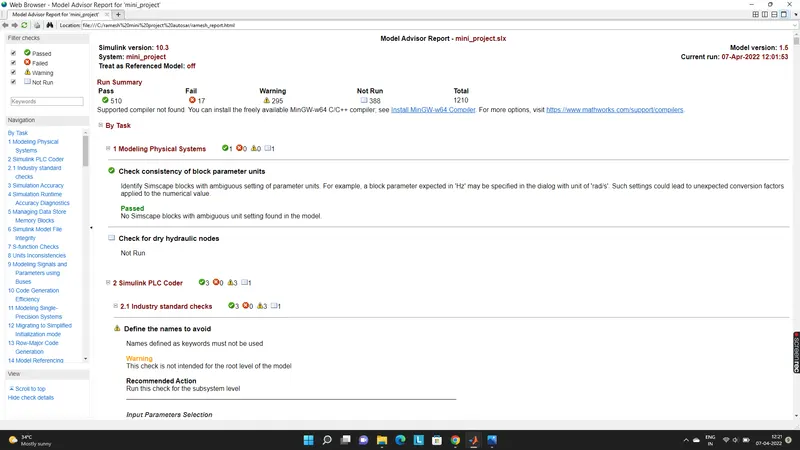
- Creation of Model Advisor Report for given Traffic Jam Assistant Feature model.
- Code Generation Profile must be in Embedded Coder.
`
- Traffic Jam Assistant is one of the most common feature in Advanced Driver Assistance System.
- Traffic Jam Assist feature brakes and accelerates the car for the driver, while maintaining a safe distance from the vehicle in front.
- Traffic Jam Assistant helps the driver arrive more relaxed at their destination, even in dense traffic or in traffic jams.
- As a partially automated comfort function, the system takes over the longitudinal & lateral guidance of the vehicle.
- This means that the car can drive off, accelerate & brake automatically, as well as steer the vehicle within certain constraints.
- The driver has to permanently supervise the system & be ready to take over the complete control of the vehicle at any time.
- Traffic Jam Assistant system helps to avoid rear end collisions in dense traffic conditions & traffic jams.
- In Traffic jams, the vehicle takes over driving off, acceleration, braking and steering within same lane
Working Principle of Traffic Jam Assistant Feature :
- Traffic Jam Assistant is based on the sensors and the functionality of the Adaptive Cruise Control (ACC) with stop & go and Lane Keeping Support (LKS).
- Traffic Jam Assistance (TJA) is an advanced driver assistance system that continuously measures the speed of the surrounding vehicles
- when Adaptive Cruise Control is switched on, then it compares with the own driving speed. If the system detects heavy traffic or a dense traffic jam at speeds less than 60 kmph, the driver can activate the functionality by press of a button.
- The vehicle will now automatically follow the vehicle in front by keeping the safe distance by taking over driving off, acceleration, braking and steering within same lane.
- Information regarding the Traffic Jam Assistant will be available to be displayed to the driver in the Instrument Panel Cluster (IPC).
- However, the driver needs to constantly supervise the system & be ready to take over the complete control of the vehicle when situation demands.
- Development of Traffic Jam Assistant Feature :-
- One specific requirement of Traffic Jam Assistant algorithm is developed which would predominantly feature in the Instrument Panel Cluster (IPC) algorithm.
- We aware that whole actual Traffic Jam Assistant is a huge algorithm and only one small part of this logic is implemented in the below model.
- The idea is to familiarize with concepts of Model Based Development in MATLAB Environment. The model is implemented according to the following requirements:
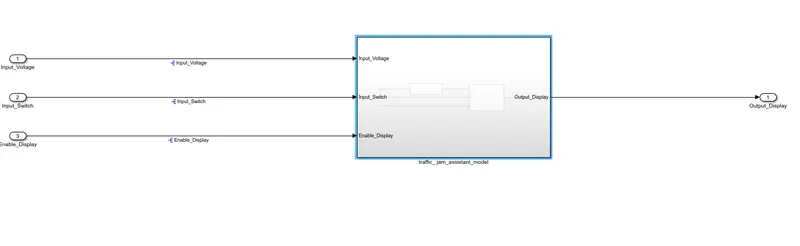
model:
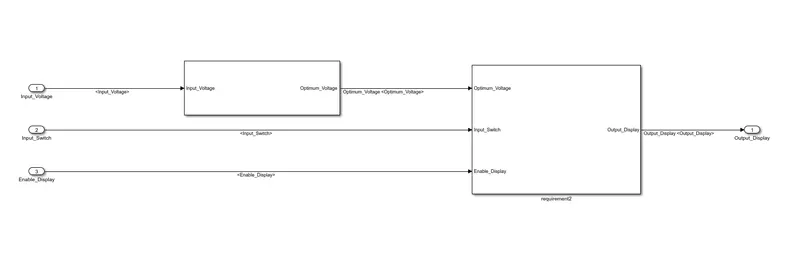
Requirement2:
Requirement 1 subsystem:
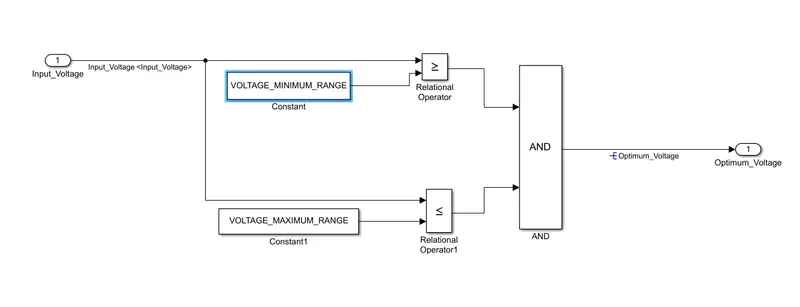
Input Signal “Input_Voltage” is compared against voltage values “VOLTAGE_MINIMUM_RANGE” & “VOLTAGE_MAXIMUM_RANGE”
Incoming input signal “Input_Voltage” must be greater than – equal to “VOLTAGE_MINIMUM_RANGE” and less than – equal to “VOLTAGE_MAXIMUM_RANGE”.
Output signal from here is “Optimum_Voltage” which will be one of the inputs to the subsystem “DisplayUnit”.
However, output signal (i.e Optimum_Voltage) is form newly in this subsystem hence we resolve this signal by right clicking on signal properties,
Requirement 2 subsystem:
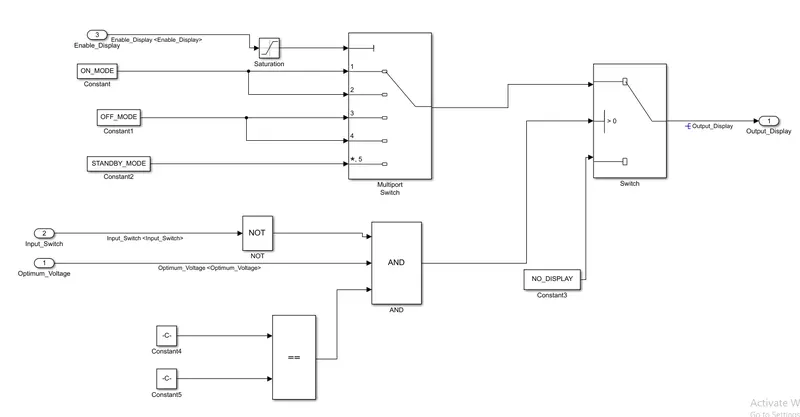
Output signal from this Requirement 2 subsystem is “Output_Display”.
- Input Signal “Enable_Display” is compared against pre – defined set of values in a multiport switch. Total data ports in the multiport switch is 5.
- Multiport switch inputs 1 & 2 is connected to calibration signal “ON_MODE”, Multiport switch inputs 3 & 4 is connected to calibration signal “OFF_MODE” while Multiport switch input 5 is connected to calibration signal “STANDBY_MODE”.
- The output from Multiport switch is connected to the first input port of the Switch block. The third input port of the Switch block is connected to the calibration signal “NO_DISPLAY”.
- Meanwhile NOT value of input signal “Input_Switch” is compared in an AND gate against input signal “Optimum_Voltage” and the output from comparing if calibration signals “INTERRUPT_1” & “INTERRUPT_2” are equal. The output of the AND gate is the seconi nput of the switch block.
- The output from the switch block is “Output_Display”. However, output signal (i.e Output_Display) is form newly in this subsystem hence we resolve this signal by right clicking on signal properties,
Then, we have changed the System Target File to 'ert.tlc' under code generation section as under;
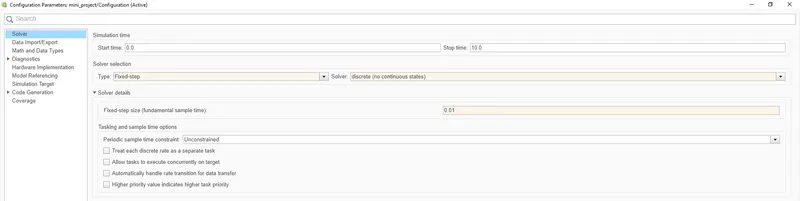
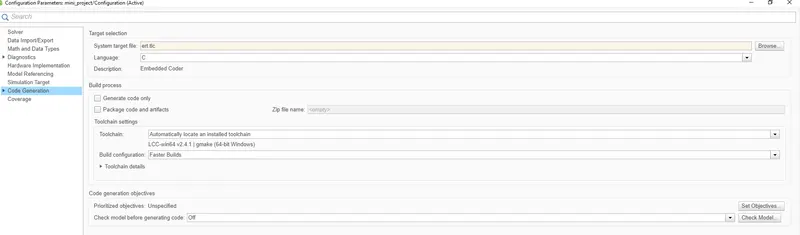
Then we have to add sLDD FILE GIVEN IN THE QUESTION:
Input Signals:
|
Name of the Signal |
Data Type |
Range |
|
Input_Voltage |
uint8 |
0 - 255 |
|
Input_Switch |
boolean |
0 – 1 |
|
Enable_Display |
uint8 |
0 - 255 |
Output Signal:
|
Name of the Signal |
Data Type |
Range |
|
Output_Display |
uint8 |
0 - 255 |
Calibration Signals:
|
Name of the Signal |
Data Type |
Range |
Initial Value |
|
VOLTAGE_MINIMUM_RANGE |
uint8 |
0 – 255 |
30 |
|
VOLTAGE_MAXIMUM_RANGE |
uint8 |
0 – 255 |
50 |
|
OFF_MODE |
uint8 |
0 – 255 |
2 |
|
ON_MODE |
uint8 |
0 – 255 |
1 |
|
STANDBY_MODE |
uint8 |
0 – 255 |
3 |
|
INTERRUPT_1 |
boolean |
0 – 1 |
1 |
|
INTERRUPT_2 |
boolean |
0 - 1 |
1 |
|
NO_DISPLAY |
uint8 |
0 – 255 |
0 |
Local Signal:
|
Name of the Signal |
Data Type |
Range |
|
Optimum_Voltage |
boolean |
0 - 1 |
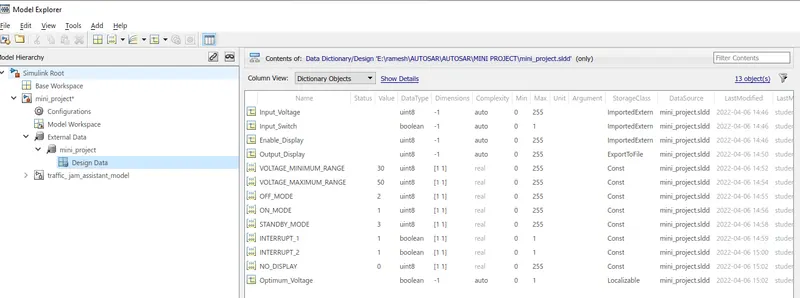
Accordingly, we have created the Simulink Data Dictionary (SLDD) by clicking on file name i.e traffic_jam_assistance_model_sldd.sldd and select Design data. Then, we have to select add signal and add simulink parameter depending on whether the values are input signal, output signal or constant/caliberation values.
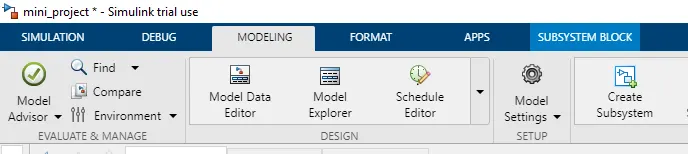
Steps for Checking MAB Guidelines in Model Advisor :-
The generated full C Code for traffic_jam_assistance_model.c is as under;
/*
 * Trial License - for use to evaluate programs for possible purchase as
 * an end-user only.
 *
 * File: ert_main.c
 *
 * Code generated for Simulink model 'mini_project'.
 *
 * Model version                  : 1.3
 * Simulink Coder version         : 9.5 (R2021a) 14-Nov-2020
 * C/C++ source code generated on : Thu Apr  7 15:31:00 2022
 *
 * Target selection: ert.tlc
 * Embedded hardware selection: Intel->x86-64 (Windows64)
 * Code generation objectives: Unspecified
 * Validation result: Not run
 */

#include <stddef.h>
#include <stdio.h>              /* This ert_main.c example uses printf/fflush */
#include "mini_project.h"              /* Model's header file */
#include "rtwtypes.h"

/*
 * Associating rt_OneStep with a real-time clock or interrupt service routine
 * is what makes the generated code "real-time".  The function rt_OneStep is
 * always associated with the base rate of the model.  Subrates are managed
 * by the base rate from inside the generated code.  Enabling/disabling
 * interrupts and floating point context switches are target specific.  This
 * example code indicates where these should take place relative to executing
 * the generated code step function.  Overrun behavior should be tailored to
 * your application needs.  This example simply sets an error status in the
 * real-time model and returns from rt_OneStep.
 */
void rt_OneStep(void);
void rt_OneStep(void)
{
  static boolean_T OverrunFlag = false;

  /* Disable interrupts here */

  /* Check for overrun */
  if (OverrunFlag) {
    rtmSetErrorStatus(mini_project_M, "Overrun");
    return;
  }

  OverrunFlag = true;

  /* Save FPU context here (if necessary) */
  /* Re-enable timer or interrupt here */
  /* Set model inputs here */

  /* Step the model */
  mini_project_step();

  /* Get model outputs here */

  /* Indicate task complete */
  OverrunFlag = false;

  /* Disable interrupts here */
  /* Restore FPU context here (if necessary) */
  /* Enable interrupts here */
}

/*
 * The example "main" function illustrates what is required by your
 * application code to initialize, execute, and terminate the generated code.
 * Attaching rt_OneStep to a real-time clock is target specific.  This example
 * illustrates how you do this relative to initializing the model.
 */
int_T main(int_T argc, const char *argv[])
{
  /* Unused arguments */
  (void)(argc);
  (void)(argv);

  /* Initialize model */
  mini_project_initialize();

  /* Attach rt_OneStep to a timer or interrupt service routine with
   * period 0.01 seconds (the model's base sample time) here.  The
   * call syntax for rt_OneStep is
   *
   *  rt_OneStep();
   */
  printf("Warning: The simulation will run forever. "
         "Generated ERT main won't simulate model step behavior. "
         "To change this behavior select the 'MAT-file logging' option.\n");
  fflush((NULL));
  while (rtmGetErrorStatus(mini_project_M) == (NULL)) {
    /*  Perform other application tasks here */
  }

  /* Disable rt_OneStep() here */

  /* Terminate model */
  mini_project_terminate();
  return 0;
}

/*
 * File trailer for generated code.
 *
 * [EOF]
 */

/*
 * Trial License - for use to evaluate programs for possible purchase as
 * an end-user only.
 *
 * File: mini_project.c
 *
 * Code generated for Simulink model 'mini_project'.
 *
 * Model version                  : 1.3
 * Simulink Coder version         : 9.5 (R2021a) 14-Nov-2020
 * C/C++ source code generated on : Thu Apr  7 15:31:00 2022
 *
 * Target selection: ert.tlc
 * Embedded hardware selection: Intel->x86-64 (Windows64)
 * Code generation objectives: Unspecified
 * Validation result: Not run
 */

#include "mini_project.h"
#include "mini_project_private.h"

/* Real-time model */
static RT_MODEL_mini_project_T mini_project_M_;
RT_MODEL_mini_project_T *const mini_project_M = &mini_project_M_;

/* Model step function */
void mini_project_step(void)
{
  /* local block i/o variables */
  boolean_T Optimum_Voltage;
  uint8_T tmp;

  /* Logic: '<S2>/AND' incorporates:
   *  Constant: '<S2>/Constant'
   *  Constant: '<S2>/Constant1'
   *  Inport: '<Root>/Input_Voltage'
   *  RelationalOperator: '<S2>/Relational Operator'
   *  RelationalOperator: '<S2>/Relational Operator1'
   */
  Optimum_Voltage = ((Input_Voltage >= VOLTAGE_MINIMUM_RANGE) && (Input_Voltage <=
    VOLTAGE_MAXIMUM_RANGE));

  /* Switch: '<S3>/Switch' incorporates:
   *  Constant: '<S3>/Constant4'
   *  Constant: '<S3>/Constant5'
   *  Inport: '<Root>/Input_Switch'
   *  Logic: '<S3>/AND'
   *  Logic: '<S3>/NOT'
   *  RelationalOperator: '<S3>/Relational Operator'
   */
  if ((!Input_Switch) && Optimum_Voltage && (INTERRUPT_1 == INTERRUPT_2)) {
    /* Saturate: '<S3>/Saturation' incorporates:
     *  Inport: '<Root>/Enable_Display'
     */
    if (Enable_Display < 7) {
      tmp = Enable_Display;
    } else {
      tmp = 7U;
    }

    /* End of Saturate: '<S3>/Saturation' */

    /* MultiPortSwitch: '<S3>/Multiport Switch' */
    switch (tmp) {
     case 1:
      /* Switch: '<S3>/Switch' incorporates:
       *  Constant: '<S3>/Constant'
       */
      Output_Display = ON_MODE;
      break;

     case 2:
      /* Switch: '<S3>/Switch' incorporates:
       *  Constant: '<S3>/Constant'
       */
      Output_Display = ON_MODE;
      break;

     case 3:
      /* Switch: '<S3>/Switch' incorporates:
       *  Constant: '<S3>/Constant1'
       */
      Output_Display = OFF_MODE;
      break;

     case 4:
      /* Switch: '<S3>/Switch' incorporates:
       *  Constant: '<S3>/Constant1'

/*
 * Trial License - for use to evaluate programs for possible purchase as
 * an end-user only.
 *
 * File: mini_project.h
 *
 * Code generated for Simulink model 'mini_project'.
 *
 * Model version                  : 1.3
 * Simulink Coder version         : 9.5 (R2021a) 14-Nov-2020
 * C/C++ source code generated on : Thu Apr  7 15:31:00 2022
 *
 * Target selection: ert.tlc
 * Embedded hardware selection: Intel->x86-64 (Windows64)
 * Code generation objectives: Unspecified
 * Validation result: Not run
 */

#ifndef RTW_HEADER_mini_project_h_
#define RTW_HEADER_mini_project_h_
#ifndef mini_project_COMMON_INCLUDES_
#define mini_project_COMMON_INCLUDES_
#include "rtwtypes.h"
#endif                                 /* mini_project_COMMON_INCLUDES_ */

#include "mini_project_types.h"

/* Includes for objects with custom storage classes. */
#include "mini_project_head.h"

/* Macros for accessing real-time model data structure */
#ifndef rtmGetErrorStatus
#define rtmGetErrorStatus(rtm)         ((rtm)->errorStatus)
#endif

#ifndef rtmSetErrorStatus
#define rtmSetErrorStatus(rtm, val)    ((rtm)->errorStatus = (val))
#endif

/* Real-time Model Data Structure */
struct tag_RTM_mini_project_T {
  const char_T * volatile errorStatus;
};

/* Model entry point functions */
extern void mini_project_initialize(void);
extern void mini_project_step(void);
extern void mini_project_terminate(void);

/* Real-time Model object */
extern RT_MODEL_mini_project_T *const mini_project_M;

/*-
 * The generated code includes comments that allow you to trace directly
 * back to the appropriate location in the model.  The basic format
 * is <system>/block_name, where system is the system number (uniquely
 * assigned by Simulink) and block_name is the name of the block.
 *
 * Use the MATLAB hilite_system command to trace the generated code back
 * to the model.  For example,
 *
 * hilite_system('<S3>')    - opens system 3
 * hilite_system('<S3>/Kp') - opens and selects block Kp which resides in S3
 *
 * Here is the system hierarchy for this model
 *
 * '<Root>' : 'mini_project'
 * '<S1>'   : 'mini_project/traffic_ jam_assistant_model'
 * '<S2>'   : 'mini_project/traffic_ jam_assistant_model/Subsystem'
 * '<S3>'   : 'mini_project/traffic_ jam_assistant_model/requirement2'
 */
#endif                                 /* RTW_HEADER_mini_project_h_ */

/*
 * File trailer for generated code.
 *
 * [EOF]
 */


/*
 * Trial License - for use to evaluate programs for possible purchase as
 * an end-user only.
 *
 * File: mini_project_private.h
 *
 * Code generated for Simulink model 'mini_project'.
 *
 * Model version                  : 1.3
 * Simulink Coder version         : 9.5 (R2021a) 14-Nov-2020
 * C/C++ source code generated on : Thu Apr  7 15:31:00 2022
 *
 * Target selection: ert.tlc
 * Embedded hardware selection: Intel->x86-64 (Windows64)
 * Code generation objectives: Unspecified
 * Validation result: Not run
 */

#ifndef RTW_HEADER_mini_project_private_h_
#define RTW_HEADER_mini_project_private_h_
#include "rtwtypes.h"

/* Imported (extern) block signals */
extern uint8_T Input_Voltage;          /* '<Root>/Input_Voltage' */
extern boolean_T Input_Switch;         /* '<Root>/Input_Switch' */
extern uint8_T Enable_Display;         /* '<Root>/Enable_Display' */

#endif                                 /* RTW_HEADER_mini_project_private_h_ */

/*
 * File trailer for generated code.
 *
 * [EOF]
 */


/*
 * Trial License - for use to evaluate programs for possible purchase as
 * an end-user only.
 *
 * File: mini_project_types.h
 *
 * Code generated for Simulink model 'mini_project'.
 *
 * Model version                  : 1.3
 * Simulink Coder version         : 9.5 (R2021a) 14-Nov-2020
 * C/C++ source code generated on : Thu Apr  7 15:31:00 2022
 *
 * Target selection: ert.tlc
 * Embedded hardware selection: Intel->x86-64 (Windows64)
 * Code generation objectives: Unspecified
 * Validation result: Not run
 */

#ifndef RTW_HEADER_mini_project_types_h_
#define RTW_HEADER_mini_project_types_h_

/* Model Code Variants */

/* Forward declaration for rtModel */
typedef struct tag_RTM_mini_project_T RT_MODEL_mini_project_T;

#endif                                 /* RTW_HEADER_mini_project_types_h_ */

/*
 * File trailer for generated code.
 *
 * [EOF]
 */


/*
 * Trial License - for use to evaluate programs for possible purchase as
 * an end-user only.
 *
 * File: mini_project_def.c
 *
 * Code generated for Simulink model 'mini_project'.
 *
 * Model version                  : 1.3
 * Simulink Coder version         : 9.5 (R2021a) 14-Nov-2020
 * C/C++ source code generated on : Thu Apr  7 15:31:00 2022
 *
 * Target selection: ert.tlc
 * Embedded hardware selection: Intel->x86-64 (Windows64)
 * Code generation objectives: Unspecified
 * Validation result: Not run
 */

#include "rtwtypes.h"
#include "mini_project_types.h"

/* Exported data definition */

/* Definition for custom storage class: ExportToFile */
uint8_T Output_Display;                /* '<S3>/Switch' */

/* Const memory section */
/* Definition for custom storage class: Const */
const boolean_T INTERRUPT_1 = 1;       /* Referenced by: '<S3>/Constant4' */
const boolean_T INTERRUPT_2 = 1;       /* Referenced by: '<S3>/Constant5' */
const uint8_T NO_DISPLAY = 0U;         /* Referenced by: '<S3>/Constant3' */
const uint8_T OFF_MODE = 2U;           /* Referenced by: '<S3>/Constant1' */
const uint8_T ON_MODE = 1U;            /* Referenced by: '<S3>/Constant' */
const uint8_T STANDBY_MODE = 3U;       /* Referenced by: '<S3>/Constant2' */
const uint8_T VOLTAGE_MAXIMUM_RANGE = 50U;/* Referenced by: '<S2>/Constant1' */
const uint8_T VOLTAGE_MINIMUM_RANGE = 30U;/* Referenced by: '<S2>/Constant' */

/*
 * File trailer for generated code.
 *
 * [EOF]
 */


/*
 * Trial License - for use to evaluate programs for possible purchase as
 * an end-user only.
 *
 * File: mini_project_head.h
 *
 * Code generated for Simulink model 'mini_project'.
 *
 * Model version                  : 1.3
 * Simulink Coder version         : 9.5 (R2021a) 14-Nov-2020
 * C/C++ source code generated on : Thu Apr  7 15:31:00 2022
 *
 * Target selection: ert.tlc
 * Embedded hardware selection: Intel->x86-64 (Windows64)
 * Code generation objectives: Unspecified
 * Validation result: Not run
 */

#ifndef RTW_HEADER_mini_project_head_h_
#define RTW_HEADER_mini_project_head_h_
#include "rtwtypes.h"
#include "mini_project_types.h"

/* Exported data declaration */

/* Declaration for custom storage class: ExportToFile */
extern uint8_T Output_Display;         /* '<S3>/Switch' */

/* Const memory section */
/* Declaration for custom storage class: Const */
extern const boolean_T INTERRUPT_1;    /* Referenced by: '<S3>/Constant4' */
extern const boolean_T INTERRUPT_2;    /* Referenced by: '<S3>/Constant5' */
extern const uint8_T NO_DISPLAY;       /* Referenced by: '<S3>/Constant3' */
extern const uint8_T OFF_MODE;         /* Referenced by: '<S3>/Constant1' */
extern const uint8_T ON_MODE;          /* Referenced by: '<S3>/Constant' */
extern const uint8_T STANDBY_MODE;     /* Referenced by: '<S3>/Constant2' */
extern const uint8_T VOLTAGE_MAXIMUM_RANGE;/* Referenced by: '<S2>/Constant1' */
extern const uint8_T VOLTAGE_MINIMUM_RANGE;/* Referenced by: '<S2>/Constant' */

#endif                                 /* RTW_HEADER_mini_project_head_h_ */

/*
 * File trailer for generated code.
 *
 * [EOF]
 */


/*
 * Trial License - for use to evaluate programs for possible purchase as
 * an end-user only.
 *
 * File: rtwtypes.h
 *
 * Code generated for Simulink model 'mini_project'.
 *
 * Model version                  : 1.3
 * Simulink Coder version         : 9.5 (R2021a) 14-Nov-2020
 * C/C++ source code generated on : Thu Apr  7 15:31:00 2022
 *
 * Target selection: ert.tlc
 * Embedded hardware selection: Intel->x86-64 (Windows64)
 * Code generation objectives: Unspecified
 * Validation result: Not run
 */

#ifndef RTWTYPES_H
#define RTWTYPES_H

/* Logical type definitions */
#if (!defined(__cplusplus))
#ifndef false
#define false                          (0U)
#endif

#ifndef true
#define true                           (1U)
#endif
#endif

/*=======================================================================*
 * Target hardware information
 *   Device type: Intel->x86-64 (Windows64)
 *   Number of bits:     char:   8    short:   16    int:  32
 *                       long:  32
 *                       native word size:  64
 *   Byte ordering: LittleEndian
 *   Signed integer division rounds to: Zero
 *   Shift right on a signed integer as arithmetic shift: on
 *=======================================================================*/

/*=======================================================================*
 * Fixed width word size data types:                                     *
 *   int8_T, int16_T, int32_T     - signed 8, 16, or 32 bit integers     *
 *   uint8_T, uint16_T, uint32_T  - unsigned 8, 16, or 32 bit integers   *
 *   real32_T, real64_T           - 32 and 64 bit floating point numbers *
 *=======================================================================*/
typedef signed char int8_T;
typedef unsigned char uint8_T;
typedef short int16_T;
typedef unsigned short uint16_T;
typedef int int32_T;
typedef unsigned int uint32_T;
typedef float real32_T;
typedef double real64_T;

/*===========================================================================*
 * Generic type definitions: boolean_T, char_T, byte_T, int_T, uint_T,       *
 *                           real_T, time_T, ulong_T.                        *
 *===========================================================================*/
typedef double real_T;
typedef double time_T;
typedef unsigned char boolean_T;
typedef int int_T;
typedef unsigned int uint_T;
typedef unsigned long ulong_T;
typedef char char_T;
typedef unsigned char uchar_T;
typedef char_T byte_T;

/*===========================================================================*
 * Complex number type definitions                                           *
 *===========================================================================*/
#define CREAL_T

typedef struct {
  real32_T re;
  real32_T im;
} creal32_T;

typedef struct {
  real64_T re;
  real64_T im;
} creal64_T;

typedef struct {