Project 1 - Parsing NASA thermodynamic data
AIM:
Write a Matlab program that extracts the coefficients and calculates the enthalpy, entropy, and specific heats for all the species in the given data file.
OBJECTIVE:
- Load and extract the useful data from the file into Matlab.
- Calculate the enthalpy, entropy, and specific heats of the species in the data file using the extracted data.
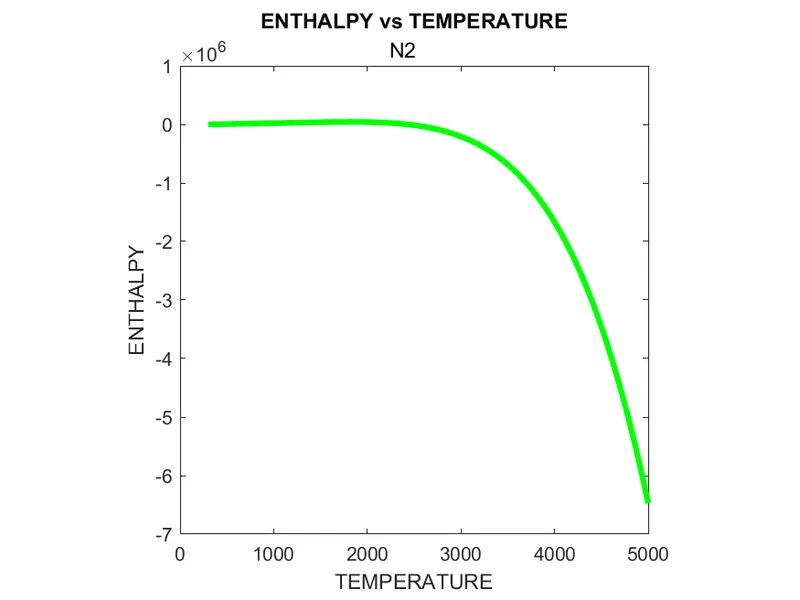
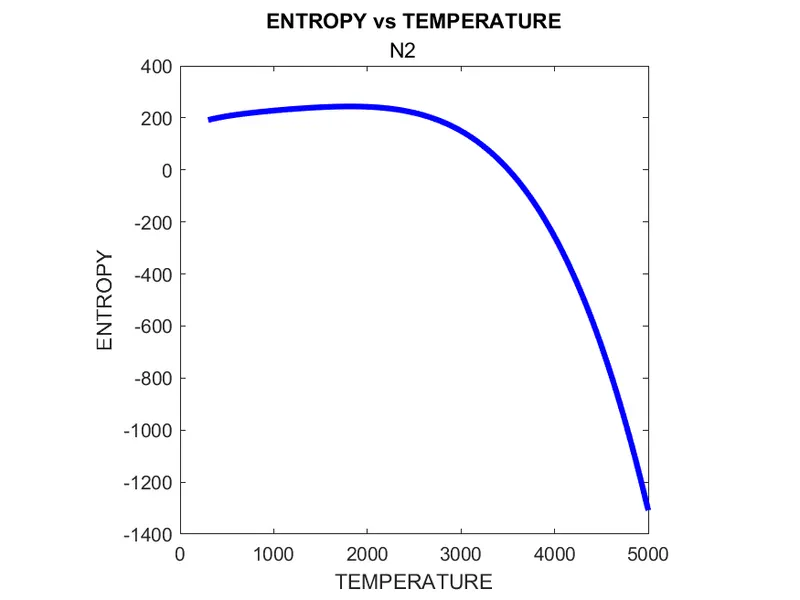
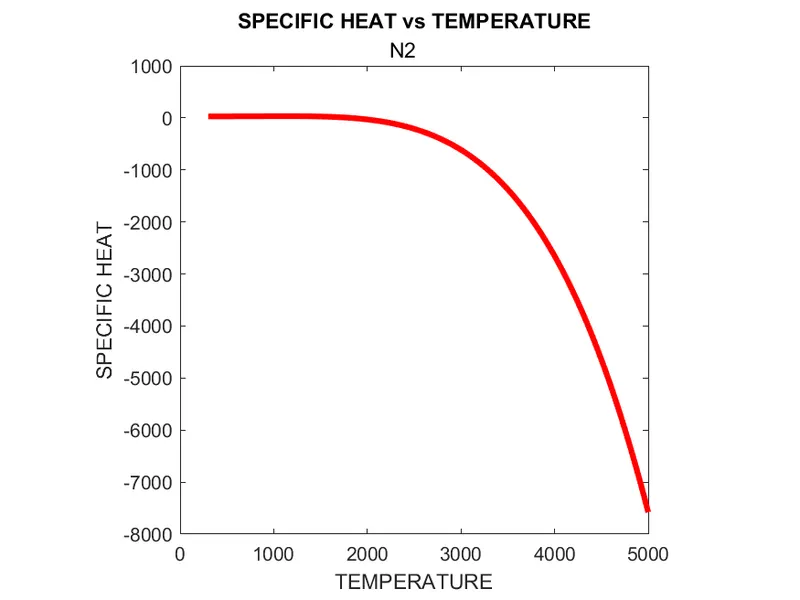
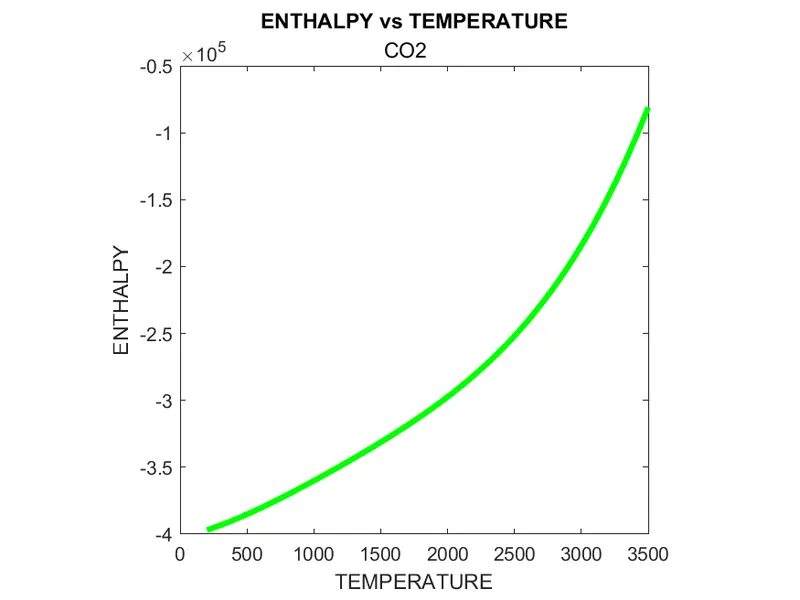
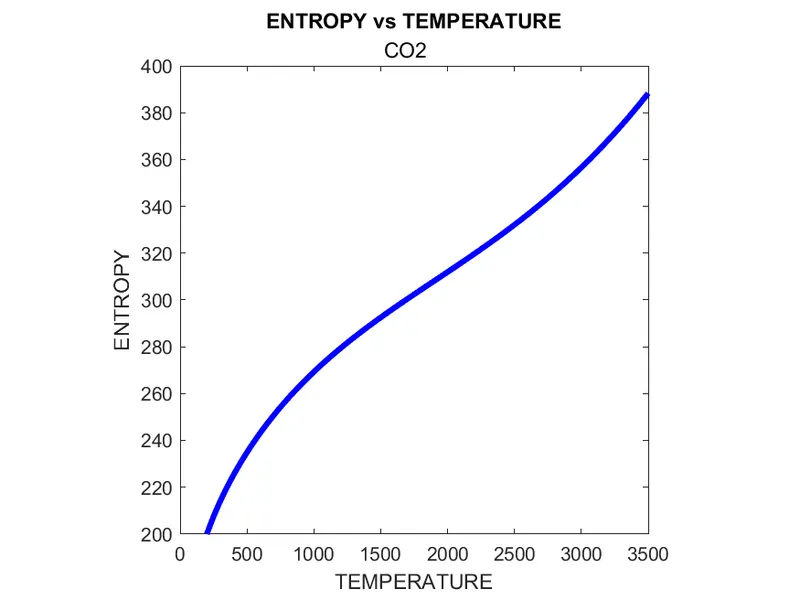
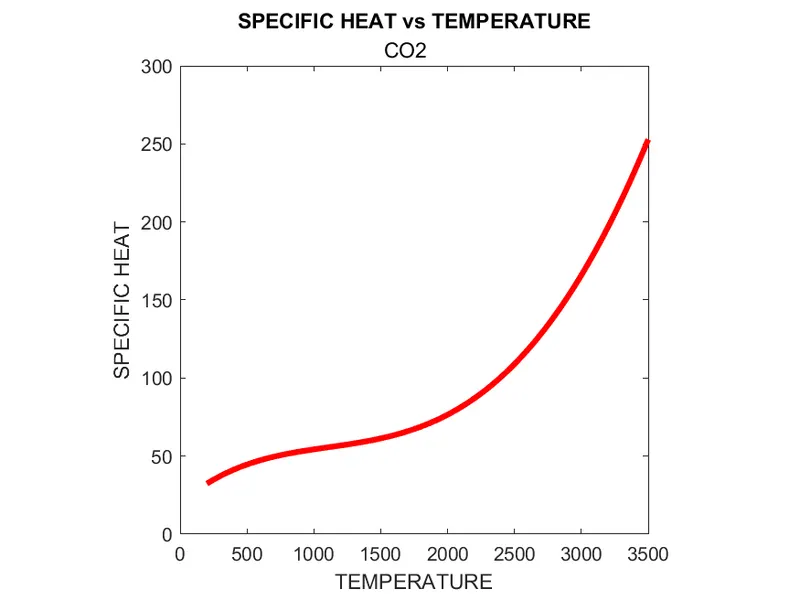
- Plot Temperature vs Specific heat, Temperature vs enthalpy, and Temperature vs Entropy.
GOVERNING EQUATIONS:
- Specific heat:
 ,
,
- Enthalpy:
 ,
,
- Entropy:
 ,
,
The FIRST 7 coefficients are HIGH-temperature coefficients and the SECOND 7 coefficients are LOW-temperature coefficients.
THEORY:
The official thermodynamic data within a range of temperatures is stored by NASA in CHEMKIN format with fourteen coefficients for the given temperature ranges with coefficients a1 to a7 for higher temperature range and a8 to a14 for low-temperature ranges, the given coefficients can be used in accordance with the specified temperature range to calculate the thermodynamic properties of that species.
The term ‘parsing’ refers to MATLAB reading an m-file (script or function) and translating it into an internal code that it stores in memory. It is this ‘parsed’ file in memory that is actually run when you execute the code.
The commands used in this program are fopen-to open the data file in Matlab,fgetl- to retrieve the data from the file line by line,fprint- to write data to a file, and close to close the opened file.the suffix 'w' is used to write data and 'r' is used to read data.
CODE:
- FUNCTIONS:
- FUNCTION TO RETRIEVE COEFFICIENTS FROM THE PARSED LINES.
function [coeff]=coeff_retrieve(tline) eloc=strfind(tline,'E'); l=numel(eloc); A=1; B=eloc(1)+3; for k=1:l tline(A:B); coeff(k)=str2double(tline(A:B)); A=eloc(k)+4; if (k)==l B=eloc(k)+3; else B=eloc(k+1)+3; end end - FUNCTION TO CALCULATE ENTHALPY ENTROPY AND SPECIFIC HEAT.
function [cp,h,s,T]=coefficients(coeff_a,temp) local_low_temp=str2double(temp{1}); local_high_temp=str2double(temp{2}); local_mid_temp=str2double(temp{3}); T=linspace(local_low_temp,local_high_temp,500); a=coeff_a; R = 8.314; for i = 1:500 if T(i) < local_mid_temp cp = (a(1) + a(2).*T + a(3).*T.^2 + a(4).*T.^3 + a(5).*T.^4).*R; h = (a(1) + (a(2).*T)./2 + (a(3).*T.^2)./3 + (a(4).*T.^3)./4 + (a(5).*T.^4)./5 + (a(6)./T)).*R.*T; s = (a(1).*log(T) + a(2).*T + (a(3).*T.^2)./2 + (a(4).*T.^3)./3 + (a(5).*T.^4)./4 + a(7)).*R; else cp = (a(8) + a(9).*T +a(10).*T.^2 + a(11).*T.^3 + a(12).*T.^4).*R; h = (a(8) + (a(9).*T)./2 + (a(10).*T.^2)./3 + (a(11).*T.^3)./4 + (a(12).*T.^4)./5 + (a(13)./T)).*R.*T; s = (a(8).*log(T) + a(9).*T + (a(10).*T.^2)./2 + (a(11).*T.^3)./3 + (a(12).*T.^4)./4 + a(14)).*R; end end end - FUNCTION TO CALCULATE MOLECULAR WEIGHT OF EACH SPECIES
function [molecular_weight] = molecule_wt(species_name)
species = upper(species_name);
constituents = {'H','C','N','O','A'};
atomic_weight = [1 12 14 16 40];
molecular_weight = 0;
for i = 1:length(species)
    for j = 1:length(constituents)
        if strcmp(species(i),constituents(j))
            molecular_weight = molecular_weight + atomic_weight(j);
            u = j;
        end
    end
    n = str2double(species(i));
    if n > 1
        molecular_weight = molecular_weight + atomic_weight(u)*(n-1);
    end
end
end
- FUNCTION TO RETRIEVE COEFFICIENTS FROM THE PARSED LINES.
- MAIN CODE:
clc
clear all
close all

coeff_a=double.empty;
f1=fopen('THERMO.DAT','r');
f2=fopen("molecular_weights of the species.txt","w");
file_name=fgetl(f1);
tline=fgetl(f1);
temp=strtrim(tline);
temp=strsplit(temp,' ');
global_low_temp=str2double(temp{1});
global_mid_temp=str2double(temp{2});
global_high_temp=str2double(temp{3});

for i=1:3
    fgetl(f1);
end
i=1;
species=fgetl(f1);

%loop to keep retrieving data until the retrieved data is"END"
while 1
    species_name=species(1:6);
    eloc=strfind(species,'G ');
    temp=strtrim(species(eloc+1:end-1));
    temp=strsplit(temp,' ');

    %for loop to retrieve the coefficients from the data file using a function
    for q=1:3
        tline=(fgetl(f1));
        coeff_a=[coeff_a coeff_retrieve(tline)];
    end

    %funtion to calcuate thermodynamic coefficients
    [cp,h,s,T]=coefficients(coeff_a,temp);

    %funtion to calcuate moclecular weight
    molecular_weight=molecule_wt(species_name);
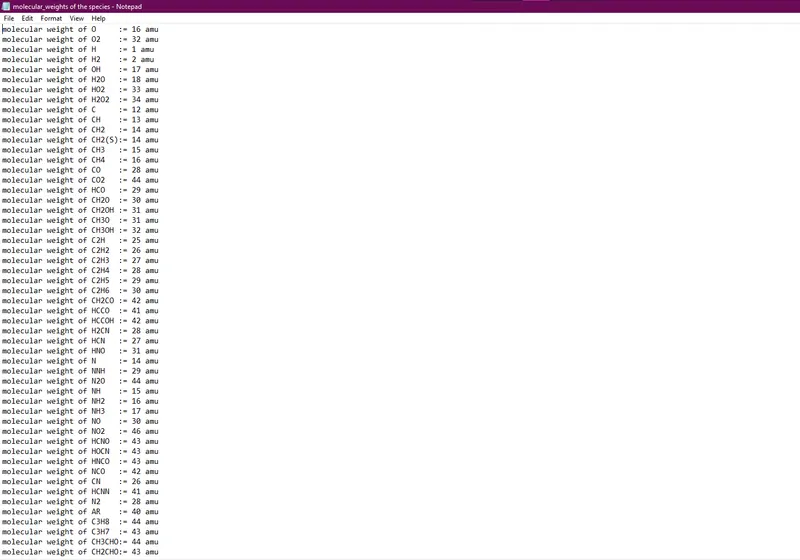
    fprintf(f2,'molecular weight of %s:= %d amu\n',species_name,molecular_weight);

    % Plot between Temperature and specific heat
    figure(1);
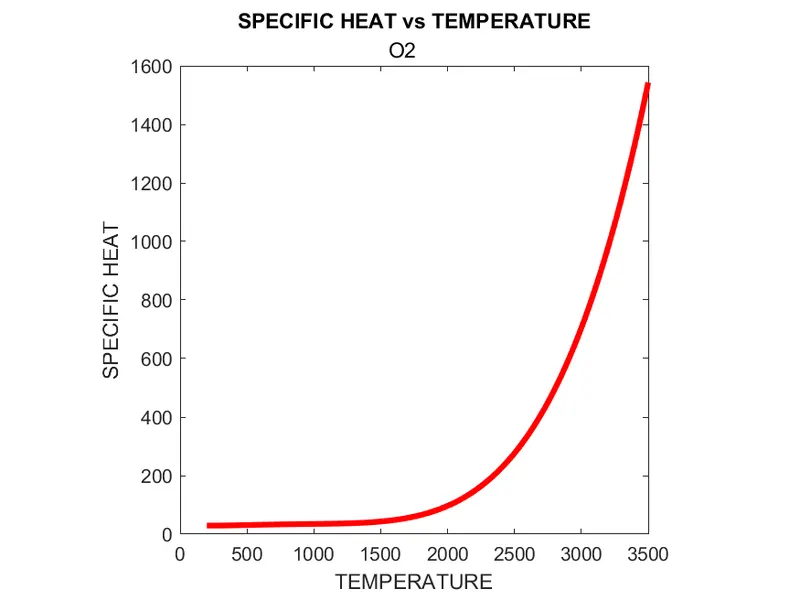
    plot(T,cp,'linewidth',3,'color','r');
    axis("square");
    title (species_name);
    xlabel('TEMPERATURE');
    ylabel('SPECIFIC HEAT');

    % Plot between Temperature and Enthalpy
    figure(2)
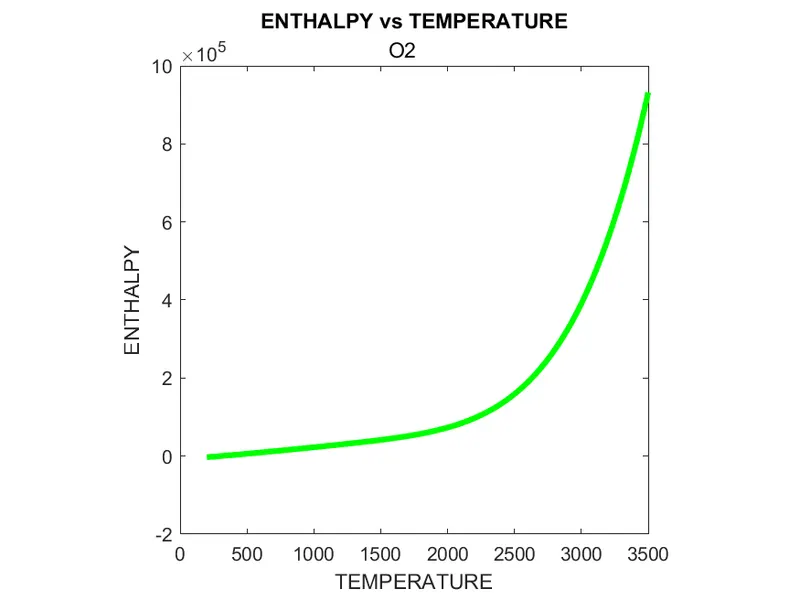
    plot(T,h,'linewidth',3,'color','g');
    axis("square");
    title(species_name);
    xlabel('TEMPERATURE');
    ylabel('ENTHALPY');

    % Plot between Temperature and Entropy
    figure(3)
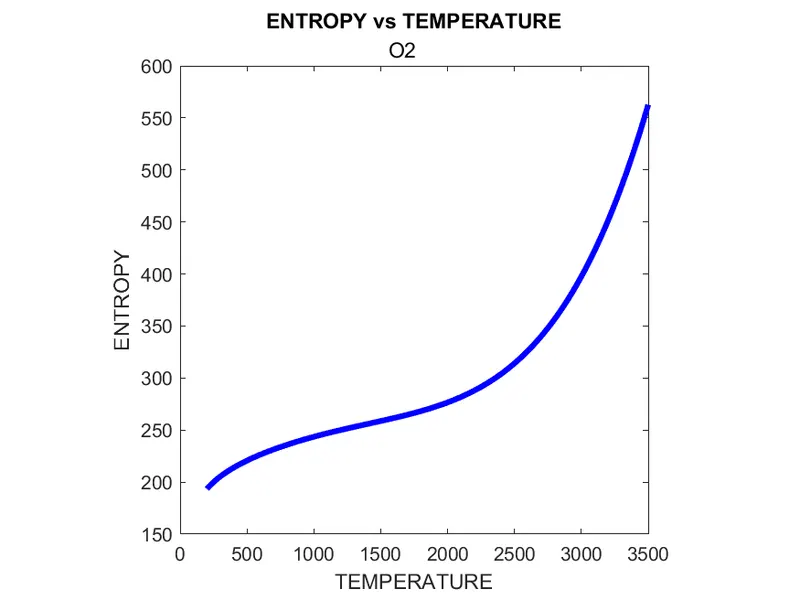
    plot(T,s,'linewidth',3,'color','b');
    axis("square");
    title(species_name);
    xlabel('TEMPERATURE');
    ylabel('ENTROPY');

    % Creating folders
    mkdir(['D:\Projects\matlab\Parsing project\', species_name]);
    directory = (['D:\Projects\matlab\Parsing project\',species_name]);
    cd(directory)

    % Saving plots
    saveas(1,'specific_heat.png');
    saveas(2,'enthalpy.png');
    saveas(3,'entropy.png');
    cd('D:\Projects\matlab\Parsing project\');

    %checking if the file ends
    species=fgetl(f1);
    endcheck=strcmp(species,'END');
    if endcheck==true
        break
    end
    coeff_a=double.empty;
    i=i+1;

end
fclose(f1);
fclose(f2);
EXPLANATION:
- Functions:
- FUNCTION TO RETRIEVE COEFFICIENTS FROM THE PARSED LINES:
- the function takes in the parsed data line by line and searches for the character 'E', and stores the positions to a variable.
- the digits before and after 'E' are extracted and stored into an array for coefficients and returned as the result of the function.
- FUNCTION TO CALCULATE ENTHALPY ENTROPY AND SPECIFIC HEAT:
- The retrieved coefficients and the local temperatures of each species are taken as input and a range of temperatures is set.
- The coefficients and temperatures are used to calculate the specific heat, enthalpy, and entropy using the governing equations.
- The calculated thermodynamic properties along with the temperature rangers are returned as the result of the function.
- FUNCTION TO CALCULATE MOLECULAR WEIGHT OF EACH SPECIES:
- The species name is taken as the input of this function.
- using loop and strcmp inbuilt function the characters in the species are compared with the elements and weights are calculated.
- FUNCTION TO RETRIEVE COEFFICIENTS FROM THE PARSED LINES:
- Main Code
- The given Data file is opened in Matlab using fopen command, and fgetl is used to retrieve data from the file line by line.
- strtrim command is used to remove leading and trailing spaces and strsplit is used to split the retrieved line with 'space' to retrieve the global temperatures
- Fgetl is looped thrice to skip the comments and the lines retrieved are checked if it contains the species' local temperature by using 'G' as the identifier and the subsequent lines are sent to a function to retrieve the coefficients.the plo
- The retrieved coefficients are used to calculate the thermodynamic properties using a function and another function is used to calculate the molecular weight,
- The plots for the thermodynamic properties vs temperature is plotted and saved to a generated folder.
- The above process is looped until the conditional statement encounters "END" as the retrieved line.
OUTPUT:
- Molecule weight output in a text file:
- Folders generated:

- Sample plots:
- O2.
-
- N2.
- CO2.
- O2.
RESULT:
- The parsing of the thermodynamic data file by NASA and calculating their thermodynamic properties and molecular weights are done using functions in MATLAB.
- The plots of the thermodynamic properties v/s temperature are saved in separate folders created.
- It can be exerted that new folders with desired information can be created and the files can be easily saved for further use.
LINKS:
REFERENCES:
- Remove leading and trailing whitespace from strings - MATLAB strtrim - MathWorks India
- while loop to repeat when the condition is true - MATLAB while - MathWorks India
- Conditional Statements - MATLAB & Simulink - MathWorks India
- Create an empty array of specified class - MATLAB empty - MathWorks India
- Write data to a text file - MATLAB fprintf - MathWorks India
- ideal_gas_thermodynamic_properties_in_chemkin_format.pdf
- formatting-strings in Matlab