Project 1 - Parsing NASA thermodynamic data
(Project 1 – Parsing NASA thermodynamics data)
AIM:
To calculate the specific heat, Entropy and Enthalpy of the given species with their local temperature range of each individual and molecular weight with help of NASA thermodynamics data file in MatLab.
EQUATION/FORMULAE:
Specific heat;
`(Cp)/R=a_1+a_2T+a_3T^2+a_4T^3+a_5T^4`
Enthalpy;
`H/(RT)=a_1+a_2T+(a_3T^2)/3+(a_4T^3)/4+(a_5T^4)/5+(a_6)/T`
Entropy;
`S/R=a_1ln(T)+a_2T+(a_3T^2)/2+(a_4T^3)/3+(a_5T^4)/4+a_7`
OBJECTIVES:
- Extract the 14 co-efficient for all species in the `NASA thermodynamics data’ file.
- Calculate the Molecular weight, Specific heat(cp), Entropy(S), and Enthalpy(H) of each element and plot those value with respect to a temperature range of its own with help of the data that we fetch from `NASA thermodynamics data’ file. And save it in different directories.
- In addition to that, we need to code to access the specific element with their name.
BODY OF THE CONTENT:
MOLECULAR WEIGHT?
The molecular mass(The molecular weight) is the mass of a given molecule: it is measured in daltons. Different molecules of the same compound may have different molecular masses because they contain different isotopes of an element.
SPECIFIC HEAT(cp)?
In thermodynamics, the specific heat capacity of a substance is the heat capacity of a sample of the substance divided by the mass of the sample. Specific heat is also sometimes referred to as massic heat capacity.
ENTHALPY(H)?
Enthalpy, a property of a thermodynamic system, is the sum of the system's internal energy and the product of its pressure and volume. It is a state function used in many measurements in chemical, biological, and physical systems at a constant pressure, which is conveniently provided by the large ambient atmosphere.
ENTROPY(S)?
Entropy is a scientific concept as well as a measurable physical property that is most commonly associated with a state of disorder, randomness, or uncertainty.
The whole code might be classified into four-part. The first part is the basic main code that combines all function code to get output. The second part is nothing but one of the function codes to calculate required values with help of another function code and plot the graph of it. The third part of the code is the one that calculates the value of cp, H, S for a specific temperature range of specific species which is used in the above second part of the code. Finally, the fourth part of the code for calculating the molecular weight of the element.
CODE:
% parsing of NASA thermodynamics data
clc,close,clear
%opening data file
file = fopen('THERMO.dat','r')

% to skip header in the data
for i = 1:5
    fgetl(file);
end
% extract species and corresponding local temp and coeff..
j =1;
for i = 1:53
    line1 = fgetl(file);
    line = strsplit(line1,' ');
    name_data(i)=line(1);
    r = 1;
    endl = length(line);
    for i = 1:3
        num_data(r,j) = str2num(line{(endl-i)});
        r = r+1;
    end
    for i =[1:2]
        line2_3 = fgetl(file);
        E_location = findstr(line2_3,'E');
        for i = 1 :length(E_location)
            num_data(r,j) = str2num(line2_3(E_location(i)-11:E_location(i)+3));
            r = r+1;
        end
    end
    line4 = fgetl(file);
    E_location = findstr(line4,'E');
    for i = 1 :length(E_location)
        num_data(r,j) = str2num(line4(E_location(i)-11:E_location(i)+3));
        r = r+1;
    end
    j = j+1;
end
% calculating cp, entropy, and entholpy
for i=1:53
    name = name_data(i);
    [r] = results(name,num_data(:,i));
% save all above graph into specific directory for each Species
    tempdirname = name_data{i};
    mkdir results
    cd results
    mkdir(tempdirname)
    cd (tempdirname)
    na1 = 'Specific heat vs Temperature';
    na2 = 'Enthalpy vs Temperature';
    na3 = 'Entropy vs Temperature';
    saveas(figure(1),na1,'jpg')
    saveas(figure(2),na2,'jpg')
    saveas(figure(3),na3,'jpg')
    cd ..\..
end
% code to calculate molecular weight and print it in command window
for i = 1:53
     m = cell2mat(name_data(i));
     m_w(i) = molecular_weight(m);
     fprintf('The Molecular weight of %s is = %f Da\n',name_data{i},m_w(i))
end
% to access specific species
specific_element = input('Name of the element : ','s');
for i = 1:53
    if strcmp(upper(specific_element),name_data(i))
        p = i;
    end
end
[result] = results(name_data(p),num_data(:,p));
FUNCTIONAL CODE:
function code - 1
% create a function program to evaluate and plot the results
function [result] = results(name_data,num_data)
temperature = linspace(num_data(3),num_data(2),num_data(2)-num_data(3));
cps = [];
Hs = [];
Ss = [];
for T = 1:length(temperature)
    [results] = cp_H_S_high(num_data,temperature(T));
    cps(T) = results(1);
    Hs(T) = results(2);
    Ss(T)= results(3);
    result = [cps,Hs,Ss];
end
% plot graphs for Specific heat, Enthalpy and Entropy
figure(1);
plot(temperature,cps,'LineWidth',2,'Color','r')
xlabel('Temperature')
ylabel('Specific heat')
title('plot of Species ',name_data)
figure(2)
plot(temperature,Hs,'LineWidth',2,'Color','g')
xlabel('Temperature')
ylabel('Enthalpy')
title('plot of Species ',name_data)
figure(3)
plot(temperature,Ss,'LineWidth',2,'Color','b')
xlabel('Temperature')
ylabel('Entropy')
title('plot of Species ',name_data)
function code - 2
% create function program for the calculation of cp,H and S
function [results] = cp_H_S_high(temp_data, T)
R = 8.314;
if T >= temp_data(1)
    cp = (temp_data(4)+temp_data(5)*T+temp_data(6)*T^2+temp_data(7)*T^3+temp_data(8)*T^4)*R;
    H = (temp_data(4)+(temp_data(5)*T)/2+(temp_data(6)*T^2)/3+(temp_data(7)*T^3)/4+(temp_data(8)*T^4)/5+(temp_data(9))/T)*T*R;
    S = (temp_data(4)*log(T)+temp_data(5)*T+(temp_data(6)*T^2)/2+(temp_data(7)*T^3)/3+(temp_data(8)*T^4)/4+temp_data(10))*R;
    results = [cp;H;S];
else
    cp = (temp_data(4+7)+temp_data(5+7)*T+temp_data(6+7)*T^2+temp_data(7+7)*T^3+temp_data(8+7)*T^4)*R;
    H = (temp_data(4+7)+(temp_data(5+7)*T)/2+(temp_data(6+7)*T^2)/3+(temp_data(7+7)*T^3)/4+(temp_data(8+7)*T^4)/5+(temp_data(9+7))/T)*T*R;
    S = (temp_data(4+7)*log(T)+temp_data(5+7)*T+(temp_data(6+7)*T^2)/2+(temp_data(7+7)*T^3)/3+(temp_data(8+7)*T^4)/4+temp_data(10+7))*R;
    results = [cp;H;S];
end
function code - 3
% create function program for the calculation of molecular weight
function [results] = molecular_weight(element)
ele = element;
% defining the atom and it's atomic weight
atom = ['C','O','H','N','A'];
atomic_weight = [12.0107 15.999 1.00784 14.0067 39.948 ];
% function's body code
molec_weight = 0;
temp_weight = 0;
for i = 1:length(ele)
    for j = 1:length(atom)
        if strcmp(ele(i),atom(j))
           temp_weight = atomic_weight(j);
           molec_weight = molec_weight + atomic_weight(j);
        end
    end

    if str2double(ele(i)) > 1
       molec_weight = molec_weight - temp_weight;
       temp_weight = temp_weight * str2double(ele(i));
       molec_weight = molec_weight + temp_weight;
    end
end
results = molec_weight;
EXPLANATION OF CODE:
MAIN CODE
- From code lines 1 to 2 - clearing the previous data.
- From code lines 3 to 4 - read the data file from NASA.
- From code lines 6 to 9 - code to skip the first five lines in the data file(unwanted data).
- From code lines 10 to 37 - extracting data from NASA thermodynamics data file and storing it in two arrays called name_array and num_array, containing the name of the element and corresponding coefficient and temperature by for loop.
- From code lines 38 to 41 - calculate cp, S, H for all the species and create plots for it.
- From code lines 42 to 55 - create a new directory and save the above plots for each element and end the for loop
- From code lines 56 to 61 - calculate molecular weight and print it in the command window.
- From code lines 62 to 69 - code for accessing particular species we want by giving the name of the species as input.
FUNCTION CODE - 1
- From code lines 1 to 2 - creating a function with the required data inputs we need.
- From code lines 3 to 13 - creating the temperature array for each species with a temperature range of its own and giving it to function code - 2 as an input to calculate cp, H, S by using for loop.
- From code lines 14 to 29 - plot the graph for cp, H, and S with respect to the temperature value and return it.
FUNCTION CODE - 2
- From code lines 1 to 2 - creating a function to calculate the cp, H, S values.
- From code lines 3 to 14 - assigning a known value of R and conditioning the calculation with respect to temperature(get from function code - 1) by using the if operator and end the functional code by closing the if operator.
- this function is used for function code - 1 to get the value for the graphs.
FUNCTION CODE - 3
- From code lines 1 to 6 - creating a function called molecular_weight and assigning the atom and atomic weight that is required to calculate the molecular weight of an element.
- From code lines 7 to 23 - we take each element in the input array and compared it with the assigned value. if it matches the molecular weight will generated and corrected until last iteration so that we get correct value of molecular weight at the end.
- From code lines 24 - stored(returning) the molecular weight of the molecule.
RESULTS:
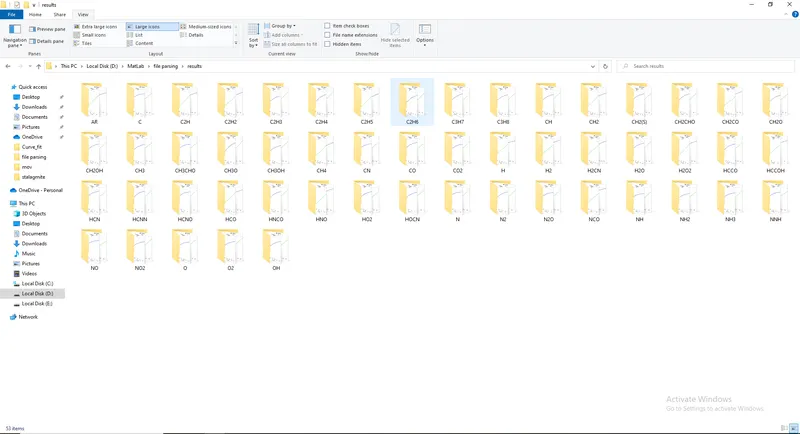
results of element O2:
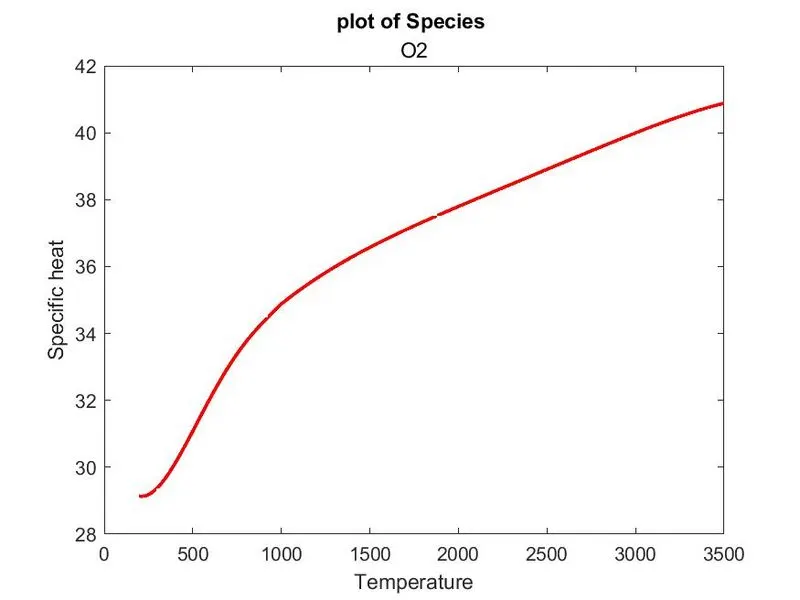
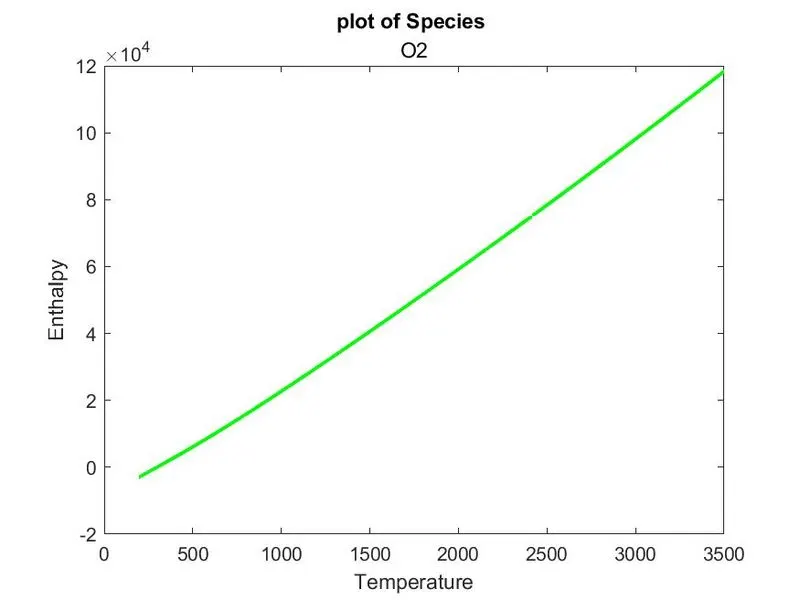
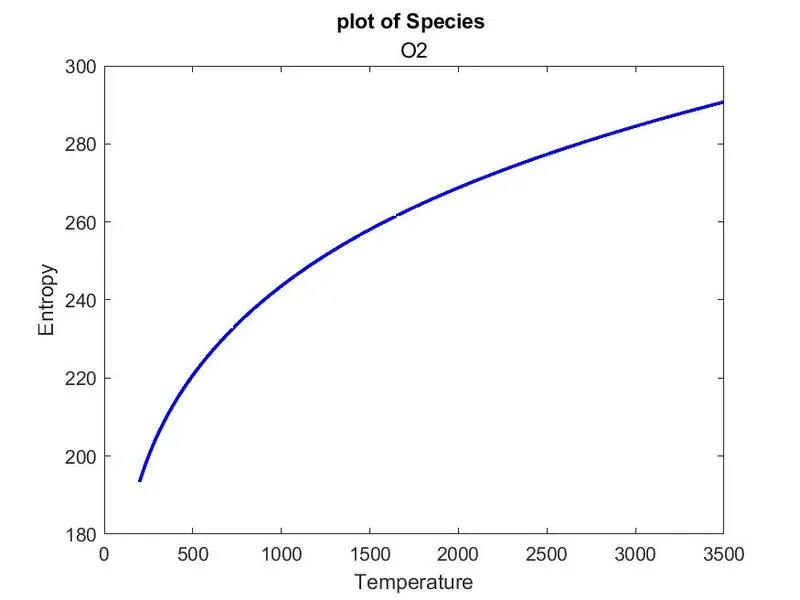
results of element N2:
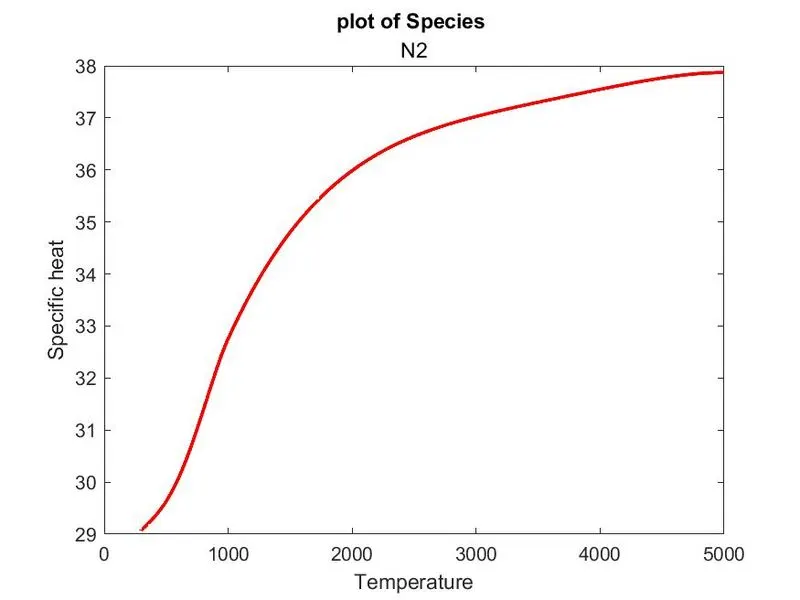
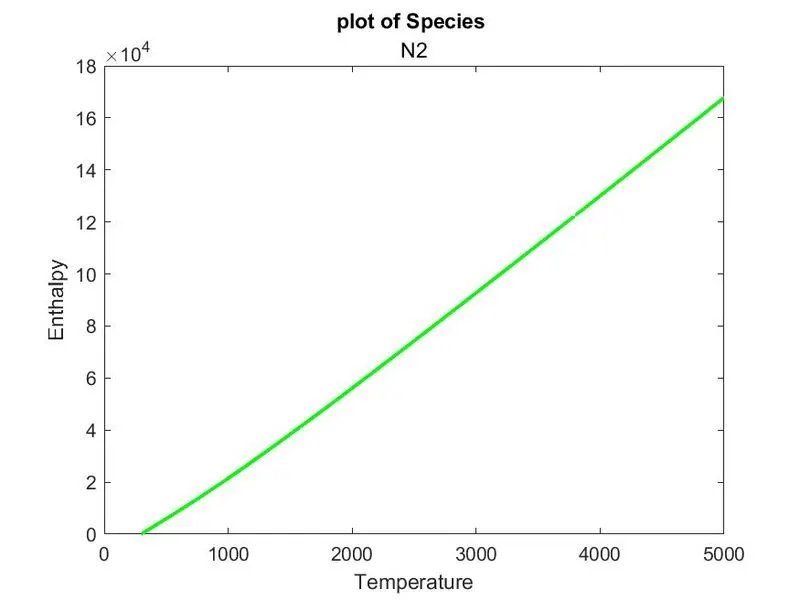
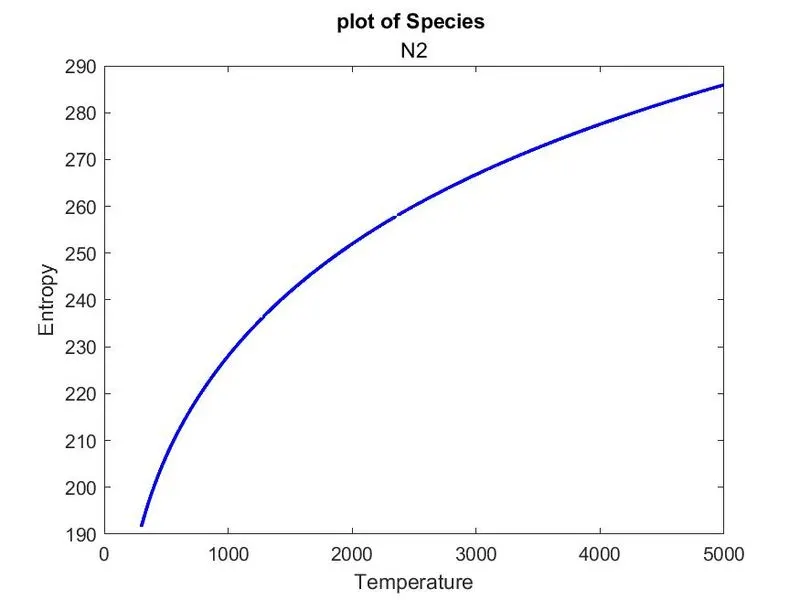
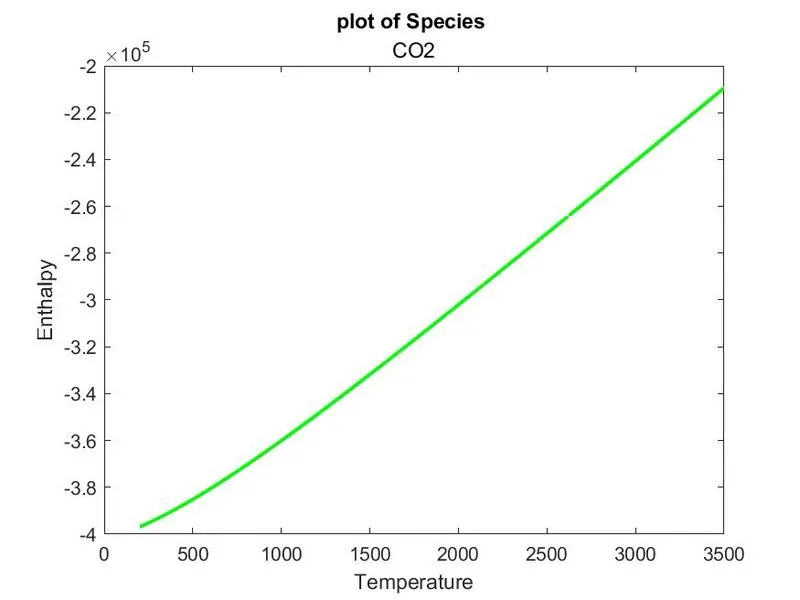
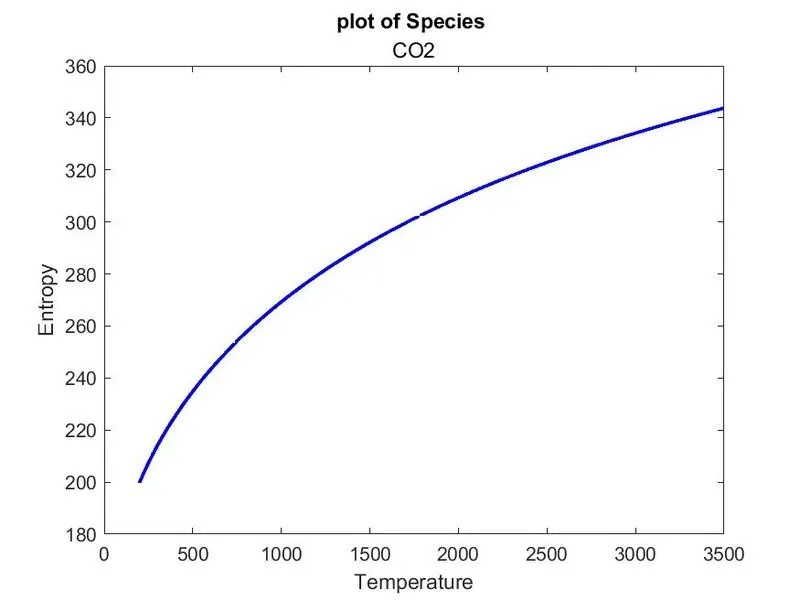
results of element CO2:
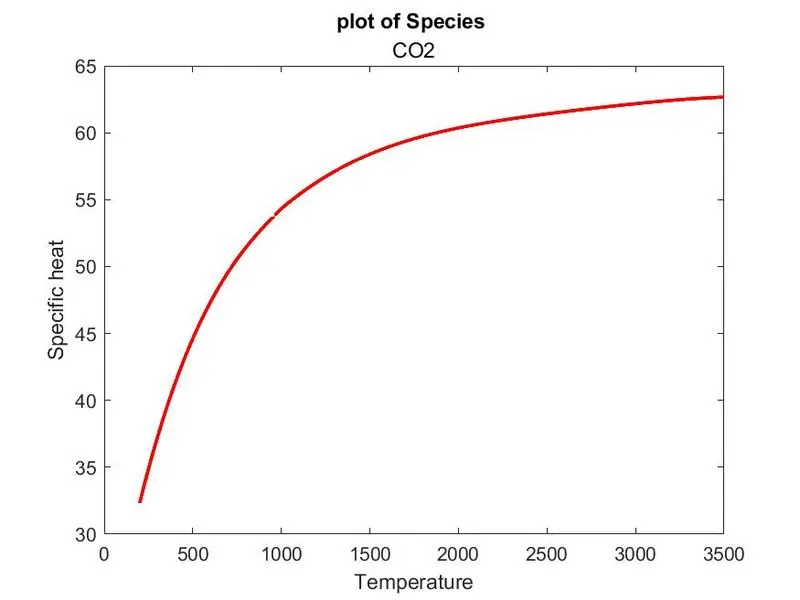
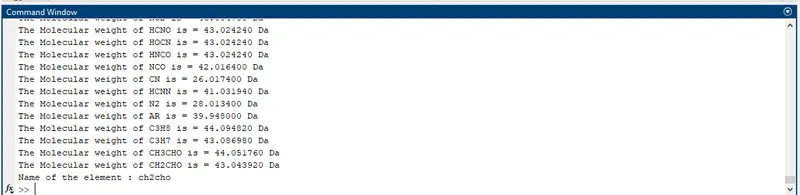
printing molecular weight of each element.
ERROR:
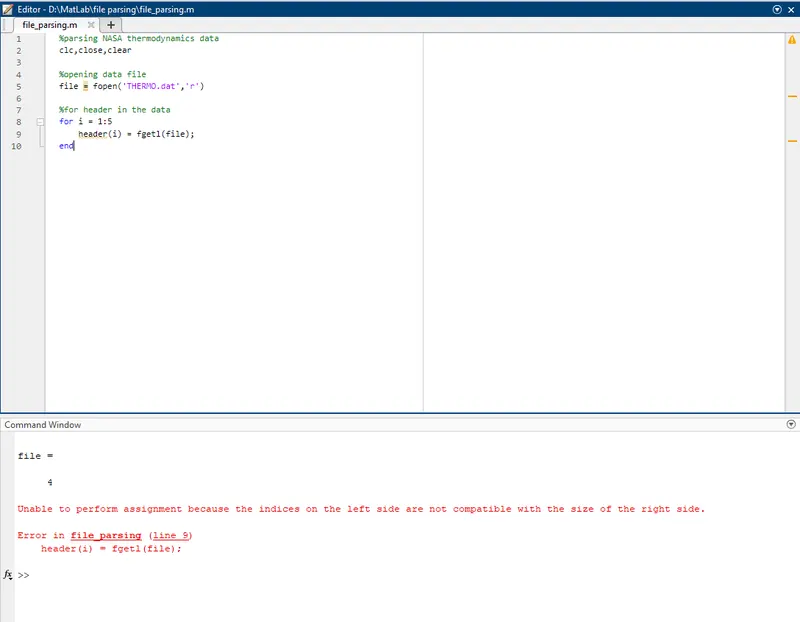
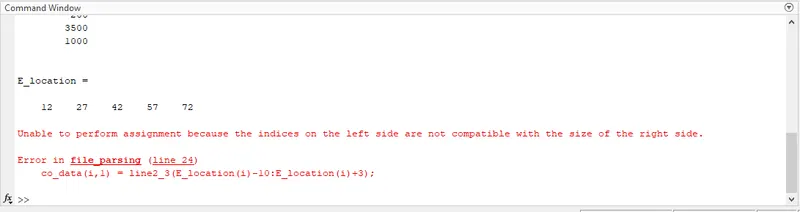
the above error occurred due to the usage of the round brackets in the cell type array.

it's due to the missing operator, more errors occurred like this.
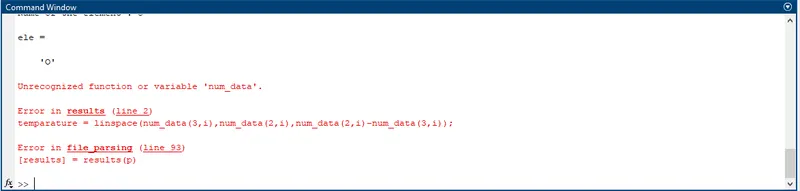
the above error occurred due to some wrong input to the function.
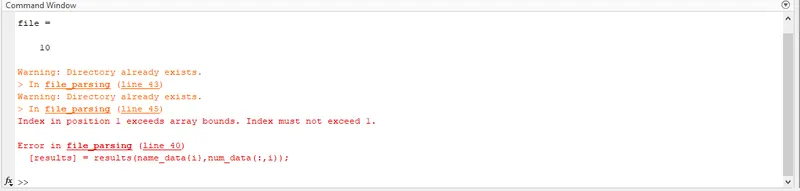
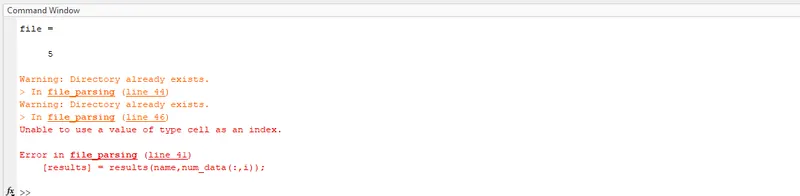
the above error is due to the usage of the same naming for both result and function name.
CONCLUSION:
The code to extract the data from the NASA thermodynamics data file and plot the graph of cp, H, S vs temperature by calculating the value of cp, H, S using the extracted coefficient, Addition to that the molecular weight of each species was calculated successfully.
REFERENCES:
- https://in.mathworks.com/matlabcentral/answers/472805-how-do-i-make-a-new-folder-and-then-name-it-using-the-string-stored-within-a-variable
- https://in.mathworks.com/help/stateflow/ref/strcmp.html#:~:text=example,the%20two%20strings%20are%20identical.
- https://www.youtube.com/watch?v=r768cWJpdD8
- https://www.youtube.com/watch?v=q8AZ1DpJRrI
- https://www.youtube.com/watch?v=1BY6bChFWxw
- https://in.mathworks.com/help/matlab/ref/mkdir.html