Project 1 - Parsing NASA thermodynamic data
Aim: To write a code in MATLAB to parse the NASA Thermodynamic data file and then calculate Thermodynamics properties, Molecular Weight and Plot the nature of the thermodynamics properties of various species.
Objectives:
1. To write a function that calculates Enthalpy, Entropy and Specific Heat using the NASA polynomials for the given species.
2. To write a function that calculates the molecular weight of each species.
3. To write a function that plots the Cp, Enthalpy and Entropy of an input species.
Introduction:
Parsing is the process of breaking a data block into smaller chunks by following a set of rules, so that it can be more easily interpreted, managed, or transmitted by a computer. NASA came up with polynomials that can be used to evaluate thermodynamics properties such as Cp, H, and S using polynomials. They have also documented the co-efficient that are required to evaluate these polynomials for 1000+ species.
Function to calculate the molecular weight:
- All the individual elements (Elements) are defined along
- with their atomic weights (atomic_weight).
- Based upon the input elements obtained, the elements are compared with the defined elements by using the 'strcmp' command.
- If there is a repetition of an element, 'str2double' is used to find that and (n-1) is multiplied to atomic_weight of the element to calculate the molecular weight.
The molecular_weight function program.
% Function for calculating molecular weight
function [w] = molecular_weight(Element_Name)

    Elements = {'H' 'C' 'N' 'O' 'H2O' 'CN'};

    % Atomic weight of each element

    atomic_weight = [1 12 14 16 18 26];
    w = 0;

    for i = 1:length(Element_Name)
        for j = 1:length(Elements)
            % Comparing the input element with the defined elements
            if strcmp(Element_Name(i), Elements(j))
                w = w + atomic_weight(j);

                % Storing the position of the matched element
                position = j;

            end
        end

    n = str2double(Element_Name(i));
        if n>1
            w = w + atomic_weight(position)*(n-1);
        end
    end
end
End of the molecular_weight function program.
Function to calculate Specific Heat, Enthalpy and Entropy:
- The input for this function is the 14 coefficients and all the temperatures.
- The local temperature is checked whether it is less than or equal to the Local mid temperature.
- If it is true then the first set is executed by using the first 7 temp coefficients or else the second set of codes is executed by using the last 7 temp coefficients.
The formulas defined are given below:
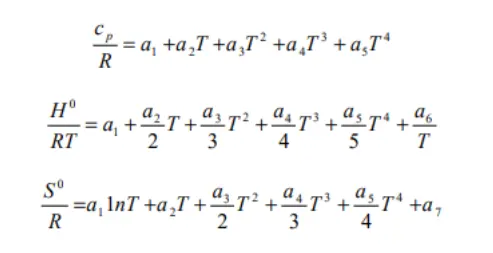
Program thermodynamic funcnction :
% Function to calculate Cp, H and S

function [Cp,H,S] = thermodynamic_func(ah1,ah2,ah3,ah4,ah5,ah6,ah7,al1,al2,al3,al4,al5,al6,al7,R,T,Local_mid_temperature)
    for i = 1:500
        if T(i) <= Local_mid_temperature
        Cp(i) = R*(ah1 + (ah2*T(i)) + (ah3*T(i)^2) + (ah4*T(i)^3) + (ah5*T(i)^4));
        H(i) = R*T(i)*(ah1 +ah2*(T(i)/2) + ah3*((T(i)^2)/3) + ah4*((T(i)^3)/4) + ah5*((T(i)^4)/5) + ah6/T(i));
        S(i) = R*(ah1*log(T(i)) + (ah2*T(i)) + ((ah3*T(i)^2)/2) + ((ah4*T(i)^3)/3) + ((ah5*T(i)^4)/4) + ah7);
    else
        Cp(i) = R*(al1 + (al2*T(i)) + (al3*T(i)^2) + (al4*T(i)^3) + (al5*T(i)^4));
        H(i) = R*T(i)*(al1 + al2*(T(i)/2) + al3*((T(i)^2)/3) + al4*((T(i)^3)/4) + al5*((T(i)^4)/5) + al6/T(i));
        S(i) = R*(al1*log(T(i)) + (al2*T(i)) + ((al3*T(i)^2)/2) + ((al4*T(i)^3)/3) + ((al5*T(i)^4)/4) + al7);
        end
    end
end
End of the thermodynamic_func program.
Function to plot graphs and save them in separate folder:
- In this function the identifies the current directory by using the command 'pwd'.
- Create a folder based upon the input variable ' Element_Name'.
- In the plots Specific Heat vs Temperature plot.
- define the title a %s is used to print the Element Name.
- In the same way as above all the plots are plotted.
- Then they are saved inthe created folder.
- Using the 'cd' command the folder is changed back to the original folder.
- The function runs for 53 times through the 'for' loop and it creates separate folders for each species and saves all the plots in the folders.
Program for plotting function:
% Function to plot graphs for all elements
function plotting_thermo(Cp,H,S,temp,Element_Name)
    % identify current directory
    cd(pwd);
    dir_name = Element_Name;

    % Creating a folder based on the Element name
    mkdir(dir_name);

    % Plotting Specific Heat Vs Temperature
    figure(1)
    plot (temp,Cp,'linewidth',3,'color','r');
    title(sprintf('Specific Heat Vs Temperature for %s:', Element_Name));
    xlabel('Temperature');
    ylabel('Specific Heat');

    % Plotting Enthalpy Vs Temperature
    figure(2)
    plot (temp,H,'linewidth',3,'color','g');
    title(sprintf('Enthalpy Vs Temperature for %s:', Element_Name));
    xlabel('Temperature');
    ylabel('Enthalpy');

    % Plotting Entropy Vs Temperature
    figure(3)
    plot (temp,S,'linewidth',3,'color','b');
    title(sprintf('Entropy Vs Temperature for %s:', Element_Name));
    xlabel('Temperature');
    ylabel('Entropy');
    cd(dir_name);

    % Saving the Plots
    saveas(1,'Cp_Vs_temp.png');
    saveas(2,'Enthalpy_Vs_temp.png');
    saveas(3,'Entropy_Vs_temp.png');

    cd ..;

end
End of the program plotting function.
Writing Molecular weights of the elements to a file:
- The function takes Element name and their molecular weight as input.
- Then a new file is created with name ,Molecular_Weight.dad' and it is opened in append mode denoted by 'a+' so that we can write the molecular weight of all elements in a single file.
- Using the 'fprintf' command the name of the element along with their molecular weight is written to the file.
- In the fprintf command %s and %f is used to denote string and number.
- Finally the file is close.
Program for writing_mol_file function:
% Writing Molecular Weight of the Elements to a File
function writing_mol_file(Element_Name, weight)

dir_name = Element_Name;
mol_file = fopen('Molecular_Weight.dat','a+');
fprintf(mol_file, 'Molecular Weight of %s is %f n', dir_name,weight);
fclose(mol_file);

end
End of the Program for writing_mol_file function.
Main Program:
The file is opened by using 'fopen' command and then stored in a cell named NASA.
Then data is read by using 'textscan' command and stored in 'x'.
Total no. of rows identified by using the command 'length(x)'.
After that file is closed and opened again.
Using 'fgetl' the first line is read and stored in string First_line.
Line two is read in the same way and a string split 'strsplit' command is used to split the string by using the 'delimeter'.
The temperature values are stored as Global_low,mid and hight_temp.
Gas constant (R) is defined.
The comments are ignores by using a for loop.
The no of times the loop has to executed is calculated.
The first line is taken split.
Then first character is stored in the variable name Element_Name.
Local temperature are defined for Low, Mid and High.
Coefficient are defined and stored the values in variables.
First string is selected and location of 'E' is identified in the string.
After that for the first coefficient,the characters from the start till the position of 'E' and the three characters after the charater 'E' are stored in the first coefficient.
Similarally process is used for second line and all coefficient are located.
Coefficients are in the form of strings, they are converted into numbers by using 'str2num' command.
Identified coefficients are given as the output of the function.
The local temperature rang is defined by using 'linspace' command.
The functions to calculate Cp, H, S, molecular weights and to plot the graphs are defined.
The loop runs based upon the values of the variables i.e., Total_no_of_species.
After that the file is closed.
clear all
close all
clc

% Opening the Chemkin NASA Thermodynamics data file
nasa = fopen('THERMO.dat','r');
x = textscan(nasa, '%s', inf, 'Delimiter','n');

% Identifying the total no of rows
Total_no_of_rows = length(x{1});
fclose(nasa);
nasa = fopen('THERMO.dat','r');

% Reading first line
First_line = fgetl(nasa);

% Getting the global temperature values
Line2 = fgetl(nasa);
s = strsplit(Line2, ' ');
Global_low_temperature = str2num(s{2});
Global_mid_temperature = str2num(s{3});
Global_high_temperature = str2num(s{4});

% Universal Gas Constant in j/mol-K
R = 8.314510;

% Ignoring the comments in Data File
for i = 1:3
    fgetl(nasa);
end
% Calculating the total no. of times loop has to be executed
% as we know the first five lines are does not represent the species
% content and the lines from the line END is not required.
% Decrease the value by four and then divided by four as each species
% values are represented by four lines
Total_no_of_species = ((Total_no_of_rows - 10)/4);

for i = 1:Total_no_of_species
    % reading the line
    L = fgetl(nasa);

    % Storing the element name
    e = strsplit(L);
    Element_Name = e{1};
    %Defining the Local Temperature Range
    Local_low_temp = str2num(e{end-3});
    Local_high_temp = str2num(e{end-2});
    Local_mid_temp = str2num(e{end-1});

    % Reading the three lines which contains the values of the 7 High
    % temperature value and the 7 Low temperature values
    x1 = fgetl(nasa);
    x2 = fgetl(nasa);
    x3 = fgetl(nasa);
     % Identifing the location of E in the string
    n = strfind(x1,'E');

    % Storing the values in the left of E and the right of E

    a1 = x1(1:n(1)+3);
    a2 = x1(n(1)+4:n(2)+3);
    a3 = x1(n(2)+4:n(3)+3);
    a4 = x1(n(3)+4:n(4)+3);
    a5 = x1(n(4)+4:n(5)+3);

    % Conversion of the string to num

    ah1 = str2num(a1);
    ah2 = str2num(a2);
    ah3 = str2num(a3);
    ah4 = str2num(a4);
    ah5 = str2num(a5);

    n1 = strfind(x2, 'E');
    a6 = x2(1:n1(1)+3);
    a7 = x2(n1(1)+4:n1(2)+3);
    a8 = x2(n1(2)+4:n1(3)+3);
    a9 = x2(n1(3)+4:n1(4)+3);
    a10 = x2(n1(4)+4:n1(5)+3);
    ah6 = str2num(a6);
    ah7 = str2num(a7);
    al1 = str2num(a8);
    al2 = str2num(a9);
    al3 = str2num(a10);

    n2 = strfind(x3, 'E');
    a11 = x3(1:n2(1)+3);
    a12 = x3(n2(1)+4:n2(2)+3);
    a13 = x3(n2(2)+4:n2(3)+3);
    a14 = x3(n2(3)+4:n2(4)+3);
    al4 = str2num(a11);
    al5 = str2num(a12);
    al6 = str2num(a13);
    al7 = str2num(a14);

    % Calulating Specific Heat
    T = linspace(Local_low_temp,Local_high_temp,500);
    [Cp,H,S] = thermodynamic_func(ah1,ah2,ah3,ah4,ah5,ah6,ah7,al1,al2,al3,al4,al5,al6,al7,R,T,Local_mid_temp);

    % plotting the Specific Heat, Enthalpy, Entropy for the elements
    plotting_thermo(Cp,H,S,T,Element_Name);

    % Calculating the Molecular Weights
    Molecular_Weight(i) = molecular_weight(Element_Name);
    sprintf('%s Species %s %f',Element_Name,'Molecular_Mass',Molecular_Weight(i))


    % Function to write Molecular eight to a file
    weight = Molecular_Weight(i);
    writing_mol_file(Element_Name, weight);
end
fclose(nasa);
End of the main program.
Stored Dirctories:

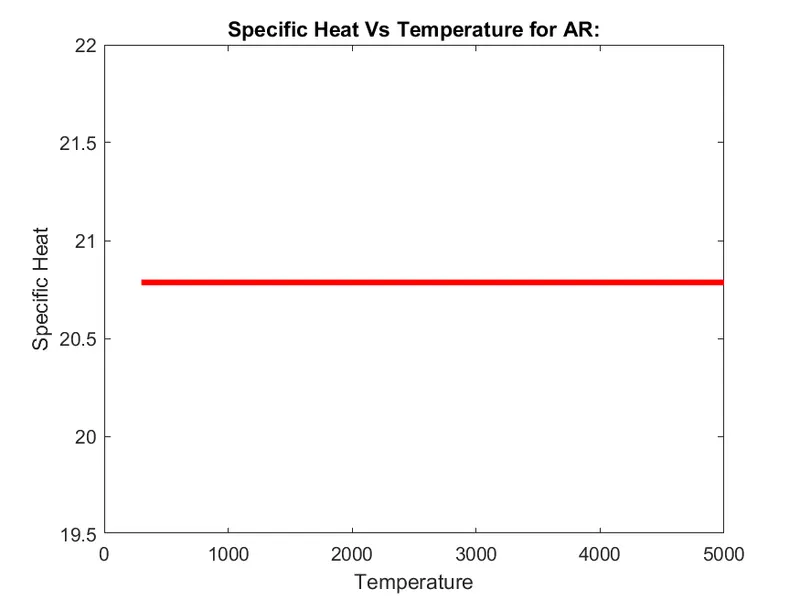
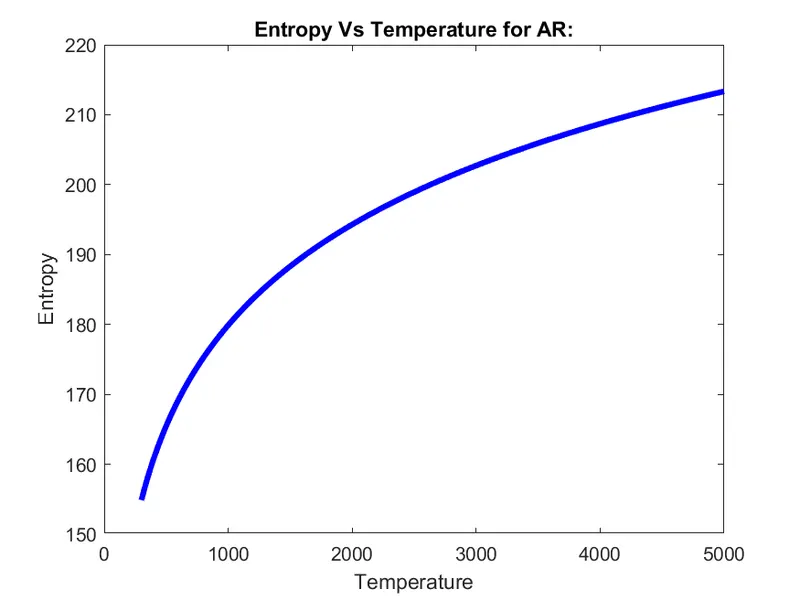
Results for AR:
Specifice Heat vs Temperature for AR:
Enthalpy vs Temperature for AR:
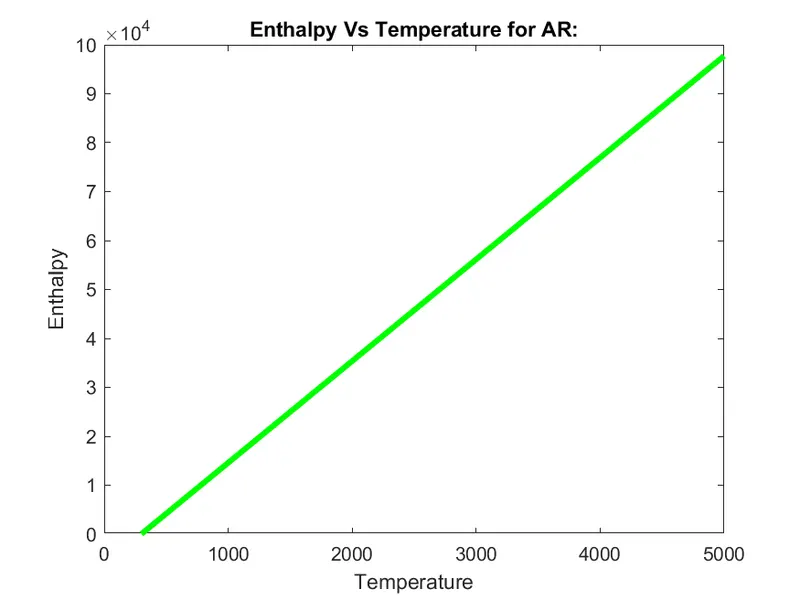
Entropy vs Temperature for AR:
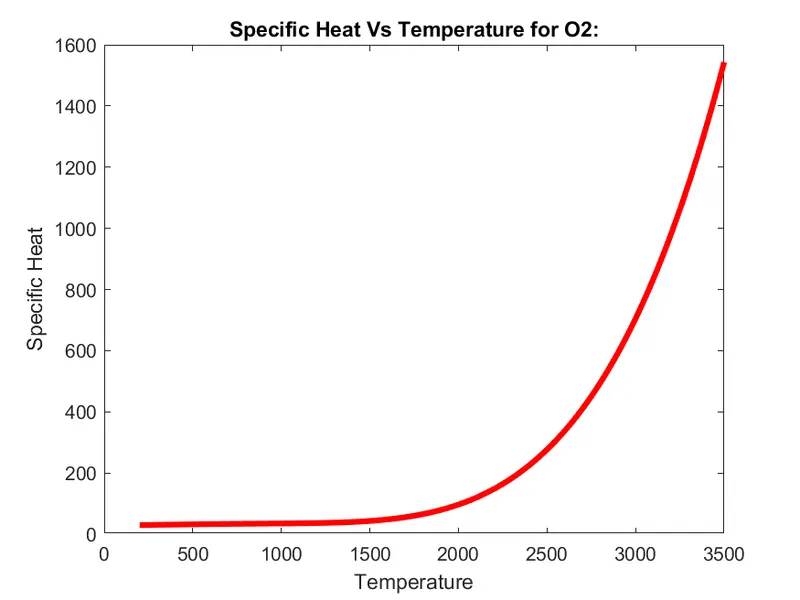
Results for O2:
Specifice Heat vs Temperature for O2:
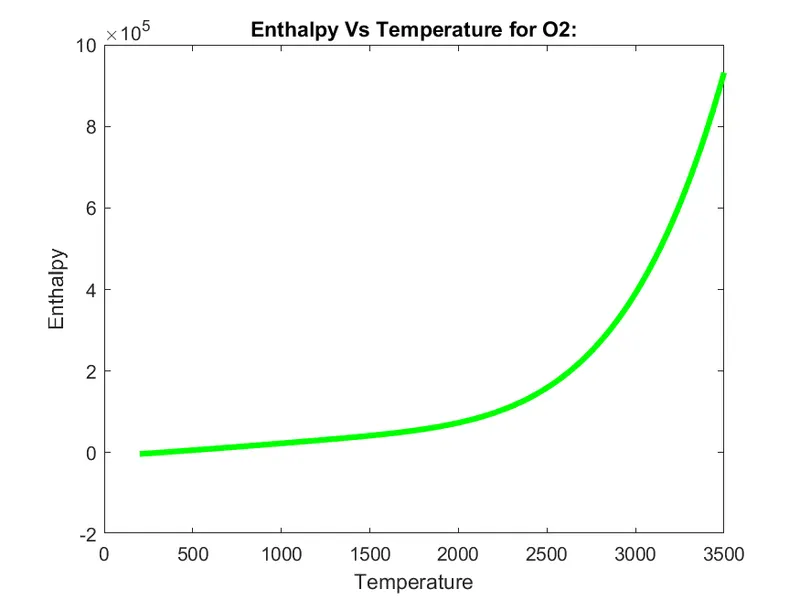
Enthalpy vs Temperature for O2:
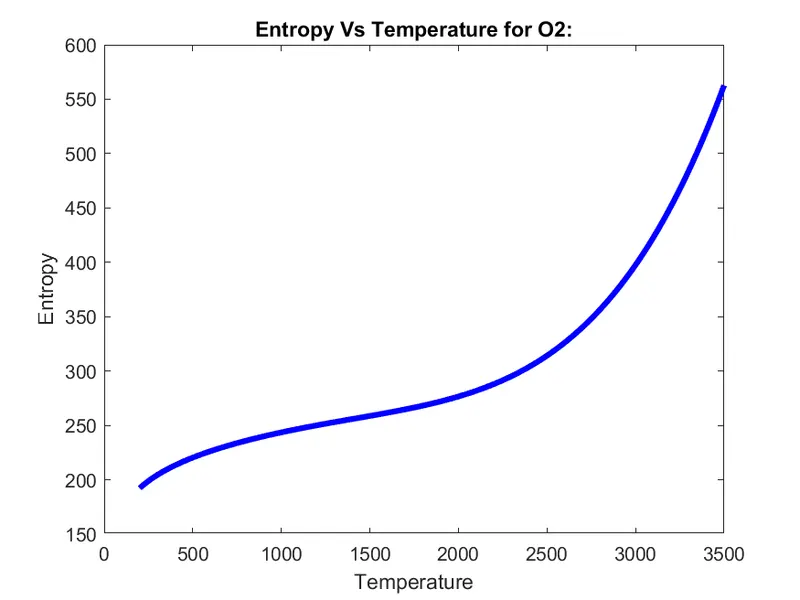
Entropy vs Temperature for O2: