Parsing NASA thermodynamic data
AIM:
To write a matlab code to parse the NASA thermodynamic data file and caluculate thermodynamic properties of various gas speices.
OBJECTIVE:
- To read the given NASA file data using fopen command.
- To Write a function that extracts the 14 co-efficients and calculates the enthalpy, entropy and specific heats for all the species in the data file.
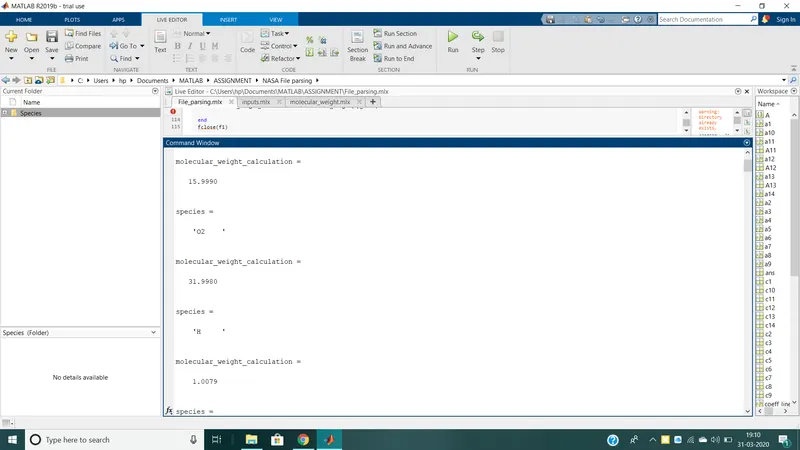
- Calculate the molecular weight of each species and display it in the command window.
- plot the Cp, Enthalpy and entropy for the local temperature range(low temperature : high tempereature)specific for each species.
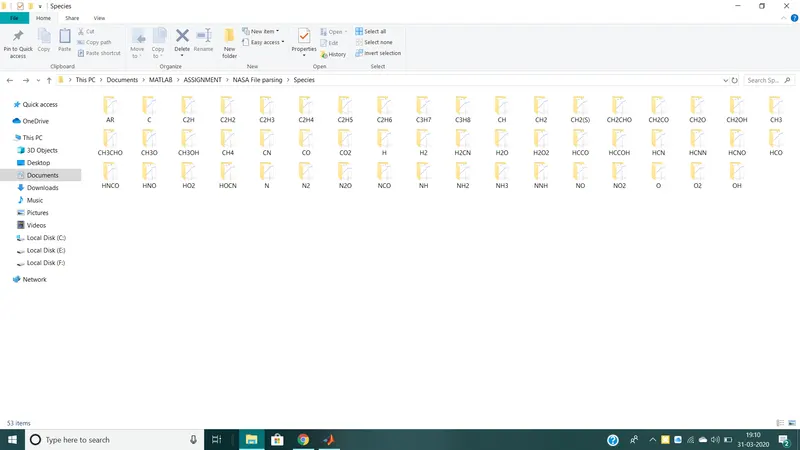
- save the plots as images with appropriate names and dump them in seprate folders for each species with suitable name. All these should be genrated automatically.
THEORY:
File parsing:
It is the method of splitting the file or other input into piece of data that can be easily stored or manupulated.By doing this we are going to split a string into pieces then recognizing them to convert it into something simpler than string.
Here in this project we are going to split tha NASA thermodynamic data which is aving 53 gas spieces values in 213 lines.To perform the caluculation for thermodynamic properties,we need some sort of coefficient values and temperature ranges which is available in the NASA file.so,we are going to parse the values which are all needed for the calucuculation of from that file.
Specific Heat:
Specific heat is the amount of energy required to raise the temperature of body per unit of mass specific heat. In SI units, specific heat is amount of heat in joules required to raise 1 gram of substance of 1 kelvin.
Enthalpy:
When a substance changes at constant pressure,Enthalpy tells how much heat and work was added or removed from the substance.Enthalpy is similar to energy but not the same.When a substance grows or shrinks,energy is used up or released.
Entropy:
The entropy of an object is a measure of the amount of energy which is unavailable to do work.Entropy is also meausre of number of possible arranagements of atoms a system can have .In this sense ,entropy is the meausre of uncertainity or randomness.
Molecular weight:
Molecular weight is the measure of the atomic weight of the atoms in a molecule .Molecualr weight is used in chemistry to determine stoichiometry in chemical reactions and equations.
GOVERNING EQUATIONS:

Here R is universal Gas constant
Cp = specific heat(J/K Kg)
H = Enthalpy(J)
S = Entropy(J/K)
T = temperature(K)
CODE:
STEP BY STEP EXPLANATION:
f1 = fopen('THERMO.dat','r');
fgetl(f1);
tline = fgetl(f1);- The Data file is opened using the fopen command which is used to open the file and fgetl command which is used to read the content in the file line by line
- We will be assining to the vriable called f1.thus fegtl(f1) is the command acts like a line cursor,which will retrive the next time while running this command for the second time and so on.
A = strsplit(tline,' ');
global_low_temp = str2num(A{2});
global_mid_temp = str2num(A{3});
global_high_temp = str2num(A{4});- The data which is obtained from the file is in the string format fow which we need to conver them into the number format by using str2num command.and by this we will get the temperature and coefficients of all the speices.
for i = 1:3
    b = fgets(f1);
end
- Here the for loop is used to get the values of the data file and skip the first three lines in it.
for j = 1:53
    species = fgetl(f1);
t = findstr(species,'.');- For getting temperature and coefficient values we use findstr command inorder to put the accurate spot and speifying the it so that we can get all the data.
%local temperatures
species(52-3:52+3)
Tl = species(52-3:t(1)+3);
Tl1 = str2double(Tl);

species(t(1)+6:62+3);
Th = species(t(1)+6:t(2)+3);
Th1 = str2double(Th);

species(t(2)+6:72+3);
Tm = species(t(2)+6:t(3)+3);
Tm1 = str2double(Tm);
sp_name = species(1:6);- The local temperature are found,here we are going to locate the string using which we will find the values of low temprature,mid temprature and high temprature whuch is assigned to the variables Tl,Tm,and Th respectively.But the values achieved are strings so to change the string to num we use the str2double command here.
%coefficients of each spieces
coeff_line_1 = fgetl(f1);
A11 = strfind(coeff_line_1,'E');
coeff_line_1(1:12+3);
 a1 = coeff_line_1(1:A11(1)+3);
 c1 = str2double(a1);
 a2 = coeff_line_1(A11(1)+4:A11(2)+3);
 c2 = str2double(a2);
 a3 = coeff_line_1(A11(2)+4:A11(3)+3);
 c3 = str2double(a3);
 a4 = coeff_line_1(A11(3)+4:A11(4)+3);
 c4 = str2double(a4);
 a5 = coeff_line_1(A11(4)+4:A11(5)+3);
 c5 = str2double(a5);

 coeff_line_2 = fgetl(f1);
 A12 = strfind(coeff_line_2,'E');
 coeff_line_2(1:12+3);

 a6 = coeff_line_2(1:A12(1)+3);
 c6 = str2double(a6);
 a7 = coeff_line_2(A12(1)+4:A12(2)+3);
 c7 = str2double(a7);
 a8 = coeff_line_1(A12(2)+4:A12(3)+3);
 c8 = str2double(a8);
 a9 = coeff_line_1(A12(3)+4:A12(4)+3);
 c9 = str2double(a9);
 a10 = coeff_line_1(A12(4)+4:A12(5)+3);
 c10 = str2double(a10);

 coeff_line_3 = fgetl(f1);
 A13 = strfind(coeff_line_3,'E');
 coeff_line_3(1:12+3);

 a11 = coeff_line_2(1:A13(1)+3);
 c11 = str2double(a11);
 a12 = coeff_line_2(A13(1)+4:A13(2)+3);
 c12 = str2double(a12);
 a13 = coeff_line_1(A13(2)+4:A13(3)+3);
 c13 = str2double(a13);
 a14 = coeff_line_1(A13(3)+4:A13(4)+3);
 c14 = str2double(a14);
- Now here the coefficients are extracted for the gas speices in which the coefficient locations are like in the 2nd row ,next 5 in the 3rd row and the rest in 4th row.
- we are going to extract the same values similarly lke we did for finding out the local temperatures using the strfind and strdouble commands and store in the variables a1,a2,a3.......a14.For extracting we are going to locate the string 'E' which is present in each coefficent value and so it will be followed for all the coefficient values in the same line and then we can proceed for the next lines.
- The values from a1 to a7 represent the high temperature coefficeints and the values from a8 to a14 represent the low temperature coefficients
%creating the folder
 mkdir(['C:UsersYASIRDesktopmatlabNASA file parsingspecies',sp_name])
%calucluating sp heat,enthalpy &entropy- In order to create the new folder with the speices name we are going to use the mkdir command so that a new folder is created in the main folder.Now we have to change the current directory from the main folder to the speices name folder
T = linspace(Tl1,Th1,100);
R = 8.314;- Temperature values are assigned using the linspace command and the universal gas constant is given.
%plotting
 figure(1)
 plot(T,Cp,'linewidth',2,'color','r')
 grid on
 title(sp_name)
 xlabel('temperature')
 ylabel('specific heat')

 figure(2)
 plot(T,h,'linewidth',2,'color','b')
 grid on
 title(sp_name)
 xlabel('temperature')
 ylabel('enthalpy')

 figure(3)
 plot(T,s,'linewidth',2,'color','g')
 grid on
 title(sp_name)
 xlabel('temperature')
ylabel('entropy')- The graphs are plotted for the specific heat and the temperature following the plot for temperature and enthalpy and plot for temperature and entropy.
%changing the path
 program = (['C:UsersYASIRDesktopmatlabNASA file parsingspecies',sp_name])
cd(program)- The directory is changed form the program to other path using the cd command.
%saving the plots
 saveas(1,'specific heat.jpg')
 saveas(2,'Enthalpy.jpg')
saveas(3,'Entropy.jpg')- Plots are saved using the saveas command
FUNCTIONS:
To caluculate the specific heat,Enthalpy and Entropy the following function is used.
%sp heat,enthalpy &entropy caluculation
function [Cp,h,s] = Cp_h_s(T,Tm1,R,c1,c2,c3,c4,c5,c6,c7,c8,c9,c10,c11,c12,c13,c14)

    if T>Tm1
Cp = (c1 + c2.*T + c3.*T.^2 + c4.*T.^3 + c5.*T.^4)*R;
h = (c1 + c2.*T/2 + c3.*T.^2/3 + c4.*T.^3/4 + c5*T.^4/5 + c6./T)*R.*T;
s = (c1*log(T) + c2*T + c3*T.^2/2 + c4*T.^3/3 + c5*T.^4/4 + c7)*R;

    else
Cp = (c8 + c9*T + c10*T.^2 + c11*T.^3 + c12*T.^4)*R;
h = (c8 + c9*T/2 + c10*T.^2/3 + c11*T.^3/4 + c12*T.^4/5 + c13./T)*R.*T;
s = (c8*log(T) + c9*T + c10*T.^2/2 + c11*T.^3/3 + c12*T.^4/4 + c14)*R;
    end
end
- The for loop command is used to caluculate the values of specific heat ,enthalpy and entropy and the if else command is used to find out the required values if the temperature below the mid temperature or above the mid temperature.
function MM = molecular_mass(sp_name)
species = upper(sp_name)
elements = ['H','C','N','O','A'];
atomic_weight = [1.00794 12.0107 15.999 14.0067 39.948 32.065];
MM = 0;
for i = 1:length(species)
    for j = 1:length(elements)
        if strcmp(species(i),elements(j))
            MM = MM+atomic_weight(j);
            u = j
        end
    end
    n = str2num(species(i));
    if n>1
        MM = MM+atomic_weight(u)*(n-1)
    end
end
end
- In order to caluculate the molecualr weight of the speiceis we declare the species elements in the form of the cell array.Their atomic mass is declared in the form of array .Then initially molecular weight is declared as zero.
THE MAIN CODE :
clear all
close all
clc
f1 = fopen('THERMO.dat','r');
fgetl(f1);
tline = fgetl(f1);
A = strsplit(tline,' ');
global_low_temp = str2num(A{2});
global_mid_temp = str2num(A{3});
global_high_temp = str2num(A{4});
for i = 1:3
    b = fgets(f1);
end
for j = 1:53
    species = fgetl(f1);
    t = findstr(species,'.');
%local temperatures
species(52-3:52+3)
Tl = species(52-3:t(1)+3);
Tl1 = str2double(Tl);

species(t(1)+6:62+3);
Th = species(t(1)+6:t(2)+3);
Th1 = str2double(Th);

species(t(2)+6:72+3);
Tm = species(t(2)+6:t(3)+3);
Tm1 = str2double(Tm);
sp_name = species(1:6);

%coefficients of each spieces
coeff_line_1 = fgetl(f1);
A11 = strfind(coeff_line_1,'E');
coeff_line_1(1:12+3);
 a1 = coeff_line_1(1:A11(1)+3);
 c1 = str2double(a1);
 a2 = coeff_line_1(A11(1)+4:A11(2)+3);
 c2 = str2double(a2);
 a3 = coeff_line_1(A11(2)+4:A11(3)+3);
 c3 = str2double(a3);
 a4 = coeff_line_1(A11(3)+4:A11(4)+3);
 c4 = str2double(a4);
 a5 = coeff_line_1(A11(4)+4:A11(5)+3);
 c5 = str2double(a5);

 coeff_line_2 = fgetl(f1);
 A12 = strfind(coeff_line_2,'E');
 coeff_line_2(1:12+3);

 a6 = coeff_line_2(1:A12(1)+3);
 c6 = str2double(a6);
 a7 = coeff_line_2(A12(1)+4:A12(2)+3);
 c7 = str2double(a7);
 a8 = coeff_line_1(A12(2)+4:A12(3)+3);
 c8 = str2double(a8);
 a9 = coeff_line_1(A12(3)+4:A12(4)+3);
 c9 = str2double(a9);
 a10 = coeff_line_1(A12(4)+4:A12(5)+3);
 c10 = str2double(a10);

 coeff_line_3 = fgetl(f1);
 A13 = strfind(coeff_line_3,'E');
 coeff_line_3(1:12+3);

 a11 = coeff_line_2(1:A13(1)+3);
 c11 = str2double(a11);
 a12 = coeff_line_2(A13(1)+4:A13(2)+3);
 c12 = str2double(a12);
 a13 = coeff_line_1(A13(2)+4:A13(3)+3);
 c13 = str2double(a13);
 a14 = coeff_line_1(A13(3)+4:A13(4)+3);
 c14 = str2double(a14);

 %creating the folder
 mkdir(['C:UsersYASIRDesktopmatlabNASA file parsingspecies',sp_name])
 %calucluating sp heat,enthalpy &entropy
 T = linspace(Tl1,Th1,100);
 R = 8.314;

[Cp,h,s] = Cp_h_s(T,Tm1,R,c1,c2,c3,c4,c5,c6,c7,c8,c9,c10,c11,c12,c13,c14);
%plotting
 figure(1)
 plot(T,Cp,'linewidth',2,'color','b')
 grid on
 title(sp_name)
 xlabel('temperature')
 ylabel('specific heat')

 figure(2)
 plot(T,h,'linewidth',2,'color','b')
 grid on
 title(sp_name)
 xlabel('temperature')
 ylabel('enthalpy')

 figure(3)
 plot(T,s,'linewidth',2,'color','b')
 grid on
 title(sp_name)
 xlabel('temperature')
 ylabel('entropy')

 %changing the path
 program = (['C:UsersYASIRDesktopmatlabNASA file parsingspecies',sp_name])
 cd(program)

 %saving the plots
 saveas(1,'specific heat.jpg')
 saveas(2,'Enthalpy.jpg')
 saveas(3,'Entropy.jpg')


%  cd('C:UsersYASIRDesktopmatlabNASA file parsing')
 MM = molecular_mass(sp_name)
end
fclose(f1)
OUTPUTS:
Screenshots of the saved files:
Molecualr weights:
Plots:
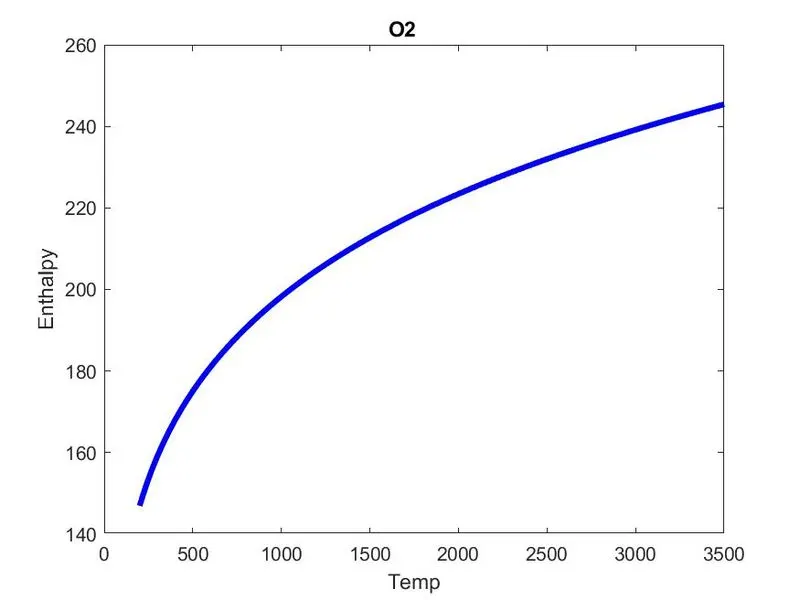
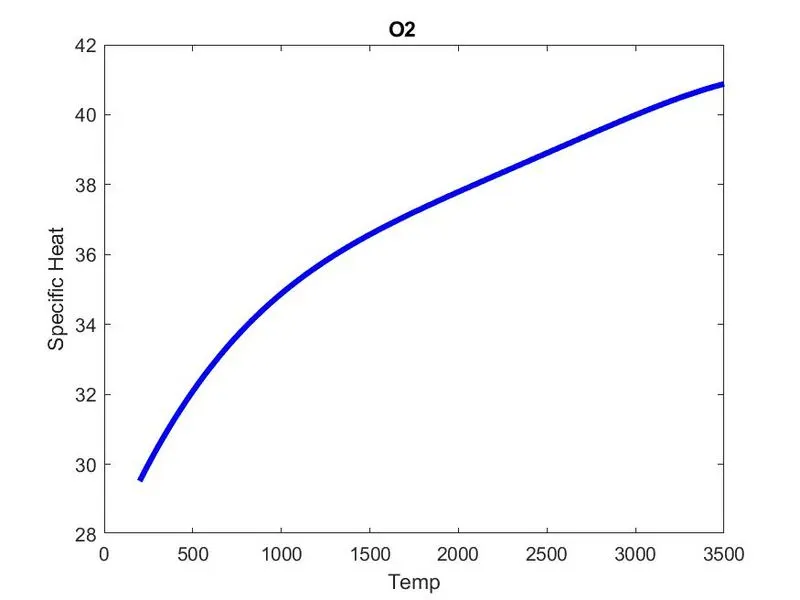
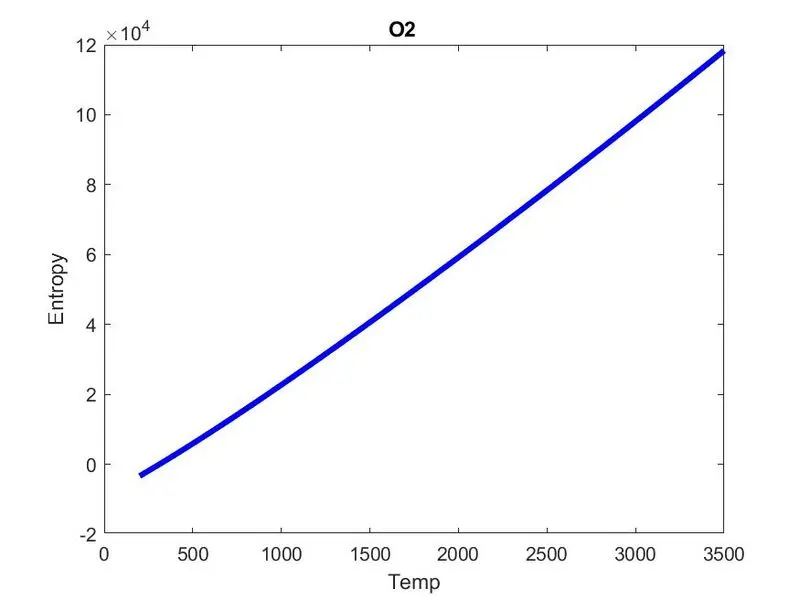
Plots for N2:
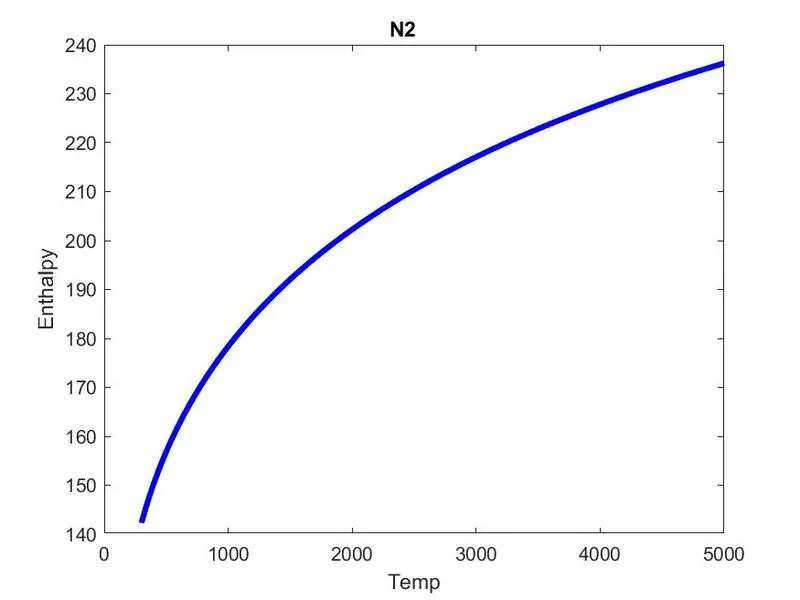
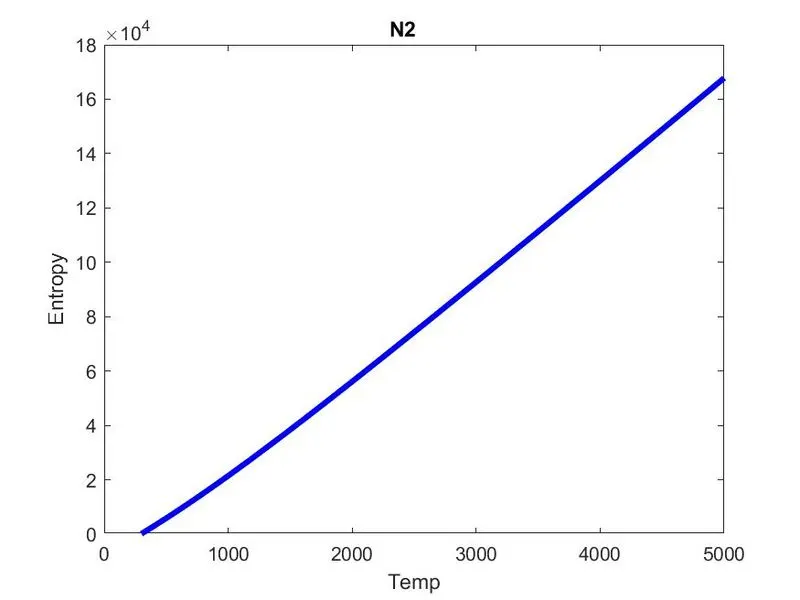
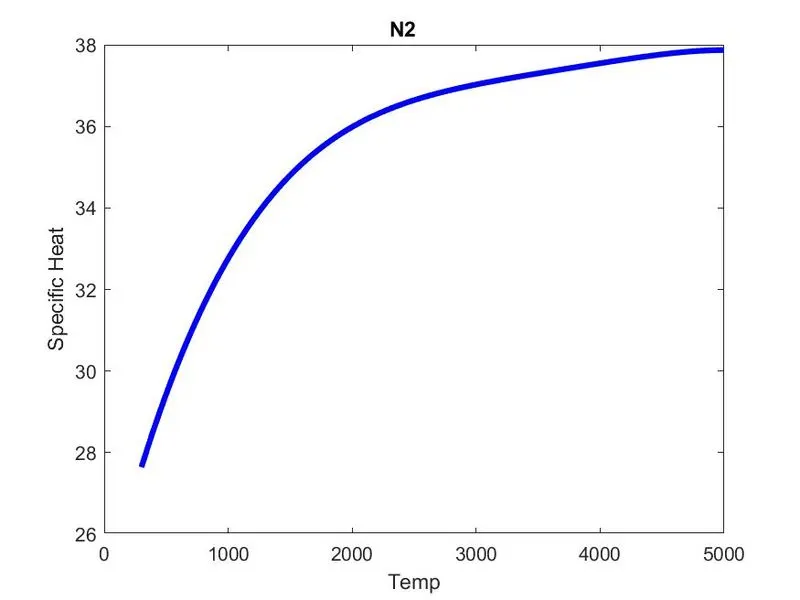
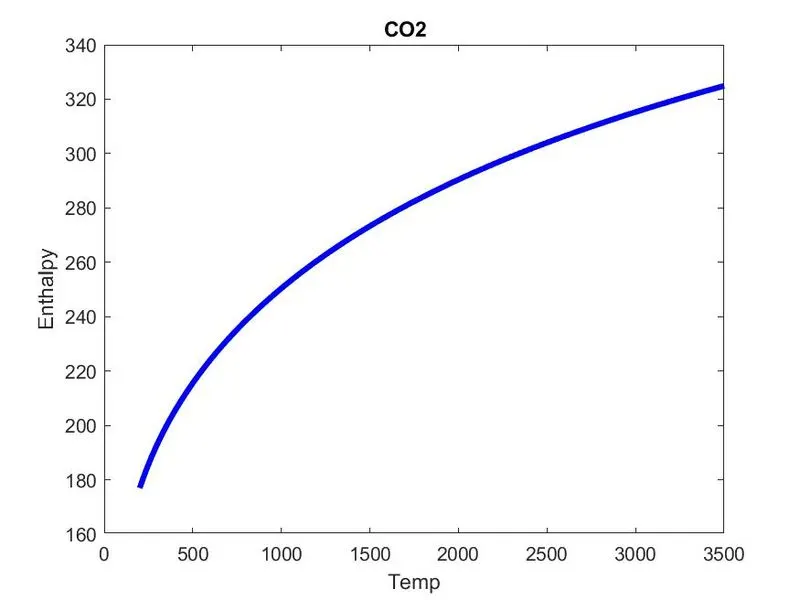
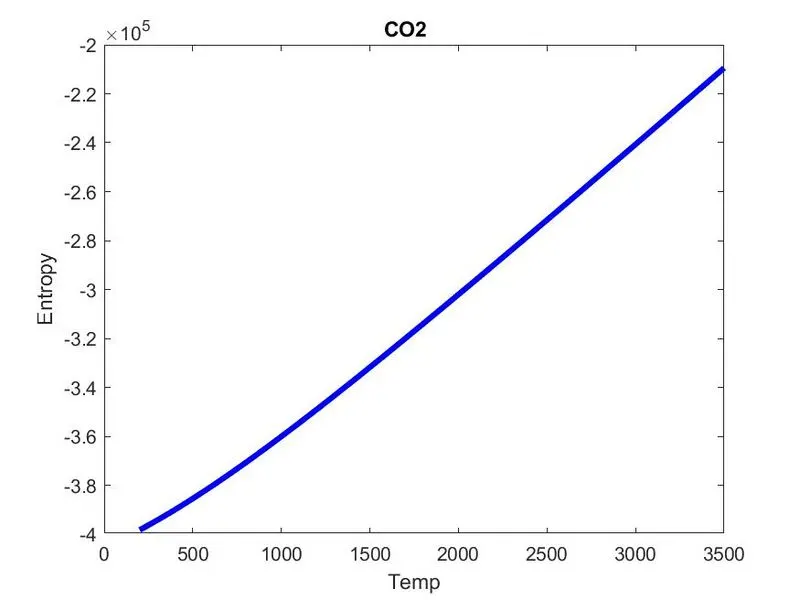
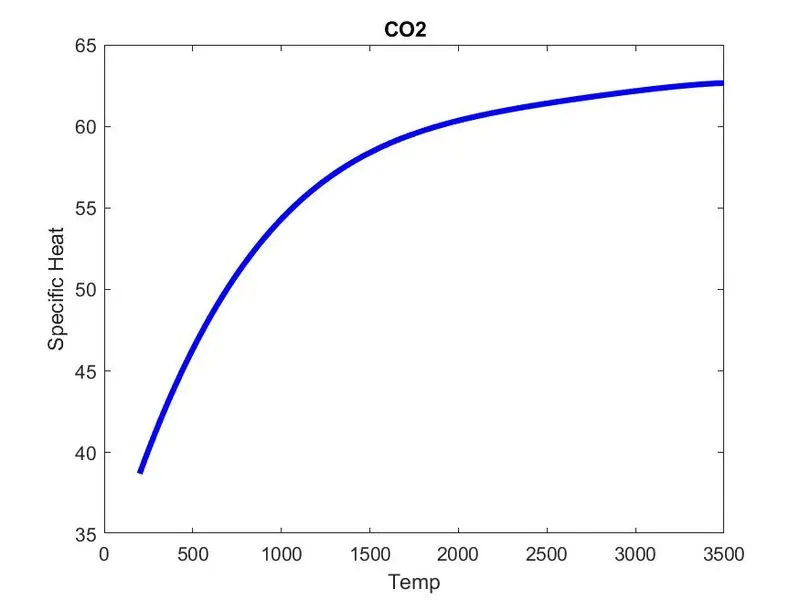
Plots for Co2:
Results:
There,NASA thernodynamic data file is succesfully parsed and plotted the graphs of specific heat,Enthalpy and Entropy for the respective input species name.