file Parsing NASA thermodynamic data
Aim: Reading and analyzing the NASA thermodynamic data file with the help of file parsing by MATLAB program.
Objectives:
- Understanding of different commands which are used to read the file data
- Finding the logic behind the data.
- plotting the graph from inputs of file data
Theroy:
File parsing:Within computational linguistics the term is used to refer to the formal analysis by a computer of a sentence or other string of words into its constituents, resulting in a parse tree showing their syntactic relation to each other, which may also contain semantic and other information.
We are using THERMO.dat file for getting data of NASA thermodynamic by using some set logics and formulas we get the data of spacific heat, Enthalpy & Entropy and plot the of this parameters with respect to temperature.
The formulas of parameters as follows:
`C_p=a1+a2*T+a3*T^2+a4*T^3+a5*T^4`
`H/(RT)=a1+(a2*T)/2+(a3*T^2)/3+(a4*T^3)/4+(a5*T^4)/5+(a6)/T`
`S/R=a1*lnT+a2*T+(a3*T^2)/2+(a4*T^3)/3+(a5*T^4)/4+a7`
Where as Cp = Spacific Heat
H = Enthalpy
S = Entropy
T = Temprature
R = Universal gas constant = 8.1344
Commands used for matlab program:
1.fopen(filename,permission) opens the file with the type of access specified by permission.
where as their are different permission which are as follows
|
|
Open file for reading. |
|
|
Open or create new file for writing. Discard existing contents, if any. |
|
|
Open or create new file for writing. Append data to the end of the file. |
|
|
Open file for reading and writing. |
|
|
Open or create new file for reading and writing. Discard existing contents, if any. |
|
|
Open or create new file for reading and writing. Append data to the end of the file. |
|
|
Open file for appending without automatic flushing of the current output buffer. |
|
|
Open file for writing without automatic flushing of the current output buffer. |
2. fgetl(fileID) returns the next line of the specified file, removing the newline characters
3.f(1)=findstr(str1, str2) searches the longer of the two input arguments for any occurrences of the shorter argument, returning the starting index of each such occurrence in the double array f(1). If no occurrences are found, then findstr returns the empty array, []. The input arguments str1 and str2 can be character vectors or string scalars.
4.str2num(chr) converts a character array or string scalar to a numeric matrix. The input can include spaces, commas, and semicolons to indicate separate elements. If str2num cannot parse the input as numeric values, then it returns an empty matrix.
The str2num function does not convert cell arrays or nonscalar string arrays, and is sensitive to spacing around + and - operators.
5.strsplit(str,delimiter) splits str at the delimiters specified by delimiter. The delimiter means by this you can divide the continuous strings in number of strings
6.mkdir(newfolder) it is used to make new folder
7.cd used change to current folder
8.strcmp(s1,s2) compares s1 and s2 and returns 1 (true) if the two are identical and 0 (false) otherwise. Text is considered identical if the size and content of each are the same. The return result is of data type logical.
MATLAB Program For File Parsing
%Programm for file parsing or reading and evaluating data from particular
%file
clear all
close all
clc
 f1 = fopen('THERMO.dat','r');% for reading the data file
 tline1 = fgetl(f1); % calling the first header line
 tline2 = fgetl(f1); % calling the second gobal temp line
 T = findstr(tline2,' '); % finding the string value with the help of gap b/w them
 global_low_temp = str2num(tline2(T(1)+3:11)); % defining the low global temp and coverting to number formate
 global_mid_temp = str2num(tline2(T(1)+12:21)); %defining the mid global temp and coverting to number formate
 global_high_temp = str2num(tline2(T(1)+22:end)); %defining the high global temp and coverting to number formate
 % for skipping the first 3 header lines
 for j = 1:3
 fgetl(f1);
 end
 %1.for finding the spacific heat, enthalpy, entropy
 for n = 1:53 % defining the length of sets to calculate the values
 tline3 = fgetl(f1);
 S = strsplit(tline3, ' ');
 spacies_name{n} = S{1}; %locating the species name  and calling the string value
 M = findstr(tline3,'G '); %  finding the position value of string
 L = strsplit(tline3(45:end),' ');% defining the set of temperature string
 Local_low_temp(n) = str2num(L{2}); % calling and converting the temprature values
 Local_mid_temp(n) = str2num(L{3});
 Local_high_temp(n) = str2num(L{4});
% calling the next line of values to find coefficients
 tline4 = fgetl(f1);
 a = findstr(tline4,'E'); % finding the E positions in tline4
 a1 = str2num(tline4(1:a(1)+3)); % locating t=and converting the first coeffi, to number
 a2 = str2num(tline4(a(1)+4:a(2)+3));
 a3 =  str2num(tline4(a(2)+4:a(3)+3));
 a4 =  str2num(tline4(a(3)+4:a(4)+3));
 a5 =  str2num(tline4(a(4)+4:a(5)+3));

 tline5 = fgetl(f1);
 a6 =   str2num(tline5(1:a(1)+3));
 a7 =   str2num(tline5(a(1)+4:a(2)+3));
 a8 =   str2num(tline5(a(2)+4:a(3)+3));
 a9 =   str2num(tline5(a(3)+4:a(4)+3));
 a10 =  str2num(tline5(a(4)+4:a(5)+3));

 tline6 = fgetl(f1);
 a11  =  str2num(tline6(1:a(1)+3));
 a12 =  str2num(tline6(a(1)+4:a(2)+3));
 a13 =  str2num(tline6(a(2)+4:a(3)+3));
 a14 =  str2num(tline6(a(3)+4:a(4)+3));

 t2 = Local_high_temp(n);
 t1 = Local_low_temp(n);
 t = linspace(t1,t2,100);% assuming the temperature range to fing Cp,H,S
 R =8.137;

for i = 1:length(t) % calculating the parameters for the range of t
 if (t>Local_mid_temp(n)) % Using the if else command for condition
    cp = (a1+a2*t+a3*(t^2)+a4*(t^3)+a5*(t^4))*R; %spacific heat
    H = (a1+(a2*t)/2+(a3*t^2)/3+(a4*t^3)/4+(a5*t^4)/5+(a6/t))*R*t; % Enthalpy
    S = (a1.*log(t)+a2.*t+(a3.*(t^2))/2+(a4.*(t^3))/3+(a5.*(t^4))/4+a7).*R; % Entropy
else
    cp = (a8+a9.*t+a10*(t.^2)+a11*(t.^3)+a12*(t.^4)).*R;
    H = (a8+(a9.*t)./2+(a10.*t.^2)./3+(a11.*t.^3)./4+(a12.*t.^4)./5+(a13./t)).*R.*t;
    S = (a8.*log(t)+a9.*t+(a10.*(t.^2))/2+(a11.*(t.^3))/3+(a12.*(t.^4))/4+a14).*R;
 end
end

% making the new folder and [~,~] is used to ignore o/p
[~,~] =  mkdir('F:Skill-lyncMATLAB for Mechanical EngineersCodingfile_parsing',spacies_name{n});
%changing the current folder
 cd(['F:Skill-lyncMATLAB for Mechanical EngineersCodingfile_parsing',spacies_name{n}]);

% Plotting the graphs for input parameters
%Plot for temperature vs specific heat
figure(1)
plot(t,cp,'linewidth',3,'color','b');
xlabel('temperature');
ylabel('specific heat');
grid on
title(spacies_name{n},'Temperature vs Specific heat');
saveas(1,'specific heat','jpg'); % for saving the file as specific heat in jpg formate

% Plot for temperature vs enthalpy
figure(2)
plot(t,H,'linewidth',3,'color','g');
xlabel('temperature');
ylabel('enthalpy');
grid on
title(spacies_name(n),'Temperature vs Enthalpy');
saveas(2,'enthalpy','jpg');


% Plot for temperature vs entropy
figure(3)
plot(t,S,'linewidth',3,'color','r');
xlabel('temperature');
ylabel('entropy');
grid on
title(spacies_name{n},'Temperature vs Entropy');
saveas(3,'entropy','jpg');
%Change the cirrent folder
cd('F:Skill-lyncMATLAB for Mechanical EngineersCodingfile_parsing');
 end
 % for displaying seperate name of gas molecules
 q = 'Enter the species name: '; % displaying this text on command window
 S_name=input(q,'s'); % input for displaying the function

for i=1:53; % defining the length of species name
  % using the string comparator for comparing the input value and spacies_name
if  strcmp(S_name, spacies_name(i)) ==1;

       n=i;
 % calculating the molecular weight by molecular weight function
 M = molecular_weight(S_name);% function to calculate the mol. wt
% displaying the molecular weight of spacies
 disp('Molecular weight of species= ')
 disp(M)

 end
end
Matlab Program for Molecular Weight Function:
%function for calculating the molecular weight
function [M]=molecular_weight(S_name)
elements=['O','H','C','N','A','S'];
atomic_mass=[15.999,1.008,12.011,14.007,39.948,32.065];
M=0;
for i=1:length(S_name);
    for j=1:length(elements);
       if strcmpi(S_name(i),elements(j));

            M=M+atomic_mass(j);
            K=(j);
        end

    end
    n=str2double(S_name(i));
    if (n>0)
        M=M+(atomic_mass(K)*(n-1));
    end
end
Explanation Of Program
1. first up all we call the our data file with the help fopen command in readable formate.consider that the given data file and the program should be in one folder. the value of fopen command should be positive in command window.
2. After that to rad the data of global temperature we have skip the header line with the help of fgetl command now next line is global temperature and we call this string array with fgetl and give it name tline2, now this a single string line with 3 temperature so to seperate them we have to find the position of single string array so to do that we use findstr command with of gap between two temperature. Now we have string arrey in three different cell now we have call them and convert them to number with the help of str2num command.
3.Now we have to skip next three text line so we fgetl command in for loop for length of 3.
. Now we have total 53 set of species in the program which are identical so we have to calculate the given parameters which are spacific heat(Cp),Enthalpy(H).,Entropy(S) for one set and we can use this one set to calculate other sets as follows,
5. Now we have call next line with the help of fgetl command, this line contains data of spacies name and local(low,mid,high) temperatures, now we have called the first line so we have divide this continuous string array with the help of strsplit command with delimiter as gap between them so we divided the string array into seperate strings now we know that our first string is spacies name so we use Braces which are used to content addressing of cell arrays.
6. Now we get our species name now to get the temperature values for this specie we have to divide the continuous line in two string arrays by strsplit command as shown in above code, now we can call our local temperature with brace with address and convert this string to number with the help of str2num.
7.Now to calculate the coefficients we have to call three lines wih the help of fgetl command get those lines one by one, after calling the first line it is continuous string consist of five coefficient which we have to separate it for this we have logic which is in our line we have letter E so we can use that for separating the coefficient by using findstr command which give us position of E from this we can get separate coefficient in string formate so to convert this we use str2num command we get all coefficient and we repeat this for next 2 lines .
8.Now ro calculate spacific heat , Enthalpy,Entropy we have to define temperature range between local low temperature and local high temperature with the help of linspace command now we use for loop for the range of temperature. In this loop we define the formula od spacific heat , Enthalpy and Entropy.
9. Now we have total 14 coefficients for one set we have divide it in two sets as follows FIRST 7 coefficients are HIGH-temperature coefficients and the SECOND 7 coefficients are LOW-temperature coefficients. like this by using conditional statement i.e. if command
10. Now we have to save this all data so for this we use mkdir command abd define the path of folder, as we know that matlab has it's own path so to change that path we use cd command to change the current folder,
11. Next step is representing this data in graphs and saving in their folder to this we use plot command and to save this plot we use saveas command, in saveas command we have to give inputs like file name and formate of file to be saved.
12. Now we have completed the program for one set of species for all species we have use for loop for length of species which 53 to get all data of species .
13. Now the last step is to calculate the molecular weight of species for this we have define a function which is as follows:
a. first we define the elements of our spacies
b. next we define their atomic mass.
c. after this by using the 'strcmp' command each species elements are compared and molecular mass is stored using two 'for loops', one to iterate the species element and one to compare the elements.
d.In some species like H2O2 the element's atomic weight to be added twice (or) thrice, hence flag operator is used to get the position and that element atomic weight is added to the molecular weight by using the 'if' condition.
OUTPUTS:
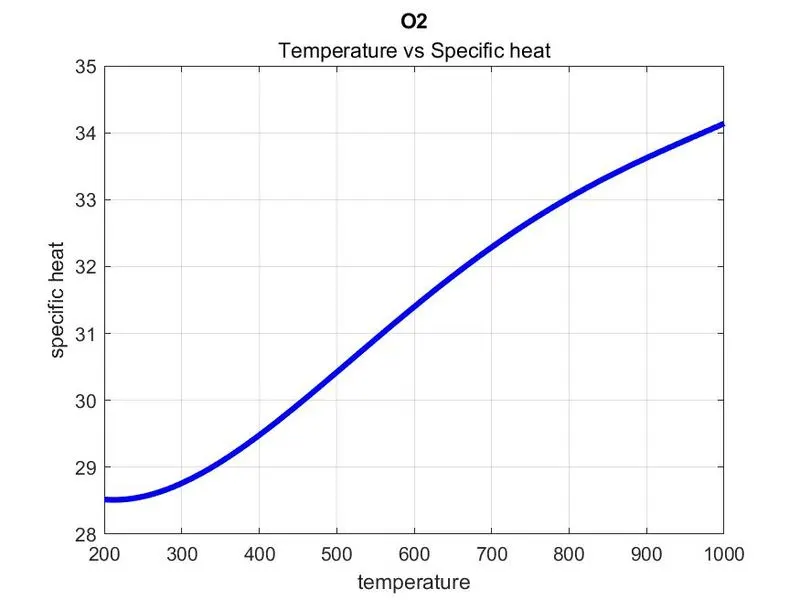
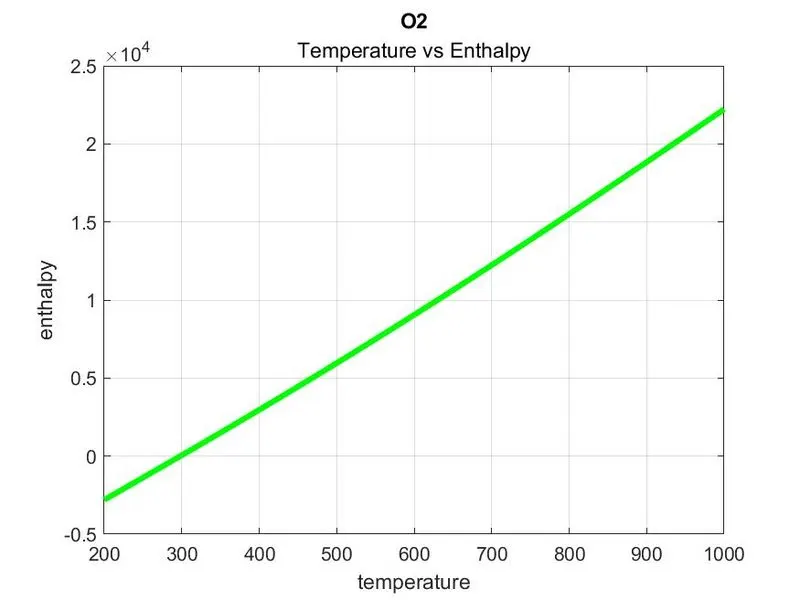
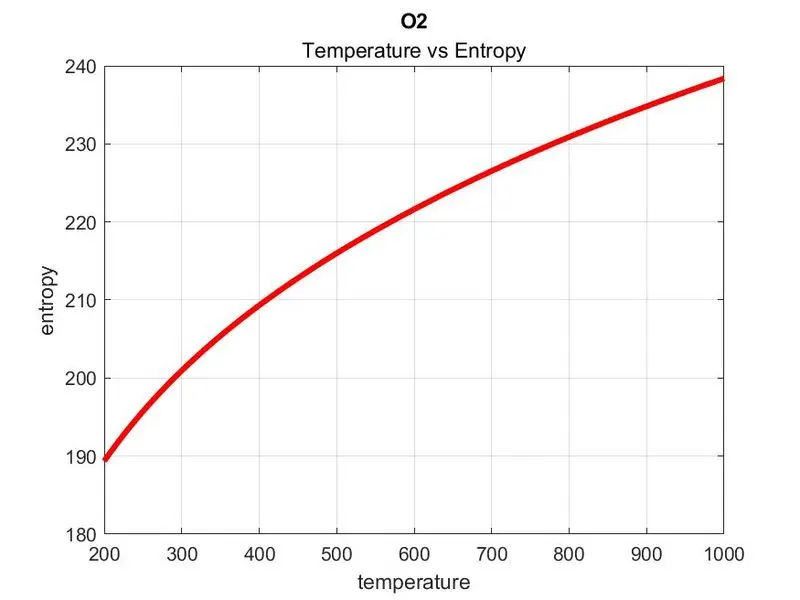
A. Plot for O2
a. Temperature Vs Spacific Heat
b. Temperature Vs Enthalpy
c. Temperature Vs Entropy
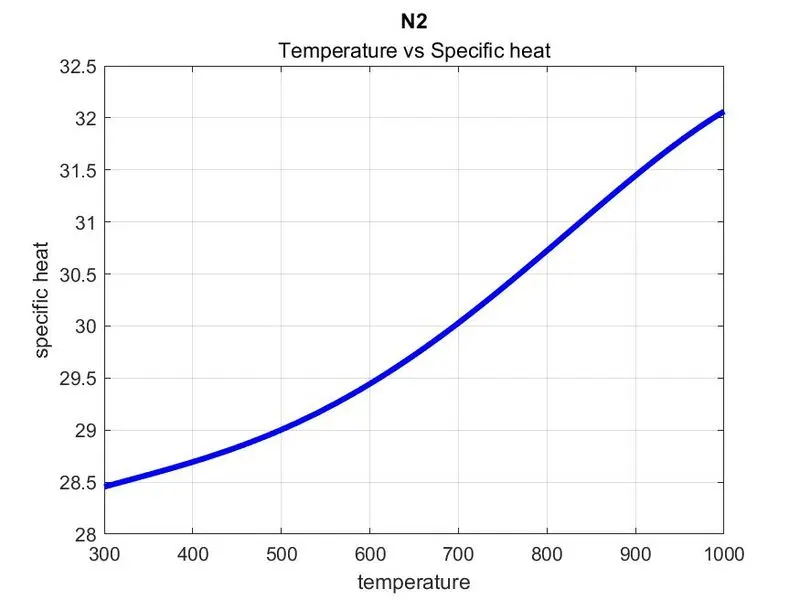
2.Plot for N2
a. Temperature Vs Spacific Heat
b. Temperature Vs Enthalpy
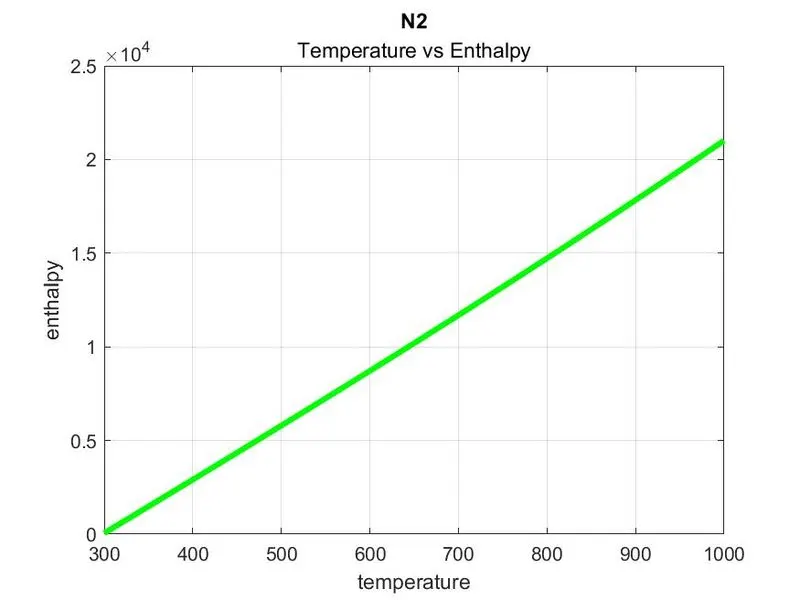
c. Temperature Vs Entropy
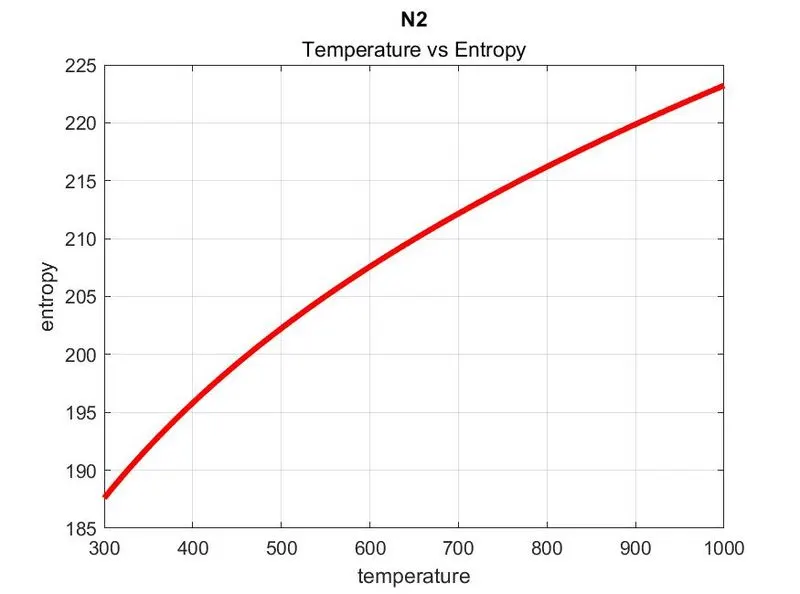
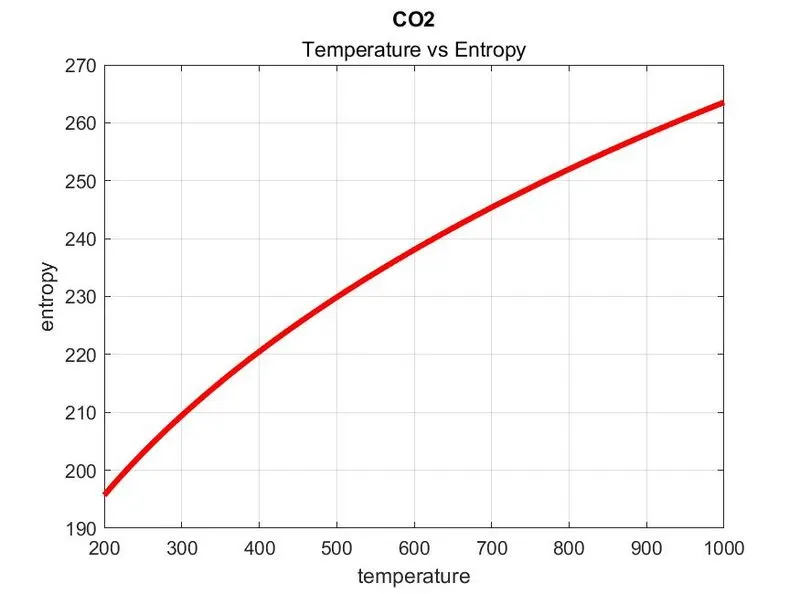
3.Plot for CO2
a. Temperature Vs Spacific Heat
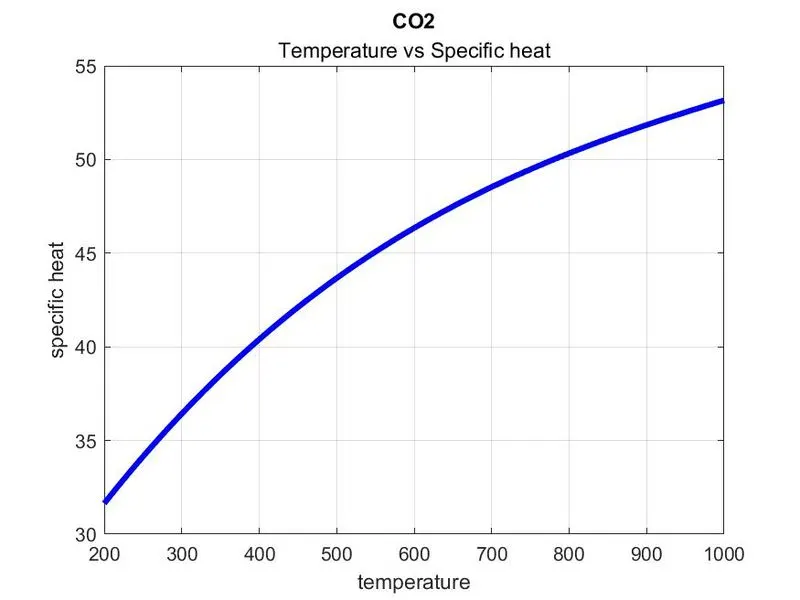
b. Temperature Vs Enthalpy
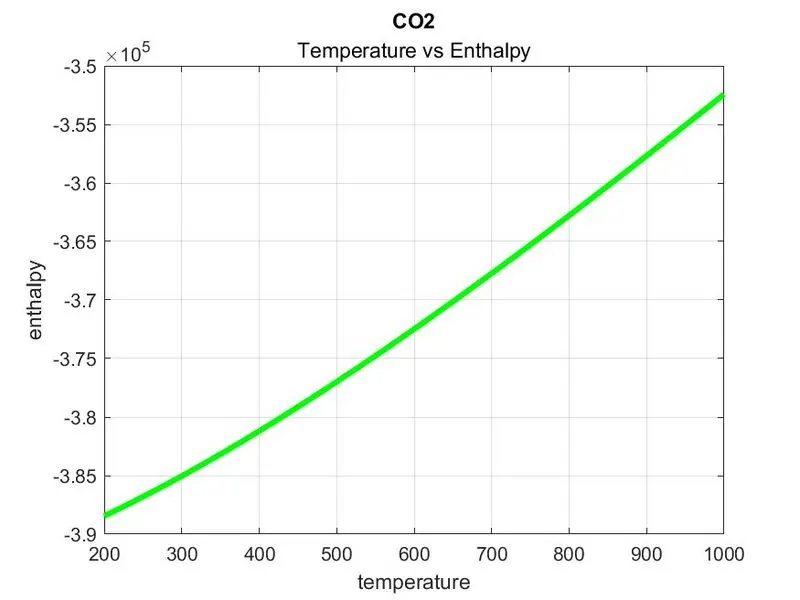
c. Temperature Vs Entropy
3. Folder of all species
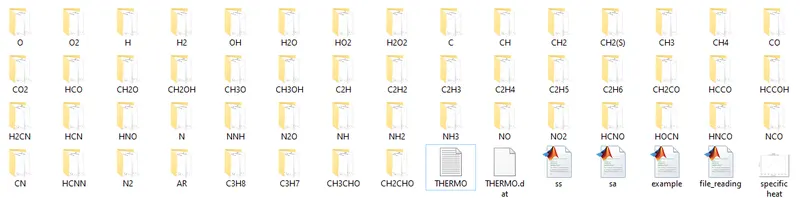
4. Display of molecular weight

CONCLUSION:
From this we can conclude that when we are handling big data and we have to get data or graphs form it we can use file parsing technique.Because it is vary easy to use once you understand logic of data written.