Parsing NASA thermodynamic data
- Aim:
Parsing of NASA thermodynamic data and extract the 14 coefficients for each species and use them in the given formulae to find the specific heat, enthalpy, entropy of each species. Creating a function for the coefficients so that it is easier to run for all the species.(53).
- Objectives:
- Parsing of NASA thermodynamic data and extract the 14 coefficients for each species.
- Using the data to calculate specific heat, enthalpy and entropy of each species.
- Calculating the molecular weight of each species and displaying it in the command window.
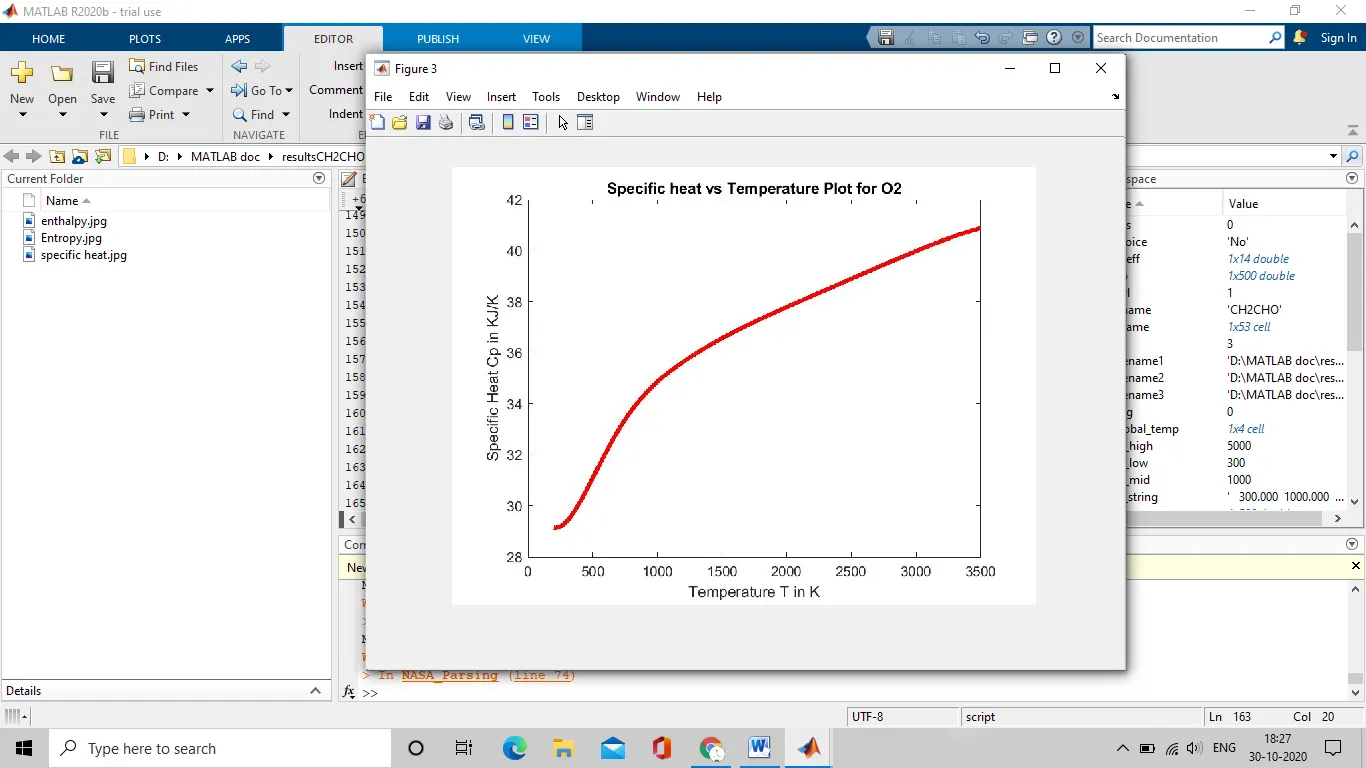
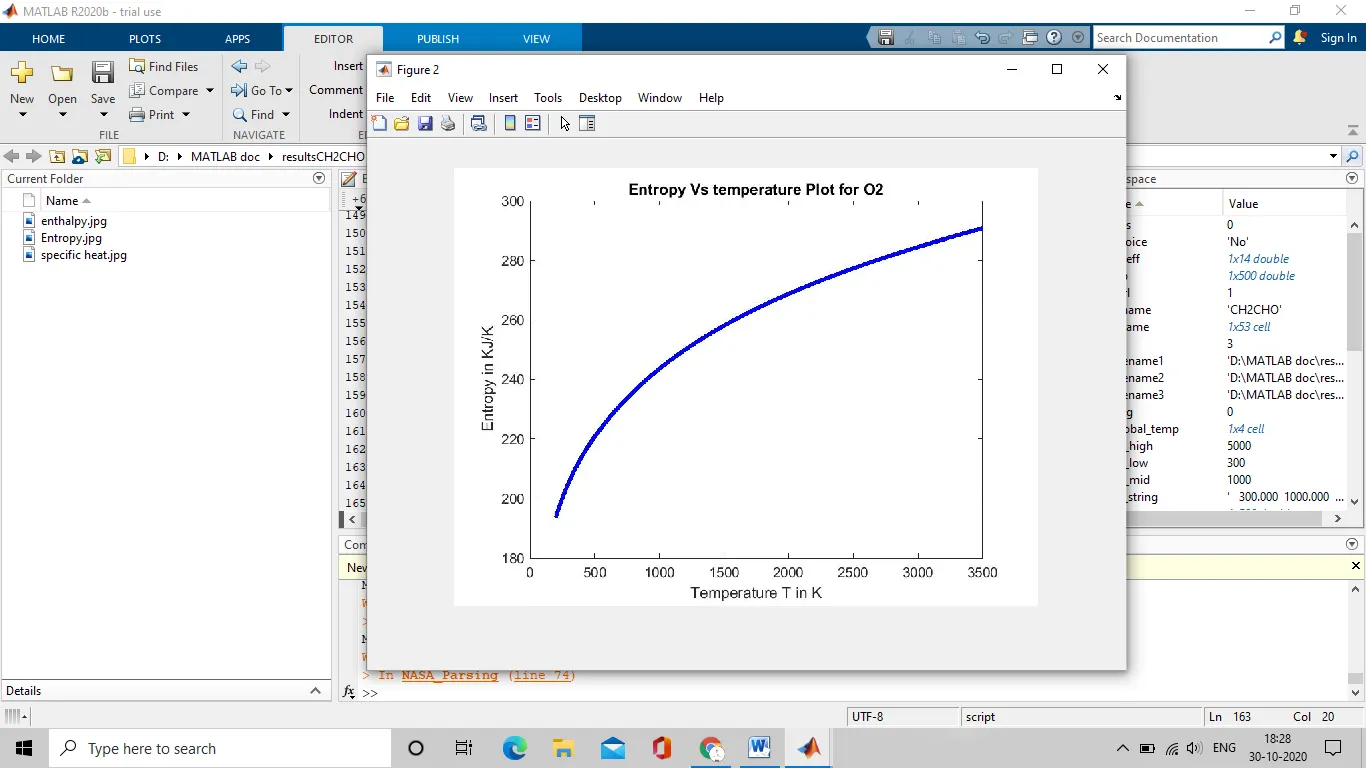
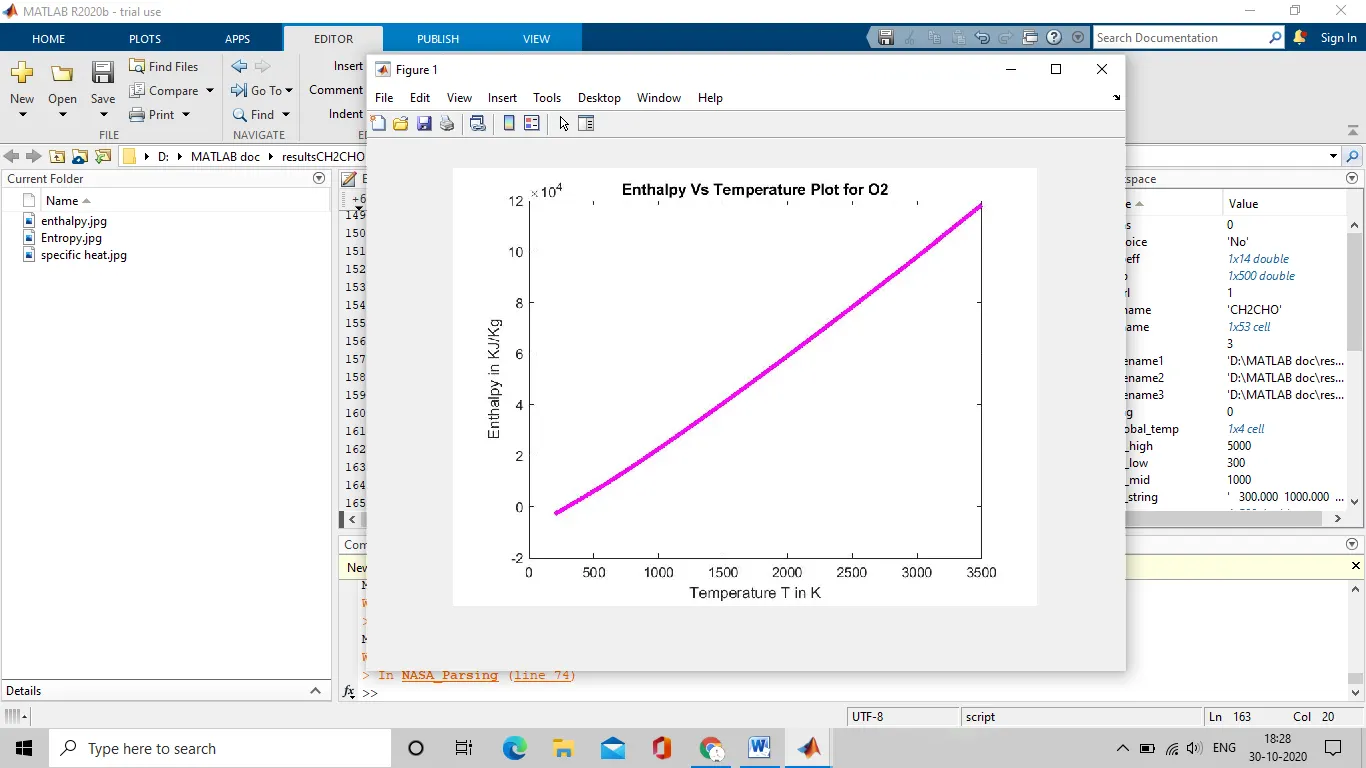
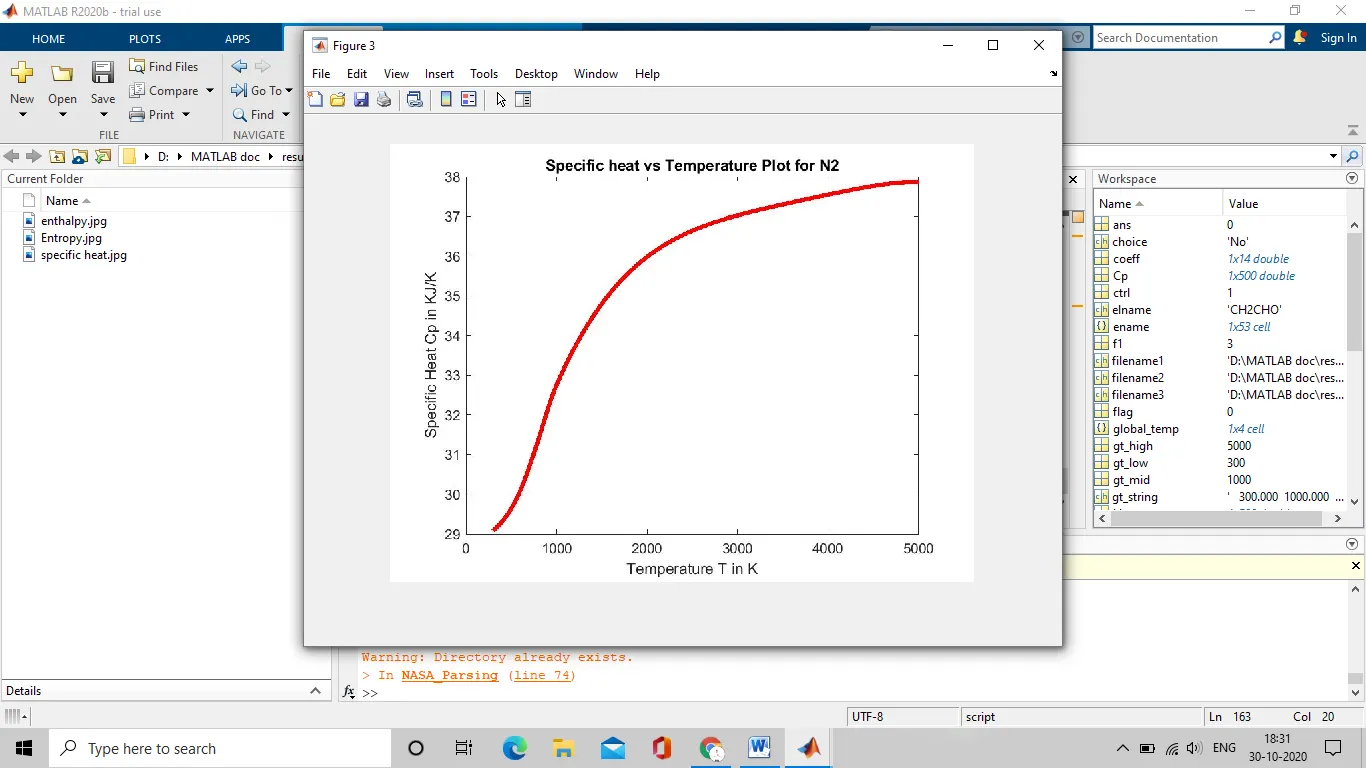
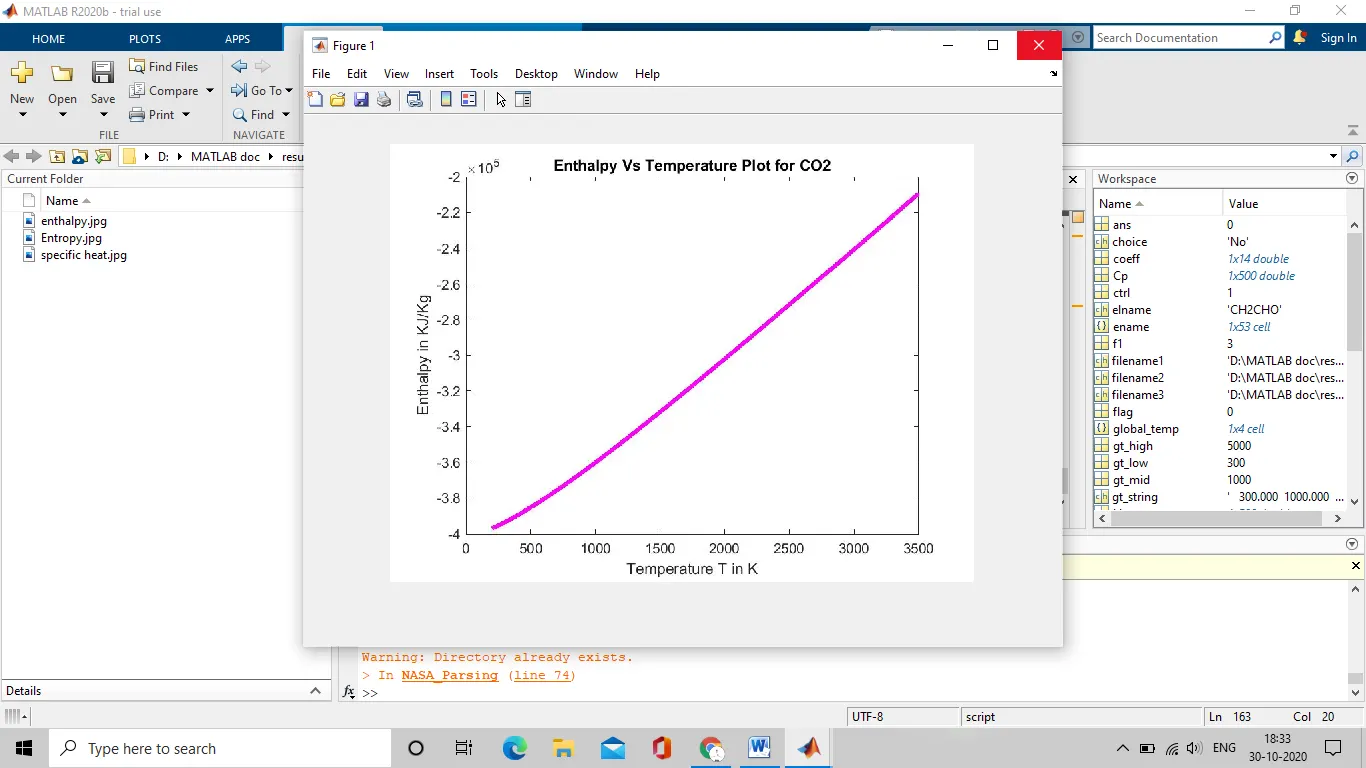
- Plotting the graphs for Cp, H, S v/s local temperature range.
- Save the plots as images with appropriate names and save them in their species folder.
- Reading the images stored in the folders for particular species like O2, N2, CO2.
- The FIRST7 coefficients are HIGH-temperature coefficients and the SECOND 7 coefficients are LOW-temperature coefficients.
- Also use the LOCAL TEMPERATURE RANGESwhich is unique for each individual species, not the GLOBAL TEMPERATURE RANGE.
- Equations:
Given formulae for specific heat, enthalpy and entropy are:
R is the universal gas constant, R=8.314 J/mol-k
T is the local temperature range.
- Specific heat:
`Cp=(a1+a2*T+a3*T^2+a4*T^3+a5*T^4)`
- Enthalpy:
`H=a1+a2*T/2+a3*T^2/3+a4*T^3/4+a5*T^4/5+a6/T`
- Entropy:
`S=a1*lnT+a2*T+a3*T^2/2+a4*T^3/3+a5*T^4/4+a7`
- Contents:
- Introduction
- Explanation of MATLAB programs with functions
- Outputs
- Errors encountered and resolved
- Results and discussions
- Reference
- Introduction:
- File parsing:
Parsing a file means reading in a data stream of some sort and building an in memory model of the semantic content of that data. This aims at facilitating performing some kind of transformation on the data. It helps to read a certain file so that certain calculations are necessary changes can be made wrt to the data file.
- NASA thermodynamic file:
In this project THERMO.dat file is used which is given by NASA, in which 14 coefficients each of 53 different species are given. This data can be used to calculate the specific heat, enthalpy and entropy using the given formulae.
Also the global temperature and the local temperature for each species is given.
- List of 53 elements or species:
AR, C, C2H, C2H2, C2H3, C2H4, C2H5, C2H6, C3H7, C3H8, CH, CH2, CH2(2), CH2CH0, CH3CO, CH20, CH2OH, CH3, CH3CHO, CH3O, CH3OH, CH4, CN, CO, CO2, H, H2, H2CN, H2O, H202, HCCO, CCOH, HCN, HCNN, HCNO, HCO, HNCO, HNO, HO2, HOCN, N, N2, N2O, NCO, NH, NH2, NH3, NNH, NO, NO2, O, O2, OH.
- Specific Heat:
The specific heat is the amount of heat per unit mass required to raise the temperature by one degree Celsius. The relationship between heat and temperature change is usually expressed in the form shown below where c is the specific heat.
- Enthalpy:
The enthalpy H of a thermodynamic system is defined as the sum of its internal energy U and the work required achieving its pressure and volume. In practice, a change in enthalpy (ΔH) is the preferred expression for measurements at constant pressure, because it simplifies the description of energy transfer. When matter transfer into or out of the system is also prevented, the enthalpy change equals the energy exchanged with the environment by heat.
- Entropy:
Entropy is an extensive property of a thermodynamic system. It quantifies the number Ω of microscopic configurations (known as microstates) that are consistent with the macroscopic quantities that characterize the system
Entropy is a function of the state of the system, so the change in entropy of a system is determined by its initial and final states. In the idealization that a process is reversible, the entropy does not change, while irreversible processes always increase the total entropy.
- Temperature:
Temperature is a physical quantity that expresses hot and cold. It is the manifestation of thermal energy, present in all matter, which is the source of the occurrence of heat, a flow of energy, when a body is in contact with another that is colder.
- Explanation of MATLAB program with functions:
- Main program:
This program is used as a main program where all the necessary functions are called and utilised. The THERMO.dat is loaded in this program initially before calling the functions and using for loop every function can be used for all the species. The total number of lines is calculated and later the unnecessary lines are subtracted and total number of species is calculated. This program has a while statement in action, in order to retrieve images related to any particular species.
The plot command is used in for to create graphs for CP v/s T, H v/s T, S v/s T, and stored in the specified folder where all the element graphs are stored.
%Parsing NASA data of different species using
%MATLAB

clear all
close all
clc

%Universal gas constant 'R' in J/(mol*K)
R=8.314;

%opening NASA thermodynamic data file 'THERMO.dat' in read mode
f1=fopen('THERMO.dat','r');

%to find total number of species
string=fgetl(f1);
i=1;
while strcmp(string,'END')==0
    string=fgetl(f1);
    i=i+1;
end

total_lines=i;
total_species=(total_lines-6)/4;  %since first 5 lines and last line is not requierd

%extraction of global temperature
%plaing the file pointer in the benginning
frewind(f1);
%Reading 1st line &skipping it since its not needed
fgetl(f1);

%Splitting the cell array and converting them into numbers
gt_string=fgetl(f1);
global_temp=strsplit(gt_string,' ');
gt_low=str2double(global_temp{2});
gt_mid=str2double(global_temp{3});
gt_high=str2double(global_temp{4});

%skipping the next 3 lines
fgetl(f1);
fgetl(f1);
fgetl(f1);

%calculating and plotting Cp,H,S for all species

for species= 1:total_species

    %calling the function for element name and its local temperatures
    [name, llt, lht, lmt]=element_name_loc_temp(f1);
    ename{species}=name;

    %dividing local temperature range into 500 values
    T=linspace(llt, lht, 500);

    %calling the function for co-efficients
    coeff= coefficient_calc(f1);

    %calculation of specific heat for 500 temperature values
    Cp=specific_heat_calc(coeff, lmt, T, R);

    %calculation of enthalpy for 500 vlaues
    H= enthalpy_calc(coeff, lmt, T, R);

    %entropy calculation
    S=entropy_calc(coeff, lmt, T, R);

    %calculation of Molecular weight
    Mol_wt= molecular_weight(name);
    fprintf('Molecular weight of %s is %d n', name, Mol_wt)
    fprintf('n')

    %plotting & saving the plots: Cp vs T, H vs T and S vs Tfor all the
    %elements
    %creating a directory to store the graphs
mkdir(['D:MATLAB docresults',name]);

%plotting Specific heat vs Temperature plot
figure(1)
plot( T, Cp, 'color','r','linewidth',3)
xlabel('Temperature T in K')
ylabel('Specific Heat Cp in KJ/K')
title(sprintf('Specific heat vs Temperature Plot for %s', name))

%plotting enthalpy vs temperature plot
figure(2)
plot(T, H, 'color','m','linewidth',3)
xlabel('Temperature T in K')
ylabel('Enthalpy in KJ/Kg')
title(sprintf('Enthalpy Vs Temperature Plot for %s', name))

%plotting Entropy Vs Temperature plot
figure(3)
plot(T,S,'color','b','linewidth',3)
xlabel('Temperature T in K')
ylabel('Entropy in KJ/K')
title(sprintf('Entropy Vs temperature Plot for %s', name))

cd(['D:MATLAB docresults',name])

saveas(figure(1),'specific heat','jpg')
saveas(figure(2),'enthalpy','jpg')
saveas(figure(3),'entropy','jpg')
end
fclose(f1);

%Asking user wheather to show plots of any particular element
ctrl=0;
flag=1;
while ctrl==0
    %asking for user response
    choice = questdlg('do you want to view H-T, S-T, c-T plot of any element?','User response','Yes','No','No');
    %execution will be controlled by user response using switch statement
    switch choice
        case 'Yes'
            % to display the elements in a dialouge box
            msgbox({'The elements present in the database are as follows:'
                'AR, C, C2H, C2H2, C2H3, C2H3, C2H4, C2H5, C2H6, C3H7, C3H8'
                'CH, CH2, CH2(S), CH2CHO, CH2CO, CH20, CH2OH, CH3, CH3CHO, CH3O'
                'CH3OH, CH4, CN, CO, CO2, H, H2, H2CN, H2O, H202'
                'HCCO, HCCOH, HCN, HCNN, HCNO, HCO, HNCO, HNO, HO2, HOCN'
                'N, N2, N20, NCO, NH, NH2, NH3, NNH, NO, NO2'
                'O, O2, OH'});
            %to ask element name in a dialouge box
            user = inputdlg('enter the element name:');

            %loop to compare the user input with all the stored elements
            %ename is the string array containing the element names

            res=0;

            for n= 1:total_species
                elname=ename{n};
                %comparing the user input & element name under case
                %insensitive mode
                res=strcmpi(elname, user);

                if res==1
                    %storing the address of folder of the matched element
                    path=strcat('D:MATLAB docresults',ename{n});
                    %storing address of the particular plot
                    filename1= fullfile(path,'enthalpy.jpg');
                    %Reading the image & storing its pixel info into matrix
                    image1= imread(filename1);
                    figure(1)
                    %displaying the image
                    imshow(image1);

                    filename2= fullfile(path, 'entropy.jpg');
                    image2=imread(filename2);
                    figure(2)
                    imshow(image2);

                    filename3= fullfile(path,'specific heat.jpg');
                    image3=imread(filename3);
                    figure(3)
                    imshow(image3);
                    flag=0;
                end   %end of if statement
            end       %end of for statement
            if flag==1
                uiwait(msgbox('please enter a valid element name'));
            end
        case'No'
            ctrl=1;
    end
end
2.Function to extract element name and local temperatures.
This function is created so that the element name and local temperatures of each element can be stored and used for calculation accordingly. In this function the line where the element name and local temperature is read using fgetl command and strtok is used so that the first string element is taken as the element name, and the local temperatures are split and converted in numerical numbers.
% function to find the element name and its local temp

function[name,llt,lht,lmt]= element_name_loc_temp(f1)
name_line=fgetl(f1);
%strtok()-returns the first token in the text string
name=strtok(name_line);

%finding &storing the posirion of '.' in variable ltline
ltline=strfind(name_line, '.');
ltline1=name_line(ltline(1)-3:ltline(1)+3);
ltline1=str2double(ltline1);  %local low temperature
ltline2=name_line(ltline(2)-4:ltline(2)+3);
ltline2=str2double(ltline2);  %local high temperature
ltline3=name_line(ltline(3)-4:ltline(3)+3);
ltline3=str2double(ltline3);  %local mid temperature

llt=ltline1;
lht=ltline2;
lmt=ltline3;
end
3.Function to retrieve the coefficients of each element.
This function is used to retrieve the coefficients the first line of the coefficient is stored using the fgetl command. And using the strfind to find the specific letter, in this case the letter ‘E’ is found using this command and the necessary values are taken around the letter E and converted using the str2num command. And this repeated for every line.
               %Function to call the coefficients
function [coeff]=coefficient_calc(f1)

%reading line 1 of the species co-efficient
line_1=fgetl(f1);
a=strfind(line_1,'E');
a1=line_1(1:a(1)+3);
a1=str2double(a1);
a2=line_1(a(1)+4:a(2)+3);
a2=str2double(a2);
a3=line_1(a(2)+4:a(3)+3);
a3=str2double(a3);
a4=line_1(a(3)+4:a(4)+3);
a4=str2double(a4);
a5=line_1(a(4)+4:a(5)+3);
a5=str2double(a5);

%reading line 2 of species co-efficient
line_2=fgetl(f1);
b=strfind(line_2,'E');
a6=line_2(1:b(1)+3);
a6=str2double(a6);
a7=line_2(b(1)+4:b(2)+3);
a7=str2double(a7);
b1=line_2(b(2)+4:b(3)+3);
b1=str2double(b1);
b2=line_2(b(3)+4:b(4)+3);
b2=str2double(b2);
b3=line_2(b(4)+4:b(5)+3);
b3=str2double(b3);

%reading line 3 of species co-efficient

line_3=fgetl(f1);
c=strfind(line_3,'E');
b4=line_3(1:c(1)+3);
b4=str2double(b4);
b5=line_3(c(1)+4:c(2)+3);
b5=str2double(b5);
b6=line_3(c(2)+4:c(3)+3);
b6=str2double(b6);
b7=line_3(c(3)+4:c(4)+3);
b7=str2double(b7);

coeff=[a1 a2 a3 a4 a5 a6 a7 b1 b2 b3 b4 b5 b6 b7];
4.Function to calculate the specific heat for 500 values:
As input parameter, this function will receive the coefficients, local mid temp, temperature matrix & Universal gas constant and will return the values for each element.
A for loop is used to calculate the value of specific heat for 500 temperature values. When the temperature values are greater or equal to local mid temp then the first 7 coefficients will be used in the formula or else the vice versa. Then the values are returned by function. The values are stored in a matrix.
% Specific heat calc
%Cp= (a1 +a2*T +a3*T^2 + a4*T^3 + a5*T^4)*R
function[Cp]=specific_heat_calc(coeff, lmt, T, R)

a=coeff;

for i=1:length(T)
     %if statement checks temmp for local mid temp to choose particular
    %formula for Cp
    if T(i)>=lmt
        %Here, Cp will be calculated using high temp coefficient
        %i.e, coeff[1:7]
        Cp(i)=(a(1)+a(2)*T(i)+a(3)*T(i)^2+a(4)*T(i)^3+a(5)*T(i)^4)*R;
    else
        %Here, Cp will be calculated using low temp coefficient
        %i.e, coeff[7:14]
        Cp(i)=(a(8)+a(9)*T(i)+a(10)*T(i)^2+a(11)*T(i)^3+a(12)*T(i)^4)*R;
    end
end
end
5.Function to calculate enthalpy:
As input parameter, this function will receive the coefficients, local mid temp, temperature matrix & Universal gas constant and will return the values for each element.
A for loop is used to calculate the value of enthalpy for 500 temperature values. When the temperature values are greater or equal to local mid temp then the first 7 coefficients will be used in the formula or else the vice versa. Then the values are returned by function. The values are stored in a matrix.
% Enthalpy calculation
%H=(a1 + a2*T/2 + a3*T^2/3 = a4*T^3/4 +a5*T^4/5 + a6/T)*R*T
function[H]=enthalpy_calc(coeff, lmt, T, R)

a=coeff;

for i=1:length(T)
    %if statement checks temmp for local mid temp to choose particular
    %formula for H
    if T(i)>=lmt
        %Here, H will be calculated using high temp coefficient
        %i.e, coeff[1:7]
        H(i)=(a(1)+(a(2)*T(i))/2+ (a(3)*T(i)^2)/3 +(a(4)*T(i)^3)/4 + (a(5)*T(i)^4)/5 +a(6)/T(i))*R*T(i);
    else
        %Here, H will be calculated using low temp coefficient
        %i.e, coeff[7:14]
        H(i)=(a(8)+(a(9)*T(i))/2 + (a(10)*T(i)^2)/3 + (a(11)*T(i)^3)/4 + (a(12)*T(i)^4)/5 + a(13)/T(i) )*R*T(i);
    end
end
end
6.Function to calculate entropy:
As input parameter, this function will receive the coefficients, local mid temp, temperature matrix & Universal gas constant and will return the values for each element.
A for loop is used to calculate the value of entropy for 500 temperature values. When the temperature values are greater or equal to local mid temp then the first 7 coefficients will be used in the formula or else the vice versa. Then the values are returned by function. The values are stored in a matrix.
% Entropy calculation
%S= (a1*logT + a2*T +(a3*T^2)/2 + (a4*T^3)/3 +(a5*T^4)/4 +a7)*R
function[S] = entropy_calc(coeff, lmt, T, R)

a=coeff;

for i=1:length(T)
    %if statement to check temp from local mid temp to choose correct
    %formula for S
    if T(i) >= lmt
        %S is calculated using high temp coeff
        %i.e, coeff[1:7]
        S(i)=(a(1)*log(T(i))+a(2)*T(i)+(a(3)*T(i)^2)/2 + (a(4)*T(i)^3)/3 + (a(5)*T(i)^4)/4 + a(7))*R;
    else
         %S is calculated using low temp coeff
        %i.e, coeff[7:14]
        S(i)=(a(8)*log(T(i))+a(9)*T(i)+(a(10)*T(i)^2)/2 + (a(11)*T(i)^3)/3 + (a(12)*T(i)^4)/4 + a(14))*R;
    end
end
end
7.Function to calculate molecular weight:
The function will receive the element name as an input parameter and return molecular weight for each element.
To calculate the molecular weight, a character string of all the letters appearing in the name of element and an array of atomic weight corresponding to the letters is required. A nested loop & if statement is used to compare each letter of the element name by the character string. The molecular weight is calculated letter by letter and if any numeric value came in between then it is first converted from string to number and the atomic weight of the preceding element is multiplied by one less value than numeric value which is further added to the molecular weight. The molecular weight is returned to the function.
% Molecular weight

function [Mol_wt]= molecular_weight(name)

%creating character vector of all letters appearing in the element names
std_element= {'C','H','O','N','A','S'};
%creating the array of atomic weight corresponding to their names
atomic_wt= [12,1,16,14,40,32];
Mol_wt=0;

for i=1:length(name)
    for j=1:length(std_element)
        %comparing the element name with vector-standard element
        if strcmp(name(i), std_element(j))
            Mol_wt= Mol_wt + atomic_wt(j);
            pos=j;
            break
        end
    end
    %converting the number(string) into a number
    num= str2double(name(i));
    if num>1
        Mol_wt= Mol_wt + (atomic_wt(pos).*(num-1));
    end
end
end
- Output:
- The folders containing all the elements and its images.

2.Molecular weight of all the elements:
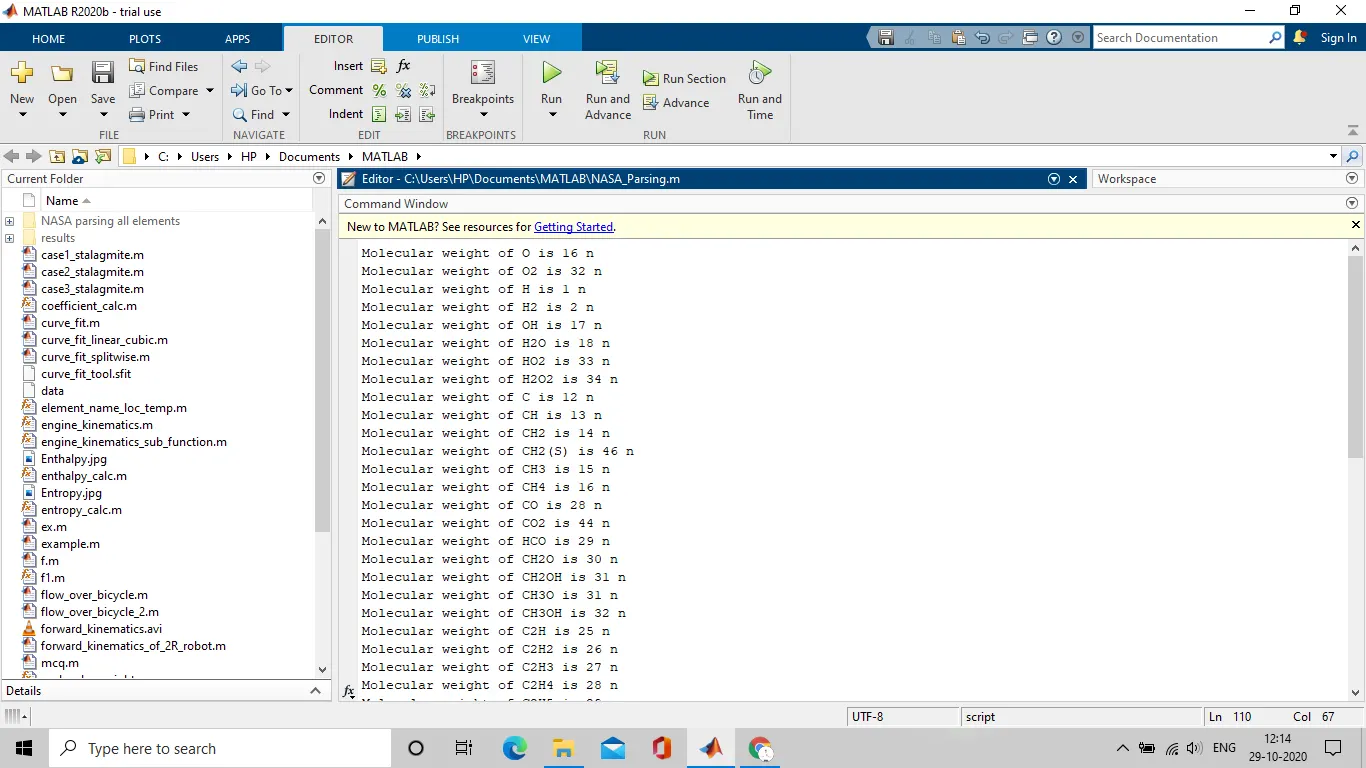
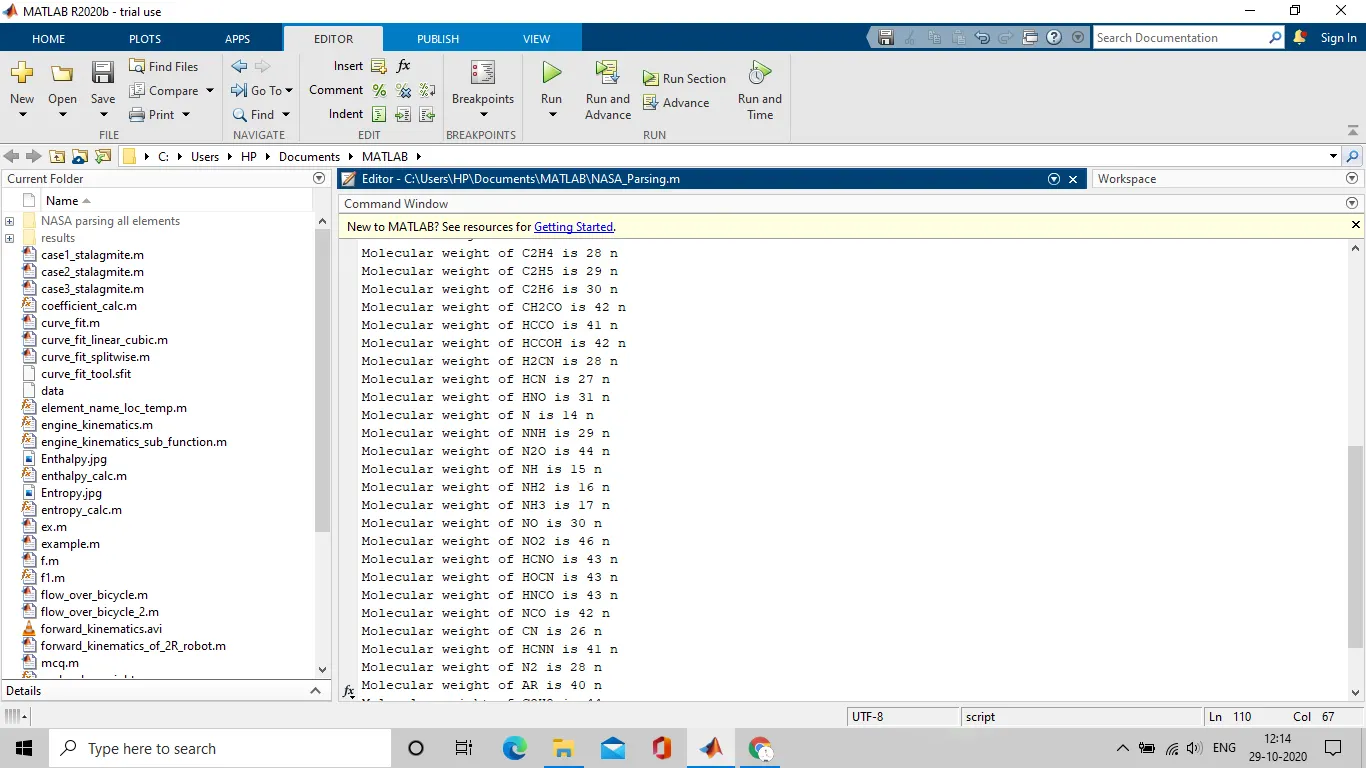
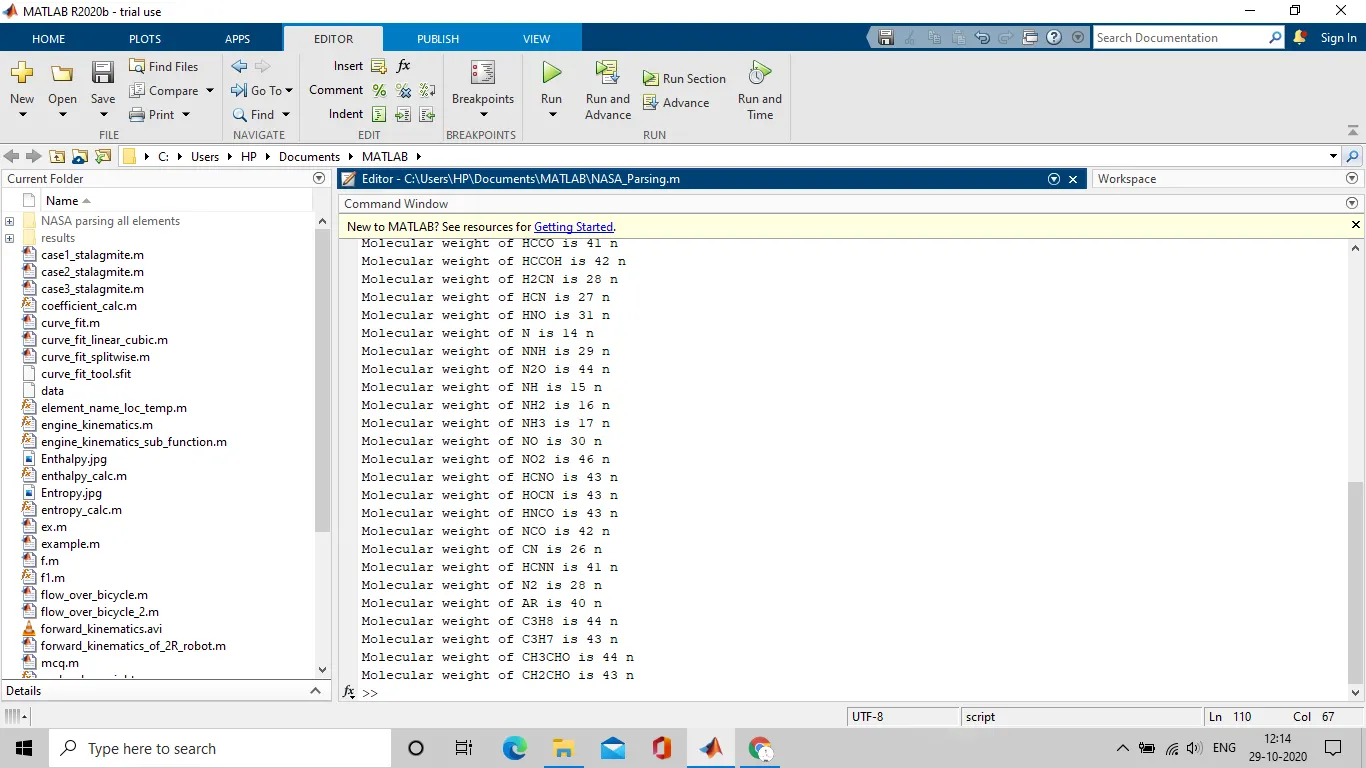
3. Plots of O2, N2, CO2:
a. O2 :
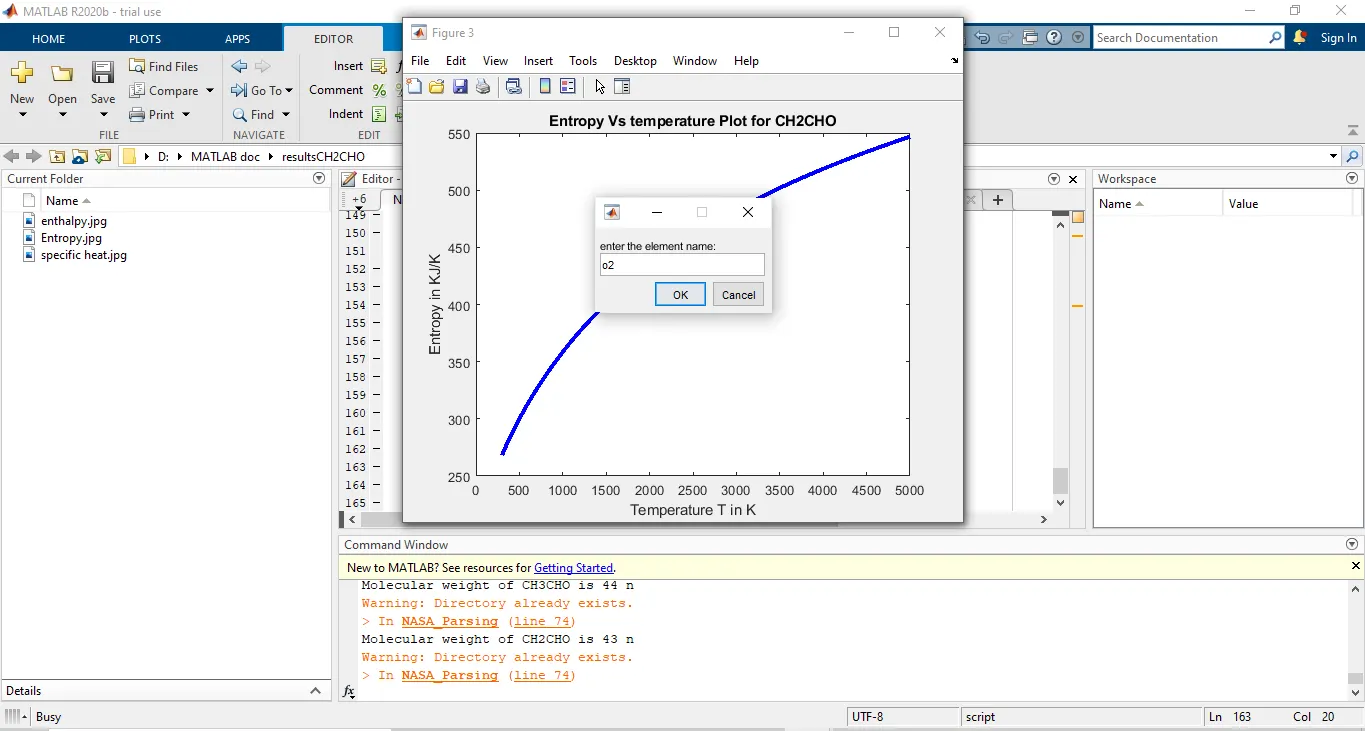
b. N2:
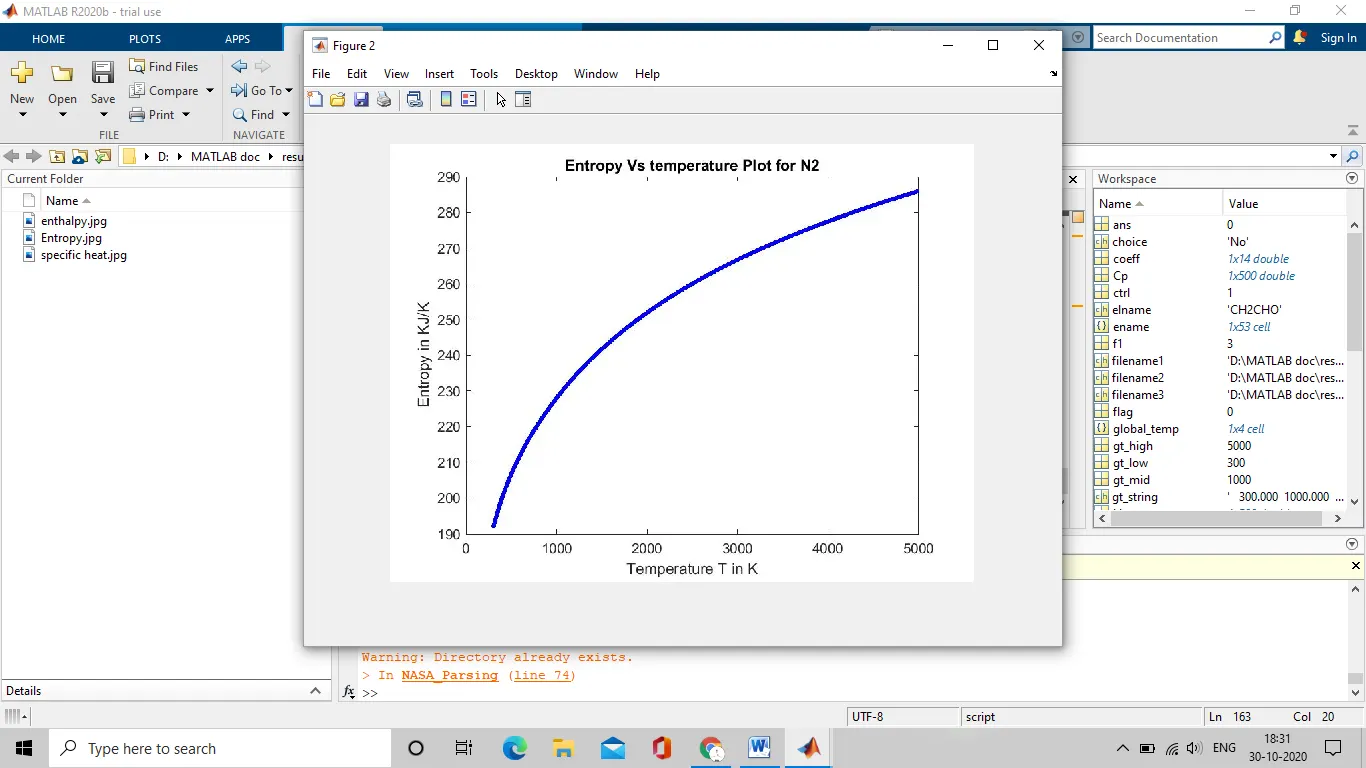
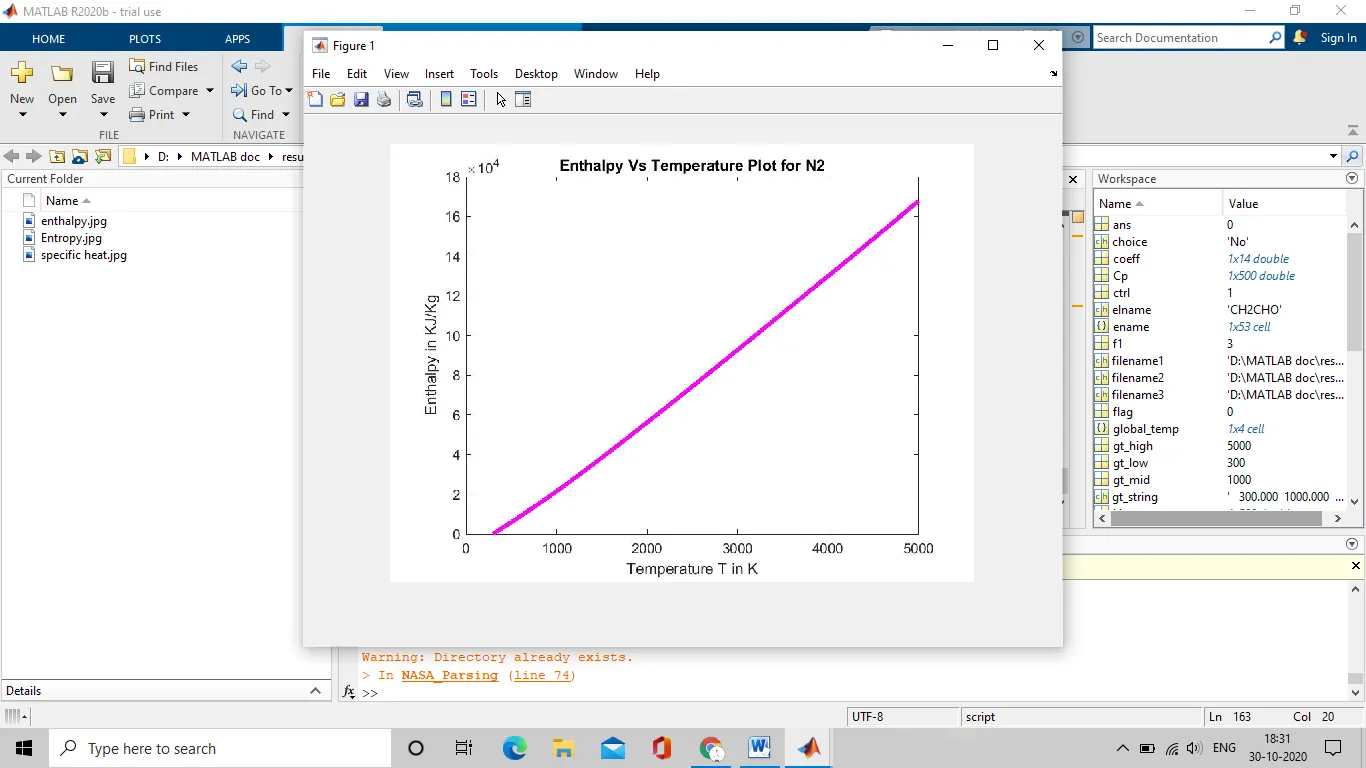
c. CO2:
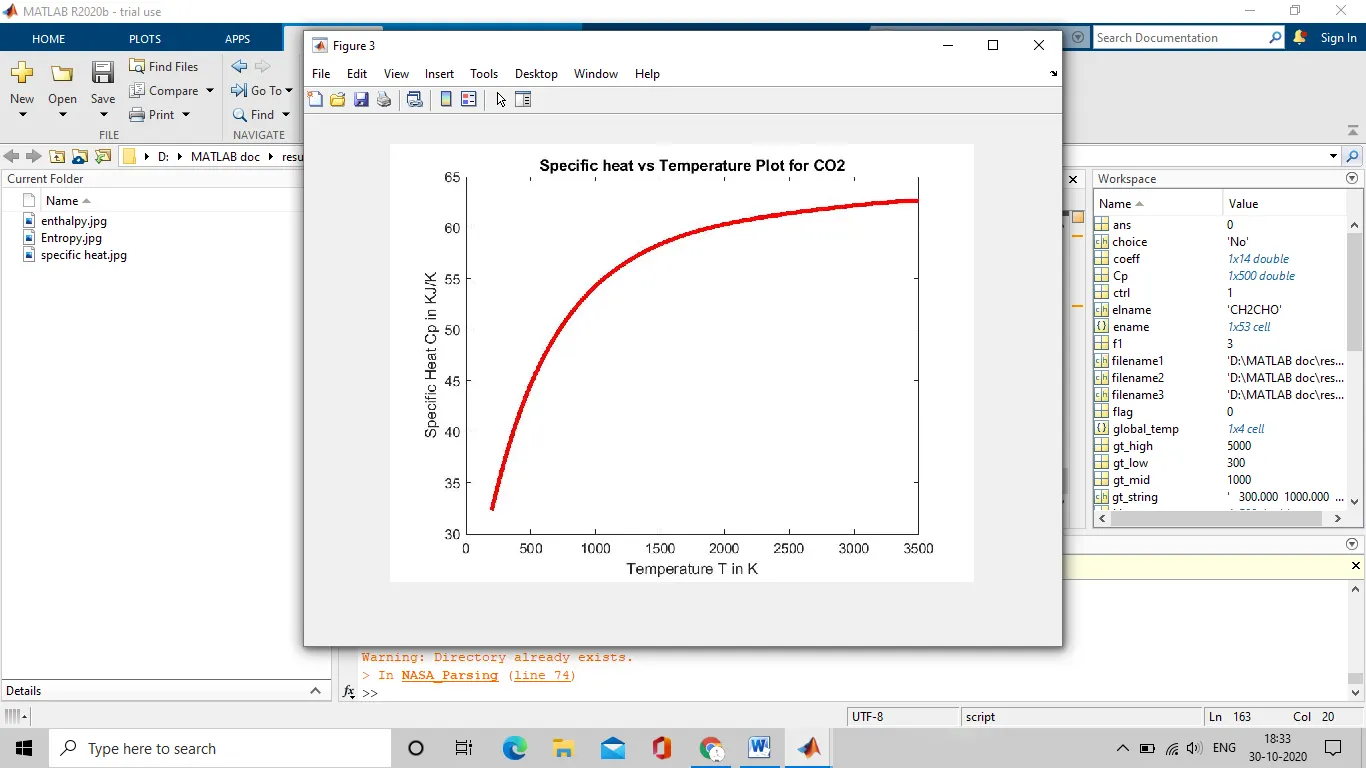
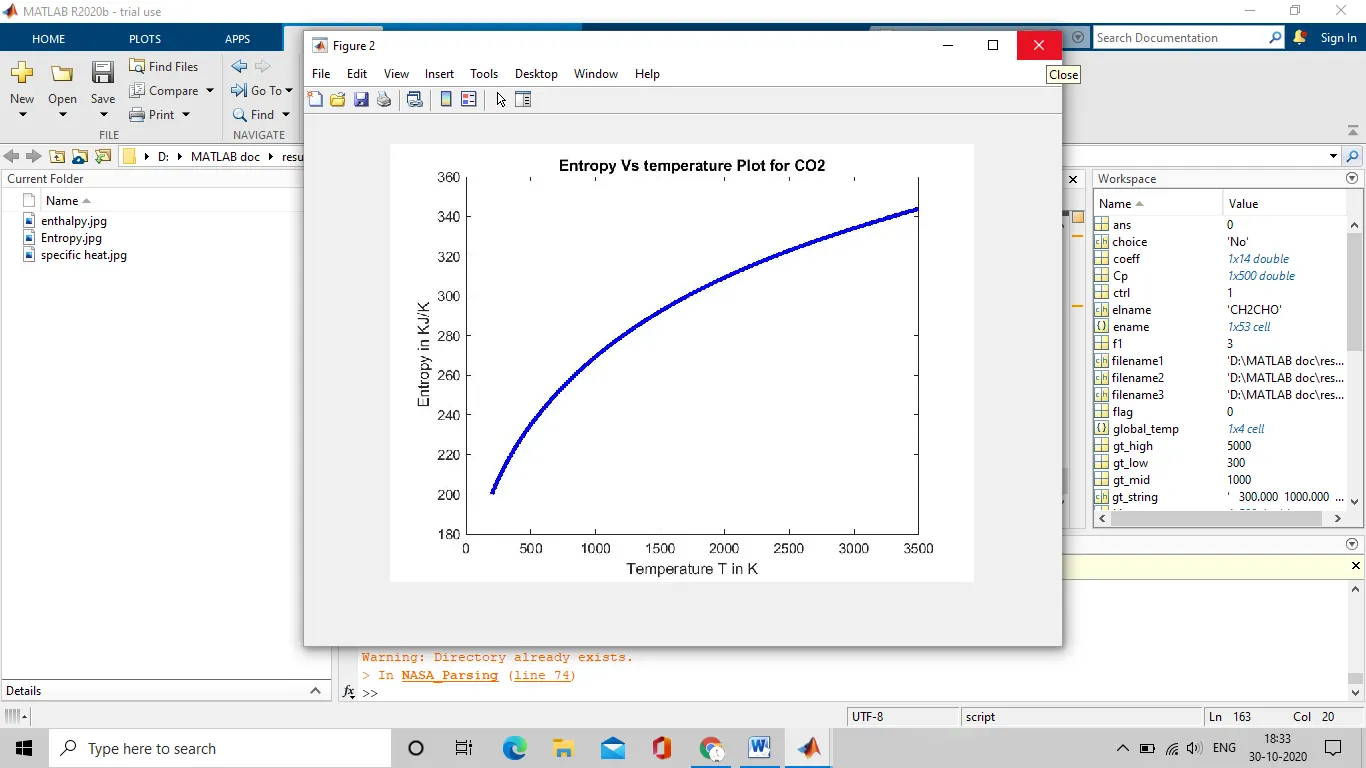
- Errors encountered and resolved:
- Syntax error:
Error occurred during creating a directory to store the results in the destination folder:
Error: mkdir(‘file location’,name)
Correct syntax: mkdir([‘file location’,name])
- Warning occurred:
“directory already exists”. This warning can ignored as it doesn’t trouble the execution of the program.
- Results/conclusion :
The NASA thermodynamic file can be parsed and the necessary data can be retrieved and used for calculation of enthalpy, entropy, specific heat and molecular weight of each species and the necessary plots can be generated.
- Reference:
1.https://en.wikipedia.org/wiki/Entropy
2.https://en.wikipedia.org/wiki/Specific_heat_capacity
3.https://in.mathworks.com/help/matlab/ref/inputparser.parse.html?s_tid=srchtitle