Project 1 - Parsing NASA thermodynamic data
PROJECT 1 : PARSING NASA THERMODYNAMIC DATA USING MATLAB
AIM:
- To write a function that extracts the 14 co-efficients and calculates the enthalpy, entropy and specific heats for all the species in the data file.
-
Determine each species' molecular weight and display it in the command window.
-
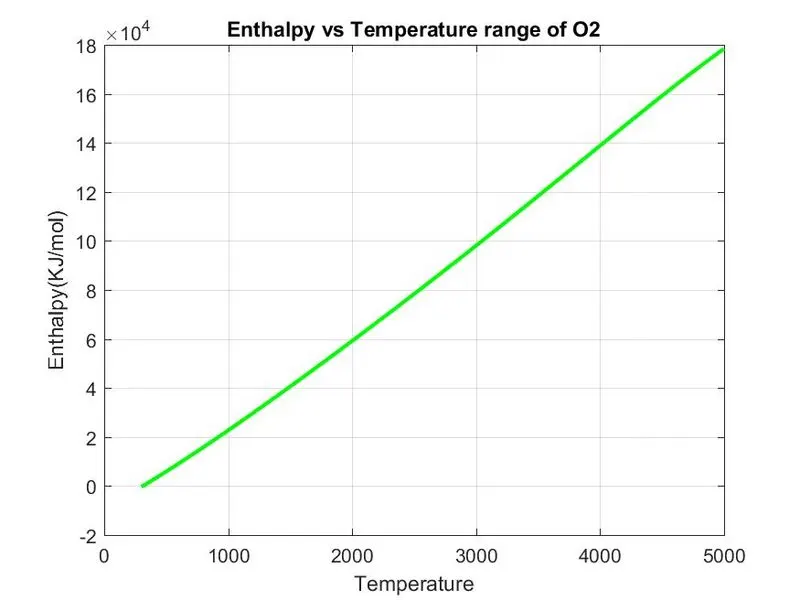
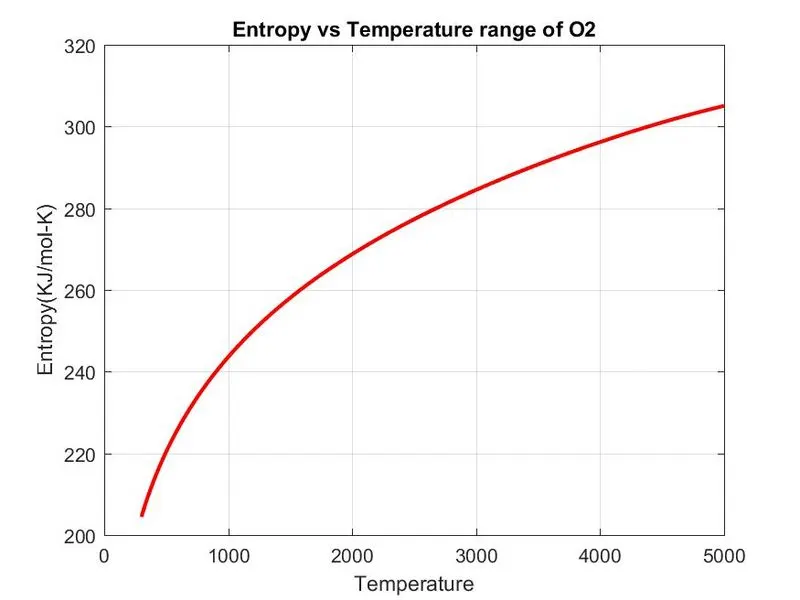
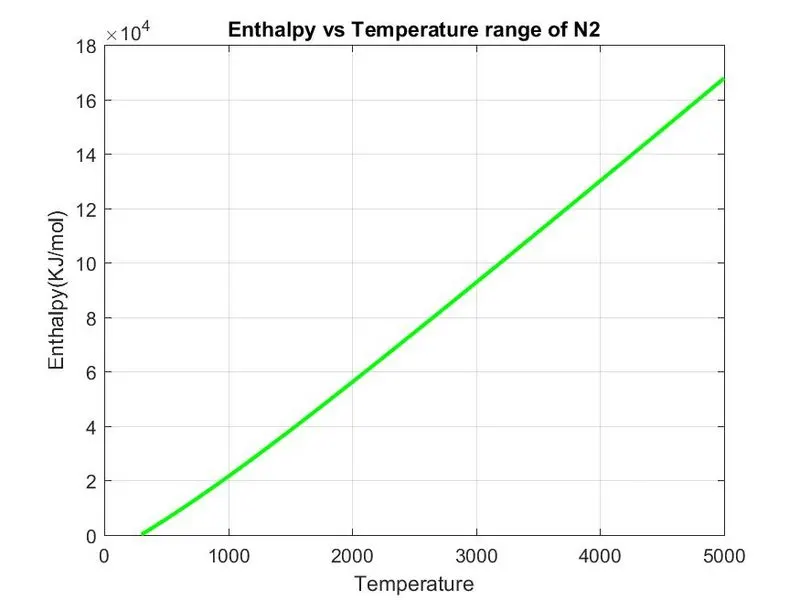
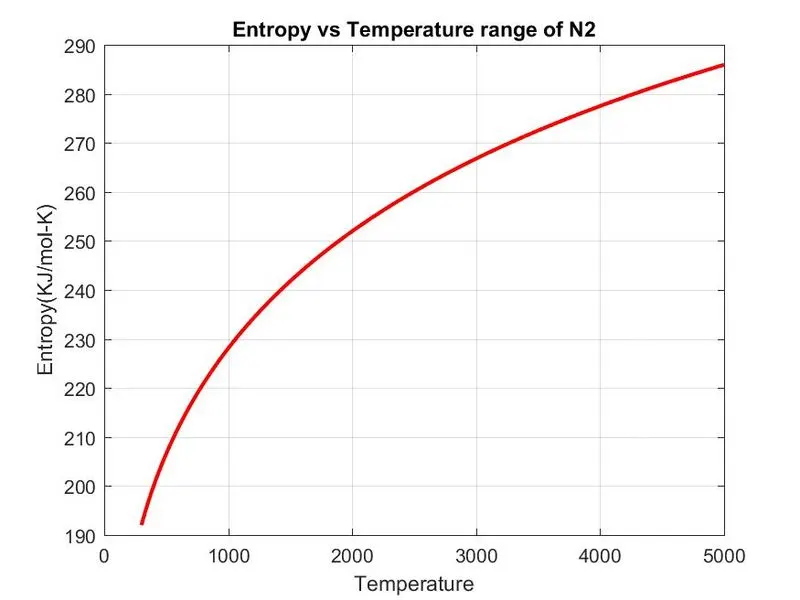
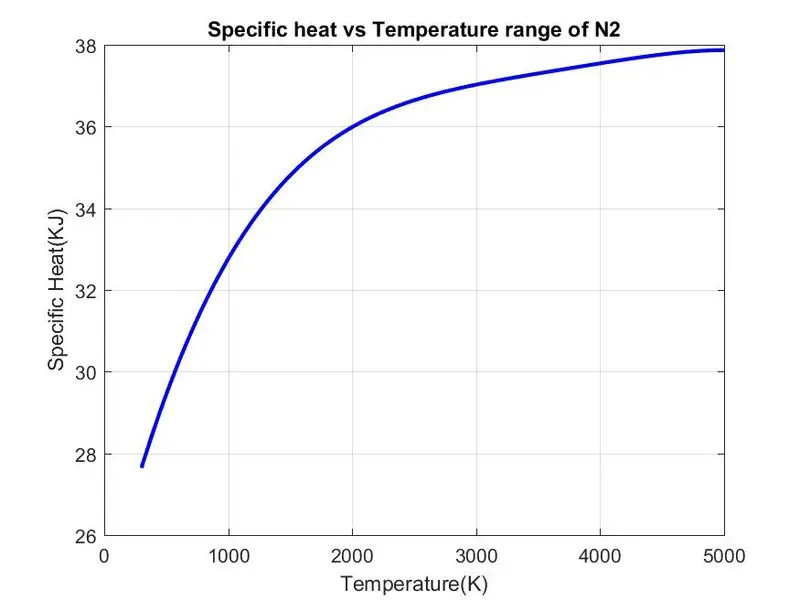
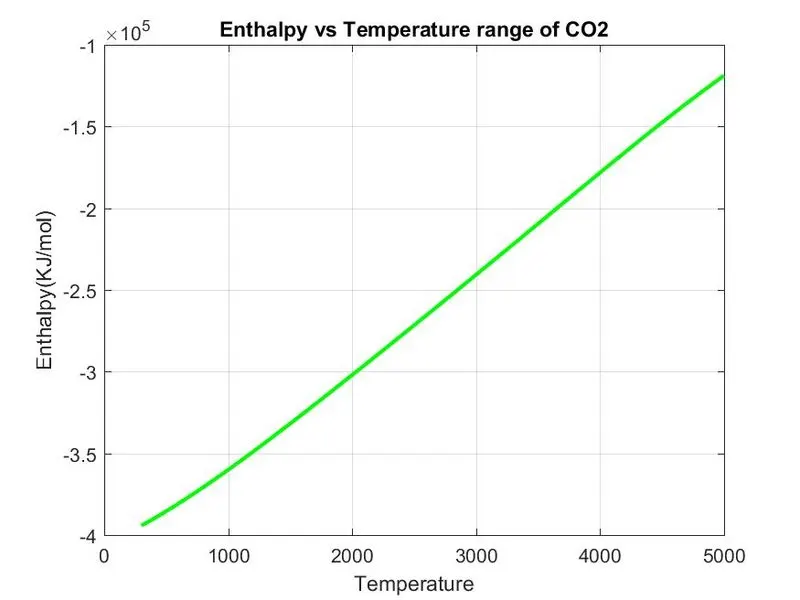
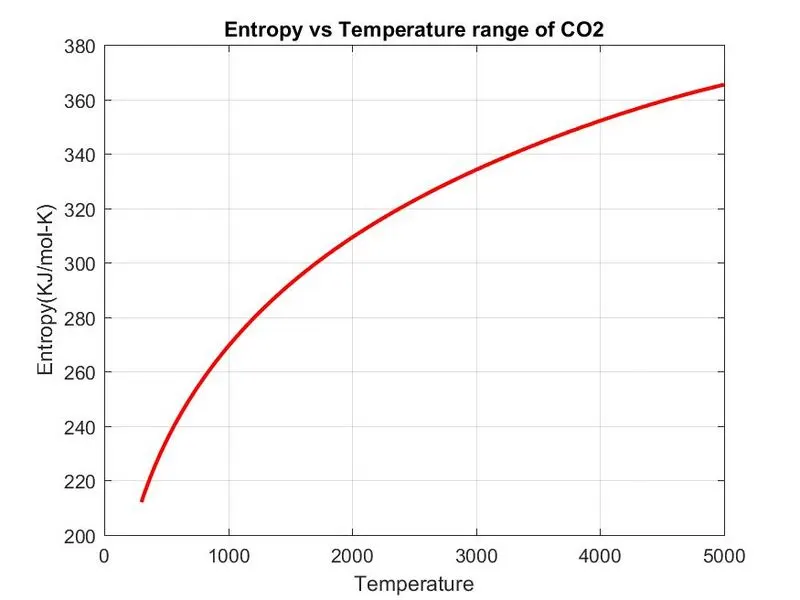
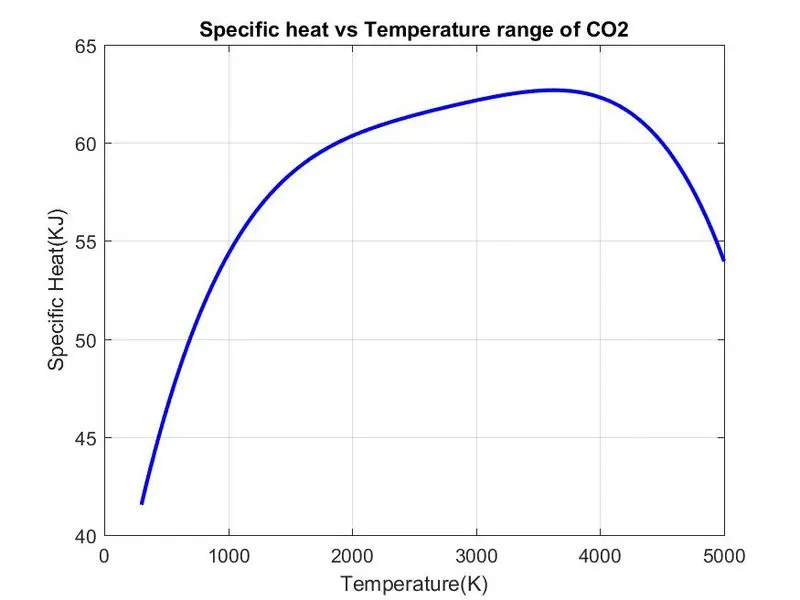
Plot the Cp, Enthalpy, and Entropy values for each species' unique local temperature range (low temperature to high temperature).
-
Create separate folders for each species with appropriate names and save the plots as images with the proper filenames. All of these ought to be produced automatically.
- Create Cp, H, and S graphs using the "THERMO.dat" file as input.
INPUTS:
`(Cp)/R=a1+a2⋅(T)+a3⋅(T)^2+a4⋅(T)^3+a5⋅(T)^4`
`H/RT=a1+a2⋅T/2+a3⋅(T^2)/3+a4⋅(T)^3/4+a5⋅(T^4)/5+a6T`
`S/R=a1⋅ln(T)+a2⋅T+a3⋅(T^2)/2+a4⋅(T^3)/3+a5⋅(T^4)/4+a7`
Here we are given the atomic mass of the following elements:
H=1.00784
C=12.0107
Ar=39.948
N=14.0067
O=15.999
R=`8.3145 J/(K−mol)`
CODE:
1) To calculate the required properties like Specific heat Cp, entropy S, enthalpy H, molecular weight, we use function to calculate them. Functions were created as per the given formulae for the properties.
2) So the function for specific heat Cp is as given below;
function Cp = Specific_heat(a1,a2,a3,a4,a5,a8,a9,a10,a11,a12,T,R,tm)

    % calculating specific heat for higher and lower temperature repectively.

    if (T <= tm)
        Cp = R*(a8 + (a9*T) + (a10*(T).^2) + (a11*(T).^3) + (a12*(T).^4));
    else
        Cp = R*(a1 + (a2*T) + (a3*(T).^2) + (a4*(T).^3) + (a5*(T).^4));
    end
3) The function for entropy S is given below;
function S = Entropy(a1,a2,a3,a4,a5,a7,a8,a9,a10,a11,a12,a14,T,R,tm)

    % calculating entropy for higher and lower temperature repectively.

    if (T <= tm)
        S = R*(a8.*log(T) + (a9*T) + ((a10*(T).^2)/2) + ((a11*(T).^3)/3) + ((a12*(T).^4)/4) + a14);
    else
        S = R*(a1.*log(T) + (a2*T) + ((a3*(T).^2)/2) + ((a4*(T).^3)/3) + ((a5*(T).^4)/4) + a7);

    end
4) The function for enthalpy H is;
function H = Enthalpy(a1,a2,a3,a4,a5,a6,a8,a9,a10,a11,a12,a13,T,R,tm)

    % calculating enthalpy for higher and lower temperature repectively.

    if (T <= tm)
        H = R*T.*(a8 + ((a9*T)/2) + ((a10*(T).^2)/3) + ((a11*(T).^3)/4) + ((a12*(T).^4)/5)
        + ((a13./T)));
    else
        H = R*T.*(a1 + ((a2*T)/2) + ((a3*(T).^2)/3) + ((a4*(T).^3)/4) + ((a5*(T).^4)/5) +
        ((a6./T)));
    end
end
5) The function for molecular weight is as follows;
function mw = molec(sp_name)

compound_name = (sp_name);

key_at = ['C','H','O','N','A'];
%storing the atomic mss value in the array
value_at = [12.0107 1.00794 15.994 14.0067 39.948];

%asssigning molecular mass as 0
struct_size = length(maindata);
for i = 1:struct_size
    name = maindata(i).Name;
    mol_wt = 0;
    for j = 1:length(name)
        for k = 1:length(std_element)
            % Comparing the element name with vector-std_element
            if strcmp(name(j),std_element(k))==1
                mol_wt = mol_wt + atomic_wt(k);
                pos = k;
                break
            end
        end
    % Converting the number(but actually a string) in element name into number
    num = str2double(name(j));
    if num>1
        mol_wt = mol_wt + (atomic_wt(pos).*(num-1));
    end
    end
    % Saving the Melocular Weight Values of each species
    % in the structure 'maindata'
    maindata(i).Molec_Wt = mol_wt;
end
fprintf('Molecular Weight of the species %s is %f',compound_name ,mw)
end
6) The main code to calculate all the required outputs is given below;
clear all
close all
clc

%Input
R=8.314; % Gas Constant

% Opening and Reading data file
f1 = fopen('THERMO.dat','r')
get = fgetl(f1);

% Now Reading Temperature from this file
temp = fgetl(f1);

%spliting
s = strsplit(temp);

% converting strings cells into numbers
tl = str2num(s{2});
tm = str2num(s{3});
th = str2num(s{4});

% Temperature Range
T = linspace(tl,th,1000);

%Skipping comment lines
for i=1:3
    get=fgetl(f1);
end

% Reading the Species
for j=1:53
    tline=fgetl(f1);

   A=strsplit(tline,' ');  % spliting into cell array
    species =  (A{1});         % To read the name of the species

     % Converting string to number
    lowtemp = str2num(A{end-3});
    midtemp = str2num(A{end-2});
    hightemp = str2num(A{end-1});


    tline1 = fgetl(f1);   % getting next line
    a = strfind(tline1,'E');  % Finding the string E

    % Finding First 7 higher and second 7 lower coefficients
    %Finding Higher coefficients
    a1 = tline1(1:a(1)+3);
    a1 = str2num(a1);
    a2 = tline1(a(1)+4:a(2)+3);
    a2 = str2num(a2);
    a3 = tline1(a(2)+4:a(3)+3);
    a3 = str2num(a3);
    a4 = tline1(a(3)+4:a(4)+3);
    a4 = str2num(a4);
    a5 = tline1(a(4)+4:a(5)+3);
    a5 = str2num(a5);

    tline2 = fgetl(f1);
    b = strfind(tline2,'E');
    a6 = tline2(1:b(1)+3);
    a6 = str2num(a6);
    a7 = tline2(b(1)+4:b(2)+3);
    a7 = str2num(a7);

    % Finding Lower coefficients
    a8 = tline2(b(2)+4:b(3)+3);
    a8 = str2num(a8);
    a9 = tline2(b(3)+4:b(4)+3);
    a9 = str2num(a9);
    a10 = tline2(b(4)+4:b(5)+3);
    a10 = str2num(a10);

    tline3 = fgetl(f1);
    c = strfind(tline3,'E');
    a11 = tline3(1:c(1)+3);
    a11 = str2num(a11);
    a12 = tline3(c(1)+4:c(2)+3);
    a12 = str2num(a12);
    a13 = tline3(c(2)+4:c(3)+3);
    a13 = str2num(a13);
    a14 = tline3(c(3)+4:c(4)+3);
    a14 = str2num(a14);
     % calculate specific heat

    Cp = Specific_heat(a1,a2,a3,a4,a5,a8,a9,a10,a11,a12,T,R,tm);
    % calculate Entropy

    S = Entropy(a1,a2,a3,a4,a5,a7,a8,a9,a10,a11,a12,a14,T,R,tm);

    % calculate Enthalpy

    H = Enthalpy(a1,a2,a3,a4,a5,a6,a8,a9,a10,a11,a12,a13,T,R,tm);

    % Calculate Molecular weight of the Species

    W = molec(species);

    % writing molecular weight file
    MW_file = fopen('Molecular Weight.txt','w');
    fprintf(MW_file,'Molecular weight of %s is %d ',species,W);
    fclose(MW_file);   % Closing the file

    %Plotting Cp, H and S with Temperature
    % Saving in a folder
    cd('C:\Users\Ganesh\Desktop\Skill lync\Project 1')  % changing directory
    mkdir(species);  %creating directory
    cd(species);


    % Plot 1 Cp vs T
    figure(1)
    plot(T,Cp,'linewidth',2,'color','b');
    xlabel('Temperature(K)');
    ylabel('Specific Heat(KJ)');
    title(sprintf('Specific heat vs Temperature range of %s',species));
    grid on
    saveas(figure(1),'Specific Heat.jpg');

    % Plot 2 S vs T
    figure(2)
    plot(T,S,'linewidth',2,'color','r');
    xlabel('Temperature');
    ylabel('Entropy(KJ/mol-K)');
    title(sprintf('Entropy vs Temperature range of %s',species));
    grid on
    saveas(figure(2),'Entropy.jpg');

    % Plot 3 H vs T
    figure(3)
    plot(T,H,'linewidth',2,'color','g');
    xlabel('Temperature');
    ylabel('Enthalpy(KJ/mol)');
    title(sprintf('Enthalpy vs Temperature range of %s',species));
    grid on
    saveas(figure(3),'Enthalpy.jpg');

    cd('C:\Users\Ganesh\Desktop\Skill lync\MAtlab')  %Changing directory to Original matlab path

end
File Parsing:
1) We have used fileID = fopen(filename) to open the given NASA thermodynamic data.
2) Then tline = fgetl(fileID) is used to return the next line of the specified file, removing the newline characters.
3) These codes are run in a loop to return the output for all the lines.
OUTPUT:
1) We get the calculated molecular weights in the command windows as shown in the below examples;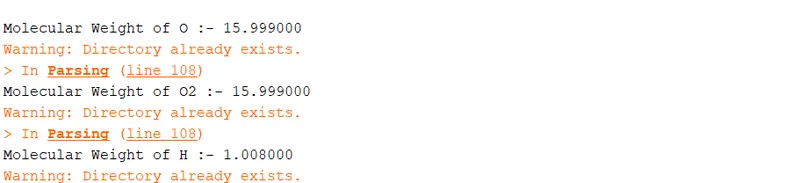
2) We get the required plot of Cp vs Temp, H vs Temp and S vs Temp for all the species, below shown plot are for 'O2','N2' and 'CO2';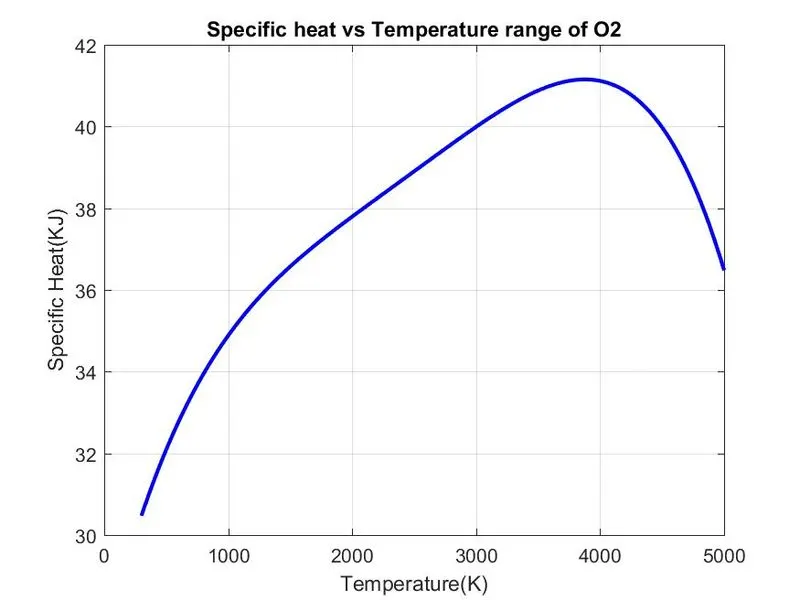
3) These outputs are stored in separate folder is shown in the below screenshot;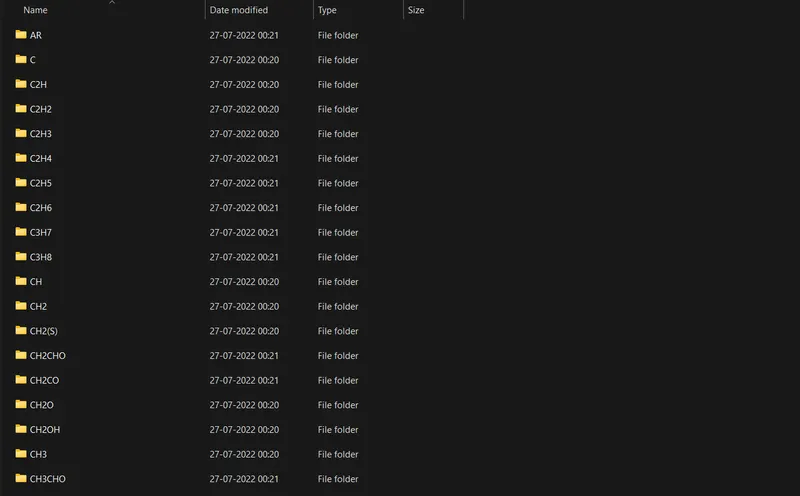
CONCLUSION AND LEARNING OUTCOME:
- Required molecular weight of the given species from NASA thermodynamic data was calculated.
- Plots were generated for each species and stored in the specific folder.
- Learned the use of parsing commands in matlab.