Project 1 - Parsing NASA thermodynamic data
Aim:
To write a code in MATLB to parse the NASA thermodynamic data file and then calculate Thermodynamic properties, Molecular weight and plot nature of the thermodynamic properties of various element with temperature.
Introduction:
- Parsing means to make something understandable. For programming this means to convert information represented in one form into another form that’s easier to work with. This is done by partially analysing the data, understanding its underlying structure(by making some assumption based on what we’re expecting to see), and then explicitly representing that structure in the code.
- Parsing a file means reading in a data stream of some sort and building an in memory model of the semantic content of that data. This aims at facilitating performing some kinf of transformation on the data.
Equations:
The equations that we are going to use in the function to calculate specific heat, enthalpy and entropy.
cp/R = a1 + a2T + a3T^2 + a4T^3 +a5T^4
H/RT = a1 + a2 T/2 + a3T^2/3 + a4T^3/4 + a5T^4/5 + a6/T
S/R  = a1lnT + a2T + a3T^2/2 + a4T^3/3 + a5T^4/5 + a7
Where,
Cp = specific heat
R = molar gas constant
T = Temperature
S = Entropy
H = Enthalpy
A = coefficients
Function to calculate the Specific Heat:
function cp = specific_heat(a1,a2,a3,a4,a5,a8,a9,a10,a11,a12,T,R,global_mid_temp)

if (T>= global_mid_temp)
    cp = R*(a1+(a2*T)+(a3*(T).^2)+(a4*(T).^3)+(a5*(T).^4));
else
    cp = R*(a8+(a9*T)+(a10*(T).^2)+(a11*(T).^3)+(a12*(T).^4));
end
end
Function to calculate the Enthalpy:
function H = enthalpy(a1,a2,a3,a4,a5,a6,a8,a9,a10,a11,a12,a13,T,R,global_mid_temp)

if (T>= global_mid_temp)
    H = R*((a1*T)+((a2*(T).^2)/2)+((a3*(T).^3)/3)+((a4*(T).^4)/4)+((a5*(T).^5/5))+a6);
else
    H = R*((a8*T)+((a9*(T).^2)/2)+((a10*(T).^3)/3)+((a11*(T).^4)/4)+((a12*(T).^5/5))+a13);
end
end
Function to calculate the Entropy:
function S = entropy(a1,a2,a3,a4,a5,a7,a8,a9,a10,a11,a12,a13,T,R,global_mid_temp)

if (T>= global_mid_temp)
    S = R*(a1.*log(T)+(a2*T)+((a3*(T).^2)/2)+((a4*(T).^3)/3)+((a5*(T).^4)/5)+a7);
else
    S = R*(a8.*log(T)+(a9*T)+((a10*(T).^2)/2)+((a11*(T).^3)/3)+((a12*(T).^4)/5)+a13);
end
end
Function to calculate the Molecular Weight:
function molecular_weight = wt(element_name)

elements = ['H' 'C' 'O' 'N' 'A' 'S'];
atomic_weight = [1 12 16 14 40 32];
species = upper(element_name)

molecular_weight = 0;

for i = 1:length(species)
    for j = 1:length(elements)

        if strcmp(species(i),elements(j))
            molecular_weight = molecular_weight+atomic_weight(j)
            k = j;
        else
            n = str2double(species(i));
            if (n>1)
                molecular_weight = molecular_weight+atomic_weight(k)*(n-1);
                break
            end
        end
    end
end
end
Function to create a file of molecular weight data of all elements:
function creating_file(element_name,molecular_weight)

cd('C:\Users\nanth_wuujgik\Documents\MATLAB\molecular_weight')
mol_file = fopen('molecular_weight.dat','a+');
fprintf(mol_file,'molecular weight of %s= %fn',element_name,molecular_weight);
fprintf(mol_file,'\n');
fclose(mol_file);
end
Main code to parse the NASA thermodynamic data file:
clear all
close all
clc

R = 8.314;

f1 = fopen('THERMO.dat','r')

l1 = fgetl(f1);
l2 = fgetl(f1);
value = strsplit(l2,' ');

global_low_temp = str2num(value{2})
global_mid_temp = str2num(value{3})
global_high_temp = str2num(value{4})

T = linspace(global_low_temp,global_high_temp,1000);

l3 = fgetl(f1);
l4 = fgetl(f1);
l5 = fgetl(f1);

for i = 1:53
    tline = fgetl(f1);
    A = strsplit(tline,' ');
    element_name = (A{1});
    low_temp = str2num(A{end-3});
    mid_temp = str2num(A{end-2});
    high_temp = str2num(A{end-1});

    tline1 = fgetl(f1);
    a = findstr(tline1,'E');

    a1 = tline1(1:a(1)+3);
    a1 = str2num(a1);
    a2 = tline1(a(1)+4:a(2)+3);
    a2 = str2num(a2);
    a3 = tline1(a(2)+4:a(3)+3);
    a3 = str2num(a3);
    a4 = tline1(a(3)+4:a(4)+3);
    a4 = str2num(a4);
    a5 = tline1(a(4)+4:a(5)+3);
    a5 = str2num(a5);

    tline2 = fgetl(f1);
    a = findstr(tline2,'E');

    a6 = tline2(1:a(1)+3);
    a6 = str2num(a6);
    a7 = tline2(a(1)+4:a(2)+3);
    a7 = str2num(a7);
    a8 = tline2(a(2)+4:a(3)+3);
    a8 = str2num(a8);
    a9 = tline2(a(3)+4:a(4)+3);
    a9 = str2num(a9);
    a10 = tline2(a(4)+4:a(5)+3);
    a10 = str2num(a10);

    tline3 = fgetl(f1);
    a = findstr(tline3,'E');

    a11 = tline3(1:a(1)+3);
    a11 = str2num(a11);
    a12 = tline3(a(1)+4:a(2)+3);
    a12 = str2num(a12);
    a13 = tline3(a(2)+4:a(3)+3);
    a13 = str2num(a13);
    a14 = tline3(a(3)+4:a(4)+3);
    a14 = str2num(a14);

    cp = specific_heat(a1,a2,a3,a4,a5,a8,a9,a10,a11,a12,T,R,global_mid_temp)
    H = enthalpy(a1,a2,a3,a4,a5,a6,a8,a9,a10,a11,a12,a13,T,R,global_mid_temp)
    S = entropy(a1,a2,a3,a4,a5,a7,a8,a9,a10,a11,a12,a13,T,R,global_mid_temp)

     molecular_weight = wt(element_name);
     fprintf('molecular weight of %s= %fn',element_name,molecular_weight)
     creating_file(element_name,molecular_weight)
    cd('C:\Users\nanth_wuujgik\Documents\MATLAB\nasa1')
    mkdir(element_name);
    cd(element_name);

    figure(1) % T vs cp
    plot(T,cp,'LineWidth',5,'Color','r')
    xlabel('Temperature(T)')
    ylabel('Specific Heat(cp)')
    grid on
    title('Temperature vs Specific Heat',element_name)
    saveas(figure(1),'T_vs_cp.jpg');

    figure(2) % T vs H
    plot(T,H,'LineWidth',5,'Color','b')
    xlabel('Temperature(T)')
    ylabel('Enthalpy(H)')
    grid on
    title('Temperature vs Entropy',element_name)
    saveas(figure(2),'T_vs_H.jpg');

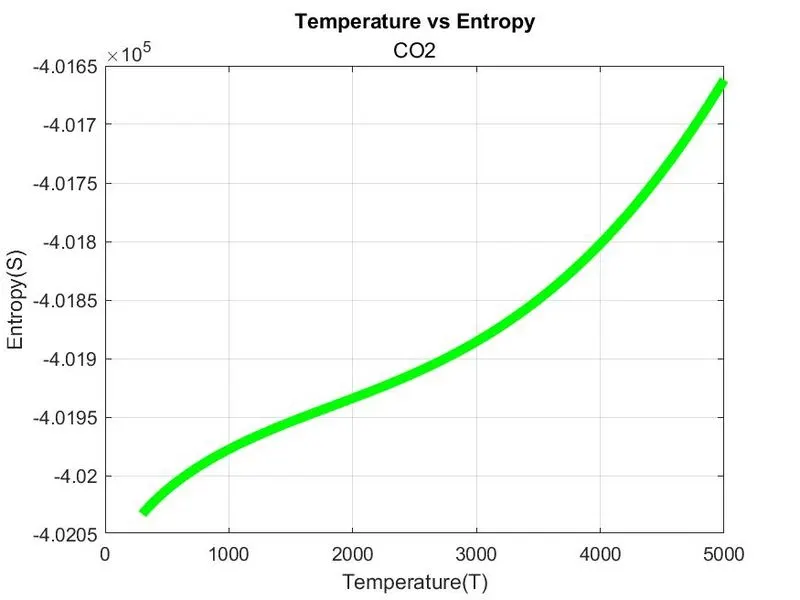
    figure(3) % T vs S
    plot(T,S,'LineWidth',5,'Color','g')
    xlabel('Temperature(T)')
    ylabel('Entropy(S)')
    grid on
    title('Temperature vs Entropy',element_name)
    saveas(figure(3),'T_vs_S.jpg');
end- Starting few commands like ‘clear all’, ‘close all’, ‘clc’ are entered to clear any existing data from previous program or command section.
- Then enter the R value as a input
- Then use a command to open the file ‘THERMO.dat’. Further use the command ‘fgetl’ to start reading the lines after reading first two lines, from the second line converting the strings to numbers and assigning global(low, mid and high) temperatures.
- To get the temperature range for calculation and plotting purpose write a commands in main program.
- Then again using ‘fgetl’ command to go to the next 3 lines and skipping it.
- Then use for loop command to get all elements and their temperatures(low, mid, high) and their coefficients.
- Then again use ‘fget’ command to further process. Then the sub function programs were made to complete the main program.
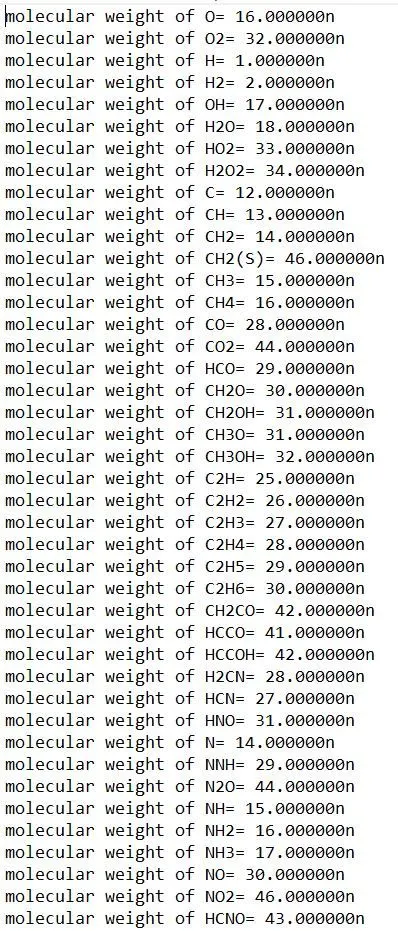
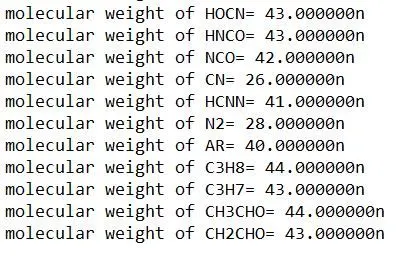
- The function program is used to calculate the specific heat, enthalpy, entropy, molecular weight and to create a file of molecular weight data of all elements.
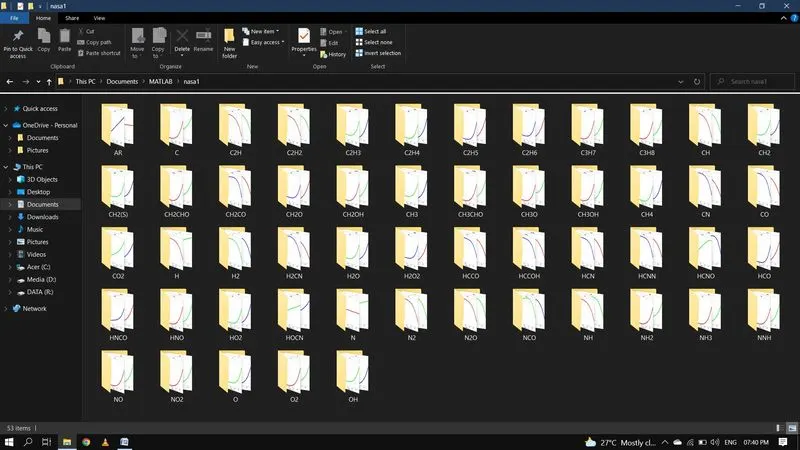
- Then use ‘mkdir’ command to create a new folder with name of the individual element and then a ‘cd’ command to mkdir as the current directory.
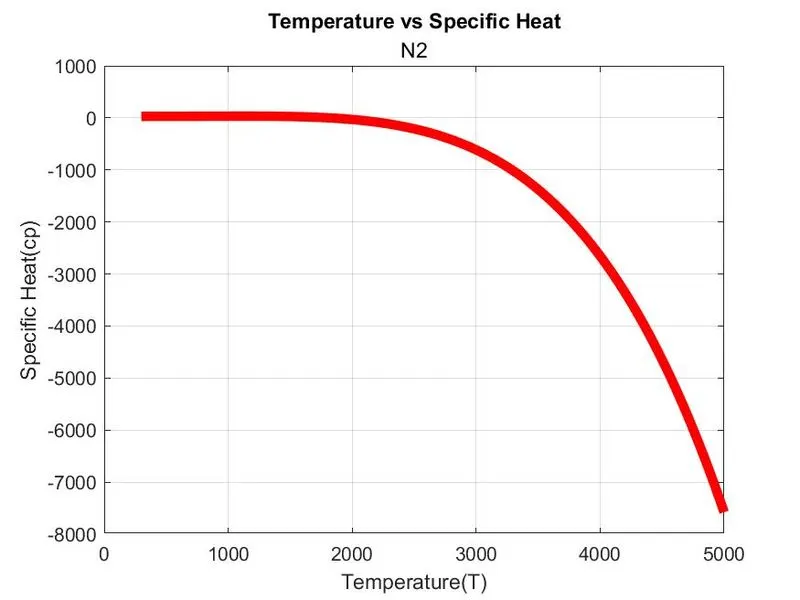
- Then use the ‘plot’ command to plot the
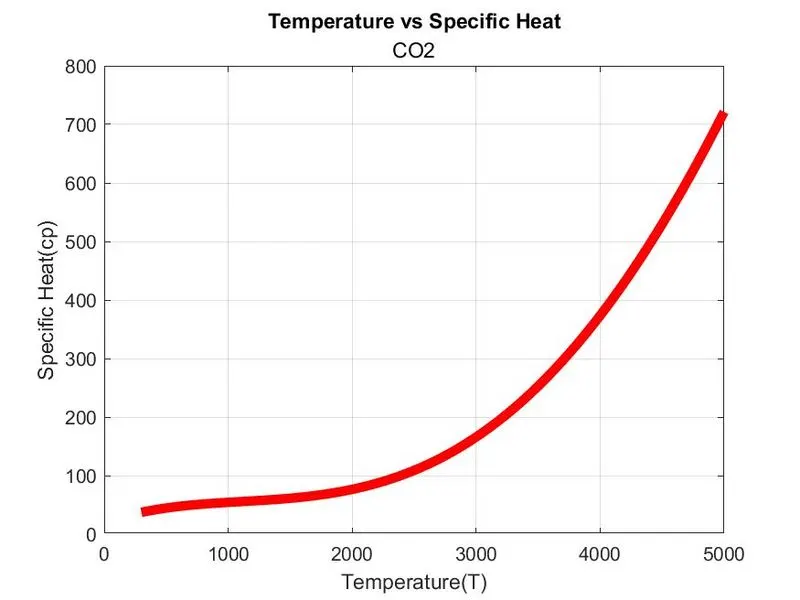
i) Temperature vs Specific heat
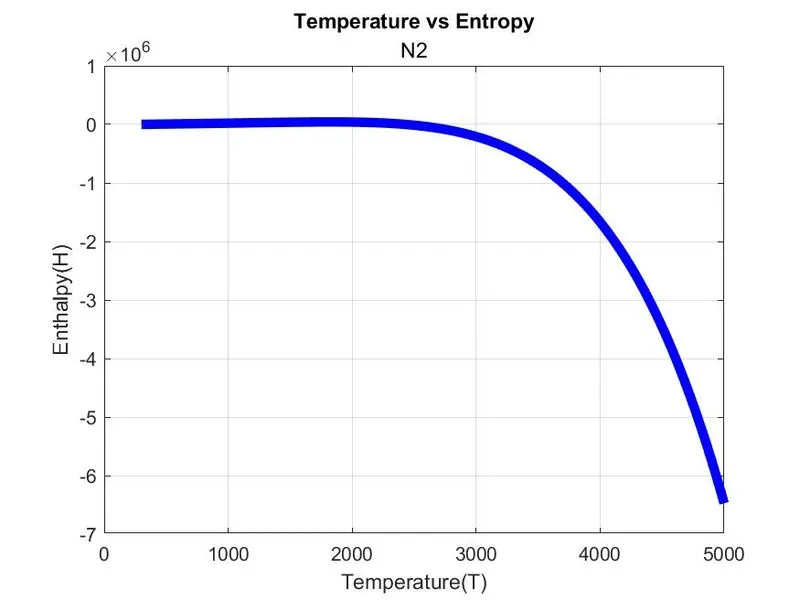
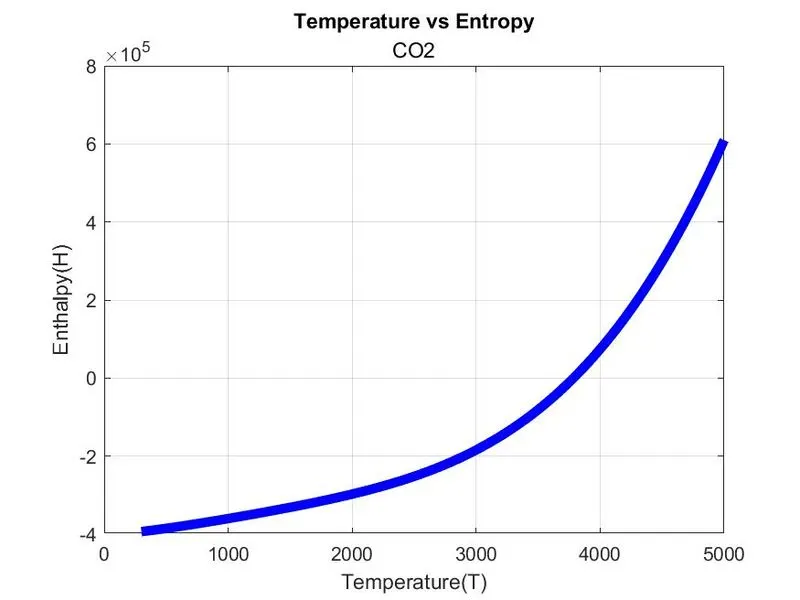
ii) Temperature vs Enthalpy
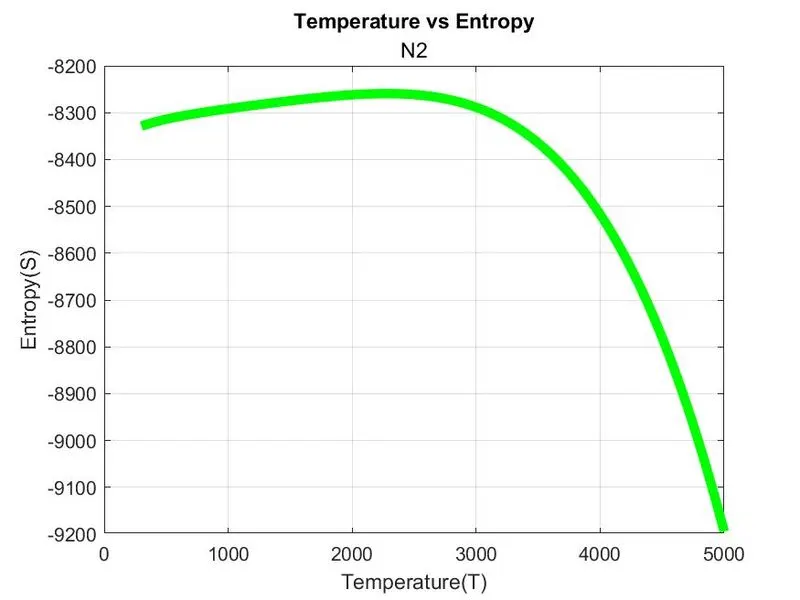
iii) Temperature vs Entropy
Results:
Plots for Oxygen (o2):
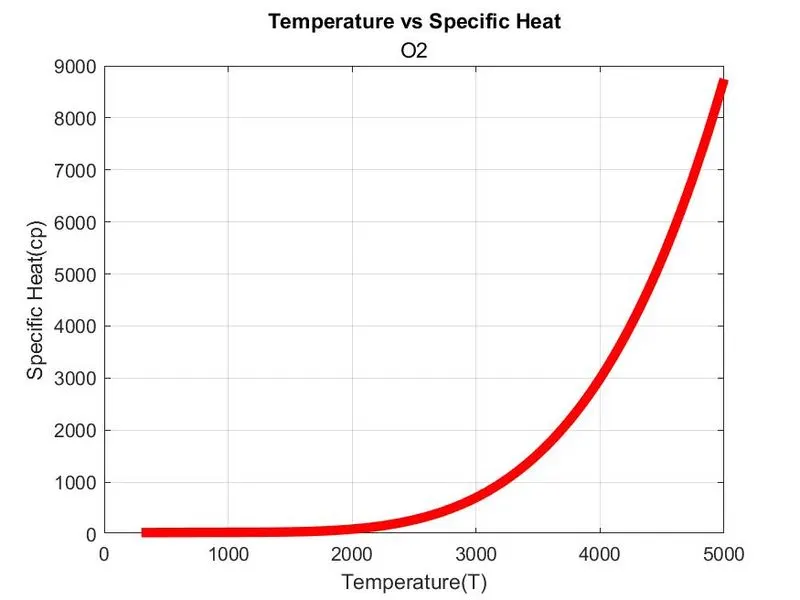
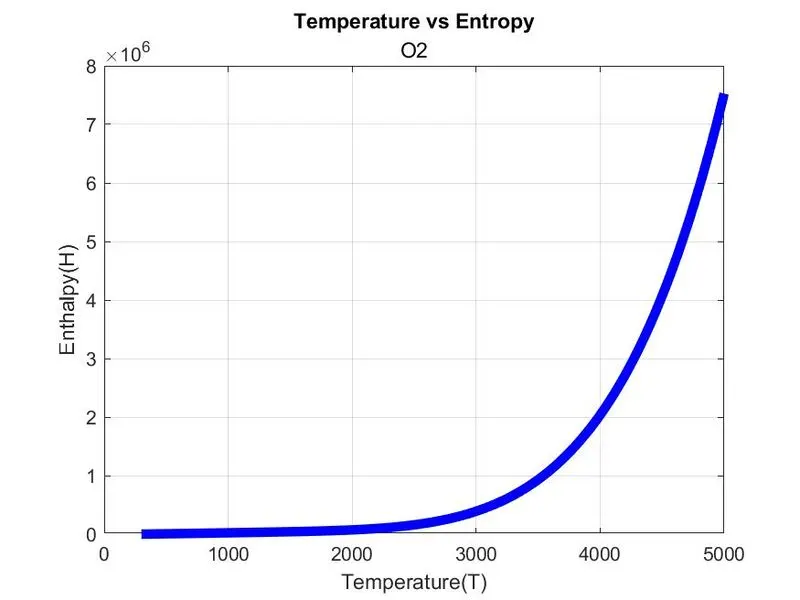
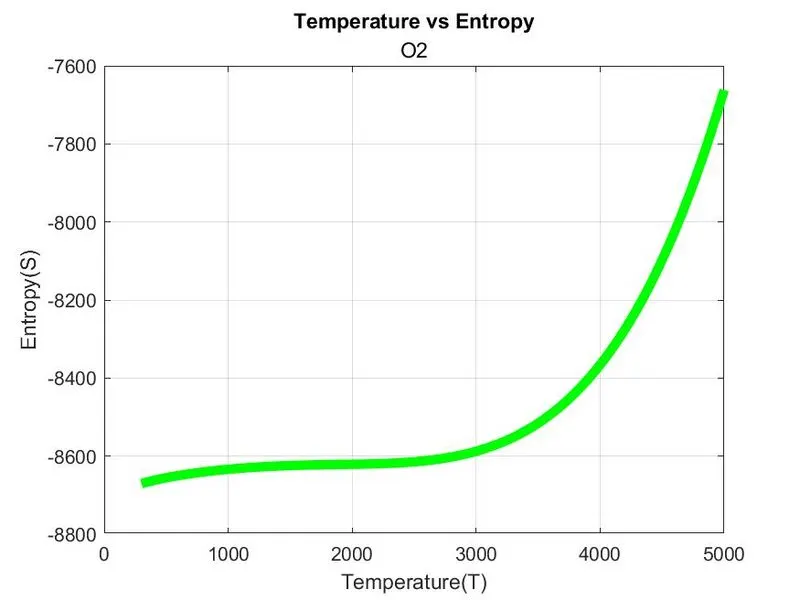
Plots for Nitrogen (N2):
Plots for Carbon Dioxide (co2):
Screenshot of the folder:
Molecular Weight:
Conclusion:
Thus the code in MATLB to parse the NASA thermodynamic data file and to calculate Thermodynamic properties, Molecular weight and plot nature of the thermodynamic properties of various element with temperature were written.