Project 1 - Parsing NASA thermodynamic data
- Parsing NASA thermodynamic data with the help of MATLAB
What is Parsing?
Parsing is analyzing (a string or text) into logical syntactic components in other words it is breaking down sentences or groups of words into separate components.
As we have been provided with NASA thermodynamic data we will parse the data and calculate the enthalpy, entropy, and specific heat of species.
The formulas we will be using in the function for the calculation are as follow.
Cp / R = a1 + a2 T + a3 T^2 + a4 T^3 + a5 T*4
H / RT = a1 + a2 T /2 + a3 T*2 /3 + a4 T*3 /4 + a5 T^4 /5 + a6/T
S / R = a1 lnT + a2 T + a3 T*2 /2 + a4 T*3 /3 + a5 T*4 /4 + a7
Where,
Cp = Specific Heat ,
H = Enthalpy ,
S = Entropy ,
R = Universal Gas Constant (8.314 J/mol.K) ,
T = Temperature.
- Function for calculating the thermodynamic properties Enthalpy, Entropy, and Specific heat.
function [cp, h, s] = coeff(a1, a2, a3, a4, a5, a6, a7, a8, a9, a10, a11, a12, a13, a14,T)
R = 8.314;
for j = 1:length(T)
   if T(j) < 300
   cp = (a1 + a2.*T + a3.*T.^2+ a4.*T.*3+ a5.*T.^4).*R;
    h = (a1 + (a2.*T)./2 + (a3.*T.*2)./3 + (a4.*T.^3) ./4 + (a5.*T.^4)./5+ (a6 ./T) ).*R.*T;
    s = (a1.*log(T) + a2.*T + (a3.*T.^2) ./2 + (a4.*T.*3)./3 + (a5.*T.^4)./4 + a7 ).*R;
   else
    cp = (a8 + a9.*T + a10.*T.*2 + a11.*T.*3 + a12 .*T.^4).*R;
     h = ( a8 + (a9.*T)./2 + (a10.*T.^2)./3 +(a11.*T.^3)./4 + (a12.*T.^4)./5 +(a13./T)).*R.*T;
     s = ( a8.*log(T) + a9.*T + (a10.*T.^2)./2 + (a11.*T.^3)./3 + (a12.*T.^4)./4 + a14).*R;
   end
end
end
In this function program, we will be taking the coefficients (a1,a2,a3,a4..........a13,a14) from the thermodynamic data file which is been extracted with the help of the main program. 'R' is the universal gas constant which is assigned as 8.314.then for calculating the thermodynamic properties with respect to the low and high temperature we will assign a 'for' loop to calculate according to the temperature ,we will be also using an 'if & else' command giving the condition of temperature less than 300 by using the variable 'j' inside the 'for' loop to manage local temperature range.So with the help of the function, we will be getting the thermodynamic properties of the species present in the data file for local temperature range.
- Function to calculate the molecular weight of the species present in the data file.
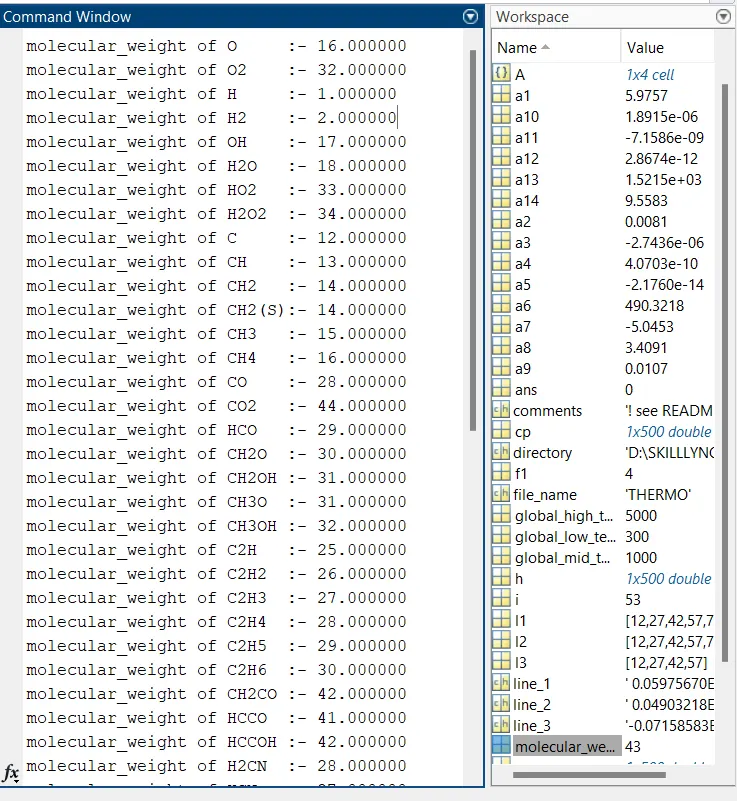
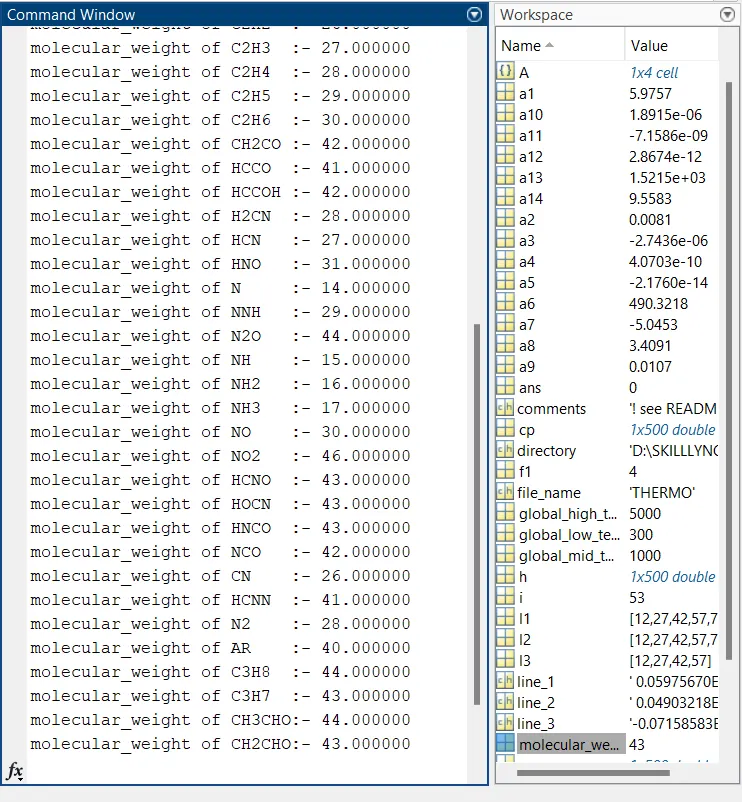
function [molecular_weight]= mole_wt (species_name)
SPECIES = upper(species_name);
elements = { 'H', 'C','N', 'O','A'};
atomic_weight = [1 12 14 16 40];
molecular_weight = 0;
for i = 1:length (SPECIES)
  for j = 1:length( elements )
     if strcmp (SPECIES(i), elements (j))
       molecular_weight = molecular_weight + atomic_weight(j);
       u = j;
    end
  end
  n = str2double(SPECIES(i));
    if n  > 1
       molecular_weight = molecular_weight + atomic_weight(u)*(n-1);
    end
 end
fprintf('molecular_weight of %s:- ', species_name)
fprintf( '%f', molecular_weight)
fprintf('\n')
end
This function command take the species name as input which we derived from the main program and with the help of 'upper ' command we can convert the lower case input to upper case. As we know every compount is made of elements and some of the majour elements are H , C , O , N , Ar so we predefine then by assigning the name and atomic weight to the variables 'elements' and 'atomic_weight'.Assigning the initial molecular weight as 0,now with the help of 'for' loop and 'if ' command we can calculate the molecular weight by adding it with the atomic weight if the elements and species are same .With the help of 'strcmp' command we can compare the 'element' and the 'species ' inside a 'if' command in which if the element and species are same calculate the molecular weight .Now for calculating the compound ,with the help of 'str2double' command we can convert the character vectors to number or string arrays to numeric array thus we can obtain the species name to numeria arry ie. number of elements and by using the 'if' command and the adove molecular weight formula with additional atomic weight arry value multiplied with number of elements minus one as one is included in the atomic weight arry value ,we can calculate molecular weight.Then with the help of 'fprint' command we can print the value in the desired format,for avoiding all the values to be printed in a single line '\n' is use in 'fprint' command.'%f' is used for float.
- Main program for executing ,ploting and storing
clear all
close all
clc

% Opening data file in read mode
f1 = fopen ('THERMO.dat', 'r');
file_name = fgetl(f1);
t_line = fgetl(f1) ;
A = strsplit (t_line, ' ');
%Defining the temperatures extracted from data file
global_low_temp = str2double (A{2});
global_mid_temp = str2double (A{3});
global_high_temp = str2double (A{4});
for i =(1:3)
comments = fgetl(f1);
end
for i = 1:53
%Extracting species name
species= fgetl(f1);
species_name = species (1:6);

%Extracting coefficients from first line
line_1 = fgetl(f1);
l1 = strfind (line_1, 'E');
a1 = str2double (line_1(1: (l1(1)+3)));
a2 = str2double (line_1((l1(1)+4):(l1(2)+3)));
a3 = str2double (line_1((l1(2)+4):(l1(3)+3)));
a4 = str2double (line_1((l1(3)+4):(l1(4)+3)));
a5 = str2double (line_1((l1(4)+4):(l1(5)+3)));

% Extracting coefficients from second line
line_2 = fgetl(f1);
l2 = strfind (line_2, 'E');
a6 = str2double (line_2(1:(l2(1)+3)));
a7 = str2double (line_2((l2(1)+4):(l2(2)+3)));
a8 = str2double (line_2((l2(2)+4):(l2(3)+3)));
a9 = str2double (line_2((l2(3)+4):(l2(4)+3)));
a10 = str2double (line_2((l2(4)+4):(l2(5)+3)));

%Extracting coefficients from third line
line_3 = fgetl(f1);
l3 = strfind (line_3, 'E');
a11 = str2double (line_3(1:(l3(1)+3)));
a12 = str2double (line_3((l3(1)+4):(l3(2)+3)));
a13 = str2double (line_3((l3(2)+4):(l3(3)+3)));
a14 = str2double (line_3((l3(3)+4):(l3(4)+3)));

%Creating folder 'SPECIES' to save thermodynamic plots of species

T = linspace(global_low_temp, global_high_temp, 500);

% calling the thermodynamic equations functtion
[cp, h, s] = coeff(a1,a2,a3,a4,a5,a6,a7,a8,a9,a10,a11,a12,a13,a14, T) ;
%Plotting
% Plot between Temperature and Specific Heat
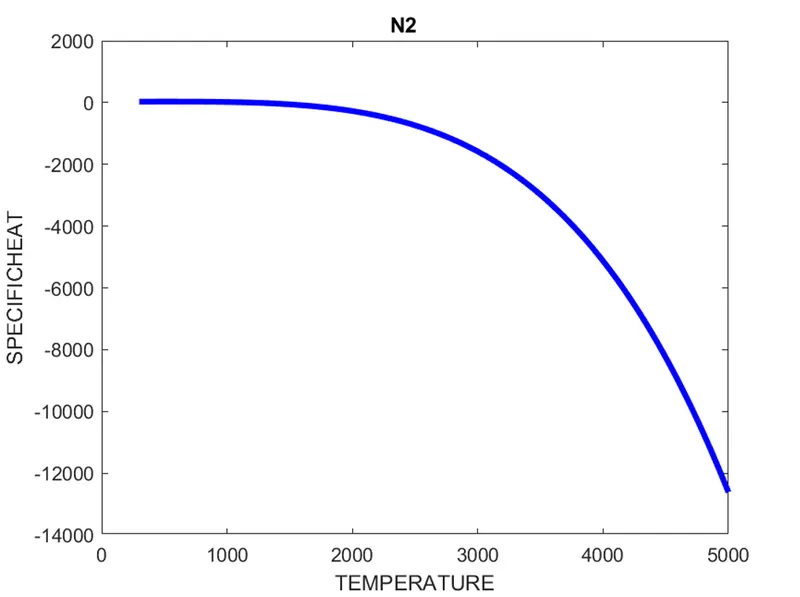
figure(1)
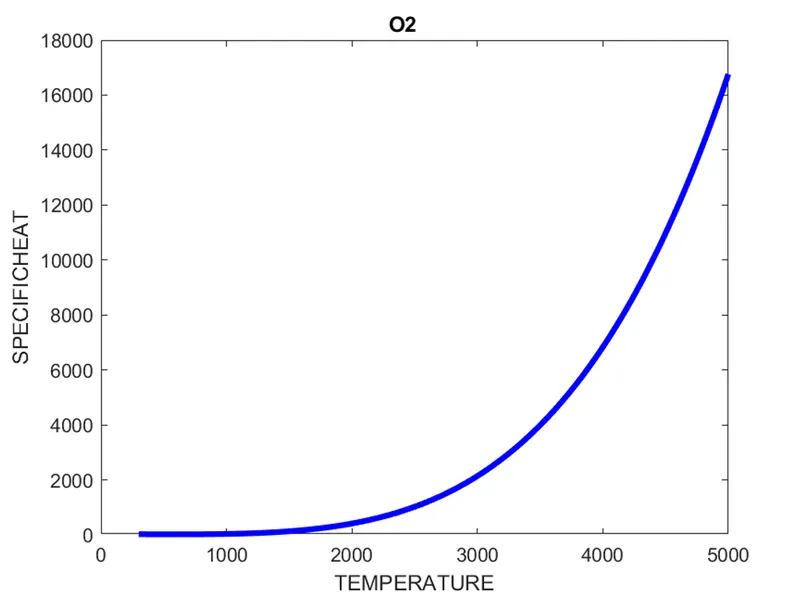
plot (T, cp,'linewidth', 3, 'color', 'b')
title (species_name)
xlabel('TEMPERATURE')
ylabel('SPECIFICHEAT')
% Plot between Temperature and Enthalpy
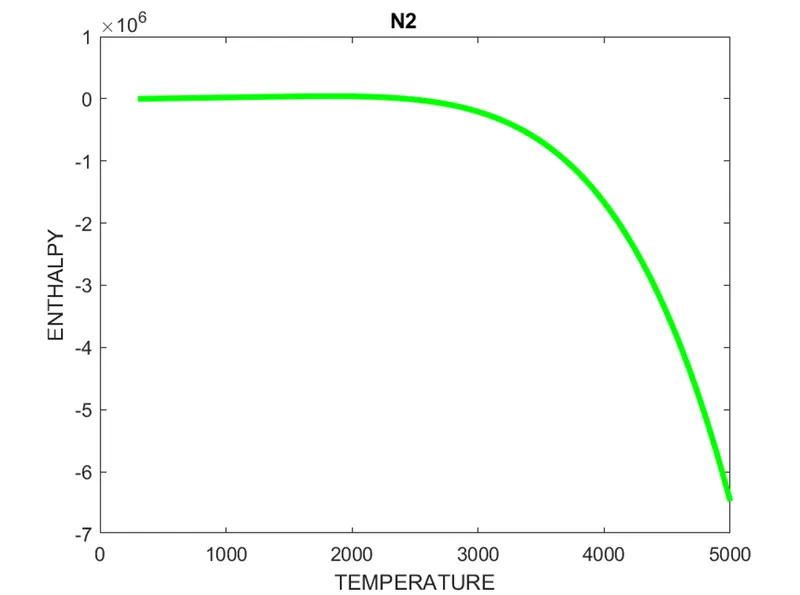
figure(2)
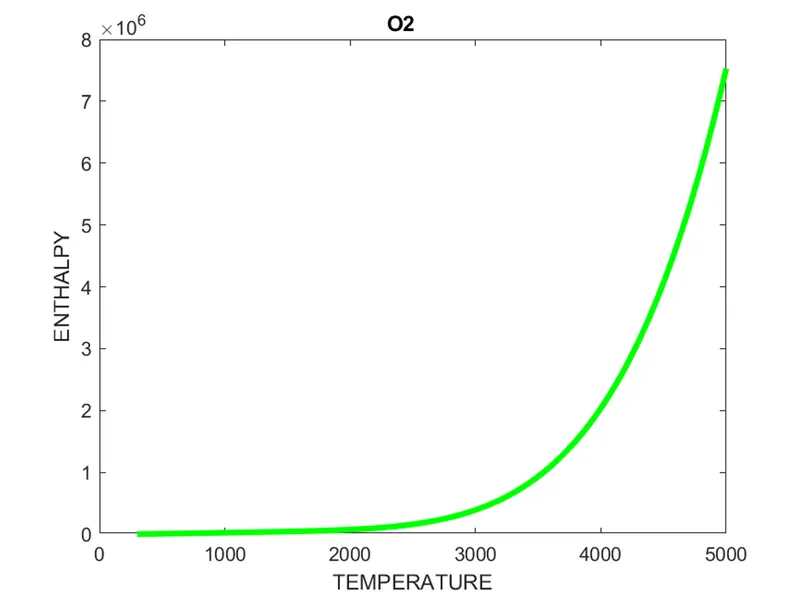
plot (T, h,'linewidth', 3, 'color', 'g')
title (species_name)
xlabel('TEMPERATURE')
ylabel('ENTHALPY')
%Plot between Temperature and Entropy
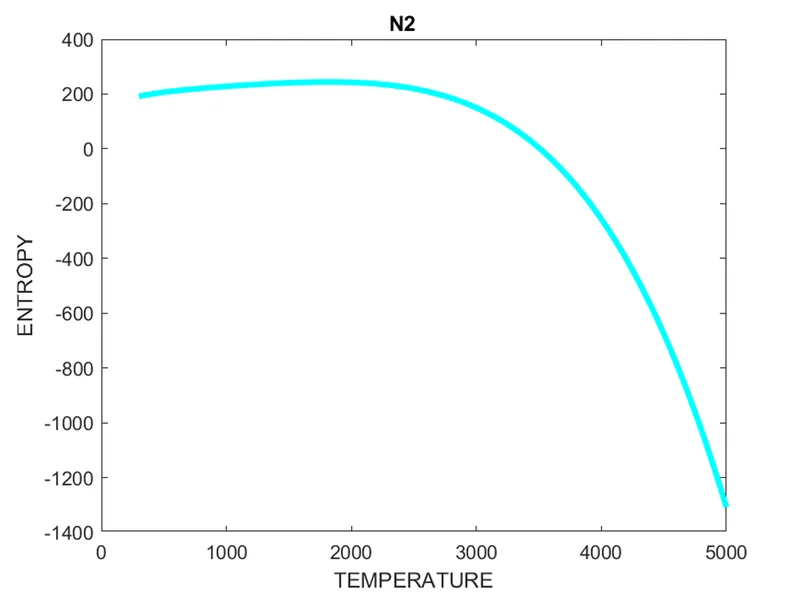
figure(3)
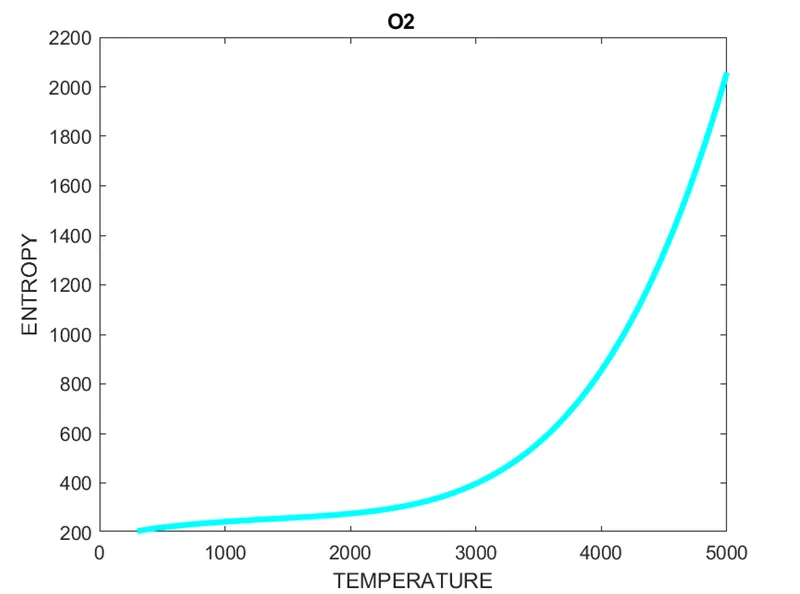
plot (T,s, 'linewidth',3, 'color', 'c')
title(species_name)
xlabel('TEMPERATURE')
ylabel('ENTROPY')
%Assigning the directory path
directory = (['D:\SKILLLYNC\MATLAB\CHALLANGES\NASA\SPECIES_PLOT']);
cd (directory)
%Creating the file in the directory
mkdir( species_name );
cd (species_name);
% Saving plots
saveas(1,'specitic_heat.png')
saveas(2,'enthalpy.png')
saveas(3,'entropy.png')
%Changing directory for callculating molecular weight
cd('D:\SKILLLYNC\MATLAB')
molecular_weight = mole_wt (species_name);
end
fclose (f1)
Clear all ,Close all,Clc is use to clear the workspace,close all graphical figures and clear the command window
STEP1: Open the data file and read the file, which we can do with the help of 'fopen' command in which we have to provide the file name and with 'r' we can read it.with the help of 'fgetl' command we derived the line then assigned it to a variable 't_line', then using 'strsplit' command providing the inputs ie t_line and space' ' split the line.
STEP2: Extracting the glodal temperature,by providing the splitted line and the position of the data in the line we can assigne the values to the desired variables ie global_low_temp ,global_mid_temp,global_high_temp
STEP3:Extracting all the coefficient,by using the above 'fgetl' command we can derive the species name and the coefficients and for determining the position we add the line according to the previous position of the coefficient ,to find the lines 'strfind' command is used by giving the input which has to be found.
STEP4:Providing the temperature range and Calling the function to calculate the thermodynamic properties,by using 'linspace' command and give the input range of global low temp to global high temp with 500 values we can obtain an arry of equi-interval temperature and then by calling the function name 'coeff' and assigning the above derived coefficients and temperature value we can calculate the thermodynamic properties.
STEP5:Ploting, which can be done with the help of 'plot' command by giving the input values of the above calculated thermodynamic properties individually along with 'linewidth' and 'color' command to assign the width and color of the ploting line.To assign tags and name we use 'title','xlabel','ylabel' and 'figure' command.
STEP6:Storing ,to store the plots at a particular location we provide the directory path to 'cd' command which opens the directory making it the current directory,then to creat a file in the directory we use 'mkdir' command and to save the figures 'saveas' command is use in which we proide the figure number and name to be assigned with file extension.
STEP7:Calculating molecular weight ,first changing the current directory with 'cd' command then calling the 'mole_wt' function giving the species name as input we can derive the molecular weight.
STEP8:Deriving for all species and close the file. to carry out the same process for all species 'for' loop is assigned before STEP2 and closed('end' command to close the loop) at STEP7 .For closing the file 'fclose' command is used.
- OUTPUT
MOLECULAR WEIGHT :
FILE DIRECTORY :

PLOTS :
OF O2 -
OF N2 -
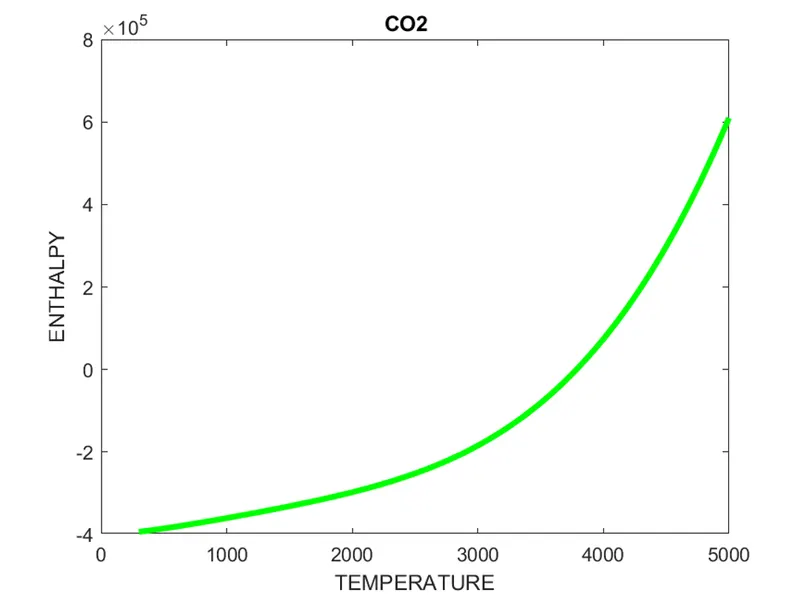
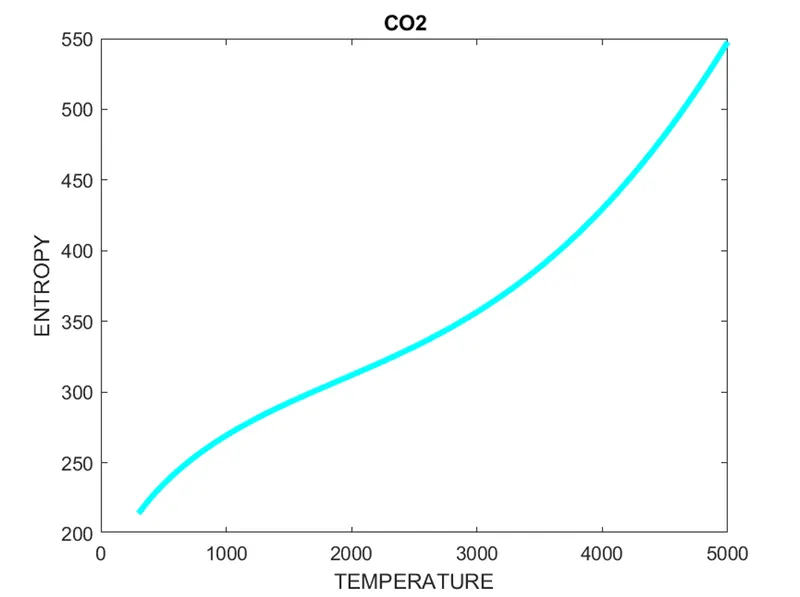
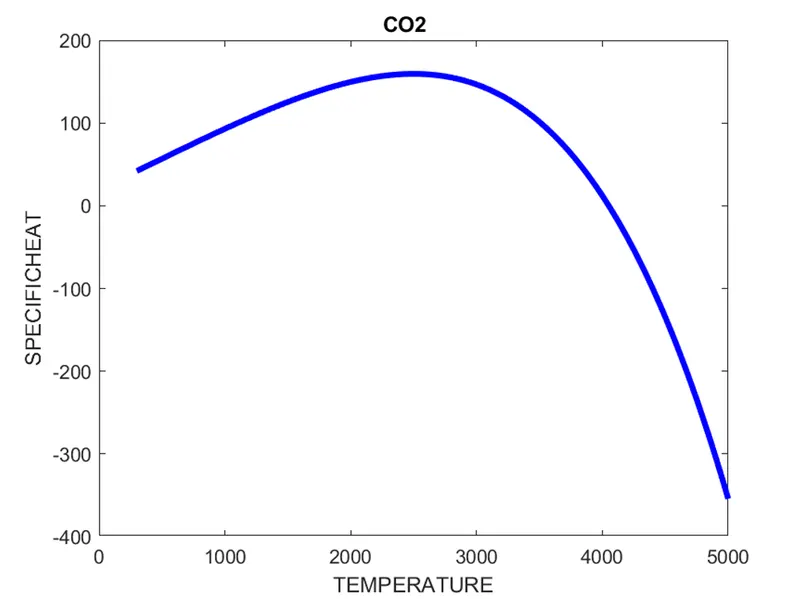
OF CO2 -
PROBLEM FACED:
Did some silly mistakes while giving the path directory (made a new directory which didnt contained the mole_wt file)
REFERENCE:
https://www.mathworks.com/help/matlab/ref/string.html
https://medium.com/the-mighty-programmer/what-is-parsing-4012f997d265