Project 1 - Parsing NASA thermodynamic data
Parsing NASA Thermodynamic Data
The project is about parsing the NASA's thermodynamics data, from that data extract the coefficients and other values to calculate entropy, enthalpy and specific heat for different species.
So the equations given below is the equation we are going to use to find the variables.
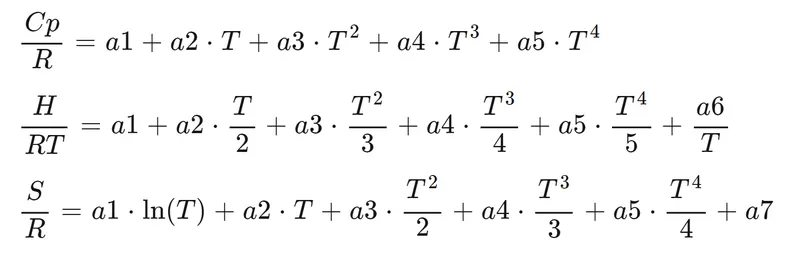
Discribing the variables:
note: dimensions of the units given below are correct from chemical thermodynamics (kmol instead kg)
( here units are differ for different objective,like chemical themodynamics or mechanical thermodynamics perspective , but dimensions are ok for every variable i have used )
R - Universal Gas Constant (kj/kmolk)
T - Temperature (kelvin(k))
S - Entropy (kj/k)
H - Enthalpy (kj/kmol)
Cp - specific heat (kj/kmolk)
{a1,a2,a3,.......a7} - coefficients (no units)
Steps and structure:
- open the data file(nasa thermodynamic data file) and separate the lines
- extract the data from separated line or skip the line which you dont want
- change the extracted data into necessary character, string or number and utilize it.
- name it with respect to their fuction or variables
- plan the function where it should be placed and call it
Logic of using the particular command in the program:
1. fopen - open the file, and get information about the file, here we use nasa's thermodynamic file
2. fget - read the first line from the opened file and extract some string which we need
3.strsplit - separate the lines and take the new string with certain limit of character in the line,here i use space '_'.
4. str2double or str2num or num2str - these are chaning the string to number or vice versa and utilize the terms or variables.
5.disp- display the line
6.strcmpi - compare the strings and tell whether true-1 or false-0, here we use this for if condition to analyse the species.
% parsig nasa thermodynamic data
clear all
close all
clc

% use fopen command to open the nasa data file
fun1 = fopen('THERMO.dat','r');

%to read the lines in the data one by one
line1 = fgetl(fun1);    %1st line
line2 = fgetl(fun2);    %2nd line

% second line has temperature data
% split the second line using strsplit
lsplit = strsplit(line2,' ');      %split by inbetween space
lowstringtemp = lsplit(2);          % low temperature
midstringtemp = lsplit(3);          % mid temperature
highstringtemp = lsplit(4);          % high temperature

% converting string into double
lowtemp = str2double(lowstringtemp);
midtemp = str2double(midstringtemp);
hightemp = str2double(highstringtemp);

% global temperature to local temperature
temp1 = linspace(midtemp,hightemp,500);     %divide into 500 parts
                                                %higher local temperature
temp2 = linspace(lowtemp,midtemp,500);      %divide into 500 parts
                                                 %lower local temperature
%universal gas constant
R = 8.314;    %kj/kmolk

%skip next three lines
for i = 1:3
  skipdata = fgetl(fun1);
end

for i = 1:53   % there are 53 species, looping for 53 times
               %nextline is species name
nameline = fgetl(fun1);
splitspecies = strsplit(nameline,' ');  %split by gap
species1 = (splitspecies{1});

%now extracting coefficients

%separate the three lines for temperature
templine1 = fgetl(fun1);
templine2 = fgetl(fun1);
templine3 = fgetl(fun1);
%splitting the line by separate terms and assigning the value
%first seven coefficients
a1 = str2double(templine1(1:15));
a2 = str2double(templine1(16:30));
a3 = str2double(templine1(31:45));
a4 = str2double(templine1(46:60));
a5 = str2double(templine1(61:75));
a6 = str2double(templine2(1:15));
a7 = str2double(templine2(16:30));
%second seven coefficients
b1 = str2double(templine2(31:45));
b2 = str2double(templine2(46:60));
b3 = str2double(templine2(61:75));
b4 = str2double(templine3(1:15));
b5 = str2double(templine3(16:30));
b6 = str2double(templine3(31:45));
b7 = str2double(templine3(46:60));

% calling the specific_heat function
[c_p1 c_p2] = specific_heat(a1,a2,a3,a4,a5,b1,b2,b3,b4,b5,R,temp1,temp2);

% calling the enthalpy function
[H1 H2] = enthalpy(a1,a2,a3,a4,a5,a6,b1,b2,b3,b4,b5,b6,temp1,temp2,R);

% calling the entropy function
[S1 S2] = entropy(a1,a2,a3,a4,a5,a7,b1,b2,b3,b4,b5,b7,temp1,temp2,R);


%plotting the graph for specific_heat, enthalpy, entropy vs temperature
%using subplots visualising the enthalpy, entropy and specific heat at same figure
plot_of_species = figure(1);

%plotting specific_heat vs temperature
subplot(3,1,1)
plot(temp1,c_p1,'linewidth',2,'color','g')
plot(temp2,c_p2,'linewidth',2,'color','g')
title(species1)
xlabel('temperature')
ylabel('specific_heat')

%plotting enthalpy vs temperature
subplot(3,1,2)
plot(temp1,H1,'linewidth',2,'color','r')
plot(temp2,H2,'linewidth',2,'color','r')
title(species1)
xlabel('temperature')
ylabel('enthalpy')

%plotting entropy vs temperature
subplot(3,1,3)
plot(temp1,S1,'linewidth',2,'color','b')
plot(temp2,S2,'linewidth',2,'color','b')
title(species1)
xlabel('temperature')
ylabel('entropy')


% save the plots in separate folder for individual species
mkdir(species1)     %creating folder for plots saved in the name of species

cd(species1)                    %open the created folder
saveas(gcf,'plot_of_species')   %save in the created folder
cd ..                           % return back to main folder


% finally molecular weight
MW = molecular_weight(species1);    %calling function

%forming sentence and display it
sentence = ['molecular weight of ',species1,' is ',num2str(MW)];
disp(sentence)

end
fclose(fun1)


% finally molecular weight
MW = molecular_weight(species1);   %calling function

% forming sentence and display it.
sentence = ['molecular weight of ',species1,' is ',num2str(MW)];
disp(sentence)     %final command display about molecular weight

end

fclose(fun1)
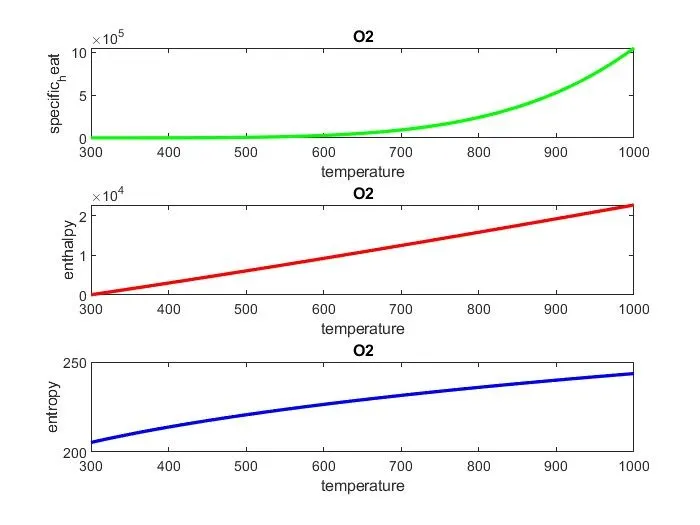
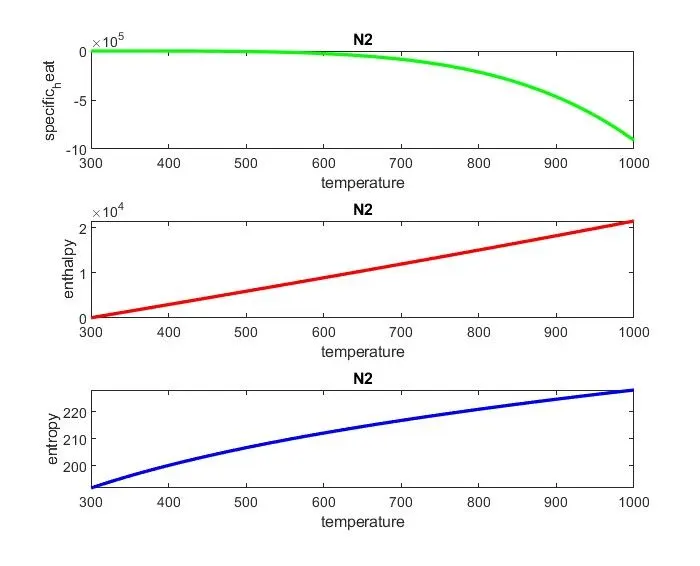
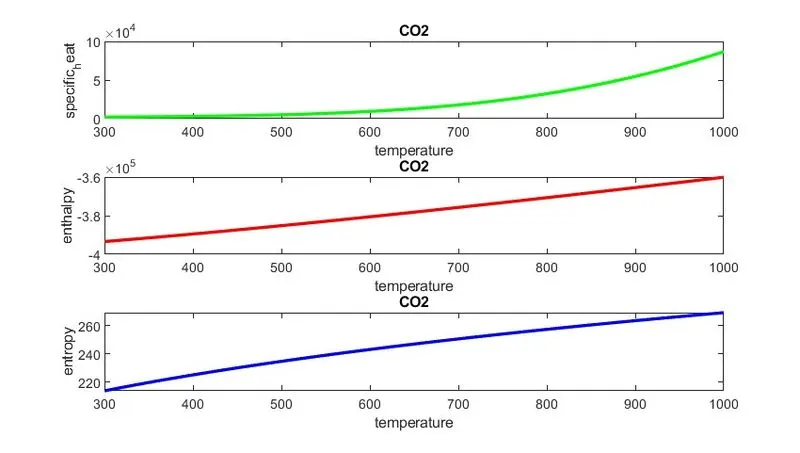
plots of O2,N2,CO2
functions saved in other scripts to call
I have used separate script for entropy, enthalpy, specific heat and molecular weight
1. entropy function
% calculating entropy
function [S1 S2] = entropy(a1,a2,a3,a4,a5,a7,b1,b2,b3,b4,b5,b7,temp1,temp2,R)

% for higher temperature
S1 = (a1.*log(temp1)+a2.*temp1+a3.*temp1.^2/2+a4.*temp1.^3/3+a5.*temp1.^4/4+a7).*R;

% for lower temperature
S2 = (b1.*log(temp2)+b2.*temp2+b3.*temp2.^2/2+b4.*temp2.^3/3+b5.*temp2.^4/4+b7).*R;

end
2. enthalpy function
%calculating enthalpy
function[H1 H2] = enthalpy(a1,a2,a3,a4,a5,a6,b1,b2,b3,b4,b5,b6,temp1,temp2,R)

%higher temperature enthalpy
H1 = (a1+temp1.*a2/2+temp1.^2*a3/3+temp1.^3*a4/4+temp1.^4*a5/5+a6./temp1).*temp1*R;

%lower temperature enthalpy
H2 = (b1+temp2.*b2/2+temp2.^2*b3/3+temp2.^3*b4/4+temp2.^4*b5/5+b6./temp2).*temp2*R;

end
3. specific_heat
%calculating specific heat(c_p)
function [c_p1 c_p2] = specific_heat(a1,a2,a3,a4,a5,b1,b2,b3,b4,b5,temp1,temp2,R)

% c_p for higher temperature
c_p1 = (a1+temp1.*a2+temp1.^2*a3+temp1.^3*a4+temp1.^4*a5).*R;

% c_p for lower temperature
c_p2 = (b1+temp2.*b2+temp2.^2*b3+temp2.^3*b4+temp2.^4*b5).*R;

end
4. Molecular weight
Molecular weight is sum of atomic weights of the atoms present in the molecule
example- H2O
atomic weight of H - 1, two H atoms in molecule, so H2 = 1*2 = 2
atomic weight of O - 16
molecular weight (H2O) = sum of atomic weight (2+16) = 18
% calculating molecular weight
function MW = molecular_weight(species1)

elements = ['H','C','N','O','A']; %data has 5 elements and 5 atomic weight
atomic_weight = [1,12,14,16,40];
MW = 0;
for i = 1:length(species1)
   for j = 1:length(elements)
     if strcmpi(species1(i),elements(j)); %comparing species letters and elements
        MW = MW + atomic_weight(j);          %to get atomic weight
        c = j;  %record the j in constant;
      end
    end
   num = str2num(species1(i));
   if num>1
     MW = MW + (atomic_weight(c)*(num-1));    %final calculation
  end
end
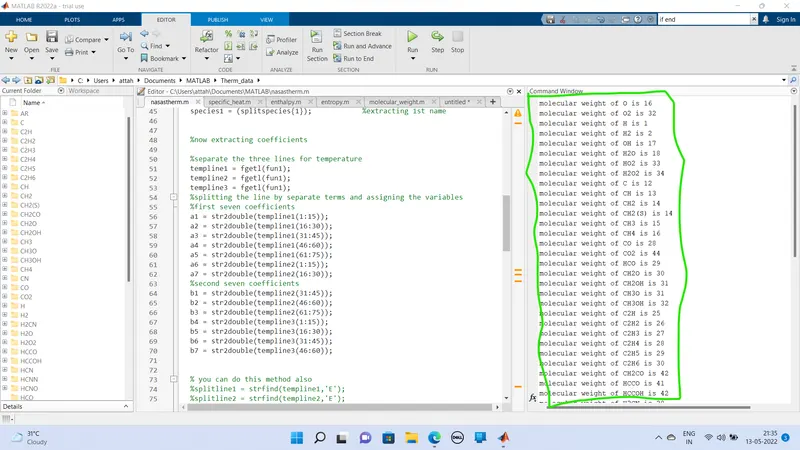
Screen shot of molecular weight on command window.
screenshot of folder saved file

Error i have faced:
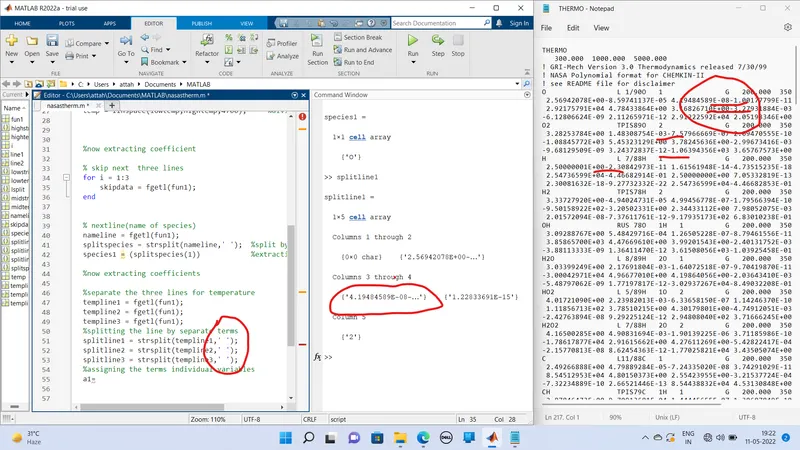
1. forgotten about the space infront of data which have position!
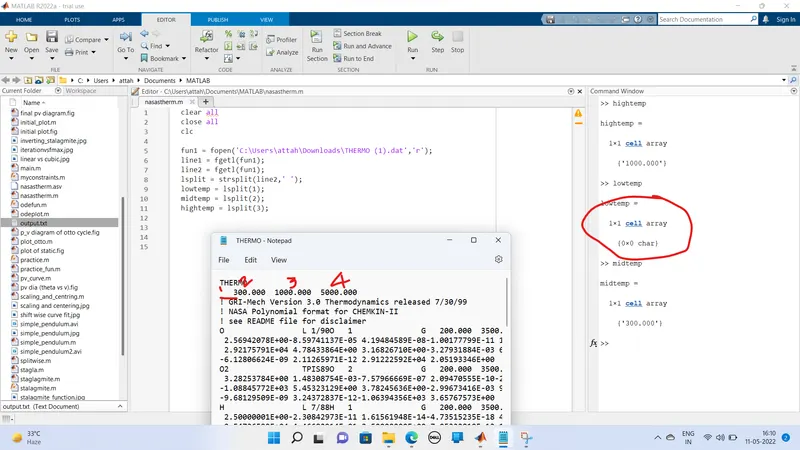
2. splitting in between space on data which no space on somedata