Project 1 - Parsing NASA thermodynamic data
AIM: To write a matlab program and calculate the thermodynamic properties of various gas species by parsing the NASA thermodynamic data file.
OBJECTIVE:
- To write a function that extracts the 14 co-efficients and calculates the enthalpy, entropy and specific heats for all the species in the data file.
- Calculate the molecular weight of each species.
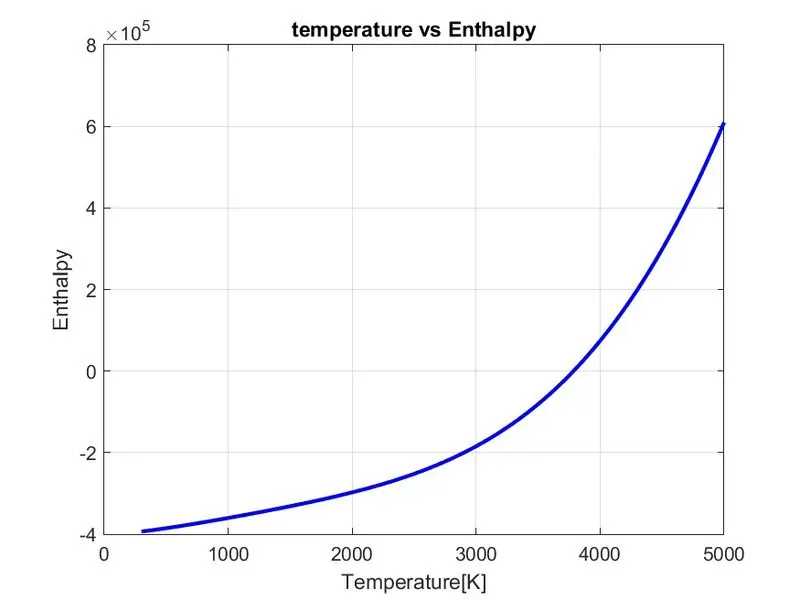
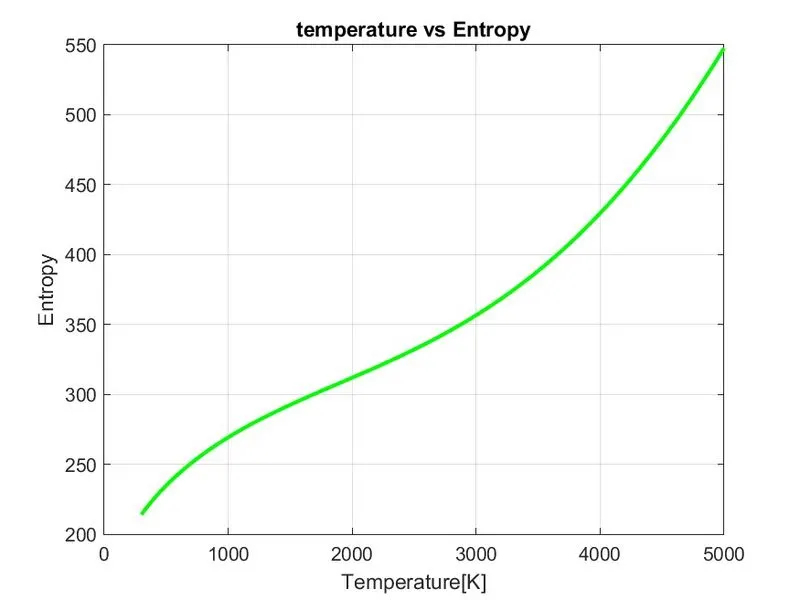
- Plot the Specific heat, Enthalpy and Entropy for the local temperature range (low temperature : high temperature) specific for each species.
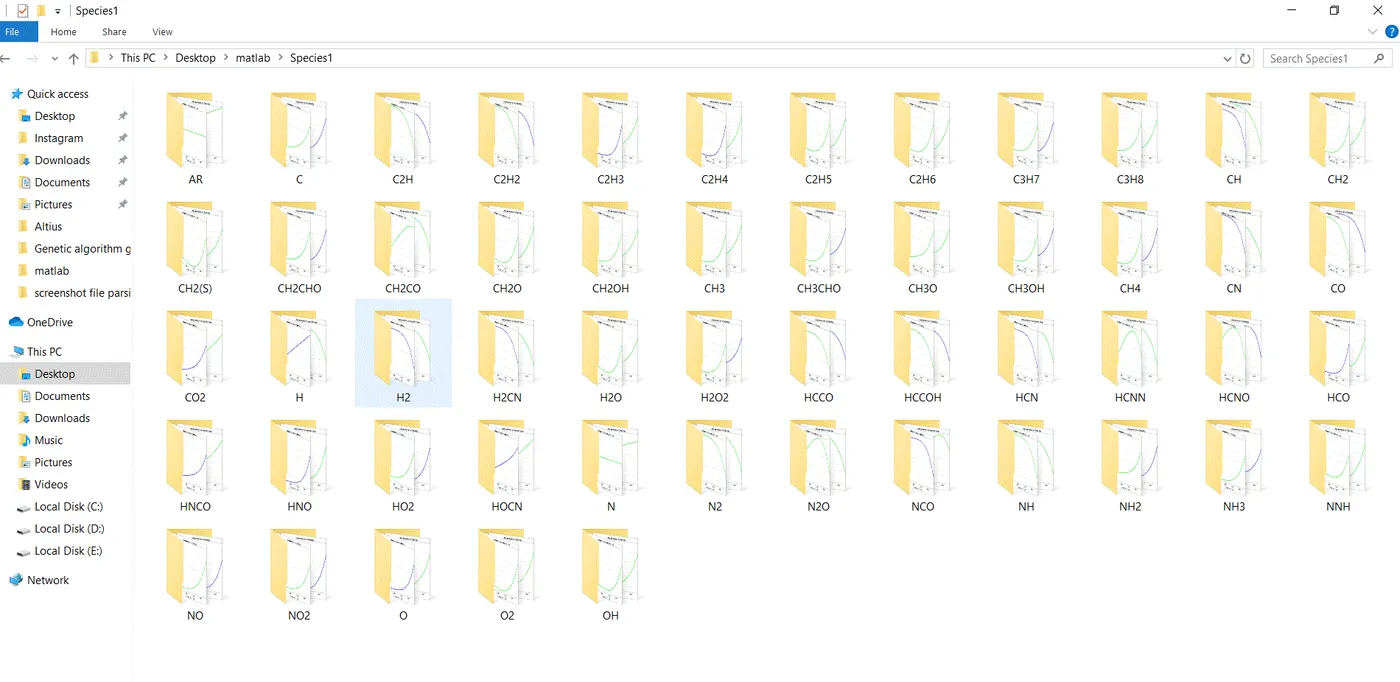
- To save the plots as images with appropriate names and dump them in separate folders for each species with suitable name.
THEORY:
- File Parsing refers to reading a data stream and building a memory model of the content of that data. This aims to perform some kind of transformation to the data. Parsing splits a data file or other input into pieces of data that can be easily stored or manipulated.
- Parsing is the process of identifying data with tokens within an instance and looking for recognizable patterns. The parsing process segregates each word, attempts to determine the relationship between the words and previously defined token sets, and then forms patterns from sequences of tokens.
FORMULA:
To calculate the thermodynamic properties:
- `(Cp)/R=a1+a2*T+a3*T^2+a4*T^3+a5*T^4`
- `H/(RT)=a1+a2*T/2+a3*T^2/3+a4*T^3/4+a5*T^4/5+(a6)/T`
- `S/R=a1*(log)*T+a3*T^2/2+a4*T^3/3+a5*T^4/4+a7`
MATLAB CODE:
% To write a matlab program for parsing nasa thermodynamic file
clear all
close all
clc
f1=fopen('THERMO.dat','r');  % Opening a file thermo.dat stored in memory
file=fgetl(f1)
local_temp=fgetl(f1)
% Gas constant
R=8.314;

% Converting string cells into numbers
local_temp_range=strsplit(local_temp,' ');
local_low_temp=str2double(local_temp_range{2})
local_mid_temp=str2double(local_temp_range{3})
local_high_temp=str2double(local_temp_range{4})

% Temperature range
T=linspace(local_low_temp,local_high_temp,1000);

%  Skipping the lines
for i =1:3;
    a=fgetl(f1);
end

for k = 1:53;
line1=fgetl(f1);
A=strsplit(line1,' ');
species_name=A{1};

line_1=fgetl(f1);
b=strfind(line_1,'E');

% Extracting 7 high temp coefficients and converting string to number
a1=line_1(1:b(1)+3);
a1=str2double(a1);
a2=line_1(b(1)+4:b(2)+3);
a2=str2double(a2);
a3=line_1(b(2)+4:b(3)+3);
a3=str2double(a3);
a4=line_1(b(3)+4:b(4)+3);
a4=str2double(a4);
a5=line_1(b(4)+4:b(5)+3);
a5=str2double(a5);

line_2= fgetl(f1);
c=strfind(line_2,'E');
a6=line_2(1:c(1)+3);
a6=str2double(a6);
a7=line_2(c(1)+4:c(2)+3);
a7=str2double(a7);

% Calculating 7 lower order coefficients
a8=line_2(c(2)+4:c(3)+3);
a8=str2double(a8);
a9=line_2(c(3)+4:c(4)+3);
a9=str2double(a9);
a10=line_2(c(4)+4:c(5)+3);
a10=str2double(a10);

line_3=fgetl(f1);
d=strfind(line_3,'E');
a11=line_3(1:d(1)+3);
a11=str2double(a11);
a12=line_3(d(1)+4:d(2)+3);
a12=str2double(a12);
a13=line_3(d(2)+4:d(3)+3);
a13=str2double(a13);
a14=line_3(d(3)+4:d(4)+3);
a14=str2double(a14);

% Calculation of specific heat
Cp=specific_heat1(a1,a2,a3,a4,a5,a8,a9,a10,a11,a12,T,R,local_mid_temp);

% Calculation of Enthalpy
H=Enthalpy2(a1,a2,a3,a4,a5,a6,a8,a9,a10,a11,a12,a13,T,R,local_mid_temp);

% Calculation of Entropy
S=Entropy3(a1,a2,a3,a4,a5,a7,a8,a9,a10,a11,a12,a14,T,R,local_mid_temp);

% Plotting T vs Cp
figure(1)
plot(T,Cp,'LineWidth',2,'color','g')
xlabel('Temperature[K]')
ylabel('Specific heat')
grid on
title('temperature vs specific heat')

% Plotting for T vs Enthalpy
figure(2)
plot(T,H,'LineWidth',2,'color','b')
xlabel('Temperature[K]')
ylabel('Enthalpy')
grid on
title('temperature vs Enthalpy')

% Plotting for  T vs Entropy
figure(3)
plot(T,S,'LineWidth',2,'color','g')
xlabel('Temperature[K]')
ylabel('Entropy')
grid on
title('temperature vs Entropy')

% Molecular weight

Mol_wt=Molecular_weight(species_name);
k=sprintf('%s Mol_wt=%f',species_name,Mol_wt)

disp(['Molecular weight of:  ',species_name])
disp(Mol_wt)

% Creating a directory
mkdir(['C:\Users\Admin\Desktop\matlab\Species1\',species_name])
cd(['C:\Users\Admin\Desktop\matlab\Species1\',species_name])

saveas(1,'cpvsT','jpg')
saveas(2,'HvsT','jpg')
saveas(3,'SvsT','jpg')

end
MATLAB PROCEDURE:
- Firstly, we start the program by opening the THERMO.dat file by fopen command and get the first line of file by using a fget1 command then input the value of Gas constant which is 8.314.
- Now we read the temperature file and we will split the temperatures using strsplit command and convert it into cell array and then the string is converted into number by using str2double command which will find out the low , mid and high temperatures.
- Then we will find out the temperature range using linspace command and skip the first three lines of the file by running a for loop.
- In order to find the 53 elements in the file ,we will run the for loop then split it into cell arrays to find the species line and then find the species name and then find the number of the temperatures in the species line.
- Now we read the next line and in order to read the coefficient data in the file we need to find the 'E' string by using strfind command to find coefficient numbers from strings.
- Then we will find first seven coefficients for higher temperature and 7 coefficients for lower temperature.
- Afterwards we will calculate the specific heat, enthalpy and entropy for 14 coefficients by creating a function in different scripts.
- After finding the Specific heat ,Enthalpy and Entropy now we plot using plot command for temperature vs specific heat , Temperature vs Enthalpy and Temperature vs entropy.
- Now we will calculate the Molecular weight and use command sprintf which formats data into string or character vector for all the molecular weights of the species.
- We change the directory using cd command and then creating directory folder where we have to save
our files using mkdir command and then we will change the directory to this created folder. - Then we will save the plots using saveas command of different species.
Creating a function for specific heat:
function [Cp]=specific_heat1(a1,a2,a3,a4,a5,a8,a9,a10,a11,a12,T,R,local_mid_temp)

% Calculation of specific heat for higher and lower temperature
if (T>=local_mid_temp)
    Cp=R*(a1+(a2*T)+(a3*T).^2)+(a4*(T).^3)+(a5*(T).^4);
else
    Cp=R*(a8+(a9*T)+(a10*T).^2)+(a11*(T).^3)+(a12*(T).^4);
end
end
Code Explanation:
- Calculating the Specific heat by creating Specific heat function and calculate it by formula for specific heat
using coefficients, Gas constant, Temperature and local mid temperature. - By using if else loop we can make a condition to make temperature greater than and equal to local mid temperature to specify higher temperature coefficient in the formula.
- Then we will use else condition to specify coefficient of Lower temperature coefficient in the formula.
Then end the loop and function to calculate Specific Heat.
Creating a function for enthalpy:
function [H]=Enthalpy2(a1,a2,a3,a4,a5,a6,a8,a9,a10,a11,a12,a13,T,R,local_mid_temp)

% Calculation of Enthalpy for higher and lower temperature
if (T>=local_mid_temp)
    H=R*((a1*T)+((a2*(T).^2)/2)+((a3*(T).^3)/3)+((a4*(T).^4)/4)+((a5*(T).^5)/5)+a6);
else
    H=R*((a8*T)+((a9*(T).^2)/2)+((a10*(T).^3)/3)+((a11*(T).^4)/4)+((a12*(T).^5)/5)+a13);
end
end
Code Explanation:
- Calculating the enthalpy by creating a Enthalpy function and calculate it by formula for enthalpy using coefficients, Gas constant, Temperature and local mid temperature.
- Now by using if else loop we can make a condition and make the temperature greater than and equal to mid
temperature to specify higher temperature coefficient in the formula. - Then we will use else condition to specify coefficient of Lower temperature coefficient in the formula.
Then end the loop and function to calculate Enthalpy.
Creating a function for entropy:
function [S]=Entropy3(a1,a2,a3,a4,a5,a7,a8,a9,a10,a11,a12,a14,T,R,local_mid_temp)

% Calculation of Entropy of higher and lower temperature
if(T>=local_mid_temp)
    S=R*(a1*log(T)+(a2*T)+((a3*(T).^2)/2)+((a4*(T).^3)/3)+((a5*(T).^4)/4)+a7);
else
   S=R*(a8*log(T)+(a9*T)+((a10*(T).^2)/2)+((a11*(T).^3)/3)+((a12*(T).^4)/4)+a14);
end
end
Code Explanation:
- Calculating the entropy by creating a entropy function and calculate it by formula for entropy using coefficients, Gas constant, Temperature and local mid temperature.
- Now by using if else loop we can make a condition and make the temperature greater than and equal to local mid
temperature to specify higher temperature coefficient in the formula. - Then we will use else condition to specify coefficient of lower temperature coefficient in the formula.
Then end the loop and function to calculate Entropy.
Creating a Function for Calculating Molecular Weight:
function Mol_wt=Molecular_weight(species_name);
Atomic_names=['H' 'C' 'O' 'N' 'A' 'S'];
Atomic_weight=[1 12 16 14 40 32];
Mol_wt=0;
for i=1:length(species_name)
for j=1:length(Atomic_names)
if strcmpi(species_name(i),Atomic_names(j))
Mol_wt=Mol_wt+Atomic_weight(j);
position=j;
end
end
n=str2double(species_name(i));
if n>1
Mol_wt=Mol_wt+Atomic_weight(position)*(n-1);
end
end
end
Code Explanation:
- We calculate the molecular weight by creating a function in different script and assigning species_name input to the script.
- Then define the main element of all 53 species in an array atomic_name that are :- 'H' 'C' 'O' 'N' 'A' 'S'.
- Now by the main elements we will create atomic_weight array :- '1' '12' '16' '14' '40' '32' respectively.
- Then we will assign molecular starting range to zero and then create a for loop condition which runs to the length of the species and an another nested for loop which runs to the length of the string of atomic names.
- Now we will create an condition using if condition and use strcmp command to compare the species and
atomic_name strings to calculate molecular masses and if comparison of both strings is found same then we will
assign its molecular weight. - Then to convert string to double precision values we use str2double command assign it to variable(n)and run an condition of if loop
to find weather the species contains more than one element if there are more than 1 elements then we will increment the atomic weight by the multiplication of position and n-1. - Then we will print the Molecular weight using fprintf command and display it using disp command.
OUTPUT OF COMMAND WINDOW:
k =

    'O Mol_wt=16.000000'

Molecular weight of:  O
    16


k =

    'O2 Mol_wt=32.000000'

Molecular weight of:  O2
    32


k =

    'H Mol_wt=1.000000'

Molecular weight of:  H
     1


k =

    'H2 Mol_wt=2.000000'

Molecular weight of:  H2
     2


k =

    'OH Mol_wt=17.000000'

Molecular weight of:  OH
    17


k =

    'H2O Mol_wt=18.000000'

Molecular weight of:  H2O
    18


k =

    'HO2 Mol_wt=33.000000'

Molecular weight of:  HO2
    33


k =

    'H2O2 Mol_wt=34.000000'

Molecular weight of:  H2O2
    34


k =

    'C Mol_wt=12.000000'

Molecular weight of:  C
    12


k =

    'CH Mol_wt=13.000000'

Molecular weight of:  CH
    13


k =

    'CH2 Mol_wt=14.000000'

Molecular weight of:  CH2
    14


k =

    'CH2(S) Mol_wt=46.000000'

Molecular weight of:  CH2(S)
    46


k =

    'CH3 Mol_wt=15.000000'

Molecular weight of:  CH3
    15


k =

    'CH4 Mol_wt=16.000000'

Molecular weight of:  CH4
    16


k =

    'CO Mol_wt=28.000000'

Molecular weight of:  CO
    28


k =

    'CO2 Mol_wt=44.000000'

Molecular weight of:  CO2
    44


k =

    'HCO Mol_wt=29.000000'

Molecular weight of:  HCO
    29


k =

    'CH2O Mol_wt=30.000000'

Molecular weight of:  CH2O
    30


k =

    'CH2OH Mol_wt=31.000000'

Molecular weight of:  CH2OH
    31


k =

    'CH3O Mol_wt=31.000000'

Molecular weight of:  CH3O
    31


k =

    'CH3OH Mol_wt=32.000000'

Molecular weight of:  CH3OH
    32


k =

    'C2H Mol_wt=25.000000'

Molecular weight of:  C2H
    25


k =

    'C2H2 Mol_wt=26.000000'

Molecular weight of:  C2H2
    26


k =

    'C2H3 Mol_wt=27.000000'

Molecular weight of:  C2H3
    27


k =

    'C2H4 Mol_wt=28.000000'

Molecular weight of:  C2H4
    28


k =

    'C2H5 Mol_wt=29.000000'

Molecular weight of:  C2H5
    29


k =

    'C2H6 Mol_wt=30.000000'

Molecular weight of:  C2H6
    30


k =

    'CH2CO Mol_wt=42.000000'

Molecular weight of:  CH2CO
    42


k =

    'HCCO Mol_wt=41.000000'

Molecular weight of:  HCCO
    41


k =

    'HCCOH Mol_wt=42.000000'

Molecular weight of:  HCCOH
    42


k =

    'H2CN Mol_wt=28.000000'

Molecular weight of:  H2CN
    28


k =

    'HCN Mol_wt=27.000000'

Molecular weight of:  HCN
    27


k =

    'HNO Mol_wt=31.000000'

Molecular weight of:  HNO
    31


k =

    'N Mol_wt=14.000000'

Molecular weight of:  N
    14


k =

    'NNH Mol_wt=29.000000'

Molecular weight of:  NNH
    29


k =

    'N2O Mol_wt=44.000000'

Molecular weight of:  N2O
    44


k =

    'NH Mol_wt=15.000000'

Molecular weight of:  NH
    15


k =

    'NH2 Mol_wt=16.000000'

Molecular weight of:  NH2
    16


k =

    'NH3 Mol_wt=17.000000'

Molecular weight of:  NH3
    17


k =

    'NO Mol_wt=30.000000'

Molecular weight of:  NO
    30


k =

    'NO2 Mol_wt=46.000000'

Molecular weight of:  NO2
    46


k =

    'HCNO Mol_wt=43.000000'

Molecular weight of:  HCNO
    43


k =

    'HOCN Mol_wt=43.000000'

Molecular weight of:  HOCN
    43


k =

    'HNCO Mol_wt=43.000000'

Molecular weight of:  HNCO
    43


k =

    'NCO Mol_wt=42.000000'

Molecular weight of:  NCO
    42


k =

    'CN Mol_wt=26.000000'

Molecular weight of:  CN
    26


k =

    'HCNN Mol_wt=41.000000'

Molecular weight of:  HCNN
    41


k =

    'N2 Mol_wt=28.000000'

Molecular weight of:  N2
    28


k =

    'AR Mol_wt=40.000000'

Molecular weight of:  AR
    40


k =

    'C3H8 Mol_wt=44.000000'

Molecular weight of:  C3H8
    44


k =

    'C3H7 Mol_wt=43.000000'

Molecular weight of:  C3H7
    43


k =

    'CH3CHO Mol_wt=44.000000'

Molecular weight of:  CH3CHO
    44


k =

    'CH2CHO Mol_wt=43.000000'

Molecular weight of:  CH2CHO
    43

>>
Screenshot of folder containing plots of each species:
Plots for O2:
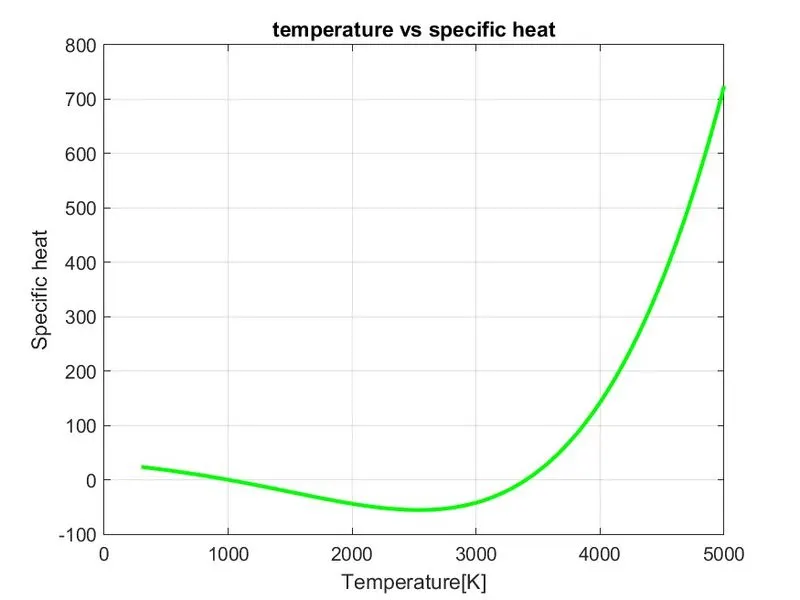
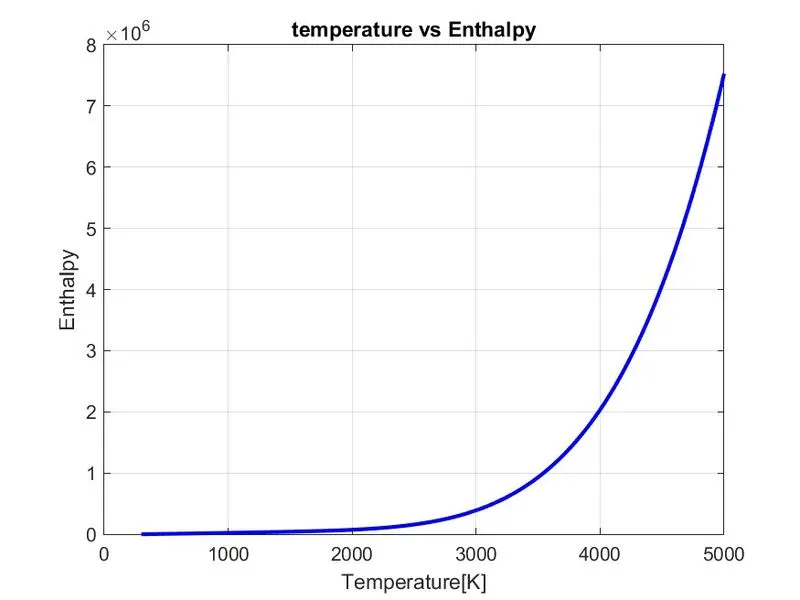
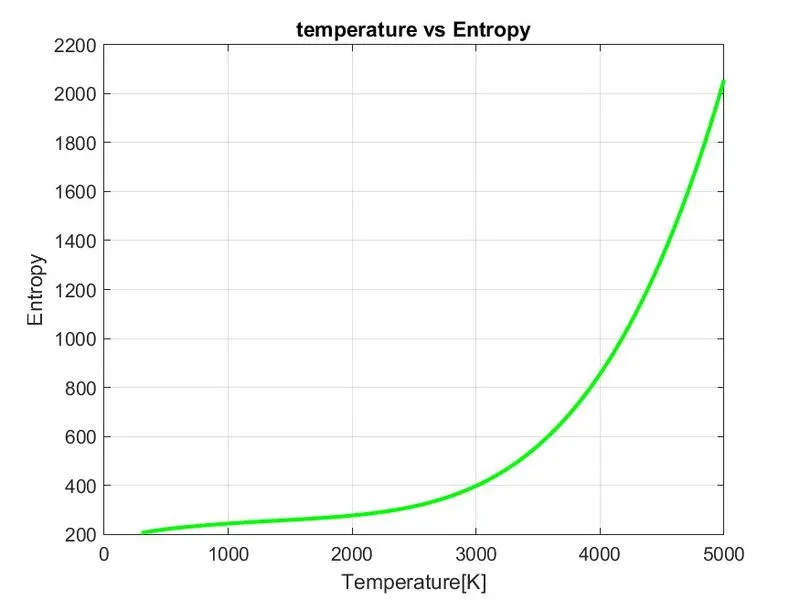
Plots for N2:
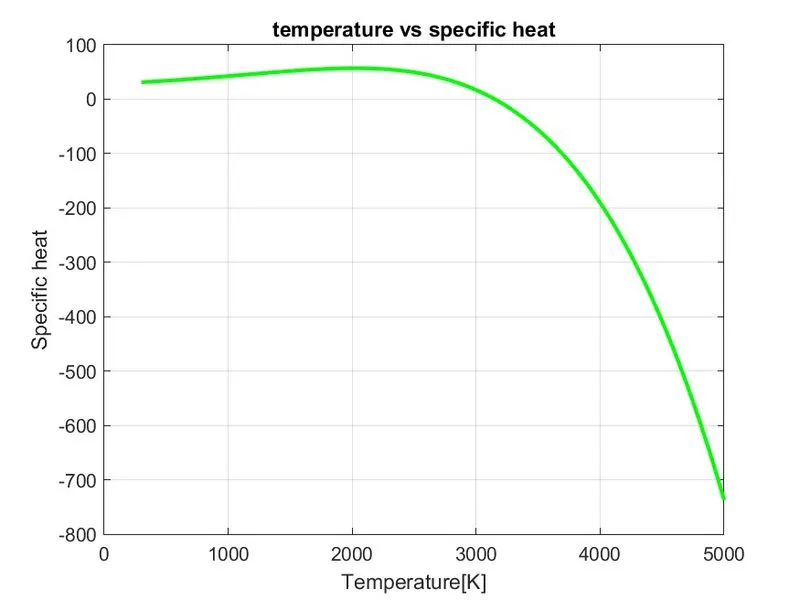
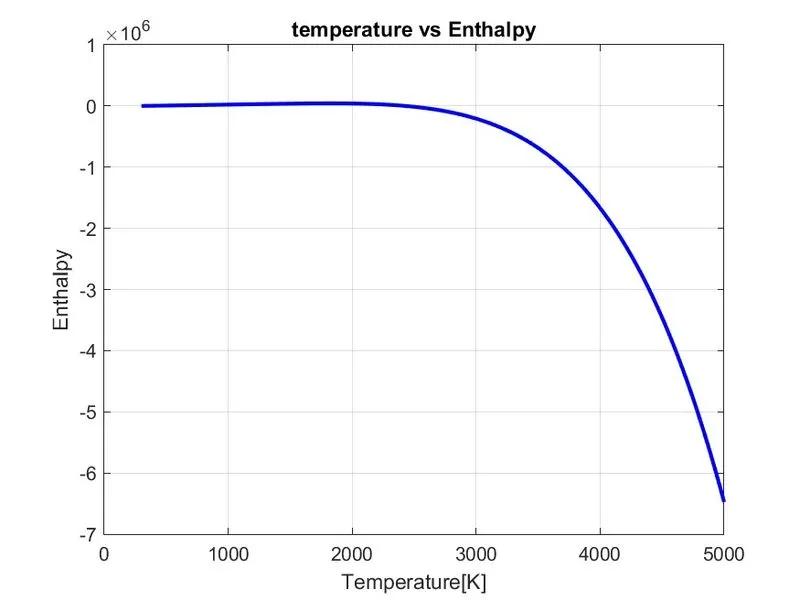
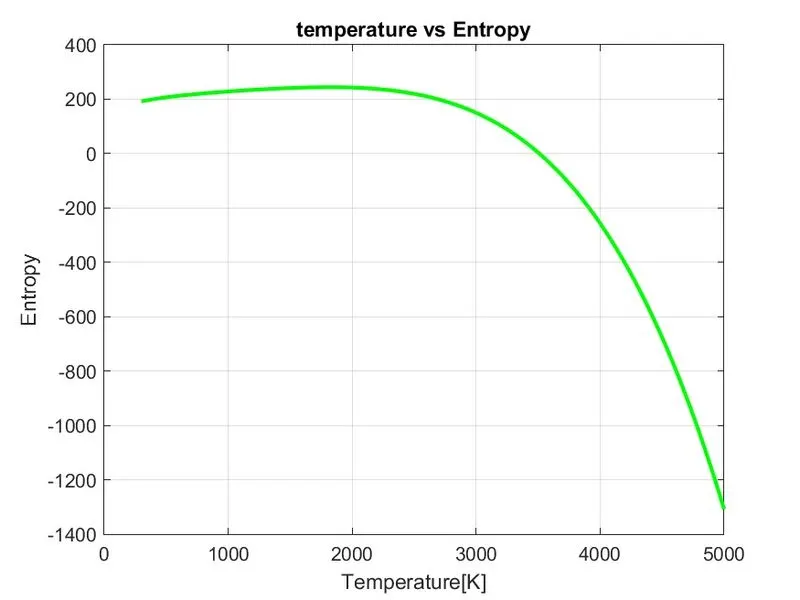
Plots for CO2:
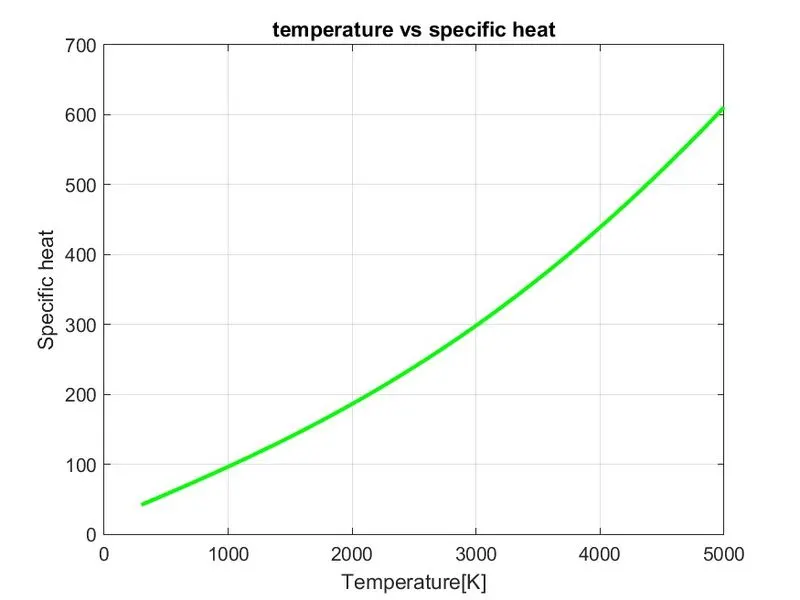
Google Drive link for the Plots: https://drive.google.com/drive/folders/1fw_43QTzYjuCocMAfq-spa6F7Jt6gU0m
Link for the Project:
https://skill-lync.com/student-projects/file-parsing-99
CONCLUSION:
- Using a Matlab program ,we have calculated the various coefficients required to evaluate various thermodynamic properties of the different species and are extracted from Nasa Thermodynamic data file.
- The specific heat , Enthalpy and Entropy are calculated for all the species and plots are plotted against the local temperature range and molecular weight for all the species is calculated.
REFERENCES:
- https://in.mathworks.com/matlabcentral/answers/196582-best-way-to-parse-text-file
- https://in.mathworks.com/matlabcentral/answers/449624-how-to-parse-extract-data-from-a-text-file
- https://in.mathworks.com/help/matlab/matlab_prog/parse-function-inputs.html
- https://in.mathworks.com/help/matlab/ref/fscanf.html