Week 2- 2R Robotic Arm Challenge
TITLE: 2R Robotic Arm Challenge
AIM: To write a matlab program for the simulation of forward kinematic robotic arm with end manipulator
OBJECTIVE:
- To create a matlab program for the movement of robotic arm having an end manipulator.
- To create a animation of the kinematic robotic arm.
THEORY:
- A Robotic arm is a mechanical arm which is programmed in such a way to perform a specified task without physical human intervention to perform a task,it has various parts which are linked together as that of a human arm, mounted on a stand.
- Robotic arms are used to automate the process of placing goods or products onto the pallets. By automating the process of robotic arm, palletizing becomes more accurate, cost-effective, and predictable.
- The use of robotic arm also reduces the risk of workers performing tasks that has high risk factor physically to human body.
- Robotic arms are also known as articulated robotic arms which are fast, reliable, and more accurate and can be programmed to do an infinite number of tasks in a different type of environment.
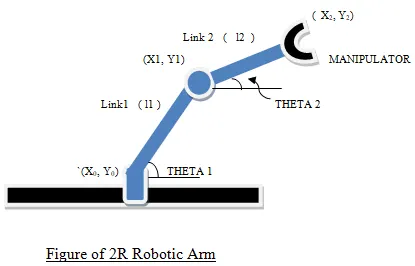
- The above figure represents the figure of 2R robotic arm.
- There are two links (i.e) Link 1 and Link 2.
- The coordinates of link L1 are (x0,y0) and (x1,y1).
- The coordinates of link L2 are (x1,y1) and (x2,y2).
- Two angles are made which are theta 1 and theta 2.
PROCEDURE FOR MATLAB CODE:
- Starting the program with three basic commands (i.e) clear all , close all , clc
- Providing input variables for two links of robotic arm.
- Assuming the length of link l1 as 1 and link L2 as 0.5.
- For different angle of theta 1 and theta 2 linspace command is used from 0 to 90 degrees for 9 different values.
- Adding a counter variable ct having a value as 1.
- Then 'for' loop command is used for repeating itself for a given number of input and then again use the 'for' loop command for second robotic arm.
- Writing the equation for the coordinates of the two links that are x0,y0,x1,y1,x2,y2.
- Plotting the coordinate values using plot command and also execute the axis command.
- Now use the pause command to suspend the program execution until a signal arrives.
- Input the getframe command to capture the entire current figure window.
- Incrementing value of ct by+1 to save the plots of the movement of arm in discrete positions.
- Making a movie using a movie command and assigning it to M variable.
- Saving it as a Uncompressed .AVI file.
MATLAB CODE:
% Program for simulation of robotic arm making an animation fo robotic arm
clear all
close all
clc
ct=1;
% Inputing the length of two links
l1=1;
l2=0.5;
% Inputing the value of theta using linspace command
theta1=linspace(0,90,9);
theta2=linspace(0,90,9);
% using the for loop for performing a set of command inside the for loop
for i=1:length(theta1)
    THETA1=theta1(i);
    for j=1:length(theta2)
        THETA2=theta2(j);
        % Coordinates
        x0=0;
        y0=0;
        x1=l1*cosd(THETA1);
        y1=l1*sind(THETA1);
        x2=x1+l2*cosd(THETA2);
        y2=y1+l2*sind(THETA2);
        % plotting
        plot([x0 x1],[y0 y1],[x1 x2],[y1 y2],'LineWidth',4)
        axis([-0.1 1.5 0 1.5])
        pause(0.003)
        M(ct)=getframe(gcf)
        ct=ct+1;
    end
end
% program for making an animation
movie(M)
videofile=VideoWriter('robotic arm','Uncompressed AVI')
open(videofile)
writeVideo(videofile,M)
close(videofile)

% Command window output
 General Properties:

       Filename:                 'robotic arm.avi'
       Path:                     'C:UsersAdminDesktopmatlab'
       FileFormat:               'avi'
       Duration:                 0

    Video Properties:

       ColorChannels:            3
       Height:                   []
       Width:                    []
       FrameCount:               0
       FrameRate:                30
       VideoBitsPerPixel:        24
       VideoFormat:              'RGB24'
       VideoCompressionMethod:   'None'

  Methods
LINK FOR ANIMATION: https://youtu.be/dWkX9dTZCPM
CONCLUSION: Thus by using matlab, 2R Robotic arm is simulated and with the help of plots obtained from the program a movie is created.